ignition MITSUBISHI TRITON 2011 Owner's Manual
[x] Cancel search | Manufacturer: MITSUBISHI, Model Year: 2011, Model line: TRITON, Model: MITSUBISHI TRITON 2011Pages: 369, PDF Size: 26.15 MB
Page 100 of 369
l
The driving range is
shown based on the ac-
cumulated fuel consumption data, however,
may be changed depending on the driving con-
dition (road condition, driving behavior,
etc.). If the battery terminals are disconnec-
ted, the accumulated fuel consumption data
will be erased. It is recommended to use the
indication as reference.
l When the vehicle is fueled, the driving range
will be updated. However, if the amount of
fueling is small, the indication may not be cor-
rect. Therefore, fill up the tank as much as
possible in case of fueling.
l When the vehicle is stopped on a steep slope,
the value of the driving range may increase.
This is caused by the fuel movement inside
the tank on the slope and is not deemed as a
failure.
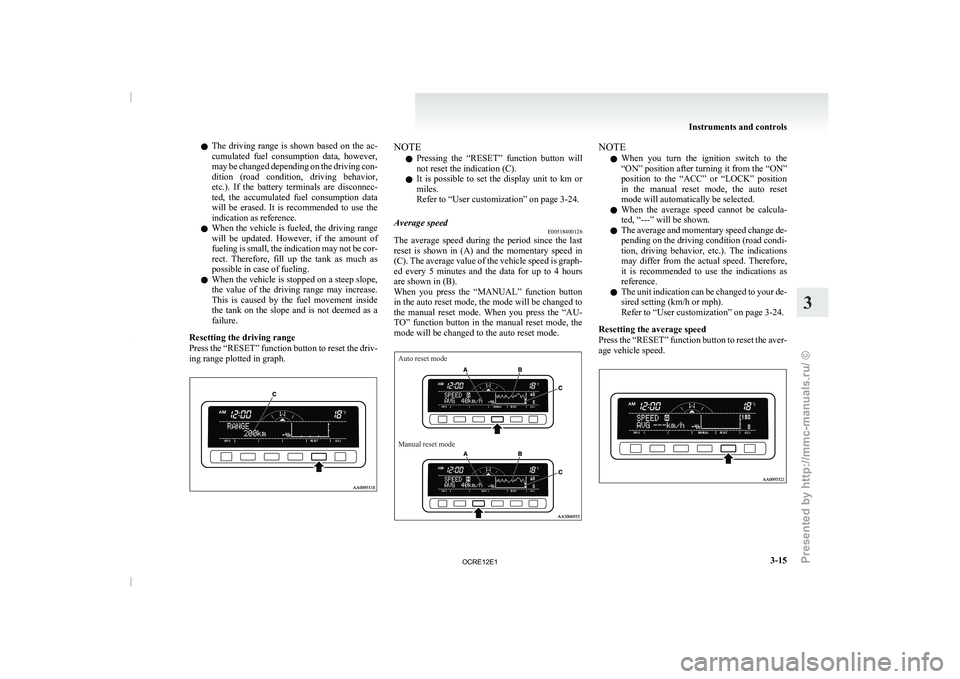
Resetting the driving range
Press the “RESET” function button to reset the driv-
ing range plotted in graph. NOTE
l Pressing
the “RESET” function button
will
not reset the indication (C).
l It is possible to set the display unit to km or
miles.
Refer to “User customization” on page 3-24.
Average speed E00518400126
The average speed during the period since the last
reset is shown in
(A)
and the momentary speed in
(C). The average value of the vehicle speed is graph-
ed every 5 minutes and the data for up to 4 hours
are shown in (B).
When you press the “MANUAL” function button
in the auto reset mode, the mode will be changed to
the manual reset mode. When you press the “AU-
TO” function button in the manual reset mode, the
mode will be changed to the auto reset mode.
Auto reset mode
Manual reset mode NOTE
l When
you turn the ignition
switch to the
“ON” position after turning it from the “ON”
position to the “ACC” or “LOCK” position
in the manual reset mode, the auto reset
mode will automatically be selected.
l When the average speed cannot be calcula-
ted, “---” will be shown.
l The average and momentary speed change de-
pending on the driving condition (road condi-
tion, driving behavior, etc.). The indications
may differ from the actual speed. Therefore,
it is recommended to use the indications as
reference.
l The unit indication can be changed to your de-
sired setting (km/h or mph).
Refer to “User customization” on page 3-24.
Resetting the average speed
Press the “RESET” function button to reset the aver-
age vehicle speed. Instruments and controls
3-15 3
OCRE12E1
Presented by http://mmc-manuals.ru/ \251
Page 101 of 369
NOTE
l The
average speed can be
reset separately for
the auto reset mode and for the manual reset
mode.
l When you turn the ignition switch to the
“ON” position about 4 hours (or more) after
turning it from the “ON” position to the
“ACC” or “LOCK” position in the auto reset
mode, the average speed indication will auto-
matically be reset.
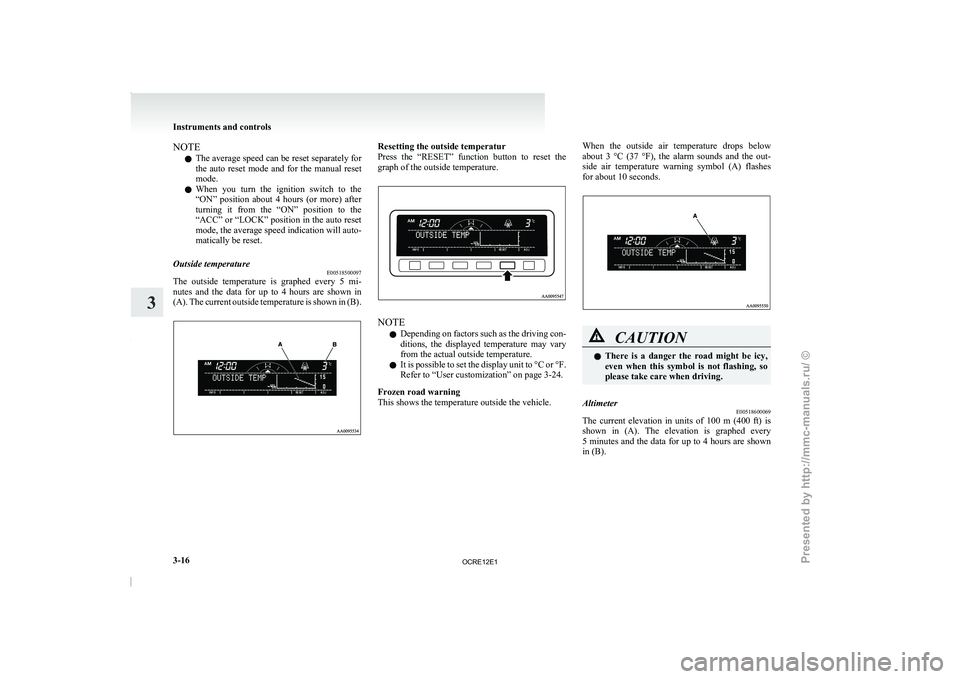
Outside temperature E00518500097
The outside temperature is graphed every 5 mi-
nutes and the data
for
up to 4 hours are shown in
(A). The current outside temperature is shown in (B). Resetting the outside temperatur
Press the “RESET” function button
to reset the
graph of the outside temperature. NOTE
l Depending
on factors such as
the driving con-
ditions, the displayed temperature may vary
from the actual outside temperature.
l It is possible to set the display unit to °C or °F.
Refer to “User customization” on page 3-24.
Frozen road warning
This shows the temperature outside the vehicle. When the outside air temperature drops below
about 3 °C (37
°F),
the alarm sounds and the out-
side air temperature warning symbol (A) flashes
for about 10 seconds. CAUTION
l
There is a danger
the
road might be icy,
even when this symbol is not flashing, so
please take care when driving.
Altimeter E00518600069
The current elevation in units of 100 m (400 ft) is
shown in (A). The elevation
is graphed every
5 minutes and the data for up to 4 hours are shown
in (B). Instruments and controls
3-16
3
OCRE12E1
Presented by http://mmc-manuals.ru/ \251
Page 115 of 369
Combination headlamps and
dipper switch E00506002129
Headlamps
NOTE l Do
not leave the headlamps
and other lamps
on for a long time while the engine is station-
ary (not running). A run-down battery could
result.
l When it rains or when the vehicle has been
washed, the inside of the lens sometimes be-
comes foggy. This is the same phenomenon
as when window glass mists up on a humid
day, and does not indicate a functional prob-
lem. When the lamp is switched on, the heat
will remove the fog. However, if water gath-
ers inside the lamp, we recommend you to
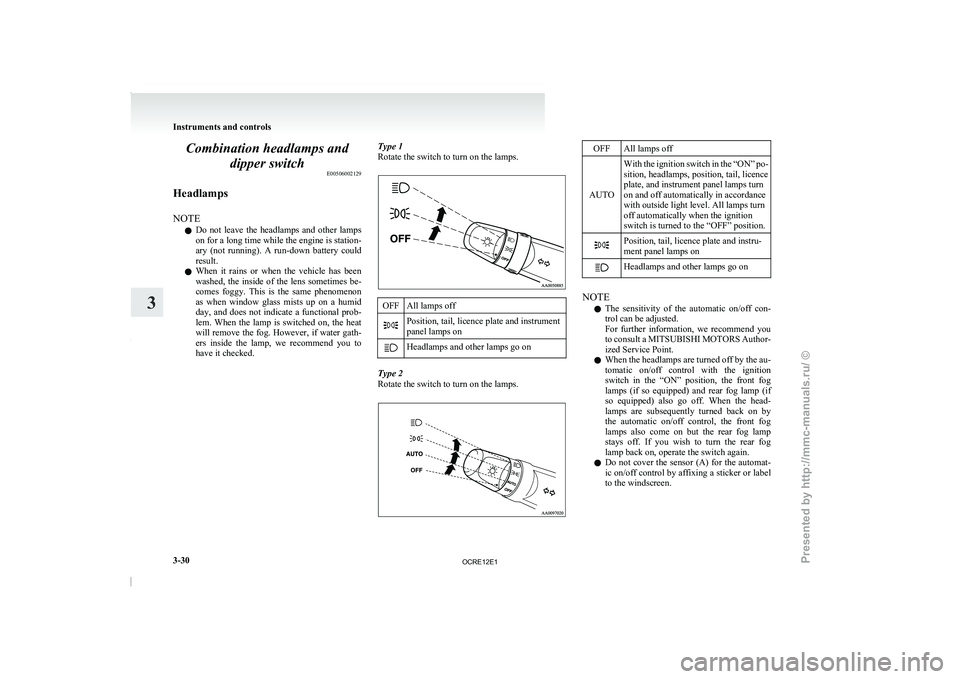
have it checked. Type 1
Rotate the switch to turn on the lamps. OFF All lamps off
Position, tail, licence plate and instrument
panel lamps on
Headlamps and other lamps go on
Type 2
Rotate the switch to turn on the lamps. OFF All lamps off
AUTO With the ignition switch in the “ON” po-
sition, headlamps, position, tail, licence
plate, and instrument panel lamps turn
on and off automatically in accordance
with outside light level. All lamps turn
off automatically when the ignition
switch is turned to the “OFF” position. Position, tail, licence plate and instru-
ment panel lamps on
Headlamps and other lamps go on
NOTE
l The
sensitivity of the automatic
on/off con-
trol can be adjusted.
For further information, we recommend you
to consult a MITSUBISHI MOTORS Author-
ized Service Point.
l When the headlamps are turned off by the au-
tomatic on/off control with the ignition
switch in the “ON” position, the front fog
lamps (if so equipped) and rear fog lamp (if
so equipped) also go off. When the head-
lamps are subsequently turned back on by
the automatic on/off control, the front fog
lamps also come on but the rear fog lamp
stays off. If you wish to turn the rear fog
lamp back on, operate the switch again.
l Do not cover the sensor (A) for the automat-
ic on/off control by affixing a sticker or label
to the windscreen. Instruments and controls
3-30
3
OCRE12E1
Presented by http://mmc-manuals.ru/ \251
Page 116 of 369
l
If the lamps do
not turn on or off with the
switch in the “AUTO” position, manually op-
erate the switch and we recommend you to
have your vehicle checked.
[Vehicles with Daytime Running Lamp]
When the ignition switch is in the “ON” position
and the lamp switch is set to the “OFF” position,
the low beam of the headlamps, tail lamps, etc.,
will illuminate.
Lamps (headlamps, fog lamp, etc.) au-
to-cutout function l If the ignition key is turned to “LOCK” or
“ACC” position or removed from the igni-
tion switch and the lamps will stay on for
about 3 minutes without opening the driver’s
door while the lamp switch in the “ ” posi-
tion, the lamps automatically turn off. l
If the ignition key
is
turned to “LOCK” or
“ACC” position or removed from the igni-
tion switch and the driver’s door is opened
within 3 minutes while the lamp switch in
the “ ” position, a buzzer will sound to
warn the driver that
the lamps have not been
turned off, and these lamps will automatical-
ly turn off.
NOTE l The lamp auto-cutout will not function when
the lamp switch is in the “ ” position.
l When the ignition key
has
been turned either
to the “LOCK” or “ACC” position or re-
moved from the ignition switch with the
lamp switch in the “ ” position, and the
lamp switch is returned
to the “OFF” posi-
tion within approximately 3 minutes, the auto-
cutout function will not be activated.
When you want to keep the lamps on l Turn the switch in the “OFF” position to
switch off all lamps while the ignition key is
in the “LOCK” or “ACC” position or re-
move it from the ignition switch.
l Turn on the lamps with the switch in the
“ ” or “ ” position again, then the
lamps will remain on.
NOTE l It is possible
to
alter the auto-cutout function
such that: • Auto-cutout function is never activated.
For details, we recommend you to consult a
MITSUBISHI MOTORS Authorized Service
Point. Lamp monitor buzzer
E00506100184
If the driver’s door is
opened when the ignition key
is in the “LOCK” or “ACC” position or removed
from the ignition switch while the lamps are on, a
buzzer will sound to remind the driver to turn off
the lamps. When the lamp auto-cutout function
acts, the buzzer will stop automatically. When this
function does not act, turn off the lamp switch to
stop the buzzer.
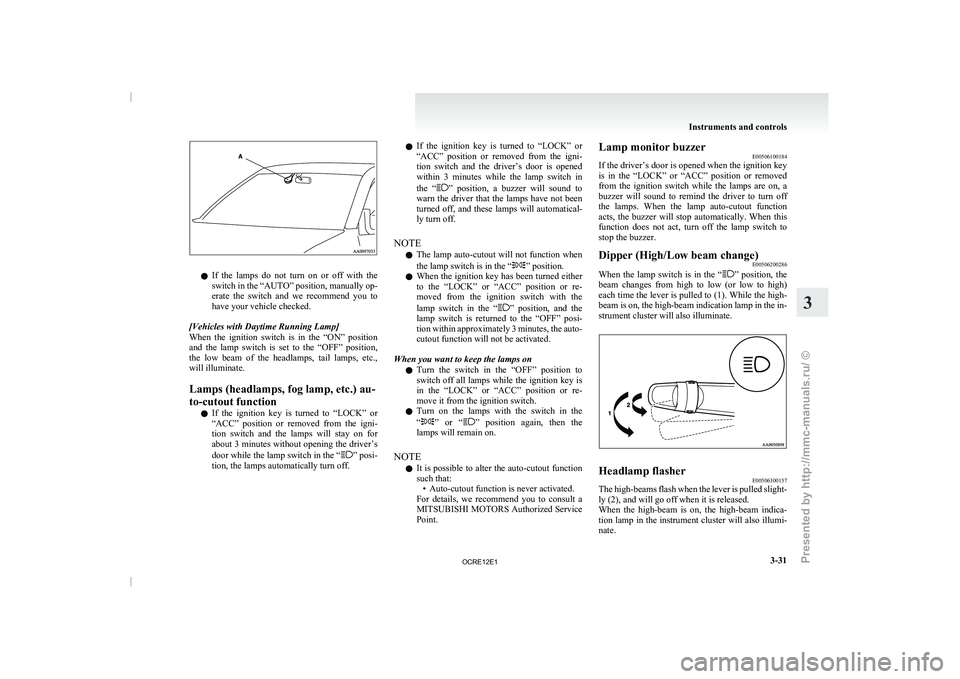
Dipper (High/Low beam change) E00506200286
When the lamp switch is in the “ ” position, the
beam changes from high
to low (or low to high)
each time the lever is pulled to (1). While the high-
beam is on, the high-beam indication lamp in the in-
strument cluster will also illuminate. Headlamp flasher
E00506300157
The high-beams flash when the lever is pulled slight-
ly (2), and will go off when it is released.
When the high-beam is on,
the high-beam indica-
tion lamp in the instrument cluster will also illumi-
nate. Instruments and controls
3-31 3
OCRE12E1
Presented by http://mmc-manuals.ru/ \251
Page 118 of 369
Switch position 0- Driver only
Switch position 3- Driver + Full luggage load-
ing
{Vehicles with heavy duty
suspension}
Switch position 4- Driver
+ Full luggage load-
ing
{Vehicles without heavy du-
ty suspension}
Double cab Vehicle condi-
tion Switch position “0”
“2” or “3” or
“4” ●: 1 person
: Full luggage loading Switch position 0- Driver only
Switch position 2- Driver + Full luggage load-
ing
{Vehicles with heavy duty
suspension for
Russia, Ka-
zakhstan and Ukraine}
Switch position 3- Driver + Full luggage load- ing
{Vehicles with heavy duty
suspension except
for Rus-
sia, Kazakhstan and Uk-
raine}
{Vehicles without heavy du-
ty suspension for Russia,
Kazakhstan and Ukraine}
Switch position 4- Driver + Full luggage load- ing
{Vehicles without heavy du-
ty suspension
except for
Russia, Kazakhstan and Uk-
raine} Turn-signals lever
E00506501273
The turn-signal lamps flash when
the lever is oper-
ated (with the ignition switch in the “ON” posi-
tion). At the same time, the turn-signal indication
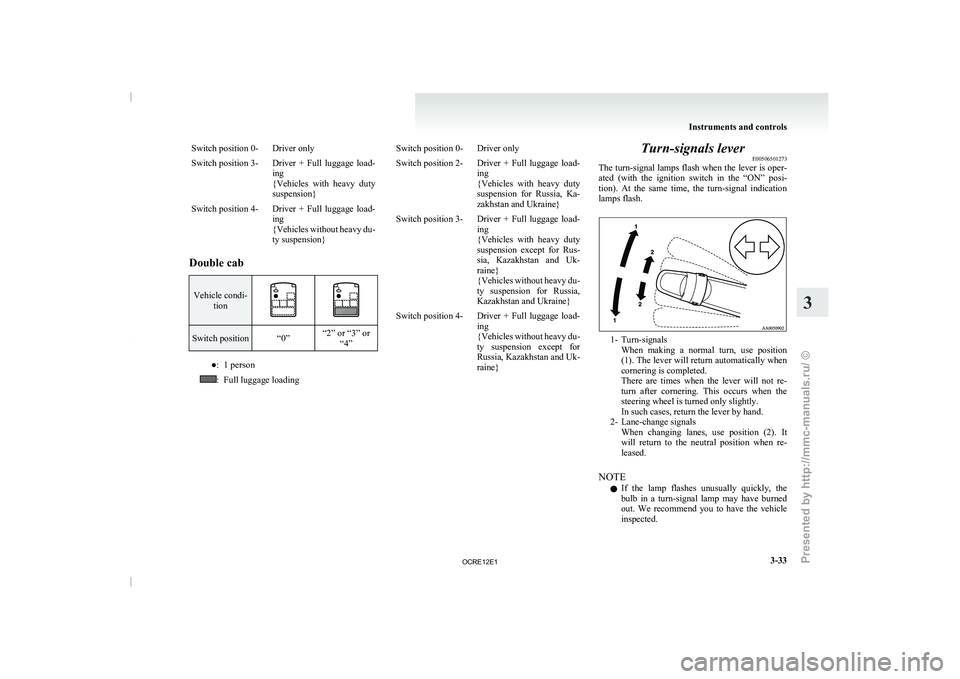
lamps flash. 1- Turn-signals
When making a normal turn,
use position
(1). The lever will return automatically when
cornering is completed.
There are times when the lever will not re-
turn after cornering. This occurs when the
steering wheel is turned only slightly.
In such cases, return the lever by hand.
2- Lane-change signals When changing lanes, use position (2). It
will return to the neutral position when re-
leased.
NOTE l If the lamp flashes unusually quickly, the
bulb in a turn-signal lamp may have burned
out. We recommend you to have the vehicle
inspected. Instruments and controls
3-33 3
OCRE12E1
Presented by http://mmc-manuals.ru/ \251
Page 119 of 369
l
It is possible to
activate the following func-
tions. For further information, we recom-
mend you to consult a MITSUBISHI
MOTORS Authorized Service Point. • Flashing of the turn-signal lamps and theindication lamp in the instrument cluster
when the lever is operated with the igni-
tion switch in the “ACC” position
• Flashing of the turn-signal lamps and the indication lamp in the instrument cluster
three times when you move the lever to
(2) slightly then release it
• The time required to operate the lever for the 3-flash function can be adjusted. Hazard warning flasher switch
E00506600903
Use the hazard warning flasher
switch when the ve-
hicle has to be parked on the road for any emergency.
The hazard warning flashers can always be operat-
ed, regardless of the position of the ignition key.
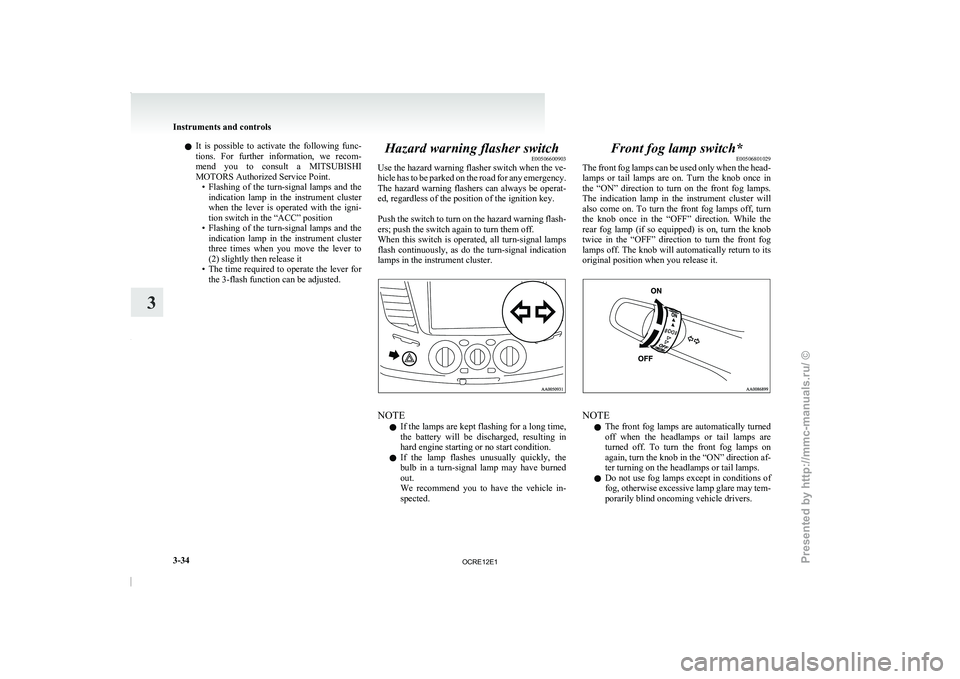
Push the switch to turn on the hazard warning flash-
ers; push the switch again to turn them off.
When this switch is operated, all turn-signal lamps
flash continuously, as do the turn-signal indication
lamps in the instrument cluster. NOTE
l If
the lamps are kept
flashing for a long time,
the battery will be discharged, resulting in
hard engine starting or no start condition.
l If the lamp flashes unusually quickly, the
bulb in a turn-signal lamp may have burned
out.
We recommend you to have the vehicle in-
spected. Front fog lamp switch*
E00506801029
The front fog lamps
can
be used only when the head-
lamps or tail lamps are on. Turn the knob once in
the “ON” direction to turn on the front fog lamps.
The indication lamp in the instrument cluster will
also come on. To turn the front fog lamps off, turn
the knob once in the “OFF” direction. While the
rear fog lamp (if so equipped) is on, turn the knob
twice in the “OFF” direction to turn the front fog
lamps off. The knob will automatically return to its
original position when you release it. NOTE
l The
front fog lamps are
automatically turned
off when the headlamps or tail lamps are
turned off. To turn the front fog lamps on
again, turn the knob in the “ON” direction af-
ter turning on the headlamps or tail lamps.
l Do not use fog lamps except in conditions of
fog, otherwise excessive lamp glare may tem-
porarily blind oncoming vehicle drivers. Instruments and controls
3-34
3
OCRE12E1
Presented by http://mmc-manuals.ru/ \251
Page 122 of 369
If the blades are frozen to the windscreen, do not
operate the wipers until the
ice has melted and the
blades are freed, otherwise the wiper motor may be
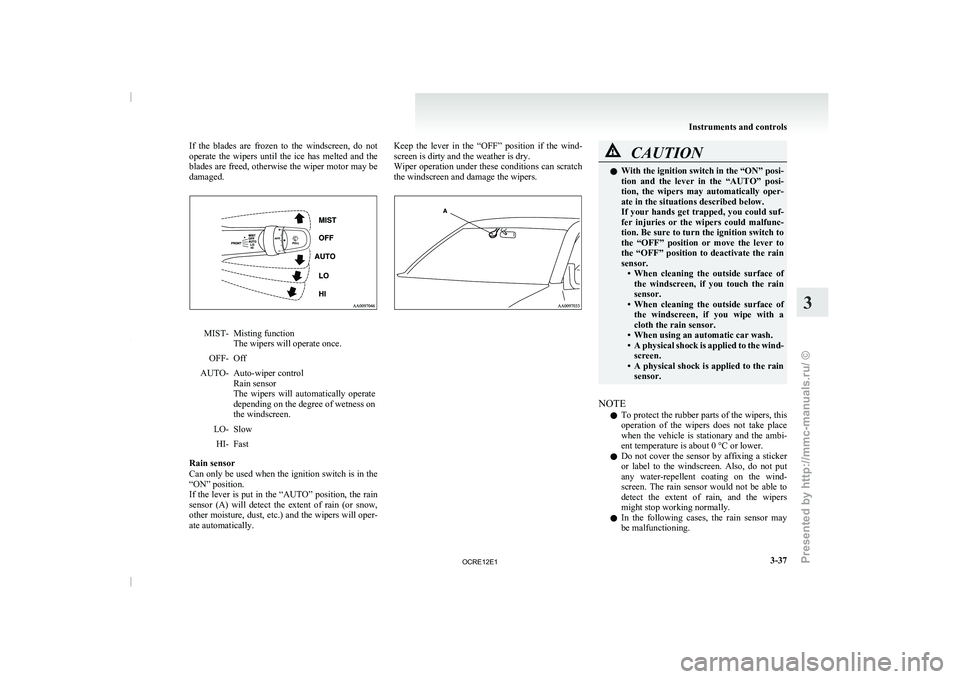
damaged. MIST- Misting function
The wipers will operate once.
OFF- Off
AUTO- Auto-wiper control Rain sensor
The wipers will automatically operate
depending on the degree of wetness on
the windscreen.
LO-
Slow
HI- Fast
Rain sensor
Can only be used when
the ignition switch is in the
“ON” position.
If the lever is put in the “AUTO” position, the rain
sensor (A) will detect the extent of rain (or snow,
other moisture, dust, etc.) and the wipers will oper-
ate automatically. Keep the lever in the “OFF” position if the wind-
screen is dirty and the weather is dry.
Wiper operation under these
conditions
can scratch
the windscreen and damage the wipers. CAUTION
l
With the ignition switch in
the “ON” posi-
tion and the lever in the “AUTO” posi-
tion, the wipers may automatically oper-
ate in the situations described below.
If your hands get trapped, you could suf-
fer injuries or the wipers could malfunc-
tion. Be sure to turn the ignition switch to
the “OFF” position or move the lever to
the “OFF” position to deactivate the rain
sensor. • When cleaning the outside surface ofthe windscreen, if you touch the rain
sensor.
• When cleaning the outside surface of the windscreen, if you wipe with a
cloth the rain sensor.
• When using an automatic car wash.
• A physical shock is applied to the wind- screen.
• A physical shock is applied to the rain sensor.
NOTE l To
protect the rubber parts
of the wipers, this
operation of the wipers does not take place
when the vehicle is stationary and the ambi-
ent temperature is about 0 °C or lower.
l Do not cover the sensor by affixing a sticker
or label to the windscreen. Also, do not put
any water-repellent coating on the wind-
screen. The rain sensor would not be able to
detect the extent of rain, and the wipers
might stop working normally.
l In the following cases, the rain sensor may
be malfunctioning. Instruments and controls
3-37 3
OCRE12E1
Presented by http://mmc-manuals.ru/ \251
Page 123 of 369
Have the vehicle inspected at a
MITSUBISHI MOTORS Authorized Service
Point.
•
When the wipers operate at a constant in-terval despite changes in the extent of rain.
• When the wipers do not operate even though it is raining.
l The wipers may automatically operate when
things such as insects or foreign objects are
affixed to the windscreen on top of the rain
sensor or when the windscreen is frozen. Ob-
jects affixed to the windscreen will stop the
wipers when the wipers cannot remove them.
To make the wipers operate again, place the
lever in the “LO” or “HI” position.
Also, the wipers may operate automatically
due to strong direct sunlight or electromag-
netic wave. To stop the wipers, place the lev-
er in the “OFF” position.
l Contact a MITSUBISHI MOTORS Author-
ized Service Point when replacing the wind-
screen or reinforcing the glass around the sen-
sor. To adjust the sensitivity of the rain sensor
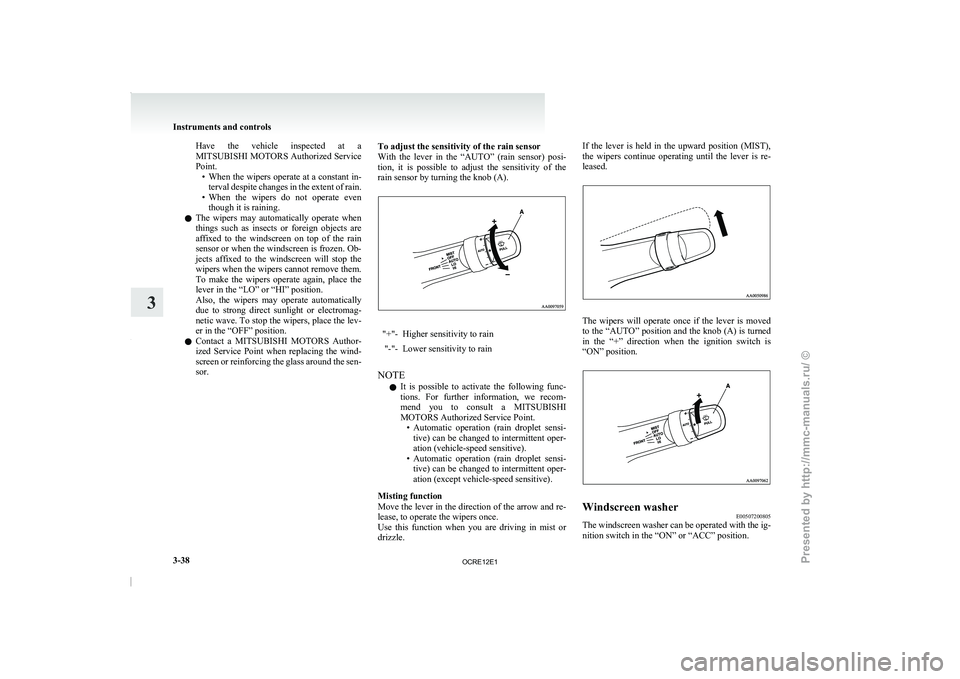
With the lever in the
“AUTO” (rain sensor) posi-
tion, it is possible to adjust the sensitivity of the
rain sensor by turning the knob (A). "+"- Higher sensitivity to rain
"-"- Lower sensitivity to rain
NOTE l It
is possible to activate
the following func-
tions. For further information, we recom-
mend you to consult a MITSUBISHI
MOTORS Authorized Service Point. • Automatic operation (rain droplet sensi-tive) can be changed to intermittent oper-
ation (vehicle-speed sensitive).
• Automatic operation (rain droplet sensi- tive) can be changed to intermittent oper-
ation (except vehicle-speed sensitive).
Misting function
Move the lever in the direction of the arrow and re-
lease, to operate the wipers once.
Use this function when you are driving in mist or
drizzle. If the lever is held in the upward position (MIST),
the wipers continue operating until
the lever is re-
leased. The wipers will operate once if the lever is moved
to the “AUTO” position and
the knob (A) is turned
in the “+” direction when the ignition switch is
“ON” position. Windscreen washer
E00507200805
The windscreen washer can be operated with the ig-
nition switch in the “ON” or “ACC” position. Instruments and controls
3-38
3
OCRE12E1
Presented by http://mmc-manuals.ru/ \251
Page 124 of 369
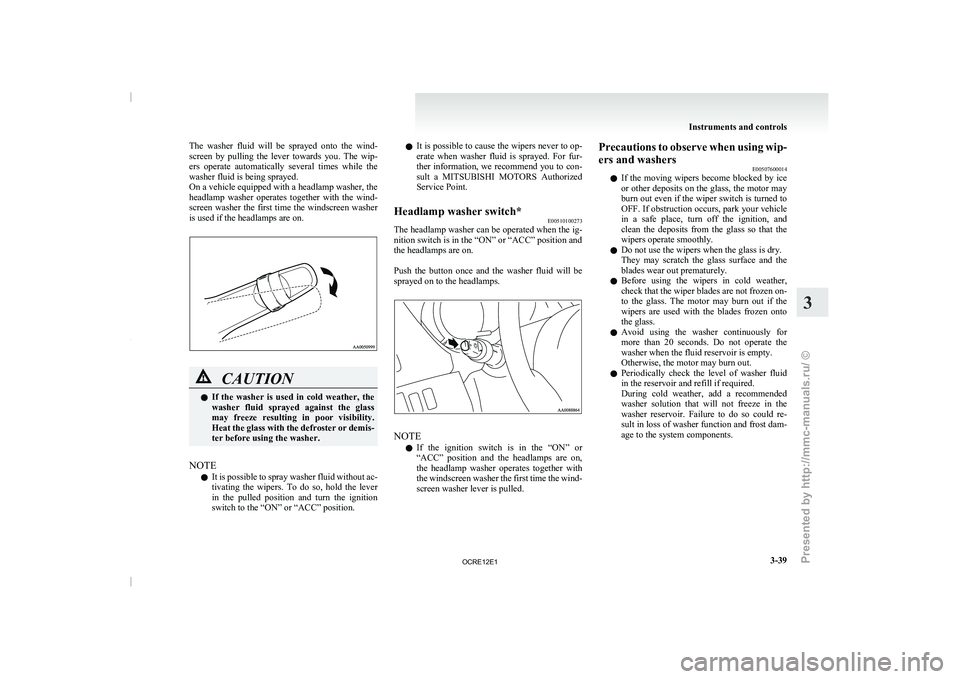
The washer fluid will be sprayed onto the wind-
screen by pulling the lever
towards you. The wip-
ers operate automatically several times while the
washer fluid is being sprayed.
On a vehicle equipped with a headlamp washer, the
headlamp washer operates together with the wind-
screen washer the first time the windscreen washer
is used if the headlamps are on. CAUTION
l
If the washer is
used
in cold weather, the
washer fluid sprayed against the glass
may freeze resulting in poor visibility.
Heat the glass with the defroster or demis-
ter before using the washer.
NOTE l It
is possible to spray
washer fluid without ac-
tivating the wipers. To do so, hold the lever
in the pulled position and turn the ignition
switch to the “ON” or “ACC” position. l
It is possible to
cause
the wipers never to op-
erate when washer fluid is sprayed. For fur-
ther information, we recommend you to con-
sult a MITSUBISHI MOTORS Authorized
Service Point.
Headlamp washer switch* E00510100273
The headlamp washer can be operated when the ig-
nition switch is in the “ON” or “ACC” position and
the headlamps are on.
Push the button once and
the washer fluid will be
sprayed on to the headlamps. NOTE
l If
the ignition switch is
in the “ON” or
“ACC” position and the headlamps are on,
the headlamp washer operates together with
the windscreen washer the first time the wind-
screen washer lever is pulled. Precautions to observe when using wip-
ers and washers
E00507600014
l If the moving wipers
become
blocked by ice
or other deposits on the glass, the motor may
burn out even if the wiper switch is turned to
OFF. If obstruction occurs, park your vehicle
in a safe place, turn off the ignition, and
clean the deposits from the glass so that the
wipers operate smoothly.
l Do not use the wipers when the glass is dry.
They may scratch the glass surface and the
blades wear out prematurely.
l Before using the wipers in cold weather,
check that the wiper blades are not frozen on-
to the glass. The motor may burn out if the
wipers are used with the blades frozen onto
the glass.
l Avoid using the washer continuously for
more than 20 seconds. Do not operate the
washer when the fluid reservoir is empty.
Otherwise, the motor may burn out.
l Periodically check the level of washer fluid
in the reservoir and refill if required.
During cold weather, add a recommended
washer solution that will not freeze in the
washer reservoir. Failure to do so could re-
sult in loss of washer function and frost dam-
age to the system components. Instruments and controls
3-39 3
OCRE12E1
Presented by http://mmc-manuals.ru/ \251
Page 125 of 369
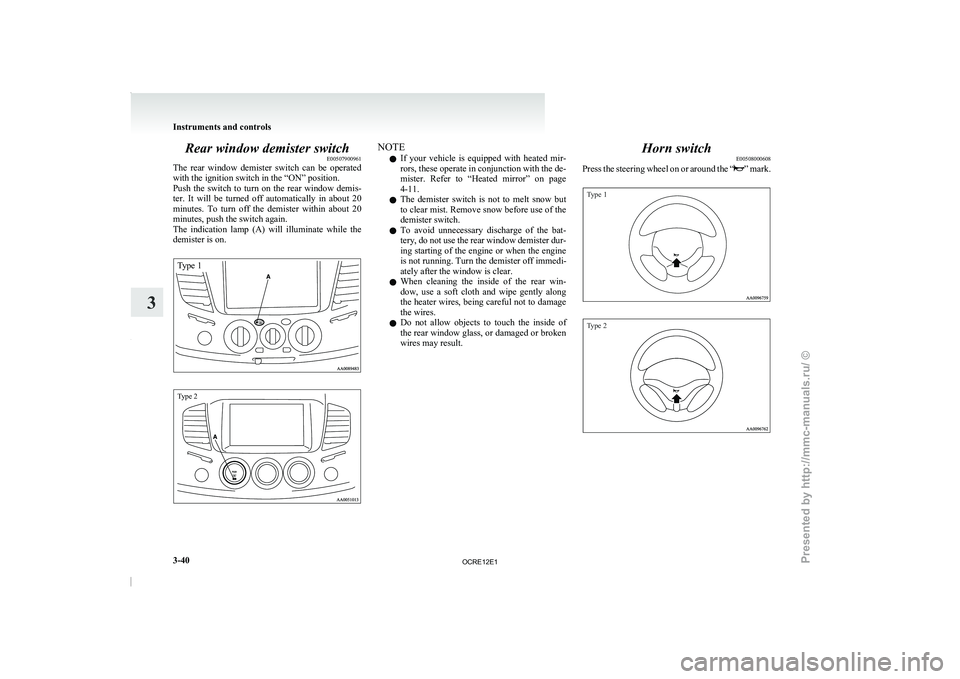
Rear window demister switch
E00507900961
The rear window demister switch
can be operated
with the ignition switch in the “ON” position.
Push the switch to turn on the rear window demis-
ter. It will be turned off automatically in about 20
minutes. To turn off the demister within about 20
minutes, push the switch again.
The indication lamp (A) will illuminate while the
demister is on.
Type 1
Type 2 NOTE
l If
your vehicle is equipped
with heated mir-
rors, these operate in conjunction with the de-
mister. Refer to “Heated mirror” on page
4-11.
l The demister switch is not to melt snow but
to clear mist. Remove snow before use of the
demister switch.
l To avoid unnecessary discharge of the bat-
tery, do not use the rear window demister dur-
ing starting of the engine or when the engine
is not running. Turn the demister off immedi-
ately after the window is clear.
l When cleaning the inside of the rear win-
dow, use a soft cloth and wipe gently along
the heater wires, being careful not to damage
the wires.
l Do not allow objects to touch the inside of
the rear window glass, or damaged or broken
wires may result. Horn switch
E00508000608
Press the steering wheel
on
or around the “ ” mark.
Type 1
Type 2Instruments and controls
3-40
3
OCRE12E1
Presented by http://mmc-manuals.ru/ \251