ignition MITSUBISHI TRITON 2011 Service Manual
[x] Cancel search | Manufacturer: MITSUBISHI, Model Year: 2011, Model line: TRITON, Model: MITSUBISHI TRITON 2011Pages: 369, PDF Size: 26.15 MB
Page 145 of 369
CAUTION
l
If the warning lamp comes on, reduce the
engine speed and stop the vehicle in a safe
area.
Then set the selector lever to “P” (PARK)
position and idle the engine until the warn-
ing lamp goes off.
When the warning lamp goes off, resume
normal driving.
If the warning lamp does not go off, we
recommend you to have your vehicle in-
spected.
Operation of the automatic transmis-
sion E00604200515CAUTION
l
Before selecting a gear with
the engine
running and the vehicle stationary, fully
depress the brake pedal to prevent the ve-
hicle from creeping.
The vehicle will begin to move as soon as
the gear is engaged, especially when the
engine speed is high, at fast idle or with
the air conditioning operating, the brakes
should only be released when you are
ready to drive away.
l Depress the brake pedal with the right
foot at all times.
Using the left foot could cause driver move-
ment delay in case of an emergency. CAUTION
l
To prevent sudden acceleration, never
race
the engine when shifting from the
“P” (PARK) or “N” (NEUTRAL) position.
l Operating the accelerator pedal while the
other foot is resting on the brake pedal
will affect braking efficiency and may
cause premature wear of brake pads.
Do not race the engine with brake pedal
pressed.
This can damage the transmission.
l Use the selector lever in the correct shift
position in accordance with driving condi-
tions.
Never coast downhill backward with the
“D” (DRIVE) position or coast forward
with the “R” (REVERSE) position.
The engine stops and the brake pedal ef-
fort or the steering wheel handling weight
increasing could lead to an accident.
Passing acceleration E00604500127
To gain extra acceleration in “D” (DRIVE) posi-
tion (when passing
another vehicle),
push the accel-
erator to the floor. The automatic transmission will
automatically downshift.
Waiting E00604600128
For short waiting periods, such as at traffic signals,
the vehicle can be left
in gear and held stationary
with the service brake.
For longer waiting periods with the engine running,
the selector lever should be placed in the “N” (NEU-
TRAL) position. CAUTION
l
Never hold the vehicle stationary
on a hill
using the accelerator pedal (without us-
ing the brake pedal). Always apply the
parking brake and/or service brakes.
l Unexpected acceleration may occur if the
selector lever is in a position other than
“P” (PARK) or “N” (NEUTRAL) position.
Prior to moving off after having stopped
the vehicle, make sure that the selector lev-
er is in “D” (DRIVE) position.
Parking E00604700246
To park the vehicle, first bring it to a complete
stop, fully engage
the parking
brake, and then
move the selector lever to the “P” (PARK) position.
If you are going to leave the vehicle unattended, al-
ways switch off the engine and remove the ignition
key.
NOTE
l On a slope, be sure to apply the parking
brake before moving the selector lever to the
“P” (PARK) position. If you move the selec-
tor lever to the “P” (PARK) position before
applying the parking brake, it may be diffi-
cult to disengage the selector lever from the
“P” (PARK) position when next you drive
the vehicle, requiring application of a strong
force to the selector lever to move from the
“P” (PARK) position. Starting and driving
4-20
4
OCRE12E1
Presented by http://mmc-manuals.ru/ \251
Page 147 of 369
WARNING
l If the lock button is always pushed to op-
erate the selector lever, the lever may be
accidentally shifted into the “P” (PARK)
or “R” (REVERSE) position. Be sure not
to push the lock button when performing
the operations indicated by in the illus-
tration.
l Always depress the brake
pedal
when
shifting the selector lever into a gear
from the “P” (PARK) or “N” (NEU-
TRAL) position.
When beginning to drive, do not shift the
selector lever from the “P” (PARK) or
“N” (NEUTRAL) position while depress-
ing the accelerator pedal, doing so is dan-
gerous because the vehicle will “jump” for-
ward or backward. Selector lever position indicator
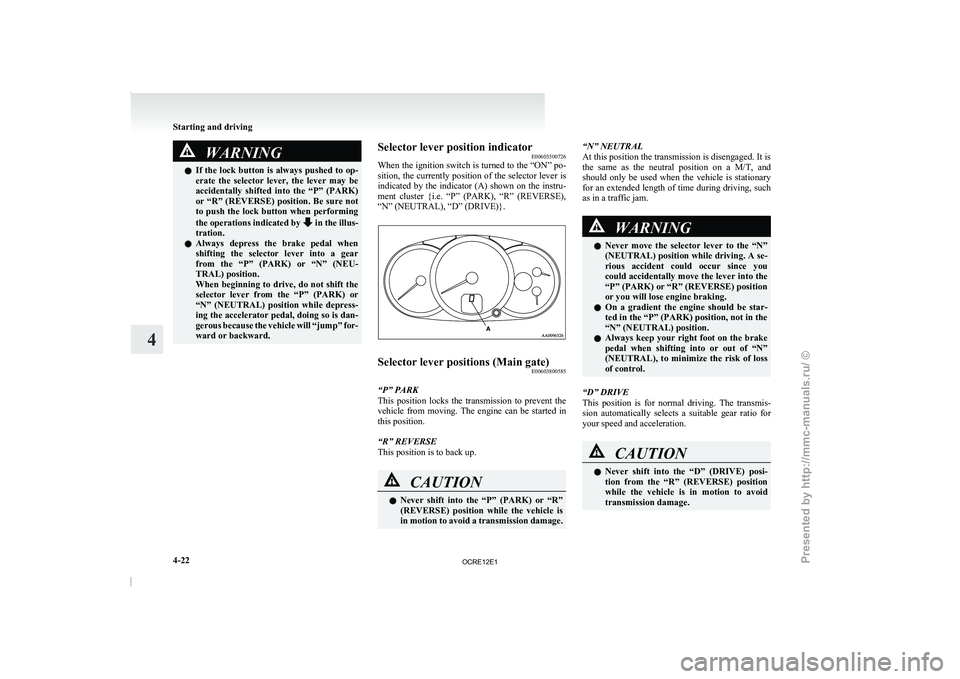
E00603500726
When the
ignition switch
is
turned to the “ON” po-
sition, the currently position of the selector lever is
indicated by the indicator (A) shown on the instru-
ment cluster {i.e. “P” (PARK), “R” (REVERSE),
“N” (NEUTRAL), “D” (DRIVE)}. Selector lever positions (Main gate)
E00603800585
“P” PARK
This position locks the transmission
to prevent the
vehicle from moving. The engine can be started in
this position.
“R” REVERSE
This position is to back up. CAUTION
l
Never shift into the
“P”
(PARK) or “R”
(REVERSE) position while the vehicle is
in motion to avoid a transmission damage. “N” NEUTRAL
At this position the transmission is disengaged. It is
the
same as the neutral
position on a M/T, and
should only be used when the vehicle is stationary
for an extended length of time during driving, such
as in a traffic jam. WARNING
l Never move the selector
lever
to the “N”
(NEUTRAL) position while driving. A se-
rious accident could occur since you
could accidentally move the lever into the
“P” (PARK) or “R” (REVERSE) position
or you will lose engine braking.
l On a gradient the engine should be star-
ted in the “P” (PARK) position, not in the
“N” (NEUTRAL) position.
l Always keep your right foot on the brake
pedal when shifting into or out of “N”
(NEUTRAL), to minimize the risk of loss
of control.
“D” DRIVE
This position is for normal
driving. The transmis-
sion automatically selects a suitable gear ratio for
your speed and acceleration. CAUTION
l
Never shift into the “D”
(DRIVE) posi-
tion from the “R” (REVERSE) position
while the vehicle is in motion to avoid
transmission damage. Starting and driving
4-22
4
OCRE12E1
Presented by http://mmc-manuals.ru/ \251
Page 150 of 369
CAUTION
l
Operating the accelerator pedal while the
other foot is resting on the brake pedal
will affect braking efficiency and may
cause premature wear of brake pads.
l Use the selector lever in the correct shift
position in accordance with driving condi-
tions.
Never coast downhill backward with the
driving shift position {“D” (DRIVE) or
sports mode} or coast forward with the
“R” (REVERSE) position.
The engine stops and the brake pedal ef-
fort or the steering wheel handling weight
increasing could lead to an accident.
l Do not race the engine with brake pedal
pressed when the vehicle is stationary.
This can damage the automatic transmis-
sion.
Passing acceleration E00604500329
To gain extra acceleration in “D” (DRIVE) posi-
tion, push the
accelerator to
the floor. The automat-
ic transmission will automatically downshift.
NOTE
l In “Sports mode”, downshifts do not take
place when the accelerator is depressed all
the way to the floor.
Waiting E00604600304
For short waiting periods, such as at traffic signals,
the vehicle can be left
in gear and held stationary
with the service brake. For longer waiting periods with the engine running,
place the selector lever
in
the “N” (NEUTRAL) po-
sition.. CAUTION
l
Never hold the vehicle
stationary
on a hill
using the accelerator pedal (without us-
ing the brake pedal). Always apply the
parking brake and/or service brakes.
l Unexpected acceleration may occur if the
selector lever is in a position other than
“P” (PARK) or “N” (NEUTRAL). Prior
to moving off after having stopped the ve-
hicle, make sure that the selector lever is
in the “D” (DRIVE) position.
Parking E00604700262
To park the vehicle, first bring it to a complete
stop, fully engage
the parking
brake, and then
move the selector lever to the “P” (PARK) position.
If you are going to leave the vehicle unattended, al-
ways switch off the engine and remove the ignition
key. NOTE
l On
a slope, be sure
to apply the parking
brake before moving the selector lever to the
“P” (PARK) position. If you move the selec-
tor lever to the “P” (PARK) position before
applying the parking brake, it may be diffi-
cult to disengage the selector lever from the
“P” (PARK) position when next you drive
the vehicle, requiring application of a strong
force to the selector lever to move from the
“P” (PARK) position.
When the automatic transmission makes no speed
change E00604800683
If the transmission does not change speeds while
driving, or your vehicle
does
not pick up enough
speed when starting on an uphill slope, it may be
that there is something unusual happening in the
transmission, causing a safety device to activate.
We recommend you to have your checked as soon
as possible. 1. If your vehicle has difficulty moving uphill,
shift the selector lever into 2 nd
gear of the
“Sports mode”.
This method might not work depending on
the type of transmission malfunction.
2. Once the vehicle is moving on a level road, move the selector lever back to “D” (DRIVE).
NOTE l When the selector lever position indicator in
the instrument panel blinks, it means that
there is an abnormal condition in the trans-
mission. Refer to “When the selector lever po-
sition indicator blinks” on page 4-19. Starting and driving
4-25 4
OCRE12E1
Presented by http://mmc-manuals.ru/ \251
Page 153 of 369
NOTE
l Shifting
of the transfer shift
lever between
“2H” ↔ “4H” should only be done at speeds
below 100 km/h (62 mph).
l During driving, never attempt to shift from
“4H” to “4L”.
l When shifting from “2H” to “4H” in cold
weather while the vehicle is in motion, the
transmission gear may make some noise. In
cold weather, try to shift the gear while the
vehicle is stopped.
l There may be a case that the transfer shift lev-
er feels heavy when it is moved from “4H”
to “2H” with the steering wheel in turned po-
sition.
This is normal and not any indication of trou-
ble. CAUTION
l
Do not operate the
transfer
shift lever
while the rear wheels of the vehicle are
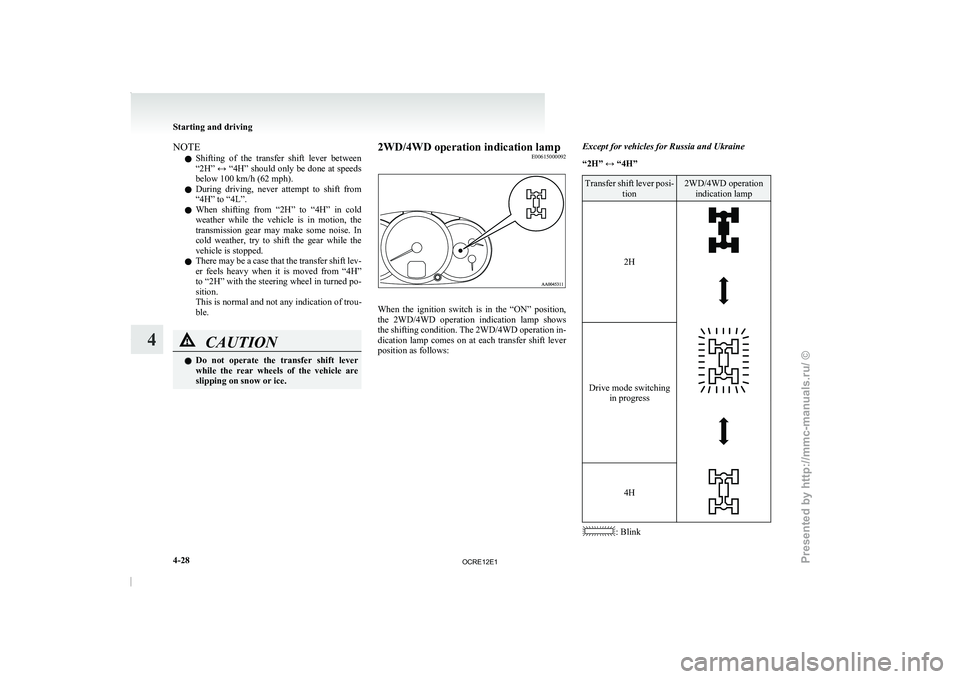
slipping on snow or ice. 2WD/4WD operation indication lamp
E00615000092 When the ignition switch is in the “ON” position,
the 2WD/4WD operation indication lamp
shows
the shifting condition. The 2WD/4WD operation in-
dication lamp comes on at each transfer shift lever
position as follows: Except for vehicles for Russia and Ukraine
“2H” ↔ “4H” Transfer shift lever posi-
tion 2WD/4WD operation
indication lamp
2H Drive mode switching
in progress 4H
: BlinkStarting and driving
4-28
4
OCRE12E1
Presented by http://mmc-manuals.ru/ \251
Page 158 of 369
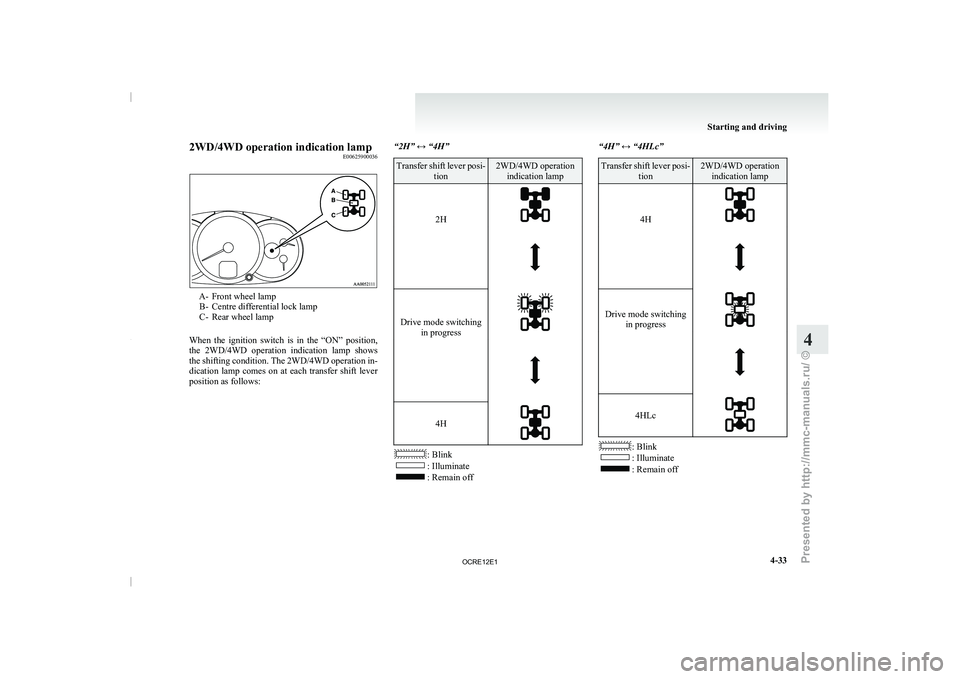
2WD/4WD operation indication lamp
E00625900036A- Front wheel lamp
B- Centre differential lock lamp
C- Rear wheel lamp
When the ignition
switch is in the “ON” position,
the 2WD/4WD operation indication lamp shows
the shifting condition. The 2WD/4WD operation in-
dication lamp comes on at each transfer shift lever
position as follows: “2H” ↔ “4H” Transfer shift lever posi-
tion 2WD/4WD operation
indication lamp
2H
Drive mode switching
in progress
4H
: Blink
: Illuminate
: Remain off“4H” ↔ “4HLc” Transfer shift lever posi-
tion 2WD/4WD operation
indication lamp
4H
Drive mode switching
in progress
4HLc
: Blink
: Illuminate
: Remain off Starting and driving
4-33 4
OCRE12E1
Presented by http://mmc-manuals.ru/ \251
Page 160 of 369
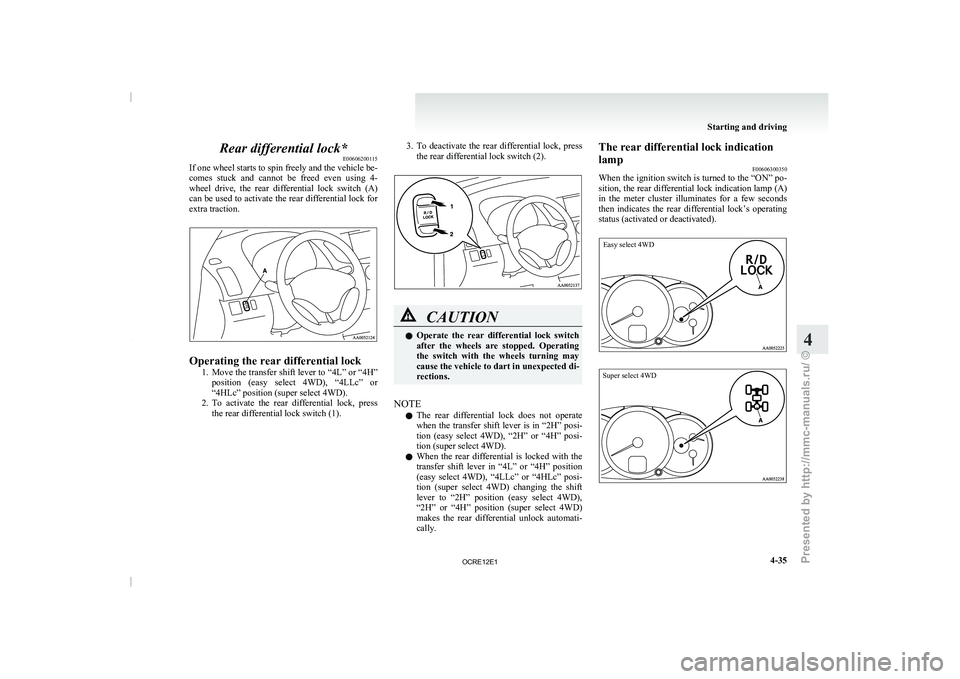
Rear differential lock*
E00606200115
If one wheel starts to
spin freely and the vehicle be-
comes stuck and cannot be freed even using 4-
wheel drive, the rear differential lock switch (A)
can be used to activate the rear differential lock for
extra traction. Operating the rear differential lock
1. Move the transfer shift lever
to “4L” or “4H”
position (easy select 4WD), “4LLc” or
“4HLc” position (super select 4WD).
2. To activate the rear differential lock, press the rear differential lock switch (1). 3. To deactivate the rear differential lock, press
the rear differential lock switch (2). CAUTION
l
Operate the rear differential
lock
switch
after the wheels are stopped. Operating
the switch with the wheels turning may
cause the vehicle to dart in unexpected di-
rections.
NOTE l The
rear differential lock does
not operate
when the transfer shift lever is in “2H” posi-
tion (easy select 4WD), “2H” or “4H” posi-
tion (super select 4WD).
l When the rear differential is locked with the
transfer shift lever in “4L” or “4H” position
(easy select 4WD), “4LLc” or “4HLc” posi-
tion (super select 4WD) changing the shift
lever to “2H” position (easy select 4WD),
“2H” or “4H” position (super select 4WD)
makes the rear differential unlock automati-
cally. The rear differential lock indication
lamp
E00606300350
When the ignition switch
is
turned to the “ON” po-
sition, the rear differential lock indication lamp (A)
in the meter cluster illuminates for a few seconds
then indicates the rear differential lock’s operating
status (activated or deactivated).
Easy select 4WD
Super select 4WD Starting and driving
4-35 4
OCRE12E1
Presented by http://mmc-manuals.ru/ \251
Page 170 of 369
l
Operation of ABS is
not restricted to situa-
tions where brakes are applied suddenly.
This system may also operate to prevent
wheel lock when you are driving over man-
holes, steel road-work plates, or the vehicle
is driven over steps or level differences in
the road, road markings, or other surfaces
which are difficult for the wheels to grip.
l When the ABS is activated, you may feel the
brake pedal pulsation and hear a characteris-
tic noise. Also at this time, you may feel as if
the pedal attempts to resist being depressed.
In this situation, to let the ABS work for
you, just hold the brake pedal down more
firmly. Do not pump the brake. This pump-
ing will result in reduced braking perform-
ance. CAUTION
l
Even the ABS cannot
prevent
the natural
laws of physics from acting on the vehi-
cle. It cannot for instance avoid accidents
that may result from excessive speed on
bends or following another vehicle too
closely or aquaplaning. It should remain
the driver’s task to observe safety precau-
tions to judge speeds and brake applica-
tions correctly in such conditions.
l Be sure to use tyres of the same type and
size on 4 wheels.
If tyre types or sizes are mixed, ABS may
not function normally. CAUTION
l
Never install a limited-slip differential,
which
is not a MITSUBISHI MOTORS
genuine part, as the ABS may not func-
tion normally.
We recommend you to consult a
MITSUBISHI MOTORS Authorized
Service Point.
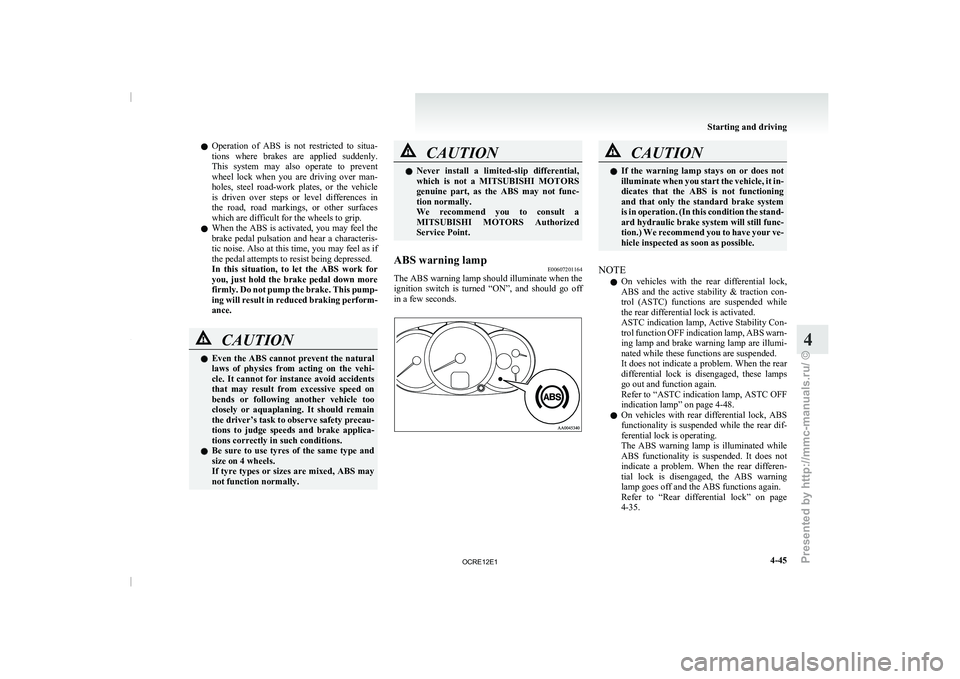
ABS warning lamp E00607201164
The ABS warning lamp should illuminate when the
ignition switch is
turned “ON”,
and should go off
in a few seconds. CAUTION
l
If the warning lamp stays
on or does not
illuminate when you start the vehicle, it in-
dicates that the ABS is not functioning
and that only the standard brake system
is in operation. (In this condition the stand-
ard hydraulic brake system will still func-
tion.) We recommend you to have your ve-
hicle inspected as soon as possible.
NOTE l On
vehicles with the rear
differential lock,
ABS and the active stability & traction con-
trol (ASTC) functions are suspended while
the rear differential lock is activated.
ASTC indication lamp, Active Stability Con-
trol function OFF indication lamp, ABS warn-
ing lamp and brake warning lamp are illumi-
nated while these functions are suspended.
It does not indicate a problem. When the rear
differential lock is disengaged, these lamps
go out and function again.
Refer to “ASTC indication lamp, ASTC OFF
indication lamp” on page 4-48.
l On vehicles with rear differential lock, ABS
functionality is suspended while the rear dif-
ferential lock is operating.
The ABS warning lamp is illuminated while
ABS functionality is suspended. It does not
indicate a problem. When the rear differen-
tial lock is disengaged, the ABS warning
lamp goes off and the ABS functions again.
Refer to “Rear differential lock” on page
4-35. Starting and driving
4-45 4
OCRE12E1
Presented by http://mmc-manuals.ru/ \251
Page 173 of 369
Active Stability Control function
E00616900056
The Active Stability Control function
is designed
to improve the vehicle’s stability by restraining its
tendency to slip sideways (for example, when round-
ing a curve in slippery conditions, or when the driv-
er takes rapid steering action to avoid an obstacle).
It works by controlling the engine output and brake
on each wheel.
NOTE
l On vehicles with the rear differential lock,
the Active Stability Control function does
not operate when the rear differential lock is
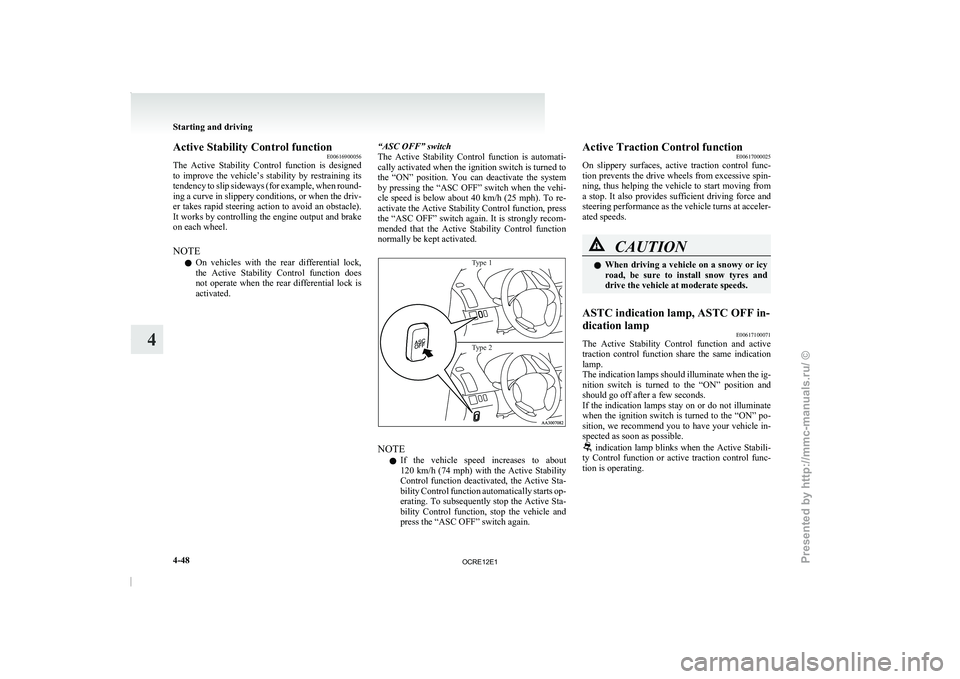
activated. “ASC OFF” switch
The
Active Stability Control function
is automati-
cally activated when the ignition switch is turned to
the “ON” position. You can deactivate the system
by pressing the “ASC OFF” switch when the vehi-
cle speed is below about 40 km/h (25 mph). To re-
activate the Active Stability Control function, press
the “ASC OFF” switch again. It is strongly recom-
mended that the Active Stability Control function
normally be kept activated.
Type 1
Type 2 NOTE
l If
the vehicle speed increases
to about
120 km/h (74 mph) with the Active Stability
Control function deactivated, the Active Sta-
bility Control function automatically starts op-
erating. To subsequently stop the Active Sta-
bility Control function, stop the vehicle and
press the “ASC OFF” switch again. Active Traction Control function
E00617000025
On slippery surfaces, active
traction
control func-
tion prevents the drive wheels from excessive spin-
ning, thus helping the vehicle to start moving from
a stop. It also provides sufficient driving force and
steering performance as the vehicle turns at acceler-
ated speeds. CAUTION
l
When driving a vehicle
on
a snowy or icy
road, be sure to install snow tyres and
drive the vehicle at moderate speeds.
ASTC indication lamp, ASTC OFF in-
dication lamp E00617100071
The Active Stability Control function and active
traction control function
share the
same indication
lamp.
The indication lamps should illuminate when the ig-
nition switch is turned to the “ON” position and
should go off after a few seconds.
If the indication lamps stay on or do not illuminate
when the ignition switch is turned to the “ON” po-
sition, we recommend you to have your vehicle in-
spected as soon as possible. indication lamp blinks when the Active Stabili-
ty Control function or active
traction control func-
tion is operating. Starting and driving
4-48
4
OCRE12E1
Presented by http://mmc-manuals.ru/ \251
Page 174 of 369
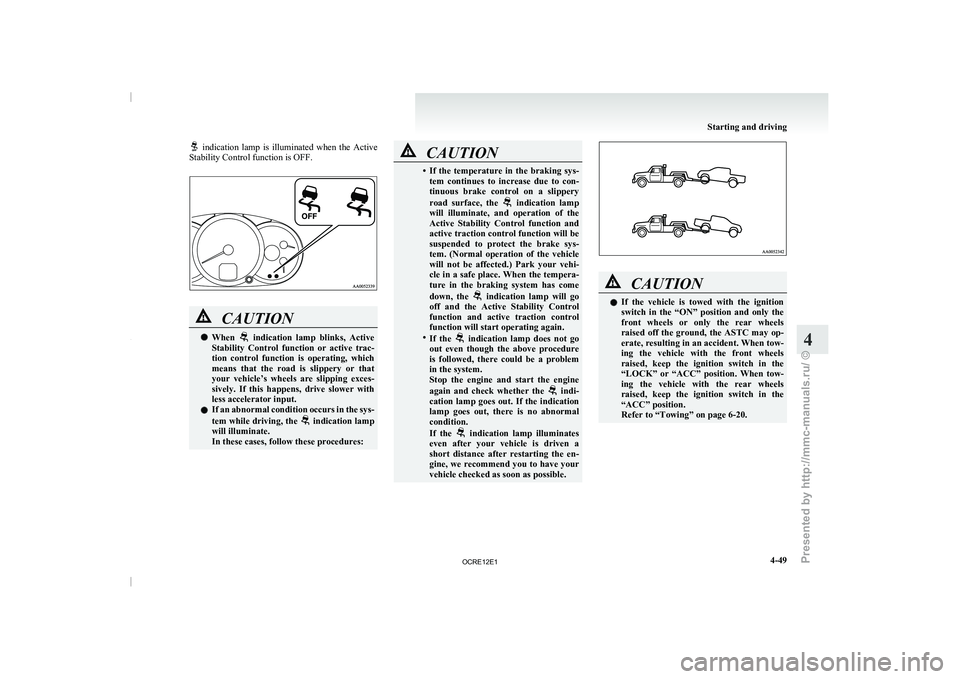
indication lamp is illuminated when the Active
Stability Control function is OFF. CAUTION
l
When indication lamp blinks, Active
Stability Control function or active
trac-
tion control function is operating, which
means that the road is slippery or that
your vehicle’s wheels are slipping exces-
sively. If this happens, drive slower with
less accelerator input.
l If an abnormal condition occurs in the sys-
tem while driving, the indication lamp
will illuminate.
In these cases, follow these procedures: CAUTION
• If the temperature in the braking sys-
tem continues to increase
due to con-
tinuous brake control on a slippery
road surface, the indication lamp
will illuminate, and operation of
the
Active Stability Control function and
active traction control function will be
suspended to protect the brake sys-
tem. (Normal operation of the vehicle
will not be affected.) Park your vehi-
cle in a safe place. When the tempera-
ture in the braking system has come
down, the indication lamp will go
off and the Active Stability
Control
function and active traction control
function will start operating again.
• If the indication lamp does not go
out even though the above
procedure
is followed, there could be a problem
in the system.
Stop the engine and start the engine
again and check whether the indi-
cation lamp goes out. If
the indication
lamp goes out, there is no abnormal
condition.
If the indication lamp illuminates
even after your vehicle is
driven a
short distance after restarting the en-
gine, we recommend you to have your
vehicle checked as soon as possible. CAUTION
l
If the vehicle is
towed
with the ignition
switch in the “ON” position and only the
front wheels or only the rear wheels
raised off the ground, the ASTC may op-
erate, resulting in an accident. When tow-
ing the vehicle with the front wheels
raised, keep the ignition switch in the
“LOCK” or “ACC” position. When tow-
ing the vehicle with the rear wheels
raised, keep the ignition switch in the
“ACC” position.
Refer to “Towing” on page 6-20. Starting and driving
4-49 4
OCRE12E1
Presented by http://mmc-manuals.ru/ \251
Page 175 of 369
Cruise control*
E00609100779
Cruise control is an automatic
speed control system
that keeps a set speed. It can be activated at about
40 km/h (25 mph) or more. CAUTION
l
When you do not
wish
to drive at a set
speed, turn off the cruise control for safety.
l Do not use cruise control when driving
conditions will not allow you to stay at
the same speed, such as in heavy traffic
or on roads that are winding, icy, snow-
covered, wet, slippery, on a steep down-
hill slope.
l On vehicles with manual transmission, do
not move the gearshift lever to the “N”
(Neutral) position while driving at a set
speed without depressing the clutch ped-
al. The engine will run too fast and might
be damaged.
NOTE l Cruise
control may not be
able to keep your
speed on uphills or downhills.
l Your speed may decrease on a steep uphill.
You may use the accelerator pedal if you
want to stay at your set speed.
l Your speed may increase to more than the
set speed on a steep downhill. You must use
the brake to control your speed. As a result,
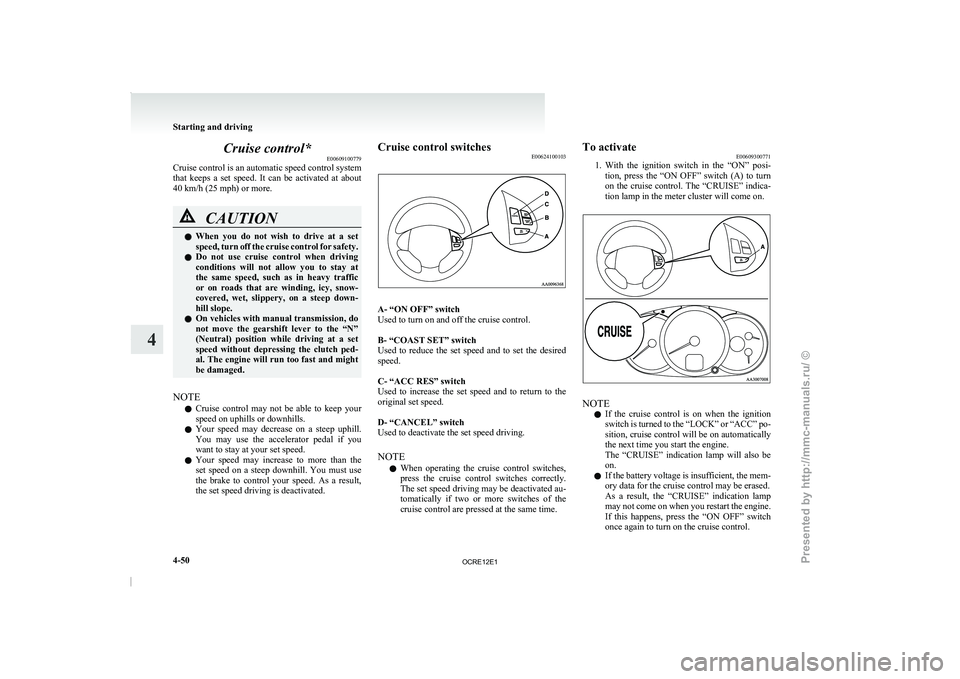
the set speed driving is deactivated. Cruise control switches
E00624100103 A- “ON OFF” switch
Used to turn on and off the cruise control.
B- “COAST SET” switch
Used to reduce the
set
speed and to set the desired
speed.
C- “ACC RES” switch
Used to increase the set speed and to return to the
original set speed.
D- “CANCEL” switch
Used to deactivate the set speed driving.
NOTE
l When operating the cruise control switches,
press the cruise control switches correctly.
The set speed driving may be deactivated au-
tomatically if two or more switches of the
cruise control are pressed at the same time. To activate
E00609300771
1. With the ignition
switch in
the “ON” posi-
tion, press the “ON OFF” switch (A) to turn
on the cruise control. The “CRUISE” indica-
tion lamp in the meter cluster will come on. NOTE
l If
the cruise control is
on when the ignition
switch is turned to the “LOCK” or “ACC” po-
sition, cruise control will be on automatically
the next time you start the engine.
The “CRUISE” indication lamp will also be
on.
l If the battery voltage is insufficient, the mem-
ory data for the cruise control may be erased.
As a result, the “CRUISE” indication lamp
may not come on when you restart the engine.
If this happens, press the “ON OFF” switch
once again to turn on the cruise control. Starting and driving
4-50
4
OCRE12E1
Presented by http://mmc-manuals.ru/ \251