brake MITSUBISHI TRITON 2011 Owner's Guide
[x] Cancel search | Manufacturer: MITSUBISHI, Model Year: 2011, Model line: TRITON, Model: MITSUBISHI TRITON 2011Pages: 369, PDF Size: 26.15 MB
Page 175 of 369
Cruise control*
E00609100779
Cruise control is an automatic
speed control system
that keeps a set speed. It can be activated at about
40 km/h (25 mph) or more. CAUTION
l
When you do not
wish
to drive at a set
speed, turn off the cruise control for safety.
l Do not use cruise control when driving
conditions will not allow you to stay at
the same speed, such as in heavy traffic
or on roads that are winding, icy, snow-
covered, wet, slippery, on a steep down-
hill slope.
l On vehicles with manual transmission, do
not move the gearshift lever to the “N”
(Neutral) position while driving at a set
speed without depressing the clutch ped-
al. The engine will run too fast and might
be damaged.
NOTE l Cruise
control may not be
able to keep your
speed on uphills or downhills.
l Your speed may decrease on a steep uphill.
You may use the accelerator pedal if you
want to stay at your set speed.
l Your speed may increase to more than the
set speed on a steep downhill. You must use
the brake to control your speed. As a result,
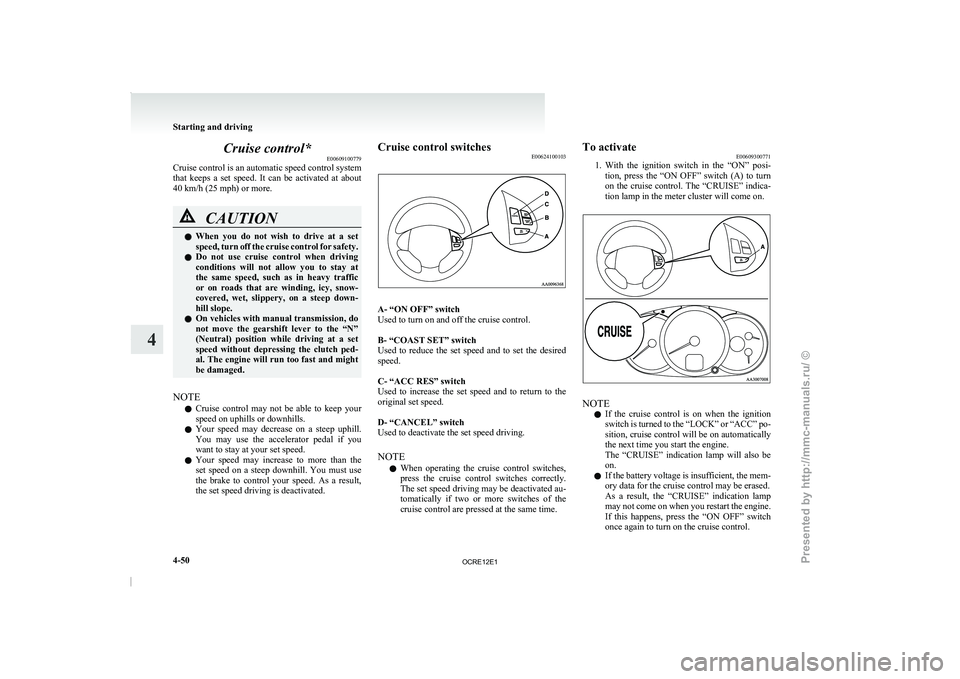
the set speed driving is deactivated. Cruise control switches
E00624100103 A- “ON OFF” switch
Used to turn on and off the cruise control.
B- “COAST SET” switch
Used to reduce the
set
speed and to set the desired
speed.
C- “ACC RES” switch
Used to increase the set speed and to return to the
original set speed.
D- “CANCEL” switch
Used to deactivate the set speed driving.
NOTE
l When operating the cruise control switches,
press the cruise control switches correctly.
The set speed driving may be deactivated au-
tomatically if two or more switches of the
cruise control are pressed at the same time. To activate
E00609300771
1. With the ignition
switch in
the “ON” posi-
tion, press the “ON OFF” switch (A) to turn
on the cruise control. The “CRUISE” indica-
tion lamp in the meter cluster will come on. NOTE
l If
the cruise control is
on when the ignition
switch is turned to the “LOCK” or “ACC” po-
sition, cruise control will be on automatically
the next time you start the engine.
The “CRUISE” indication lamp will also be
on.
l If the battery voltage is insufficient, the mem-
ory data for the cruise control may be erased.
As a result, the “CRUISE” indication lamp
may not come on when you restart the engine.
If this happens, press the “ON OFF” switch
once again to turn on the cruise control. Starting and driving
4-50
4
OCRE12E1
Presented by http://mmc-manuals.ru/ \251
Page 177 of 369
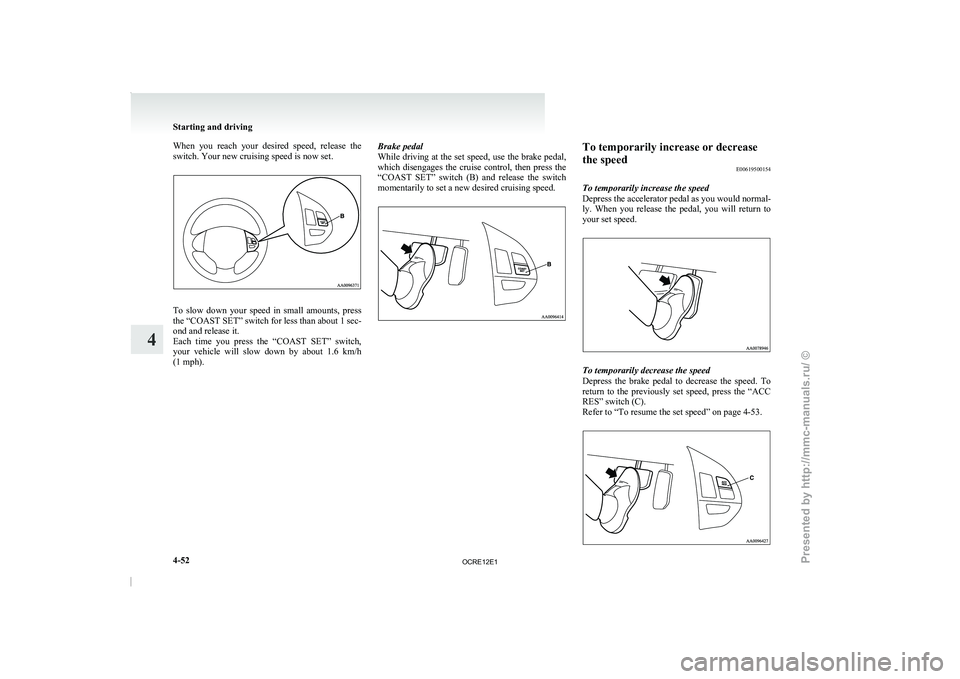
When you reach your desired speed, release the
switch. Your new cruising speed is now set.
To slow down your speed in small amounts, press
the “COAST SET” switch
for
less than about 1 sec-
ond and release it.
Each time you press the “COAST SET” switch,
your vehicle will slow down by about 1.6 km/h
(1 mph). Brake pedal
While driving at the
set
speed, use the brake pedal,
which disengages the cruise control, then press the
“COAST SET” switch (B) and release the switch
momentarily to set a new desired cruising speed. To temporarily increase or decrease
the speed
E00619500154
To temporarily increase the speed
Depress the accelerator pedal as
you would normal-
ly. When you release the pedal, you will return to
your set speed. To temporarily decrease the speed
Depress the brake pedal
to
decrease the speed. To
return to the previously set speed, press the “ACC
RES” switch (C).
Refer to “To resume the set speed” on page 4-53. Starting and driving
4-52
4
OCRE12E1
Presented by http://mmc-manuals.ru/ \251
Page 178 of 369
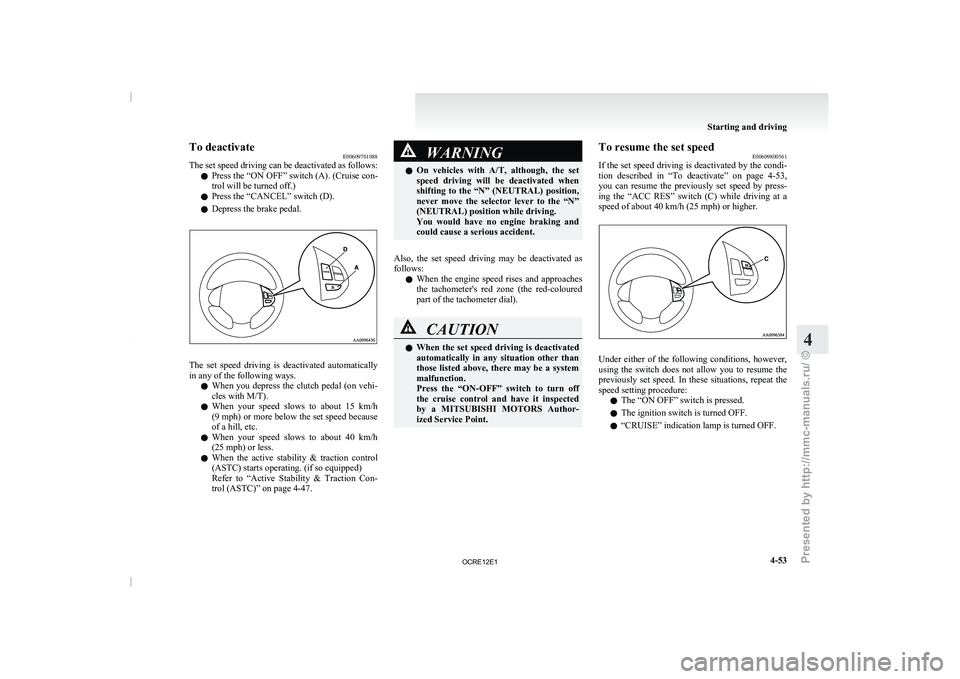
To deactivate
E00609701088
The set speed driving can
be deactivated as follows:
l Press the “ON OFF” switch (A). (Cruise con-
trol will be turned off.)
l Press the “CANCEL” switch (D).
l Depress the brake pedal. The set speed driving is deactivated automatically
in any of the following ways.
l When you depress the
clutch
pedal (on vehi-
cles with M/T).
l When your speed slows to about 15 km/h
(9 mph) or more below the set speed because
of a hill, etc.
l When your speed slows to about 40 km/h
(25 mph) or less.
l When the active stability & traction control
(ASTC) starts operating. (if so equipped)
Refer to “Active Stability & Traction Con-
trol (ASTC)” on page 4-47. WARNING
l On vehicles with A/T, although,
the set
speed driving will be deactivated when
shifting to the “N” (NEUTRAL) position,
never move the selector lever to the “N”
(NEUTRAL) position while driving.
You would have no engine braking and
could cause a serious accident.
Also, the set speed driving may be deactivated as
follows: l When
the engine
speed rises
and approaches
the tachometer's red zone (the red-coloured
part of the tachometer dial). CAUTION
l
When the set speed driving
is deactivated
automatically in any situation other than
those listed above, there may be a system
malfunction.
Press the “ON-OFF” switch to turn off
the cruise control and have it inspected
by a MITSUBISHI MOTORS Author-
ized Service Point. To resume the set speed
E00609800561
If the set speed driving
is deactivated by the condi-
tion described in “To deactivate” on page 4-53,
you can resume the previously set speed by press-
ing the “ACC RES” switch (C) while driving at a
speed of about 40 km/h (25 mph) or higher. Under either of the following conditions, however,
using the switch does
not
allow you to resume the
previously set speed. In these situations, repeat the
speed setting procedure:
l The “ON OFF” switch is pressed.
l The ignition switch is turned OFF.
l “CRUISE” indication lamp is turned OFF. Starting and driving
4-53 4
OCRE12E1
Presented by http://mmc-manuals.ru/ \251
Page 179 of 369
Cargo loads
E00609901123
Cargo loads precautions CAUTION
l
When
loading
luggage, be
careful to the
following. • Stow cargo and luggage in the cargoarea whenever possible.
• Distribute cargo or luggage evenly not to be unbalanced in weight.
• Do not place cargo or luggage on the instrument panel.
Also, do not stack up cargo or luggage
on the front passenger’s seat or the
rear seat.
Having the driver’s vision blocked,
and your cargo being thrown inside
the cabin if you suddenly have to
brake can cause a serious accident or
injury. Trailer towing (Except for
vehicles for Morocco) E00610000521
In order to tow a
trailer with your vehicle, when hav-
ing a trailer towing device mounted that meets all
relevant regulations in your area, consult a
MITSUBISHI MOTORS Authorized Service Point.
The regulations concerning the towing of a trailer
may differ from country to country. You are ad-
vised to obey the regulations in each area. CAUTION
l
Danger of Accident!
A towing bar should
be
fitted according
to MITSUBISHI MOTORS guidelines.
NOTE l If
you are going to
tow a trailer, pay careful
attention to the following points.
Maximum towable weight with brake
and maximum trailer-nose weight
Never exceed the maximum towable weight with
brake and the maximum trailer-nose weight as lis-
ted in the specifications. (Refer to “Vehicle
weight” on page 9-10.)
If you tow a trailer at an altitude of more than
1,000 m above sea-level, reduce your weight by
10 % of the gross combination weight for every in-
crease of 1,000 m above sea-level, as the engine out-
put is lowered owing to decrease in atmospheric
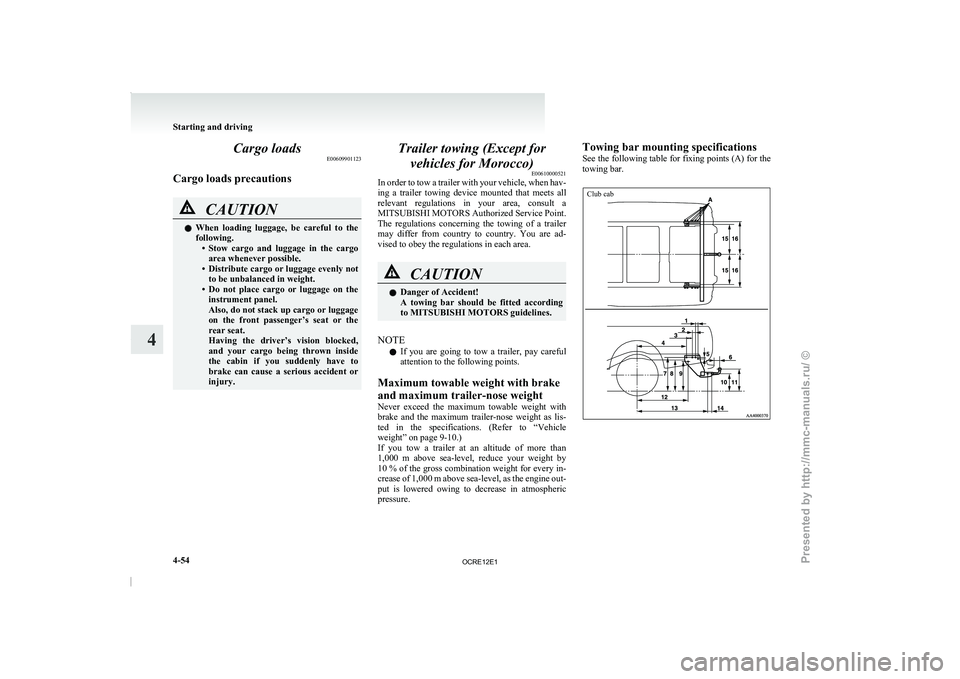
pressure. Towing bar mounting specifications
See
the following table
for
fixing points (A) for the
towing bar.
Club cab Starting and driving
4-54
4
OCRE12E1
Presented by http://mmc-manuals.ru/ \251
Page 181 of 369
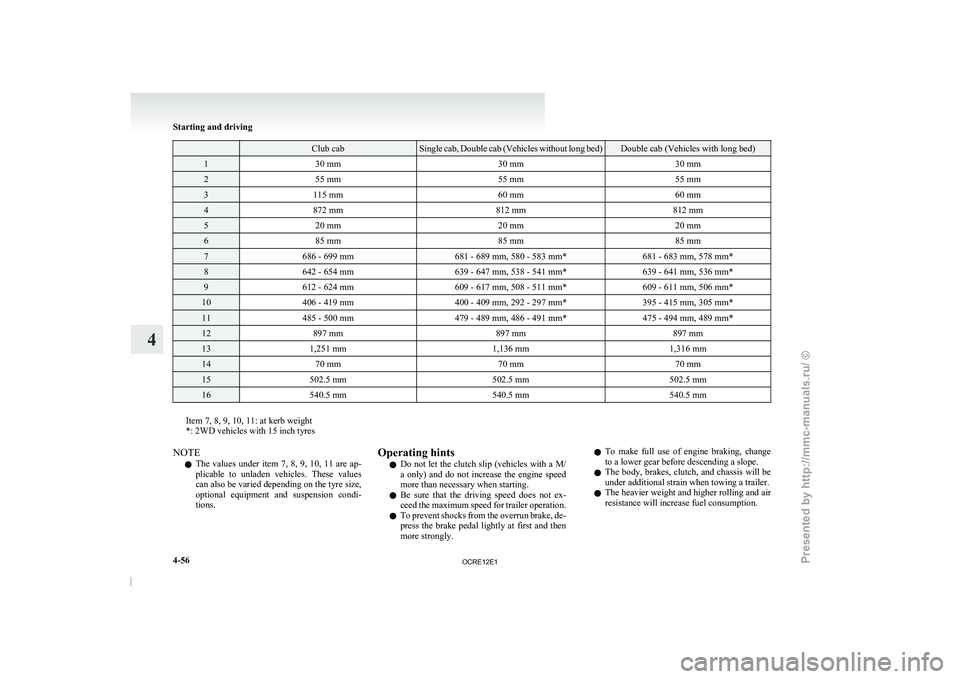
Club cab Single cab, Double cab (Vehicles without long bed) Double cab (Vehicles with long bed)
1
30 mm 30 mm30 mm2
55 mm 55 mm55 mm3
115 mm 60 mm60 mm4
872 mm 812 mm812 mm5
20 mm 20 mm20 mm6
85 mm 85 mm85 mm7
686 - 699 mm 681 - 689 mm, 580 - 583 mm* 681 - 683 mm, 578 mm*8
642 - 654 mm 639 - 647 mm, 538 - 541 mm* 639 - 641 mm, 536 mm*9
612 - 624 mm 609 - 617 mm, 508 - 511 mm* 609 - 611 mm, 506 mm*10
406 - 419 mm 400 - 409 mm, 292 - 297 mm* 395 - 415 mm, 305 mm*11
485 - 500 mm 479 - 489 mm, 486 - 491 mm* 475 - 494 mm, 489 mm*12
897 mm 897 mm897 mm13
1,251 mm 1,136 mm1,316 mm14
70 mm 70 mm70 mm15
502.5 mm 502.5 mm502.5 mm16
540.5 mm 540.5 mm540.5 mmItem 7, 8, 9, 10, 11: at kerb weight
*: 2WD vehicles with 15 inch tyres
NOTE
l The
values under item 7,
8, 9, 10, 11 are ap-
plicable to unladen vehicles. These values
can also be varied depending on the tyre size,
optional equipment and suspension condi-
tions. Operating hints
l Do
not let the
clutch
slip (vehicles with a M/
a only) and do not increase the engine speed
more than necessary when starting.
l Be sure that the driving speed does not ex-
ceed the maximum speed for trailer operation.
l To prevent shocks from the overrun brake, de-
press the brake pedal lightly at first and then
more strongly. l
To make full use
of engine braking, change
to a lower gear before descending a slope.
l The body, brakes, clutch, and chassis will be
under additional strain when towing a trailer.
l The heavier weight and higher rolling and air
resistance will increase fuel consumption. Starting and driving
4-56
4
OCRE12E1
Presented by http://mmc-manuals.ru/ \251
Page 182 of 369
Additional precautions for vehicles equipped with
an automatic transmission
It is recommended the “2”
(SECOND) position
(4A/T) or 2 nd
gear in sports mode (5A/T) on slopes
or at low speed. Use the “L” (LOW) position
(4A/T) or 1 st
gear in sports mode (5A/T) in moun-
tainous areas in order to make better use of engine
braking and to assist the brake system. However,
be sure that the speed does not exceed the maxi-
mum speed limit for the selected gear. Starting and driving
4-57 4
OCRE12E1
Presented by http://mmc-manuals.ru/ \251
Page 188 of 369
CAUTION
l
Normally, use the “ ” (outside) posi-
tion to keep the
windscreen and side win-
dows clear and quickly remove fog or
frost from the windscreen.
If high cooling performance is desired, or
if the outside air is dusty or otherwise con-
taminated, use the “ ” (recirculation)
position. Set the air
selection lever to the
“ ” (outside) position periodically to in-
crease ventilation so that
the windows do
not become fogged up.
l Use of the “ ” (recirculation) position
for extended time may
cause the windows
to fog up.
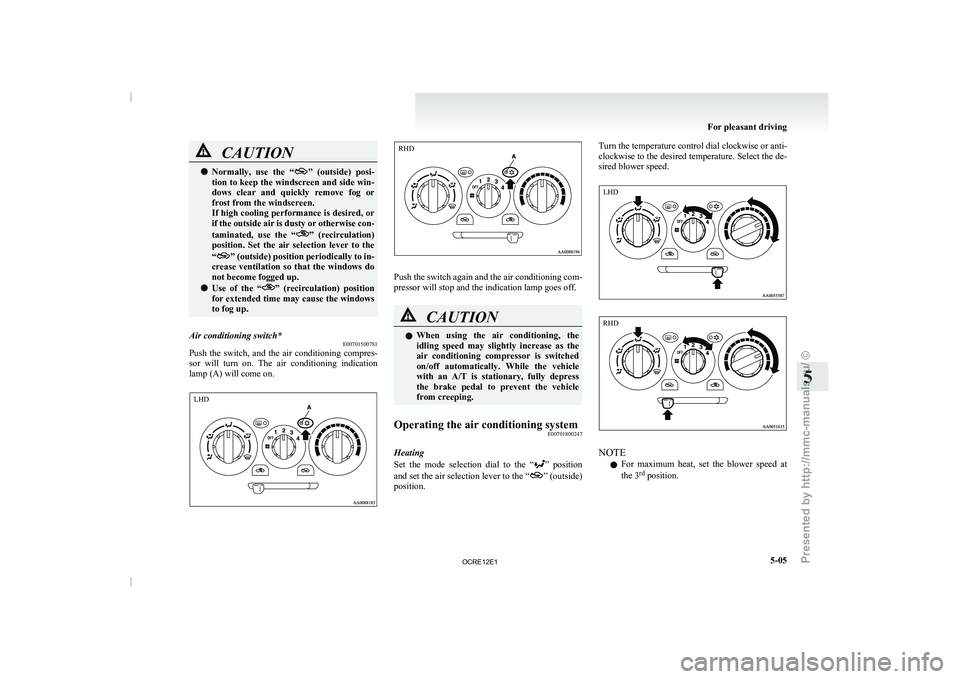
Air conditioning switch* E00701500781
Push the switch, and the air conditioning compres-
sor will turn on. The
air conditioning indication
lamp (A) will come on. Push the switch again and the air conditioning com-
pressor will stop and the indication lamp goes off.
CAUTION
l
When using the air conditioning,
the
idling speed may slightly increase as the
air conditioning compressor is switched
on/off automatically. While the vehicle
with an A/T is stationary, fully depress
the brake pedal to prevent the vehicle
from creeping.
Operating the air conditioning system E00701800247
Heating
Set the mode selection dial
to the “ ” position
and set the air
selection lever to the “ ” (outside)
position. Turn the temperature control dial clockwise or anti-
clockwise to the desired temperature.
Select the de-
sired blower speed. NOTE
l For
maximum heat, set the
blower speed at
the 3 rd
position. For pleasant driving
5-05 5 LHD RHD LHD RHD
OCRE12E1
Presented by http://mmc-manuals.ru/ \251
Page 193 of 369
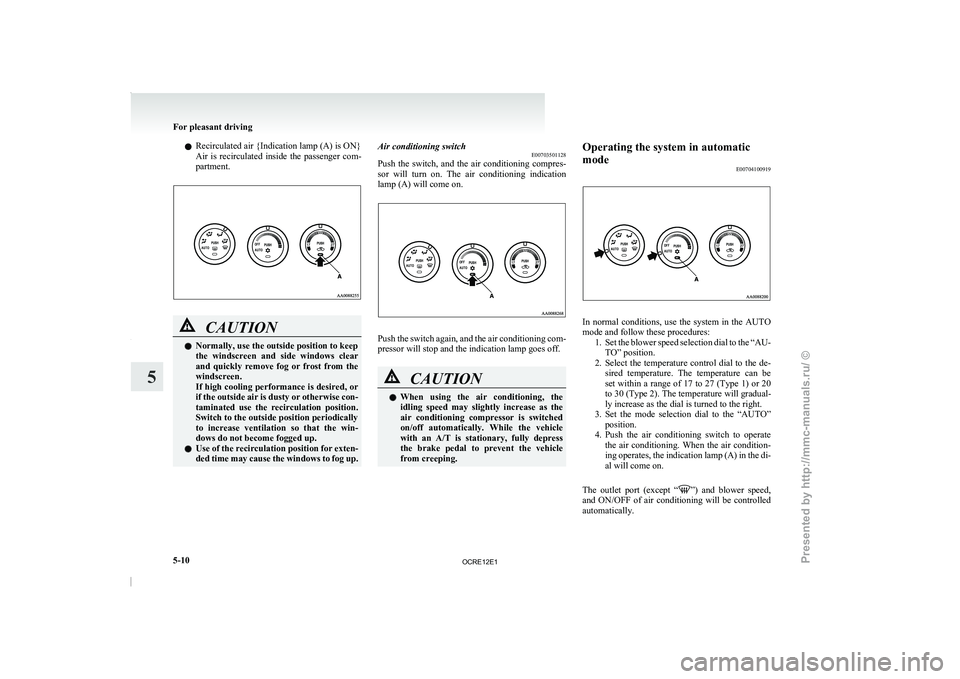
l
Recirculated air {Indication lamp (A) is ON}
Air is recirculated inside
the
passenger com-
partment. CAUTION
l
Normally, use the outside position to keep
the windscreen and side windows
clear
and quickly remove fog or frost from the
windscreen.
If high cooling performance is desired, or
if the outside air is dusty or otherwise con-
taminated use the recirculation position.
Switch to the outside position periodically
to increase ventilation so that the win-
dows do not become fogged up.
l Use of the recirculation position for exten-
ded time may cause the windows to fog up. Air conditioning switch
E00703501128
Push the switch, and the
air conditioning compres-
sor will turn on. The air conditioning indication
lamp (A) will come on. Push the switch again, and the air conditioning com-
pressor will stop and the indication lamp goes off.
CAUTION
l
When
using
the air
conditioning,
the
idling speed may slightly increase as the
air conditioning compressor is switched
on/off automatically. While the vehicle
with an A/T is stationary, fully depress
the brake pedal to prevent the vehicle
from creeping. Operating the system in automatic
mode
E00704100919 In normal conditions, use the system in the AUTO
mode and follow these procedures:
1. Set the blower speed selection
dial to the “AU-
TO” position.
2. Select the temperature control dial to the de- sired temperature. The temperature can be
set within a range of 17 to 27 (Type 1) or 20
to 30 (Type 2). The temperature will gradual-
ly increase as the dial is turned to the right.
3. Set the mode selection dial to the “AUTO” position.
4. Push the air conditioning switch to operate the air conditioning. When the air condition-
ing operates, the indication lamp (A) in the di-
al will come on.
The outlet port (except “ ”) and blower speed,
and ON/OFF of air
conditioning will be controlled
automatically. For pleasant driving
5-10
5
OCRE12E1
Presented by http://mmc-manuals.ru/ \251
Page 238 of 369
Speaker enrollment
E00727500196
It takes about 2 to
3 minutes to complete the speak-
er enrollment process.
To ensure the best results, run through the process
while in the driver’s seat, in an environment that is
as quiet as possible (when there is no rain or strong
winds and the vehicle windows are closed). Please
turn off your phone while in speaker enrollment to
prevent interruption of the process.
Use the following procedure for speaker enrollment. 1. Stop your vehicle in a safe area, put the gear-shift lever in the “N” (Neutral) position
(M/T), or the selector lever in the “P”
(PARK) position (A/T), and pull the parking
brake lever.
NOTE l Speaker enrollment is not possible unless the
vehicle is parked. Make sure you park the ve-
hicle in a safe area before attempting speaker
enrollment.
2. Press the SPEECH button.
3. Say “Voice training”.
4. The voice guide will say “This operation must be performed in a quiet environment
while the vehicle is stopped. See the owner’s
manual for the list of required training phra-
ses. Press and release the SPEECH button
when you are ready to begin. Press the HANG-
UP button to cancel at any time”.
Press the SPEECH button to start the speaker
enrollment process. NOTE
l If
you do not start
the speaker enrollment proc-
ess within 3 minutes of pressing the
SPEECH button, the speaker enrollment func-
tion will time out.
The voice guide will say “Speaker Enroll-
ment has timed out”. The system will then
beep and the voice recognition mode will be
deactivated.
5. The voice guide will prompt for phrase 1. Re- peat the corresponding phrase listed in table
“Enrollment commands” on page 5-66.
The system will register your voice and then
move on to the registration of the next com-
mand. Continue the process until all phrases
have been registered.
NOTE l To repeat the most recent voice training com-
mand, press and release the SPEECH button.
l If you press the HANG-UP button anytime
during the process, the system will beep and
stop the speaker enrollment process.
6. When all enrollment commands have been read out, the voice guide will say “Speaker
enrollment is complete”. The system will
then end the speaker enrollment process and
return to the main menu.
NOTE l Completing the speaker enrollment process
will turn on the voice model automatically.
l The commands “Help” and “Cancel” will not
work in this mode. Enabling and disabling the voice model and re-
training
E00727600096
You can turn a voice
model registered with the
speaker enrollment function on and off whenever
you want.
You can also retrain the system.
Use the following procedure to perform these ac-
tions. 1. Press the SPEECH button.
2. Say “Voice training”.
3. If you have completed a speaker enrollmentprocess once already, the voice guide will
say either “Enrollment is enabled. Would
you like to disable or retrain?” or “Enroll-
ment is disabled. Would you like to enable
or retrain?”
4. When enrollment is “enabled”, the voice mod- el is on; when enrollment is “disabled”, the
voice model is off. Say the command that
fits your needs.
Say “Retrain” to start the speaker enrollment
process and recreate a new voice model. (Re-
fer to “Speaker enrollment” on page 5-55.)
Connecting the Bluetooth ®
2.0 inter-
face and Bluetooth ®
device
E00760600204
Before you can make or receive hands-free calls or
play music using the Bluetooth ®
2.0 interface func-
tion, you must pair the
Bluetooth®
device and Blue-
tooth ®
2.0 interface. For pleasant driving
5-55 5
OCRE12E1
Presented by http://mmc-manuals.ru/ \251
Page 239 of 369
NOTE
l Pairing
is required only when
the device is
used for the first time. Once the device has
been paired with the Bluetooth ®
2.0 inter-
face, you only need to bring the device into
the vehicle next time and the device will au-
tomatically connect to the Bluetooth ®
2.0 in-
terface (if supported by the device).
Up to 7 Bluetooth ®
devices can be paired with the
Bluetooth ®
2.0 interface.
If multiple paired Bluetooth ®
devices are available
in the vehicle, the cellular phone or music player
most recently connected is automatically connected
to the Bluetooth ®
2.0 interface.
You can also change a Bluetooth ®
device to be con-
nected.
To pair
To pair a Bluetooth ®
device with the Bluetooth ®
2.0 interface, follow the steps below. 1. Stop your vehicle in a safe area, put the gear-shift lever in the “N” (Neutral) position
(M/T), or the selector lever in the “P”
(PARK) position (A/T), and pull the parking
brake lever.
NOTE l You cannot pair Bluetooth ®
devices with the
Bluetooth ®
2.0 interface unless the vehicle is
parked. Before pairing a Bluetooth ®
device
with the Bluetooth ®
2.0 interface, confirm
that the vehicle is parked in a safe location.
2. Press the SPEECH button.
3. Say “Setup”. 4. Say “Pairing options.”
5. The
voice guide will
say
“Select one of the
following: pair, edit, delete, or list.” Say
“Pair.”
NOTE l If 7 devices have already been paired, the
voice guide will say “Maximum devices
paired” and then the system will end the pair-
ing process. To register a new device, delete
one device and then repeat the pairing process.
(Refer to “Deleting a device” on page 5-57.)
6. The voice guide will say “Please say a 4-dig- it pairing code.” Say a 4-digit number.
When the confirmation function is on, the sys-
tem will confirm whether the number said is
acceptable. Answer “Yes.”
Answer “No” to return to pairing code selec-
tion.
NOTE l Some Bluetooth ®
devices require a specific
pairing code.
Please refer to the device manual for pairing
code requirements. l
The
pairing code entered here is only used
for the Bluetooth ®
connection certification.
It is any 4-digit number the user would like
to select.
Remember the pairing code as it needs to be
keyed into the Bluetooth ®
device later in the
pairing process.
Depending on the connection settings of the
Bluetooth ®
device, this code may have to be
entered each time you connect the Blue-
tooth ®
device to the Bluetooth ®
2.0 inter-
face. For the default connection settings, re-
fer to the instructions for the device.
7. The voice guide will say “Start pairing proce- dure on the device. See the device manual
for instructions.” Enter in the Bluetooth ®
de-
vice the 4-digit number you have registered
in Step 6.
NOTE l According to the corresponding device to
Bluetooth ®
, it might take a few minutes to
pair the Bluetooth ®
device with the Blue-
tooth ®
2.0 interface.
l If the Bluetooth ®
2.0 interface cannot recog-
nize the Bluetooth ®
device, the voice guide
will say “Pairing has timed out” and the pair-
ing process will be cancelled.
Confirm that the device you are pairing sup-
ports Bluetooth ®
, and try pairing it again.
l If you enter the wrong number, the voice
guide will say “Pairing failed” and the pair-
ing process will be cancelled. Confirm the
number is right, and try pairing it again. For pleasant driving
5-56
5
OCRE12E1
Presented by http://mmc-manuals.ru/ \251