Lamp MITSUBISHI TRITON 2011 Manual Online
[x] Cancel search | Manufacturer: MITSUBISHI, Model Year: 2011, Model line: TRITON, Model: MITSUBISHI TRITON 2011Pages: 369, PDF Size: 26.15 MB
Page 184 of 369
Ventilators
.................................................................................... 5-02
Heater/Manual air conditioning* ..................................................5-03
Automatic air conditioning* ......................................................... 5-08
Important operation tips for the air conditioning..........................5-12 Air purifier*.................................................................................. 5-12
LW/MW/FM electronic tuning radio with CD player* ................5-13
To play tracks from USB device* ................................................5-27
To play tracks from a Bluetooth ®
device (vehicles with
Bluetooth ®
2.0 interface).......................................................... 5-36
To use the external audio input function* ....................................5-39
Steering wheel remote control switch* ........................................5-40
Error codes
.................................................................................... 5-42
Error codes (iPod)......................................................................... 5-44
Error codes (USB memory device) ..............................................5-46
Audio system anti-theft feature .................................................... 5-48
Handling of compact discs ........................................................... 5-48
Antenna......................................................................................... 5-50
Link System* ................................................................................ 5-51
Bluetooth ®
2.0 interface* ............................................................. 5-51
USB input terminal* ..................................................................... 5-67
Sun visors..................................................................................... 5-69
Vanity mirror* .............................................................................. 5-70
Ashtray.......................................................................................... 5-70
Cigarette lighter ............................................................................ 5-71
Accessory socket*........................................................................ 5-72
Digital clock* ............................................................................... 5-73
Interior lamps ................................................................................5-73
Storage spaces............................................................................... 5-75
Cup holder*.................................................................................. 5-78
Bottle holder ................................................................................. 5-79 Convenient hook
........................................................................... 5-80
Coat hook*.................................................................................... 5-80
First-aid kit and warning triangle securing bands* ......................5-80 For pleasant driving
5
OCRE12E1
Presented by http://mmc-manuals.ru/ \251
Page 188 of 369
CAUTION
l
Normally, use the “ ” (outside) posi-
tion to keep the
windscreen and side win-
dows clear and quickly remove fog or
frost from the windscreen.
If high cooling performance is desired, or
if the outside air is dusty or otherwise con-
taminated, use the “ ” (recirculation)
position. Set the air
selection lever to the
“ ” (outside) position periodically to in-
crease ventilation so that
the windows do
not become fogged up.
l Use of the “ ” (recirculation) position
for extended time may
cause the windows
to fog up.
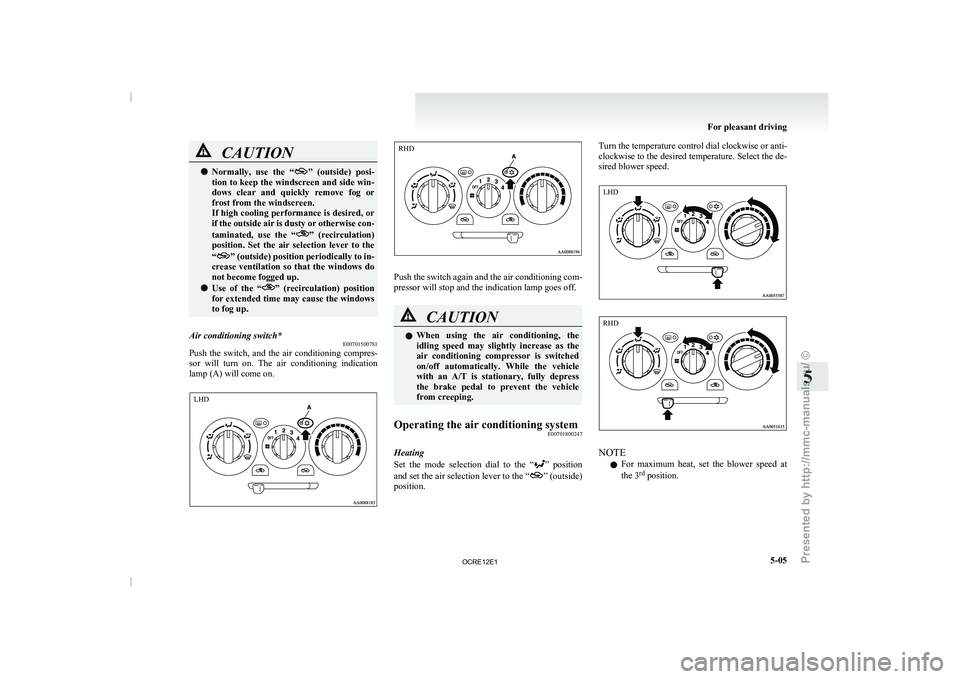
Air conditioning switch* E00701500781
Push the switch, and the air conditioning compres-
sor will turn on. The
air conditioning indication
lamp (A) will come on. Push the switch again and the air conditioning com-
pressor will stop and the indication lamp goes off.
CAUTION
l
When using the air conditioning,
the
idling speed may slightly increase as the
air conditioning compressor is switched
on/off automatically. While the vehicle
with an A/T is stationary, fully depress
the brake pedal to prevent the vehicle
from creeping.
Operating the air conditioning system E00701800247
Heating
Set the mode selection dial
to the “ ” position
and set the air
selection lever to the “ ” (outside)
position. Turn the temperature control dial clockwise or anti-
clockwise to the desired temperature.
Select the de-
sired blower speed. NOTE
l For
maximum heat, set the
blower speed at
the 3 rd
position. For pleasant driving
5-05 5 LHD RHD LHD RHD
OCRE12E1
Presented by http://mmc-manuals.ru/ \251
Page 192 of 369
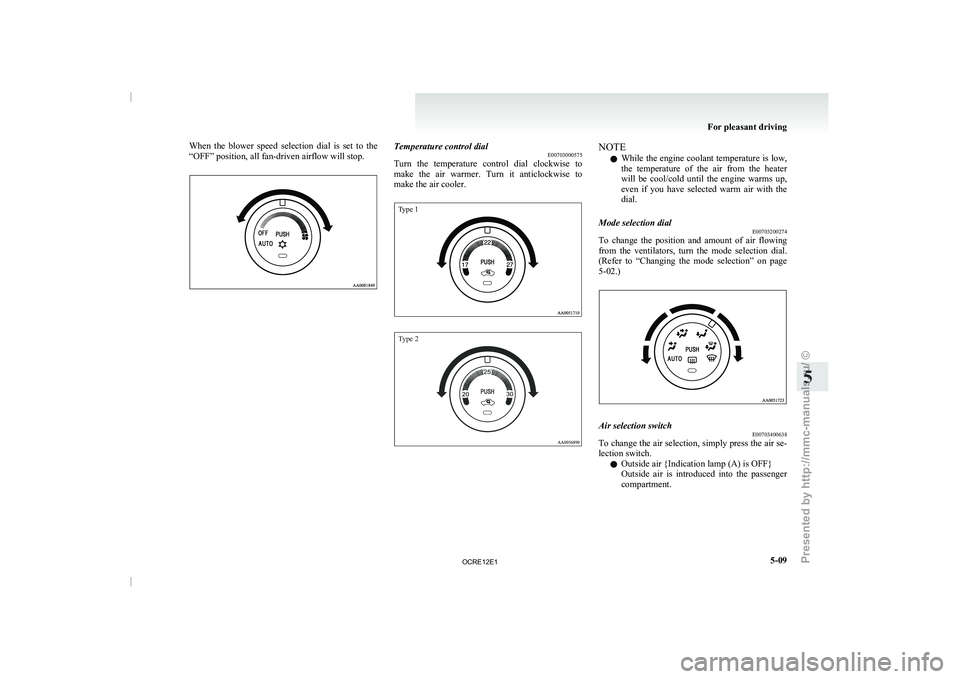
When the blower speed selection dial is set to the
“OFF” position, all fan-driven airflow will stop.
Temperature control dial
E00703000575
Turn the temperature control dial
clockwise to
make the air warmer. Turn it anticlockwise to
make the air cooler.
Type 1
Type 2 NOTE
l While the engine coolant
temperature
is low,
the temperature of the air from the heater
will be cool/cold until the engine warms up,
even if you have selected warm air with the
dial.
Mode selection dial E00703200274
To change the position and amount of air flowing
from the ventilators, turn
the
mode selection dial.
(Refer to “Changing the mode selection” on page
5-02.) Air selection switch
E00703400638
To change the air selection, simply press the air se-
lection switch.
l Outside air {Indication lamp (A) is OFF}
Outside
air
is introduced
into
the passenger
compartment. For pleasant driving
5-09 5
OCRE12E1
Presented by http://mmc-manuals.ru/ \251
Page 193 of 369
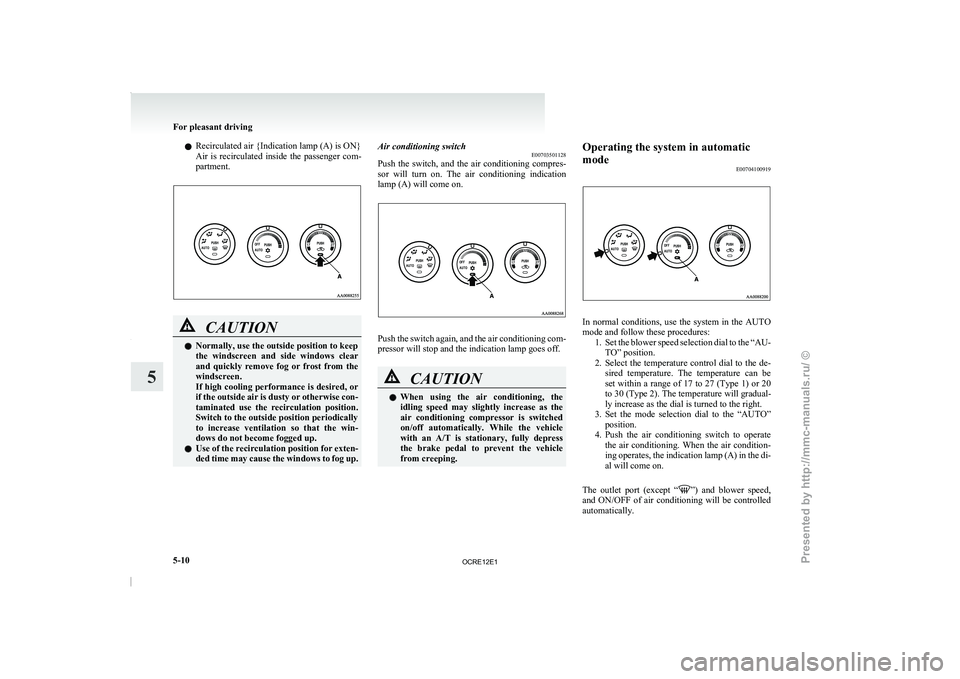
l
Recirculated air {Indication lamp (A) is ON}
Air is recirculated inside
the
passenger com-
partment. CAUTION
l
Normally, use the outside position to keep
the windscreen and side windows
clear
and quickly remove fog or frost from the
windscreen.
If high cooling performance is desired, or
if the outside air is dusty or otherwise con-
taminated use the recirculation position.
Switch to the outside position periodically
to increase ventilation so that the win-
dows do not become fogged up.
l Use of the recirculation position for exten-
ded time may cause the windows to fog up. Air conditioning switch
E00703501128
Push the switch, and the
air conditioning compres-
sor will turn on. The air conditioning indication
lamp (A) will come on. Push the switch again, and the air conditioning com-
pressor will stop and the indication lamp goes off.
CAUTION
l
When
using
the air
conditioning,
the
idling speed may slightly increase as the
air conditioning compressor is switched
on/off automatically. While the vehicle
with an A/T is stationary, fully depress
the brake pedal to prevent the vehicle
from creeping. Operating the system in automatic
mode
E00704100919 In normal conditions, use the system in the AUTO
mode and follow these procedures:
1. Set the blower speed selection
dial to the “AU-
TO” position.
2. Select the temperature control dial to the de- sired temperature. The temperature can be
set within a range of 17 to 27 (Type 1) or 20
to 30 (Type 2). The temperature will gradual-
ly increase as the dial is turned to the right.
3. Set the mode selection dial to the “AUTO” position.
4. Push the air conditioning switch to operate the air conditioning. When the air condition-
ing operates, the indication lamp (A) in the di-
al will come on.
The outlet port (except “ ”) and blower speed,
and ON/OFF of air
conditioning will be controlled
automatically. For pleasant driving
5-10
5
OCRE12E1
Presented by http://mmc-manuals.ru/ \251
Page 231 of 369
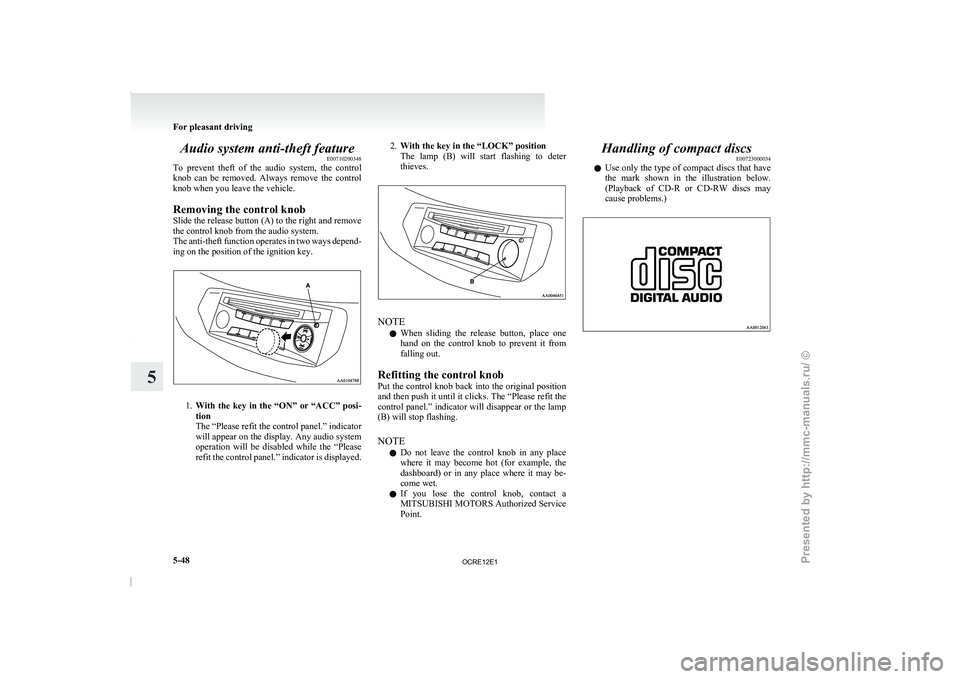
Audio system anti-theft feature
E00710200348
To prevent theft of the
audio system, the control
knob can be removed. Always remove the control
knob when you leave the vehicle.
Removing the control knob
Slide the release button (A) to the right and remove
the control knob from the audio system.
The anti-theft function operates in two ways depend-
ing on the position of the ignition key. 1.
With the key in the “ON” or “ACC” posi-
tion
The “Please refit the control panel.” indicator
will appear on the
display. Any audio system
operation will be disabled while the “Please
refit the control panel.” indicator is displayed. 2.
With the key in the “LOCK” position
The lamp (B) will start
flashing to deter
thieves. NOTE
l When
sliding the release button,
place one
hand on the control knob to prevent it from
falling out.
Refitting the control knob
Put the control knob back into the original position
and then push it until it clicks. The “Please refit the
control panel.” indicator will disappear or the lamp
(B) will stop flashing.
NOTE l Do not leave the control knob in any place
where it may become hot (for example, the
dashboard) or in any place where it may be-
come wet.
l If you lose the control knob, contact a
MITSUBISHI MOTORS Authorized Service
Point. Handling of compact discs
E00723000034
l Use only the type
of
compact discs that have
the mark shown in the illustration below.
(Playback of CD-R or CD-RW discs may
cause problems.) For pleasant driving
5-48
5
OCRE12E1
Presented by http://mmc-manuals.ru/ \251
Page 256 of 369
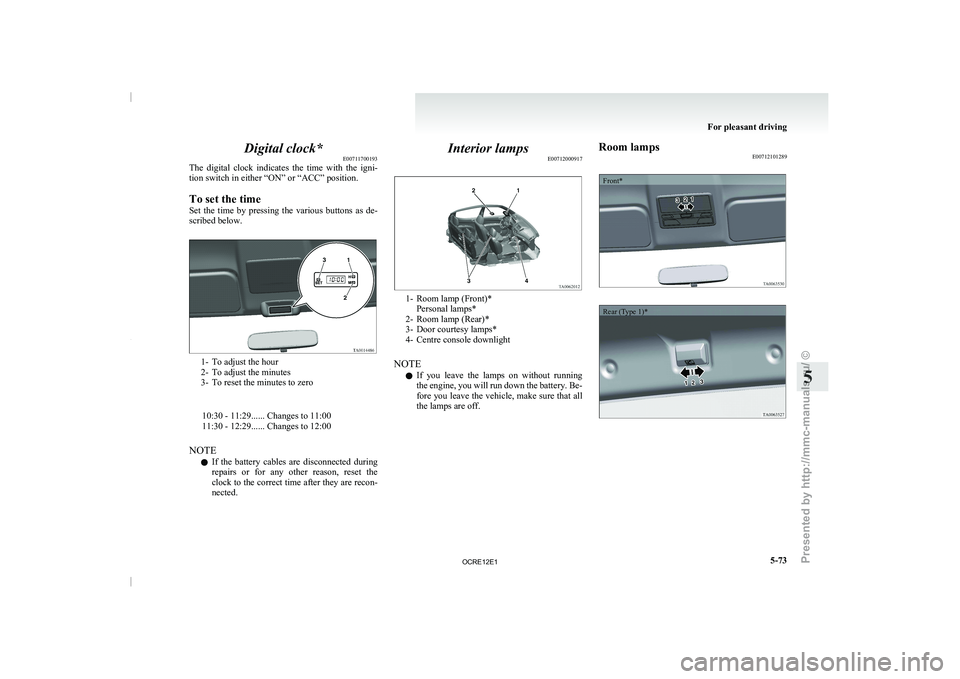
Digital clock*
E00711700193
The digital clock indicates the
time with the igni-
tion switch in either “ON” or “ACC” position.
To set the time
Set the time by pressing the various buttons as de-
scribed below. 1- To adjust the hour
2- To adjust the minutes
3- To reset the minutes to zero
10:30 - 11:29...... Changes to 11:00
11:30 - 12:29...... Changes to 12:00
NOTE l If the
battery
cables are disconnected during
repairs or for any other reason, reset the
clock to the correct time after they are recon-
nected. Interior lamps
E00712000917 1- Room lamp (Front)*
Personal lamps*
2- Room lamp (Rear)*
3- Door courtesy lamps*
4- Centre console downlight
NOTE l If
you
leave the lamps on without running
the engine, you will run down the battery. Be-
fore you leave the vehicle, make sure that all
the lamps are off. Room lamps
E00712101289
Front*
Rear (Type 1)* For pleasant driving
5-73 5
OCRE12E1
Presented by http://mmc-manuals.ru/ \251
Page 257 of 369
![MITSUBISHI TRITON 2011 Manual Online Rear (Type 2)*1
(ON/
) - The lamp illuminates.
2
( ) -
[Vehicles without central door locks
system]
The room lamp goes
on when a door
is opened. When all doors are
closed, the room lamp is i](/img/19/58153/w960_58153-256.png "MITSUBISHI TRITON 2011 Manual Online Rear (Type 2)*1
(ON/
) - The lamp illuminates.
2
( ) -
[Vehicles without central door locks
system]
The room lamp goes
on when a door
is opened. When all doors are
closed, the room lamp is i")
Rear (Type 2)*1
(ON/
) - The lamp illuminates.
2
( ) -
[Vehicles without central door locks
system]
The room lamp goes
on when a door
is opened. When all doors are
closed, the room lamp is illuminated
and dimmed gradually for 7 seconds
then goes out.
However, the lamp goes out immedi-
ately without being dimmed when
the ignition switch is turned to the
“ON” position.
[Vehicles with central door locks sys-
tem]
The room lamp goes on when a door
is opened. When all doors are
closed, the room lamp is illuminated
and dimmed gradually for 15 sec-
onds then goes out.
However, the lamp goes out immedi-
ately without being dimmed in case
of the followings:
l All doors are closed and the ig-
nition switch is turned to the
“ON” position.
l All doors are locked using the
key mechanism of the driver’s
door, the lock knob of the driv-
er’s door, or the remote con-
trol switch of the keyless entry
system (if so equipped).
NOTE
l On
vehicles with keyless entry
system,
when the ignition key
is removed with the doors
closed, the lamp is illuminated
and after about 15 seconds it
goes off.
The dimming period is also ad-
justable.
For further information, we
recommend you to consult a
MITSUBISHI MOTORS Au-
thorized Service Point.
3
(OFF/ ) - The lamp goes off.
Personal lamps* E00712500156
Push the switch (A) to turn on the lamp. Push it
again to turn it off. For pleasant driving
5-74
5
OCRE12E1
Presented by http://mmc-manuals.ru/ \251
Page 258 of 369
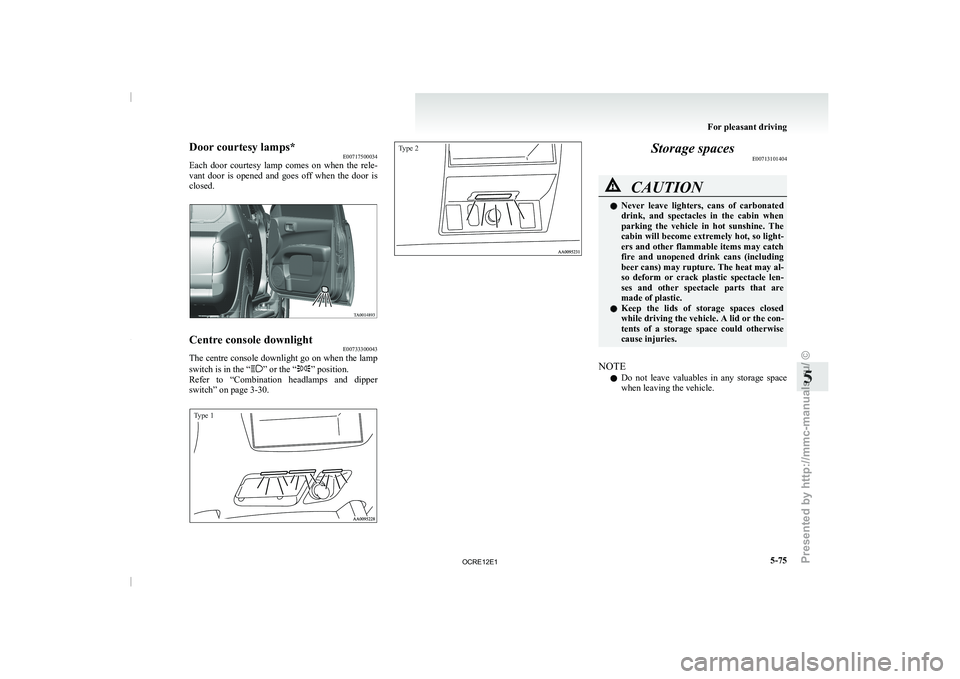
Door courtesy lamps*
E00717500034
Each door courtesy lamp comes
on when the rele-
vant door is opened and goes off when the door is
closed. Centre console downlight
E00733300043
The centre console downlight go on when the lamp
switch is in the “ ” or the “ ” position.
Refer to “Combination headlamps and
dipper
switch” on page 3-30.
Type 1
Type 2 Storage spaces
E00713101404 CAUTION
l
Never leave lighters, cans
of
carbonated
drink, and spectacles in the cabin when
parking the vehicle in hot sunshine. The
cabin will become extremely hot, so light-
ers and other flammable items may catch
fire and unopened drink cans (including
beer cans) may rupture. The heat may al-
so deform or crack plastic spectacle len-
ses and other spectacle parts that are
made of plastic.
l Keep the lids of storage spaces closed
while driving the vehicle. A lid or the con-
tents of a storage space could otherwise
cause injuries.
NOTE l Do
not leave valuables in
any storage space
when leaving the vehicle. For pleasant driving
5-75 5
OCRE12E1
Presented by http://mmc-manuals.ru/ \251
Page 259 of 369
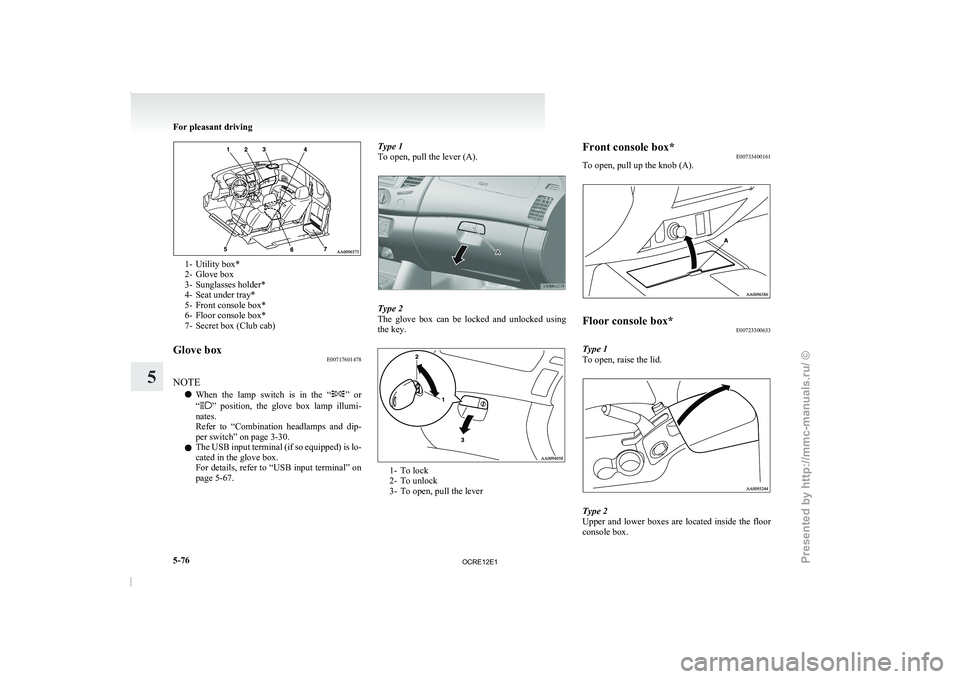
1- Utility box*
2- Glove box
3- Sunglasses holder*
4- Seat under tray*
5-
Front console box*
6-
Floor console box*
7- Secret box (Club cab)
Glove box E00717601478
NOTE l When
the lamp switch is
in the “ ” or
“ ” position, the glove box lamp illumi-
nates.
Refer to “Combination headlamps
and dip-
per switch” on page 3-30.
l The USB input terminal (if so equipped) is lo-
cated in the glove box.
For details, refer to “USB input terminal” on
page 5-67. Type 1
To open, pull the lever (A).
Type 2
The glove box can
be
locked and unlocked using
the key. 1- To lock
2- To unlock
3- To open, pull the leverFront console box*
E00733400161
To open, pull up the knob (A). Floor console box*
E00723300633
Type 1
To open, raise the lid. Type 2
Upper and lower boxes
are
located inside the floor
console box. For pleasant driving
5-76
5
OCRE12E1
Presented by http://mmc-manuals.ru/ \251
Page 267 of 369
If the vehicle breaks down
E00800101166
If the vehicle breaks down
on the road, move it to
the shoulder and use the hazard warning flashers and/
or the warning triangle etc.
Refer to “Hazard warning flasher switch” on page
3-34.
If the engine stops/fails
Vehicle operation and control are affected if the en-
gine stops.
Before moving the vehicle to a safe area, be aware
of the following:
l The brake booster becomes inoperative and
the pedal effort will increase. Press down the
brake pedal harder than usual.
l Since the power steering pump is no longer
operative, the steering wheel feels heavy
when turning it. Emergency starting
E00800502112
If the engine cannot be
started because the battery
is weak or dead, the battery from another vehicle
can be used with jumper cables to start the engine. WARNING
l To start the engine
using
jumper cables
connected from another vehicle, perform
the correct procedures according to the in-
struction manual. Incorrect procedures
could result in a fire or explosion or dam-
age to the vehicles.
1. Get the vehicles close enough so the jumper
cables can
reach, but
be sure the vehicles
aren’t touching each other.
If they are, it could cause a ground connec-
tion you don’t want. The vehicle will not
start, and the bad grounding could damage
the electrical systems. CAUTION
l
Check the other vehicle.
It
must have a 12-
volt battery.
If the other system isn’t 12-volt, shorting
can damage both vehicles.
2. You could be injured if the vehicles move.
Set the
parking brake
firmly on each vehicle.
Put an automatic transmission in “P”
(PARK) or a manual transmission in “N”
(Neutral). Turn off the ignition switch. WARNING
l Turn off the ignition on
both vehicles be-
forehand.
Make sure that the cables or your clothes
cannot be caught by the fan or drive belt.
Personal injury could result.
NOTE l Turn
off all lamps, heater
and other electrical
loads. This will avoid sparks and help save
both batteries.
3. Make sure battery electrolyte is at the proper level.
Refer to “Battery” on page 8-10. WARNING
l If electrolyte fluid is
not
visible, or ap-
pears to be frozen, Do Not Attempt Jump
Starting!
A battery might rupture or explode if the
temperature is below the freezing point
or if it is not filled to the proper level.
4. Connect one end of one jumper cable to the
positive (+)
terminal of
the discharged bat-
tery (A), and the other end to the positive (+)
terminal of the booster battery (B).
For emergencies
6-02
6
OCRE12E1
Presented by http://mmc-manuals.ru/ \251