heater NISSAN 370Z ROADSTER 2016 Z34 Repair Manual
[x] Cancel search | Manufacturer: NISSAN, Model Year: 2016, Model line: 370Z ROADSTER, Model: NISSAN 370Z ROADSTER 2016 Z34Pages: 428, PDF Size: 3.01 MB
Page 218 of 428
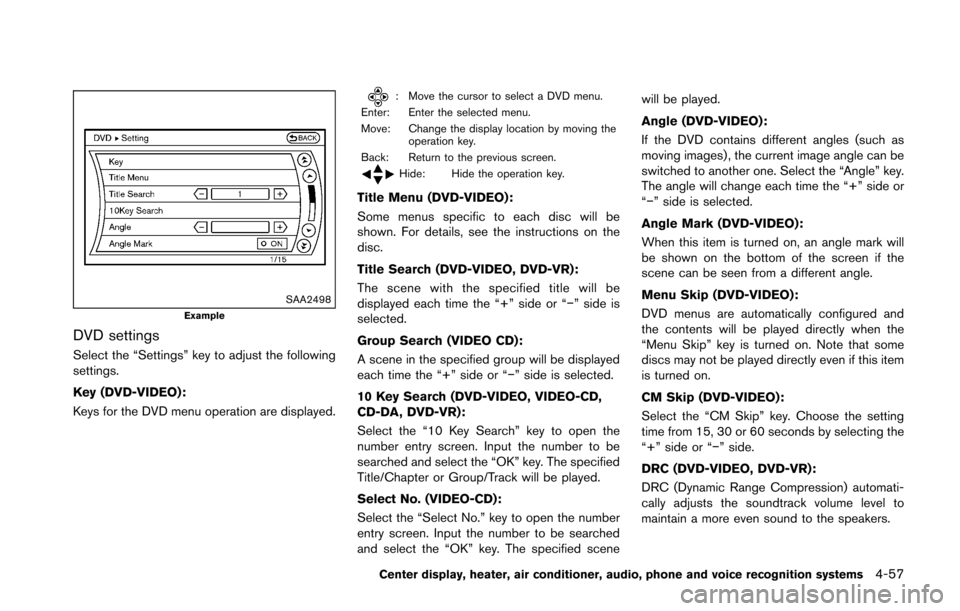
SAA2498Example
DVD settings
Select the “Settings” key to adjust the following
settings.
Key (DVD-VIDEO) :
Keys for the DVD menu operation are displayed.
: Move the cursor to select a DVD menu.
Enter: Enter the selected menu.
Move: Change the display location by moving the operation key.
Back: Return to the previous screen.
Hide: Hide the operation key.
Title Menu (DVD-VIDEO) :
Some menus specific to each disc will be
shown. For details, see the instructions on the
disc.
Title Search (DVD-VIDEO, DVD-VR):
The scene with the specified title will be
displayed each time the “+” side or “í” side is
selected.
Group Search (VIDEO CD):
A scene in the specified group will be displayed
each time the “+” side or “í” side is selected.
10 Key Search (DVD-VIDEO, VIDEO-CD,
CD-DA, DVD-VR):
Select the “10 Key Search” key to open the
number entry screen. Input the number to be
searched and select the “OK” key. The specified
Title/Chapter or Group/Track will be played.
Select No. (VIDEO-CD):
Select the “Select No.” key to open the number
entry screen. Input the number to be searched
and select the “OK” key. The specified scene will be played.
Angle (DVD-VIDEO):
If the DVD contains different angles (such as
moving images) , the current image angle can be
switched to another one. Select the “Angle” key.
The angle will change each time the “+” side or
“í” side is selected.
Angle Mark (DVD-VIDEO):
When this item is turned on, an angle mark will
be shown on the bottom of the screen if the
scene can be seen from a different angle.
Menu Skip (DVD-VIDEO):
DVD menus are automatically configured and
the contents will be played directly when the
“Menu Skip” key is turned on. Note that some
discs may not be played directly even if this item
is turned on.
CM Skip (DVD-VIDEO):
Select the “CM Skip” key. Choose the setting
time from 15, 30 or 60 seconds by selecting the
“+” side or “í” side.
DRC (DVD-VIDEO, DVD-VR):
DRC (Dynamic Range Compression) automati-
cally adjusts the soundtrack volume level to
maintain a more even sound to the speakers.
Center display, heater, air conditioner, audio, phone and voice recognition systems4-57
Page 219 of 428
4-58Center display, heater, air conditioner, audio, phone and voice recognition systems
DVD Language (DVD-VIDEO, VIDEO-CD):
Select the “DVD Language” key to open the
number entry screen. Input the number corre-
sponding to the preferred language and select
the “OK” key. The DVD top menu language will
be changed to the one specified.
Display:
To adjust the image quality of the screen, select
the preferred adjustment items.
Audio:
Select the preferred language for audio.
Subtitle (DVD-VIDEO, DVD-VR):
Select the preferred language for subtitles.
Display Mode (DVD-VIDEO, VIDEO-CD,
DVD-VR):
Select from the “Full”, “Wide”, “Normal” or
“Cinema” modes.
Title List (DVD-VR):
Select the preferred title from the list.
Play Mode:
Select the preferred play mode.
PG/PL Mode (DVD-VR):
Select the “PG” or “PL” mode.USB (Universal Serial Bus) CONNEC-
TION PORT (models with navigation
system)
Audio main operation
WARNING
Do not connect, disconnect or operate
the USB device while driving. Doing so
can be a distraction. If distracted you
could lose control of your vehicle and
cause an accident or serious injury.
CAUTION
.Do not force the USB device into the
USB port. Inserting the USB device
tilted or up-side-down into the port
may damage the port. Make sure
that the USB device is connected
correctly into the USB port.
. Do not grab the USB port cover (if
so equipped) when pulling the USB
device out of the port. This could
damage the port and the cover. .
Do not leave the USB cable in a
place where it can be pulled unin-
tentionally. Pulling the cable may
damage the port.
Refer to your device manufacturer’s owner
information regarding the proper use and care
of the device.
Page 220 of 428
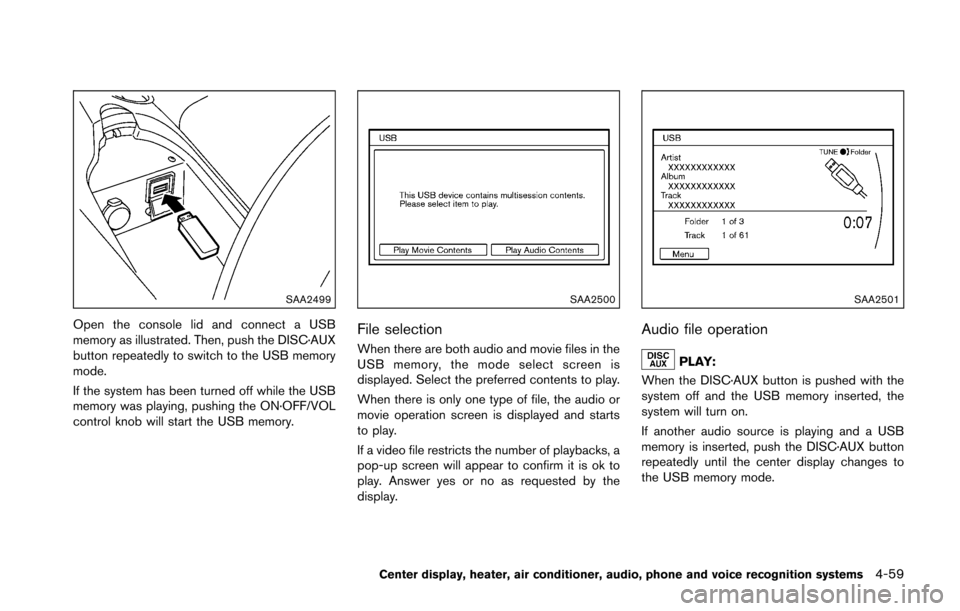
SAA2499
Open the console lid and connect a USB
memory as illustrated. Then, push the DISC·AUX
button repeatedly to switch to the USB memory
mode.
If the system has been turned off while the USB
memory was playing, pushing the ON·OFF/VOL
control knob will start the USB memory.
SAA2500
File selection
When there are both audio and movie files in the
USB memory, the mode select screen is
displayed. Select the preferred contents to play.
When there is only one type of file, the audio or
movie operation screen is displayed and starts
to play.
If a video file restricts the number of playbacks, a
pop-up screen will appear to confirm it is ok to
play. Answer yes or no as requested by the
display.
SAA2501
Audio file operation
PLAY:
When the DISC·AUX button is pushed with the
system off and the USB memory inserted, the
system will turn on.
If another audio source is playing and a USB
memory is inserted, push the DISC·AUX button
repeatedly until the center display changes to
the USB memory mode.
Center display, heater, air conditioner, audio, phone and voice recognition systems4-59
Page 221 of 428
4-60Center display, heater, air conditioner, audio, phone and voice recognition systems
Next/Previous File and Fast
Forward/Rewind:
When the
orbutton is pushed for more
than 1.5 seconds while a USB memory is being
played, the USB memory will play while for-
warding or rewinding. When the button is
released, the USB memory will return to normal
play speed.
When the
orbutton is pushed for less
than 1.5 seconds while the USB memory is
being played, the next track or the beginning of
the current track on the USB memory will be
played.
When the rewind button is pushed for less than
1.5 seconds within 3 seconds after the current
track starts playing, the previous track will be
played.
The multi-function controller can also be used to
select tracks when the USB memory is being
played.
Folder selection:
To change to another folder in the USB memory,
turn the folder selector or choose a folder
displayed on the screen using the multi-function
controller.
REPEAT (RPT) , RANDOM (RDM):
When the RPT button is pushed while the USB
memory is played, the play pattern can be
change as follows.
To change the play mode, push the RPT button
repeatedly and the mode will change as follows.
Normal ?1 Folder Repeat ?1 Track Repeat ?
All Random ?1 Folder Random ?Normal
SAA2502
Menu:
There are some options available during play-
back. Select one of the following options that
are displayed on the screen if necessary. Refer
to the following information for each item.
. Movie Playback
Switch to the movie playback mode. This
item is displayed only when a USB memory
contains movie files.
. Folder List/Track List
Displays the folder or track list. The “Movie
Playback” key is also displayed in this list
screen, and enables switching to the movie
playback mode.
Page 222 of 428
.Play Mode
Select the preferred play mode.
SAA2503
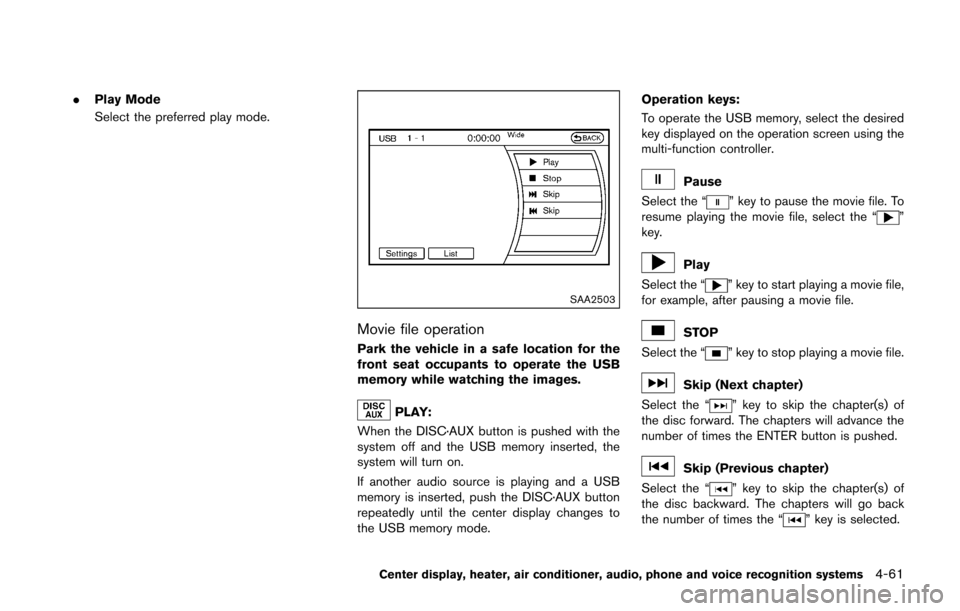
Movie file operation
Park the vehicle in a safe location for the
front seat occupants to operate the USB
memory while watching the images.
PLAY:
When the DISC·AUX button is pushed with the
system off and the USB memory inserted, the
system will turn on.
If another audio source is playing and a USB
memory is inserted, push the DISC·AUX button
repeatedly until the center display changes to
the USB memory mode. Operation keys:
To operate the USB memory, select the desired
key displayed on the operation screen using the
multi-function controller.
Pause
Select the “
” key to pause the movie file. To
resume playing the movie file, select the “”
key.
Play
Select the “
” key to start playing a movie file,
for example, after pausing a movie file.
STOP
Select the “
” key to stop playing a movie file.
Skip (Next chapter)
Select the “
” key to skip the chapter(s) of
the disc forward. The chapters will advance the
number of times the ENTER button is pushed.
Skip (Previous chapter)
Select the “
” key to skip the chapter(s) of
the disc backward. The chapters will go back
the number of times the “
” key is selected.
Center display, heater, air conditioner, audio, phone and voice recognition systems4-61
Page 223 of 428
4-62Center display, heater, air conditioner, audio, phone and voice recognition systems
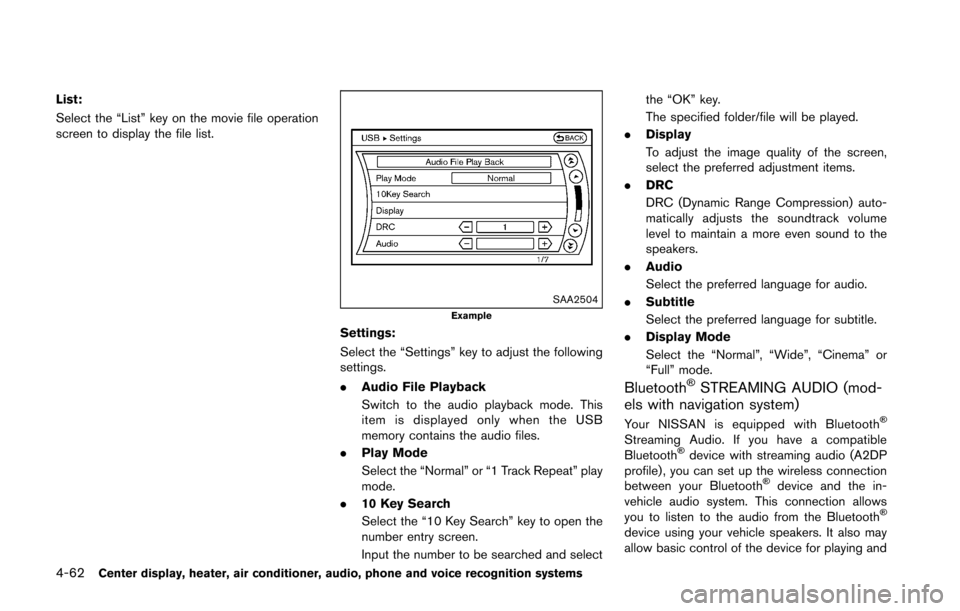
List:
Select the “List” key on the movie file operation
screen to display the file list.
SAA2504Example
Settings:
Select the “Settings” key to adjust the following
settings.
.Audio File Playback
Switch to the audio playback mode. This
item is displayed only when the USB
memory contains the audio files.
. Play Mode
Select the “Normal” or “1 Track Repeat” play
mode.
. 10 Key Search
Select the “10 Key Search” key to open the
number entry screen.
Input the number to be searched and select the “OK” key.
The specified folder/file will be played.
. Display
To adjust the image quality of the screen,
select the preferred adjustment items.
. DRC
DRC (Dynamic Range Compression) auto-
matically adjusts the soundtrack volume
level to maintain a more even sound to the
speakers.
. Audio
Select the preferred language for audio.
. Subtitle
Select the preferred language for subtitle.
. Display Mode
Select the “Normal”, “Wide”, “Cinema” or
“Full” mode.
BluetoothŠSTREAMING AUDIO (mod-
els with navigation system)
Your NISSAN is equipped with BluetoothŠ
Streaming Audio. If you have a compatible
BluetoothŠdevice with streaming audio (A2DP
profile) , you can set up the wireless connection
between your Bluetooth
Šdevice and the in-
vehicle audio system. This connection allows
you to listen to the audio from the Bluetooth
Š
device using your vehicle speakers. It also may
allow basic control of the device for playing and
Page 224 of 428
skipping audio files using the AVRCP Blue-
toothŠprofile. All BluetoothŠDevices do not
have the same level of controls for AVRCP.
Please consult the manual for your Bluetooth
Š
Device for more details.
Once your BluetoothŠdevice is connected to
the in-vehicle audio system, it will automatically
reconnect whenever the device is present in the
vehicle and you select Bluetooth
ŠAudio from
your audio system. You do not need to manually
reconnect for each usage.
Wireless LAN (Wi-Fi) and the Bluetooth
Š
functions share the same frequency band (2.4
GHz) . Using the BluetoothŠand the wireless
LAN functions at the same time may slow down
or disconnect the communication and cause
undesired noise. It is recommended that you
turn off the wireless LAN (Wi-Fi) when using the
Bluetooth
Šfunctions.
Regulatory information
FCC Regulatory information:
. CAUTION: To maintain compliance with
FCC’s RF exposure guidelines, use only
the supplied antenna. Unauthorized antenna,
modification, or attachments could damage
the transmitter and may violate FCC regula-
tions.
. Operation is subject to the following two
conditions:
1) This device may not cause interference
and
2) This device must accept any interfer- ence, including interference that may
cause undesired operation of the device
IC Regulatory information:
. Operation is subject to the following two
conditions:
1) This device may not cause interference,
and
2) This device must accept any interfer- ence, including interference that may
cause undesired operation of the device.
. This Class B digital apparatus meets all
requirements of the Canadian Interference-
Causing Equipment Regulations. Bluetooth trademark:BluetoothŠis a trademark owned
by Bluetooth SIG, Inc. and li-
censed to Clarion Co., Ltd.
Center display, heater, air conditioner, audio, phone and voice recognition systems4-63
Page 225 of 428
4-64Center display, heater, air conditioner, audio, phone and voice recognition systems
SAA2505
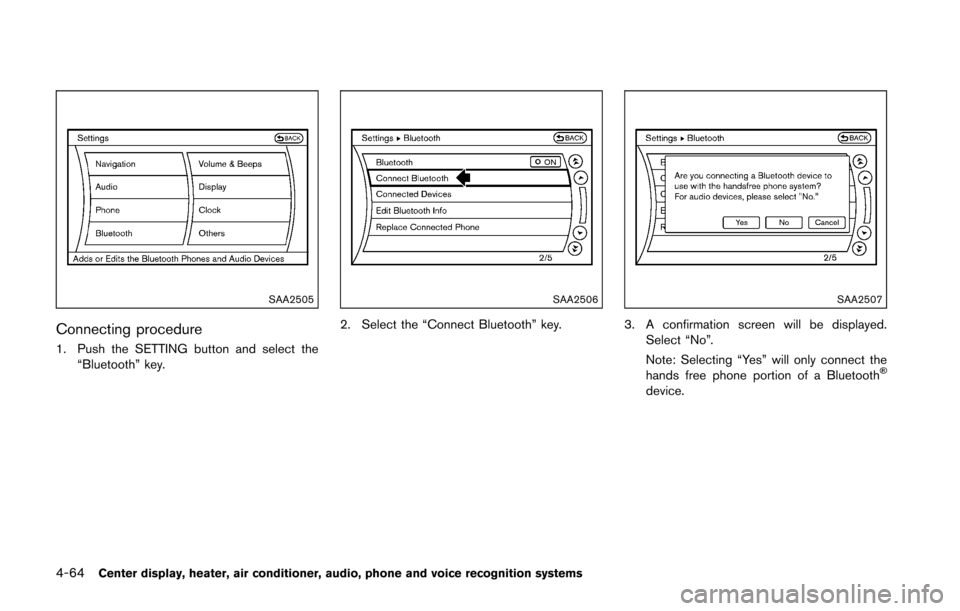
Connecting procedure
1. Push the SETTING button and select the“Bluetooth” key.
SAA2506
2. Select the “Connect Bluetooth” key.
SAA2507
3. A confirmation screen will be displayed.
Select “No”.
Note: Selecting “Yes” will only connect the
hands free phone portion of a Bluetooth
Š
device.
Page 226 of 428
SAA3005
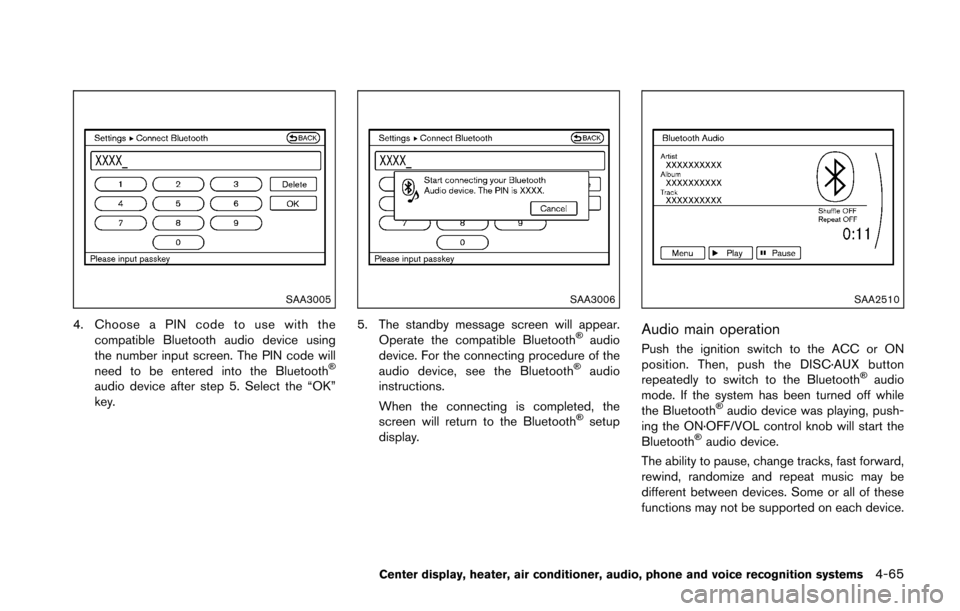
4. Choose a PIN code to use with thecompatible Bluetooth audio device using
the number input screen. The PIN code will
need to be entered into the Bluetooth
Š
audio device after step 5. Select the “OK”
key.
SAA3006
5. The standby message screen will appear.Operate the compatible BluetoothŠaudio
device. For the connecting procedure of the
audio device, see the Bluetooth
Šaudio
instructions.
When the connecting is completed, the
screen will return to the Bluetooth
Šsetup
display.
SAA2510
Audio main operation
Push the ignition switch to the ACC or ON
position. Then, push the DISC·AUX button
repeatedly to switch to the Bluetooth
Šaudio
mode. If the system has been turned off while
the Bluetooth
Šaudio device was playing, push-
ing the ON·OFF/VOL control knob will start the
Bluetooth
Šaudio device.
The ability to pause, change tracks, fast forward,
rewind, randomize and repeat music may be
different between devices. Some or all of these
functions may not be supported on each device.
Center display, heater, air conditioner, audio, phone and voice recognition systems4-65
Page 227 of 428
4-66Center display, heater, air conditioner, audio, phone and voice recognition systems
DISC·AUX button:
When the DISC·AUX button is pushed with the
system off and the Bluetooth
Šaudio device
connected, the system will turn on. If another
audio source is playing and the Bluetooth
Š
audio device is connected, push the DISC·AUX
button repeatedly until the display changes to
the Bluetooth
Šaudio mode.
Next/Previous Track and Fast
Forward/Rewind:
When the
orbutton is pushed for more
than 1.5 seconds while a BluetoothŠaudio file is
being played, the BluetoothŠaudio device will
play while forwarding or rewinding. When the
button is released, the Bluetooth
Šaudio device
will return to normal play speed.
When the
orbutton is pushed for less
than 1.5 seconds while a BluetoothŠaudio file is
being played, the next track or the beginning of
the current track on the Bluetooth
Šaudio device
will be played.
When the rewind button is pushed for less than
1.5 seconds within 3 seconds after the current
track starts playing, the previous track will be
played.
The multi-function controller can also be used to
select tracks when the Bluetooth
Šaudio play mode screen is shown on the display. (“Blue-
tooth audio” will be indicated on the header of
the screen.)
REPEAT (RPT) , RANDOM (RDM):
To change the play mode, push the
button
repeatedly and the mode changes as follows.
Normal ?Shuffle All Tracks ?Shuffle Group
? Repeat 1 Track ?Repeat All Tracks ?
Repeat Group ?Normal
Operation keys:
To operate a Bluetooth
Šaudio device, select a
key displayed on the operation screen using the
multi-function controller.
Play
Select the “
” key to start playing when
pausing. Select this key again to pause the
audio play.
Pause
Select the “
” key to pause the BluetoothŠ
audio device. Select this key again to resume
playing.
Play Mode:
The play mode setting display will appear when
the “Menu” key is selected. Choose the preferred play mode from the
following items.
.
Shuffle
Choose “Shuffle OFF”, “Shuffle All Tracks”
and “Shuffle Group”.
. Repeat
Choose from “Repeat OFF”, “Repeat 1
Track”, “Repeat All Tracks” and “Repeat
Group”.