heater NISSAN 370Z ROADSTER 2016 Z34 Workshop Manual
[x] Cancel search | Manufacturer: NISSAN, Model Year: 2016, Model line: 370Z ROADSTER, Model: NISSAN 370Z ROADSTER 2016 Z34Pages: 428, PDF Size: 3.01 MB
Page 208 of 428
DISP button:
While a CD with recorded music information
tags (CD-text/ID3-text tags) is being played, the
title of the played track is displayed. If the title
information is not provided then “Track” is
displayed.
When the DISP button is pushed repeatedly,
further information about the track can be
displayed along with the track title as follows:
CD:
Track time ?Album ?Artist ?Track time
CD with MP3/WMA:
Track time ?Album ?Artist ?Folder name ?
Track time
Track details:
Pushing and holding the DISP button will turn
the display into a detailed overview and after a
few seconds it returns to the main display.
button:
When the SCAN button is pushed while a CD is
being played, the first 10 seconds of all the
tracks will be played.
When the SCAN button is pushed again, the
CD will return to normal play from the track
which is playing.
CD eject button:
When the CD eject button is pushed while a CD
is loaded, the CD will be ejected.
When the CD eject button is pushed twice, the
CD will be ejected further, and the CD can be
removed with ease.
When the ignition switch is in the “OFF” or
“LOCK” position it is possible to eject the CD
currently being played. However the audio unit
will not be activated.
If a CD is ejected by pushing the CD eject
button, and it is not taken out from the loading
slot within 8 seconds, the CD will automatically
be reloaded to the slot to protect the CD.
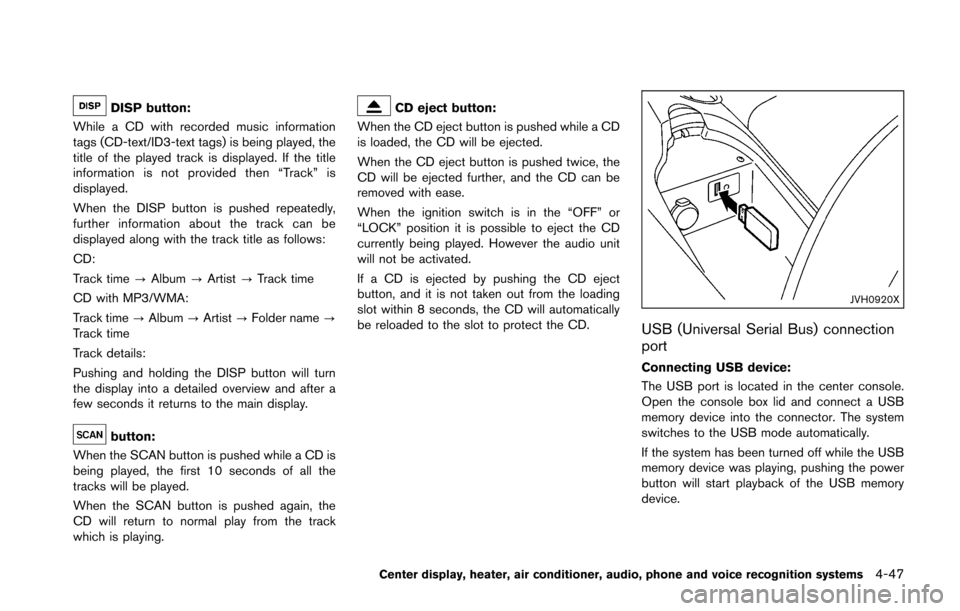
JVH0920X
USB (Universal Serial Bus) connection
port
Connecting USB device:
The USB port is located in the center console.
Open the console box lid and connect a USB
memory device into the connector. The system
switches to the USB mode automatically.
If the system has been turned off while the USB
memory device was playing, pushing the power
button will start playback of the USB memory
device.
Center display, heater, air conditioner, audio, phone and voice recognition systems4-47
Page 209 of 428
4-48Center display, heater, air conditioner, audio, phone and voice recognition systems
WARNING
Do not connect, disconnect or operate
the USB device while driving. Doing so
can be a distraction. If distracted you
could lose control of your vehicle and
cause an accident or serious injury.
CAUTION
.Do not force the USB device into the
USB port. Inserting the USB device
tilted or up-side-down into the port
may damage the port. Make sure
that the USB device is connected
correctly into the USB port. (Some
USB devices come with a
mark as a guide. Make sure that
the mark is facing the correct direc-
tion before inserting the device.)
. Do not leave the USB cable in a
place where it can be pulled unin-
tentionally. Pulling the cable may
damage the port.
Refer to your device manufacturer’s owner
information regarding the proper use and care of the device.
USB button:
When the USB button is pushed with the
system off and the USB memory device is
inserted, the system will turn on.
USB device main operation:
The following operations are identical to the
audio main operation of the Compact Disc (CD)
operation. For details, see “CD player operation”
(P.4-45) .
. List view
. Quick search
.
. RDM (Random play)
. RPT (Repeat track)
. SCAN
. Folder browsing
DISP button:
While a track with recorded music information
tags (ID3-tags) is being played, the title of the
played track is displayed. If the tags are not
provided then a notification message is dis-
played.
When the DISP button is pushed repeatedly,
further information about the track can be
displayed along with the track title as follows: Track time
?Artist ?Album ?Folder name ?
Track time
Track details:
Pushing and holding the DISP button will turn
the display into a detailed overview and after a
few seconds it returns to the main display, or
push the DISP button briefly.
Page 210 of 428
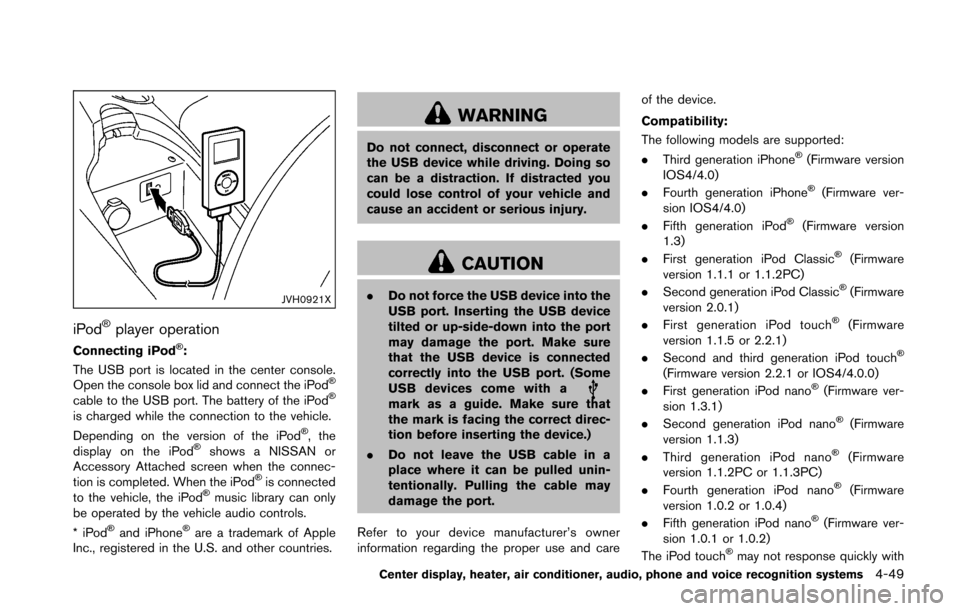
JVH0921X
iPodŠplayer operation
Connecting iPodŠ:
The USB port is located in the center console.
Open the console box lid and connect the iPod
Š
cable to the USB port. The battery of the iPodŠ
is charged while the connection to the vehicle.
Depending on the version of the iPodŠ, the
display on the iPodŠshows a NISSAN or
Accessory Attached screen when the connec-
tion is completed. When the iPod
Šis connected
to the vehicle, the iPodŠmusic library can only
be operated by the vehicle audio controls.
*iPod
Šand iPhoneŠare a trademark of Apple
Inc., registered in the U.S. and other countries.
WARNING
Do not connect, disconnect or operate
the USB device while driving. Doing so
can be a distraction. If distracted you
could lose control of your vehicle and
cause an accident or serious injury.
CAUTION
. Do not force the USB device into the
USB port. Inserting the USB device
tilted or up-side-down into the port
may damage the port. Make sure
that the USB device is connected
correctly into the USB port. (Some
USB devices come with a
mark as a guide. Make sure that
the mark is facing the correct direc-
tion before inserting the device.)
. Do not leave the USB cable in a
place where it can be pulled unin-
tentionally. Pulling the cable may
damage the port.
Refer to your device manufacturer’s owner
information regarding the proper use and care of the device.
Compatibility:
The following models are supported:
.
Third generation iPhone
Š(Firmware version
IOS4/4.0)
. Fourth generation iPhone
Š(Firmware ver-
sion IOS4/4.0)
. Fifth generation iPod
Š(Firmware version
1.3)
. First generation iPod Classic
Š(Firmware
version 1.1.1 or 1.1.2PC)
. Second generation iPod Classic
Š(Firmware
version 2.0.1)
. First generation iPod touch
Š(Firmware
version 1.1.5 or 2.2.1)
. Second and third generation iPod touch
Š
(Firmware version 2.2.1 or IOS4/4.0.0)
. First generation iPod nanoŠ(Firmware ver-
sion 1.3.1)
. Second generation iPod nano
Š(Firmware
version 1.1.3)
. Third generation iPod nano
Š(Firmware
version 1.1.2PC or 1.1.3PC)
. Fourth generation iPod nano
Š(Firmware
version 1.0.2 or 1.0.4)
. Fifth generation iPod nano
Š(Firmware ver-
sion 1.0.1 or 1.0.2)
The iPod touch
Šmay not response quickly with
Center display, heater, air conditioner, audio, phone and voice recognition systems4-49
Page 211 of 428
4-50Center display, heater, air conditioner, audio, phone and voice recognition systems
the system in some cases.
Make sure that the iPodŠfirmware is updated.
Operating tips:
. iPod Shuffle
Šand iPod miniŠare not
supported.
. Some iPod
Šoperations may not be available
with this system.
USB button:
When the USB button is pushed with the
system off and the iPod
Šis connected to the
vehicle, the system will turn on.
iPod
Šmain operation:
Interface:
The interface for iPod
Šoperation shown on the
audio system display is similar to the iPodŠ
interface. Use the TUNE/MENU knob to play a
track on the iPodŠ.
The following items can be chosen from the
menu list screen.
. Playlists
. Artists
. Albums
. Tracks
. Genres
For further information about each item, see the
iPod
Šowner’s manual. The following operations are identical to the
audio main operation of the Compact Disc (CD)
operation. For details, see “CD player operation”
(P.4-45) .
.
List view
. Quick search
.
. RDM (Random play)
. RPT (Repeat track)
. Folder browsing
DISP button:
While a track with recorded music information
tags (ID3-tags) is being played, the title of the
played track is displayed. If the tags are not
provided then a notification message is dis-
played.
When the DISP button is pushed repeatedly,
further information about the track can be
displayed along with the track title as follows:
Track time ?Album ?Artist ?Genre ?Track
time
Track details:
Pushing and holding the DISP button will turn
the display into a detailed overview and after a
few seconds it returns to the main display, or
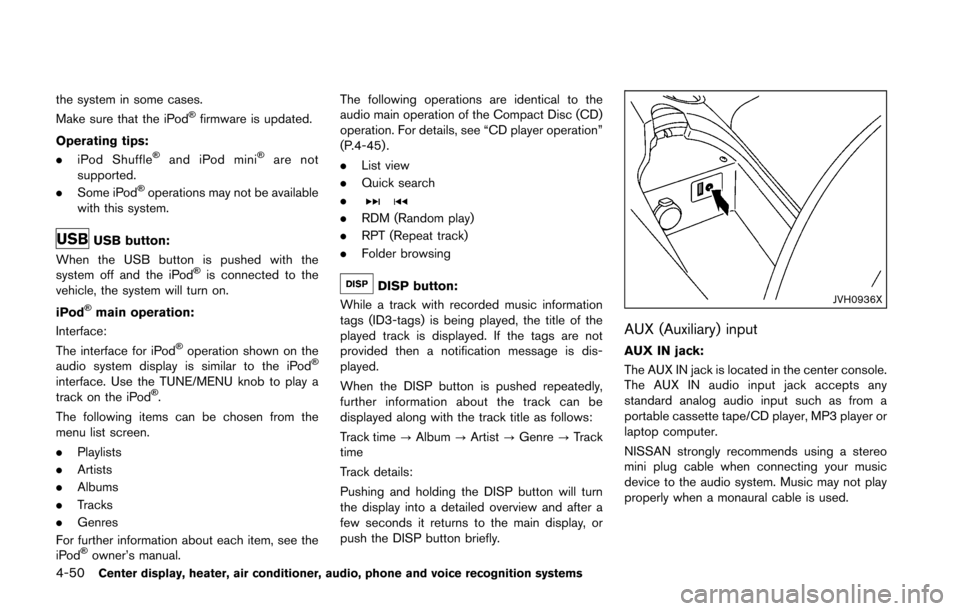
push the DISP button briefly.JVH0936X
AUX (Auxiliary) input
AUX IN jack:
The AUX IN jack is located in the center console.
The AUX IN audio input jack accepts any
standard analog audio input such as from a
portable cassette tape/CD player, MP3 player or
laptop computer.
NISSAN strongly recommends using a stereo
mini plug cable when connecting your music
device to the audio system. Music may not play
properly when a monaural cable is used.
Page 212 of 428
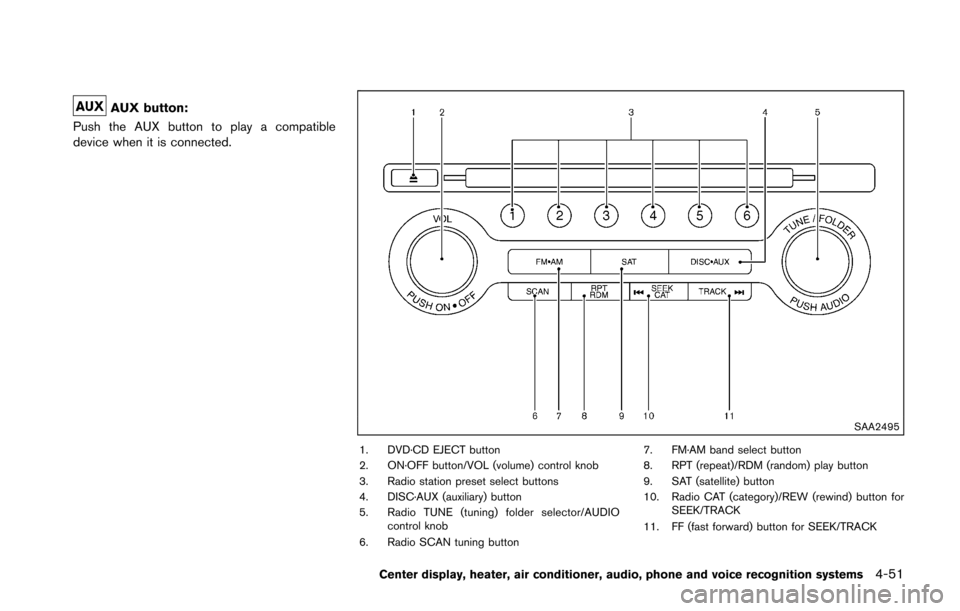
AUX button:
Push the AUX button to play a compatible
device when it is connected.
SAA2495
1. DVD·CD EJECT button
2. ON·OFF button/VOL (volume) control knob
3. Radio station preset select buttons
4. DISC·AUX (auxiliary) button
5. Radio TUNE (tuning) folder selector/AUDIO control knob
6. Radio SCAN tuning button 7. FM·AM band select button
8. RPT (repeat)/RDM (random) play button
9. SAT (satellite) button
10. Radio CAT (category)/REW (rewind) button for
SEEK/TRACK
11. FF (fast forward) button for SEEK/TRACK
Center display, heater, air conditioner, audio, phone and voice recognition systems4-51
Page 213 of 428
4-52Center display, heater, air conditioner, audio, phone and voice recognition systems
FM-AM-SAT RADIO WITH COMPACT
DISC (CD) PLAYER
For all operation precautions, see “Audio opera-
tion precautions” (P.4-30) .
The satellite radio mode requires an active
SiriusXM Satellite Radio subscription. The sa-
tellite radio is not available in Alaska, Hawaii and
Guam.
It may take some time to receive the activation
signal after subscribing the SiriusXM Satellite
Radio. After receiving the activation signal, an
available channel list will be automatically
updated in the radio. Push the ignition switch
from LOCK to ACC to update the channel list.
Audio main operation
Head unit:
The auto loudness circuit enhances the low and
high frequency ranges automatically in both
radio reception and CD playback.
ON·OFF/Volume control:
Push the ignition switch to the ACC or ON
position, and then push the ON·OFF button
while the system is off to turn on the last audio
source, which was playing immediately before
the system was turned off. While the system is
on, pushing the ON·OFF button turns the system
off.Turn the VOL control knob to adjust the volume.
Adjusting tone quality and speaker bal-
ance:
To adjust Bass, Treble, Balance and Fade, push
the Audio control knob. When the display shows
the setting you want to change (Bass, Treble,
Balance and Fade) , rotate the Audio control
knob to set the desired setting. For the other
setting methods, see “How to use SETTING
button” (P.4-10).
This vehicle has some sound effect functions as
follows:
.
Speed Sensitive Vol.
For more details, see “How to use SETTING
button” (P.4-10).
Switching the display:
Pushing the DISC·AUX button will switch the
displays as follows:
iPod
Š/USB ?CD/DVD ?BluetoothŠAudio ?
AUX ?iPodŠ/USB
FM-AM-SAT radio operation
radio (FM/AM) band select:
Pushing the radio band select button will
change the band as follows:
AM ?FM1 ?FM2 ?AM
radio (SAT) band select:
Pushing the radio band select button will
change the band as follows:
XM1 ?XM2 ?XM3 ?XM1
When the radio band select button is pushed
while the ignition switch is in the ACC or ON
position, the radio will come on at the channel
last played.
The last channel played will also come on when
the ON·OFF button is pushed to ON.
The satellite radio is not available in Alaska,
Hawaii and Guam.
If another audio source is playing when the radio
band select button is turned to ON, the audio
source will automatically be turned off and the
last radio channel played will come on.
When the stereo broadcast signal is weak, the
radio will automatically change from stereo to
monaural reception.
Page 214 of 428
TUNE (Tuning):
.For AM and FM radio
Turn the radio TUNE knob for manual tuning.
. For SiriusXM Satellite Radio
Turn the radio TUNE knob to seek channels
from all of the categories when any category
is not selected.
SEEK tuning/CATEGORY
(CAT):
. For AM and FM radio
Push the SEEK button
orto tune
from low to high or high to low frequencies
and to stop at the next broadcasting station.
. For SiriusXM Satellite Radio
Push the SEEK button
orto tune
to the first channel of the next or previous
category.
During satellite radio reception, the following
notices will be displayed under certain condi-
tions.
. NO SIGNAL (No signal is received while the
SAT tuner is connected.)
. OFF AIR (Broadcasting signed off)
. CHECK ANTENNA (Antenna connection
error)
. LOADING (When the initial setting is
performed) .
UPDATING (When the satellite radio sub-
scription is not active)
SCAN tuning:
Push the SCAN tuning button to tune from low
to high frequencies and stop at each broad-
casting station/channel for 5 seconds. Pushing
the button again during this 5 seconds period
will stop SCAN tuning and the radio will remain
tuned to that station/channel.
If the SCAN tuning button is not pushed within 5
seconds, SCAN tuning moves to the next
station/channel.
*1to*6Station memory operations:
12 stations/channels can be set for the FM band
(6 each for FM1 and FM2) , 18 for SiriusXM
Satellite Radio (6 each for XM1, XM2 and XM3)
and 6 stations can be set for the AM band.
1. Choose the radio band using the radio band select button.
2. Tune to the desired station/channel using the SEEK/TRACK, SCAN button or the
radio TUNE knob.
3. Push and hold the desired station preset button
*1to*6until the radio mutes.
4. The station indicator will then come on and the sound will resume. Memorizing is now
complete. 5. Other buttons can be set in the same
manner.
If the battery cable is disconnected, or if the fuse
opens, the radio memory will be erased. In that
case, reset the desired stations/channels.
List (AM and FM radio):
When the “List” key on the display is selected
while the FM or AM radio is being played, the
preset station list will be displayed.
If 1 of the 6 preset stations listed is touched and
held, the current station will be stored as the
new preset.
Menu (SiriusXM Satellite Radio):
When the “Menu” key on the display is selected
while the SiriusXM Satellite Radio is being
played, the menu list will be displayed.
The following items are available.
. Preset List
Displays the preset channel list. If 1 of the 6
preset stations listed is touched and held,
the current station will be stored as the new
preset.
. Customize Channel List
Selects specific channels to skip while using
the TUNE, SEEK/CATEGORY or Menu-
Categories feature.
Center display, heater, air conditioner, audio, phone and voice recognition systems4-53
Page 215 of 428
4-54Center display, heater, air conditioner, audio, phone and voice recognition systems
.Favorite Artists & Songs
Stores the current artist or song that is being
played. Touch the “Alert” key to be reminded
when the stored artist or song is playing on a
station while listening to SiriusXM Satellite
Radio.
. Categories
Selecting a category will go to the first
channel in that category as defined by
SiriusXM Satellite Radio.
. Direct Tune
Inputs the channel number by using a
keypad.
Compact Disc (CD) player operation
Push the ignition switch to the ACC or ON
position and insert the Compact Disc (CD) into
the slot with the label side facing up. The CD will
be guided automatically into the slot and start
playing.
After loading the CD, the number of tracks on
the CD and the play time will appear on the
display.
If the radio is already operating, it will auto-
matically turn off and the CD will play.
If the system has been turned off while the CD
was playing, pushing the ON·OFF button will
start the CD.
Do not use 3.1 in (8 cm) discs.
PLAY:
When the DISC·AUX (CD play) button is
pushed with the system off and the CD loaded,
the system will turn on and the CD will start to
play.
When the DISC·AUX button is pushed with the
CD loaded and the radio playing, the radio will
automatically be turned off and the CD will start
to play.
Menu:
When the “Menu” key on the display is selected
while the CD is being played, the menu screen
will be displayed. The following menu options
are available.
. Folder List (for CD with compressed audio
files)
Displays the folder list.
. Track List
Displays the track list.
. Play Mode
Select a play mode from the following items.
— Normal
— 1 Folder Repeat (for CD with com-
pressed audio files)
— 1 Track Repeat
— 1 Disc Random — 1 Folder Random (for CD with com-
pressed audio files)
Next/Previous Track and Fast
Forward/Rewind:
When the
orbutton is pushed for more
than 1.5 seconds while the CD is being played,
the CD will play while fast forwarding or
rewinding. When the button is released, the
CD will return to normal play speed.
When the
orbutton is pushed for less
than 1.5 seconds while the CD is being played,
the next track or the beginning of the current
track on the CD will be played.
When the rewind button is pushed for less than
1.5 seconds within 3 seconds after the current
track starts playing, the previous track will be
played.
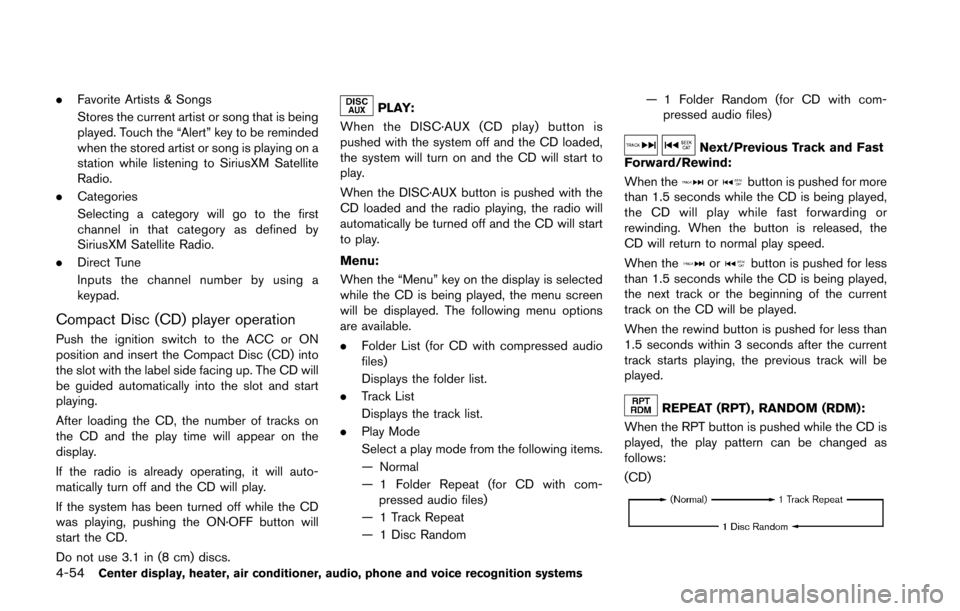
REPEAT (RPT) , RANDOM (RDM):
When the RPT button is pushed while the CD is
played, the play pattern can be changed as
follows:
(CD)
Page 216 of 428
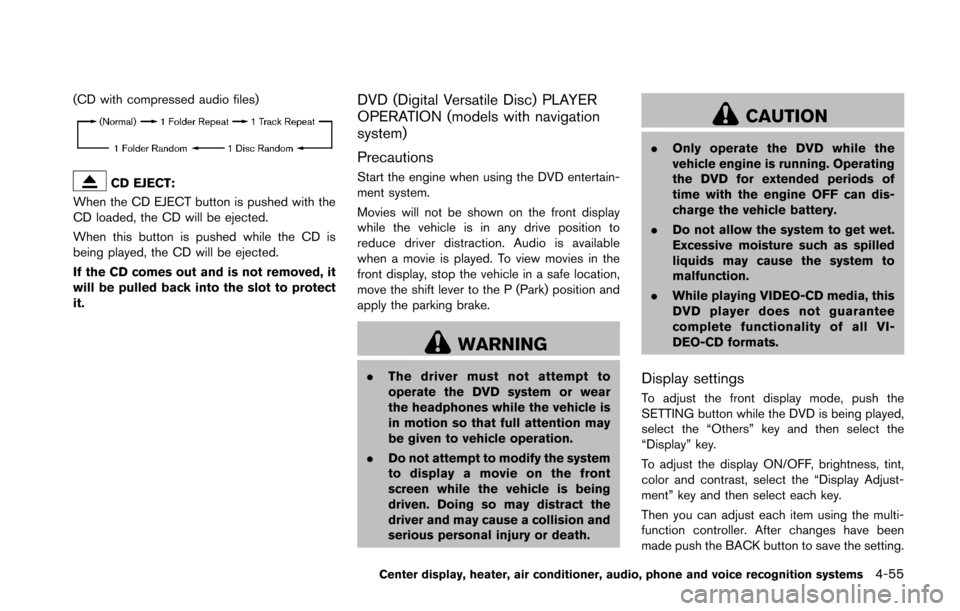
(CD with compressed audio files)
CD EJECT:
When the CD EJECT button is pushed with the
CD loaded, the CD will be ejected.
When this button is pushed while the CD is
being played, the CD will be ejected.
If the CD comes out and is not removed, it
will be pulled back into the slot to protect
it.
DVD (Digital Versatile Disc) PLAYER
OPERATION (models with navigation
system)
Precautions
Start the engine when using the DVD entertain-
ment system.
Movies will not be shown on the front display
while the vehicle is in any drive position to
reduce driver distraction. Audio is available
when a movie is played. To view movies in the
front display, stop the vehicle in a safe location,
move the shift lever to the P (Park) position and
apply the parking brake.
WARNING
. The driver must not attempt to
operate the DVD system or wear
the headphones while the vehicle is
in motion so that full attention may
be given to vehicle operation.
. Do not attempt to modify the system
to display a movie on the front
screen while the vehicle is being
driven. Doing so may distract the
driver and may cause a collision and
serious personal injury or death.
CAUTION
.Only operate the DVD while the
vehicle engine is running. Operating
the DVD for extended periods of
time with the engine OFF can dis-
charge the vehicle battery.
. Do not allow the system to get wet.
Excessive moisture such as spilled
liquids may cause the system to
malfunction.
. While playing VIDEO-CD media, this
DVD player does not guarantee
complete functionality of all VI-
DEO-CD formats.
Display settings
To adjust the front display mode, push the
SETTING button while the DVD is being played,
select the “Others” key and then select the
“Display” key.
To adjust the display ON/OFF, brightness, tint,
color and contrast, select the “Display Adjust-
ment” key and then select each key.
Then you can adjust each item using the multi-
function controller. After changes have been
made push the BACK button to save the setting.
Center display, heater, air conditioner, audio, phone and voice recognition systems4-55
Page 217 of 428
4-56Center display, heater, air conditioner, audio, phone and voice recognition systems
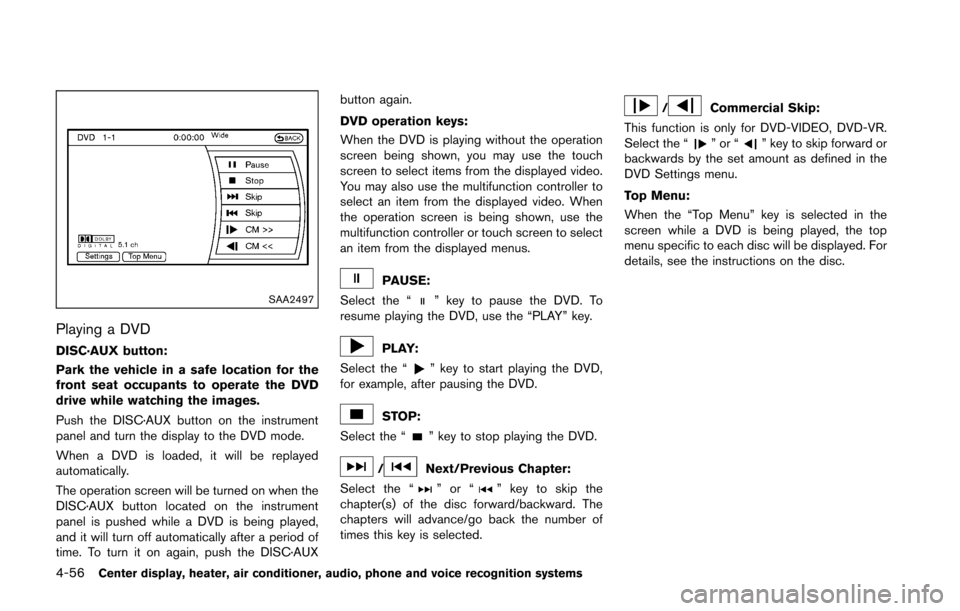
SAA2497
Playing a DVD
DISC·AUX button:
Park the vehicle in a safe location for the
front seat occupants to operate the DVD
drive while watching the images.
Push the DISC·AUX button on the instrument
panel and turn the display to the DVD mode.
When a DVD is loaded, it will be replayed
automatically.
The operation screen will be turned on when the
DISC·AUX button located on the instrument
panel is pushed while a DVD is being played,
and it will turn off automatically after a period of
time. To turn it on again, push the DISC·AUXbutton again.
DVD operation keys:
When the DVD is playing without the operation
screen being shown, you may use the touch
screen to select items from the displayed video.
You may also use the multifunction controller to
select an item from the displayed video. When
the operation screen is being shown, use the
multifunction controller or touch screen to select
an item from the displayed menus.
PAUSE:
Select the “
” key to pause the DVD. To
resume playing the DVD, use the “PLAY” key.
PLAY:
Select the “
” key to start playing the DVD,
for example, after pausing the DVD.
STOP:
Select the “
” key to stop playing the DVD.
/Next/Previous Chapter:
Select the “
”or“” key to skip the
chapter(s) of the disc forward/backward. The
chapters will advance/go back the number of
times this key is selected.
/Commercial Skip:
This function is only for DVD-VIDEO, DVD-VR.
Select the “
”or“” key to skip forward or
backwards by the set amount as defined in the
DVD Settings menu.
Top Menu:
When the “Top Menu” key is selected in the
screen while a DVD is being played, the top
menu specific to each disc will be displayed. For
details, see the instructions on the disc.