display NISSAN ALMERA 2001 Service Manual
[x] Cancel search | Manufacturer: NISSAN, Model Year: 2001, Model line: ALMERA, Model: NISSAN ALMERA 2001Pages: 2898, PDF Size: 60.76 MB
Page 2010 of 2898
SEL504X
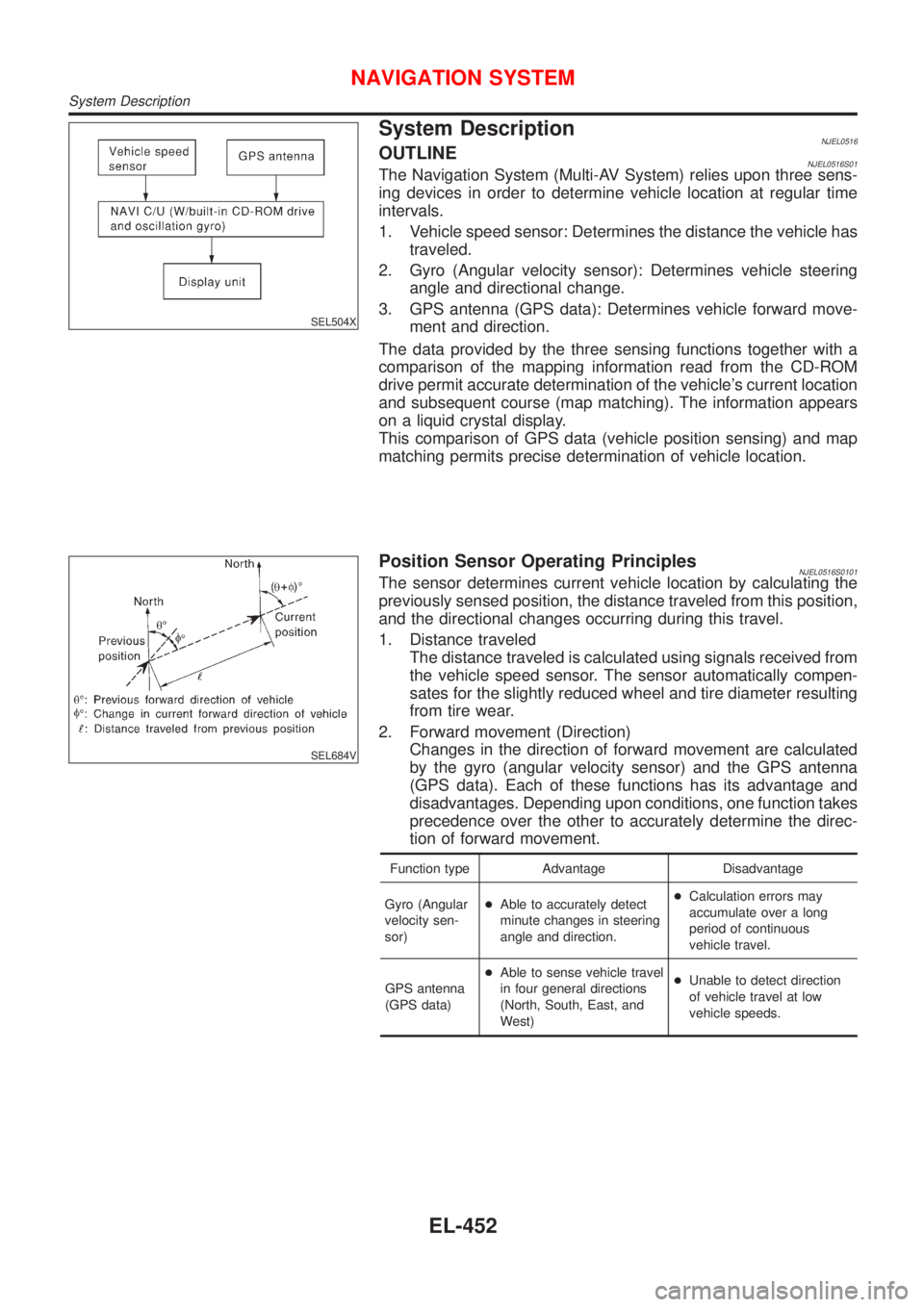
System DescriptionNJEL0516OUTLINENJEL0516S01The Navigation System (Multi-AV System) relies upon three sens-
ing devices in order to determine vehicle location at regular time
intervals.
1. Vehicle speed sensor: Determines the distance the vehicle has
traveled.
2. Gyro (Angular velocity sensor): Determines vehicle steering
angle and directional change.
3. GPS antenna (GPS data): Determines vehicle forward move-
ment and direction.
The data provided by the three sensing functions together with a
comparison of the mapping information read from the CD-ROM
drive permit accurate determination of the vehicle's current location
and subsequent course (map matching). The information appears
on a liquid crystal display.
This comparison of GPS data (vehicle position sensing) and map
matching permits precise determination of vehicle location.
SEL684V
Position Sensor Operating PrinciplesNJEL0516S0101The sensor determines current vehicle location by calculating the
previously sensed position, the distance traveled from this position,
and the directional changes occurring during this travel.
1. Distance traveled
The distance traveled is calculated using signals received from
the vehicle speed sensor. The sensor automatically compen-
sates for the slightly reduced wheel and tire diameter resulting
from tire wear.
2. Forward movement (Direction)
Changes in the direction of forward movement are calculated
by the gyro (angular velocity sensor) and the GPS antenna
(GPS data). Each of these functions has its advantage and
disadvantages. Depending upon conditions, one function takes
precedence over the other to accurately determine the direc-
tion of forward movement.
Function type Advantage Disadvantage
Gyro (Angular
velocity sen-
sor)+Able to accurately detect
minute changes in steering
angle and direction.+Calculation errors may
accumulate over a long
period of continuous
vehicle travel.
GPS antenna
(GPS data)+Able to sense vehicle travel
in four general directions
(North, South, East, and
West)+Unable to detect direction
of vehicle travel at low
vehicle speeds.
NAVIGATION SYSTEM
System Description
EL-452
Page 2012 of 2898
for example, when the vehicle is in a tunnel, in a parking lot
inside building, under an elevated superhighway or near strong
power lines, the location may not be detected. Turbulent/
electric weather conditions may also affect positioning perfor-
mance. If something is placed on the antenna, the radio wave
from GPS satellites may not be received.
SEL507X
COMPONENT DESCRIPTIONNJEL0516S02NAVI Control UnitNJEL0516S0201+The gyro (angular speed sensor) and the CD-ROM drive are
built-in units that control the navigation functions.
+Signals are received from the gyro, the vehicle speed sensor,
and the GPS antenna. Vehicle location is determined by com-
bining this data with the data contained in the CD-ROM map.
Locational information is shown on liquid crystal display panel.
SEL506X
CD-ROM DriverNJEL0516S0202Maps, traffic control regulations, and other pertinent information
can be easily red from the CD-ROM disc.
Map CD-ROMNJEL0516S0203+The map CD-ROM has maps, traffic control regulations, and
other pertinent information.
+To improve CD-ROM map matching and route determination
functions, the CD-ROM uses an exclusive Nissan format.
Therefore, the use of a CD-ROM provided by other manufac-
turers cannot be used.
SEL690V
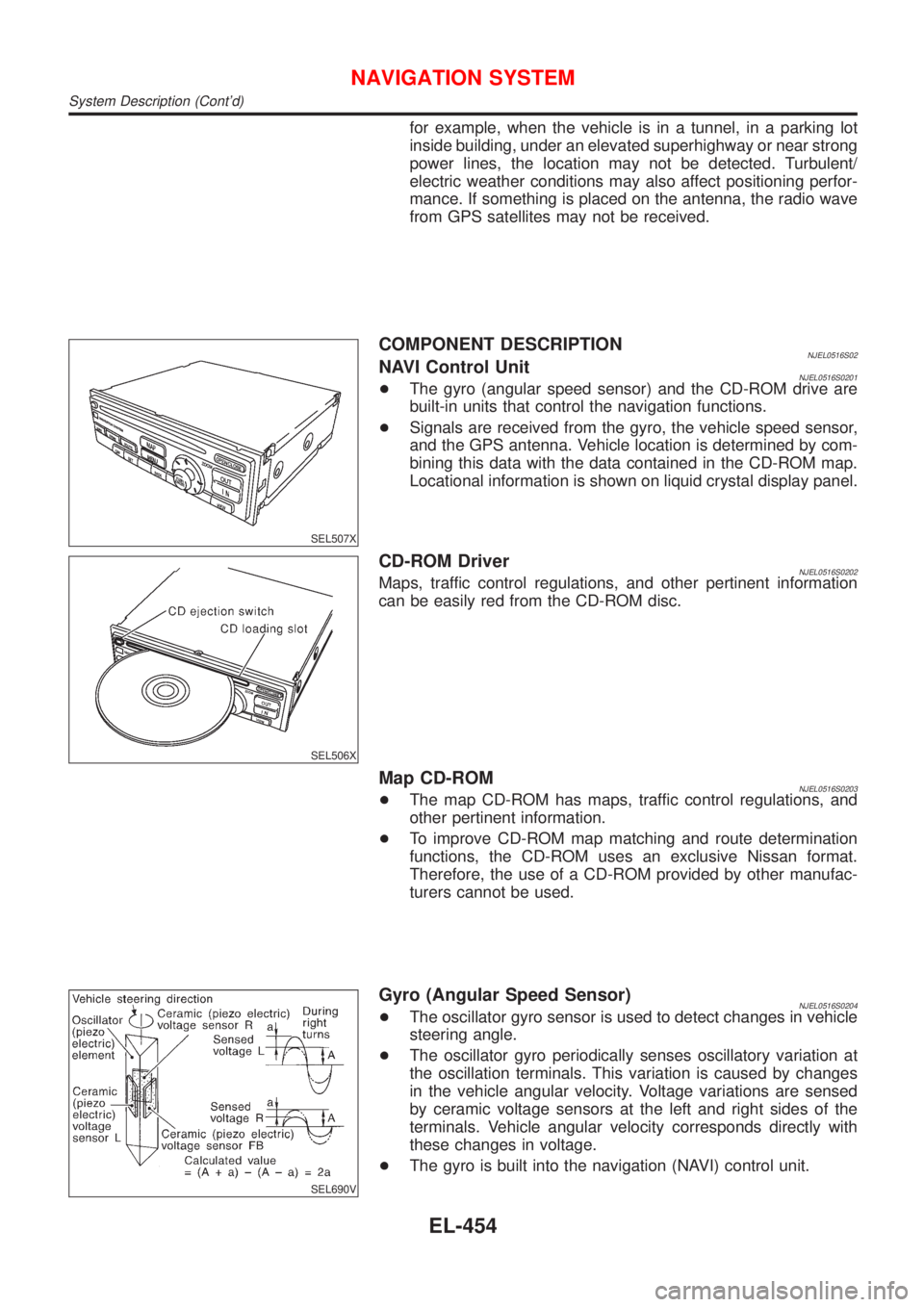
Gyro (Angular Speed Sensor)NJEL0516S0204+The oscillator gyro sensor is used to detect changes in vehicle
steering angle.
+The oscillator gyro periodically senses oscillatory variation at
the oscillation terminals. This variation is caused by changes
in the vehicle angular velocity. Voltage variations are sensed
by ceramic voltage sensors at the left and right sides of the
terminals. Vehicle angular velocity corresponds directly with
these changes in voltage.
+The gyro is built into the navigation (NAVI) control unit.
NAVIGATION SYSTEM
System Description (Cont'd)
EL-454
Page 2013 of 2898
MAP DISPLAY
BIRDVIEW
R
SEL524X
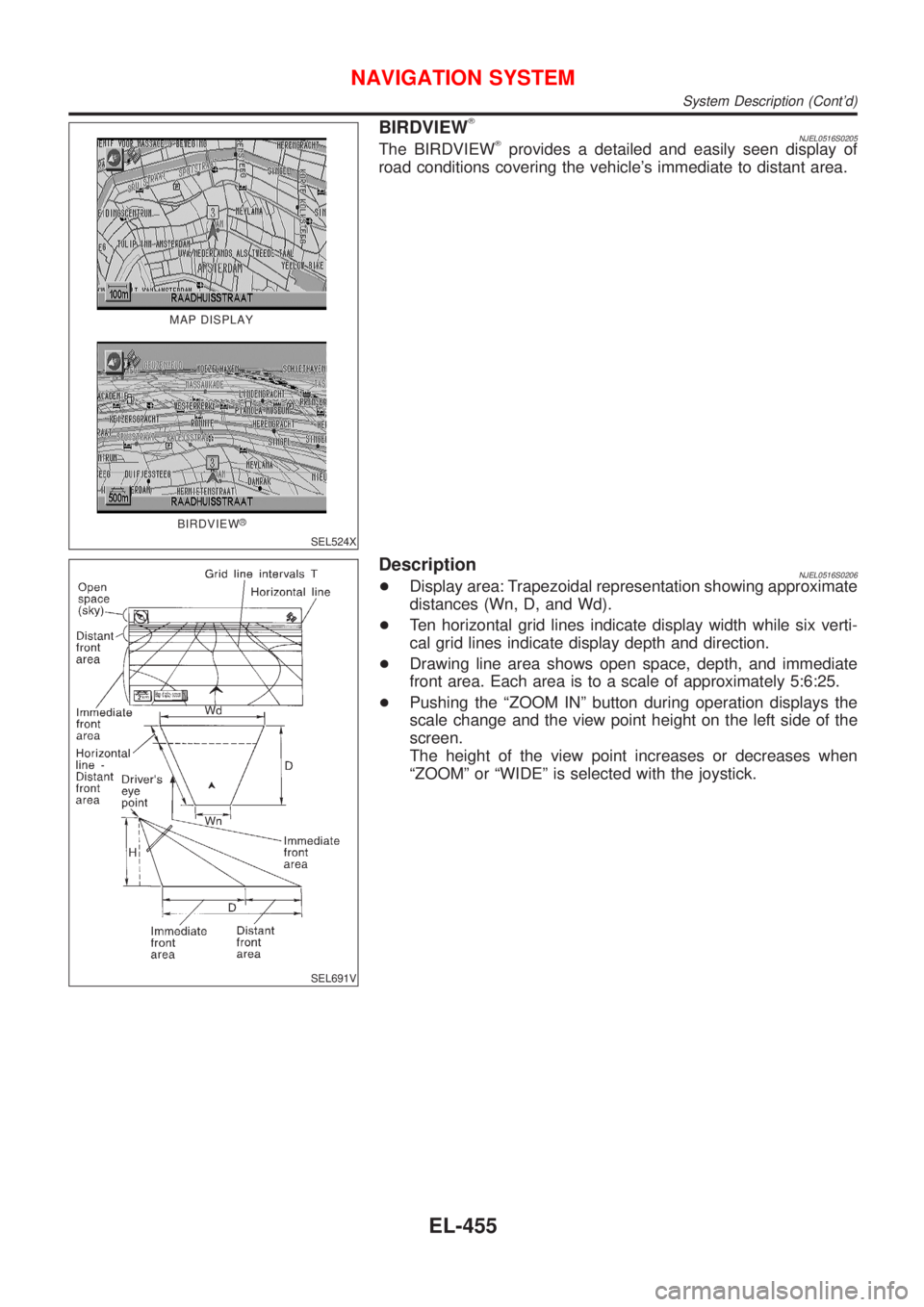
BIRDVIEWTNJEL0516S0205The BIRDVIEWTprovides a detailed and easily seen display of
road conditions covering the vehicle's immediate to distant area.
SEL691V
DescriptionNJEL0516S0206+Display area: Trapezoidal representation showing approximate
distances (Wn, D, and Wd).
+Ten horizontal grid lines indicate display width while six verti-
cal grid lines indicate display depth and direction.
+Drawing line area shows open space, depth, and immediate
front area. Each area is to a scale of approximately 5:6:25.
+Pushing the ªZOOM INº button during operation displays the
scale change and the view point height on the left side of the
screen.
The height of the view point increases or decreases when
ªZOOMº or ªWIDEº is selected with the joystick.
NAVIGATION SYSTEM
System Description (Cont'd)
EL-455
Page 2014 of 2898
MAP DISPLAY=NJEL0516S03
SEL525X
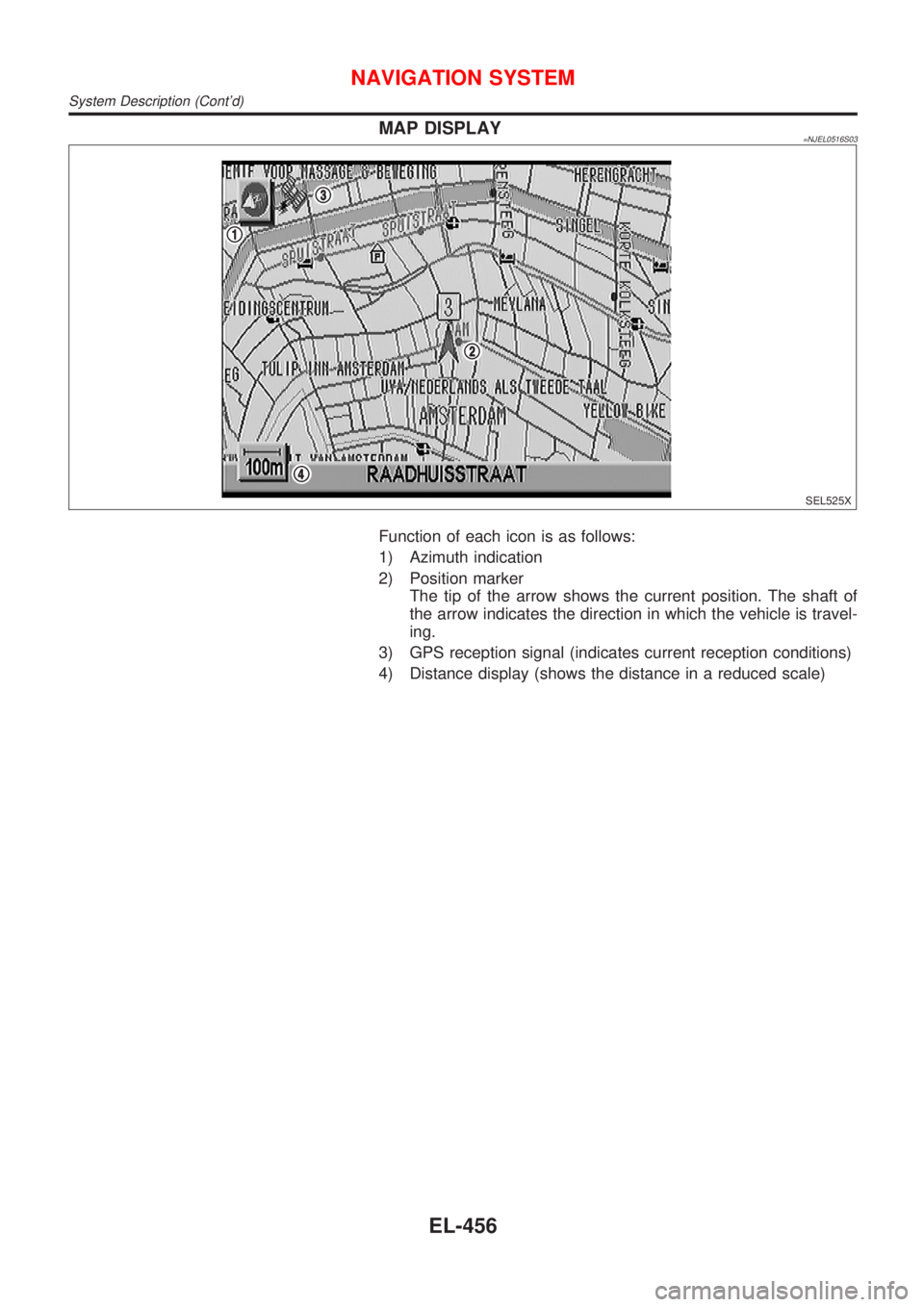
Function of each icon is as follows:
1) Azimuth indication
2) Position marker
The tip of the arrow shows the current position. The shaft of
the arrow indicates the direction in which the vehicle is travel-
ing.
3) GPS reception signal (indicates current reception conditions)
4) Distance display (shows the distance in a reduced scale)
NAVIGATION SYSTEM
System Description (Cont'd)
EL-456
Page 2015 of 2898
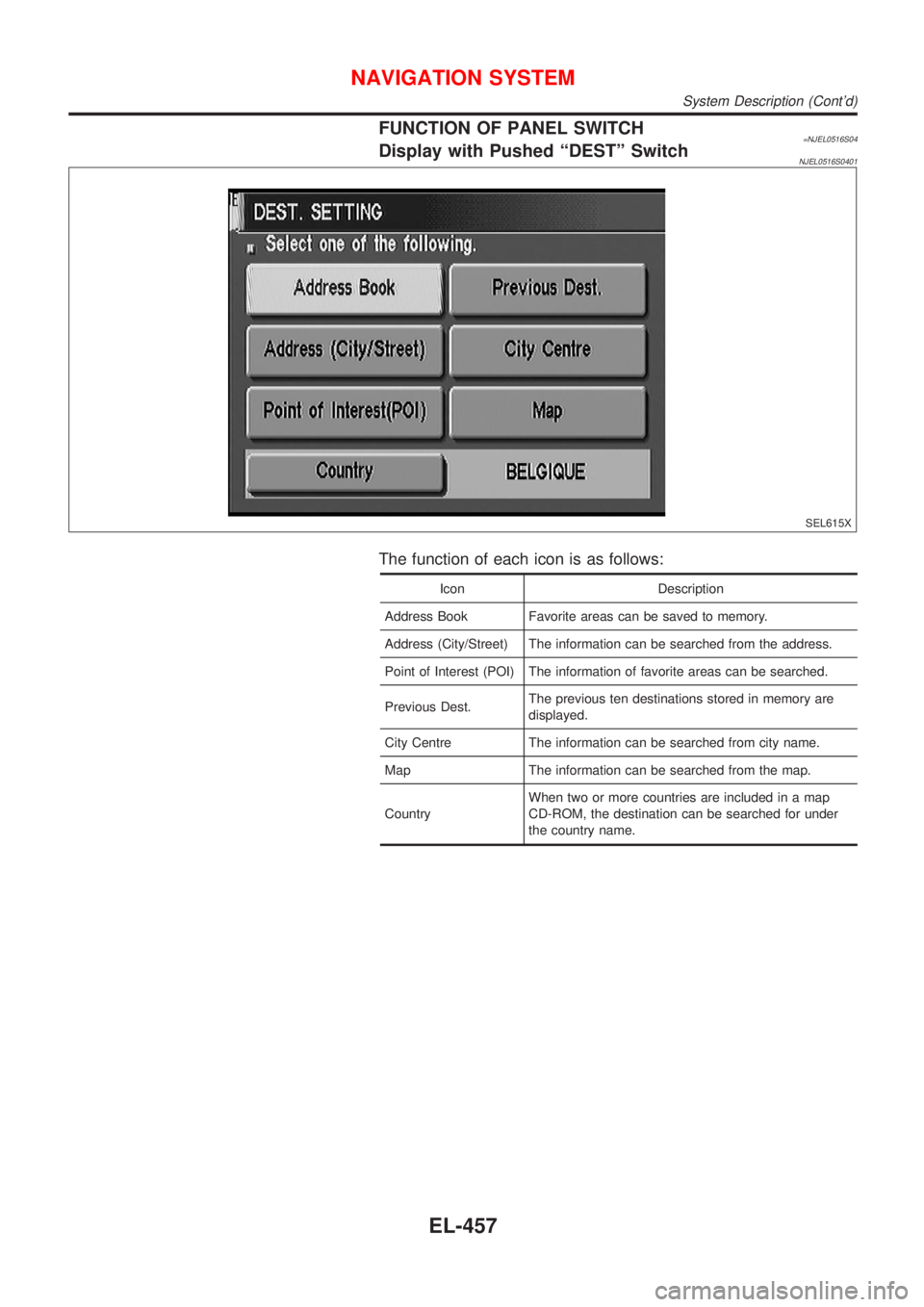
FUNCTION OF PANEL SWITCH=NJEL0516S04Display with Pushed ªDESTº SwitchNJEL0516S0401
SEL615X
The function of each icon is as follows:
Icon Description
Address Book Favorite areas can be saved to memory.
Address (City/Street) The information can be searched from the address.
Point of Interest (POI) The information of favorite areas can be searched.
Previous Dest.The previous ten destinations stored in memory are
displayed.
City Centre The information can be searched from city name.
Map The information can be searched from the map.
CountryWhen two or more countries are included in a map
CD-ROM, the destination can be searched for under
the country name.
NAVIGATION SYSTEM
System Description (Cont'd)
EL-457
Page 2016 of 2898
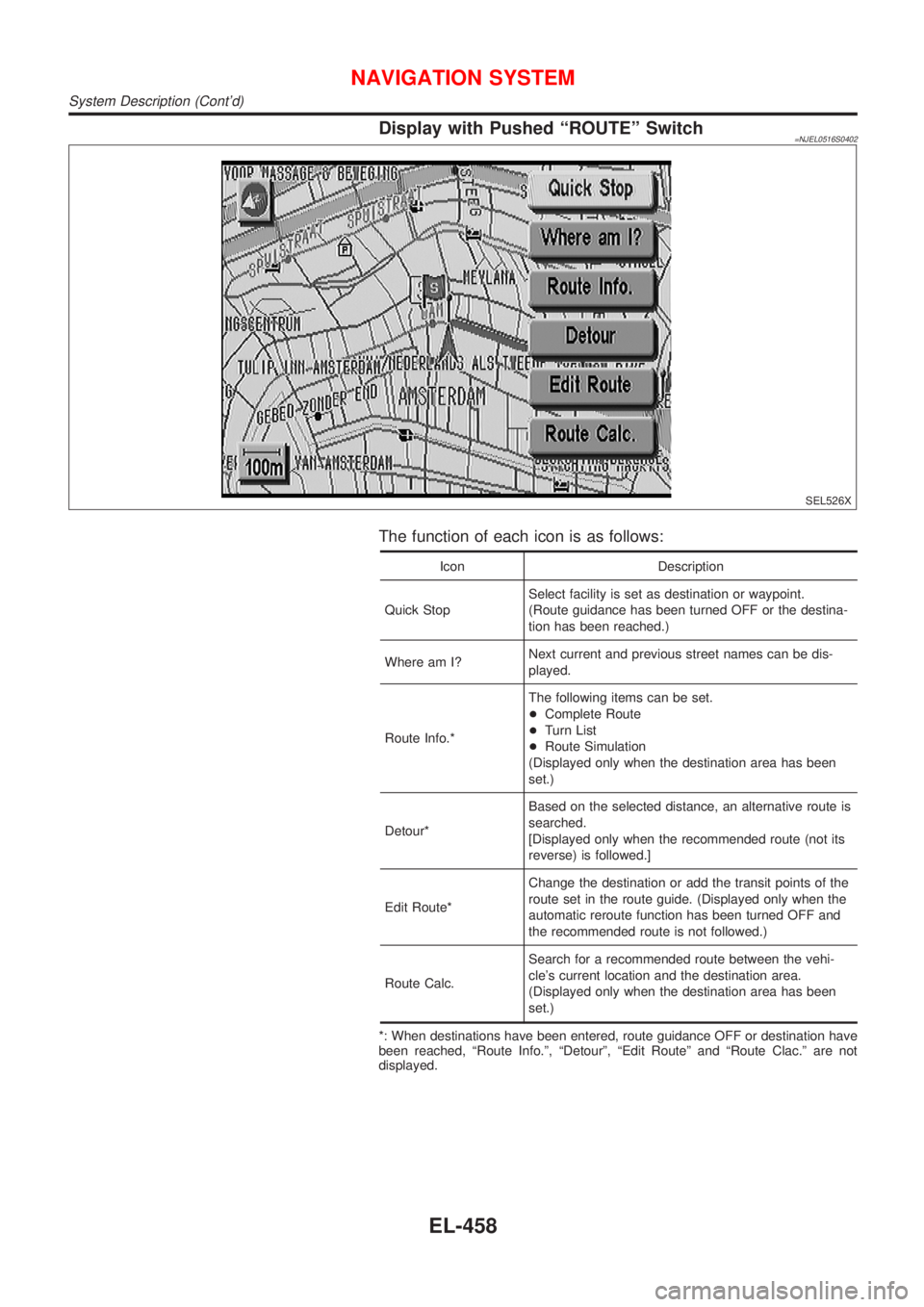
Display with Pushed ªROUTEº Switch=NJEL0516S0402
SEL526X
The function of each icon is as follows:
Icon Description
Quick StopSelect facility is set as destination or waypoint.
(Route guidance has been turned OFF or the destina-
tion has been reached.)
Where am I?Next current and previous street names can be dis-
played.
Route Info.*The following items can be set.
+Complete Route
+Turn List
+Route Simulation
(Displayed only when the destination area has been
set.)
Detour*Based on the selected distance, an alternative route is
searched.
[Displayed only when the recommended route (not its
reverse) is followed.]
Edit Route*Change the destination or add the transit points of the
route set in the route guide. (Displayed only when the
automatic reroute function has been turned OFF and
the recommended route is not followed.)
Route Calc.Search for a recommended route between the vehi-
cle's current location and the destination area.
(Displayed only when the destination area has been
set.)
*: When destinations have been entered, route guidance OFF or destination have
been reached, ªRoute Info.º, ªDetourº, ªEdit Routeº and ªRoute Clac.º are not
displayed.
NAVIGATION SYSTEM
System Description (Cont'd)
EL-458
Page 2017 of 2898
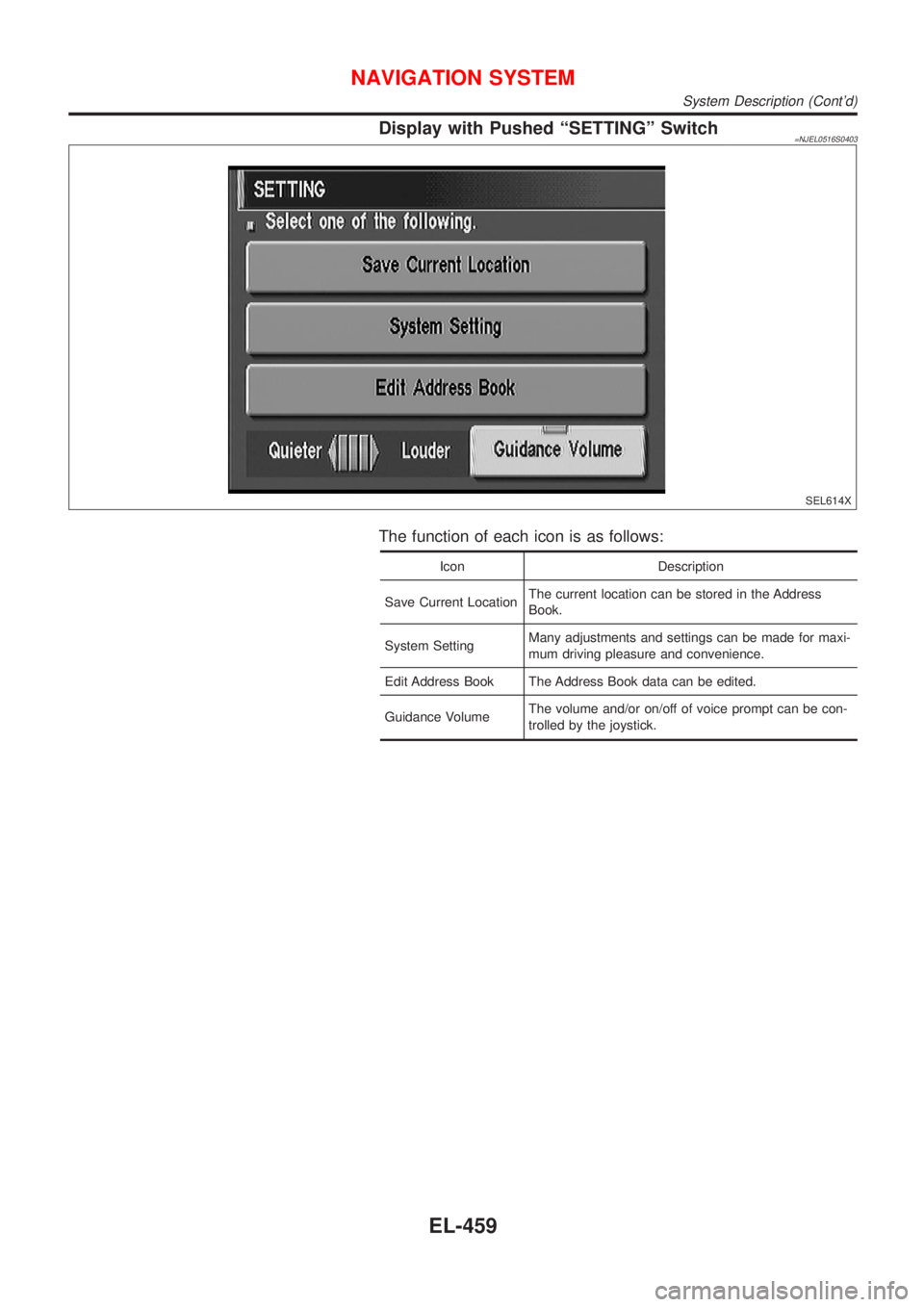
Display with Pushed ªSETTINGº Switch=NJEL0516S0403
SEL614X
The function of each icon is as follows:
Icon Description
Save Current LocationThe current location can be stored in the Address
Book.
System SettingMany adjustments and settings can be made for maxi-
mum driving pleasure and convenience.
Edit Address Book The Address Book data can be edited.
Guidance VolumeThe volume and/or on/off of voice prompt can be con-
trolled by the joystick.
NAVIGATION SYSTEM
System Description (Cont'd)
EL-459
Page 2034 of 2898
Self-diagnosis ModeNJEL0519APPLICATION ITEMSNJEL0519S01
Mode DescriptionReference
page
Self DiagnosisSelf-diagnosis for Navigation, Display and GPS Antenna
connection.EL-477
Confirmation/
adjustmentDiagnose the DisplayColor and gray gradation of display can be checked in
this mode.EL-485
Diagnosis for Signals from the CarSeveral input signals to NAVI control unit, can be moni-
tored in this mode.EL-483
NavigationCheck the map CD-
ROM versionThe version (parts number) of inserted CD-ROM can be
checked in this model.EL-484
Error historyDiagnosis results previously stored in the memory
(before turning ignition switch ON) are displayed in this
mode. Time and location when/where the errors
occurred are also displayed.EL-479
Longitude & LatitudeDisplay the map. Use the joystick to adjust position. Lon-
gitude and latitude will be displayed.EL-486
Adjust the AngleTurning angle of the vehicle on the display can be
adjusted in this mode.EL-487
Speed CalibrationUnder ordinary conditions, the navigation system dis-
tance measuring function will automatically compensate
for minute decreases in wheel and tire diameter caused
by tire wear or low pressure. Speed calibration immedi-
ately restores system accuracy in cases such as when
distance calibration is needed because of the use of tire
chains in inclement weather.EL-488
Initialize LocationThis mode is for initializing the current location. Use
when the vehicle is transported a long distance by a
trailer, etc.EL-489
MODEMAP
SEL617X
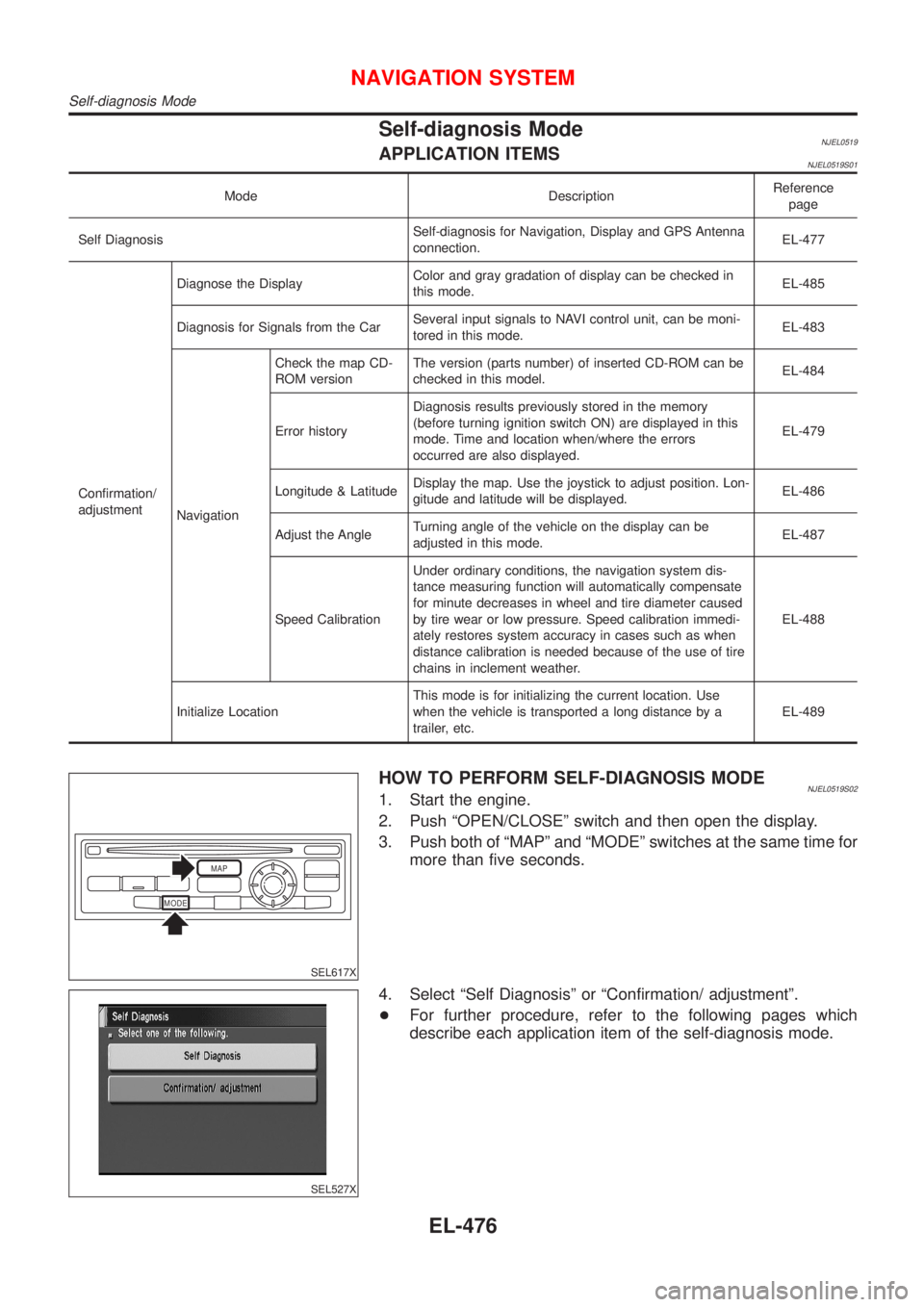
HOW TO PERFORM SELF-DIAGNOSIS MODENJEL0519S021. Start the engine.
2. Push ªOPEN/CLOSEº switch and then open the display.
3. Push both of ªMAPº and ªMODEº switches at the same time for
more than five seconds.
SEL527X
4. Select ªSelf Diagnosisº or ªConfirmation/ adjustmentº.
+For further procedure, refer to the following pages which
describe each application item of the self-diagnosis mode.
NAVIGATION SYSTEM
Self-diagnosis Mode
EL-476
Page 2035 of 2898
SEL527X
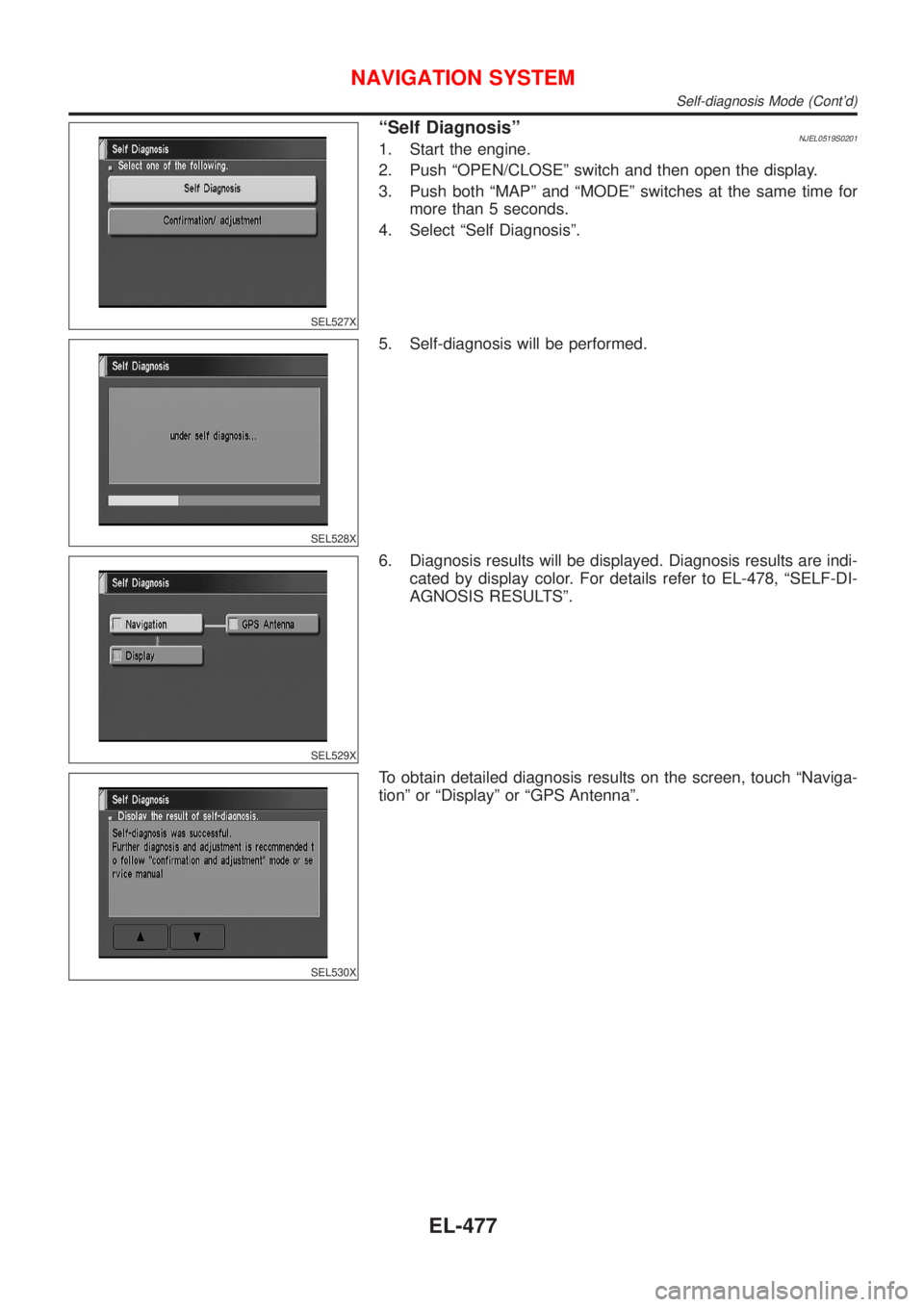
ªSelf DiagnosisºNJEL0519S02011. Start the engine.
2. Push ªOPEN/CLOSEº switch and then open the display.
3. Push both ªMAPº and ªMODEº switches at the same time for
more than 5 seconds.
4. Select ªSelf Diagnosisº.
SEL528X
5. Self-diagnosis will be performed.
SEL529X
6. Diagnosis results will be displayed. Diagnosis results are indi-
cated by display color. For details refer to EL-478, ªSELF-DI-
AGNOSIS RESULTSº.
SEL530X
To obtain detailed diagnosis results on the screen, touch ªNaviga-
tionº or ªDisplayº or ªGPS Antennaº.
NAVIGATION SYSTEM
Self-diagnosis Mode (Cont'd)
EL-477
Page 2036 of 2898
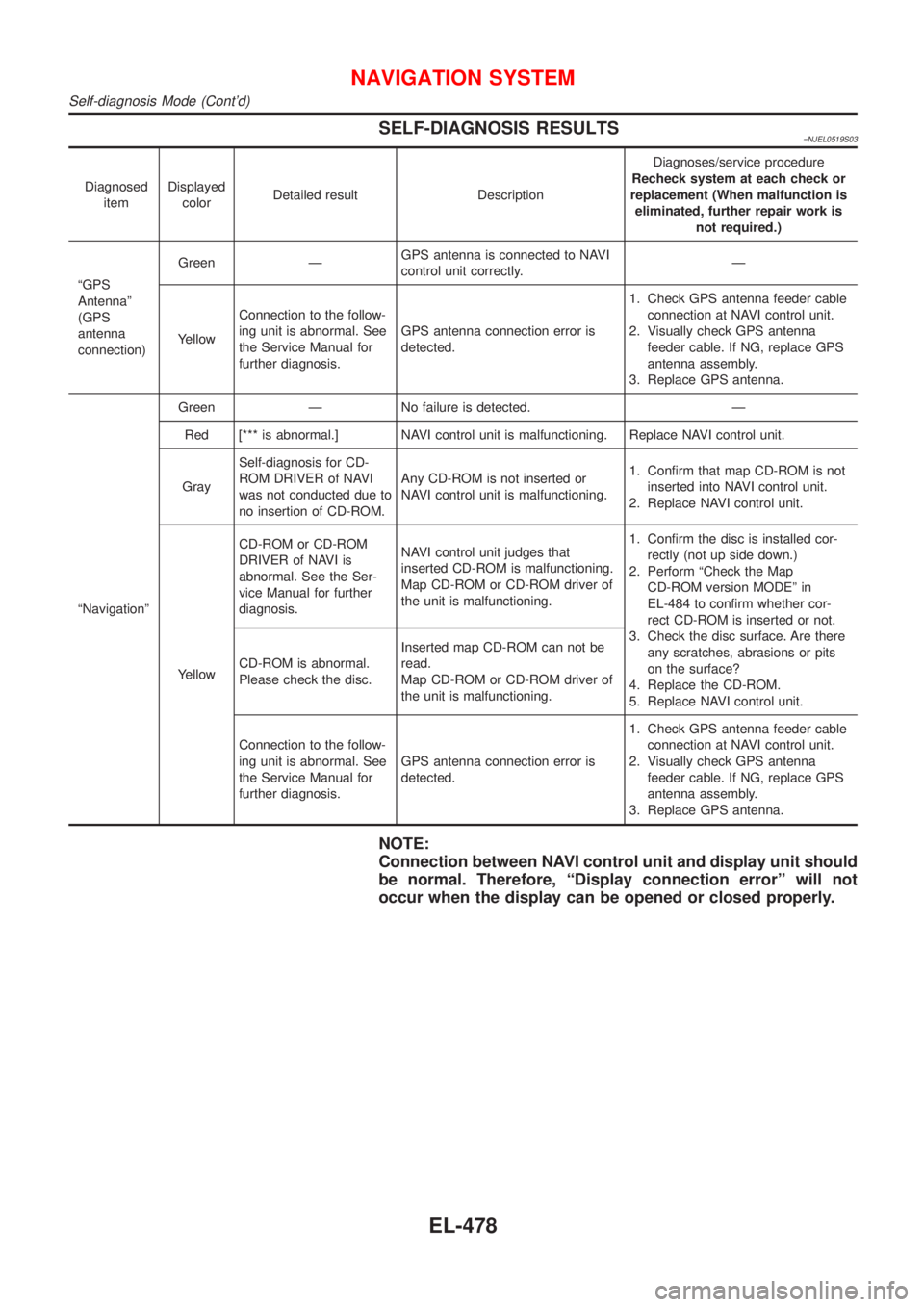
SELF-DIAGNOSIS RESULTS=NJEL0519S03
Diagnosed
itemDisplayed
colorDetailed result DescriptionDiagnoses/service procedure
Recheck system at each check or
replacement (When malfunction is
eliminated, further repair work is
not required.)
ªGPS
Antennaº
(GPS
antenna
connection)Green ÐGPS antenna is connected to NAVI
control unit correctly.Ð
YellowConnection to the follow-
ing unit is abnormal. See
the Service Manual for
further diagnosis.GPS antenna connection error is
detected.1. Check GPS antenna feeder cable
connection at NAVI control unit.
2. Visually check GPS antenna
feeder cable. If NG, replace GPS
antenna assembly.
3. Replace GPS antenna.
ªNavigationºGreen Ð No failure is detected. Ð
Red [*** is abnormal.] NAVI control unit is malfunctioning. Replace NAVI control unit.
GraySelf-diagnosis for CD-
ROM DRIVER of NAVI
was not conducted due to
no insertion of CD-ROM.Any CD-ROM is not inserted or
NAVI control unit is malfunctioning.1. Confirm that map CD-ROM is not
inserted into NAVI control unit.
2. Replace NAVI control unit.
YellowCD-ROM or CD-ROM
DRIVER of NAVI is
abnormal. See the Ser-
vice Manual for further
diagnosis.NAVI control unit judges that
inserted CD-ROM is malfunctioning.
Map CD-ROM or CD-ROM driver of
the unit is malfunctioning.1. Confirm the disc is installed cor-
rectly (not up side down.)
2. Perform ªCheck the Map
CD-ROM version MODEº in
EL-484 to confirm whether cor-
rect CD-ROM is inserted or not.
3. Check the disc surface. Are there
any scratches, abrasions or pits
on the surface?
4. Replace the CD-ROM.
5. Replace NAVI control unit. CD-ROM is abnormal.
Please check the disc.Inserted map CD-ROM can not be
read.
Map CD-ROM or CD-ROM driver of
the unit is malfunctioning.
Connection to the follow-
ing unit is abnormal. See
the Service Manual for
further diagnosis.GPS antenna connection error is
detected.1. Check GPS antenna feeder cable
connection at NAVI control unit.
2. Visually check GPS antenna
feeder cable. If NG, replace GPS
antenna assembly.
3. Replace GPS antenna.
NOTE:
Connection between NAVI control unit and display unit should
be normal. Therefore, ªDisplay connection errorº will not
occur when the display can be opened or closed properly.
NAVIGATION SYSTEM
Self-diagnosis Mode (Cont'd)
EL-478