engine NISSAN ALMERA 2001 Service Manual
[x] Cancel search | Manufacturer: NISSAN, Model Year: 2001, Model line: ALMERA, Model: NISSAN ALMERA 2001Pages: 2898, PDF Size: 60.76 MB
Page 2042 of 2898
SEL527X
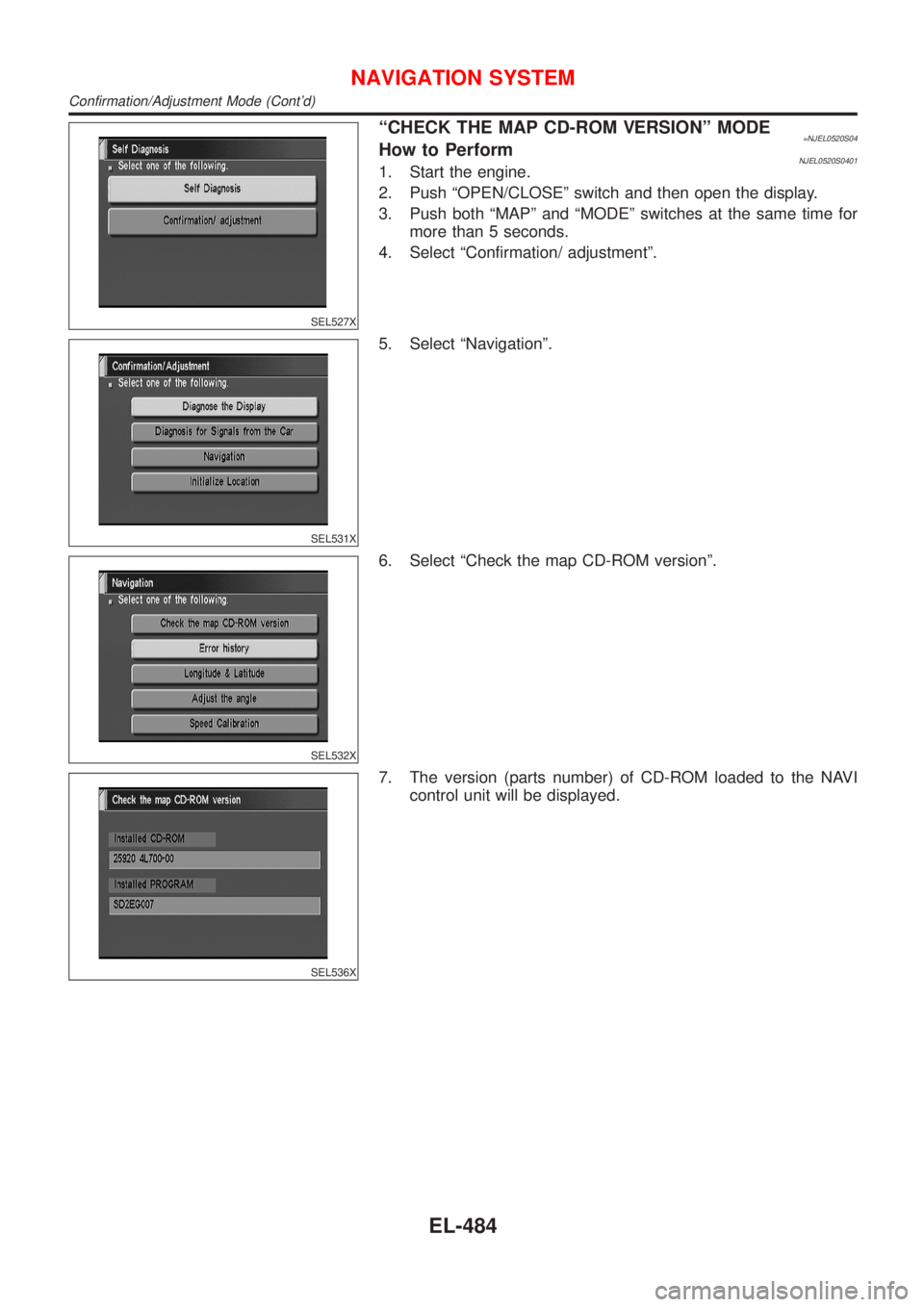
ªCHECK THE MAP CD-ROM VERSIONº MODE=NJEL0520S04How to PerformNJEL0520S04011. Start the engine.
2. Push ªOPEN/CLOSEº switch and then open the display.
3. Push both ªMAPº and ªMODEº switches at the same time for
more than 5 seconds.
4. Select ªConfirmation/ adjustmentº.
SEL531X
5. Select ªNavigationº.
SEL532X
6. Select ªCheck the map CD-ROM versionº.
SEL536X
7. The version (parts number) of CD-ROM loaded to the NAVI
control unit will be displayed.
NAVIGATION SYSTEM
Confirmation/Adjustment Mode (Cont'd)
EL-484
Page 2043 of 2898
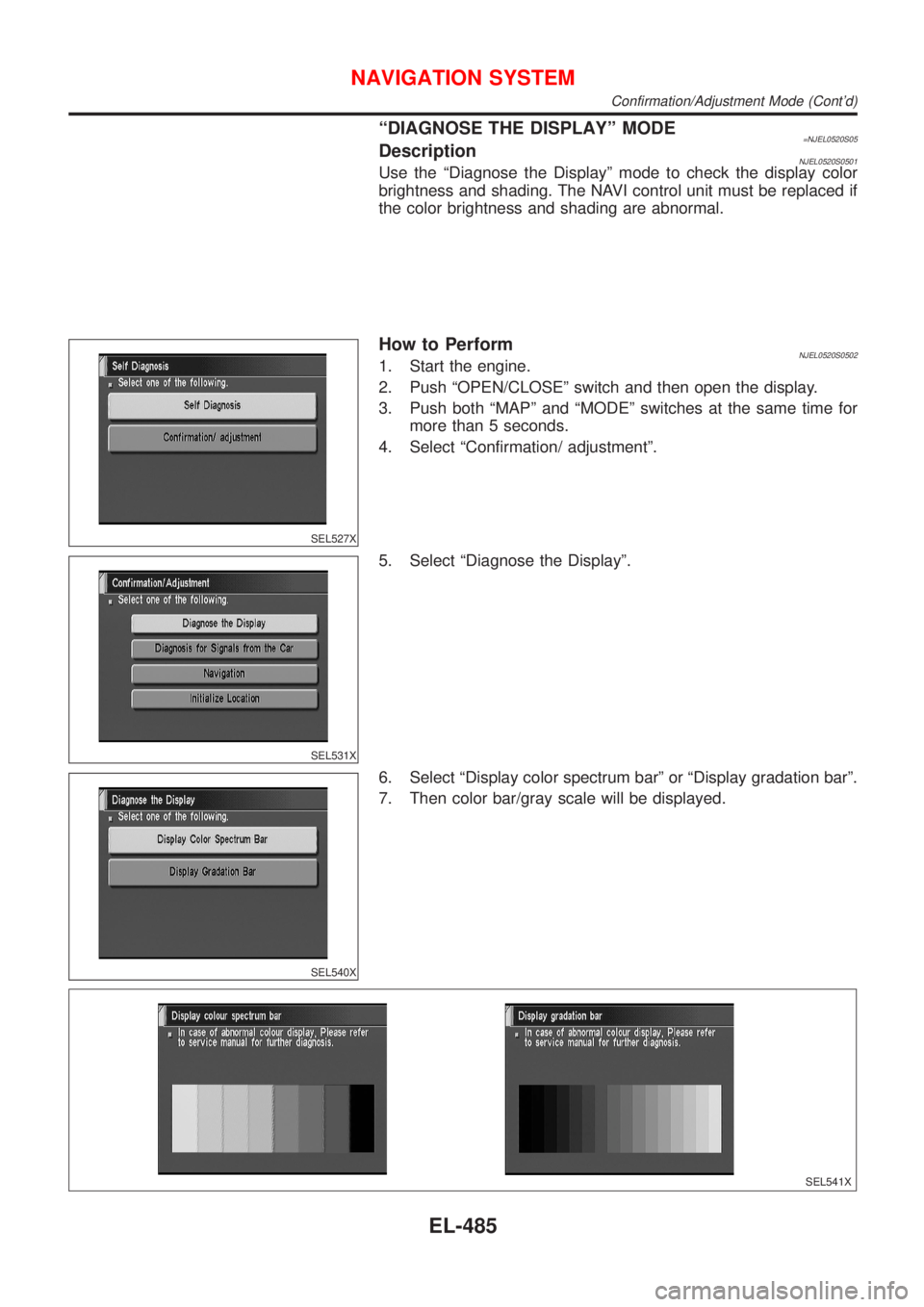
ªDIAGNOSE THE DISPLAYº MODE=NJEL0520S05DescriptionNJEL0520S0501Use the ªDiagnose the Displayº mode to check the display color
brightness and shading. The NAVI control unit must be replaced if
the color brightness and shading are abnormal.
SEL527X
How to PerformNJEL0520S05021. Start the engine.
2. Push ªOPEN/CLOSEº switch and then open the display.
3. Push both ªMAPº and ªMODEº switches at the same time for
more than 5 seconds.
4. Select ªConfirmation/ adjustmentº.
SEL531X
5. Select ªDiagnose the Displayº.
SEL540X
6. Select ªDisplay color spectrum barº or ªDisplay gradation barº.
7. Then color bar/gray scale will be displayed.
SEL541X
NAVIGATION SYSTEM
Confirmation/Adjustment Mode (Cont'd)
EL-485
Page 2044 of 2898
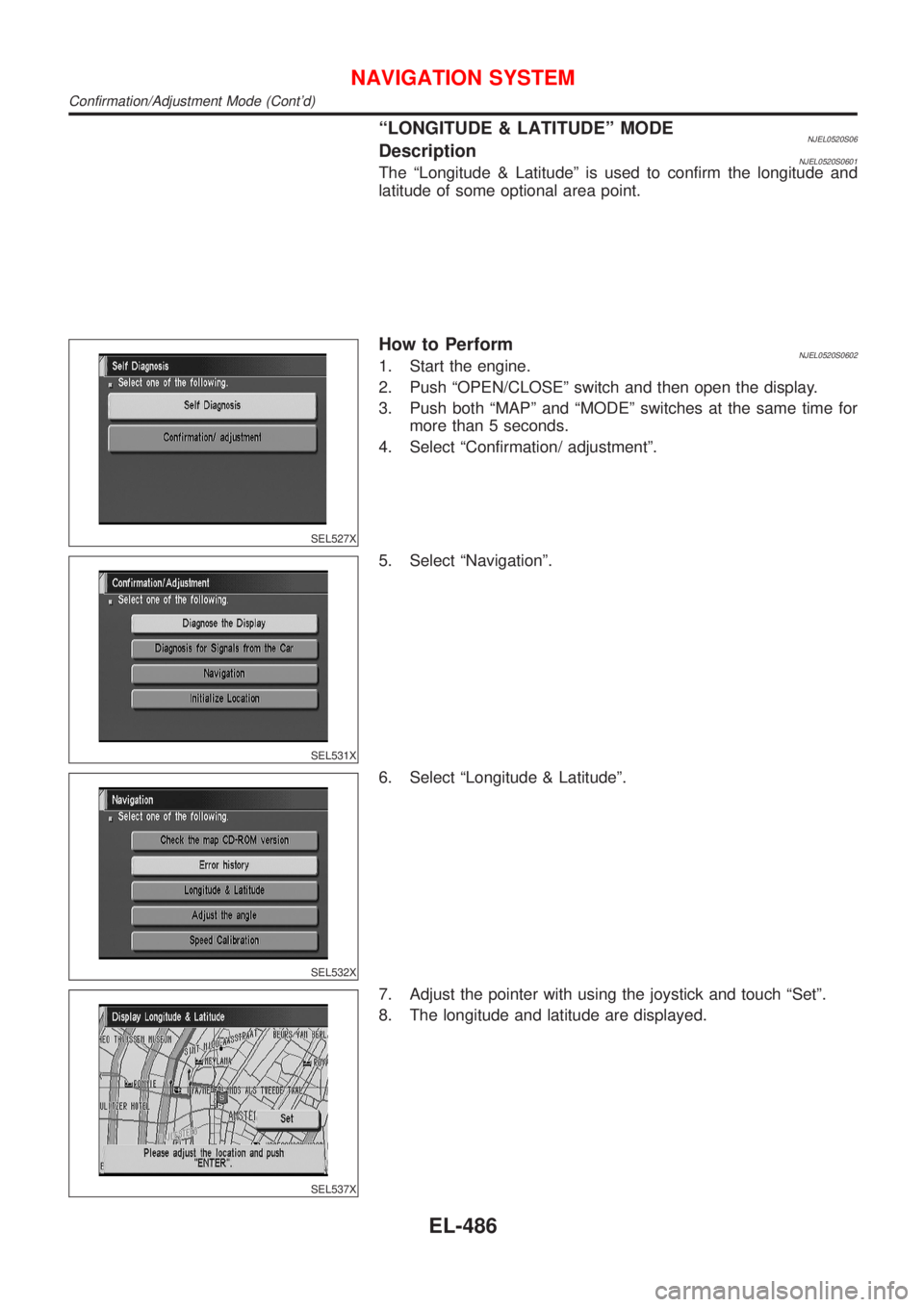
ªLONGITUDE & LATITUDEº MODENJEL0520S06DescriptionNJEL0520S0601The ªLongitude & Latitudeº is used to confirm the longitude and
latitude of some optional area point.
SEL527X
How to PerformNJEL0520S06021. Start the engine.
2. Push ªOPEN/CLOSEº switch and then open the display.
3. Push both ªMAPº and ªMODEº switches at the same time for
more than 5 seconds.
4. Select ªConfirmation/ adjustmentº.
SEL531X
5. Select ªNavigationº.
SEL532X
6. Select ªLongitude & Latitudeº.
SEL537X
7. Adjust the pointer with using the joystick and touch ªSetº.
8. The longitude and latitude are displayed.
NAVIGATION SYSTEM
Confirmation/Adjustment Mode (Cont'd)
EL-486
Page 2045 of 2898
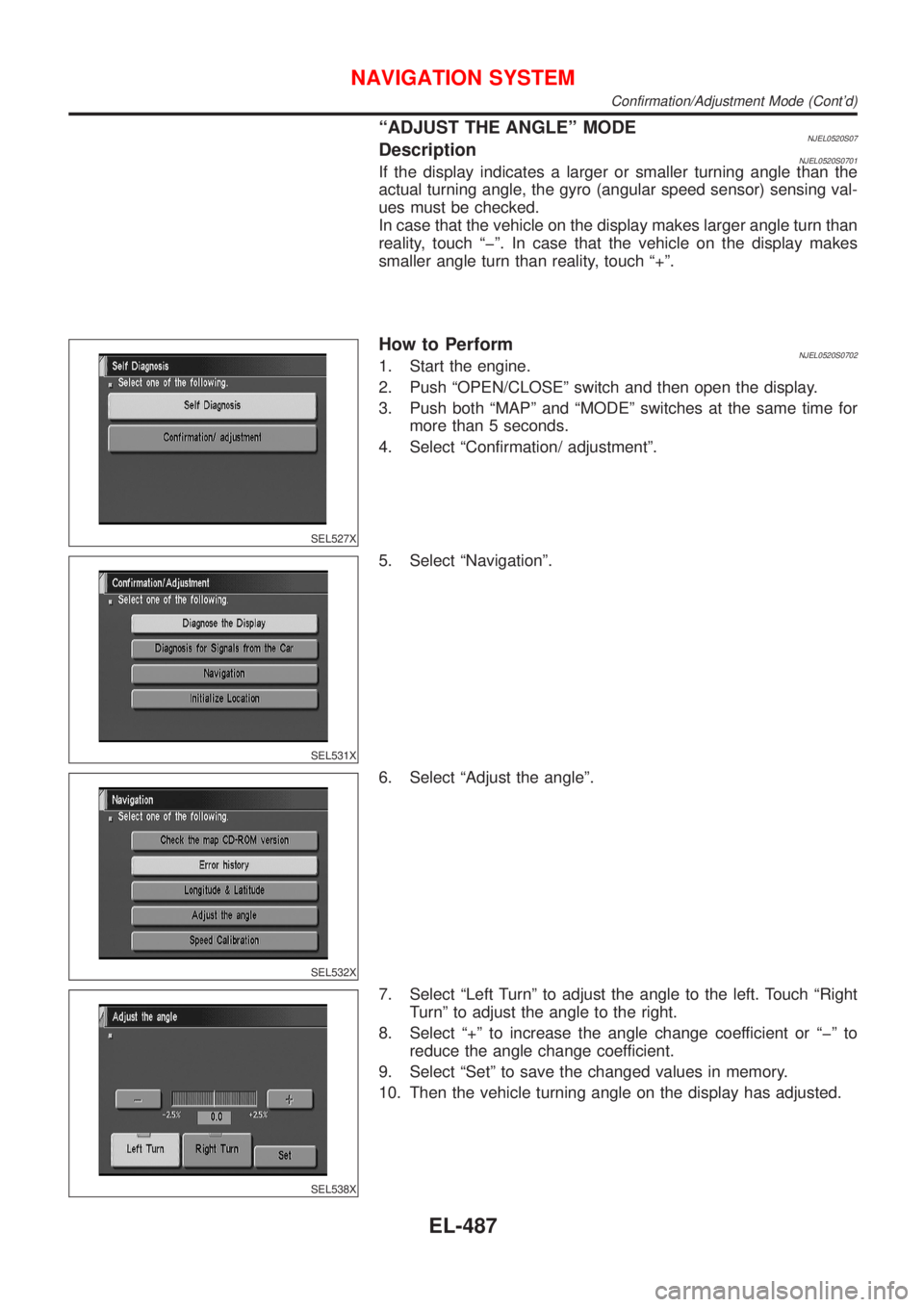
ªADJUST THE ANGLEº MODENJEL0520S07DescriptionNJEL0520S0701If the display indicates a larger or smaller turning angle than the
actual turning angle, the gyro (angular speed sensor) sensing val-
ues must be checked.
In case that the vehicle on the display makes larger angle turn than
reality, touch ªþº. In case that the vehicle on the display makes
smaller angle turn than reality, touch ª+º.
SEL527X
How to PerformNJEL0520S07021. Start the engine.
2. Push ªOPEN/CLOSEº switch and then open the display.
3. Push both ªMAPº and ªMODEº switches at the same time for
more than 5 seconds.
4. Select ªConfirmation/ adjustmentº.
SEL531X
5. Select ªNavigationº.
SEL532X
6. Select ªAdjust the angleº.
SEL538X
7. Select ªLeft Turnº to adjust the angle to the left. Touch ªRight
Turnº to adjust the angle to the right.
8. Select ª+º to increase the angle change coefficient or ªþº to
reduce the angle change coefficient.
9. Select ªSetº to save the changed values in memory.
10. Then the vehicle turning angle on the display has adjusted.
NAVIGATION SYSTEM
Confirmation/Adjustment Mode (Cont'd)
EL-487
Page 2046 of 2898
SEL527X
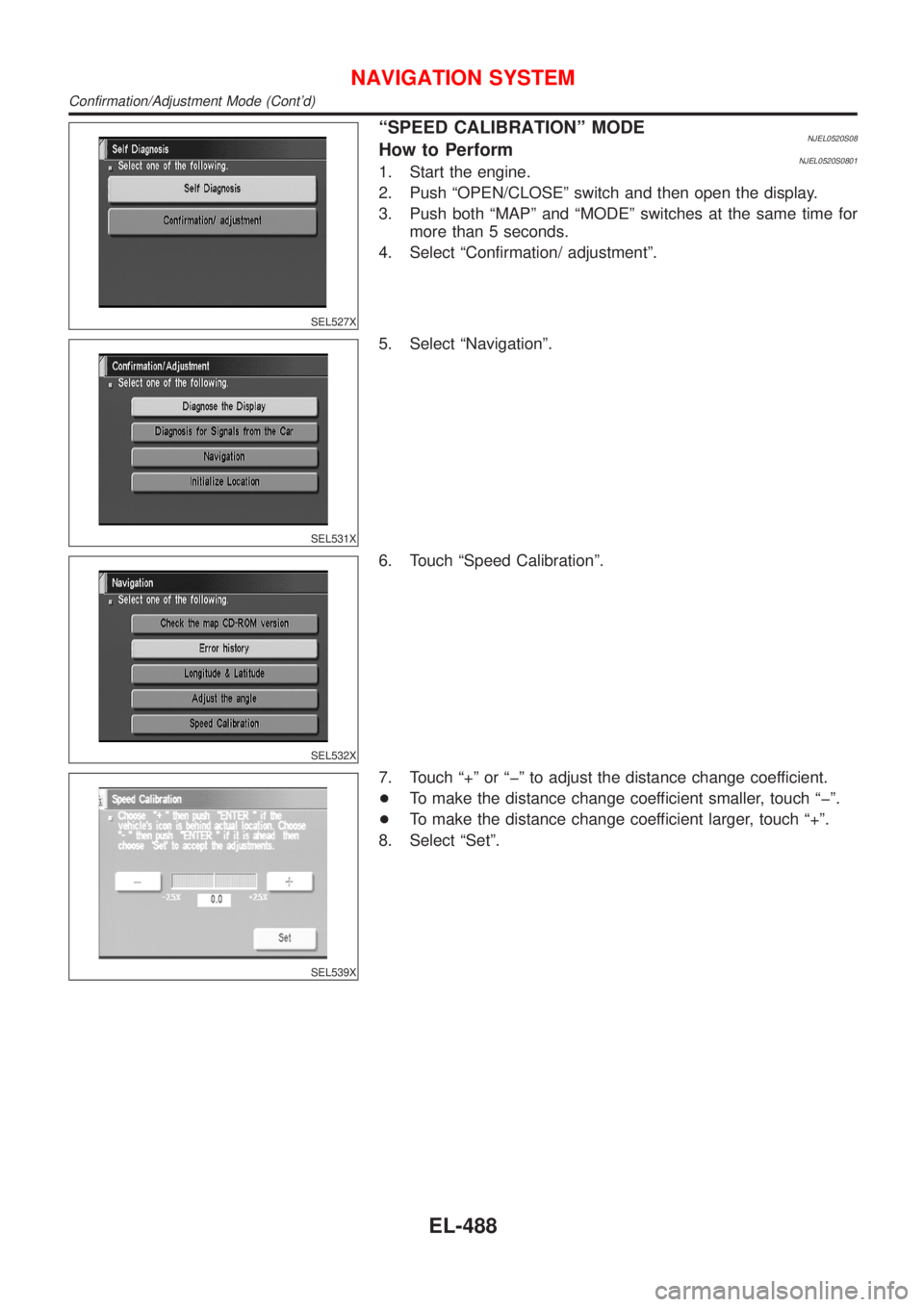
ªSPEED CALIBRATIONº MODENJEL0520S08How to PerformNJEL0520S08011. Start the engine.
2. Push ªOPEN/CLOSEº switch and then open the display.
3. Push both ªMAPº and ªMODEº switches at the same time for
more than 5 seconds.
4. Select ªConfirmation/ adjustmentº.
SEL531X
5. Select ªNavigationº.
SEL532X
6. Touch ªSpeed Calibrationº.
SEL539X
7. Touch ª+º or ªþº to adjust the distance change coefficient.
+To make the distance change coefficient smaller, touch ªþº.
+To make the distance change coefficient larger, touch ª+º.
8. Select ªSetº.
NAVIGATION SYSTEM
Confirmation/Adjustment Mode (Cont'd)
EL-488
Page 2049 of 2898
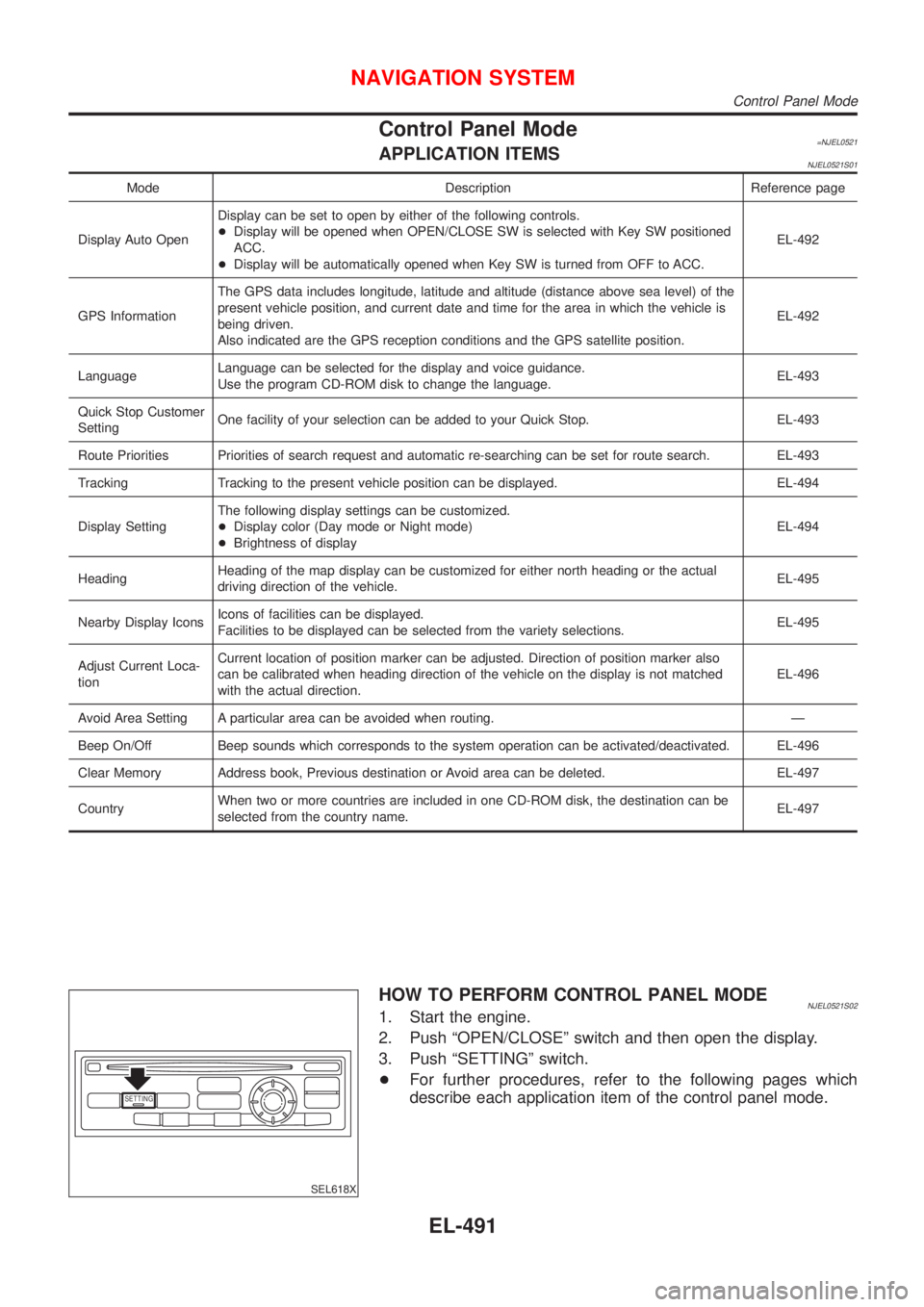
Control Panel Mode=NJEL0521APPLICATION ITEMSNJEL0521S01
Mode Description Reference page
Display Auto OpenDisplay can be set to open by either of the following controls.
+Display will be opened when OPEN/CLOSE SW is selected with Key SW positioned
ACC.
+Display will be automatically opened when Key SW is turned from OFF to ACC.EL-492
GPS InformationThe GPS data includes longitude, latitude and altitude (distance above sea level) of the
present vehicle position, and current date and time for the area in which the vehicle is
being driven.
Also indicated are the GPS reception conditions and the GPS satellite position.EL-492
LanguageLanguage can be selected for the display and voice guidance.
Use the program CD-ROM disk to change the language.EL-493
Quick Stop Customer
SettingOne facility of your selection can be added to your Quick Stop. EL-493
Route Priorities Priorities of search request and automatic re-searching can be set for route search. EL-493
Tracking Tracking to the present vehicle position can be displayed. EL-494
Display SettingThe following display settings can be customized.
+Display color (Day mode or Night mode)
+Brightness of displayEL-494
HeadingHeading of the map display can be customized for either north heading or the actual
driving direction of the vehicle.EL-495
Nearby Display IconsIcons of facilities can be displayed.
Facilities to be displayed can be selected from the variety selections.EL-495
Adjust Current Loca-
tionCurrent location of position marker can be adjusted. Direction of position marker also
can be calibrated when heading direction of the vehicle on the display is not matched
with the actual direction.EL-496
Avoid Area Setting A particular area can be avoided when routing. Ð
Beep On/Off Beep sounds which corresponds to the system operation can be activated/deactivated. EL-496
Clear Memory Address book, Previous destination or Avoid area can be deleted. EL-497
CountryWhen two or more countries are included in one CD-ROM disk, the destination can be
selected from the country name.EL-497
SETTING
SEL618X
HOW TO PERFORM CONTROL PANEL MODENJEL0521S021. Start the engine.
2. Push ªOPEN/CLOSEº switch and then open the display.
3. Push ªSETTINGº switch.
+For further procedures, refer to the following pages which
describe each application item of the control panel mode.
NAVIGATION SYSTEM
Control Panel Mode
EL-491
Page 2050 of 2898
SEL619X
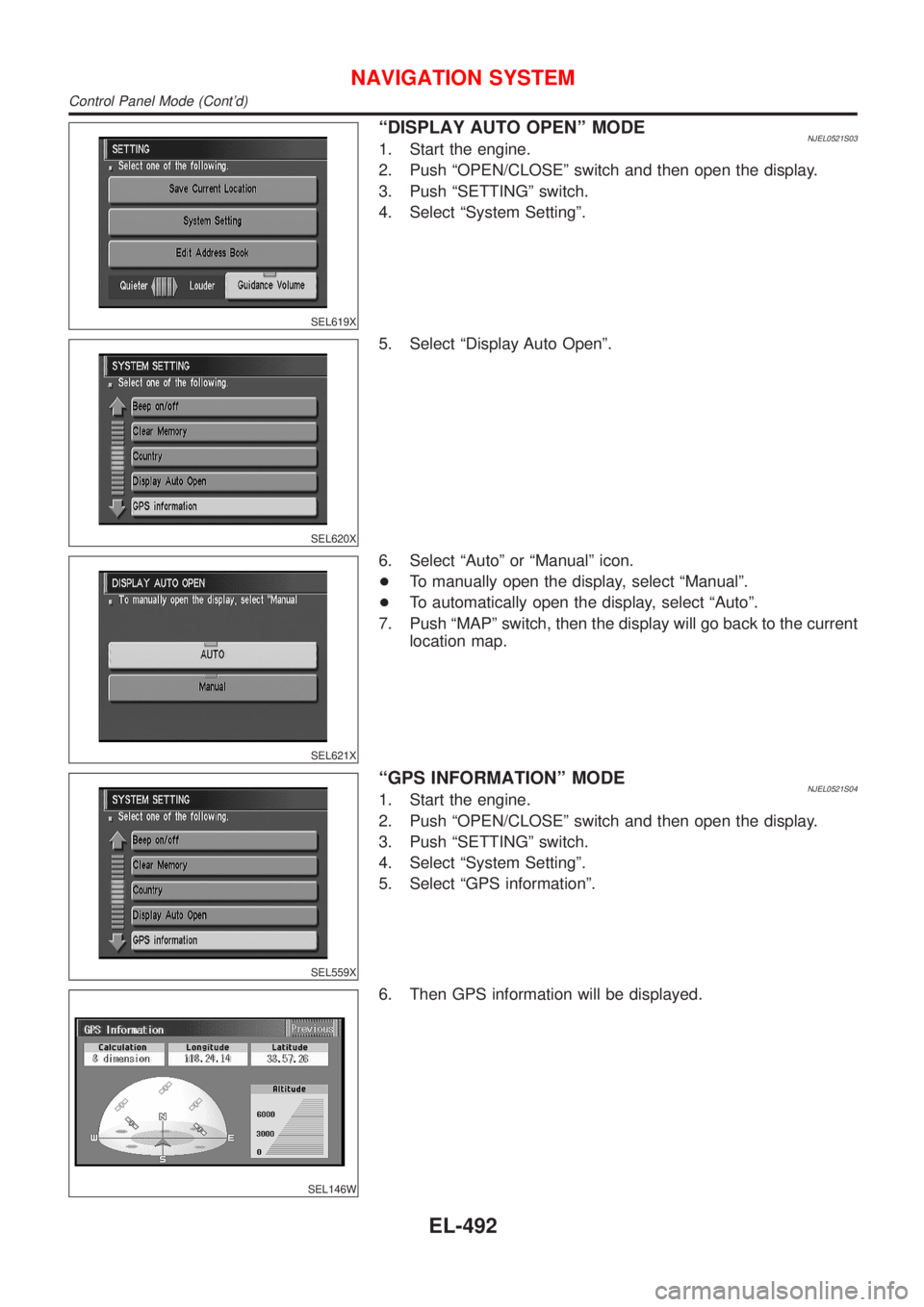
ªDISPLAY AUTO OPENº MODENJEL0521S031. Start the engine.
2. Push ªOPEN/CLOSEº switch and then open the display.
3. Push ªSETTINGº switch.
4. Select ªSystem Settingº.
SEL620X
5. Select ªDisplay Auto Openº.
SEL621X
6. Select ªAutoº or ªManualº icon.
+To manually open the display, select ªManualº.
+To automatically open the display, select ªAutoº.
7. Push ªMAPº switch, then the display will go back to the current
location map.
SEL559X
ªGPS INFORMATIONº MODENJEL0521S041. Start the engine.
2. Push ªOPEN/CLOSEº switch and then open the display.
3. Push ªSETTINGº switch.
4. Select ªSystem Settingº.
5. Select ªGPS informationº.
SEL146W
6. Then GPS information will be displayed.
NAVIGATION SYSTEM
Control Panel Mode (Cont'd)
EL-492
Page 2051 of 2898
SEL565X
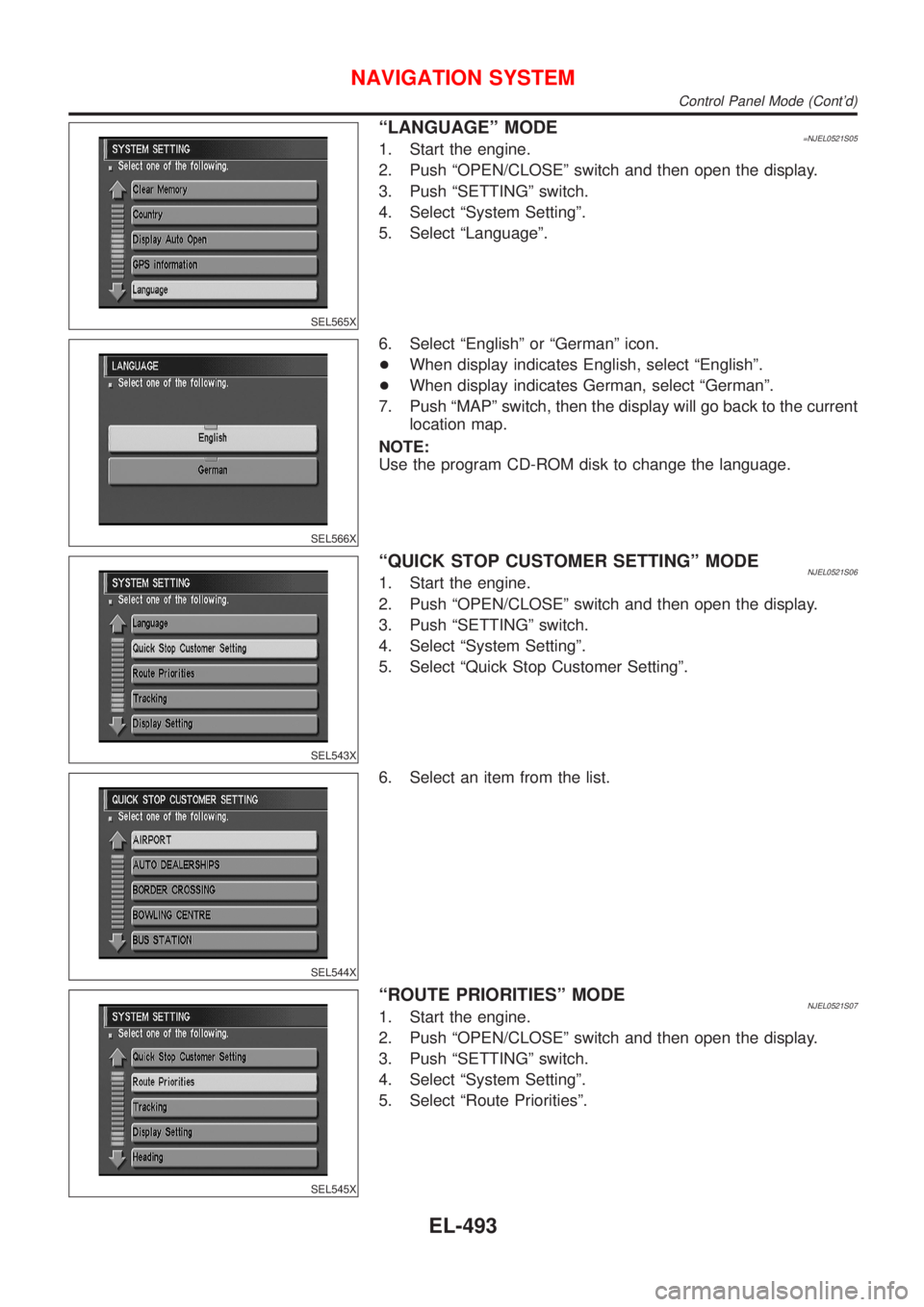
ªLANGUAGEº MODE=NJEL0521S051. Start the engine.
2. Push ªOPEN/CLOSEº switch and then open the display.
3. Push ªSETTINGº switch.
4. Select ªSystem Settingº.
5. Select ªLanguageº.
SEL566X
6. Select ªEnglishº or ªGermanº icon.
+When display indicates English, select ªEnglishº.
+When display indicates German, select ªGermanº.
7. Push ªMAPº switch, then the display will go back to the current
location map.
NOTE:
Use the program CD-ROM disk to change the language.
SEL543X
ªQUICK STOP CUSTOMER SETTINGº MODENJEL0521S061. Start the engine.
2. Push ªOPEN/CLOSEº switch and then open the display.
3. Push ªSETTINGº switch.
4. Select ªSystem Settingº.
5. Select ªQuick Stop Customer Settingº.
SEL544X
6. Select an item from the list.
SEL545X
ªROUTE PRIORITIESº MODENJEL0521S071. Start the engine.
2. Push ªOPEN/CLOSEº switch and then open the display.
3. Push ªSETTINGº switch.
4. Select ªSystem Settingº.
5. Select ªRoute Prioritiesº.
NAVIGATION SYSTEM
Control Panel Mode (Cont'd)
EL-493
Page 2052 of 2898
SEL546X
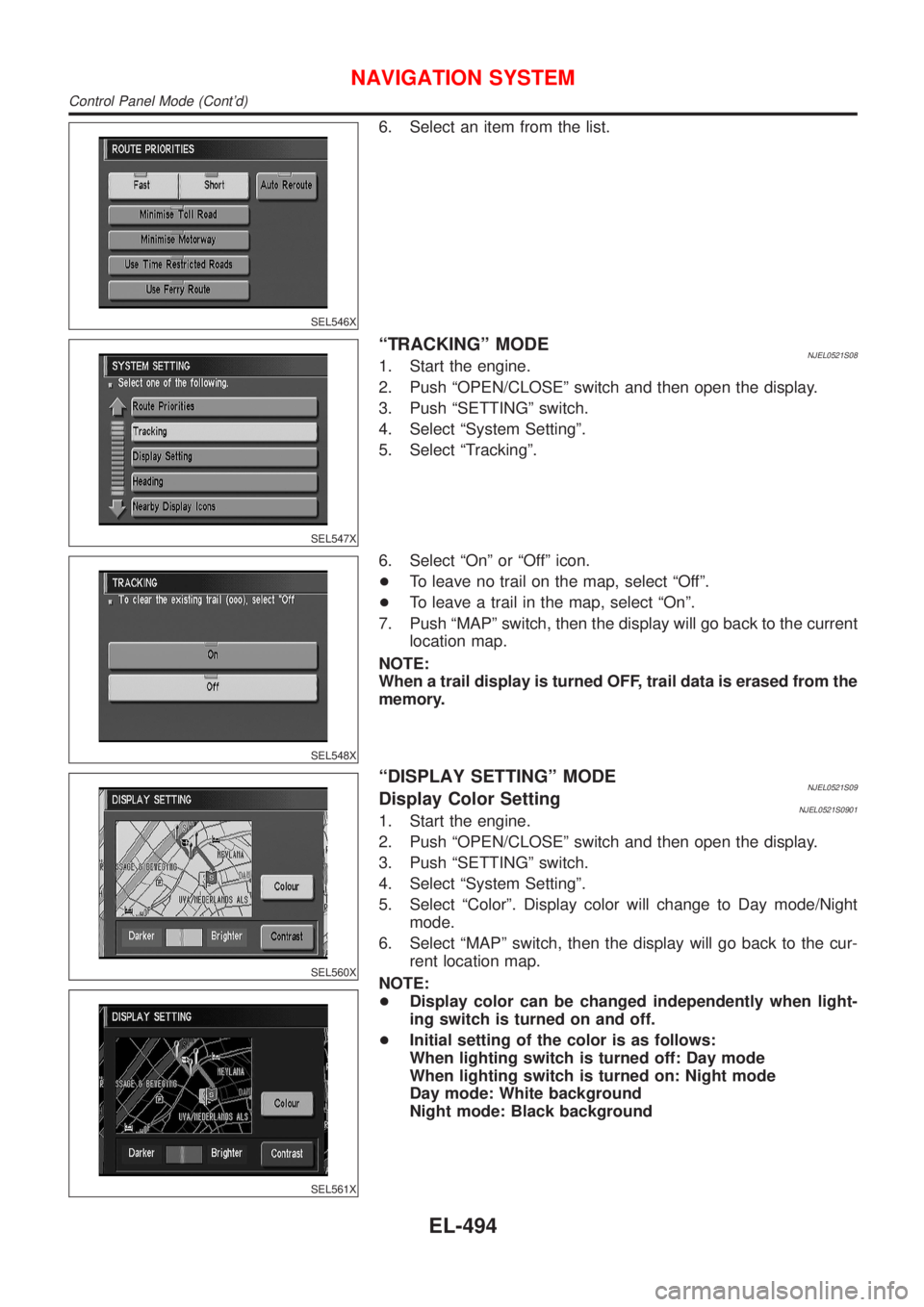
6. Select an item from the list.
SEL547X
ªTRACKINGº MODENJEL0521S081. Start the engine.
2. Push ªOPEN/CLOSEº switch and then open the display.
3. Push ªSETTINGº switch.
4. Select ªSystem Settingº.
5. Select ªTrackingº.
SEL548X
6. Select ªOnº or ªOffº icon.
+To leave no trail on the map, select ªOffº.
+To leave a trail in the map, select ªOnº.
7. Push ªMAPº switch, then the display will go back to the current
location map.
NOTE:
When a trail display is turned OFF, trail data is erased from the
memory.
SEL560X
SEL561X
ªDISPLAY SETTINGº MODENJEL0521S09Display Color SettingNJEL0521S09011. Start the engine.
2. Push ªOPEN/CLOSEº switch and then open the display.
3. Push ªSETTINGº switch.
4. Select ªSystem Settingº.
5. Select ªColorº. Display color will change to Day mode/Night
mode.
6. Select ªMAPº switch, then the display will go back to the cur-
rent location map.
NOTE:
+Display color can be changed independently when light-
ing switch is turned on and off.
+Initial setting of the color is as follows:
When lighting switch is turned off: Day mode
When lighting switch is turned on: Night mode
Day mode: White background
Night mode: Black background
NAVIGATION SYSTEM
Control Panel Mode (Cont'd)
EL-494
Page 2053 of 2898
SEL562X
Brightness SettingNJEL0521S09021. Start the engine.
2. Push ªOPEN/CLOSEº switch and then open the display.
3. Push ªSETTINGº switch.
4. Select ªSystem Settingº.
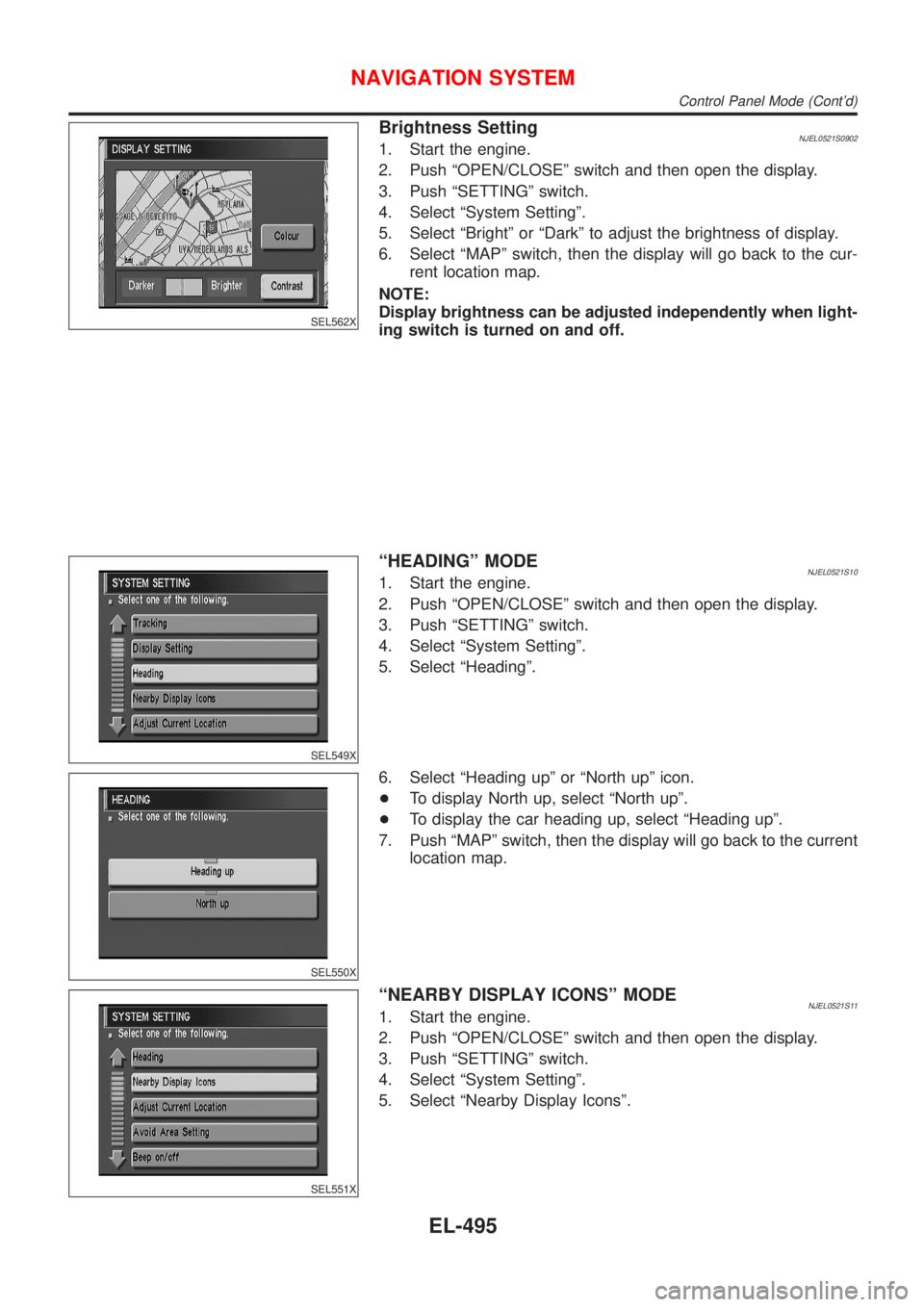
5. Select ªBrightº or ªDarkº to adjust the brightness of display.
6. Select ªMAPº switch, then the display will go back to the cur-
rent location map.
NOTE:
Display brightness can be adjusted independently when light-
ing switch is turned on and off.
SEL549X
ªHEADINGº MODENJEL0521S101. Start the engine.
2. Push ªOPEN/CLOSEº switch and then open the display.
3. Push ªSETTINGº switch.
4. Select ªSystem Settingº.
5. Select ªHeadingº.
SEL550X
6. Select ªHeading upº or ªNorth upº icon.
+To display North up, select ªNorth upº.
+To display the car heading up, select ªHeading upº.
7. Push ªMAPº switch, then the display will go back to the current
location map.
SEL551X
ªNEARBY DISPLAY ICONSº MODENJEL0521S111. Start the engine.
2. Push ªOPEN/CLOSEº switch and then open the display.
3. Push ªSETTINGº switch.
4. Select ªSystem Settingº.
5. Select ªNearby Display Iconsº.
NAVIGATION SYSTEM
Control Panel Mode (Cont'd)
EL-495