bulb NISSAN ALTIMA 2005 L31 / 3.G Owners Manual
[x] Cancel search | Manufacturer: NISSAN, Model Year: 2005, Model line: ALTIMA, Model: NISSAN ALTIMA 2005 L31 / 3.GPages: 304, PDF Size: 4.91 MB
Page 9 of 304
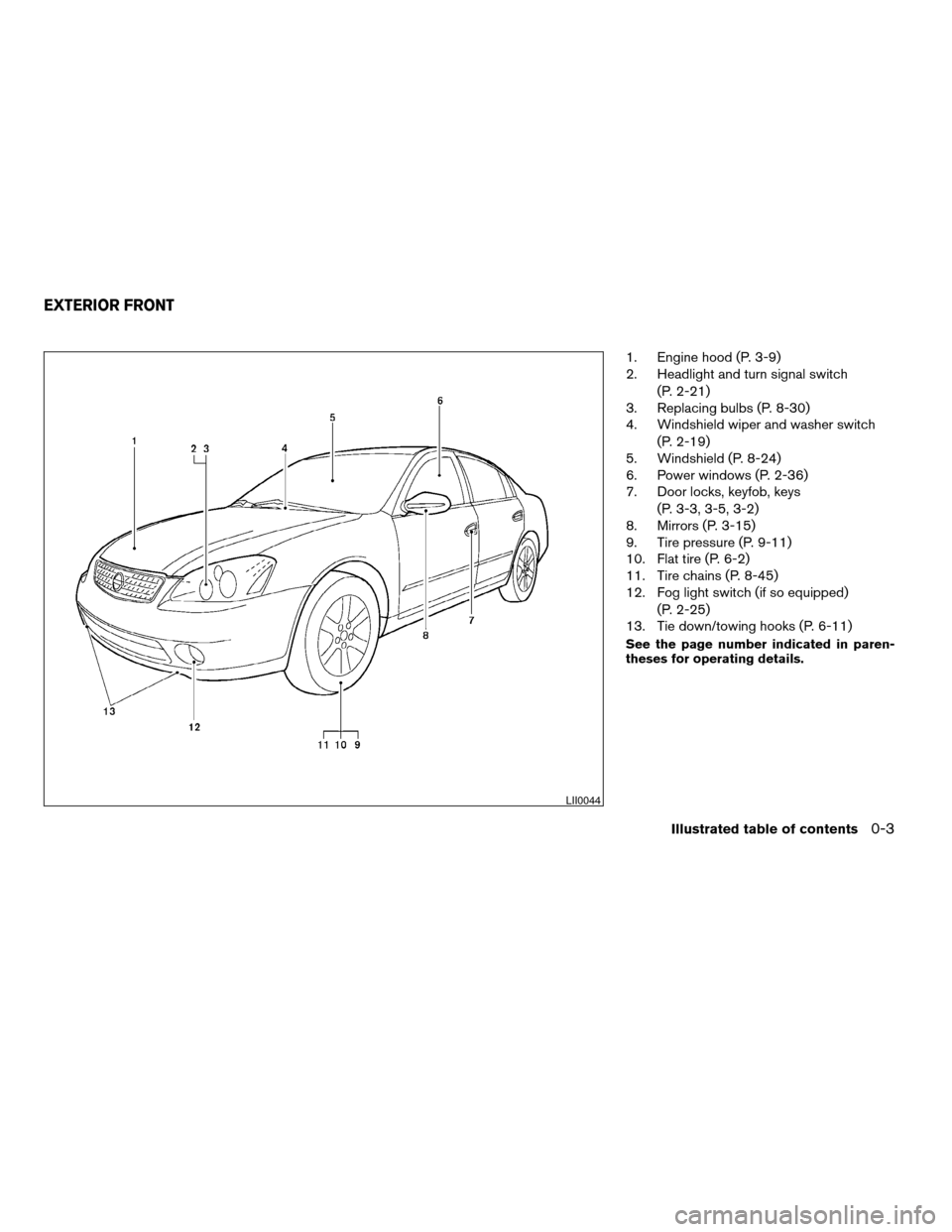
1. Engine hood (P. 3-9)
2. Headlight and turn signal switch(P. 2-21)
3. Replacing bulbs (P. 8-30)
4. Windshield wiper and washer switch
(P. 2-19)
5. Windshield (P. 8-24)
6. Power windows (P. 2-36)
7. Door locks, keyfob, keys
(P. 3-3, 3-5, 3-2)
8. Mirrors (P. 3-15)
9. Tire pressure (P. 9-11)
10. Flat tire (P. 6-2)
11. Tire chains (P. 8-45)
12. Fog light switch (if so equipped)
(P. 2-25)
13. Tie down/towing hooks (P. 6-11)
See the page number indicated in paren-
theses for operating details.
LII0044
EXTERIOR FRONT
Illustrated table of contents0-3
ZREVIEW COPYÐ2005 Altima (l30)
Owners ManualÐUSA_English (nna)
06/29/04Ðtbrooks
X
Page 10 of 304
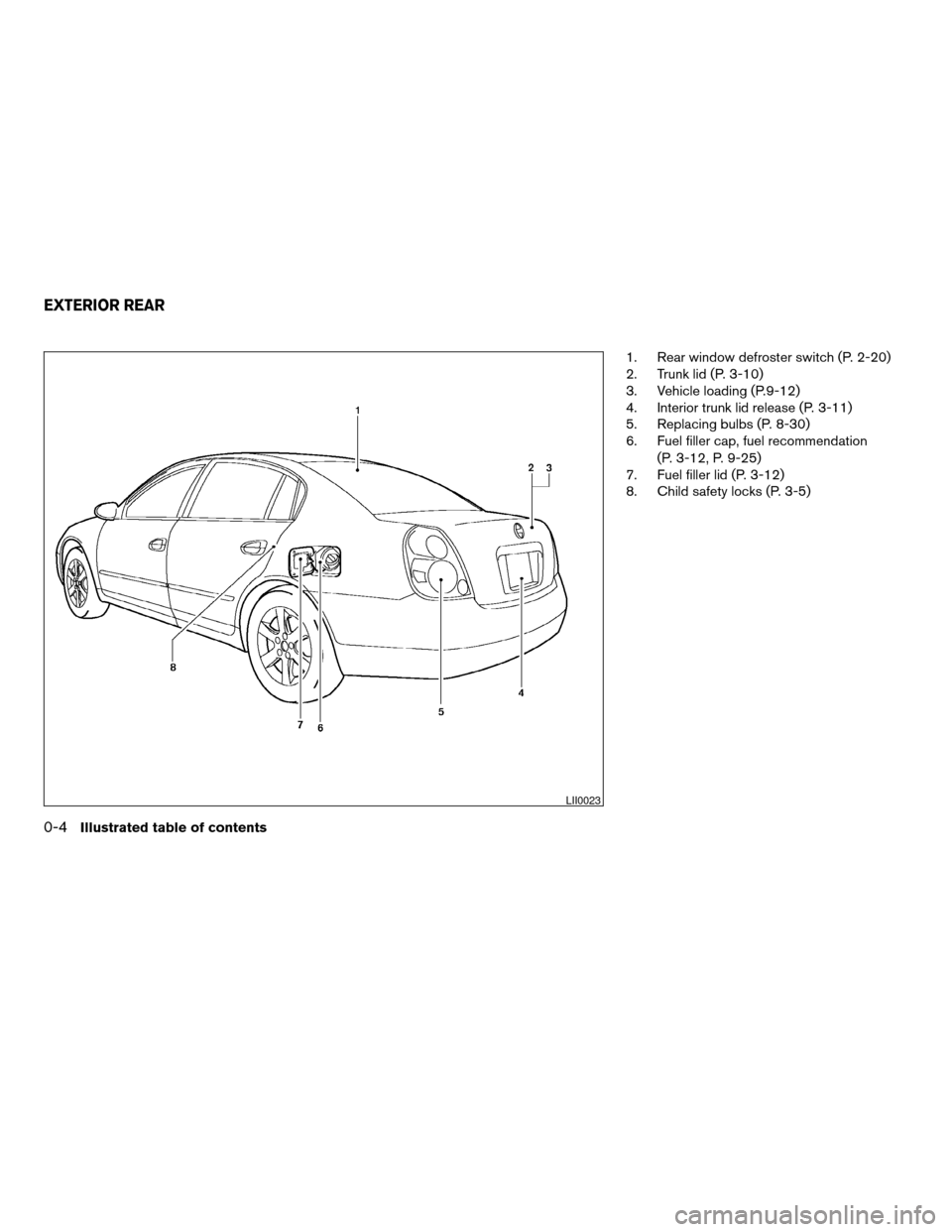
1. Rear window defroster switch (P. 2-20)
2. Trunk lid (P. 3-10)
3. Vehicle loading (P.9-12)
4. Interior trunk lid release (P. 3-11)
5. Replacing bulbs (P. 8-30)
6. Fuel filler cap, fuel recommendation(P. 3-12, P. 9-25)
7. Fuel filler lid (P. 3-12)
8. Child safety locks (P. 3-5)
LII0023
EXTERIOR REAR
0-4Illustrated table of contents
ZREVIEW COPYÐ2005 Altima (l30)
Owners ManualÐUSA_English (nna)
06/29/04Ðtbrooks
X
Page 68 of 304
2 Instruments and controls
Instrument panel...................................2-2
Meters and gauges ................................2-3
Speedometer and odometer .....................2-4
Trip computer (if so equipped) ...................2-5
Tachometer ....................................2-7
Engine coolant temperature gauge ...............2-8
Fuel gauge ....................................2-8
Engine oil pressure gauge .......................2-9
Voltmeter ..................................... 2-10
Fuel consumption gauge .......................2-10
Warning/indicator lights and audible reminders ......2-11
Checking bulbs ............................... 2-11
Warning lights ................................ 2-11
Indicator lights ................................ 2-14
Audible reminders ............................. 2-15
Security systems ................................. 2-16
Vehicle security system (if so equipped) ..........2-16
Nissan vehicle immobilizer system (NVIS) ........2-17
Windshield wiper and washer switch ...............2-19
Switch operation .............................. 2-19
Rear window and outside mirror (if so equipped)
defroster switch .................................. 2-20
Headlight and turn signal switch ....................2-21Xenon headlights (if so equipped)
...............2-21
Headlight control switch ........................ 2-21
Daytime running light system (Canada only) ......2-23
Instrument brightness control ...................2-24
Turn signal switch ............................. 2-24
Fog light switch (if so equipped) ................2-25
Hazard warning flasher switch .....................2-25
Horn ............................................ 2-26
Heated seat (if so equipped) .......................2-26
Traction control system (TCS) off switch
(if so equipped) .................................. 2-27
Power outlet ..................................... 2-27
Cigarette lighter and ashtray (if so equipped) ........2-28
Storage ......................................... 2-29
Map pockets .................................. 2-29
Seatback pockets (if so equipped) ..............2-29
Sunglasses holder ............................. 2-30
Cup holders .................................. 2-30
Glove box .................................... 2-31
Console box .................................. 2-31
Instrument panel storage (if so equipped) ........2-33
Covered storage box (if so equipped) ............2-34
Grocery hooks (if so equipped) .................2-34
ZREVIEW COPYÐ2005 Altima(l30)
Owners ManualÐUSA_English (nna)
06/29/04Ðtbrooks
X
Page 79 of 304
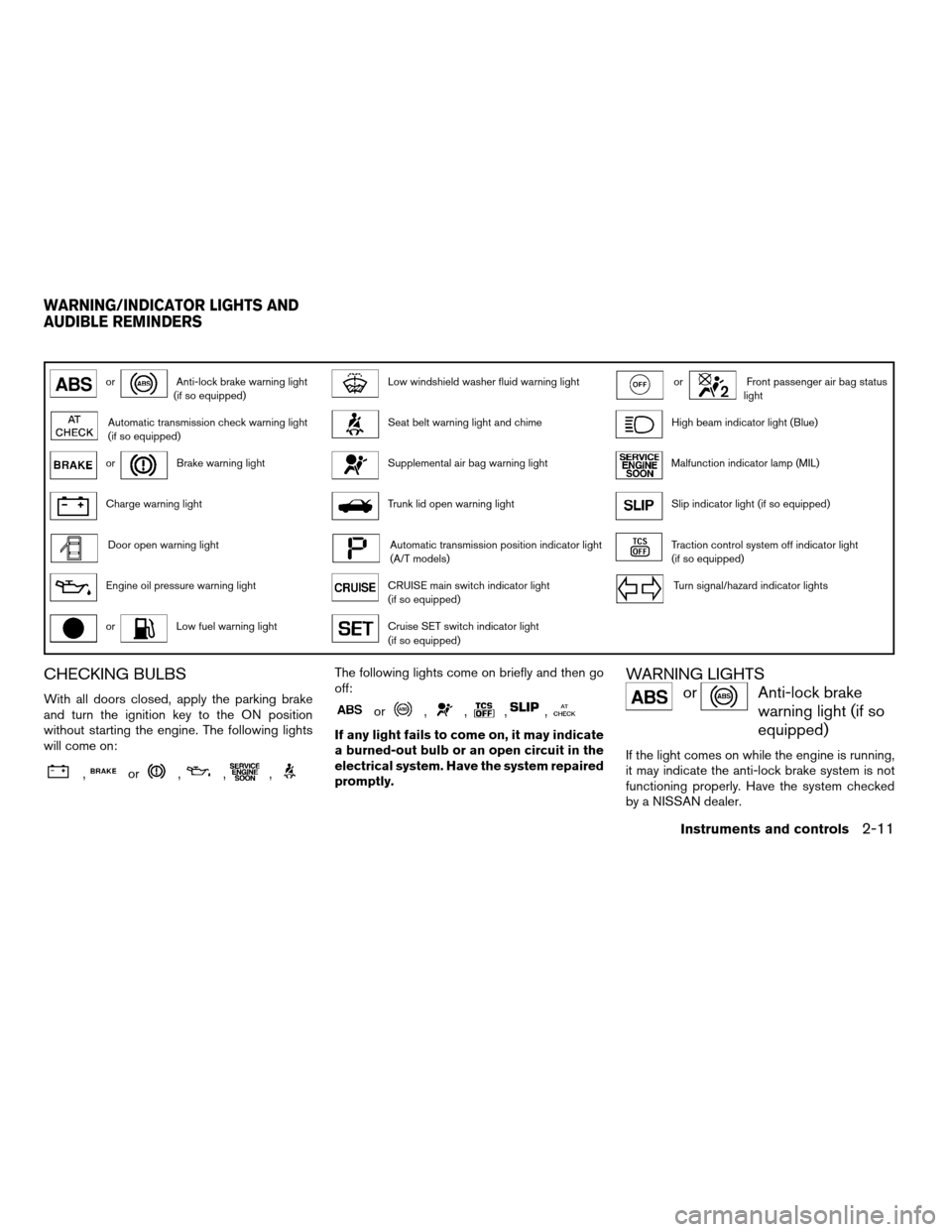
orAnti-lock brake warning light
(if so equipped)Low windshield washer fluid warning lightorFront passenger air bag status
light
Automatic transmission check warning light
(if so equipped)Seat belt warning light and chimeHigh beam indicator light (Blue)
orBrake warning lightSupplemental air bag warning lightMalfunction indicator lamp (MIL)
Charge warning lightTrunk lid open warning lightSlip indicator light (if so equipped)
Door open warning lightAutomatic transmission position indicator light
(A/T models)Traction control system off indicator light
(if so equipped)
Engine oil pressure warning lightCRUISE main switch indicator light
(if so equipped)Turn signal/hazard indicator lights
orLow fuel warning lightCruise SET switch indicator light
(if so equipped)
CHECKING BULBS
With all doors closed, apply the parking brake
and turn the ignition key to the ON position
without starting the engine. The following lights
will come on:
,or,,,
The following lights come on briefly and then go
off:
or,,,,
If any light fails to come on, it may indicate
a burned-out bulb or an open circuit in the
electrical system. Have the system repaired
promptly.
WARNING LIGHTS
orAnti-lock brake
warning light (if so
equipped)
If the light comes on while the engine is running,
it may indicate the anti-lock brake system is not
functioning properly. Have the system checked
by a NISSAN dealer.
WARNING/INDICATOR LIGHTS AND
AUDIBLE REMINDERS
Instruments and controls2-11
ZREVIEW COPYÐ2005 Altima (l30)
Owners ManualÐUSA_English (nna)
06/28/04Ðtbrooks
X
Page 89 of 304
XENON HEADLIGHTS (if so
equipped)
WARNING
cHIGH VOLTAGE
cWhen xenon headlights are on, they
produce a high voltage. To prevent an
electric shock, never attempt to modify
or disassemble. Always have your xe-
non headlights replaced at a NISSAN
dealer.
c Xenon headlights provide considerably
more light than conventional head-
lights. If they are not correctly aimed,
they might temporarily blind an oncom-
ing driver or the driver ahead of you and
cause a serious accident. If headlights
are not aimed correctly, immediately
take your vehicle to a NISSAN dealer
and have the headlights adjusted
correctly.
When the xenon headlight is initially turned on, its
brightness or color varies slightly. However, the
color and brightness will soon stabilize. c The life of xenon headlights will be
shortened by frequent on-off opera-
tion. It is generally desirable not to turn
off the headlights for short intervals (for example, when the vehicle stops at
a traffic signal) . Even when the daytime
running lights are active (Canada only) ,
the xenon headlights do not turn on.
This way the life of the xenon head-
lights is not reduced.
c If the xenon headlight bulb is close to
burning out, the brightness will drasti-
cally decrease, the light will start blink-
ing, or the color of the light will be-
come reddish. If one or more of the
above signs appear, contact a NISSAN
dealer.
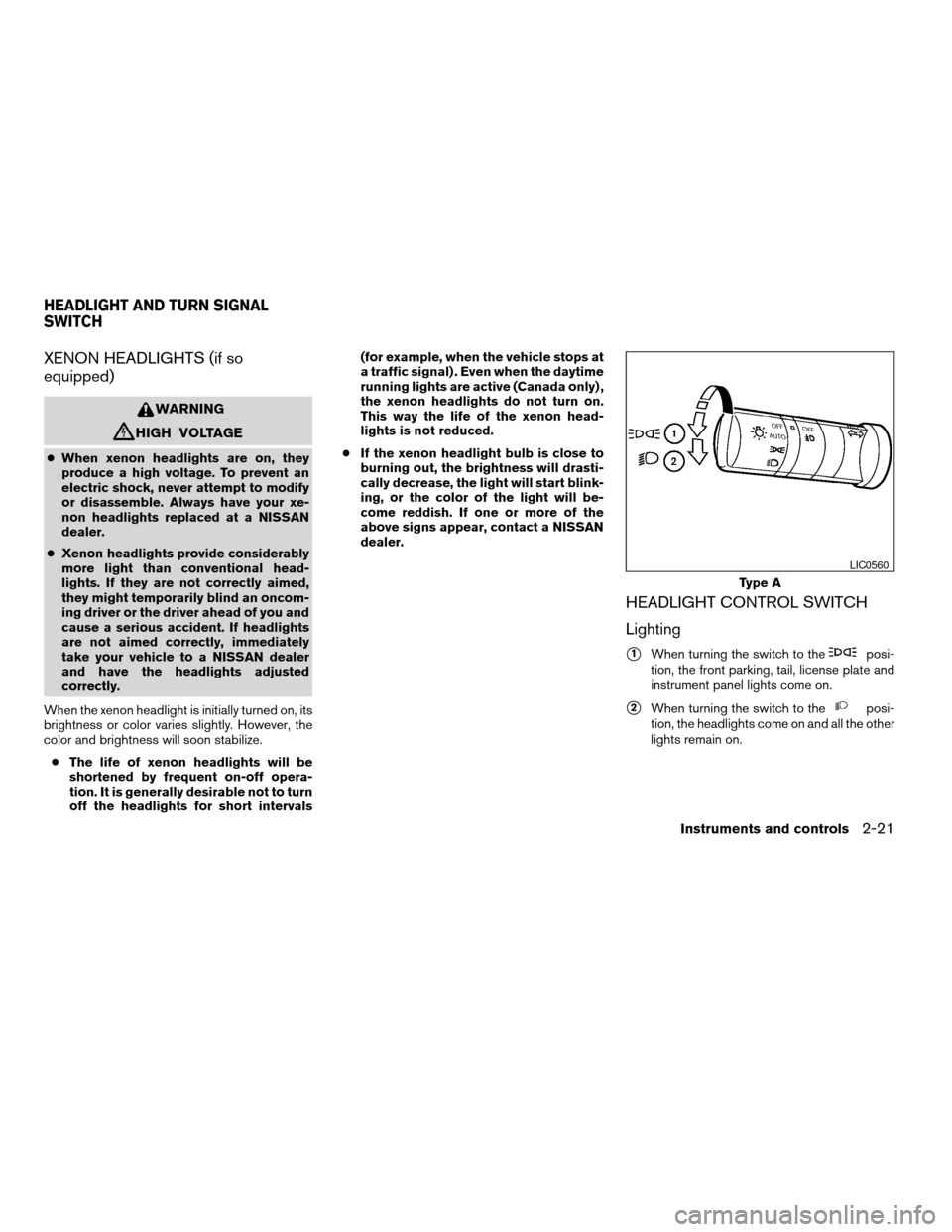
HEADLIGHT CONTROL SWITCH
Lighting
s1When turning the switch to theposi-
tion, the front parking, tail, license plate and
instrument panel lights come on.
s2When turning the switch to theposi-
tion, the headlights come on and all the other
lights remain on.
Type A
LIC0560
HEADLIGHT AND TURN SIGNAL
SWITCH
Instruments and controls2-21
ZREVIEW COPYÐ2005 Altima (l30)
Owners ManualÐUSA_English (nna)
06/28/04Ðtbrooks
X
Page 109 of 304
The light illuminates when the trunk lid is opened.
When the trunk lid is closed, the light goes off.
The light will go off after about 30 minutes if the
trunk lid is left open, unless the ignition key is in
the ACC or ON position.
For bulb replacement procedures, refer to “Exte-
rior and interior lights” in the “Maintenance and
do-it-yourself” section of this manual.The HomeLink
TUniversal Transceiver provides a
convenient way to consolidate the functions of up
to three individual hand-held transmitters into
one built-in device.
HomeLink TUniversal Transceiver:
c Will operate most Radio Frequency (RF)
devices such as garage doors, gates, home
and office lighting, entry door locks and se-
curity systems.
c Is powered by your vehicle’s battery. No
separate batteries are required. If the vehi-
cle’s battery is discharged or is discon-
nected, HomeLink Twill retain all program-
ming.
Once the HomeLink TUniversal Transceiver
is programmed, retain the original trans-
mitter for future programming procedures
(Example: new vehicle purchases) . Upon
sale of the vehicle, the programmed
HomeLink TUniversal Transceiver buttons
should be erased for security purposes. For
additional information refer to “Program-
ming HomeLink T” later in this section.WARNING
c Do not use the HomeLink TUniversal
Transceiver with any garage door
opener that lacks safety stop and re-
verse features as required by federal
safety standards. (These standards be-
came effective for opener models
manufactured after April 1, 1982) . A ga-
rage door opener which cannot detect
an object in the path of a closing garage
door and then automatically stop and
reverse, does not meet current federal
safety standards. Using a garage door
opener without these features in-
creases the risk of serious injury or
death.
c During the programming procedure
your garage door or security gate will
open and close (if the transmitter is
within range) . Make sure that people or
objects are clear of the garage door,
gate, etc. that you are programming.
c Your vehicle’s engine should be turned
off while programming the HomeLink T
Universal Transceiver.
TRUNK LIGHT HOMELINK TUNIVERSAL
TRANSCEIVER (if so equipped)
Instruments and controls2-41
ZREVIEW COPYÐ2005 Altima (l30)
Owners ManualÐUSA_English (nna)
06/28/04Ðtbrooks
X
Page 246 of 304
HEADLIGHTS
Replacing the xenon headlight bulb
WARNING
cHIGH VOLTAGE
When xenon headlights are on, they pro-
duce a high voltage. To prevent an electric
shock, never attempt to modify or disas-
semble. Always have your xenon head-
lights replaced at a NISSAN dealer. For
additional information, see “Headlight
and turn signal switch” in the “Instru-
ments and controls” section.
Replacing the halogen headlight bulb
The headlight is a semi-sealed beam type which
uses a replaceable headlight (halogen) bulb. Be-
cause the headlight assembly must be removed
from the vehicle for bulb replacement, see your
NISSAN dealer.
CAUTION
cAiming is not necessary after replacing
the bulb. When aiming adjustment is
necessary, contact a NISSAN dealer. c
Do not leave the headlight assembly
open without a bulb installed for a long
period of time. Dust, moisture, smoke,
etc. entering the headlight body may
affect bulb performance. Remove the
bulb from the headlight assembly just
before a replacement bulb is installed.
c Only touch the plastic base when han-
dling the bulb. Never touch the glass
envelope. Touching the glass could sig-
nificantly affect bulb life and/or head-
light performance.
c High pressure halogen gas is sealed
inside the halogen bulb. The bulb may
break if the glass envelope is scratched
or the bulb is dropped.
c Use the same number and wattage as
originally installed:
Low beam:
Wattage: 55
Bulb no.: H1*
High beam: Wattage: 60
Bulb no.: HB3 (9005)*
*: Always check with the Parts Depart-
ment at a NISSAN dealer for the latest
parts information.
FRONT PARK/TURN/SIDEMARKER
LIGHT
Bulb replacement requires the removal of the
headlight assembly. If replacement is required,
see your NISSAN dealer.
FOG LIGHTS (if so equipped)
Replacing the fog light bulb
CAUTION
c High pressure halogen gas is sealed
inside the halogen bulb. The bulb may
break if the glass envelope is scratched
or the bulb is dropped.
c When handling the bulb, do not touch
the glass envelope.
LIGHTS
8-30Maintenance and do-it-yourself
ZREVIEW COPYÐ2005 Altima (l30)
Owners ManualÐUSA_English (nna)
06/28/04Ðtbrooks
X
Page 247 of 304
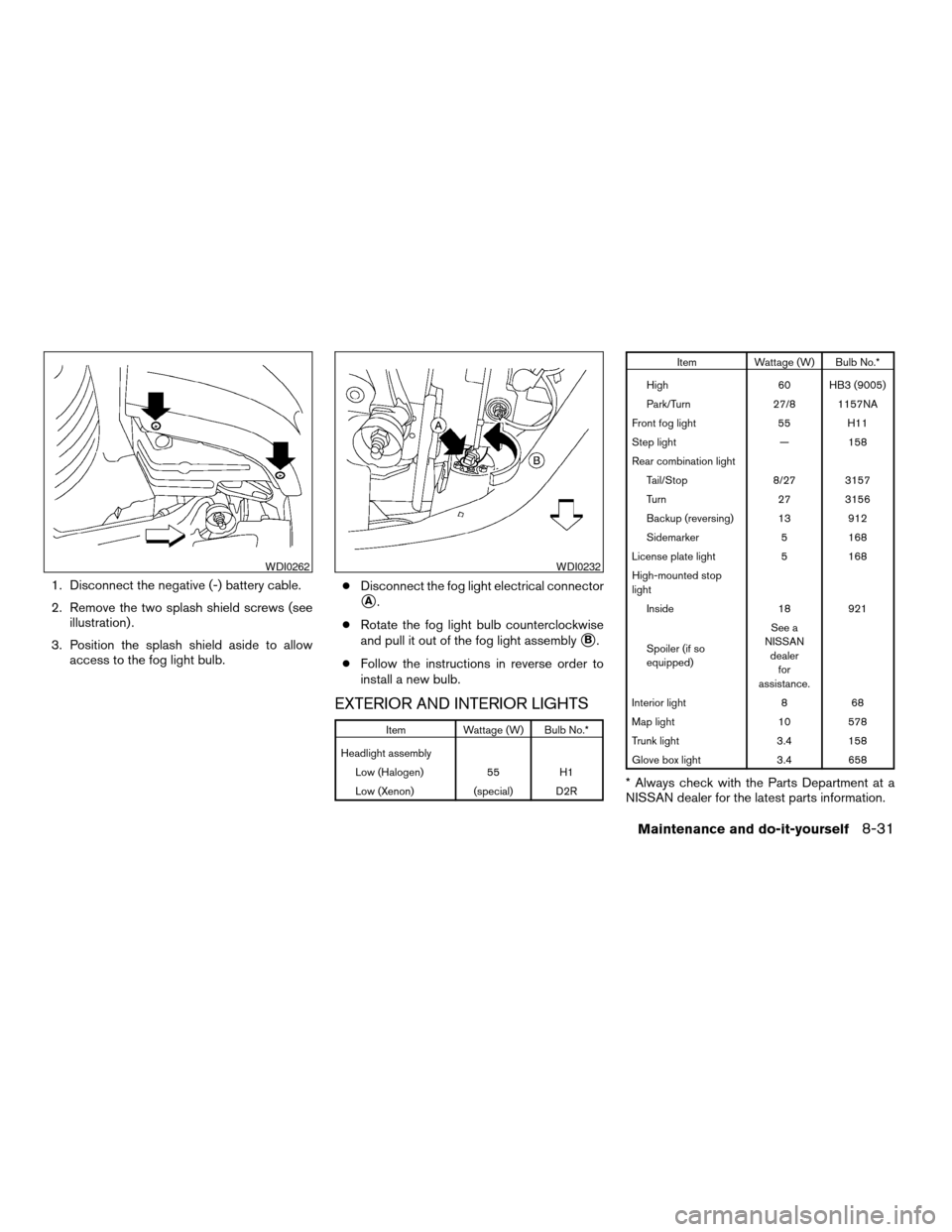
1. Disconnect the negative (-) battery cable.
2. Remove the two splash shield screws (seeillustration) .
3. Position the splash shield aside to allow access to the fog light bulb. c
Disconnect the fog light electrical connector
sA.
c Rotate the fog light bulb counterclockwise
and pull it out of the fog light assembly
sB.
c Follow the instructions in reverse order to
install a new bulb.
EXTERIOR AND INTERIOR LIGHTS
Item Wattage (W) Bulb No.*
Headlight assembly Low (Halogen) 55 H1
Low (Xenon) (special) D2R
Item Wattage (W) Bulb No.*
High 60 HB3 (9005)
Park/Turn 27/8 1157NA
Front fog light 55 H11
Step light — 158
Rear combination light Tail/Stop 8/27 3157
Turn 27 3156
Backup (reversing) 13 912
Sidemarker 5 168
License plate light 5 168
High-mounted stop
light Inside 18 921
Spoiler (if so
equipped) See a
NISSAN dealer for
assistance.
Interior light 8 68
Map light 10 578
Trunk light 3.4 158
Glove box light 3.4 658
* Always check with the Parts Department at a
NISSAN dealer for the latest parts information.
WDI0262WDI0232
Maintenance and do-it-yourself8-31
ZREVIEW COPYÐ2005 Altima (l30)
Owners ManualÐUSA_English (nna)
06/28/04Ðtbrooks
X
Page 249 of 304
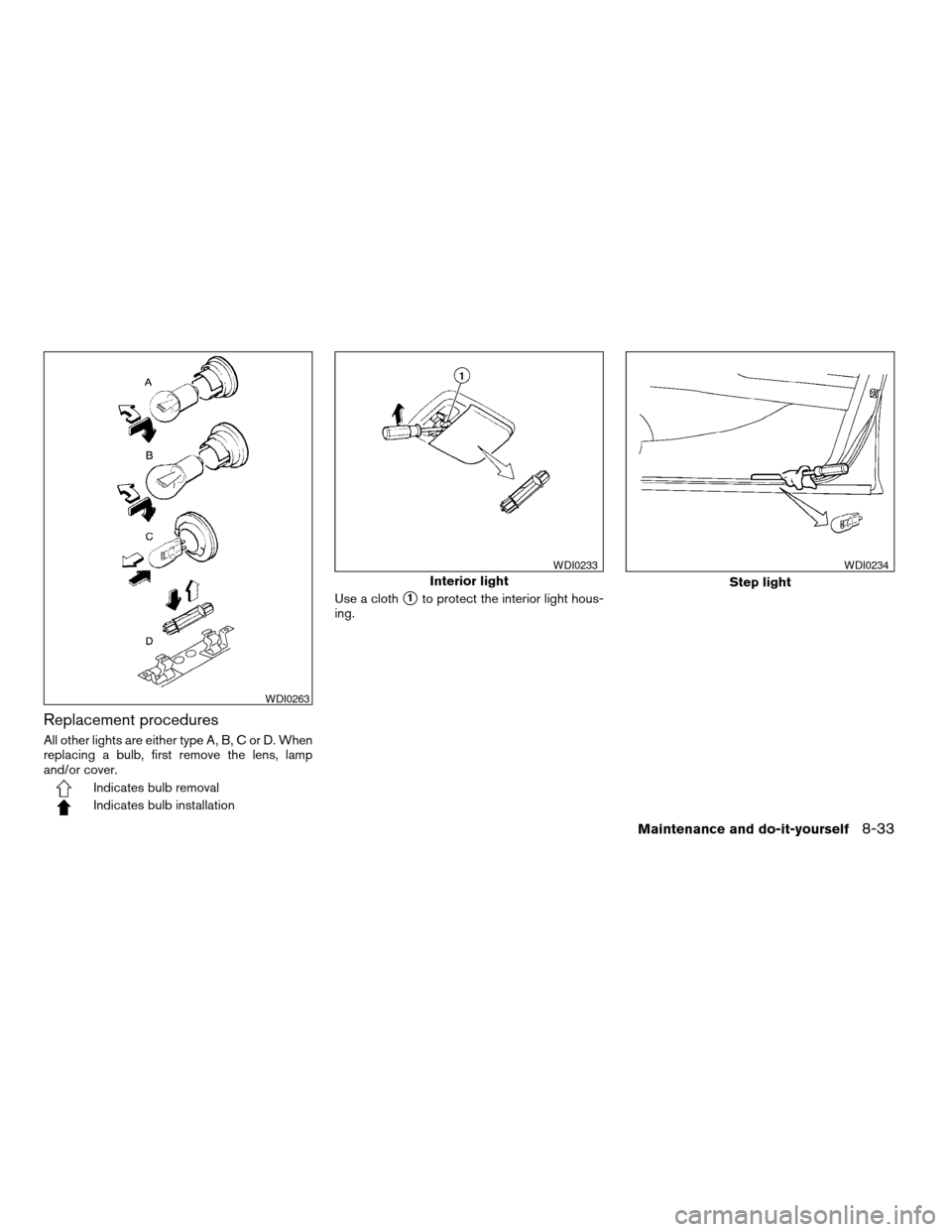
Replacement procedures
All other lights are either type A, B, C or D. When
replacing a bulb, first remove the lens, lamp
and/or cover.
Indicates bulb removal
Indicates bulb installationUse a cloth
s1to protect the interior light hous-
ing.
WDI0263
Interior light
WDI0233
Step light
WDI0234
Maintenance and do-it-yourself8-33
ZREVIEW COPYÐ2005 Altima (l30)
Owners ManualÐUSA_English (nna)
06/28/04Ðtbrooks
X
Page 253 of 304
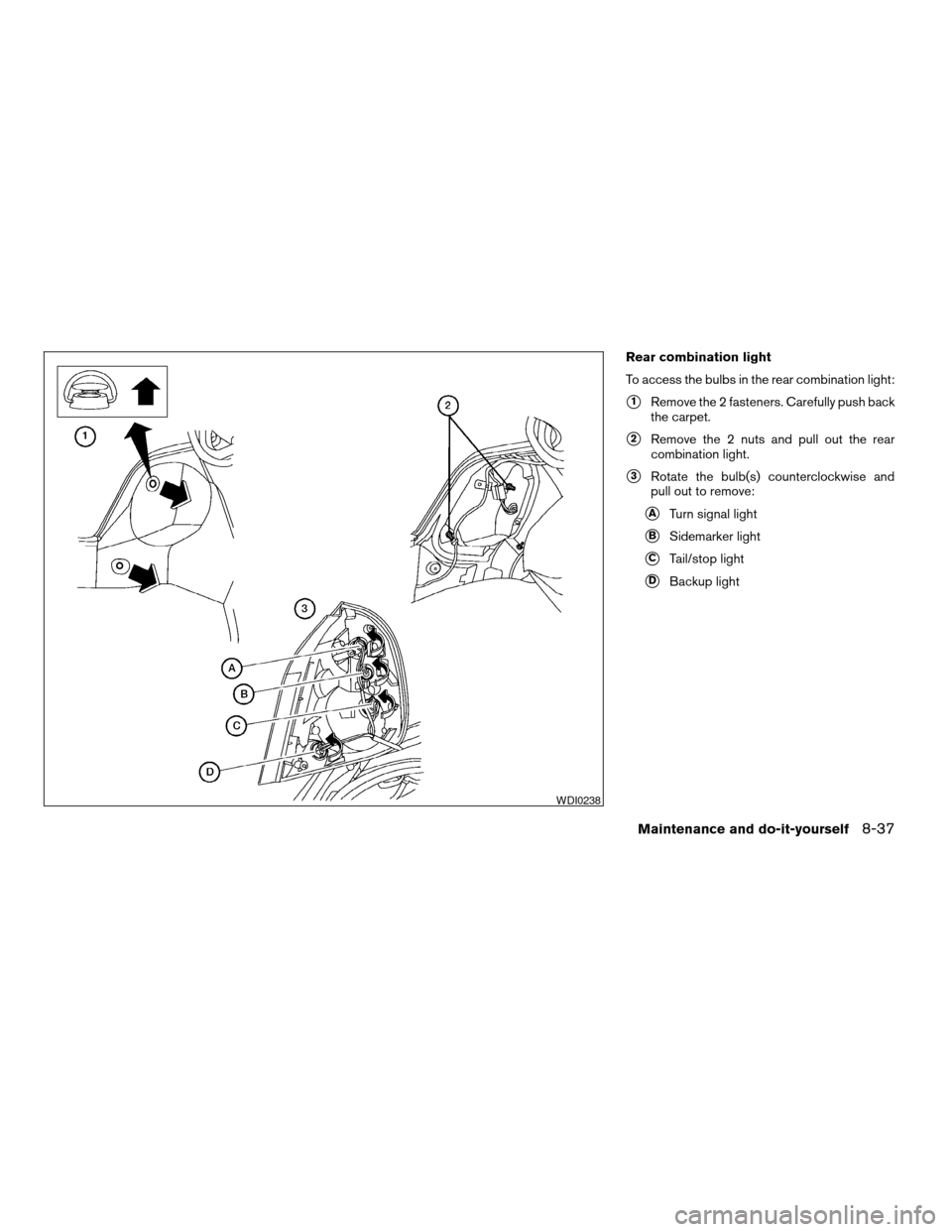
Rear combination light
To access the bulbs in the rear combination light:
s1Remove the 2 fasteners. Carefully push back
the carpet.
s2Remove the 2 nuts and pull out the rear
combination light.
s3Rotate the bulb(s) counterclockwise and
pull out to remove:
sATurn signal light
sBSidemarker light
sCTail/stop light
sDBackup light
WDI0238
Maintenance and do-it-yourself8-37
ZREVIEW COPYÐ2005 Altima(l30)
Owners ManualÐUSA_English (nna)
06/28/04Ðtbrooks
X