power steering NISSAN ALTIMA 2018 Owner´s Manual
[x] Cancel search | Manufacturer: NISSAN, Model Year: 2018, Model line: ALTIMA, Model: NISSAN ALTIMA 2018Pages: 467, PDF Size: 5.42 MB
Page 26 of 467
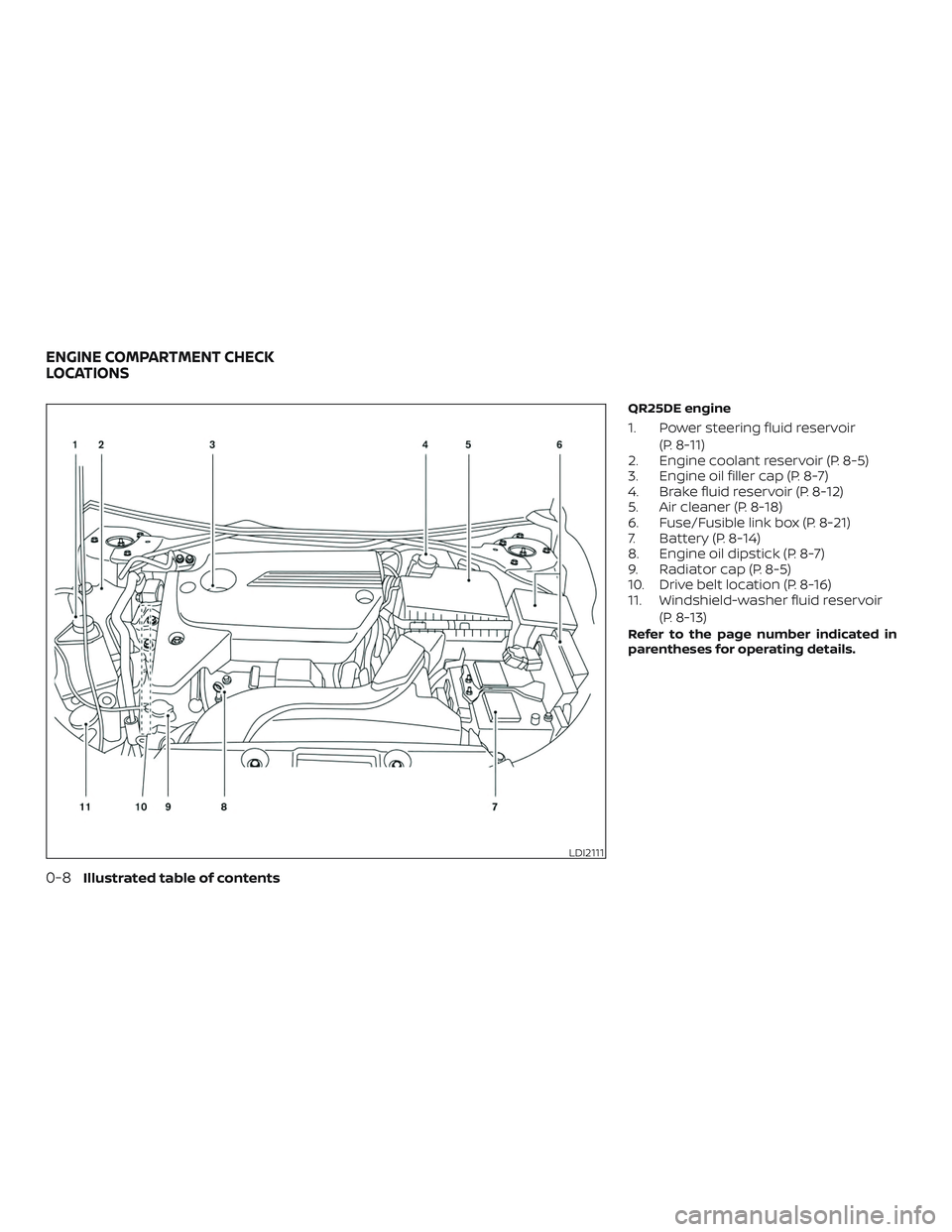
QR25DE engine
1. Power steering fluid reservoir(P. 8-11)
2. Engine coolant reservoir (P. 8-5)
3. Engine oil filler cap (P. 8-7)
4. Brake fluid reservoir (P. 8-12)
5. Air cleaner (P. 8-18)
6. Fuse/Fusible link box (P. 8-21)
7. Battery (P. 8-14)
8. Engine oil dipstick (P. 8-7)
9. Radiator cap (P. 8-5)
10. Drive belt location (P. 8-16)
11. Windshield-washer fluid reservoir
(P. 8-13)
Refer to the page number indicated in
parentheses for operating details.
LDI2111
ENGINE COMPARTMENT CHECK
LOCATIONS
0-8Illustrated table of contents
Page 27 of 467
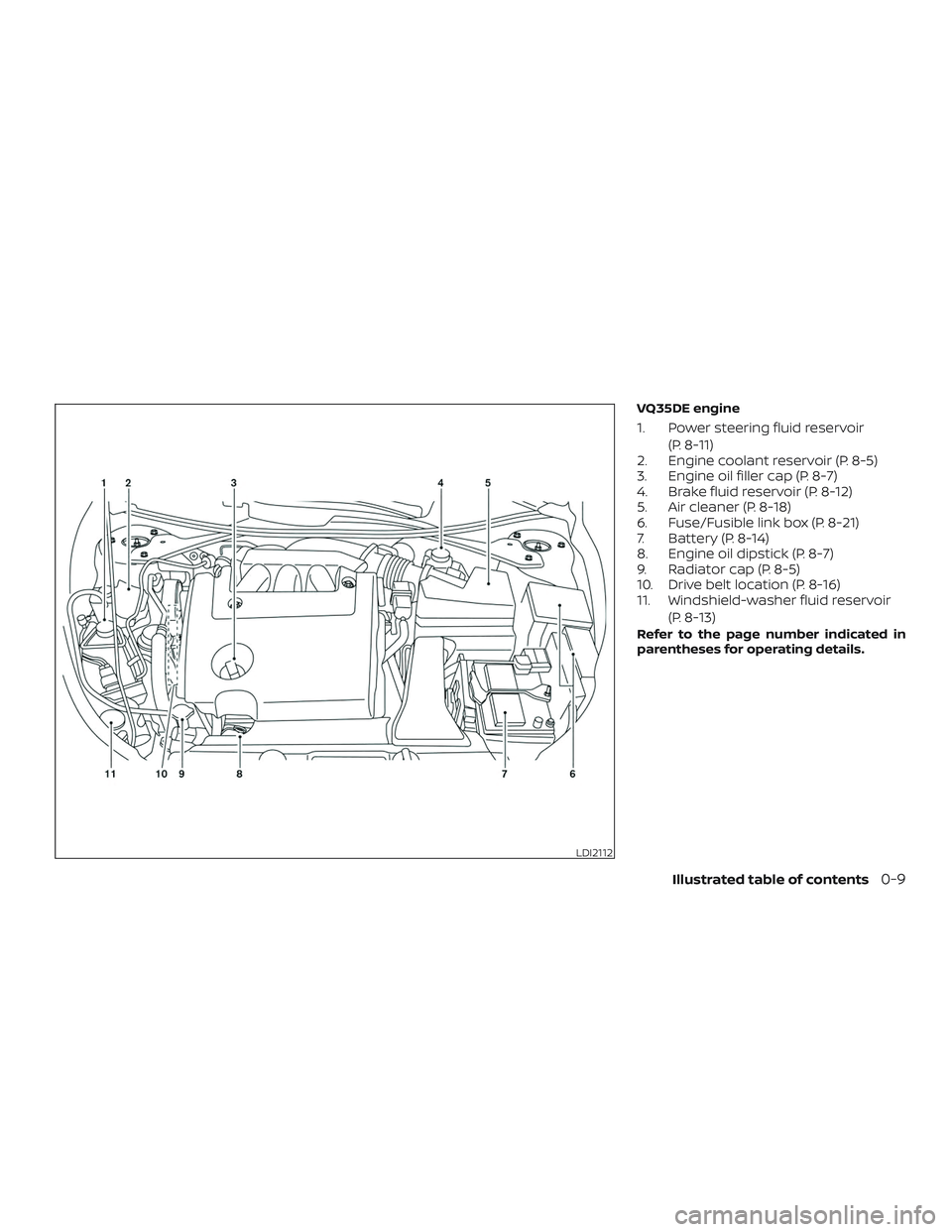
VQ35DE engine
1. Power steering fluid reservoir(P. 8-11)
2. Engine coolant reservoir (P. 8-5)
3. Engine oil filler cap (P. 8-7)
4. Brake fluid reservoir (P. 8-12)
5. Air cleaner (P. 8-18)
6. Fuse/Fusible link box (P. 8-21)
7. Battery (P. 8-14)
8. Engine oil dipstick (P. 8-7)
9. Radiator cap (P. 8-5)
10. Drive belt location (P. 8-16)
11. Windshield-washer fluid reservoir
(P. 8-13)
Refer to the page number indicated in
parentheses for operating details.
LDI2112
Illustrated table of contents0-9
Page 28 of 467
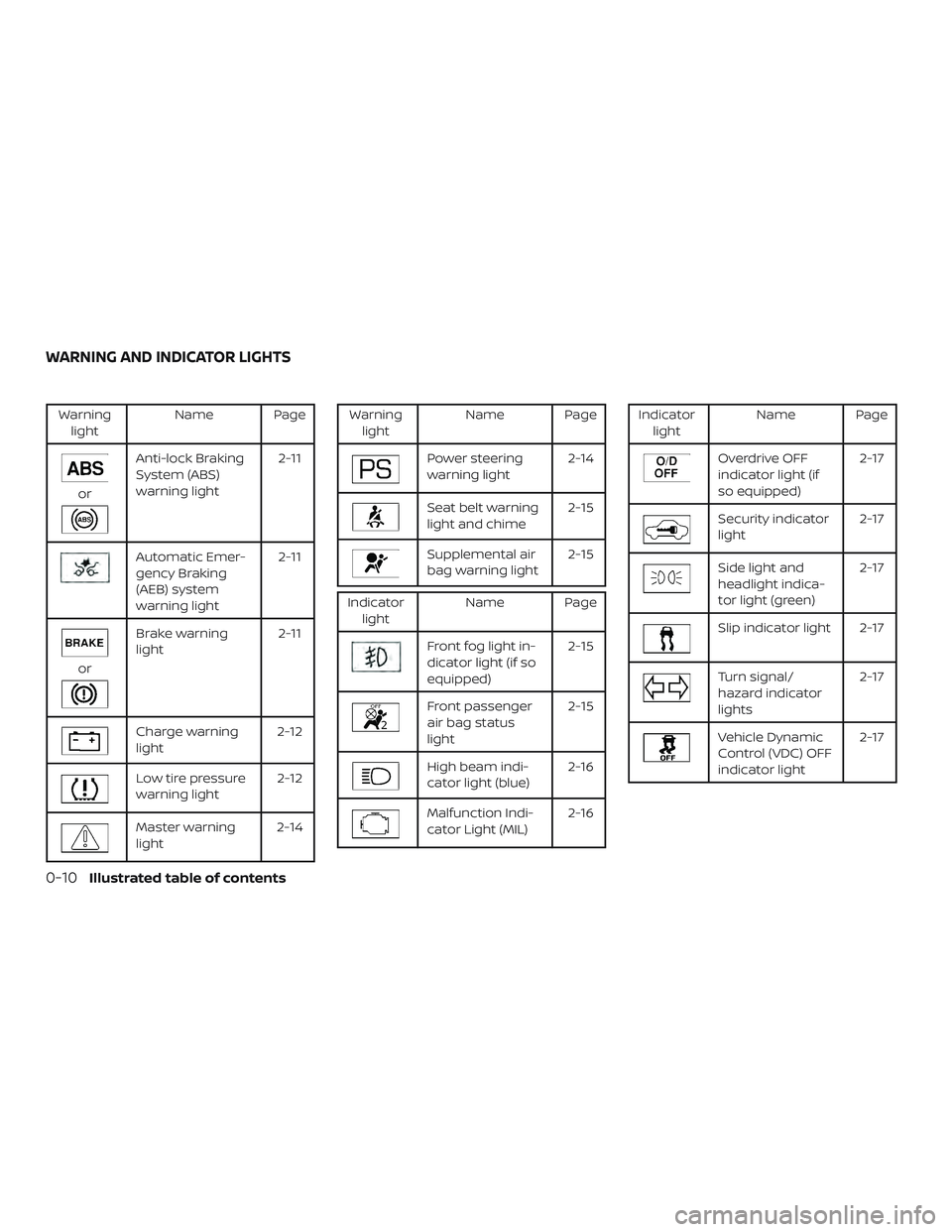
Warninglight Name Page
or
Anti-lock Braking
System (ABS)
warning light 2-11
Automatic Emer-
gency Braking
(AEB) system
warning light2-11
or
Brake warning
light
2-11
Charge warning
light2-12
Low tire pressure
warning light2-12
Master warning
light2-14
Warning
light Name Page
Power steering
warning light 2-14
Seat belt warning
light and chime 2-15
Supplemental air
bag warning light2-15
Indicator
light Name Page
Front fog light in-
dicator light (if so
equipped) 2-15
Front passenger
air bag status
light2-15
High beam indi-
cator light (blue)
2-16
Malfunction Indi-
cator Light (MIL)2-16
Indicator
light Name Page
Overdrive OFF
indicator light (if
so equipped) 2-17
Security indicator
light
2-17
Side light and
headlight indica-
tor light (green)2-17
Slip indicator light 2-17
Turn signal/
hazard indicator
lights2-17
Vehicle Dynamic
Control (VDC) OFF
indicator light2-17
WARNING AND INDICATOR LIGHTS
0-10Illustrated table of contents
Page 92 of 467
2 Instruments and controls
Instrument panel................................2-2
Meters and gauges ..............................2-3
Speedometer and odometer .................2-4
Tachometer ..................................2-5
Engine coolant temperature gauge ..........2-5
Fuel gauge ...................................2-6
Compass (if so equipped) ....................... 2-7
Compass display ............................. 2-7
Warning lights, indicator lights and audible
reminders ...................................... 2-10
Checking lights .............................. 2-10
Warning lights ................................ 2-11
Indicator lights .............................. 2-15
Audible reminders ........................... 2-17
Vehicle information display .....................2-18
How to use the vehicle information
display ...................................... 2-19
Startup display .............................. 2-19
Resetting the trip computer .................2-19
Settings ..................................... 2-19
Vehicle information display warnings
and indicators ............................... 2-27
Security systems ............................... 2-31
Vehicle security system .....................2-31NISSAN Vehicle Immobilizer System
.........2-32
Wiper and washer switch .......................2-34
Switch operation ............................ 2-34
Rear window and outside mirror
(if so equipped) defroster switch ................2-35
Headlight and turn signal switch ...............2-35
Headlight control switch .....................2-35
Daytime Running Lights (DRL) system
(Type A) (if so equipped) .....................2-38
LED Daytime Running Lights (DRL)
system (Type B) (if so equipped) .............2-38
Instrument brightness control ...............2-39
Turn signal switch ........................... 2-39
Fog light switch (if so equipped) .............2-40
Horn ........................................... 2-40
Heated seat switches (if so equipped) ..........2-41
Heated steering wheel switch (if so equipped) . . 2-42
Vehicle Dynamic Control (VDC) OFF switch ......2-42
E-c
all (SOS) switch (if so equipped) ..............2-43
Power outlets .................................. 2-43
Extended storage switch .......................2-44
Storage ........................................ 2-45
Front-door pockets .......................... 2-45
Seatback pockets ........................... 2-46
Page 102 of 467
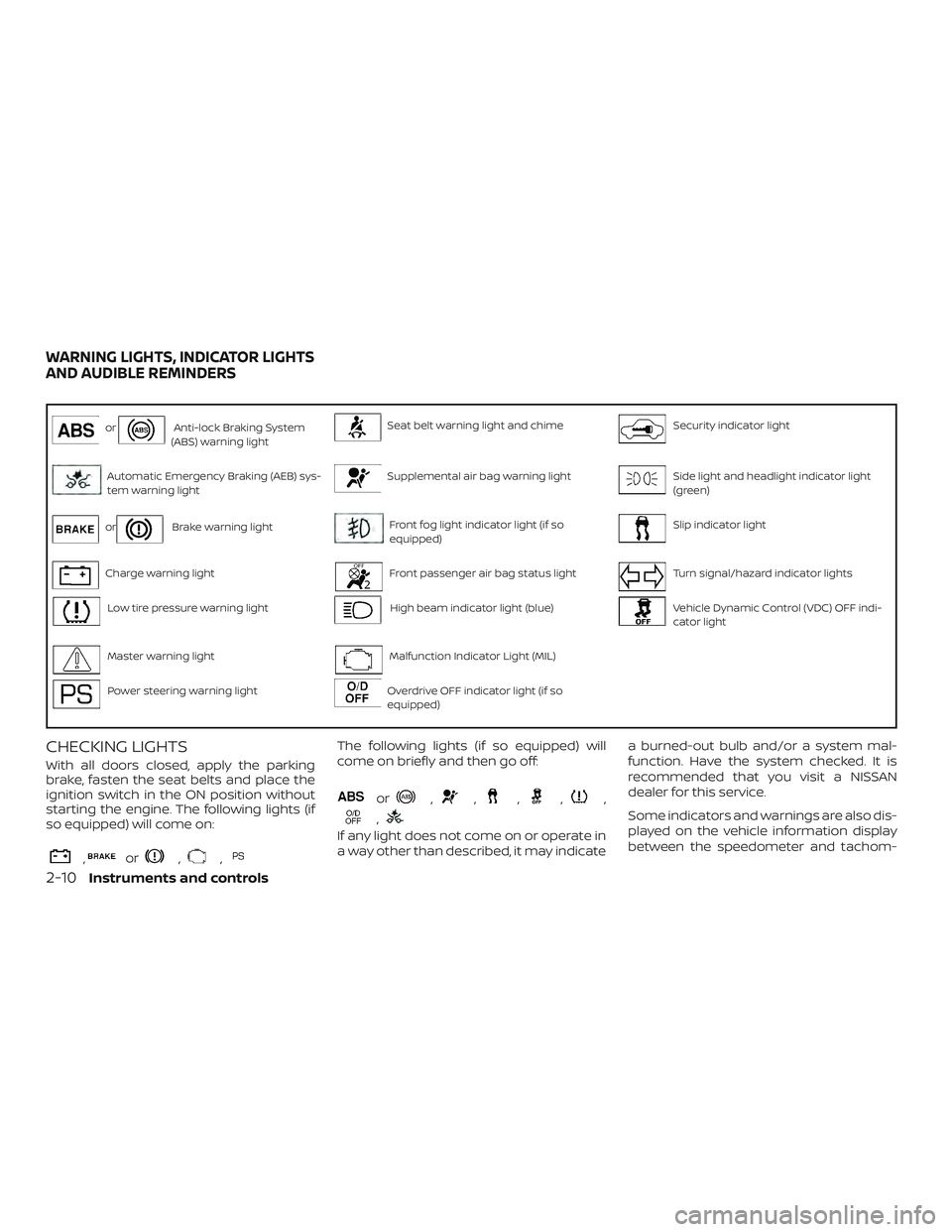
orAnti-lock Braking System
(ABS) warning lightSeat belt warning light and chimeSecurity indicator light
Automatic Emergency Braking (AEB) sys-
tem warning lightSupplemental air bag warning lightSide light and headlight indicator light
(green)
orBrake warning lightFront fog light indicator light (if so
equipped)Slip indicator light
Charge warning lightFront passenger air bag status lightTurn signal/hazard indicator lights
Low tire pressure warning lightHigh beam indicator light (blue)Vehicle Dynamic Control (VDC) OFF indi-
cator light
Master warning lightMalfunction Indicator Light (MIL)
Power steering warning lightOverdrive OFF indicator light (if so
equipped)
CHECKING LIGHTS
With all doors closed, apply the parking
brake, fasten the seat belts and place the
ignition switch in the ON position without
starting the engine. The following lights (if
so equipped) will come on:
,or,,
The following lights (if so equipped) will
come on briefly and then go off:
or,,,,,
,
If any light does not come on or operate in
a way other than described, it may indicate a burned-out bulb and/or a system mal-
function. Have the system checked. It is
recommended that you visit a NISSAN
dealer for this service.
Some indicators and warnings are also dis-
played on the vehicle information display
between the speedometer and tachom-
WARNING LIGHTS, INDICATOR LIGHTS
AND AUDIBLE REMINDERS
2-10Instruments and controls
Page 106 of 467
∙ When replacing a wheel without theTPMS such as the spare tire, the TPMS
will not function and the low tire pres-
sure warning light will flash for ap-
proximately 1 minute. The light will re-
main on af ter 1 minute. Have your
tires replaced and/or TPMS system
reset as soon as possible. It is recom-
mended that you visit a NISSAN dealer
for these services.
∙ Replacing tires with those not origi- nally specified by NISSAN could affect
the proper operation of the TPMS.
CAUTION
∙ The TPMS is not a substitute for theregular tire pressure check. Be sure to
check the tire pressure regularly.
∙ If the vehicle is being driven at speeds of less than 16 mph (25 km/h), the
TPMS may not operate correctly.
∙ Be sure to install the specified size of tires to the four wheels correctly.
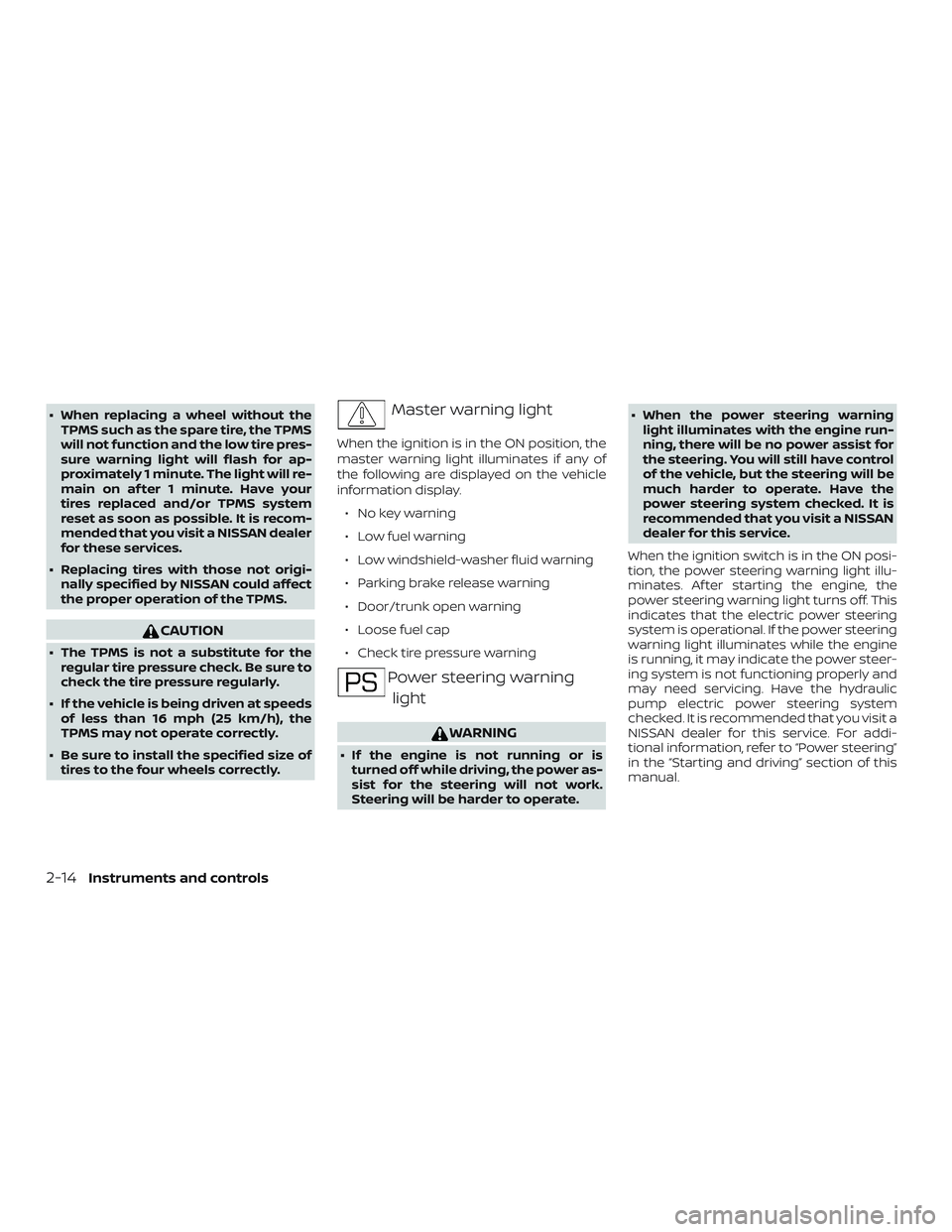
Master warning light
When the ignition is in the ON position, the
master warning light illuminates if any of
the following are displayed on the vehicle
information display.
∙ No key warning
∙ Low fuel warning
∙ Low windshield-washer fluid warning
∙ Parking brake release warning
∙ Door/trunk open warning
∙ Loose fuel cap
∙ Check tire pressure warning
Power steering warninglight
WARNING
∙ If the engine is not running or is turned off while driving, the power as-
sist for the steering will not work.
Steering will be harder to operate. ∙ When the power steering warning
light illuminates with the engine run-
ning, there will be no power assist for
the steering. You will still have control
of the vehicle, but the steering will be
much harder to operate. Have the
power steering system checked. It is
recommended that you visit a NISSAN
dealer for this service.
When the ignition switch is in the ON posi-
tion, the power steering warning light illu-
minates. Af ter starting the engine, the
power steering warning light turns off. This
indicates that the electric power steering
system is operational. If the power steering
warning light illuminates while the engine
is running, it may indicate the power steer-
ing system is not functioning properly and
may need servicing. Have the hydraulic
pump electric power steering system
checked. It is recommended that you visit a
NISSAN dealer for this service. For addi-
tional information, refer to “Power steering”
in the “Starting and driving” section of this
manual.
2-14Instruments and controls
Page 134 of 467
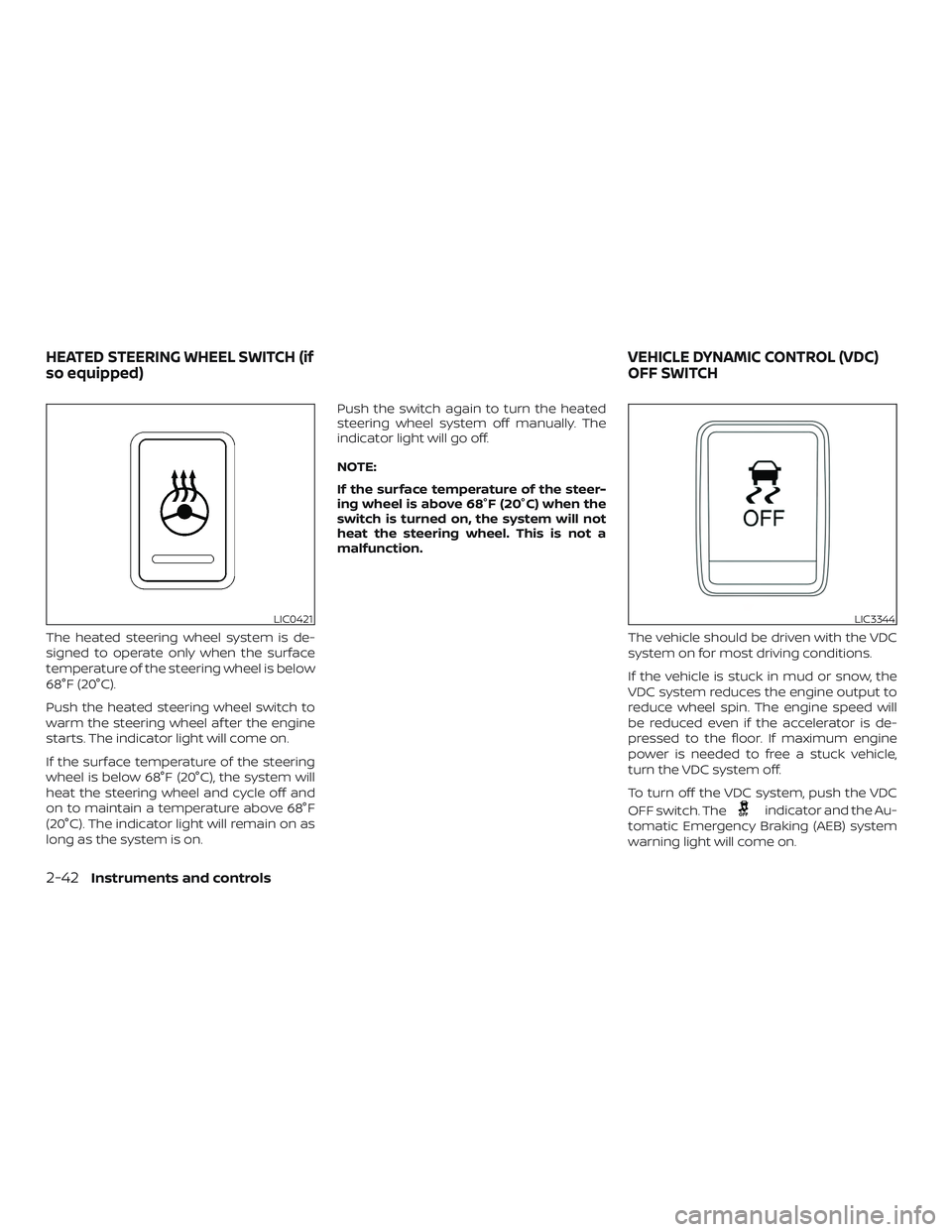
The heated steering wheel system is de-
signed to operate only when the surface
temperature of the steering wheel is below
68°F (20°C).
Push the heated steering wheel switch to
warm the steering wheel af ter the engine
starts. The indicator light will come on.
If the surface temperature of the steering
wheel is below 68°F (20°C), the system will
heat the steering wheel and cycle off and
on to maintain a temperature above 68°F
(20°C). The indicator light will remain on as
long as the system is on.Push the switch again to turn the heated
steering wheel system off manually. The
indicator light will go off.
NOTE:
If the surface temperature of the steer-
ing wheel is above 68°F (20°C) when the
switch is turned on, the system will not
heat the steering wheel. This is not a
malfunction.
The vehicle should be driven with the VDC
system on for most driving conditions.
If the vehicle is stuck in mud or snow, the
VDC system reduces the engine output to
reduce wheel spin. The engine speed will
be reduced even if the accelerator is de-
pressed to the floor. If maximum engine
power is needed to free a stuck vehicle,
turn the VDC system off.
To turn off the VDC system, push the VDC
OFF switch. The
indicator and the Au-
tomatic Emergency Braking (AEB) system
warning light will come on.
LIC0421LIC3344
HEATED STEERING WHEEL SWITCH (if
so equipped) VEHICLE DYNAMIC CONTROL (VDC)
OFF SWITCH
2-42Instruments and controls
Page 153 of 467
3 Pre-driving checks and adjustments
Keys.............................................3-2NISSAN Intelligent Key® .......................3-2
NISSAN Vehicle Immobilizer System
keys..........................................3-4
Doors ...........................................3-4
Locking with key ..............................3-5
Locking with inside lock knob .................3-5
Locking with power door lock switch .........3-6
Automatic door locks.........................3-6
Child safety rear door lock ....................3-6
NISSAN Intelligent Key® .......................... 3-7
Operating range ..............................3-8
Door locks/unlocks precaution ...............3-9
NISSAN Intelligent Key® operation ............3-10
How to use the remote keyless entry
function ..................................... 3-13
Warning lights and audible reminders .......3-17
Warning signals ............................. 3-17
Troubleshooting guide ......................3-18
Remote Engine Start (if so equipped) ...........3-20
Remote Engine Start operating range .......3-20
Remote starting the vehicle .................3-21Extending engine run time
..................3-21
Canceling a Remote Engine Start ............3-21
Conditions the Remote Engine Start will
notwork .................................... 3-22
Hood ........................................... 3-23
Trunk lid ........................................ 3-24
Opener operation ........................... 3-24
Interior trunk lid release .....................3-25
Interior trunk access ........................ 3-25
Fuel-filler door .................................. 3-26
Opener operation ........................... 3-26
Fuel-filler cap ................................ 3-26
Steering wheel ................................. 3-28
Tilt operation ................................ 3-29
Telescopic operation ........................ 3-29
Sun visors ...................................... 3-29
Vanity mirrors ............................... 3-30
Mirrors ......................................... 3-30
Manual anti-glare rearview mirror
(if so equipped) .............................. 3-30
Automatic
anti-glare rearview mirror
(if so equipped) .............................. 3-30
Outside mirrors ............................. 3-32
Page 208 of 467
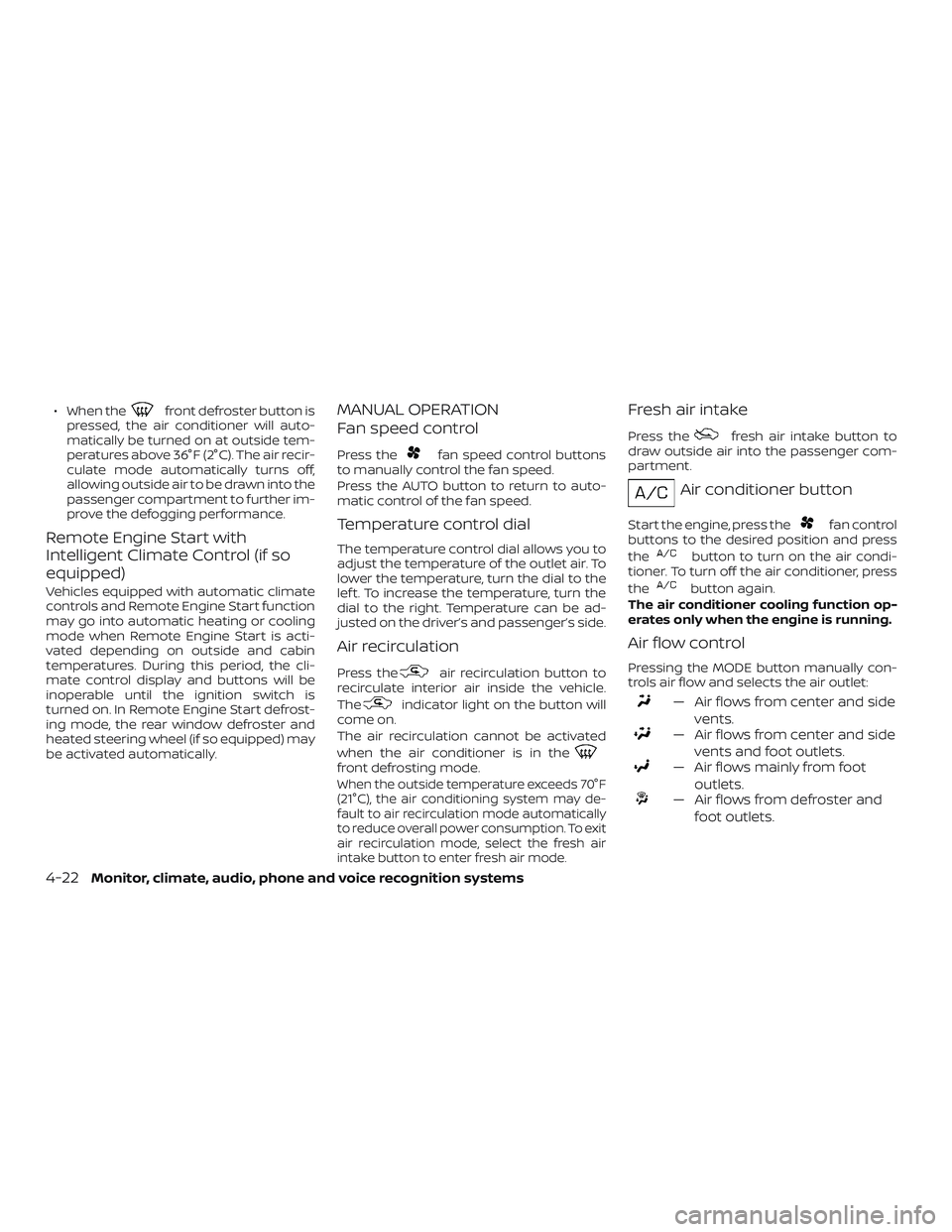
∙ When thefront defroster button is
pressed, the air conditioner will auto-
matically be turned on at outside tem-
peratures above 36°F (2°C). The air recir-
culate mode automatically turns off,
allowing outside air to be drawn into the
passenger compartment to further im-
prove the defogging performance.
Remote Engine Start with
Intelligent Climate Control (if so
equipped)
Vehicles equipped with automatic climate
controls and Remote Engine Start function
may go into automatic heating or cooling
mode when Remote Engine Start is acti-
vated depending on outside and cabin
temperatures. During this period, the cli-
mate control display and buttons will be
inoperable until the ignition switch is
turned on. In Remote Engine Start defrost-
ing mode, the rear window defroster and
heated steering wheel (if so equipped) may
be activated automatically.
MANUAL OPERATION
Fan speed control
Press thefan speed control buttons
to manually control the fan speed.
Press the AUTO button to return to auto-
matic control of the fan speed.
Temperature control dial
The temperature control dial allows you to
adjust the temperature of the outlet air. To
lower the temperature, turn the dial to the
lef t. To increase the temperature, turn the
dial to the right. Temperature can be ad-
justed on the driver’s and passenger’s side.
Air recirculation
Press theair recirculation button to
recirculate interior air inside the vehicle.
The
indicator light on the button will
come on.
The air recirculation cannot be activated
when the air conditioner is in the
front defrosting mode.
When the outside temperature exceeds 70°F
(21°C), the air conditioning system may de-
fault to air recirculation mode automatically
to reduce overall power consumption. To exit
air recirculation mode, select the fresh air
intake button to enter fresh air mode.
Fresh air intake
Press thefresh air intake button to
draw outside air into the passenger com-
partment.
Air conditioner button
Start the engine, press thefan control
buttons to the desired position and press
the
button to turn on the air condi-
tioner. To turn off the air conditioner, press
the
button again.
The air conditioner cooling function op-
erates only when the engine is running.
Air flow control
Pressing the MODE button manually con-
trols air flow and selects the air outlet:
— Air flows from center and side vents.
— Air flows from center and sidevents and foot outlets.
— Air flows mainly from footoutlets.
— Air flows from defroster andfoot outlets.
4-22Monitor, climate, audio, phone and voice recognition systems
Page 255 of 467
AEB system operation.......................5-59
Turning the AEB system on/off ..............5-61
AEB system limitations ......................5-61
System temporarily unavailable .............5-63
System malfunction ......................... 5-63
System maintenance ........................ 5-64
Intelligent Forward Collision Warning (I-FCW) ....5-65
I-FCW system operation .....................5-67
Turning the I-FCW system on/off ............5-68
I-FCW system limitations ....................5-69
System temporarily unavailable .............5-74
System malfunction ......................... 5-75
System maintenance ........................ 5-75
Break-in schedule .............................. 5-76
Fuel efficient driving tips ........................5-77
Increasing fuel economy .......................5-78
Parking/parking on hills ........................5-79
Power steering ................................. 5-80
Brake system ................................... 5-81
Brake precautions ........................... 5-81Anti-lock Braking System (ABS)
..............5-81
Brake assist ................................. 5-82
Vehicle Dynamic Control (VDC) system .........5-83
Brake force distribution ......................5-85
Hill start assist system .......................... 5-86
Front and Rear Sonar System (if so equipped) . . 5-86 System operation ........................... 5-87
How to enable/disable the sonar
system ...................................... 5-89
Sonar limitations ............................ 5-89
System temporarily unavailable .............5-90
System maintenance ........................ 5-90
Cold weather driving ........................... 5-91
Freeing a frozen door lock ...................5-91
Antifreeze ................................... 5-91
Battery...................................... 5-91
Dr
aining of coolant water ....................5-91
Tire equipment .............................. 5-91
Special winter equipment ...................5-92
Driving on snow or ice .......................5-92
Engine block heater (if so equipped) .........5-92