brake NISSAN ALTIMA 2023 Owners Manual
[x] Cancel search | Manufacturer: NISSAN, Model Year: 2023, Model line: ALTIMA, Model: NISSAN ALTIMA 2023Pages: 644, PDF Size: 4.12 MB
Page 15 of 644
16. Electronic parking brake switch(if so equipped) (P. 5-25)
Automatic brake hold switch
(if so equipped) (P. 5-27)
17. Push-button ignition switch (P. 5-13)
18. Cruise control switches (if so equipped)
(P. 5-68)
Intelligent Cruise Control (ICC) switches
(if so equipped) (P. 5-71)
Bluetooth® Hands-free Phone System*
ProPILOT Assist Switch (if so equipped)
(P. 5-94)
19. Driver supplemental knee airbag
(P. 1-47)
20. Hood release (P. 3-22) Fuel-filler door release (P. 3-25)
Tilt/telescopic steering wheel controls
(P. 3-27)
21. Trip computer reset switch (P. 2-4) Instrument brightness control (P. 2-62)
Steering assist switch (for vehicles with
ProPILOT Assist) (if so equipped)
(P. 2-66)
Trunk opener (P. 3-22)
*: For additional information, refer to the
separate NissanConnect® Owner's
Manual.
Refer to the page number indicated in
parentheses for operating details.
Illustrated table of contents0-7
Page 16 of 644
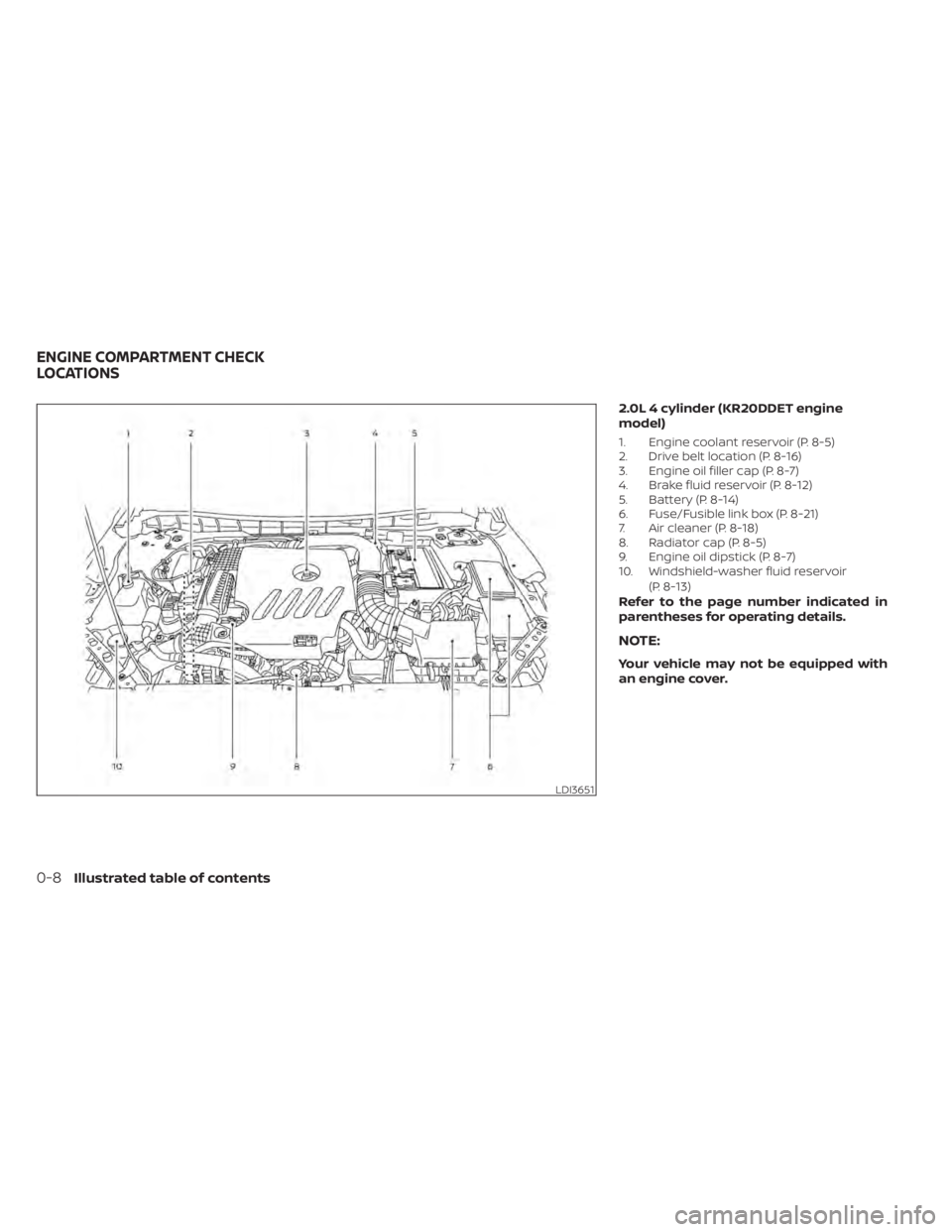
2.0L 4 cylinder (KR20DDET engine
model)
1. Engine coolant reservoir (P. 8-5)
2. Drive belt location (P. 8-16)
3. Engine oil filler cap (P. 8-7)
4. Brake fluid reservoir (P. 8-12)
5. Battery (P. 8-14)
6. Fuse/Fusible link box (P. 8-21)
7. Air cleaner (P. 8-18)
8. Radiator cap (P. 8-5)
9. Engine oil dipstick (P. 8-7)
10. Windshield-washer fluid reservoir(P. 8-13)
Refer to the page number indicated in
parentheses for operating details.
NOTE:
Your vehicle may not be equipped with
an engine cover.
LDI3651
ENGINE COMPARTMENT CHECK
LOCATIONS
0-8Illustrated table of contents
Page 17 of 644
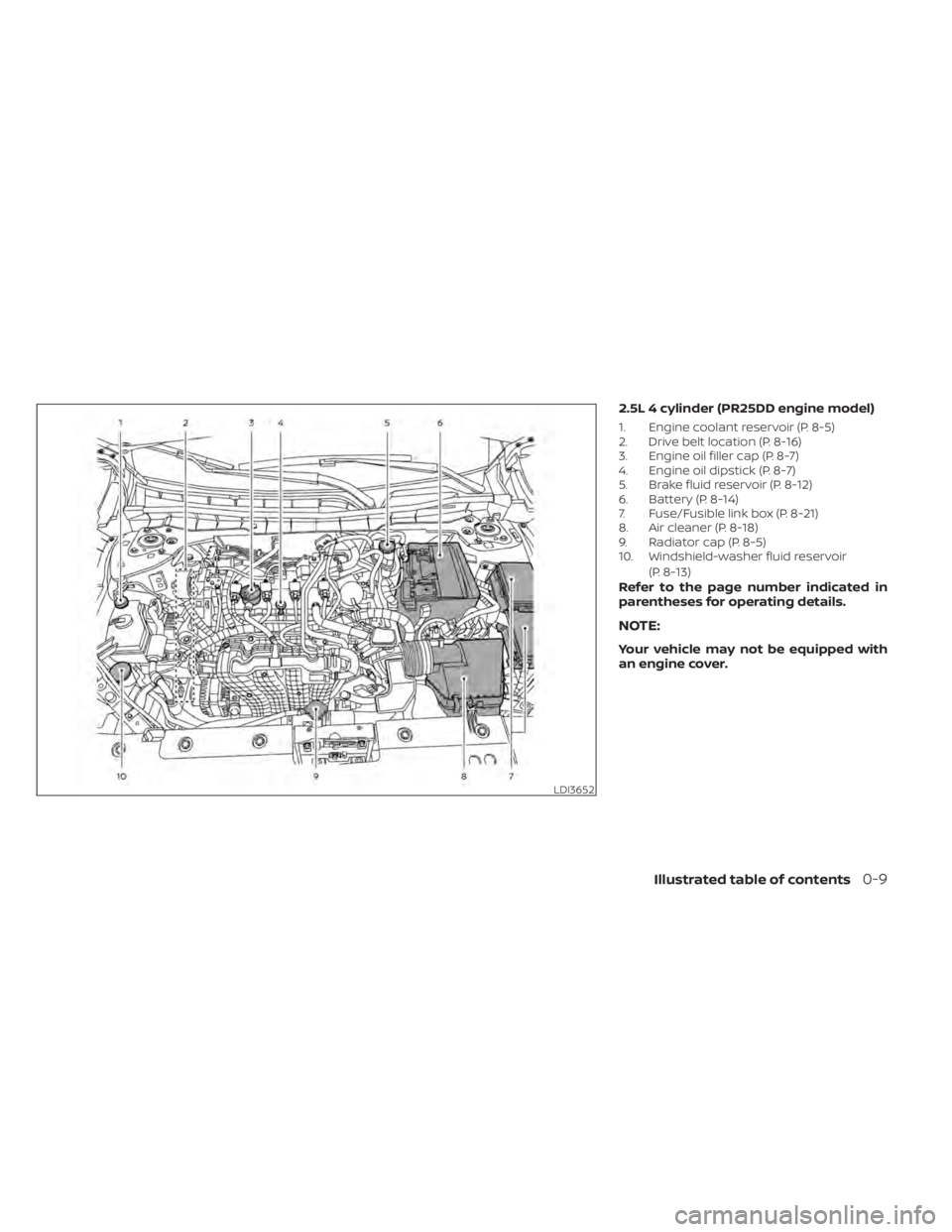
2.5L 4 cylinder (PR25DD engine model)
1. Engine coolant reservoir (P. 8-5)
2. Drive belt location (P. 8-16)
3. Engine oil filler cap (P. 8-7)
4. Engine oil dipstick (P. 8-7)
5. Brake fluid reservoir (P. 8-12)
6. Battery (P. 8-14)
7. Fuse/Fusible link box (P. 8-21)
8. Air cleaner (P. 8-18)
9. Radiator cap (P. 8-5)
10. Windshield-washer fluid reservoir(P. 8-13)
Refer to the page number indicated in
parentheses for operating details.
NOTE:
Your vehicle may not be equipped with
an engine cover.
LDI3652
Illustrated table of contents0-9
Page 18 of 644
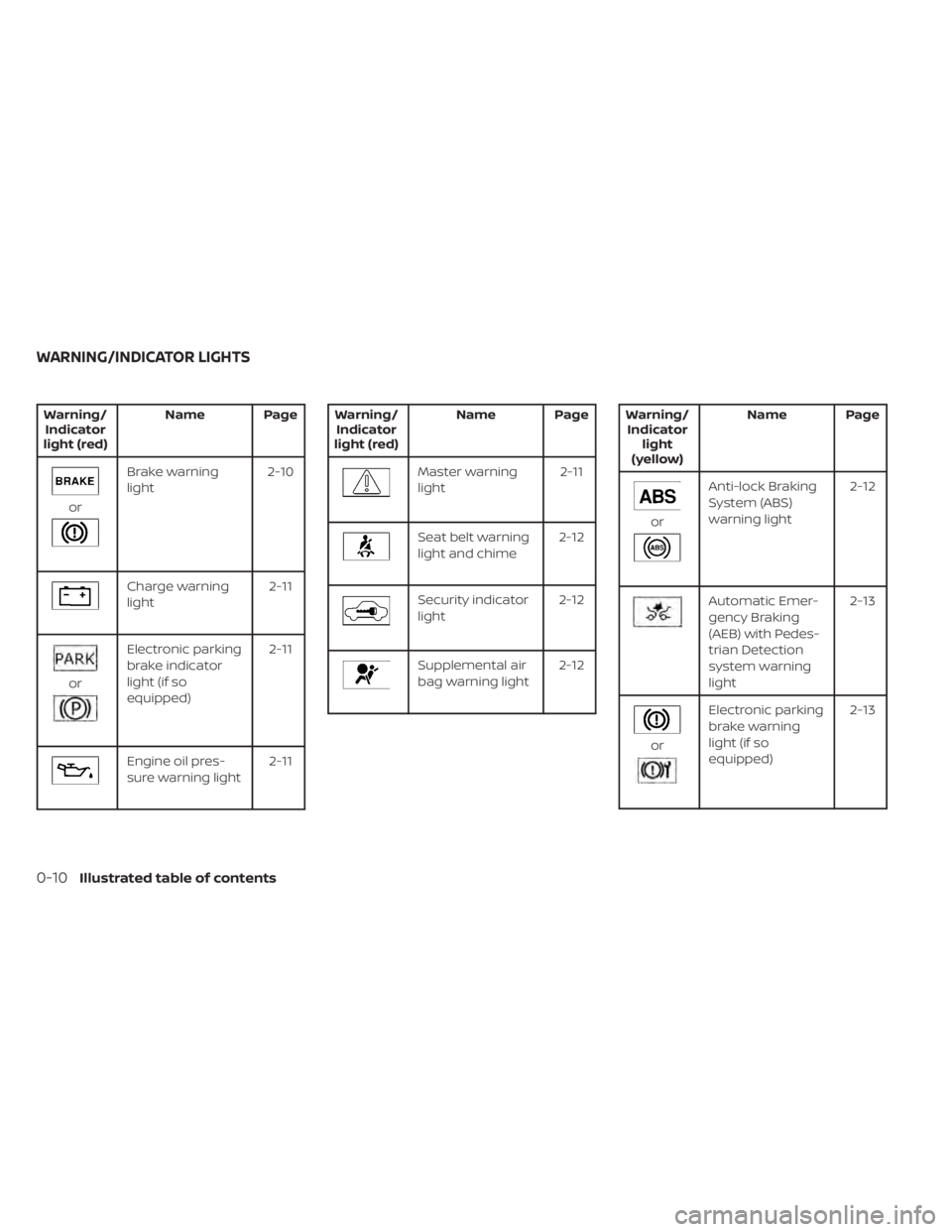
Warning/Indicator
light (red) Name Page
or
Brake warning
light
2-10
Charge warning
light 2-11
or
Electronic parking
brake indicator
light (if so
equipped)2-11
Engine oil pres-
sure warning light
2-11
Warning/
Indicator
light (red) Name Page
Master warning
light
2-11
Seat belt warning
light and chime2-12
Security indicator
light2-12
Supplemental air
bag warning light2-12
Warning/
Indicator light
(yellow) Name Page
or
Anti-lock Braking
System (ABS)
warning light
2-12
Automatic Emer-
gency Braking
(AEB) with Pedes-
trian Detection
system warning
light 2-13
or
Electronic parking
brake warning
light (if so
equipped)
2-13
WARNING/INDICATOR LIGHTS
0-10Illustrated table of contents
Page 19 of 644
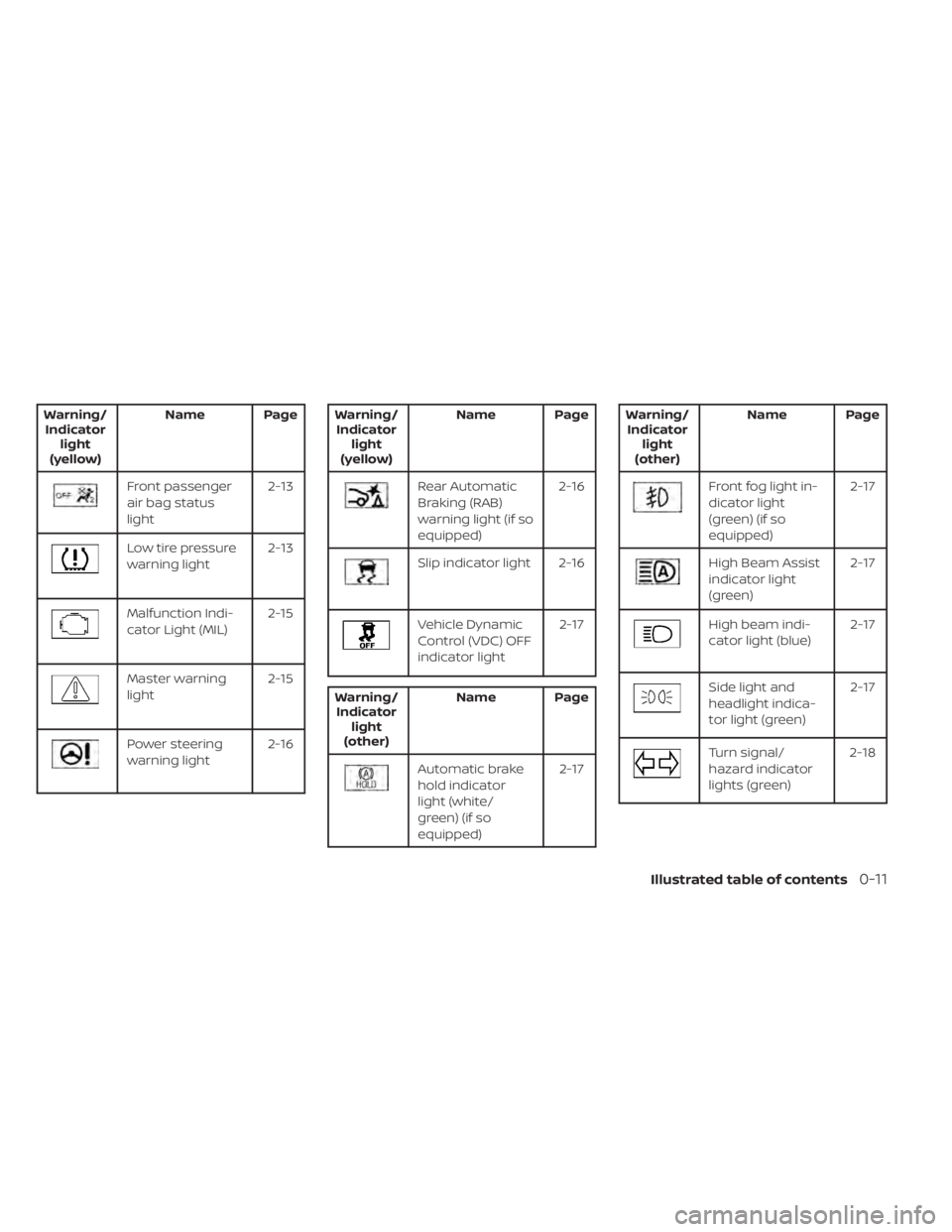
Warning/Indicator light
(yellow) Name Page
Front passenger
air bag status
light
2-13
Low tire pressure
warning light
2-13
Malfunction Indi-
cator Light (MIL)2-15
Master warning
light2-15
Power steering
warning light2-16
Warning/
Indicator light
(yellow) Name Page
Rear Automatic
Braking (RAB)
warning light (if so
equipped) 2-16
Slip indicator light 2-16
Vehicle Dynamic
Control (VDC) OFF
indicator light
2-17
Warning/
Indicator light
(other) Name Page
Automatic brake
hold indicator
light (white/
green) (if so
equipped) 2-17
Warning/
Indicator light
(other) Name Page
Front fog light in-
dicator light
(green) (if so
equipped) 2-17
High Beam Assist
indicator light
(green)
2-17
High beam indi-
cator light (blue)
2-17
Side light and
headlight indica-
tor light (green)2-17
Turn signal/
hazard indicator
lights (green)2-18
Illustrated table of contents0-11
Page 93 of 644
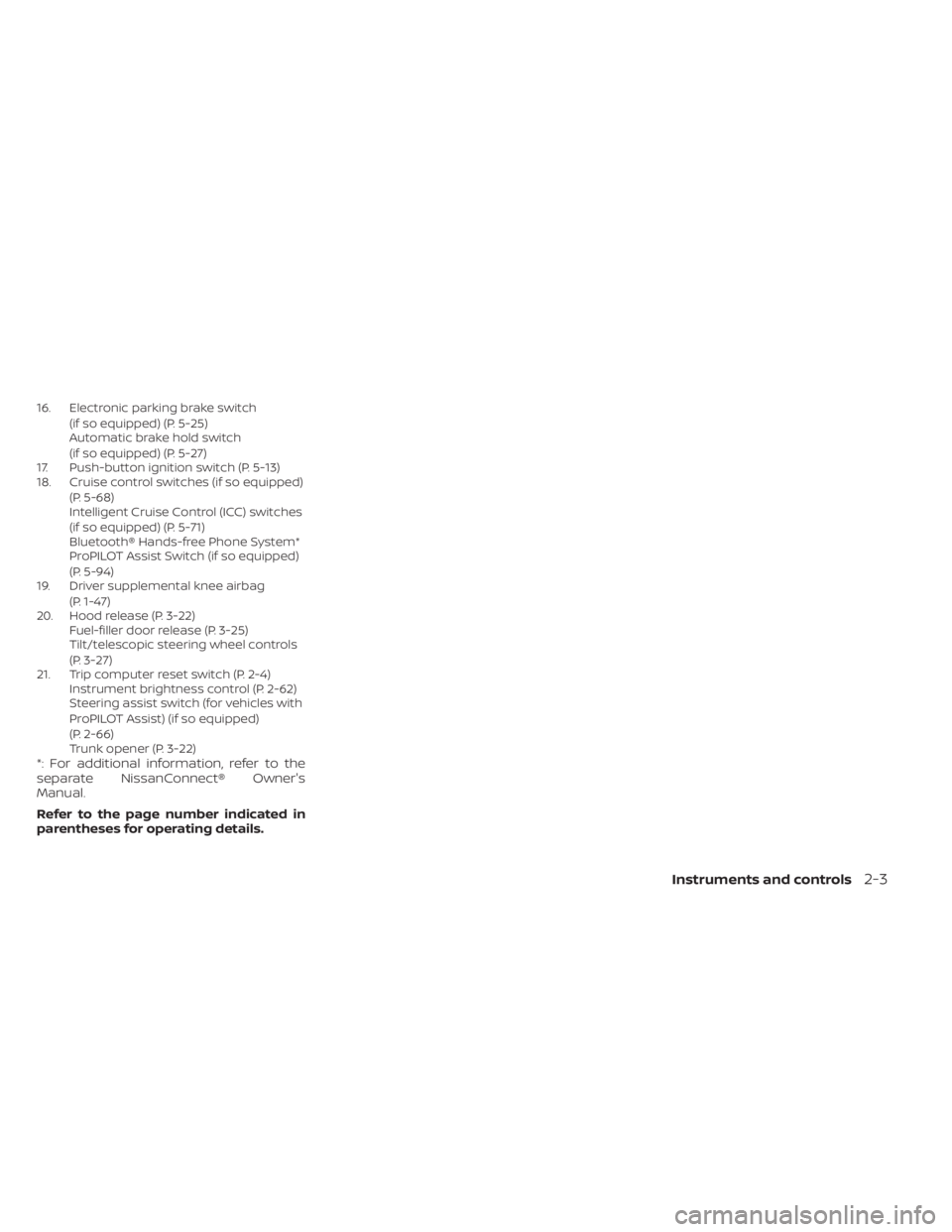
16. Electronic parking brake switch(if so equipped) (P. 5-25)
Automatic brake hold switch
(if so equipped) (P. 5-27)
17. Push-button ignition switch (P. 5-13)
18. Cruise control switches (if so equipped)
(P. 5-68)
Intelligent Cruise Control (ICC) switches
(if so equipped) (P. 5-71)
Bluetooth® Hands-free Phone System*
ProPILOT Assist Switch (if so equipped)
(P. 5-94)
19. Driver supplemental knee airbag
(P. 1-47)
20. Hood release (P. 3-22) Fuel-filler door release (P. 3-25)
Tilt/telescopic steering wheel controls
(P. 3-27)
21. Trip computer reset switch (P. 2-4) Instrument brightness control (P. 2-62)
Steering assist switch (for vehicles with
ProPILOT Assist) (if so equipped)
(P. 2-66)
Trunk opener (P. 3-22)
*: For additional information, refer to the
separate NissanConnect® Owner's
Manual.
Refer to the page number indicated in
parentheses for operating details.
Instruments and controls2-3
Page 99 of 644
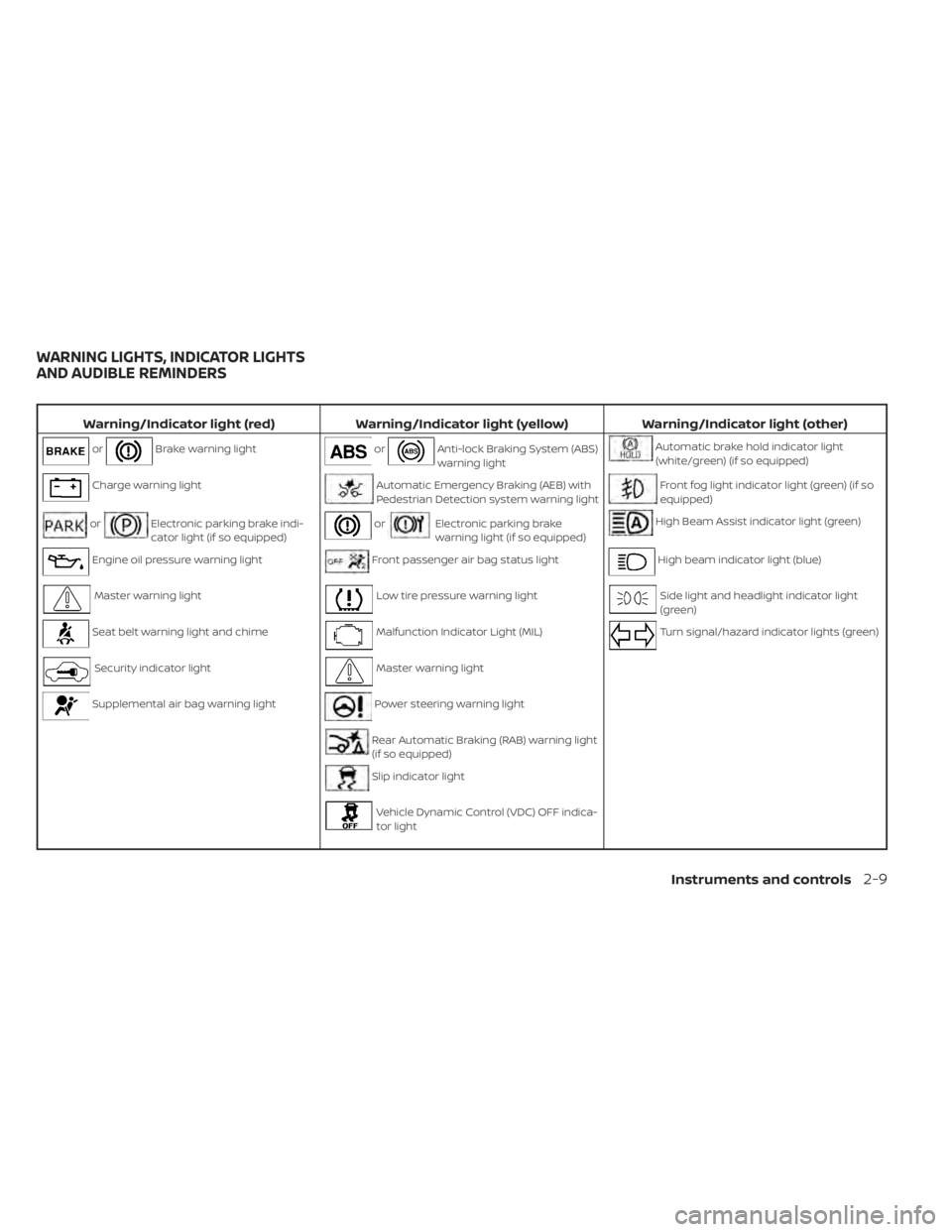
Warning/Indicator light (red)Warning/Indicator light (yellow) Warning/Indicator light (other)
orBrake warning lightorAnti-lock Braking System (ABS)
warning lightAutomatic brake hold indicator light
(white/green) (if so equipped)
Charge warning lightAutomatic Emergency Braking (AEB) with
Pedestrian Detection system warning lightFront fog light indicator light (green) (if so
equipped)
orElectronic parking brake indi-
cator light (if so equipped)orElectronic parking brake
warning light (if so equipped)High Beam Assist indicator light (green)
Engine oil pressure warning lightFront passenger air bag status lightHigh beam indicator light (blue)
Master warning lightLow tire pressure warning lightSide light and headlight indicator light
(green)
Seat belt warning light and chimeMalfunction Indicator Light (MIL)Turn signal/hazard indicator lights (green)
Security indicator lightMaster warning light
Supplemental air bag warning lightPower steering warning light
Rear Automatic Braking (RAB) warning light
(if so equipped)
Slip indicator light
Vehicle Dynamic Control (VDC) OFF indica-
tor light
WARNING LIGHTS, INDICATOR LIGHTS
AND AUDIBLE REMINDERS
Instruments and controls2-9
Page 100 of 644
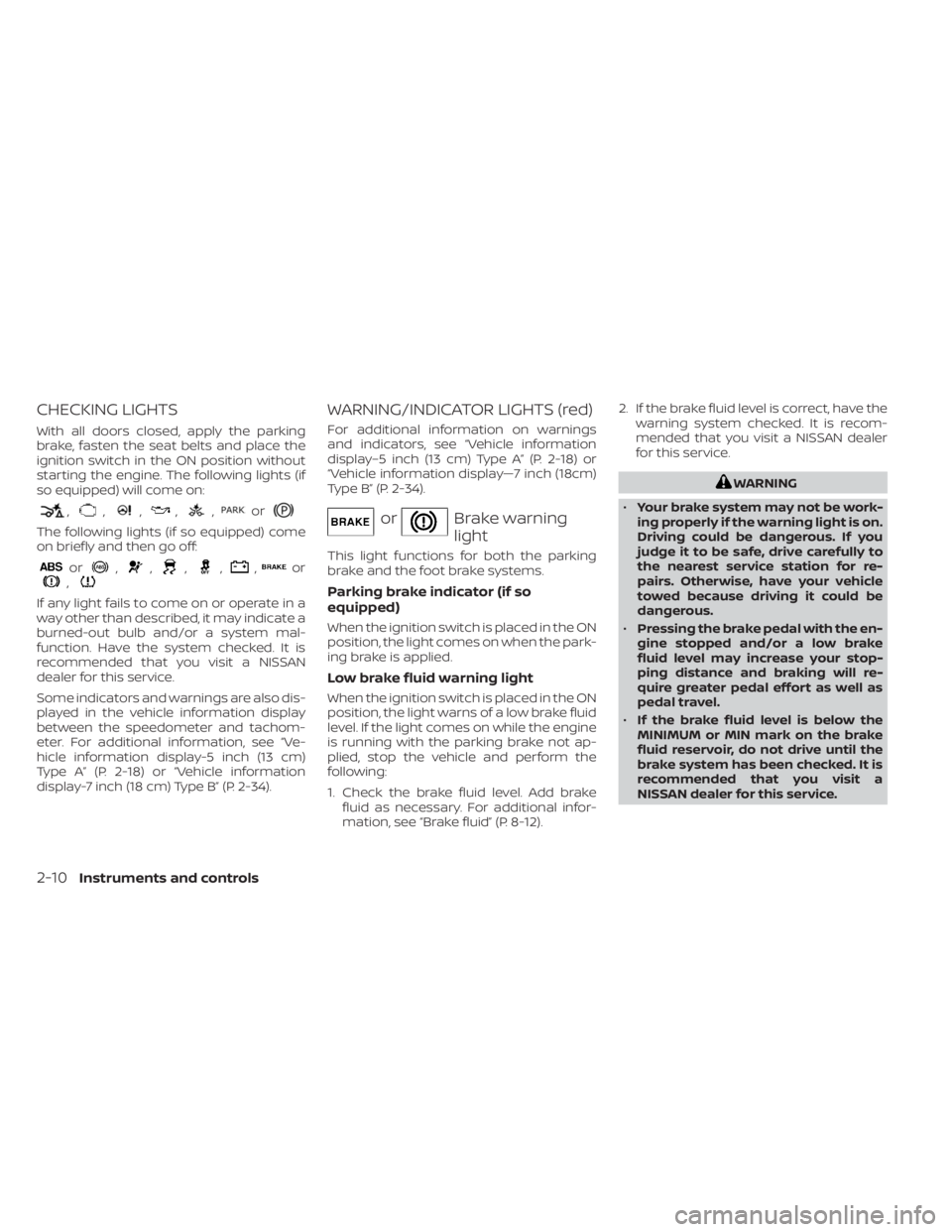
CHECKING LIGHTS
With all doors closed, apply the parking
brake, fasten the seat belts and place the
ignition switch in the ON position without
starting the engine. The following lights (if
so equipped) will come on:
,,,,,or
The following lights (if so equipped) come
on briefly and then go off:
or,,,,,or,
If any light fails to come on or operate in a
way other than described, it may indicate a
burned-out bulb and/or a system mal-
function. Have the system checked. It is
recommended that you visit a NISSAN
dealer for this service.
Some indicators and warnings are also dis-
played in the vehicle information display
between the speedometer and tachom-
eter. For additional information, see “Ve-
hicle information display-5 inch (13 cm)
Type A” (P. 2-18) or “Vehicle information
display-7 inch (18 cm) Type B” (P. 2-34).
WARNING/INDICATOR LIGHTS (red)
For additional information on warnings
and indicators, see “Vehicle information
display–5 inch (13 cm) Type A” (P. 2-18) or
“Vehicle information display—7 inch (18cm)
Type B” (P. 2-34).
orBrake warning
light
This light functions for both the parking
brake and the foot brake systems.
Parking brake indicator (if so
equipped)
When the ignition switch is placed in the ON
position, the light comes on when the park-
ing brake is applied.
Low brake fluid warning light
When the ignition switch is placed in the ON
position, the light warns of a low brake fluid
level. If the light comes on while the engine
is running with the parking brake not ap-
plied, stop the vehicle and perform the
following:
1. Check the brake fluid level. Add brakefluid as necessary. For additional infor-
mation, see “Brake fluid” (P. 8-12). 2. If the brake fluid level is correct, have the
warning system checked. It is recom-
mended that you visit a NISSAN dealer
for this service.
WARNING
• Your brake system may not be work-
ing properly if the warning light is on.
Driving could be dangerous. If you
judge it to be safe, drive carefully to
the nearest service station for re-
pairs. Otherwise, have your vehicle
towed because driving it could be
dangerous.
• Pressing the brake pedal with the en-
gine stopped and/or a low brake
fluid level may increase your stop-
ping distance and braking will re-
quire greater pedal effort as well as
pedal travel.
• If the brake fluid level is below the
MINIMUM or MIN mark on the brake
fluid reservoir, do not drive until the
brake system has been checked. It is
recommended that you visit a
NISSAN dealer for this service.
2-10Instruments and controls
Page 101 of 644
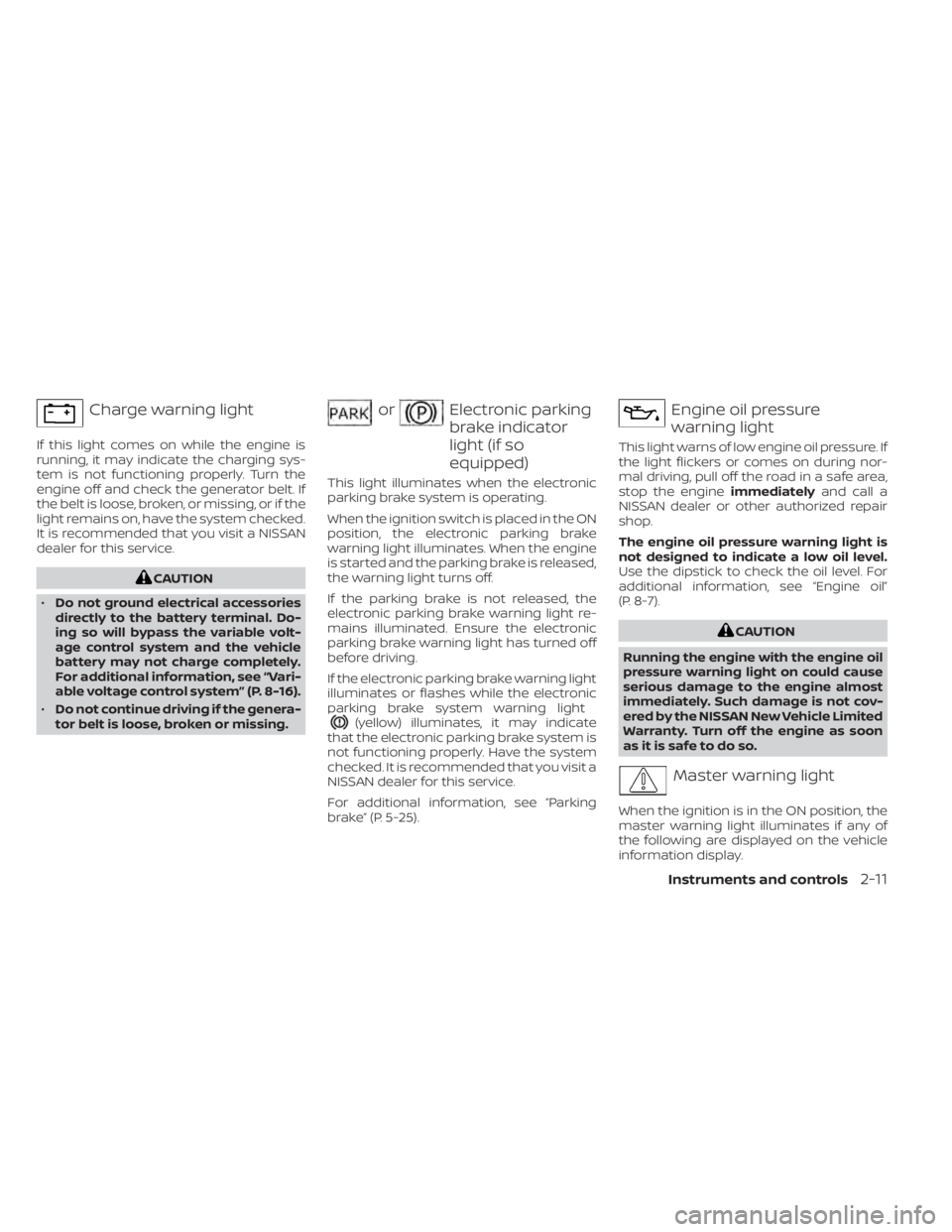
Charge warning light
If this light comes on while the engine is
running, it may indicate the charging sys-
tem is not functioning properly. Turn the
engine off and check the generator belt. If
the belt is loose, broken, or missing, or if the
light remains on, have the system checked.
It is recommended that you visit a NISSAN
dealer for this service.
CAUTION
• Do not ground electrical accessories
directly to the battery terminal. Do-
ing so will bypass the variable volt-
age control system and the vehicle
battery may not charge completely.
For additional information, see “Vari-
able voltage control system” (P. 8-16).
• Do not continue driving if the genera-
tor belt is loose, broken or missing.
orElectronic parking
brake indicator
light (if so
equipped)
This light illuminates when the electronic
parking brake system is operating.
When the ignition switch is placed in the ON
position, the electronic parking brake
warning light illuminates. When the engine
is started and the parking brake is released,
the warning light turns off.
If the parking brake is not released, the
electronic parking brake warning light re-
mains illuminated. Ensure the electronic
parking brake warning light has turned off
before driving.
If the electronic parking brake warning light
illuminates or flashes while the electronic
parking brake system warning light
(yellow) illuminates, it may indicate
that the electronic parking brake system is
not functioning properly. Have the system
checked. It is recommended that you visit a
NISSAN dealer for this service.
For additional information, see “Parking
brake” (P. 5-25).
Engine oil pressure
warning light
This light warns of low engine oil pressure. If
the light flickers or comes on during nor-
mal driving, pull off the road in a safe area,
stop the engine immediatelyand call a
NISSAN dealer or other authorized repair
shop.
The engine oil pressure warning light is
not designed to indicate a low oil level.
Use the dipstick to check the oil level. For
additional information, see “Engine oil”
(P. 8-7).
CAUTION
Running the engine with the engine oil
pressure warning light on could cause
serious damage to the engine almost
immediately. Such damage is not cov-
ered by the NISSAN New Vehicle Limited
Warranty. Turn off the engine as soon
as it is safe to do so.
Master warning light
When the ignition is in the ON position, the
master warning light illuminates if any of
the following are displayed on the vehicle
information display.
Instruments and controls2-11
Page 102 of 644
• Parking brake release warning
• Door open warning (while moving)
• Steering Alert hands on detectionwarning
The warning(s) remain on the vehicle infor-
mation display until action is taken, or the
ignition is placed in the OFF position.
Seat belt warning light and
chime
The light and chime remind you to fasten
the driver and front passenger seat belts.
For additional information, see “Seat belts”
(P. 1-12).
Security indicator light
This light blinks when the ignition switch is
placed in the OFF, LOCK or AUTO ACC
position.
The blinking security indicator light indi-
cates that the security systems equipped
on the vehicle are operational.
For additional information, see “Security
systems” (P. 2-52).
Supplemental air bag
warning light
When the ignition switch is placed in the ON
or START position, the supplemental air
bag warning light illuminates for about 7
seconds and then turns off. This means the
system is operational.
If any of the following conditions occur, the
front air bag, side air bag, curtain air bag,
and pretensioner systems need servicing
and your vehicle must be taken to a NISSAN
dealer:
• The supplemental air bag warning light remains on af ter approximately 7
seconds.
• The supplemental air bag warning light flashes intermittently.
• The supplemental air bag warning light does not come on at all.
Unless checked and repaired, the supple-
mental restraint system (air bag system)
and/or the pretensioners may not function
properly. For additional details, see “Supple-
mental Restraint System (SRS)” (P. 1-47).
WARNING
If the supplemental air bag warning
light is on, it could mean that the front
air bag, side air bag, curtain air bag sys-
tems and/or pretensioner systems will
not operate in an accident. To help
avoid injury to yourself or others, have
your vehicle checked as soon as pos-
sible. It is recommended that you visit a
NISSAN dealer for this service.
WARNING/INDICATOR LIGHTS
(yellow)
For additional information on warnings
and indicators, see “Vehicle information
display-5 inch (13 cm) Type A” (P. 2-18) or
“Vehicle information display-7 inch (18 cm)
Type B” (P. 2-34).
orAnti-lock Braking
System (ABS)
warning light
When the ignition switch is placed in the ON
position, the ABS warning light illuminates
and then turns off. This indicates the ABS is
operational.
2-12Instruments and controls