tow NISSAN ALTIMA HYBRID 2009 L32A / 4.G User Guide
[x] Cancel search | Manufacturer: NISSAN, Model Year: 2009, Model line: ALTIMA HYBRID, Model: NISSAN ALTIMA HYBRID 2009 L32A / 4.GPages: 353, PDF Size: 4.18 MB
Page 96 of 353
The Malfunction Indicator Light may stop blinking
and come on steady. Have the vehicle inspected
by a NISSAN dealer. You do not need to have
your vehicle towed to the dealer.
CAUTION
Continued vehicle operation without hav-
ing the emission control system checked
and repaired as necessary could lead to
poor driveability, reduced fuel economy,
and possible damage to the emission con-
trol system.
Ready operation indicator light
The ready indicator light illuminates when the
Hybrid System is powered and the vehicle may
be driven.
Security indicator light
This light blinks when the ignition switch is
placed in the OFF, LOCK or ACC position.
The blinking security indicator light indicates that
the security systems equipped on the vehicle are
operational.
For additional information, see “Security sys-
tems” later in this section.
Slip indicator light
This indicator light will blink when the traction
control system, Vehicle Dynamic Control System
or Anti-lock Braking System is limiting wheel
spin. Slippery road conditions may exist if the slip
indicator blinks on. If this happens, adjust your
driving accordingly.
The slip indicator light also comes on when the
ignition switch is placed in the ON position and
the Hybrid System is in the READY mode. The
light will turn off after about 2 seconds if the
system is operational. If the light does not come
on or does not go off, have the system checked
by a NISSAN dealer.
Turn signal/hazard indicator
lights
The appropriate light flashes when the turn signal
switch is activated.
Both lights flash when the hazard switch is turned
on.
AUDIBLE REMINDERS
Brake pad wear warning
The disc brake pads have audible wear warnings.
When a disc brake pad requires replacement, it
makes a high pitched scraping sound when the
vehicle is in motion, whether or not the brake
pedal is depressed. Have the brakes checked as
soon as possible if the warning sound is heard.
NISSAN Intelligent Key™ door buzzer
The Intelligent Key door buzzer sounds if the
Intelligent Key is left inside the vehicle when
locking the doors. When the buzzer sounds, be
sure to check both the vehicle and the Intelligent
Key. See “NISSAN Intelligent Key™” in the “Pre-
driving checks and adjustments” section.
Key reminder chime
A chime sounds if the driver’s door is opened
while the ignition switch is placed in the ACC or
OFF position or placed in the OFF or LOCK
position with the Intelligent Key left in the Intelli-
gent Key port. Make sure the ignition switch is
placed in the LOCK position, and take the Intel-
ligent Key with you when leaving the vehicle.
Instruments and controls2-17
ZREVIEW COPYÐ2009 Altima Hybrid Electric
(ahv)
Owners ManualÐCanadian_French(fr_can)
06/16/08Ðdebbie
X
Page 107 of 353
SWITCH OPERATION
The windshield wiper and washer switch oper-
ates when the ignition switch is placed in the ON
position.
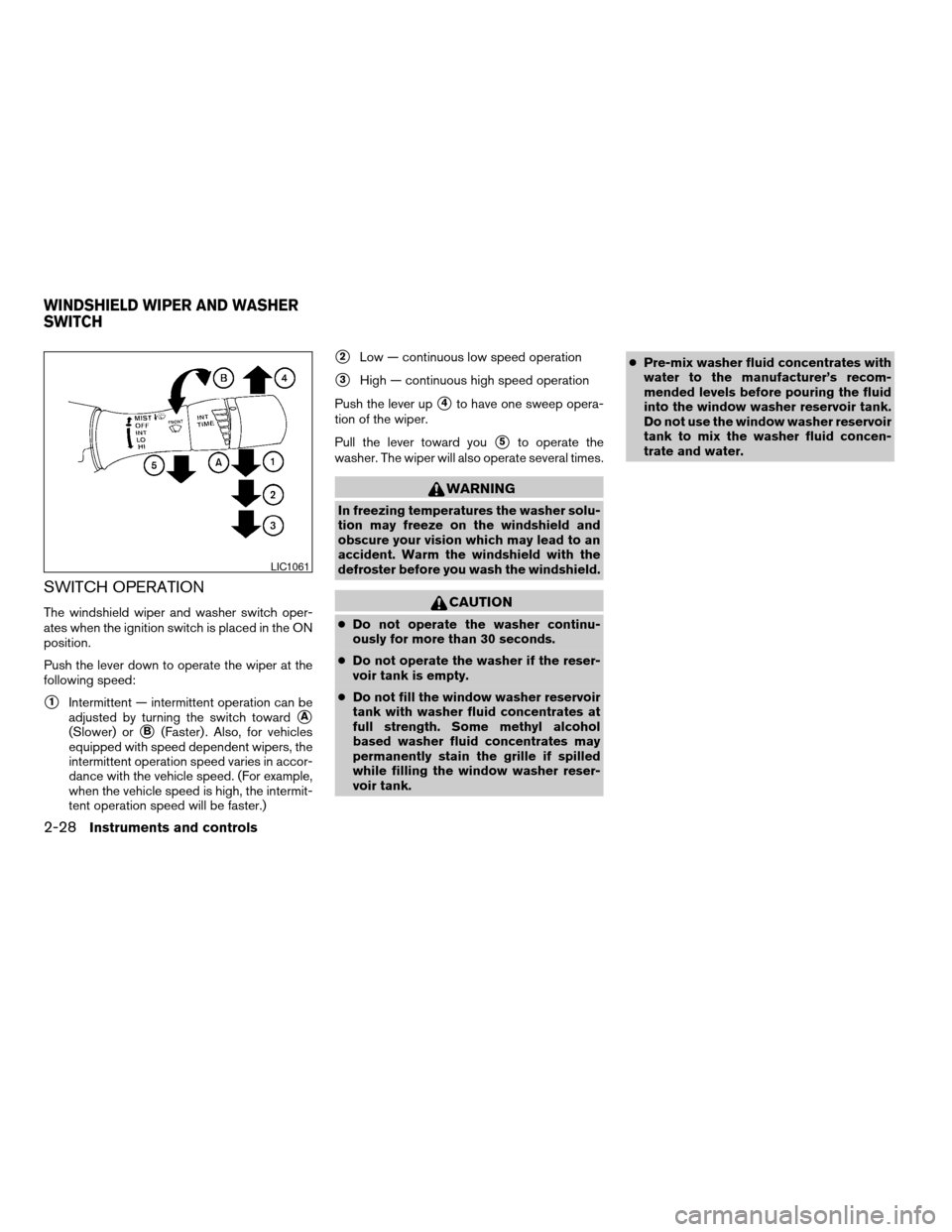
Push the lever down to operate the wiper at the
following speed:
s1Intermittent — intermittent operation can be
adjusted by turning the switch toward
sA
(Slower) orsB(Faster) . Also, for vehicles
equipped with speed dependent wipers, the
intermittent operation speed varies in accor-
dance with the vehicle speed. (For example,
when the vehicle speed is high, the intermit-
tent operation speed will be faster.)
s2Low — continuous low speed operation
s3High — continuous high speed operation
Push the lever up
s4to have one sweep opera-
tion of the wiper.
Pull the lever toward you
s5to operate the
washer. The wiper will also operate several times.
WARNING
In freezing temperatures the washer solu-
tion may freeze on the windshield and
obscure your vision which may lead to an
accident. Warm the windshield with the
defroster before you wash the windshield.
CAUTION
cDo not operate the washer continu-
ously for more than 30 seconds.
cDo not operate the washer if the reser-
voir tank is empty.
cDo not fill the window washer reservoir
tank with washer fluid concentrates at
full strength. Some methyl alcohol
based washer fluid concentrates may
permanently stain the grille if spilled
while filling the window washer reser-
voir tank.cPre-mix washer fluid concentrates with
water to the manufacturer’s recom-
mended levels before pouring the fluid
into the window washer reservoir tank.
Do not use the window washer reservoir
tank to mix the washer fluid concen-
trate and water.
LIC1061
WINDSHIELD WIPER AND WASHER
SWITCH
2-28Instruments and controls
ZREVIEW COPYÐ2009 Altima Hybrid Electric
(ahv)
Owners ManualÐCanadian_French(fr_can)
06/16/08Ðdebbie
X
Page 123 of 353
When power window switch does not
operate
If the power window automatic function (closing
only) does not operate properly, perform the fol-
lowing procedure to initialize the power window
system:
1. Place the ignition switch in the ON position.
2. Open the window more than halfway by
operating the power window switch.
3. Pull the power window switch and hold it to
close the window, and then hold the switch
more than 3 seconds after the window is
closed.
4. Release the power window switch. Operate
the window by the automatic function to
confirm the initialization is complete. The
power window automatically opens or
closes depending on if the automatic down
or up function is selected.
5. Perform steps 2 through 4 above for other
windows.
If the power window function does not operate
properly after performing the above procedure,
see a NISSAN dealer for assistance.
AUTOMATIC MOONROOF
The moonroof will only operate when the ignition
switch is placed in the ON position. The auto-
matic moonroof is operational for about 45 sec-
onds, even if the ignition switch is placed in the
ACC or OFF position. If the driver’s door or the
front passenger’s door is opened during this
period of about 45 seconds, power to the moon-
roof is canceled.
Sliding the moonroof
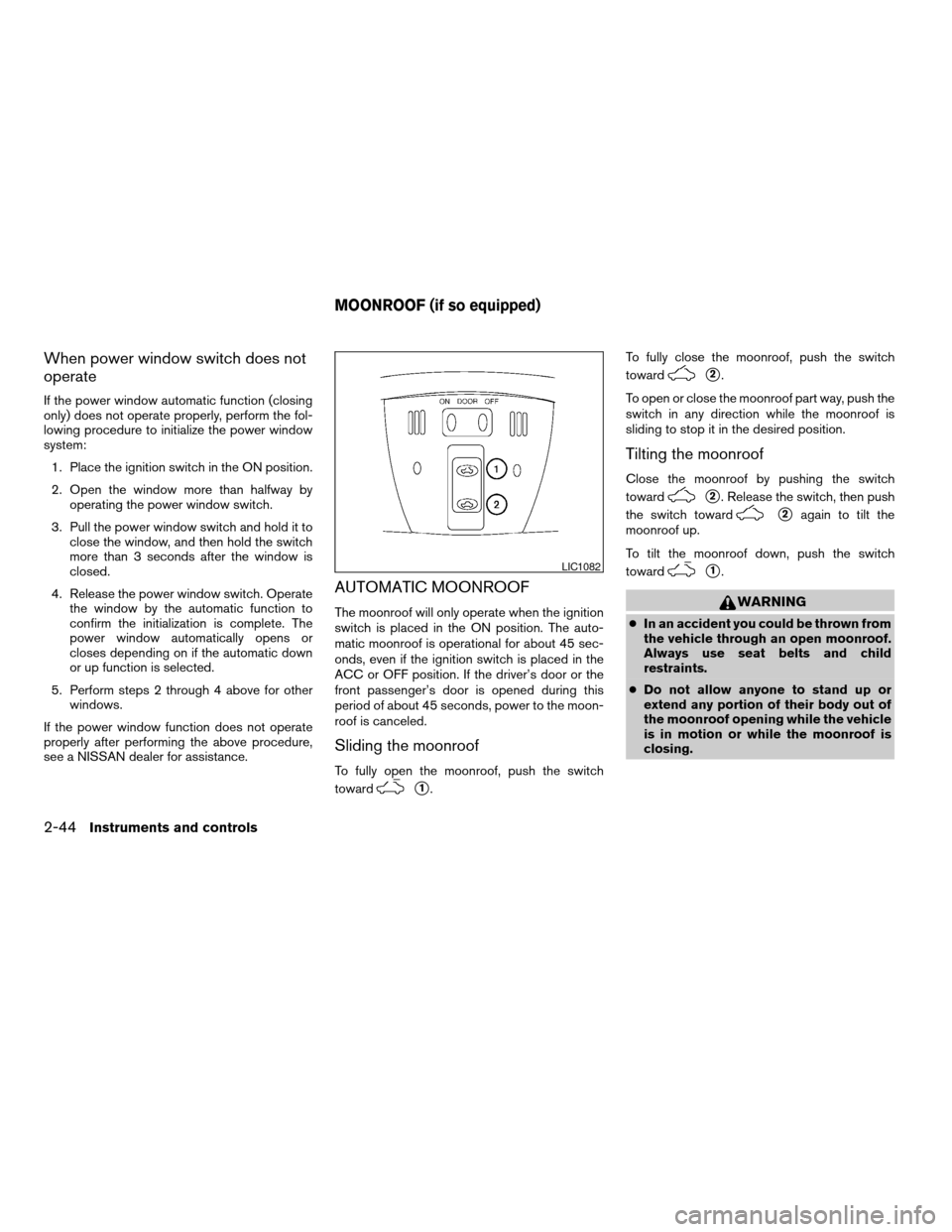
To fully open the moonroof, push the switch
toward
s1.To fully close the moonroof, push the switch
toward
s2.
To open or close the moonroof part way, push the
switch in any direction while the moonroof is
sliding to stop it in the desired position.
Tilting the moonroof
Close the moonroof by pushing the switch
toward
s2. Release the switch, then push
the switch toward
s2again to tilt the
moonroof up.
To tilt the moonroof down, push the switch
toward
s1.
WARNING
cIn an accident you could be thrown from
the vehicle through an open moonroof.
Always use seat belts and child
restraints.
cDo not allow anyone to stand up or
extend any portion of their body out of
the moonroof opening while the vehicle
is in motion or while the moonroof is
closing.
LIC1082
MOONROOF (if so equipped)
2-44Instruments and controls
ZREVIEW COPYÐ2009 Altima Hybrid Electric
(ahv)
Owners ManualÐCanadian_French(fr_can)
06/16/08Ðdebbie
X
Page 124 of 353
CAUTION
cRemove water drops, snow, ice or sand
from the moonroof before opening.
cDo not place heavy objects on the
moonroof or surrounding area.
Resetting the moonroof switch
The moonroof switch may not operate properly
and need to be reset if any of the following
conditions have occurred:
cthe moonroof has been manually moved,
cthe moonroof motor has been removed and
reinstalled after the moonroof has been re-
positioned or adjusted,
cthe moonroof glass panel has been adjusted
or changed, or
cthe electrical supply interrupted and/or
some malfunction has been detected.
Use the following reset procedure to return the
moonroof operation to normal.
1. Place the ignition switch in the ON position.
2. Push and hold the moonroof switch
toward
s2. Once the moonroof has
reached the full tilt position, release the
switch. Push and hold the switch towardthe
s2position again. After a delay of
four seconds, the moonroof will make a small
movement and backup.
3. Release the switch.
4. Within 5 seconds of releasing the switch,
push and continuously hold the switch
toward
s2. The moonroof will move
from the tilt position to the open position and
back to the close position.
NOTE:
If the switch is released at any time during
Step 4, the procedure must be restarted.
5. Release the switch. Do not place the ignition
switch in the OFF position for at least 2
seconds. The moonroof is now reset.
If the moonroof still does not operate properly,
have the moonroof system checked by a NISSAN
dealer.
Auto-reverse function (when closing or
tilting down the moonroof)
The auto-reverse function can be activated when
the moonroof is closed or tilted down by auto-
matic operation when the ignition switch is
placed in the ON position or for about 45 sec-
onds after the ignition switch is placed in the OFF
position.Depending on the environment or driving
conditions, the auto-reverse function may
be activated if an impact or load similar to
something being caught in the moonroof
occurs.
WARNING
There are some small distances immedi-
ately before the closed position which
cannot be detected. Make sure that all
passengers have their hands, etc., inside
the vehicle before closing the moonroof.
When closing:
If the control unit detects something caught in the
moonroof as it moves to the front, the moonroof
will immediately open backward.
When tilting down:
If the control unit detects something caught in the
moonroof as it tilts down, the moonroof will im-
mediately tilt up.
If the auto-reverse function malfunctions and re-
peats opening or tilting up the moonroof, keep
pushing the tilt down switch within 5 seconds
after it happens; the moonroof will fully close
gradually. Make sure nothing is caught in the
moonroof.
Instruments and controls2-45
ZREVIEW COPYÐ2009 Altima Hybrid Electric
(ahv)
Owners ManualÐCanadian_French(fr_can)
06/16/08Ðdebbie
X
Page 135 of 353
Any key that is not given to your dealer at the time
of registration will no longer be able to start your
vehicle.
Do not allow the immobilizer system key, which
contains an electrical transponder, to come into
contact with salt water. This could affect system
function.WARNING
cAlways have the doors locked while
driving. Along with the use of seat belts,
this provides greater safety in the event
of an accident by helping to prevent
persons from being thrown from the
vehicle. This also helps keep children
and others from unintentionally open-
ing the doors, and will help keep out
intruders.
cBefore opening any door, always look
for and avoid oncoming traffic.
cDo not leave children unattended inside
the vehicle. They could unknowingly ac-
tivate switches or controls. Unattended
children could become involved in seri-
ous accidents.
LOCKING WITH KEY
The power door lock system allows you to lock or
unlock all doors at the same time.
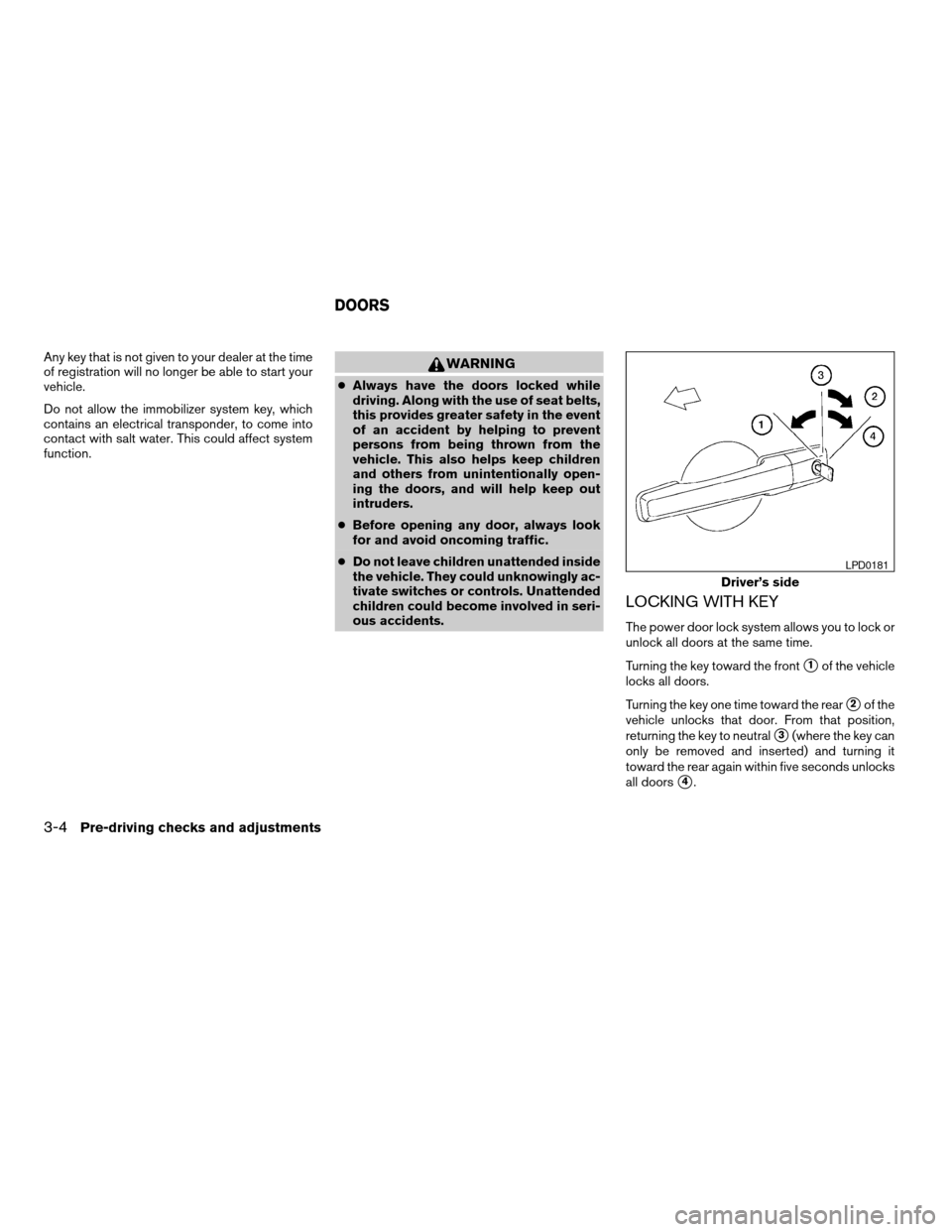
Turning the key toward the front
s1of the vehicle
locks all doors.
Turning the key one time toward the rear
s2of the
vehicle unlocks that door. From that position,
returning the key to neutral
s3(where the key can
only be removed and inserted) and turning it
toward the rear again within five seconds unlocks
all doors
s4.
Driver’s side
LPD0181
DOORS
3-4Pre-driving checks and adjustments
ZREVIEW COPYÐ2009 Altima Hybrid Electric
(ahv)
Owners ManualÐCanadian_French(fr_can)
06/16/08Ðdebbie
X
Page 136 of 353

Opening and closing windows (if so
equipped)
The driver’s door key operation allows you to
open and close windows equipped with auto-
matic operation at the same time.
cTo open the windows, turn the driver’s door
key toward the rear of the vehicle forlonger
than 1 secondafter the door is unlocked.
cTo close the windows, turn the driver’s door
key toward the front of the vehicle forlonger
than 1 secondafter the door is locked.
Windows stop when the key cylinder is released.
LOCKING WITH INSIDE LOCK
KNOB
To lock the door without the key, move the inside
lock knob to the lock position
s1, then close the
door.
To unlock the door without the key, move the
inside lock knob to the unlock position
s2.
LOCKING WITH POWER DOOR
LOCK SWITCH
To lock all the doors without a key, push the door
lock switch (driver’s or front passenger’s side) to
the lock position
s1. When locking the door this
way, be certain not to leave the key inside the
vehicle.
To unlock all the doors without a key, push the
door lock switch (driver’s or front passenger’s
side) to the unlock position
s2.
Inside lock
WPD0291
Door lock switch
WPD0381
Pre-driving checks and adjustments3-5
ZREVIEW COPYÐ2009 Altima Hybrid Electric
(ahv)
Owners ManualÐCanadian_French(fr_can)
06/16/08Ðdebbie
X
Page 138 of 353
WARNING
cRadio waves could adversely affect
electric medical equipment. Those who
use a pacemaker should contact the
electric medical equipment manufac-
turer for the possible influences before
use.
cThe Intelligent Key transmits radio
waves when the buttons are pushed.
The FAA advises the radio waves may
affect aircraft navigation and communi-
cation systems. Do not operate the In-
telligent Key while on an airplane. Make
sure the buttons are not operated unin-
tentionally when the unit is stored for a
flight.
The Intelligent Key can operate all the door locks
using the remote controller function or pushing
the request switch on the vehicle without taking
the key out from a pocket or purse. The operating
environment and/or conditions may affect the
Intelligent Key operation.
Be sure to read the following before using the
Intelligent Key:
CAUTION
cBe sure to carry the Intelligent Key with
you when operating the vehicle.
cNever leave the Intelligent Key in the
vehicle when you leave the vehicle.
The Intelligent Key is always communicating with
the vehicle as it receives radio waves. The Intel-
ligent Key transmits weak radio waves. Environ-
mental conditions may interfere with the opera-
tion of the Intelligent Key system under the
following operating conditions.
cWhen operating near a location where
strong radio waves are transmitted, such as
a TV tower, power station and broadcasting
station.
cWhen in possession of wireless equipment,
such as a cellular telephone, transceiver,
and CB radio.
cWhen the Intelligent Key is in contact with or
covered by metallic materials.
cWhen any type of radio wave remote control
is used nearby.
cWhen the Intelligent Key is placed near an
electric appliance such as a personal com-
puter.cWhen the vehicle is parked near a parking
meter.
In such cases, correct the operating conditions
before using the Intelligent Key function or use
the mechanical key.
Although the life of the battery varies depending
on the operating conditions, the battery’s life is
approximately 2 years. If the battery is dis-
charged, replace it with a new one.
When the Intelligent Key battery is almost dis-
charged, insert the Intelligent Key into the Intelli-
gent Key port to start the Hybrid System. Replace
the discharged battery with a new one as soon as
possible. For more details, see “Push-button ig-
nition switch” in the “Starting and driving” sec-
tion.
Since the Intelligent Key is continuously receiving
radio waves, if the key is left near equipment
which transmits strong radio waves, such as sig-
nals from a TV and personal computer, the bat-
tery life may become shorter.
For information regarding replacement of a bat-
tery, see “Battery” in the “Maintenance and do-it-
yourself” section.
NISSAN INTELLIGENT KEY™
Pre-driving checks and adjustments3-7
ZREVIEW COPYÐ2009 Altima Hybrid Electric
(ahv)
Owners ManualÐCanadian_French(fr_can)
06/16/08Ðdebbie
X
Page 153 of 353
cDo not fill a portable fuel container in
the vehicle or trailer. Static electricity
can cause an explosion of flammable
liquid, vapor or gas in any vehicle or
trailer. To reduce the risk of serious
injury or death when filling portable fuel
containers:
– Always place the container on the
ground when filling.
– Do not use electronic devices when
filling.
– Keep the pump nozzle in contact
with the container while you are fill-
ing it.
– Use only approved portable fuel con-
tainers for flammable liquid.CAUTION
cIf fuel is spilled on the vehicle body,
flush it away with water to avoid paint
damage.
cInsert the fuel-filler cap straight into the
fuel-filler tube, then tighten until the
fuel-filler cap clicks. Failure to tighten
the fuel-filler cap properly may cause
the
Malfunction Indicator Light
(MIL) to illuminate. Failure to tighten
the fuel-filler cap properly may cause
the
Malfunction Indicator Light
(MIL) to illuminate. If the
light
illuminates because the fuel-filler cap
is loose or missing, tighten or install the
cap and continue to drive the vehicle.
The
light should turn off after a
few driving trips. If the
light
does not turn off after a few driving
trips, have the vehicle inspected by a
NISSAN dealer.
cFor additional information, see the
“Malfunction Indicator Light (MIL)” in
the “Instruments and Controls” section
earlier in this manual.
TILT OPERATION
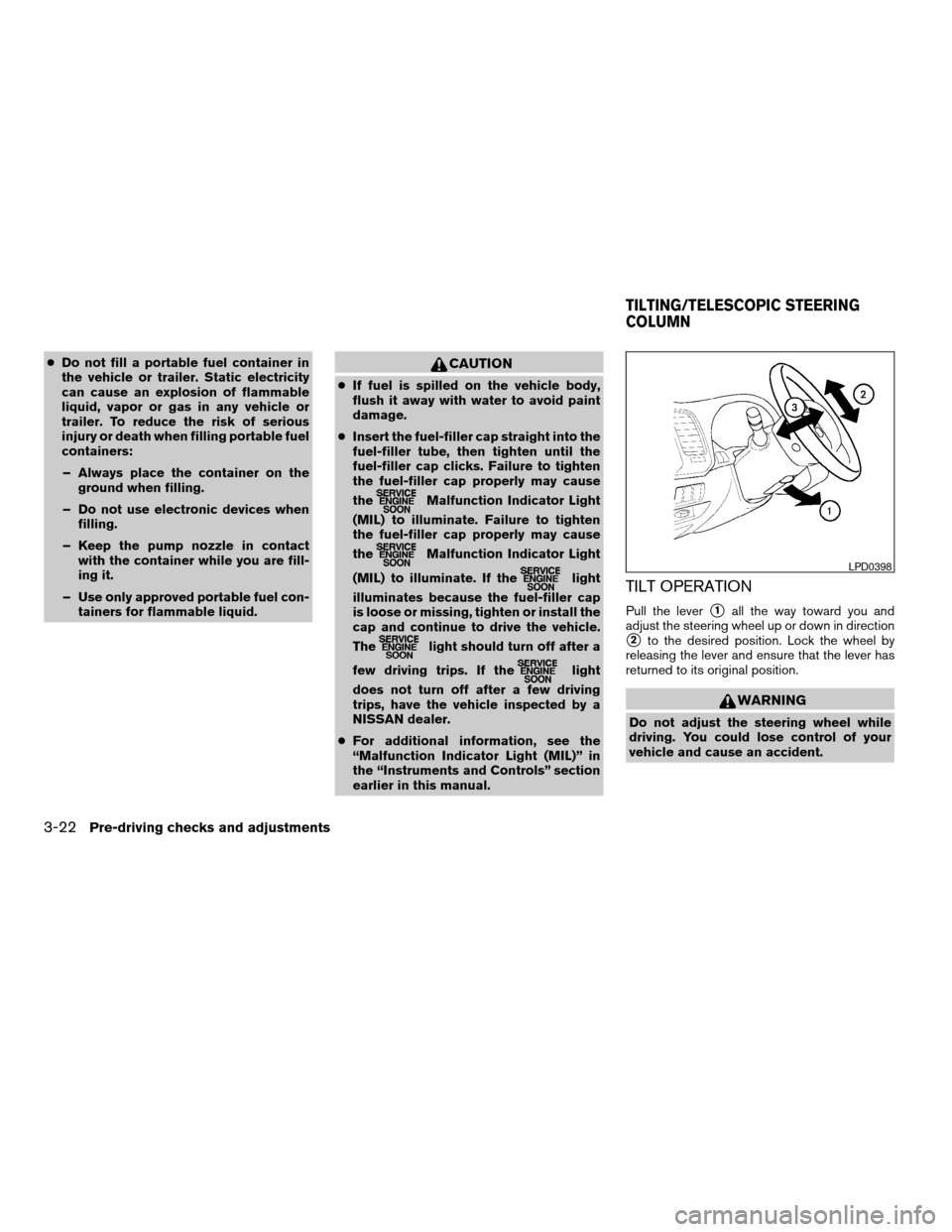
Pull the levers1all the way toward you and
adjust the steering wheel up or down in direction
s2to the desired position. Lock the wheel by
releasing the lever and ensure that the lever has
returned to its original position.
WARNING
Do not adjust the steering wheel while
driving. You could lose control of your
vehicle and cause an accident.
LPD0398
TILTING/TELESCOPIC STEERING
COLUMN
3-22Pre-driving checks and adjustments
ZREVIEW COPYÐ2009 Altima Hybrid Electric
(ahv)
Owners ManualÐCanadian_French(fr_can)
06/16/08Ðdebbie
X
Page 154 of 353
TELESCOPIC OPERATION
Pull the levers1all the way toward you and
adjust the steering wheel forward or backward in
direction
s3, to the desired position. Lock the
wheel by releasing the lever and ensure that the
lever has returned to its original position.
WARNING
Do not adjust the steering wheel any
closer to you than is necessary for proper
steering operation and comfort. The driv-
er’s air bag inflates with great force. If you
are unrestrained, leaning forward, sitting
sideways or out of position in any way, you
are at greater risk of injury or death in a
crash. You may also receive serious or
fatal injuries from the air bag if you are up
against it when it inflates. Always sit back
against the seatback and as far away as
practical from the steering wheel. Always
use the seat belts.
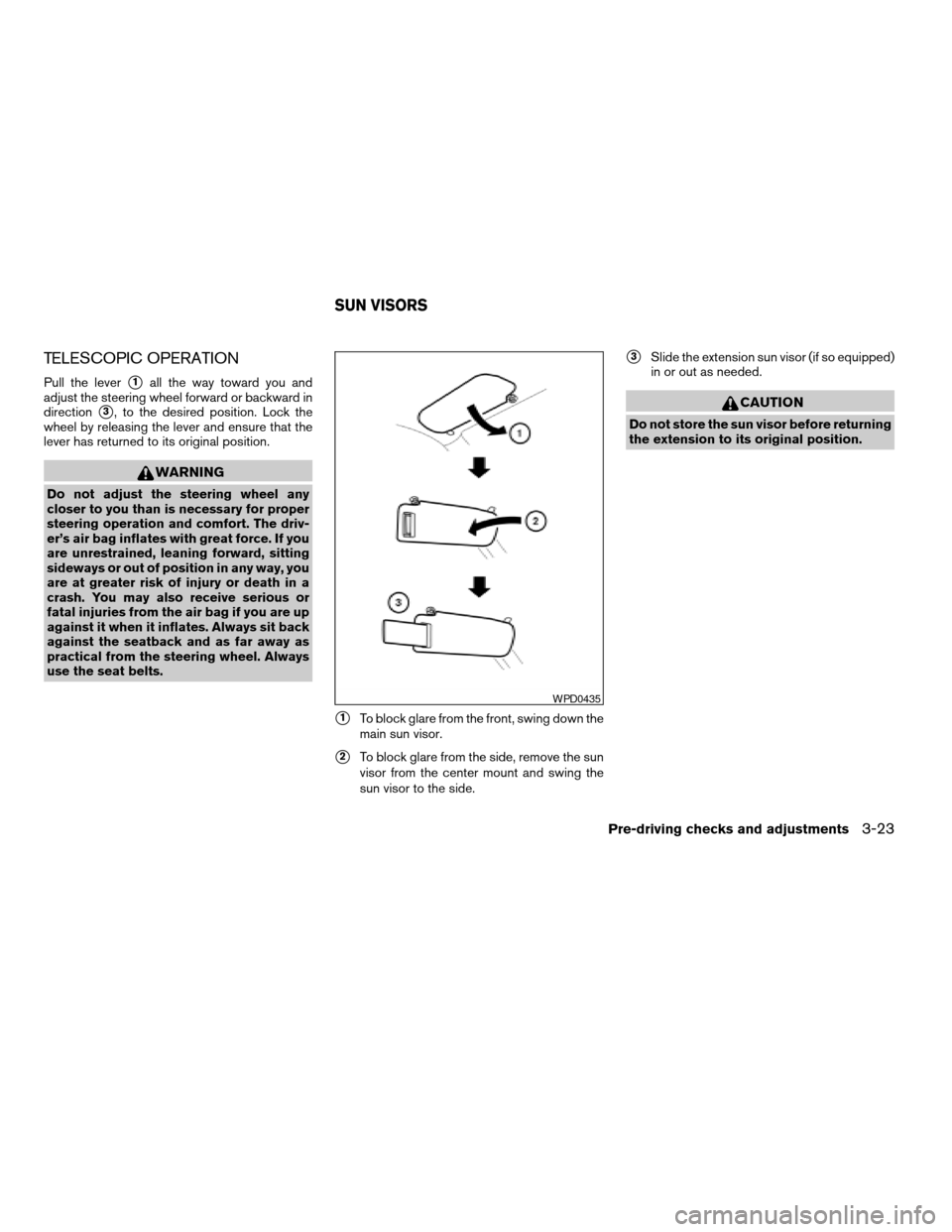
s1To block glare from the front, swing down the
main sun visor.
s2To block glare from the side, remove the sun
visor from the center mount and swing the
sun visor to the side.
s3Slide the extension sun visor (if so equipped)
in or out as needed.
CAUTION
Do not store the sun visor before returning
the extension to its original position.
WPD0435
SUN VISORS
Pre-driving checks and adjustments3-23
ZREVIEW COPYÐ2009 Altima Hybrid Electric
(ahv)
Owners ManualÐCanadian_French(fr_can)
06/16/08Ðdebbie
X
Page 169 of 353

Adjust air flow direction by moving the ventilator
slides.
Open or close the ventilators by using the dial.
Move the dial toward the
to open the ven-
tilators or toward the
to close them.
Right and Left
WHA0736
Center
WHA0737
Rear (if so equipped)
WHA0688
VENTS
4-10Monitor, climate, audio, phone and voice recognition systems
ZREVIEW COPYÐ2009 Altima Hybrid Electric
(ahv)
Owners ManualÐCanadian_French(fr_can)
06/16/08Ðdebbie
X