brakes NISSAN ARMADA 2011 Owners Manual
[x] Cancel search | Manufacturer: NISSAN, Model Year: 2011, Model line: ARMADA, Model: NISSAN ARMADA 2011Pages: 489, PDF Size: 4.35 MB
Page 345 of 489
●Do not drive across steep slopes. In-
stead drive either straight up or straight
down the slopes. Off-road vehicles can
tip over sideways much more easily
than they can forward or backward.
● Many hills are too steep for any vehicle.
If you drive up them, you may stall. If
you drive down them, you may not be
able to control your speed. If you drive
across them, you may roll over.
● Do not shift gears while driving on
downhill grades as this could cause
loss of control of the vehicle.
● Stay alert when driving to the top of a
hill. At the top there could be a drop-off
or other hazard that could cause an
accident.
● If your engine stalls or you cannot make
it to the top of a steep hill, never at-
tempt to turn around. Your vehicle
could tip or roll over. Always back
straight down in R (Reverse) gear and
apply brakes to control your speed.
● Heavy braking going down a hill could
cause your brakes to overheat and fade,
resulting in loss of control and an acci-
dent. Apply brakes lightly and use a low
gear to control your speed. ●
Unsecured cargo can be thrown around
when driving over rough terrain. Prop-
erly secure all cargo so it will not be
thrown forward and cause injury to you
or your passengers.
● To avoid raising the center of gravity
excessively, do not exceed the rated
capacity of the roof rack and evenly
distribute the load. Secure heavy loads
in the cargo area as far forward and as
low as possible. Do not equip the ve-
hicle with tires larger than specified in
this manual. This could cause your ve-
hicle to roll over.
● Do not grip the inside or spokes of the
steering wheel when driving off-road.
The steering wheel could move sud-
denly and injure your hands. Instead
drive with your fingers and thumbs on
the outside of the rim.
● Before operating the vehicle, ensure
that the driver and all passengers have
their seat belts fastened.
● Lower your speed when encountering
strong crosswinds. With a higher center
of gravity, your NISSAN is more af-
fected by strong side winds. Slower
speeds ensure better vehicle control. ●
Do not drive beyond the performance
capability of the tires, even with 4WD
engaged.
● For 4WD equipped vehicles, do not at-
tempt to raise two wheels off the
ground and shift the transmission to
any drive or reverse position with the
engine running. Doing so may result in
drivetrain damage or unexpected ve-
hicle movement which could result in
serious vehicle damage or personal
injury.
● Do not attempt to test a 4WD equipped
vehicle on a 2-wheel dynamometer
(such as the dynamometers used by
some states for emissions testing) , or
similar equipment even if the other two
wheels are raised off the ground. Make
sure you inform test facility personnel
that your vehicle is equipped with 4WD
before it is placed on a dynamometer.
Using the wrong test equipment may
result in drivetrain damage or unex-
pected vehicle movement which could
result in serious vehicle damage or per-
sonal injury.
● Accelerating quickly, sharp steering
maneuvers or sudden braking may
cause loss of control.
5-8Starting and driving
Page 346 of 489
●If at all possible, avoid sharp turning
maneuvers, particularly at high speeds.
Your NISSAN four-wheel drive vehicle
has a higher center of gravity than a
passenger car. The vehicle is not de-
signed for cornering at the same
speeds as passenger cars.
● Always use tires of the same type, size,
brand, construction (bias, bias-belted,
or radial) , and tread pattern on all four
wheels. Install tire chains on the rear
wheels when driving on slippery roads
and drive carefully.
● Be sure to check the brakes immedi-
ately after driving in mud or water. See
“Brake system” later in this section for
“Wet brakes”.
● Avoid parking your vehicle on steep
hills. If you get out of the vehicle and it
rolls forward, backward or sideways,
you could be injured.
● Whenever you drive off-road through
sand, mud or water as deep as the
wheel hub, more frequent maintenance
may be required. See “Periodic mainte-
nance” in the “NISSAN Service and
Maintenance Guide.”
Page 369 of 489
WARNING
●While driving on a slippery surface, be
careful when braking, accelerating or
downshifting. Abrupt braking or accel-
erating could cause the wheels to skid
and result in an accident.
● If the engine is not running or is turned
off while driving, the power assist for
the brakes will not work. Braking will be
harder.
Wet brakes
When the vehicle is washed or driven through
water, the brakes may get wet. As a result, your
braking distance will be longer and the vehicle
may pull to one side during braking.
To dry the brakes, drive the vehicle at a safe
speed while lightly pressing the brake pedal to
heat up the brakes. Do this until the brakes return
to normal. Avoid driving the vehicle at high
speeds until the brakes function correctly.
Parking brake break-in
Break-in the parking brake shoes whenever the
stopping effect of the parking brake is weakened
or whenever the parking brake shoes and/or
drum/rotors are replaced, in order to assure the
best brake performance. This procedure is described in the vehicle service
manual and can be performed by a NISSAN
dealer.
ANTI-LOCK BRAKING SYSTEM
(ABS)
Page 370 of 489
WARNING
Do not pump the brake pedal. Doing so
may result in increased stopping
distances.
Self-test feature
The ABS includes electronic sensors, electric
pumps, hydraulic solenoids and a computer. The
computer has a built-in diagnostic feature that
tests the system each time you start the engine
and move the vehicle at a low speed in forward or
reverse. When the self-test occurs, you may hear
a “clunk” noise and/or feel a pulsation in the brake
pedal. This is normal and does not indicate a
malfunction. If the computer senses a malfunc-
tion, it switches the ABS off and illuminates the
ABS warning light on the instrument panel. The
brake system then operates normally, but without
anti-lock assistance.
If the ABS warning light illuminates during the
self-test or while driving, have the vehicle
checked by a NISSAN dealer.
Normal operation
The ABS operates at speeds above3-6MPH(5
- 10 km/h) . The speed varies according to road
conditions.When the ABS senses that 1 or more wheels are
close to locking up, the actuator rapidly applies
and releases hydraulic pressure. This action is
similar to pumping the brakes very quickly. You
may feel a pulsation in the brake pedal and hear a
noise from under the hood or feel a vibration from
the actuator when it is operating. This is normal
and indicates that the ABS is operating properly.
However, the pulsation may indicate that road
conditions are hazardous and extra care is re-
quired while driving.
The Vehicle Dynamic Control (VDC) system uses
various sensors to monitor driver inputs and ve-
hicle motion. Under certain driving conditions,
the VDC System helps to perform the following
functions:
● Controls brake pressure to reduce wheel
slip on one slipping drive wheel so power is
transferred to a non slipping drive wheel on
the same axle.
● Controls brake pressure and engine output
to reduce drive wheel slip based on vehicle
speed (traction control function) .
● If the 4WD transfer case is shifted into 4LO
the
Page 400 of 489
When driving in areas using road salt or other
corrosive materials, check lubrication frequently.
Lights*Clean the headlights on a regular basis.
Make sure that the headlights, stop lights, tail
lights, turn signal lights, and other lights are all
operating properly and installed securely. Also
check headlight aim.
Road wheel nuts (lug nuts)* When checking
the tires, make sure no wheel nuts are missing,
and check for any loose wheel nuts. Tighten if
necessary.
Tire rotation* Tires should be rotated every
7,500 miles (12,000 km) .
Tires* Check the pressure with a gauge often
and always prior to long distance trips. If neces-
sary, adjust the pressure in all tires, including the
spare, to the pressure specified. Check carefully
for damage, cuts or excessive wear.
Tire Pressure Monitoring System (TPMS)
transmitter components Replace the TPMS
transmitter grommet seal, valve core and cap
when the tires are replaced due to wear or age.
Wheel alignment and balance If the vehicle
should pull to either side while driving on a
straight and level road, or if you detect uneven or
abnormal tire wear, there may be a need for wheel alignment. If the steering wheel or seat vibrates at
normal highway speeds, wheel balancing may be
needed.
● For additional information regarding tires,
refer to “Important Tire Safety Information”
(US) or “Tire Safety Information” (Canada) in
the Warranty Information Booklet.
Windshield Clean the windshield on a regular
basis. Check the windshield at least every six
months for cracks or other damage. Have a dam-
aged windshield repaired by a qualified repair
facility.
Windshield wiper blades* Check for cracks or
wear if they do not wipe properly.
Inside the vehicle
The maintenance items listed here should be
checked on a regular basis, such as when per-
forming periodic maintenance, cleaning the ve-
hicle, etc.
Additional information on the following
items with an “*” is found later in this sec-
tion.
Accelerator pedal Check the pedal for smooth
operation and make sure the pedal does not bind
or require uneven effort. Keep the floor mat away
from the pedal. Automatic transmission P (Park) position
mechanism
On a fairly steep hill check that your
vehicle is held securely with the shift selector in
the P (Park) position without applying any brakes.
Brake pedal Check the pedal for smooth opera-
tion. If the brake pedal suddenly goes down fur-
ther than normal, the pedal feels spongy or the
vehicle seems to take longer to stop, see a
NISSAN dealer immediately. Keep the floor mat
away from the pedal.
Brakes Check that the brakes do not pull the
vehicle to one side when applied.
Parking brake Check the parking brake opera-
tion regularly. The vehicle should be securely held
on a fairly steep hill with only the parking brake
applied. If the parking brake needs adjustment,
see a NISSAN dealer.
Seats Check seat position controls such as seat
adjusters, seatback recliner, etc. to ensure they
operate smoothly and all latches lock securely in
every position. Check that the head restraints and
headrests move up and down smoothly and the
locks (if so equipped) hold securely in all latched
positions.
Maintenance and do-it-yourself8-3
Page 420 of 489
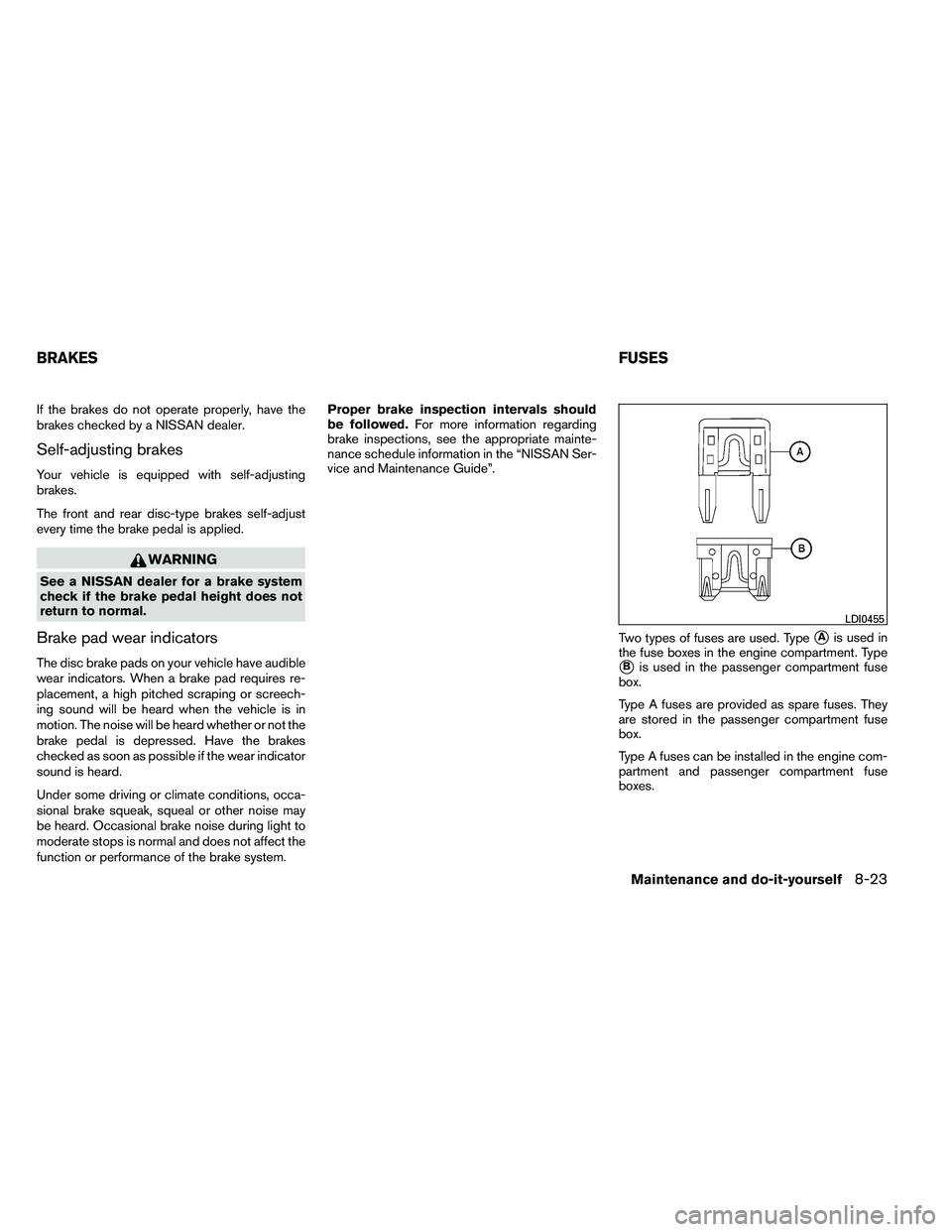
If the brakes do not operate properly, have the
brakes checked by a NISSAN dealer.
Self-adjusting brakes
Your vehicle is equipped with self-adjusting
brakes.
The front and rear disc-type brakes self-adjust
every time the brake pedal is applied.
Page 467 of 489
NOTE:
A weight-distributing hitch system may af-
fect the operation of trailer surge brakes. If
you are considering use of a weight-
distributing hitch system with a surge
brake-equipped trailer, check with the
surge brake, hitch or trailer manufacturer
to determine if and how this can be done.
Follow the instructions provided by the manufac-
turer for installing and using the weight-
distributing hitch system.
General set-up instructions are as follows:1. Park unloaded vehicle on a level surface. With the ignition on and the doors closed,
allow the vehicle to stand for several minutes
so that it can level.
2. Measure the height of a reference point on the front and rear bumpers at the center of
the vehicle.
3. Attach the trailer to the vehicle and adjust the hitch equalizers so that the front bumper
height is within0-.5inches (0 – 13 mm) of
the reference height measured in step 2. The
rear bumper should be no higher than the
reference height measured in step 2.
Page 469 of 489
Trailer brakes
When towing a trailer load of 3,500 lbs.
(1,587 kg) or more, trailers with a brake
system MUST be used.However, most states
require a separate braking system on trailers with
a loaded weight above a specific amount. Make
sure the trailer meets the local regulations and
the regulations where you plan to tow.
Several types of braking systems are available.
Surge Brakes - The surge brake actuator is
mounted on the trailer tongue with a hydraulic line
running to each trailer wheel. Surge brakes are
activated by the trailer pushing against the hitch
ball when the tow vehicle is braking. Hydraulic
surge brakes are common on rental trailers and
some boat trailers. In this type of system, there is
no hydraulic or electric connection for brake op-
eration between the tow vehicle and the trailer.
Electric Trailer Brakes - Electric braking sys-
tems are activated by an electronic signal sent
from a trailer brake controller (special brake-
sensing module) . If electric trailer brakes are
used, see “Electric trailer brake controller” in this
section.
Have a professional supplier of towing equip-
ment make sure the trailer brakes are properly
installed and demonstrate proper brake function
testing.
Page 473 of 489
●Avoid towing a trailer for your vehicle’s first
500 miles (805 km) .
● For the first 500 miles (805 km) that you do
tow, do not drive over 50 MPH (80 km/h) .
● Have your vehicle serviced more often than
at intervals specified in the recommended
Maintenance Schedule in the “NISSAN Ser-
vice and Maintenance Guide”.
● When making a turn, your trailer wheels will
be closer to the inside of the turn than your
vehicle wheels. To compensate for this,
make a larger than normal turning radius
during the turn.
● Crosswinds and rough roads will adversely
affect vehicle/trailer handling, possibly caus-
ing vehicle sway. When being passed by
larger vehicles, be prepared for possible
changes in crosswinds that could affect ve-
hicle handling.
Do the following if the trailer begins to sway: 1. Take your foot off the accelerator pedal to allow the vehicle to coast and steer as
straight ahead as the road conditions allow.
This combination will help stabilize the ve-
hicle
– Do not correct trailer sway by steering or applying the brakes. 2. When the trailer sway stops, gently apply the
brakes and pull to the side of the road in a
safe area.
3. Try to rearrange the trailer load so it is bal- anced as described earlier in this section.
● Be careful when passing other vehicles.
Passing while towing a trailer requires con-
siderably more distance than normal pass-
ing. Remember, the length of the trailer must
also pass the other vehicle before you can
safely change lanes.
● Use the Tow Mode or downshift the trans-
mission to a lower gear for engine braking
when driving down steep or long hills. This
will help slow the vehicle without applying
the brakes.
● Avoid holding the brake pedal down too long
or too frequently. This could cause the
brakes to overheat, resulting in reduced
braking efficiency.
● Increase your following distance to allow for
greater stopping distances while towing a
trailer. Anticipate stops and brake gradually.
● NISSAN recommends that the cruise con-
trol not be used while towing a trailer. ●
Some states or provinces have specific
regulations and speed limits for vehicles that
are towing trailers. Obey the local speed
limits.
● Check your hitch, trailer wiring harness con-
nections, and trailer wheel lug nuts after 50
miles (80 km) of travel and at every break.
● When launching a boat, don’t allow the wa-
ter level to go over the exhaust tail pipe or
rear bumper.
● Make sure you disconnect the trailer lights
before backing the trailer into the water or
the trailer lights may burn out.
When towing a trailer, final drive gear oil
should be replaced and transmission
oil/fluid should be changed more fre-
quently. For additional information, see the
“Maintenance and do-it-yourself” section
earlier in this manual.
Tow mode
Using tow mode is recommended when pulling a
heavy trailer or hauling a heavy load. Press the
TOW MODE switch to activate tow mode. The
indicator light on the TOW MODE switch illumi-
nates when tow mode is selected. Press the
TOW MODE switch again to turn tow mode off.
Tow mode is automatically cancelled when the
ignition switch is turned OFF.
9-30Technical and consumer information
Page 485 of 489
S
Safety Child safety rear door lock ..........3-7
Child seat belts .....1-36, 1-44, 1-49, 1-54
Reporting safety defects (US only) .....9-33
Screen (See NISSAN mobile entertainment
system) ......................4-79
Seat adjustment Front manual seat adjustment ........1-2
Front power seat adjustment .........1-4
Second row bench seats ...........1-6
Second row captain’s chair ..........1-5
Third row power folding seats .......1-23
Seatback pockets ................2-43
Seat belt Child safety ..................1-35
Infants and small children ..........1-35
Injured Person ................1-28
Larger children ................1-36
Precautions on seat belt usage .......1-25
Pregnant women ...............1-28
Pre-tensioner seat belt system .......1-70
Rear center seat belt ............1-31
Seat belt extenders .............1-34
Seat belt maintenance ............1-34
Seat belts ...................1-25
Shoulder belt height adjustment ......1-33
Three-point type with retractor .......1-28
Seat belt warning light ..............2-18
Seats Adjustment ...................1-2
Automatic drive positioner ..........3-36
Front seats ...................1-2
Heated seats .................2-35 Manual front seat adjustment
.........1-2
Second row captain’s chair adjustment .....1-5
Security indicator light ..............2-20
Security system (NISSAN vehicle immobilizer
system) , engine start ........2-27, 3-4, 5-13
Self-adjusting brakes ..............8-23
Service
manual order form ...........9-35
Servicing air conditioner .............4-39
Setting button ...............4-9, 4-25
Shifting Automatic transmission ...........5-16
Shift lock release .................5-18
Shoulder belt height adjustment ........1-33
Side air bag system (See supplemental side air
bag, curtain and rollover air bag systems) . . .1-69
Sonar Front system .................5-36
Rear system .................5-35
Spark plug replacement .............8-17
Speedometer ...................2-5
SRS warning label ................1-71
Starting Before starting the engine ..........5-13
Jump starting .................6-8
Precautions when starting and driving . . . .5-2
Push starting .................6-10
Starting the engine .............5-13
Startup screen ..................4-19
Steering Heated steering wheel ...........2-36
Power steering fluid .............8-12
Power steering system ...........5-31
Tilting steering wheel ............3-30
Steering wheel audio control switch ......4-74
Stop light .....................8-32
Storage ......................2-40 Overhead storage compartment
......2-43
Storage bin ................2-44, 2-48
Storage tray ...................2-40
Sunglasses case .................2-42
Sunglasses holder ................2-42
Sunroof ......................2-55
Sunroof (see Moonroof) .............2-55
Sun visors ....................3-31
Supplemental
air bag warning labels ......1-71
Supplemental air bag warning light . . .1-72, 2-18
Supplemental front impact air bag system . . .1-64
Supplemental restraint system Information and warning labels .......1-71
Precautions on supplemental restraint
system ....................1-57
Supplemental restraint system
(Supplemental air bag system) .........1-57
Switch Autolight switch ...............2-31
Automatic power window switch ......2-53
Fog light switch ...............2-34
Hazard warning flasher switch .......2-34
Headlight and turn signal switch ......2-30
Headlight control switch ..........2-30
Ignition switch .................5-9
Power door lock switch ............3-6
Rear sonar system off switch ........2-37
Rear window and outside mirror defroster
switch .....................2-30
Rear window wiper and washer
switches ...................2-29
Turn signal switch ..............2-33
Vehicle dynamic control (VDC) off
switch .....................2-37
Windshield wiper and washer switch . . .2-28
10-6