key NISSAN ARMADA 2017 2.G Owners Manual
[x] Cancel search | Manufacturer: NISSAN, Model Year: 2017, Model line: ARMADA, Model: NISSAN ARMADA 2017 2.GPages: 614, PDF Size: 2.87 MB
Page 328 of 614
display or prompted. Review the expanded
command list when this mode is active. See
examples of Alternate Command Mode screens.
Please note that in this mode the recognition
success rate may be affected as the number of
available commands and ways of speaking each
command are increased. To improve the recog-
nition success rate, try using the Speaker
Adaptation Function available in that mode.
(See “Speaker adaptation function (for Alternate
Command Mode)” (P.4-140) .) Otherwise it is
recommended that Alternate Command Mode
be turned OFF and Standard Mode be used for
the best recognition performance.
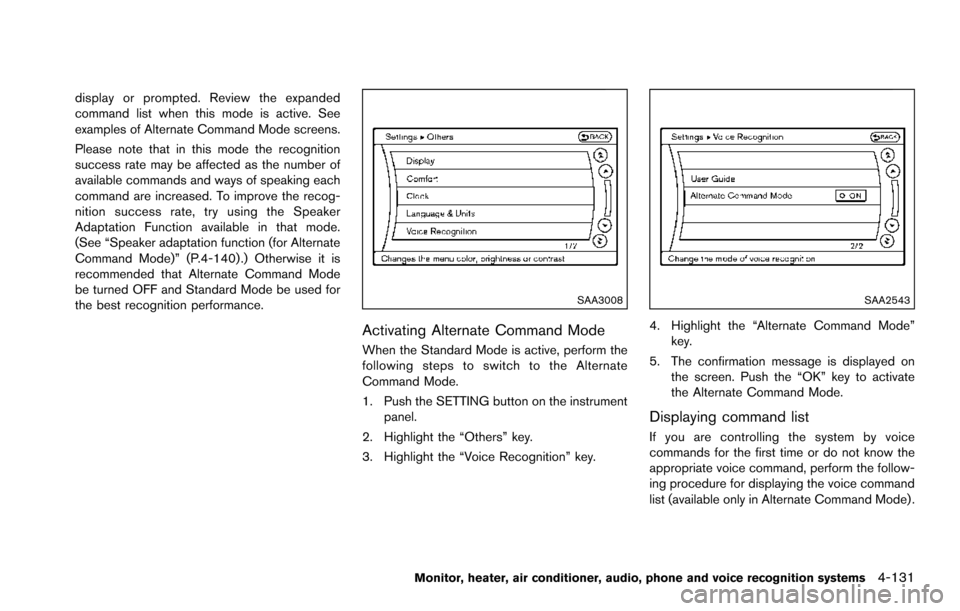
SAA3008
Activating Alternate Command Mode
When the Standard Mode is active, perform the
following steps to switch to the Alternate
Command Mode.
1. Push the SETTING button on the instrumentpanel.
2. Highlight the “Others” key.
3. Highlight the “Voice Recognition” key.
SAA2543
4. Highlight the “Alternate Command Mode” key.
5. The confirmation message is displayed on the screen. Push the “OK” key to activate
the Alternate Command Mode.
Displaying command list
If you are controlling the system by voice
commands for the first time or do not know the
appropriate voice command, perform the follow-
ing procedure for displaying the voice command
list (available only in Alternate Command Mode) .
Monitor, heater, air conditioner, audio, phone and voice recognition systems4-131
Page 329 of 614
4-132Monitor, heater, air conditioner, audio, phone and voice recognition systems
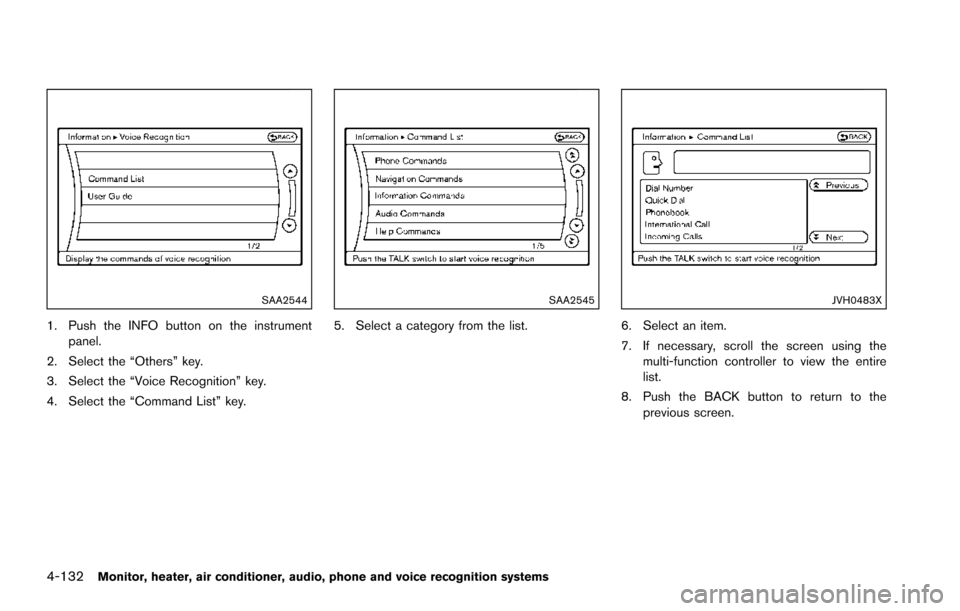
SAA2544
1. Push the INFO button on the instrumentpanel.
2. Select the “Others” key.
3. Select the “Voice Recognition” key.
4. Select the “Command List” key.
SAA2545
5. Select a category from the list.
JVH0483X
6. Select an item.
7. If necessary, scroll the screen using the multi-function controller to view the entire
list.
8. Push the BACK button to return to the previous screen.
Page 335 of 614
4-138Monitor, heater, air conditioner, audio, phone and voice recognition systems
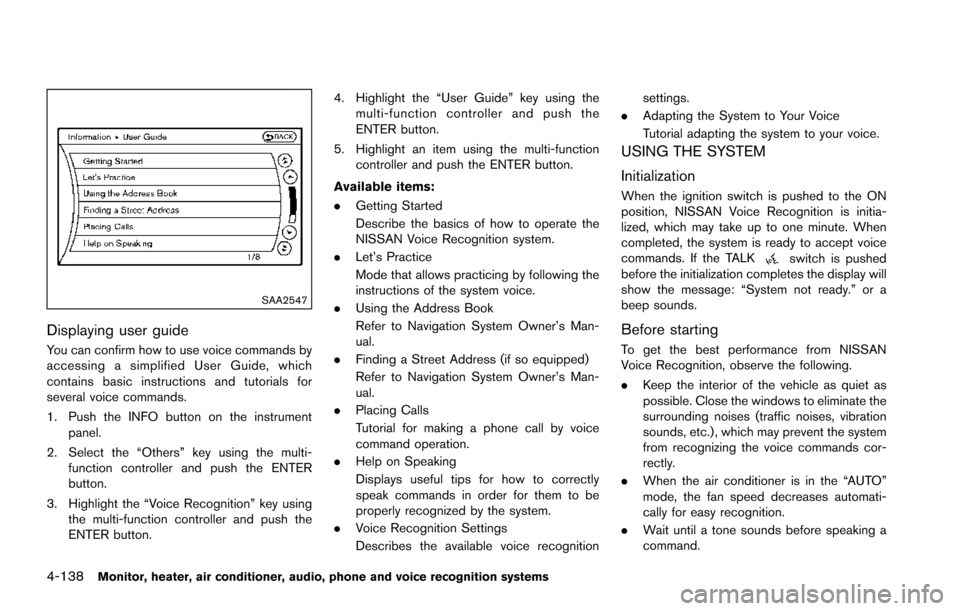
SAA2547
Displaying user guide
You can confirm how to use voice commands by
accessing a simplified User Guide, which
contains basic instructions and tutorials for
several voice commands.
1. Push the INFO button on the instrumentpanel.
2. Select the “Others” key using the multi- function controller and push the ENTER
button.
3. Highlight the “Voice Recognition” key using the multi-function controller and push the
ENTER button. 4. Highlight the “User Guide” key using the
multi-function controller and push the
ENTER button.
5. Highlight an item using the multi-function controller and push the ENTER button.
Available items:
. Getting Started
Describe the basics of how to operate the
NISSAN Voice Recognition system.
. Let’s Practice
Mode that allows practicing by following the
instructions of the system voice.
. Using the Address Book
Refer to Navigation System Owner’s Man-
ual.
. Finding a Street Address (if so equipped)
Refer to Navigation System Owner’s Man-
ual.
. Placing Calls
Tutorial for making a phone call by voice
command operation.
. Help on Speaking
Displays useful tips for how to correctly
speak commands in order for them to be
properly recognized by the system.
. Voice Recognition Settings
Describes the available voice recognition settings.
. Adapting the System to Your Voice
Tutorial adapting the system to your voice.
USING THE SYSTEM
Initialization
When the ignition switch is pushed to the ON
position, NISSAN Voice Recognition is initia-
lized, which may take up to one minute. When
completed, the system is ready to accept voice
commands. If the TALK
switch is pushed
before the initialization completes the display will
show the message: “System not ready.” or a
beep sounds.
Before starting
To get the best performance from NISSAN
Voice Recognition, observe the following.
. Keep the interior of the vehicle as quiet as
possible. Close the windows to eliminate the
surrounding noises (traffic noises, vibration
sounds, etc.) , which may prevent the system
from recognizing the voice commands cor-
rectly.
. When the air conditioner is in the “AUTO”
mode, the fan speed decreases automati-
cally for easy recognition.
. Wait until a tone sounds before speaking a
command.
Page 337 of 614
4-140Monitor, heater, air conditioner, audio, phone and voice recognition systems
— “Dial one eight zero zero six six two sixtwo zero zero.”
Note 1: For the best voice recognition phone
dialing results, say phone numbers as single
digits.
Note 2: You cannot say 555-6000 as “five five
five six thousands”.
Note 3: When speaking a house number, speak
the number “0” as “zero”. If the letter “o (Oh)” is
included in the house number, it will not be
recognized as the number “0 (zero)” even if you
speak “oh” instead of “zero”. Please speak
“zero” for the number “0 (zero)”, “oh” for the
letter “o (oh)”.
Send digits using dial tone:
. Press the TALK
switch during a phone
call.
. The menu will be launched and you will be
provided with the following guidance:
"Please say the digits to dial".
. After guidance, say the digits of the number
you want to send. After this, the digits that
have been recognized will be read out.
. If you press the ENTER button on the
steering wheel or on the multi-function
controller, the selected digits will be sent.
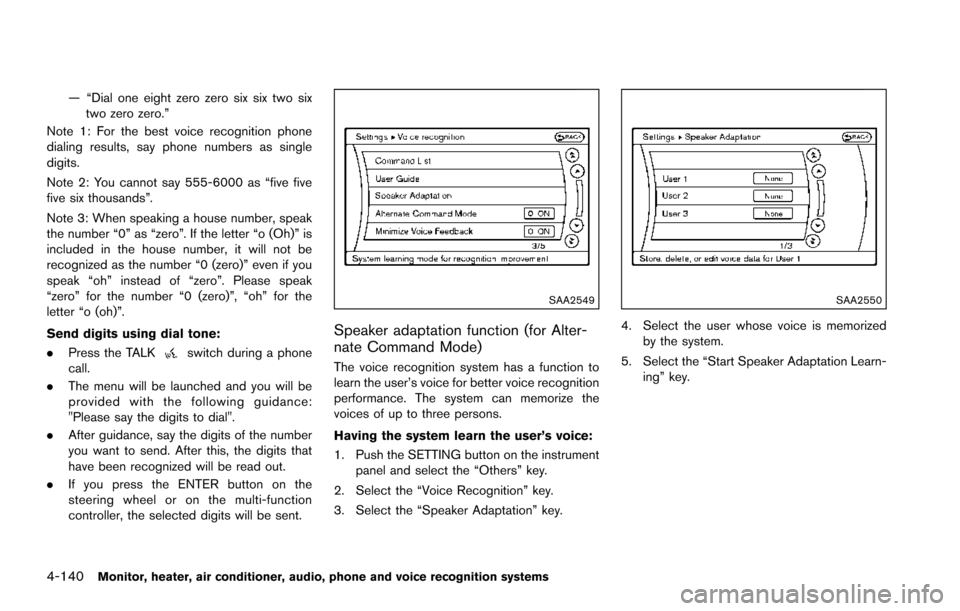
SAA2549
Speaker adaptation function (for Alter-
nate Command Mode)
The voice recognition system has a function to
learn the user’s voice for better voice recognition
performance. The system can memorize the
voices of up to three persons.
Having the system learn the user’s voice:
1. Push the SETTING button on the instrument
panel and select the “Others” key.
2. Select the “Voice Recognition” key.
3. Select the “Speaker Adaptation” key.
SAA2550
4. Select the user whose voice is memorized by the system.
5. Select the “Start Speaker Adaptation Learn- ing” key.
Page 338 of 614
SAA2551
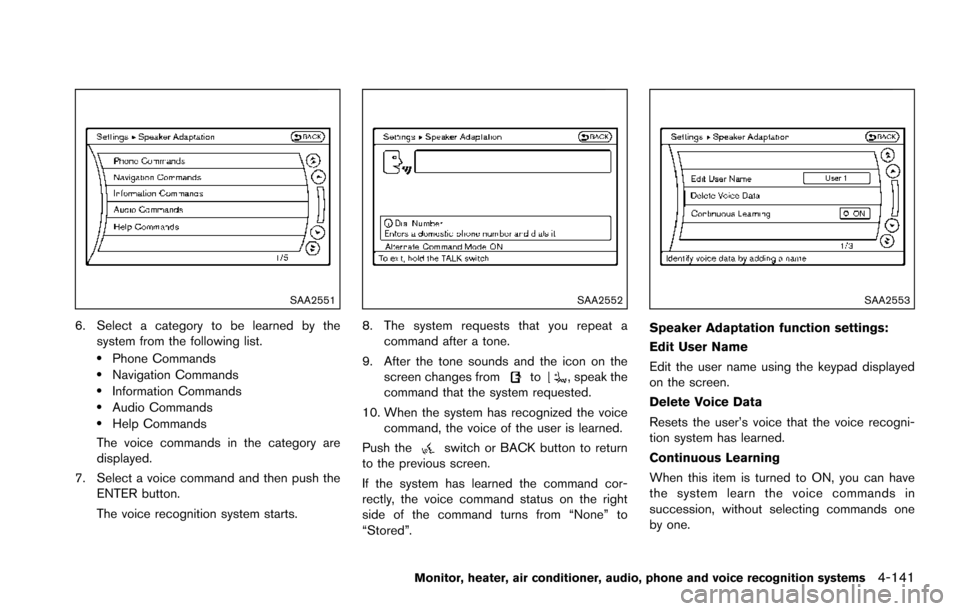
6. Select a category to be learned by thesystem from the following list.
.Phone Commands.Navigation Commands.Information Commands.Audio Commands.Help Commands
The voice commands in the category are
displayed.
7. Select a voice command and then push the ENTER button.
The voice recognition system starts.
SAA2552
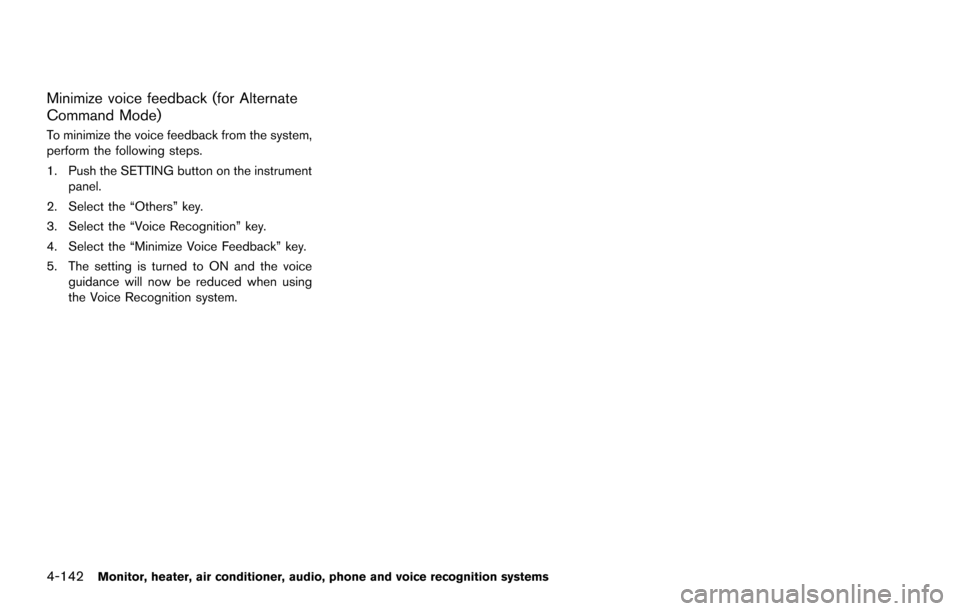
8. The system requests that you repeat a
command after a tone.
9. After the tone sounds and the icon on the screen changes from
to, speak the
command that the system requested.
10. When the system has recognized the voice command, the voice of the user is learned.
Push the
switch or BACK button to return
to the previous screen.
If the system has learned the command cor-
rectly, the voice command status on the right
side of the command turns from “None” to
“Stored”.
SAA2553
Speaker Adaptation function settings:
Edit User Name
Edit the user name using the keypad displayed
on the screen.
Delete Voice Data
Resets the user’s voice that the voice recogni-
tion system has learned.
Continuous Learning
When this item is turned to ON, you can have
the system learn the voice commands in
succession, without selecting commands one
by one.
Monitor, heater, air conditioner, audio, phone and voice recognition systems4-141
Page 339 of 614
4-142Monitor, heater, air conditioner, audio, phone and voice recognition systems
Minimize voice feedback (for Alternate
Command Mode)
To minimize the voice feedback from the system,
perform the following steps.
1. Push the SETTING button on the instrumentpanel.
2. Select the “Others” key.
3. Select the “Voice Recognition” key.
4. Select the “Minimize Voice Feedback” key.
5. The setting is turned to ON and the voice guidance will now be reduced when using
the Voice Recognition system.
Page 342 of 614
5 Starting and driving
Precautions when starting and driving ................................ 5-4Exhaust gas (carbon monoxide) ...................................... 5-4
Three-way catalyst .............................................................. 5-4
Tire Pressure Monitoring System (TPMS) .................... 5-5
Avoiding collision and rollover ......................................... 5-8
On-pavement and off-road driving precautions .......... 5-9
Off-road recovery ................................................................ 5-9
Rapid air pressure loss ...................................................... 5-9
Drinking alcohol/drugs and driving .............................. 5-10
Driving safety precautions .............................................. 5-10
Push-button ignition switch ................................................. 5-12 Operating range for engine start function ................. 5-13
Push-button ignition switch positions ......................... 5-14
Emergency engine shut off ............................................ 5-14
Intelligent Key battery discharge .................................. 5-15
Before starting the engine ................................................... 5-15
Starting the engine ................................................................ 5-16 Remote start (if so equipped) ....................................... 5-16
Driving the vehicle ................................................................. 5-17 Engine protection mode ................................................. 5-17
Automatic transmission ................................................... 5-18
Parking brake ........................................................................\
.. 5-22
Lane Departure Warning (LDW)/Lane Departure
Prevention (LDP) (if so equipped) .................................... 5-23 LDW system operation ................................................... 5-24 Turning the LDW system ON/OFF ............................ 5-25
How to enable/disable the LDW system ................. 5-26
LDP system operation .................................................. 5-26
Turning the LDP system ON/OFF ............................. 5-28
How to enable/disable the LDP system .................. 5-28
LDW/LDP system limitations ...................................... 5-29
System temporarily unavailable .................................. 5-31
System malfunction ....................................................... 5-32
System maintenance ..................................................... 5-32
Blind Spot Warning (BSW) (if so equipped) ................ 5-33
BSW system operation ................................................ 5-35
Turning the BSW system ON/OFF ........................... 5-36
How to enable/disable the BSW system ................ 5-36
BSW system limitations ............................................... 5-37
BSW driving situations ................................................. 5-38
System temporarily unavailable .................................. 5-41
System malfunction ....................................................... 5-41
System maintenance ..................................................... 5-42
Blind Spot Intervention
Š(BSI) (if so equipped) ........... 5-43
BSI system operation .................................................... 5-45
Turning the BSI system ON/OFF ............................... 5-46
How to enable/disable the BSI system ................... 5-47
BSI system limitations ................................................... 5-47
BSI driving situations .................................................... 5-49
System temporarily unavailable .................................. 5-54
Page 354 of 614
SSD0436
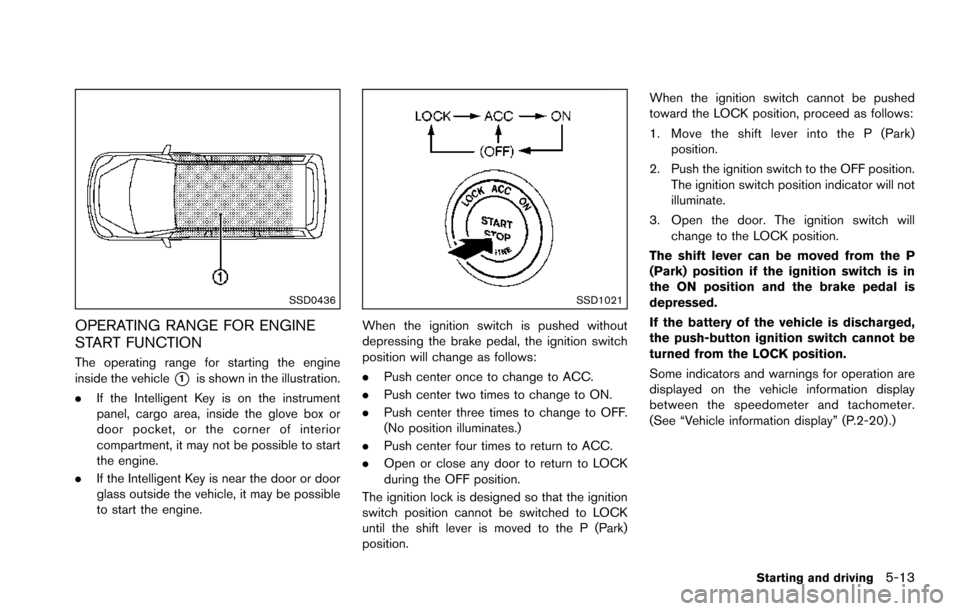
OPERATING RANGE FOR ENGINE
START FUNCTION
The operating range for starting the engine
inside the vehicle
*1is shown in the illustration.
. If the Intelligent Key is on the instrument
panel, cargo area, inside the glove box or
door pocket, or the corner of interior
compartment, it may not be possible to start
the engine.
. If the Intelligent Key is near the door or door
glass outside the vehicle, it may be possible
to start the engine.
SSD1021
When the ignition switch is pushed without
depressing the brake pedal, the ignition switch
position will change as follows:
.Push center once to change to ACC.
. Push center two times to change to ON.
. Push center three times to change to OFF.
(No position illuminates.)
. Push center four times to return to ACC.
. Open or close any door to return to LOCK
during the OFF position.
The ignition lock is designed so that the ignition
switch position cannot be switched to LOCK
until the shift lever is moved to the P (Park)
position. When the ignition switch cannot be pushed
toward the LOCK position, proceed as follows:
1. Move the shift lever into the P (Park)
position.
2. Push the ignition switch to the OFF position. The ignition switch position indicator will not
illuminate.
3. Open the door. The ignition switch will change to the LOCK position.
The shift lever can be moved from the P
(Park) position if the ignition switch is in
the ON position and the brake pedal is
depressed.
If the battery of the vehicle is discharged,
the push-button ignition switch cannot be
turned from the LOCK position.
Some indicators and warnings for operation are
displayed on the vehicle information display
between the speedometer and tachometer.
(See “Vehicle information display” (P.2-20) .)
Starting and driving5-13
Page 355 of 614
5-14Starting and driving
PUSH-BUTTON IGNITION SWITCH
POSITIONS
LOCK (Normal parking position)
The ignition switch can only be locked in this
position.
The ignition switch will be unlocked when it is
pushed to the ACC position while carrying the
Intelligent Key.
ACC (Accessories)
This position activates electrical accessories
such as the radio, when the engine is not
running.
ACC has a battery saver feature that will turn the
ignition switch to the OFF position after a period
of time under the following conditions:
.all doors are closed.
. shift lever is in P (Park) .
. turn signal/hazard indicator lights are not
flashing.
The battery saver feature will be cancelled if any
of the following occur:
. any door is opened.
. shift lever is moved out of P (Park) .
. ignition switch changes position.
ON (Normal operating position)
This position turns on the ignition system and
electrical accessories.
ON has a battery saver feature that will turn the
ignition switch to the OFF position, if the vehicle
is not running, after some time under the
following conditions:
.all doors are closed.
. shift lever is in P (Park) .
. turn signal/hazard indicator lights are not
flashing.
The battery saver feature will be cancelled if any
of the following occur:
. any door is opened.
. shift lever is moved out of P (Park) .
. ignition switch changes position.
OFF
The engine can be turned off in the position.
The ignition lock is designed so that the ignition
switch cannot be switched to the LOCK position
until the shift lever is moved to the P (Park)
position.
CAUTION
Do not leave the vehicle with the push-
button ignition switch in ACC or ON
positions when the engine is not run-
ning for an extended period. This can
discharge the battery.
EMERGENCY ENGINE SHUT OFF
To shut off the engine in an emergency situation
while driving, perform the following procedure:
.Rapidly push the push-button ignition switch
3 consecutive times in less than 1.5
seconds, or
. Push and hold the push-button ignition
switch for more than 2 seconds.
Page 356 of 614
JVS0404X
INTELLIGENT KEY BATTERY DIS-
CHARGE
If the battery of the Intelligent Key is discharged,
or environmental conditions interfere with the
Intelligent Key operation, start the engine
according to the following procedure:
1. Move the shift lever to the P (Park) position.
2. Firmly apply the foot brake.
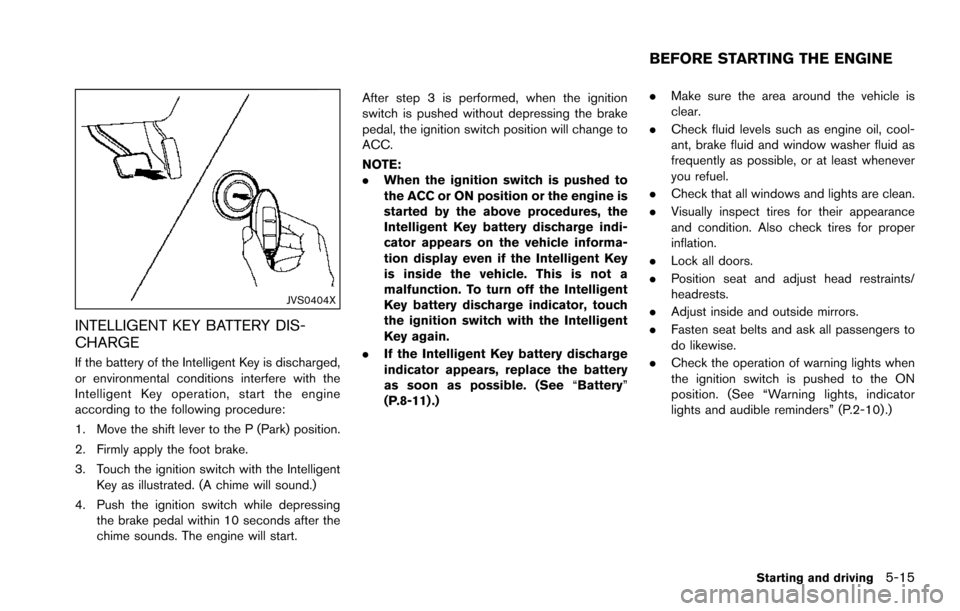
3. Touch the ignition switch with the IntelligentKey as illustrated. (A chime will sound.)
4. Push the ignition switch while depressing the brake pedal within 10 seconds after the
chime sounds. The engine will start. After step 3 is performed, when the ignition
switch is pushed without depressing the brake
pedal, the ignition switch position will change to
ACC.
NOTE:
.
When the ignition switch is pushed to
the ACC or ON position or the engine is
started by the above procedures, the
Intelligent Key battery discharge indi-
cator appears on the vehicle informa-
tion display even if the Intelligent Key
is inside the vehicle. This is not a
malfunction. To turn off the Intelligent
Key battery discharge indicator, touch
the ignition switch with the Intelligent
Key again.
. If the Intelligent Key battery discharge
indicator appears, replace the battery
as soon as possible. (See “Battery”
(P.8-11) .) .
Make sure the area around the vehicle is
clear.
. Check fluid levels such as engine oil, cool-
ant, brake fluid and window washer fluid as
frequently as possible, or at least whenever
you refuel.
. Check that all windows and lights are clean.
. Visually inspect tires for their appearance
and condition. Also check tires for proper
inflation.
. Lock all doors.
. Position seat and adjust head restraints/
headrests.
. Adjust inside and outside mirrors.
. Fasten seat belts and ask all passengers to
do likewise.
. Check the operation of warning lights when
the ignition switch is pushed to the ON
position. (See “Warning lights, indicator
lights and audible reminders” (P.2-10) .)
Starting and driving5-15
BEFORE STARTING THE ENGINE