key NISSAN ARMADA 2017 2.G Owners Manual
[x] Cancel search | Manufacturer: NISSAN, Model Year: 2017, Model line: ARMADA, Model: NISSAN ARMADA 2017 2.GPages: 614, PDF Size: 2.87 MB
Page 358 of 614
1. Make sure that the Intelligent Key is on you.
2. Depress the brake pedal.
3. Push the ignition switch once to the ONposition.
For additional information about the remote
engine start function, see “Remote engine start”
(P.3-19) .ENGINE PROTECTION MODE
The engine has an engine protection mode to
reduce the chance of damage if the coolant
temperature becomes too high (for example,
when climbing steep grades in high temperature
with heavy loads, such as when towing a trailer) .
When the engine temperature reaches a certain
level:
. The engine coolant temperature gauge will
move toward the H position.
. Engine power may be reduced.
. The air conditioning cooling function may be
automatically turned OFF for a short time
(the blower will continue to operate) .
Engine power and, under some conditions,
vehicle speed will decrease. Vehicle speed can
be controlled with the accelerator pedal, but the
vehicle may not accelerate at the desired speed.
The transmission will downshift or upshift as it
reaches prescribed shift points. You can also
shift manually.
As driving conditions change and engine cool-
ant temperature is reduced, vehicle speed can
be increased using the accelerator pedal, and
air conditioning cooling function will automati-
cally be turned back ON. If:
1. The engine coolant temperature is not
reduced.
2. The air conditioning cooling function does not turn back ON.
3. The engine oil pressure warning light
illuminates or engine coolant temperature
gauge does not return to the normal range
from the H position, this may indicate a
malfunction. Move the vehicle off the road to
a safe area and allow the engine to cool. If
after checking the oil and coolant, the
remains on or engine coolant temperature
does not return to the normal range, do not
continue to drive. It is recommended you
contact a NISSAN dealer.
The Malfunction Indicator Light (MIL)
may
also come ON. You do not need to have your
vehicle towed, unless it remains on, but have it
inspected soon. It is recommended you contact
a NISSAN dealer for this service. See “Warning
lights, indicator lights and audible reminders”
(P.2-10) .
WARNING
Overheating can result in reduced en-
gine power and vehicle speed. The
Starting and driving5-17
DRIVING THE VEHICLE
Page 367 of 614
5-26Starting and driving
SSD0959
SSD1102
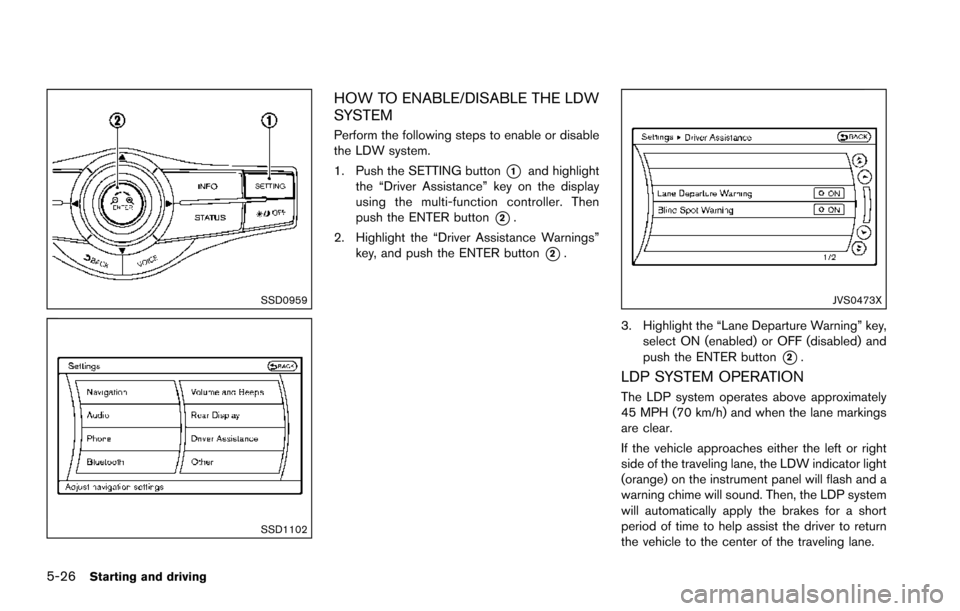
HOW TO ENABLE/DISABLE THE LDW
SYSTEM
Perform the following steps to enable or disable
the LDW system.
1. Push the SETTING button
*1and highlight
the “Driver Assistance” key on the display
using the multi-function controller. Then
push the ENTER button
*2.
2. Highlight the “Driver Assistance Warnings” key, and push the ENTER button
*2.
JVS0473X
3. Highlight the “Lane Departure Warning” key,
select ON (enabled) or OFF (disabled) and
push the ENTER button
*2.
LDP SYSTEM OPERATION
The LDP system operates above approximately
45 MPH (70 km/h) and when the lane markings
are clear.
If the vehicle approaches either the left or right
side of the traveling lane, the LDW indicator light
(orange) on the instrument panel will flash and a
warning chime will sound. Then, the LDP system
will automatically apply the brakes for a short
period of time to help assist the driver to return
the vehicle to the center of the traveling lane.
Page 369 of 614
5-28Starting and driving
TURNING THE LDP SYSTEM ON/OFF
To turn on the LDP system, push the dynamic
driver assistance switch
*3on the steering
wheel after starting the engine. The LDP ON
indicator light (green)
*1on the instrument
panel will illuminate. Push the dynamic driver
assistance switch
*3again to turn off the LDP
system. The LDP ON indicator light (green)
*1will turn off.
The dynamic driver assistance switch
*3is
used for the LDP, BSI (if so equipped) and DCA
systems.
When the dynamic driver assistance switch
*3is pushed, the BSI and DCA systems will also
turn on or off simultaneously. The LDP system
can be individually set to on or off on the center
display
*2and using the center multi-function
control panel
*4.
If the system is set to off, the system will not turn
on even if the dynamic driver assistance switch
*3is pushed to on. To set the system to on or
off on the center display, see “How to enable/
disable the LDP system” (P.5-28) .
SSD0959
SSD1102
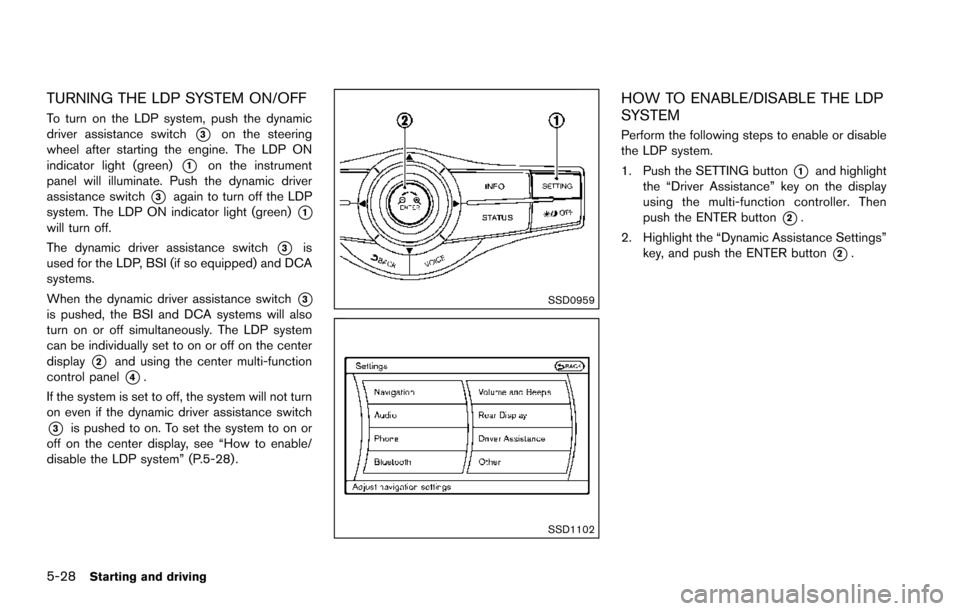
HOW TO ENABLE/DISABLE THE LDP
SYSTEM
Perform the following steps to enable or disable
the LDP system.
1. Push the SETTING button
*1and highlight
the “Driver Assistance” key on the display
using the multi-function controller. Then
push the ENTER button
*2.
2. Highlight the “Dynamic Assistance Settings” key, and push the ENTER button
*2.
Page 370 of 614
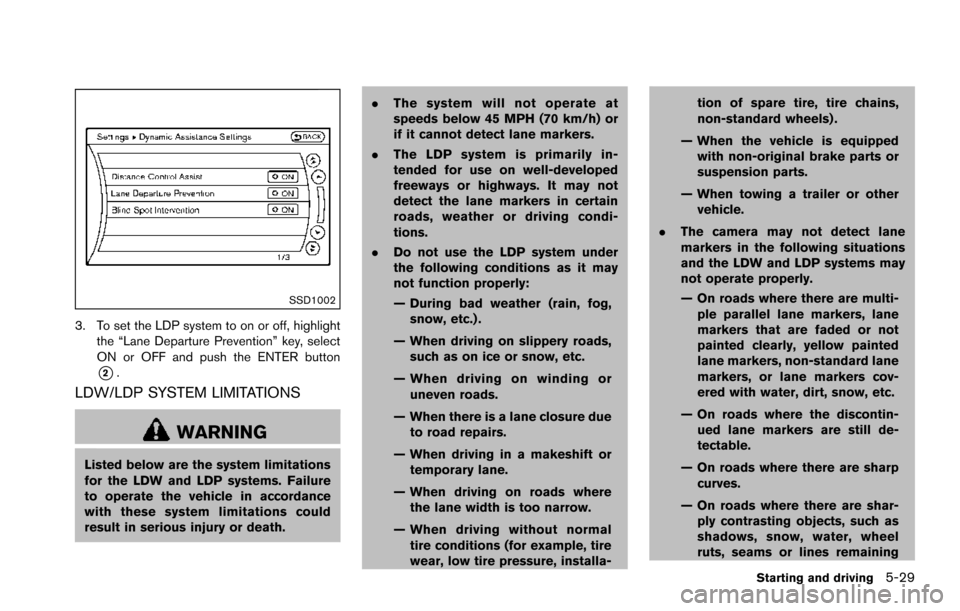
SSD1002
3. To set the LDP system to on or off, highlightthe “Lane Departure Prevention” key, select
ON or OFF and push the ENTER button
*2.
LDW/LDP SYSTEM LIMITATIONS
WARNING
Listed below are the system limitations
for the LDW and LDP systems. Failure
to operate the vehicle in accordance
with these system limitations could
result in serious injury or death. .
The system will not operate at
speeds below 45 MPH (70 km/h) or
if it cannot detect lane markers.
. The LDP system is primarily in-
tended for use on well-developed
freeways or highways. It may not
detect the lane markers in certain
roads, weather or driving condi-
tions.
. Do not use the LDP system under
the following conditions as it may
not function properly:
— During bad weather (rain, fog,
snow, etc.) .
— When driving on slippery roads, such as on ice or snow, etc.
— When driving on winding or uneven roads.
— When there is a lane closure due to road repairs.
— When driving in a makeshift or temporary lane.
— When driving on roads where the lane width is too narrow.
— When driving without normal tire conditions (for example, tire
wear, low tire pressure, installa- tion of spare tire, tire chains,
non-standard wheels) .
— When the vehicle is equipped with non-original brake parts or
suspension parts.
— When towing a trailer or other vehicle.
. The camera may not detect lane
markers in the following situations
and the LDW and LDP systems may
not operate properly.
— On roads where there are multi-
ple parallel lane markers, lane
markers that are faded or not
painted clearly, yellow painted
lane markers, non-standard lane
markers, or lane markers cov-
ered with water, dirt, snow, etc.
— On roads where the discontin- ued lane markers are still de-
tectable.
— On roads where there are sharp curves.
— On roads where there are shar- ply contrasting objects, such as
shadows, snow, water, wheel
ruts, seams or lines remaining
Starting and driving5-29
Page 377 of 614
5-36Starting and driving
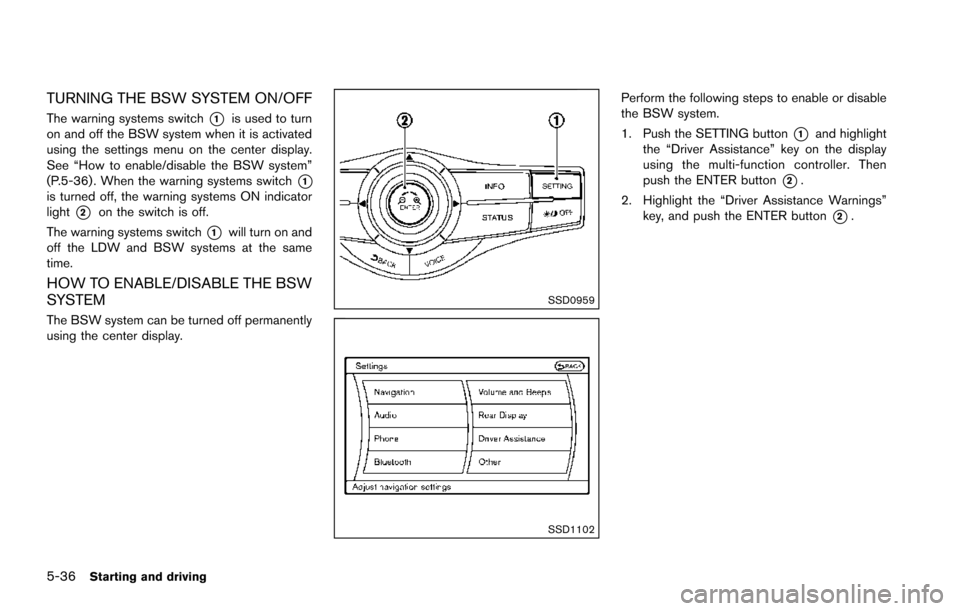
TURNING THE BSW SYSTEM ON/OFF
The warning systems switch*1is used to turn
on and off the BSW system when it is activated
using the settings menu on the center display.
See “How to enable/disable the BSW system”
(P.5-36) . When the warning systems switch
*1is turned off, the warning systems ON indicator
light
*2on the switch is off.
The warning systems switch
*1will turn on and
off the LDW and BSW systems at the same
time.
HOW TO ENABLE/DISABLE THE BSW
SYSTEM
The BSW system can be turned off permanently
using the center display.
SSD0959
SSD1102
Perform the following steps to enable or disable
the BSW system.
1. Push the SETTING button
*1and highlight
the “Driver Assistance” key on the display
using the multi-function controller. Then
push the ENTER button
*2.
2. Highlight the “Driver Assistance Warnings” key, and push the ENTER button
*2.
Page 378 of 614
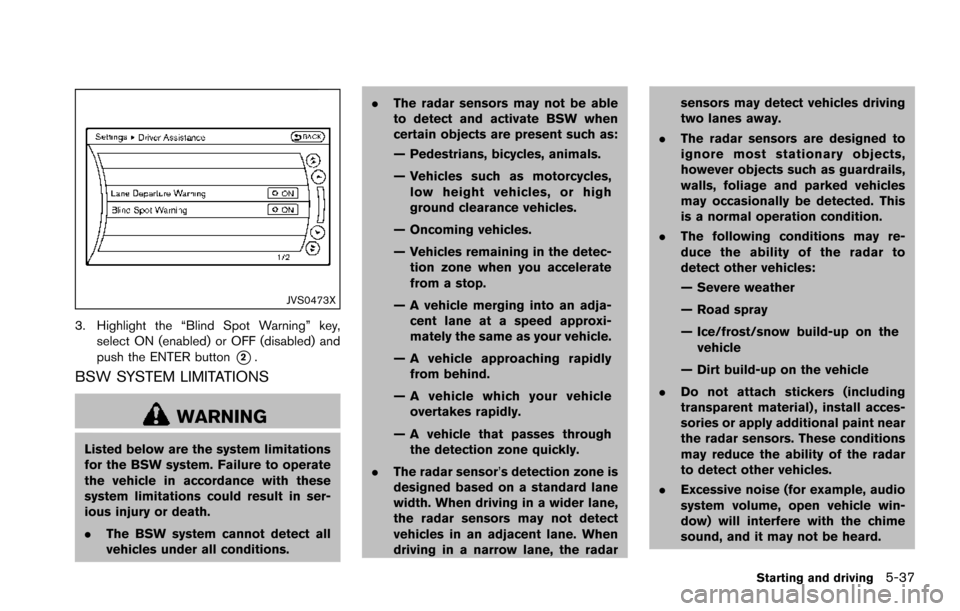
JVS0473X
3. Highlight the “Blind Spot Warning” key,select ON (enabled) or OFF (disabled) and
push the ENTER button
*2.
BSW SYSTEM LIMITATIONS
WARNING
Listed below are the system limitations
for the BSW system. Failure to operate
the vehicle in accordance with these
system limitations could result in ser-
ious injury or death.
.The BSW system cannot detect all
vehicles under all conditions. .
The radar sensors may not be able
to detect and activate BSW when
certain objects are present such as:
— Pedestrians, bicycles, animals.
— Vehicles such as motorcycles,
low height vehicles, or high
ground clearance vehicles.
— Oncoming vehicles.
— Vehicles remaining in the detec- tion zone when you accelerate
from a stop.
— A vehicle merging into an adja- cent lane at a speed approxi-
mately the same as your vehicle.
— A vehicle approaching rapidly from behind.
— A vehicle which your vehicle overtakes rapidly.
— A vehicle that passes through the detection zone quickly.
. The radar sensor’s detection zone is
designed based on a standard lane
width. When driving in a wider lane,
the radar sensors may not detect
vehicles in an adjacent lane. When
driving in a narrow lane, the radar sensors may detect vehicles driving
two lanes away.
. The radar sensors are designed to
ignore most stationary objects,
however objects such as guardrails,
walls, foliage and parked vehicles
may occasionally be detected. This
is a normal operation condition.
. The following conditions may re-
duce the ability of the radar to
detect other vehicles:
— Severe weather
— Road spray
— Ice/frost/snow build-up on the
vehicle
— Dirt build-up on the vehicle
. Do not attach stickers (including
transparent material) , install acces-
sories or apply additional paint near
the radar sensors. These conditions
may reduce the ability of the radar
to detect other vehicles.
. Excessive noise (for example, audio
system volume, open vehicle win-
dow) will interfere with the chime
sound, and it may not be heard.
Starting and driving5-37
Page 388 of 614
SSD0959
SSD1102
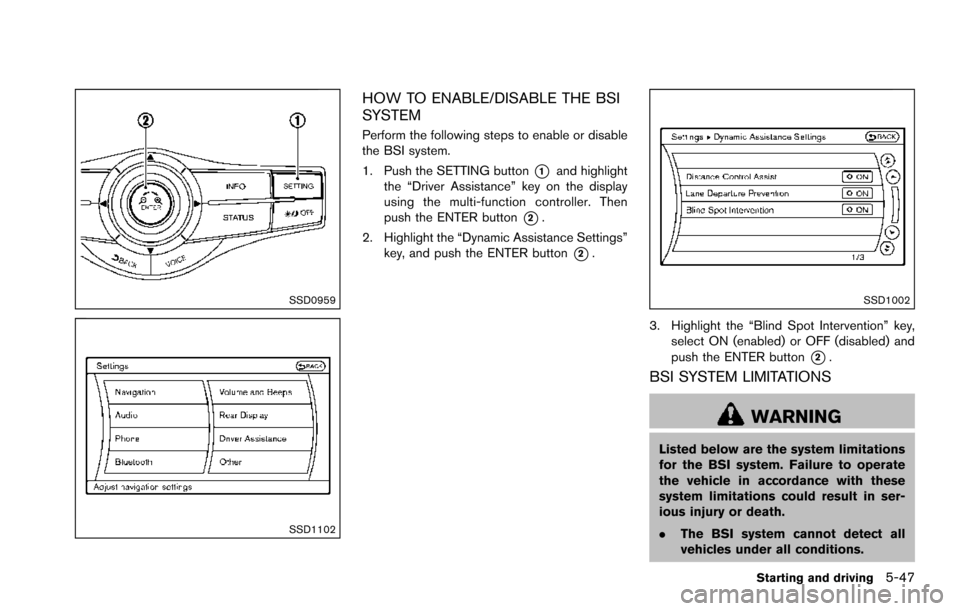
HOW TO ENABLE/DISABLE THE BSI
SYSTEM
Perform the following steps to enable or disable
the BSI system.
1. Push the SETTING button
*1and highlight
the “Driver Assistance” key on the display
using the multi-function controller. Then
push the ENTER button
*2.
2. Highlight the “Dynamic Assistance Settings” key, and push the ENTER button
*2.
SSD1002
3. Highlight the “Blind Spot Intervention” key,
select ON (enabled) or OFF (disabled) and
push the ENTER button
*2.
BSI SYSTEM LIMITATIONS
WARNING
Listed below are the system limitations
for the BSI system. Failure to operate
the vehicle in accordance with these
system limitations could result in ser-
ious injury or death.
.The BSI system cannot detect all
vehicles under all conditions.
Starting and driving5-47
Page 404 of 614
SSD0959
SSD1102Example
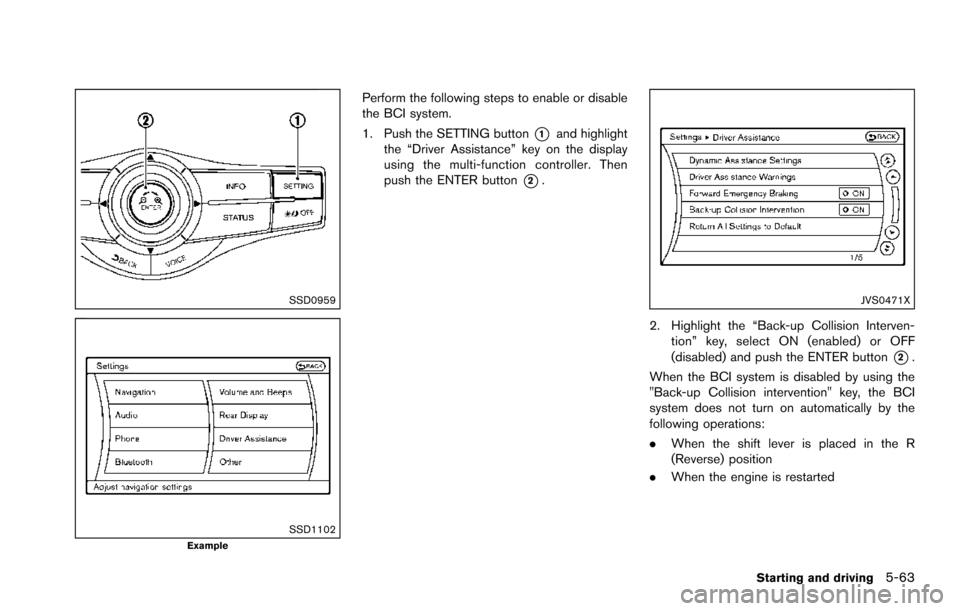
Perform the following steps to enable or disable
the BCI system.
1. Push the SETTING button
*1and highlight
the “Driver Assistance” key on the display
using the multi-function controller. Then
push the ENTER button
*2.
JVS0471X
2. Highlight the “Back-up Collision Interven-
tion” key, select ON (enabled) or OFF
(disabled) and push the ENTER button
*2.
When the BCI system is disabled by using the
"Back-up Collision intervention" key, the BCI
system does not turn on automatically by the
following operations:
. When the shift lever is placed in the R
(Reverse) position
. When the engine is restarted
Starting and driving5-63
Page 438 of 614
switch*3.)
For details about the conventional (fixed speed)
cruise control mode, see “Intelligent Cruise
Control (ICC)” (P.5-69) .
When the engine is turned off, the system is
automatically turned off.
SSD0959
SSD1102
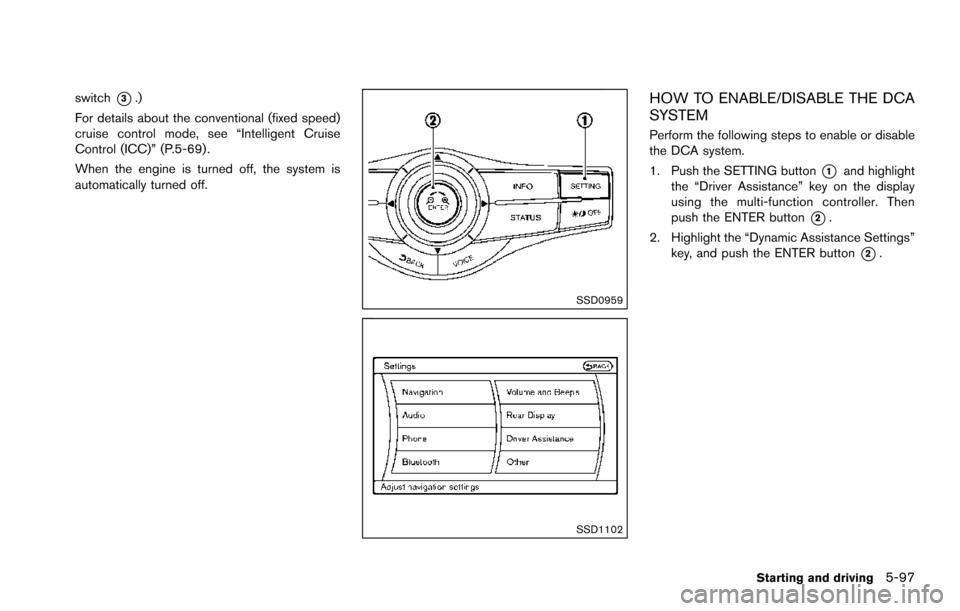
HOW TO ENABLE/DISABLE THE DCA
SYSTEM
Perform the following steps to enable or disable
the DCA system.
1. Push the SETTING button
*1and highlight
the “Driver Assistance” key on the display
using the multi-function controller. Then
push the ENTER button
*2.
2. Highlight the “Dynamic Assistance Settings” key, and push the ENTER button
*2.
Starting and driving5-97
Page 439 of 614
5-98Starting and driving
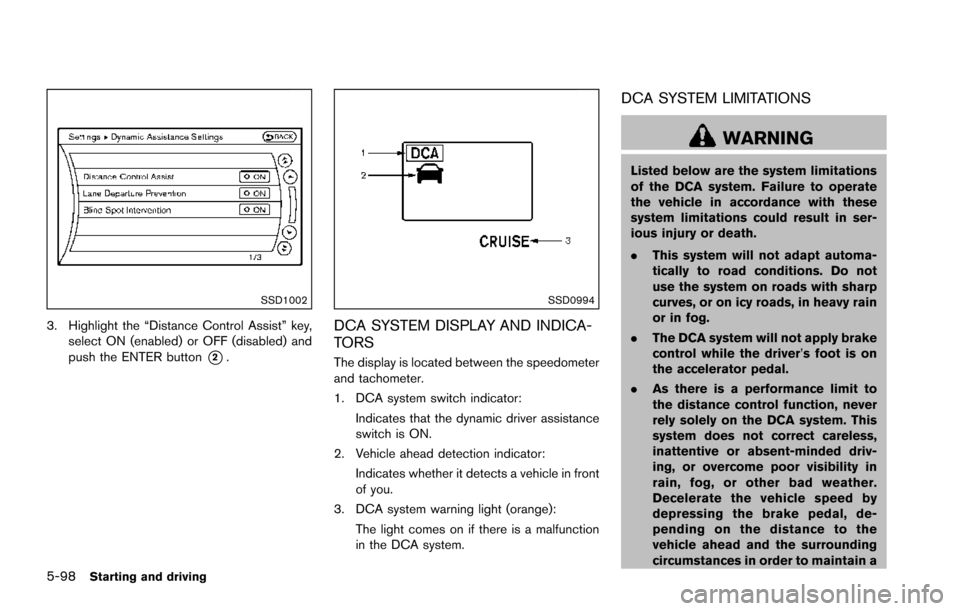
SSD1002
3. Highlight the “Distance Control Assist” key,select ON (enabled) or OFF (disabled) and
push the ENTER button
*2.
SSD0994
DCA SYSTEM DISPLAY AND INDICA-
TORS
The display is located between the speedometer
and tachometer.
1. DCA system switch indicator:
Indicates that the dynamic driver assistance
switch is ON.
2. Vehicle ahead detection indicator: Indicates whether it detects a vehicle in front
of you.
3. DCA system warning light (orange): The light comes on if there is a malfunction
in the DCA system.
DCA SYSTEM LIMITATIONS
WARNING
Listed below are the system limitations
of the DCA system. Failure to operate
the vehicle in accordance with these
system limitations could result in ser-
ious injury or death.
.This system will not adapt automa-
tically to road conditions. Do not
use the system on roads with sharp
curves, or on icy roads, in heavy rain
or in fog.
. The DCA system will not apply brake
control while the driver’s foot is on
the accelerator pedal.
. As there is a performance limit to
the distance control function, never
rely solely on the DCA system. This
system does not correct careless,
inattentive or absent-minded driv-
ing, or overcome poor visibility in
rain, fog, or other bad weather.
Decelerate the vehicle speed by
depressing the brake pedal, de-
pending on the distance to the
vehicle ahead and the surrounding
circumstances in order to maintain a