key NISSAN ARMADA 2017 2.G Manual Online
[x] Cancel search | Manufacturer: NISSAN, Model Year: 2017, Model line: ARMADA, Model: NISSAN ARMADA 2017 2.GPages: 614, PDF Size: 2.87 MB
Page 281 of 614
4-84Monitor, heater, air conditioner, audio, phone and voice recognition systems
SAA2510
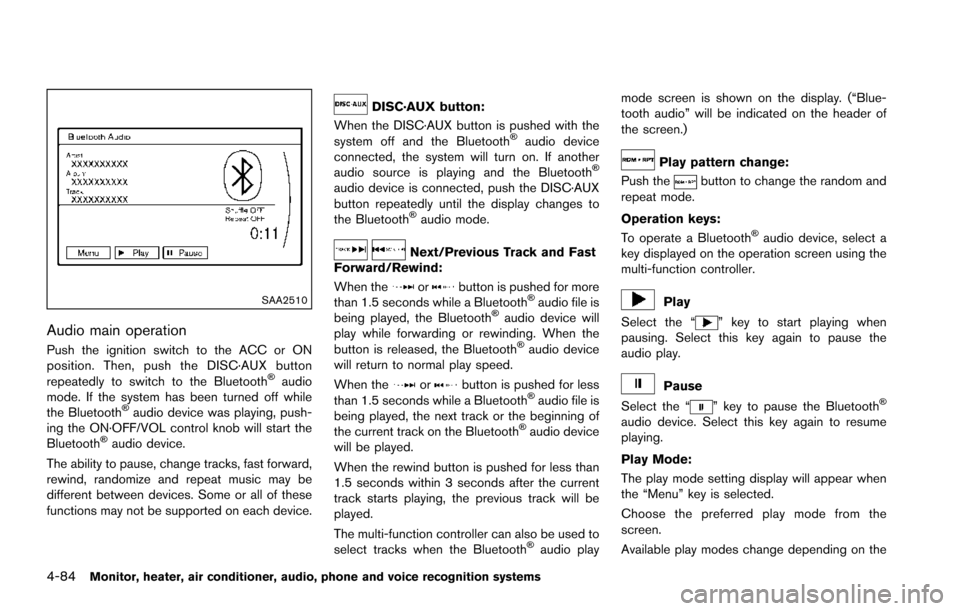
Audio main operation
Push the ignition switch to the ACC or ON
position. Then, push the DISC·AUX button
repeatedly to switch to the Bluetooth
Šaudio
mode. If the system has been turned off while
the Bluetooth
Šaudio device was playing, push-
ing the ON·OFF/VOL control knob will start the
Bluetooth
Šaudio device.
The ability to pause, change tracks, fast forward,
rewind, randomize and repeat music may be
different between devices. Some or all of these
functions may not be supported on each device.
DISC·AUX button:
When the DISC·AUX button is pushed with the
system off and the Bluetooth
Šaudio device
connected, the system will turn on. If another
audio source is playing and the Bluetooth
Š
audio device is connected, push the DISC·AUX
button repeatedly until the display changes to
the Bluetooth
Šaudio mode.
Next/Previous Track and Fast
Forward/Rewind:
When the
orbutton is pushed for more
than 1.5 seconds while a BluetoothŠaudio file is
being played, the BluetoothŠaudio device will
play while forwarding or rewinding. When the
button is released, the Bluetooth
Šaudio device
will return to normal play speed.
When the
orbutton is pushed for less
than 1.5 seconds while a BluetoothŠaudio file is
being played, the next track or the beginning of
the current track on the Bluetooth
Šaudio device
will be played.
When the rewind button is pushed for less than
1.5 seconds within 3 seconds after the current
track starts playing, the previous track will be
played.
The multi-function controller can also be used to
select tracks when the Bluetooth
Šaudio play mode screen is shown on the display. (“Blue-
tooth audio” will be indicated on the header of
the screen.)
Play pattern change:
Push the
button to change the random and
repeat mode.
Operation keys:
To operate a Bluetooth
Šaudio device, select a
key displayed on the operation screen using the
multi-function controller.
Play
Select the “
” key to start playing when
pausing. Select this key again to pause the
audio play.
Pause
Select the “
” key to pause the BluetoothŠ
audio device. Select this key again to resume
playing.
Play Mode:
The play mode setting display will appear when
the “Menu” key is selected.
Choose the preferred play mode from the
screen.
Available play modes change depending on the
Page 282 of 614
connected device.
SAA2511
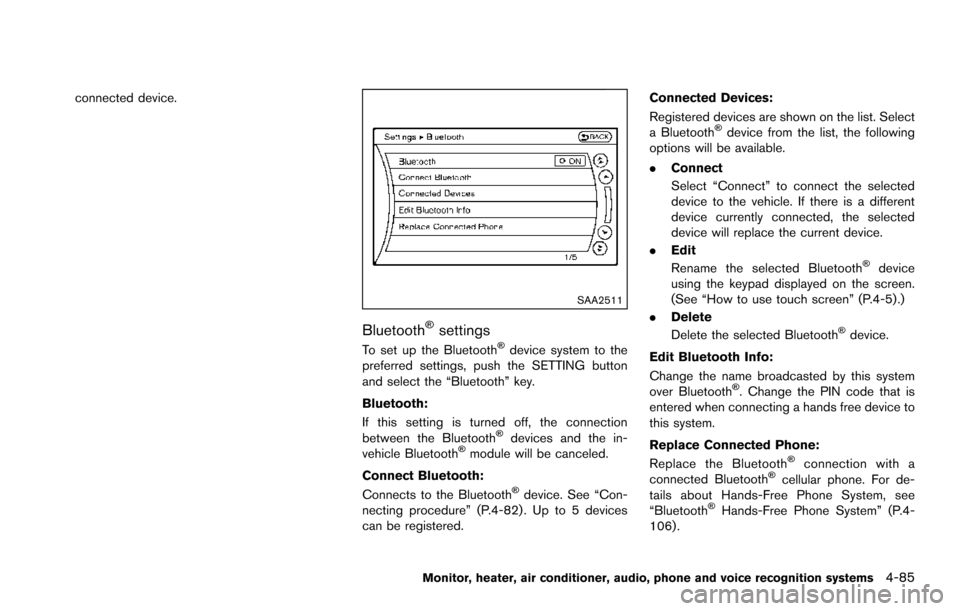
BluetoothŠsettings
To set up the BluetoothŠdevice system to the
preferred settings, push the SETTING button
and select the “Bluetooth” key.
Bluetooth:
If this setting is turned off, the connection
between the Bluetooth
Šdevices and the in-
vehicle BluetoothŠmodule will be canceled.
Connect Bluetooth:
Connects to the Bluetooth
Šdevice. See “Con-
necting procedure” (P.4-82) . Up to 5 devices
can be registered. Connected Devices:
Registered devices are shown on the list. Select
a Bluetooth
Šdevice from the list, the following
options will be available.
. Connect
Select “Connect” to connect the selected
device to the vehicle. If there is a different
device currently connected, the selected
device will replace the current device.
. Edit
Rename the selected Bluetooth
Šdevice
using the keypad displayed on the screen.
(See “How to use touch screen” (P.4-5).)
. Delete
Delete the selected Bluetooth
Šdevice.
Edit Bluetooth Info:
Change the name broadcasted by this system
over Bluetooth
Š. Change the PIN code that is
entered when connecting a hands free device to
this system.
Replace Connected Phone:
Replace the Bluetooth
Šconnection with a
connected BluetoothŠcellular phone. For de-
tails about Hands-Free Phone System, see
“Bluetooth
ŠHands-Free Phone System” (P.4-
106) .
Monitor, heater, air conditioner, audio, phone and voice recognition systems4-85
Page 285 of 614
4-88Monitor, heater, air conditioner, audio, phone and voice recognition systems
SAA3162
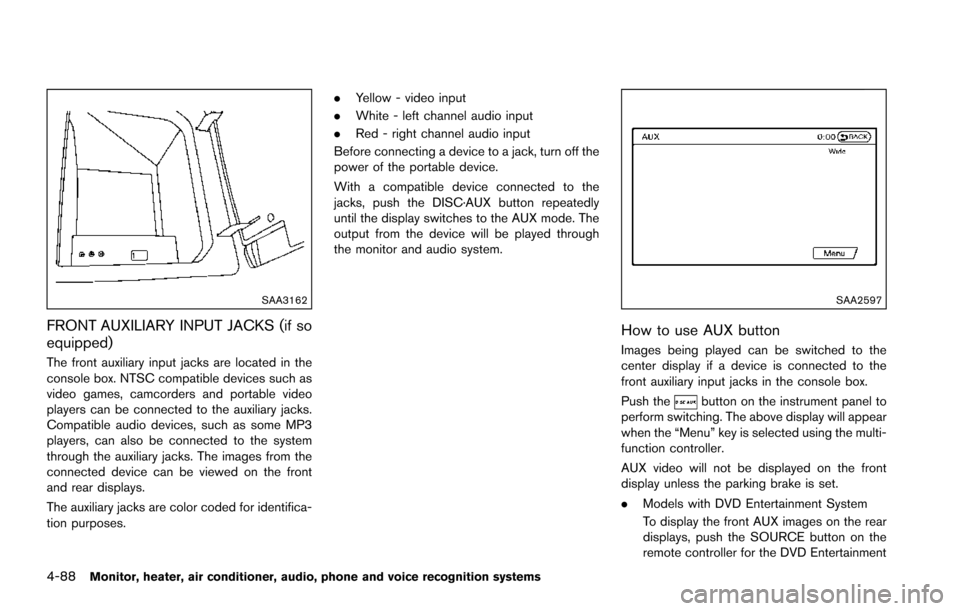
FRONT AUXILIARY INPUT JACKS (if so
equipped)
The front auxiliary input jacks are located in the
console box. NTSC compatible devices such as
video games, camcorders and portable video
players can be connected to the auxiliary jacks.
Compatible audio devices, such as some MP3
players, can also be connected to the system
through the auxiliary jacks. The images from the
connected device can be viewed on the front
and rear displays.
The auxiliary jacks are color coded for identifica-
tion purposes..
Yellow - video input
. White - left channel audio input
. Red - right channel audio input
Before connecting a device to a jack, turn off the
power of the portable device.
With a compatible device connected to the
jacks, push the DISC·AUX button repeatedly
until the display switches to the AUX mode. The
output from the device will be played through
the monitor and audio system.
SAA2597
How to use AUX button
Images being played can be switched to the
center display if a device is connected to the
front auxiliary input jacks in the console box.
Push the
button on the instrument panel to
perform switching. The above display will appear
when the “Menu” key is selected using the multi-
function controller.
AUX video will not be displayed on the front
display unless the parking brake is set.
. Models with DVD Entertainment System
To display the front AUX images on the rear
displays, push the SOURCE button on the
remote controller for the DVD Entertainment
Page 286 of 614
System. (See “DVD Entertainment System”
(P.4-92) .)
SAA2496
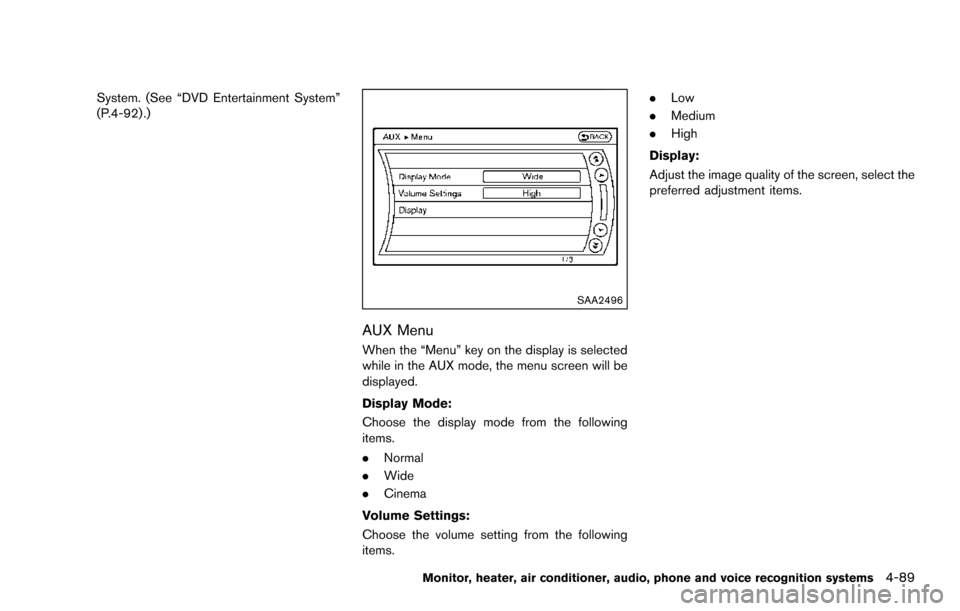
AUX Menu
When the “Menu” key on the display is selected
while in the AUX mode, the menu screen will be
displayed.
Display Mode:
Choose the display mode from the following
items.
.Normal
. Wide
. Cinema
Volume Settings:
Choose the volume setting from the following
items. .
Low
. Medium
. High
Display:
Adjust the image quality of the screen, select the
preferred adjustment items.
Monitor, heater, air conditioner, audio, phone and voice recognition systems4-89
Page 293 of 614
4-96Monitor, heater, air conditioner, audio, phone and voice recognition systems
.The sound may also be interrupted tem-
porarily when there is an obstacle between
the headphones and the transmitter. Re-
move the obstacle, such as opaque materi-
als, hands, hair, etc.
JVH1489X
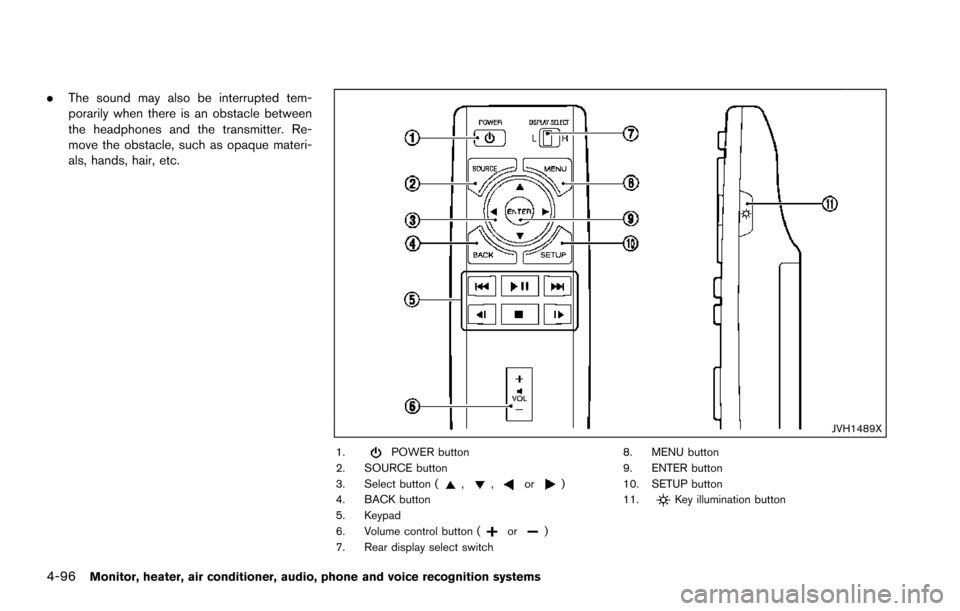
1.POWER button
2. SOURCE button
3. Select button (
,,or)
4. BACK button
5. Keypad
6. Volume control button (
or)
7. Rear display select switch 8. MENU button
9. ENTER button
10. SETUP button
11.
Key illumination button
Page 298 of 614
Settings:
Select to display the settings screen. See
“Setting menu” (P.4-102) .
Top Menu:
When the “Top Menu” key is selected in the
screen while a DVD is being played, the top
menu specific to each disc will be displayed. For
details, see the instructions on the disc.
DVD/USB operation keys
To operate the DVD/USB movie file, select the
preferred key displayed on the operation screen.
If you perform an operation with the remote
controller, a symbol will be displayed on the
lower left part of the rear seat screens indicating
the function performed. This symbol will auto-
matically turn off if no remote controller opera-
tion is performed for a specified period of time.
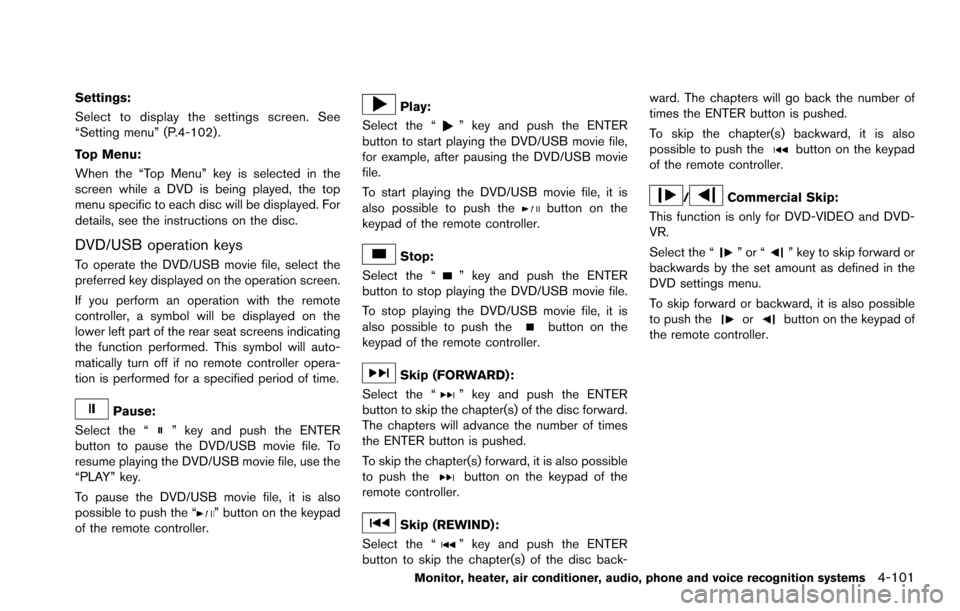
Pause:
Select the “
” key and push the ENTER
button to pause the DVD/USB movie file. To
resume playing the DVD/USB movie file, use the
“PLAY” key.
To pause the DVD/USB movie file, it is also
possible to push the “
” button on the keypad
of the remote controller.
Play:
Select the “
” key and push the ENTER
button to start playing the DVD/USB movie file,
for example, after pausing the DVD/USB movie
file.
To start playing the DVD/USB movie file, it is
also possible to push the
button on the
keypad of the remote controller.
Stop:
Select the “
” key and push the ENTER
button to stop playing the DVD/USB movie file.
To stop playing the DVD/USB movie file, it is
also possible to push the
button on the
keypad of the remote controller.
Skip (FORWARD) :
Select the “
” key and push the ENTER
button to skip the chapter(s) of the disc forward.
The chapters will advance the number of times
the ENTER button is pushed.
To skip the chapter(s) forward, it is also possible
to push the
button on the keypad of the
remote controller.
Skip (REWIND):
Select the “
” key and push the ENTER
button to skip the chapter(s) of the disc back- ward. The chapters will go back the number of
times the ENTER button is pushed.
To skip the chapter(s) backward, it is also
possible to push the
button on the keypad
of the remote controller.
/Commercial Skip:
This function is only for DVD-VIDEO and DVD-
VR.
Select the “
”or“” key to skip forward or
backwards by the set amount as defined in the
DVD settings menu.
To skip forward or backward, it is also possible
to push the
orbutton on the keypad of
the remote controller.
Monitor, heater, air conditioner, audio, phone and voice recognition systems4-101
Page 299 of 614
4-102Monitor, heater, air conditioner, audio, phone and voice recognition systems
SAA2498Front screen
JVH0361XRear display
Setting menu
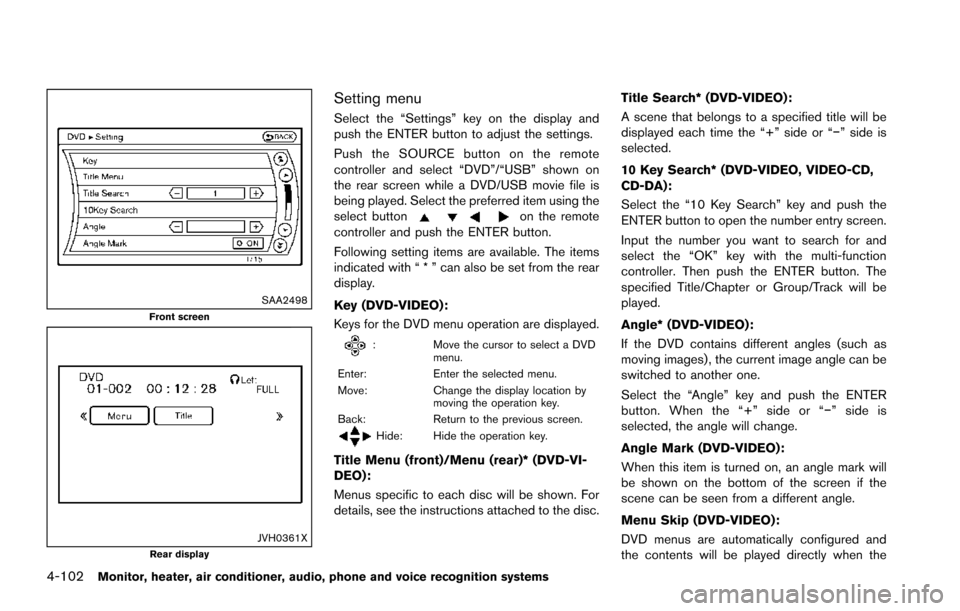
Select the “Settings” key on the display and
push the ENTER button to adjust the settings.
Push the SOURCE button on the remote
controller and select “DVD”/“USB” shown on
the rear screen while a DVD/USB movie file is
being played. Select the preferred item using the
select button
on the remote
controller and push the ENTER button.
Following setting items are available. The items
indicated with “ * ” can also be set from the rear
display.
Key (DVD-VIDEO) :
Keys for the DVD menu operation are displayed.
: Move the cursor to select a DVD
menu.
Enter: Enter the selected menu.
Move: Change the display location by
moving the operation key.
Back: Return to the previous screen.
Hide: Hide the operation key.
Title Menu (front)/Menu (rear)* (DVD-VI-
DEO):
Menus specific to each disc will be shown. For
details, see the instructions attached to the disc. Title Search* (DVD-VIDEO) :
A scene that belongs to a specified title will be
displayed each time the “+” side or “í” side is
selected.
10 Key Search* (DVD-VIDEO, VIDEO-CD,
CD-DA):
Select the “10 Key Search” key and push the
ENTER button to open the number entry screen.
Input the number you want to search for and
select the “OK” key with the multi-function
controller. Then push the ENTER button. The
specified Title/Chapter or Group/Track will be
played.
Angle* (DVD-VIDEO):
If the DVD contains different angles (such as
moving images) , the current image angle can be
switched to another one.
Select the “Angle” key and push the ENTER
button. When the “+” side or “í
” side is
selected, the angle will change.
Angle Mark (DVD-VIDEO):
When this item is turned on, an angle mark will
be shown on the bottom of the screen if the
scene can be seen from a different angle.
Menu Skip (DVD-VIDEO):
DVD menus are automatically configured and
the contents will be played directly when the
Page 300 of 614
“Menu Skip” key is turned on. Note that some
discs may not be played directly even if this item
is turned on.
CM Skip (DVD-VIDEO):
The amount of seconds for CM Skip can be set
to 15, 30 or 60 seconds.
DRC (DVD-VIDEO) :
DRC (Dynamic Range Compression) allows
tuning of the dynamic range of sound recorded
in the Dolby Digital format.
DVD Language (DVD-VIDEO, VIDEO-CD):
Select the “DVD Language” key and push the
ENTER button to open the number entry screen.
Input the number corresponding to the preferred
language and select the “OK” key with the multi-
function controller. Then push the ENTER
button. The DVD top menu language will be
changed to the one selected.
Display:
Adjust the image quality of the screen, select the
preferred adjustment items and push the ENTER
button.
Audio*:
Choose the preferred language using the multi-
function controller and push the ENTER button.Subtitle* (DVD-VIDEO):
Choose the preferred language using the multi-
function controller and push the ENTER button.
To turn off the subtitles, push and hold the
ENTER button until a beep sounds.
Display Mode (DVD-VIDEO, VIDEO-CD):
Choose from the “Full”, “Wide”, “Normal” or
“Cinema” mode using the multi-function con-
troller and push the ENTER button again.
Title List:
Select the preferred title from the list.
Play Mode:
Choose the preferred play mode using the multi-
function controller and push the ENTER button.
PG/PL Mode:
Select the “PG” or “PL” mode.Remote controller operation
Use the remote controller to adjust the following
items.
Rear display select switch:
To activate the left screen or right screen, move
the rear display select switch on the remote
controller to the side corresponding to the
screen you want to activate (L or R) .
POWER button:
The rear displays can be activated or deacti-
vated individually.
To activate or deactivate the rear displays, push
the
button on the remote controller.
SOURCE button:
The media available for playback will be
displayed when the SOURCE button is pushed.
MENU button:
Push the MENU button to display the operation
screen for the source that is being played.
Select button:
Push the select button
,to
select the items displayed on the rear screen.
ENTER button:
Push the ENTER button to confirm the setting
for the selected item.
Monitor, heater, air conditioner, audio, phone and voice recognition systems4-103
Page 301 of 614
4-104Monitor, heater, air conditioner, audio, phone and voice recognition systems
SETUP button:
Push the SETUP button to display the rear seat
display settings. (See “Rear display settings”
(P.4-104) .)
BACK button:
Push to go back to the previous screen or
cancel the selection.
Volume:
To adjust the speaker volume push
oron the volume control button.
This button is used to control the volume from
the vehicle speakers. To adjust the volume of the
headphones, use the volume knob that is
attached to the headphones.
Keypad:
: PLAY/PAUSE button
: STOP button
: FORWARD button
: REWIND button
: FORWARD button for commercial skip (forDVD-VIDEO and DVD-VR)
: REWIND button for commercial skip (forDVD-VIDEO and DVD-VR)
Key illumination button:
If the key illumination button is pushed, the
buttons on the remote controller will be lit up.
Rear display settings
Display mode adjustment of the rear seat
displays can be performed while a DVD or
USB movie is being played. Set the rear display
select switch on the remote controller to either L
or R according to the display you want to set,
and then push the SETUP button. It is not
possible to make display mode adjustments to
the left and right displays at the same time.
Aspect:
Select the display size from “FULL”, “NORMAL”,
“CINEMA” or “WIDE”.
Picture Mode:
Select the Picture Mode from “NORMAL”,
“DYNAMIC”, “CINEMA”, “GAME” .
To adjust the display brightness automatically,
select the “Brightness” key and then select from
“DARKER”, “NORMAL” or “BRIGHTER”. When
adjusting manually, select “OFF” and push
ENTER button on the remote controller.
To adjust tint, color or contrast, select a key
using the select button (
or) , push
ENTER on the remote controller.
Push the BACK button on the remote controller
to apply the settings and return to the previous
display.
To return the adjustment levels to the default
value, select “Execute” next to “Initialization” push the select button (
,) on the remote
controller and push the ENTER button. The
“Execute” key is deactivated when the picture
mode settings are already in the default value.
Color System:
To choose the color system, select from
“NTSC”, “PAL”, “PAL-60”, “PAL-M”, “PAL-N” or
“AUTO” .
3D Y/C filter:
Set to ON/OFF push the select button (
or) and push ENTER button on the remote
controller. When turned on, small characters
and an outline of the shapes will be displayed
more clearly than when turned off.
AUX Volume Setting:
This is only active when in the Rear AUX mode.
To set the AUX volume, select from “HIGH”,
“LOW” or “MIDDLE” .
Page 306 of 614
JVH0473X
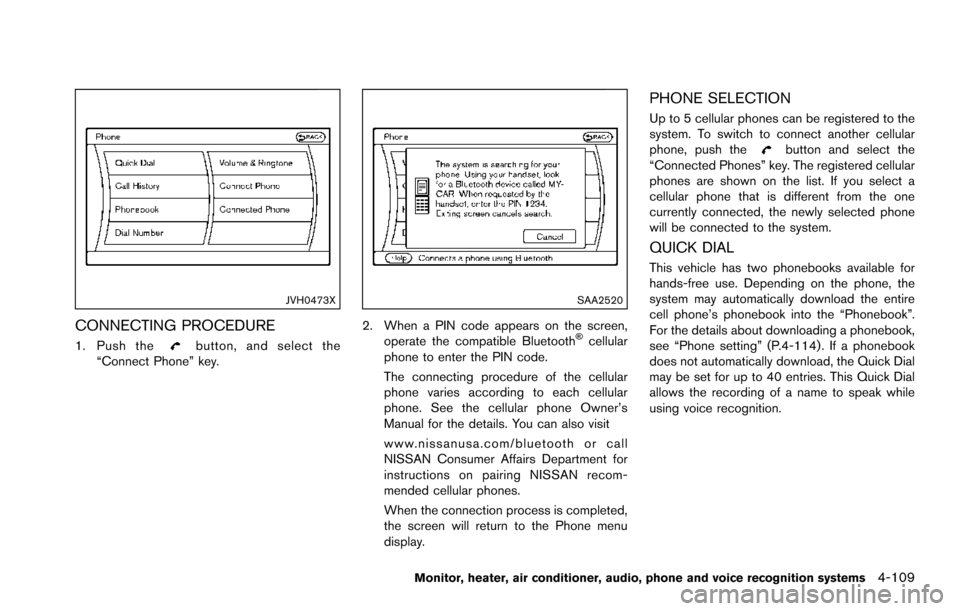
CONNECTING PROCEDURE
1. Push thebutton, and select the
“Connect Phone” key.
SAA2520
2. When a PIN code appears on the screen,
operate the compatible BluetoothŠcellular
phone to enter the PIN code.
The connecting procedure of the cellular
phone varies according to each cellular
phone. See the cellular phone Owner’s
Manual for the details. You can also visit
www.nissanusa.com/bluetooth or call
NISSAN Consumer Affairs Department for
instructions on pairing NISSAN recom-
mended cellular phones.
When the connection process is completed,
the screen will return to the Phone menu
display.
PHONE SELECTION
Up to 5 cellular phones can be registered to the
system. To switch to connect another cellular
phone, push the
button and select the
“Connected Phones” key. The registered cellular
phones are shown on the list. If you select a
cellular phone that is different from the one
currently connected, the newly selected phone
will be connected to the system.
QUICK DIAL
This vehicle has two phonebooks available for
hands-free use. Depending on the phone, the
system may automatically download the entire
cell phone’s phonebook into the “Phonebook”.
For the details about downloading a phonebook,
see “Phone setting” (P.4-114) . If a phonebook
does not automatically download, the Quick Dial
may be set for up to 40 entries. This Quick Dial
allows the recording of a name to speak while
using voice recognition.
Monitor, heater, air conditioner, audio, phone and voice recognition systems4-109