display NISSAN ARMADA 2017 2.G Owners Manual
[x] Cancel search | Manufacturer: NISSAN, Model Year: 2017, Model line: ARMADA, Model: NISSAN ARMADA 2017 2.GPages: 614, PDF Size: 2.87 MB
Page 331 of 614
4-134Monitor, heater, air conditioner, audio, phone and voice recognition systems
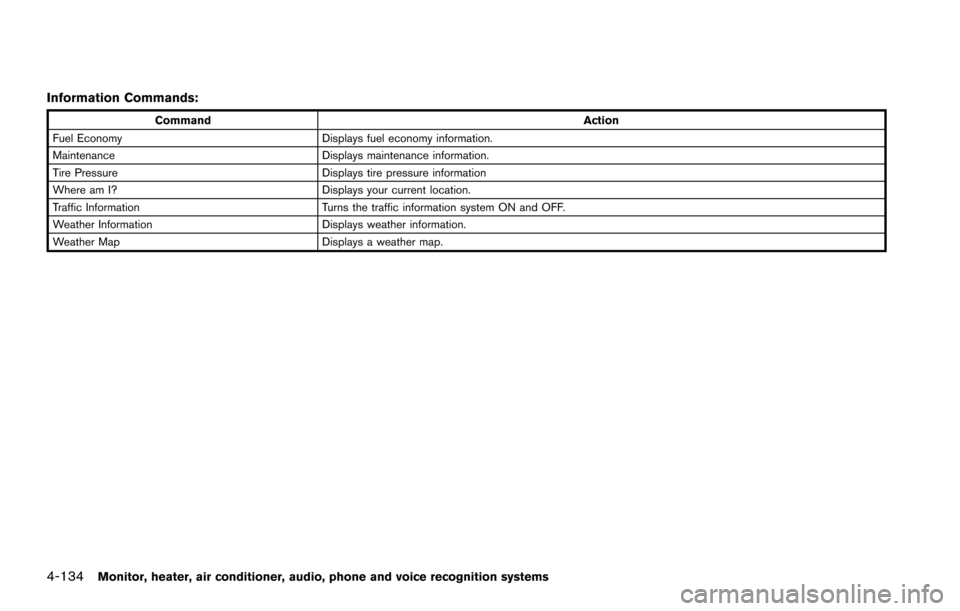
Information Commands:
CommandAction
Fuel Economy Displays fuel economy information.
Maintenance Displays maintenance information.
Tire Pressure Displays tire pressure information
Where am I? Displays your current location.
Traffic Information Turns the traffic information system ON and OFF.
Weather Information Displays weather information.
Weather Map Displays a weather map.
Page 333 of 614
4-136Monitor, heater, air conditioner, audio, phone and voice recognition systems
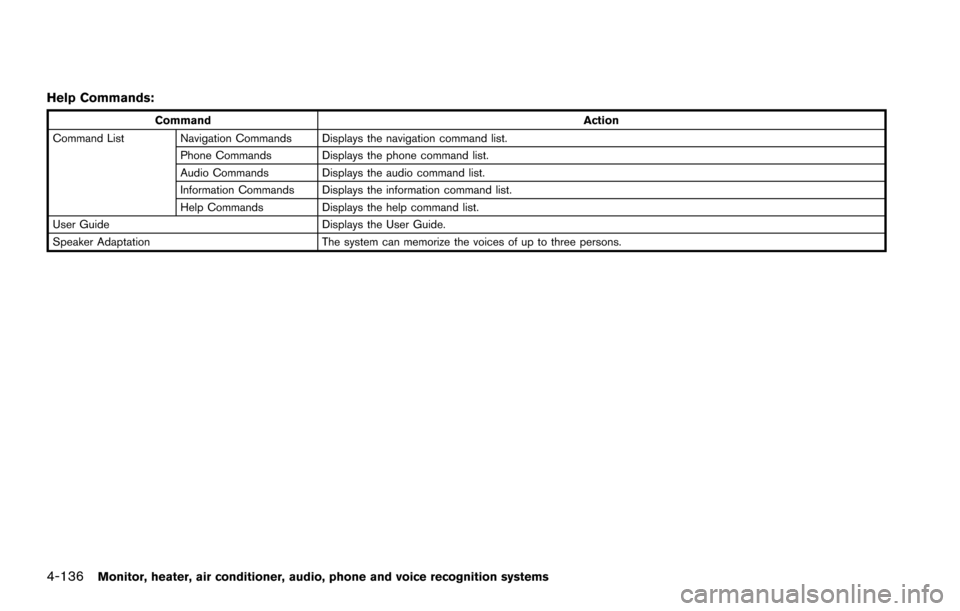
Help Commands:
CommandAction
Command List Navigation Commands Displays the navigation command list. Phone Commands Displays the phone command list.
Audio Commands Displays the audio command list.
Information Commands Displays the information command list.
Help Commands Displays the help command list.
User Guide Displays the User Guide.
Speaker Adaptation The system can memorize the voices of up to three persons.
Page 335 of 614
4-138Monitor, heater, air conditioner, audio, phone and voice recognition systems
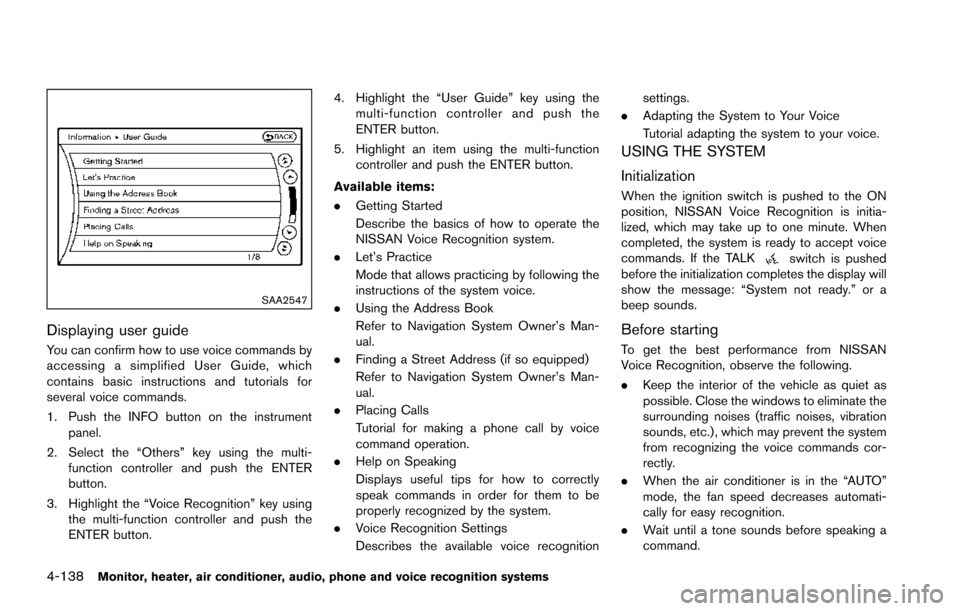
SAA2547
Displaying user guide
You can confirm how to use voice commands by
accessing a simplified User Guide, which
contains basic instructions and tutorials for
several voice commands.
1. Push the INFO button on the instrumentpanel.
2. Select the “Others” key using the multi- function controller and push the ENTER
button.
3. Highlight the “Voice Recognition” key using the multi-function controller and push the
ENTER button. 4. Highlight the “User Guide” key using the
multi-function controller and push the
ENTER button.
5. Highlight an item using the multi-function controller and push the ENTER button.
Available items:
. Getting Started
Describe the basics of how to operate the
NISSAN Voice Recognition system.
. Let’s Practice
Mode that allows practicing by following the
instructions of the system voice.
. Using the Address Book
Refer to Navigation System Owner’s Man-
ual.
. Finding a Street Address (if so equipped)
Refer to Navigation System Owner’s Man-
ual.
. Placing Calls
Tutorial for making a phone call by voice
command operation.
. Help on Speaking
Displays useful tips for how to correctly
speak commands in order for them to be
properly recognized by the system.
. Voice Recognition Settings
Describes the available voice recognition settings.
. Adapting the System to Your Voice
Tutorial adapting the system to your voice.
USING THE SYSTEM
Initialization
When the ignition switch is pushed to the ON
position, NISSAN Voice Recognition is initia-
lized, which may take up to one minute. When
completed, the system is ready to accept voice
commands. If the TALK
switch is pushed
before the initialization completes the display will
show the message: “System not ready.” or a
beep sounds.
Before starting
To get the best performance from NISSAN
Voice Recognition, observe the following.
. Keep the interior of the vehicle as quiet as
possible. Close the windows to eliminate the
surrounding noises (traffic noises, vibration
sounds, etc.) , which may prevent the system
from recognizing the voice commands cor-
rectly.
. When the air conditioner is in the “AUTO”
mode, the fan speed decreases automati-
cally for easy recognition.
. Wait until a tone sounds before speaking a
command.
Page 336 of 614
.Speak in a natural voice without pausing
between words.
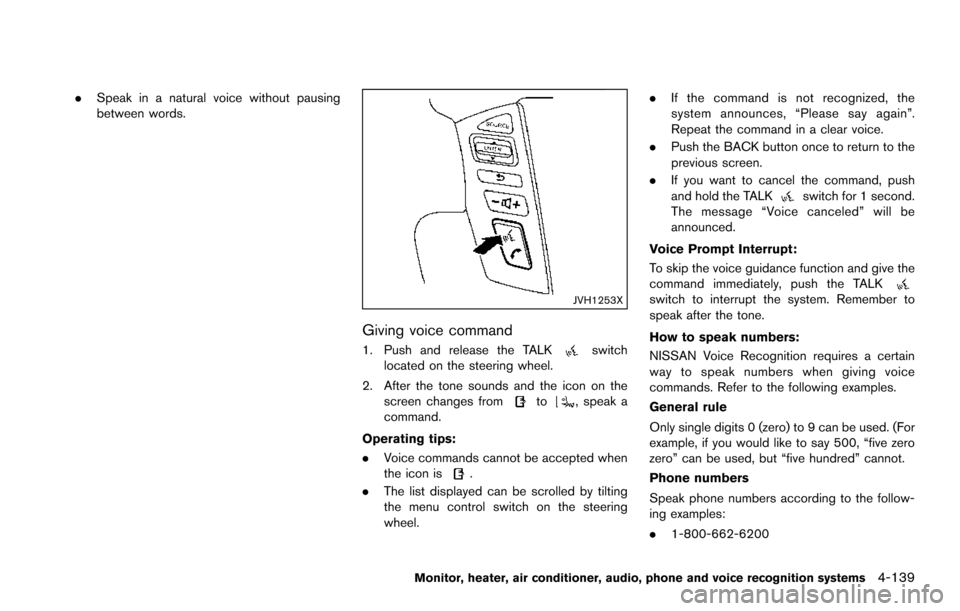
JVH1253X
Giving voice command
1. Push and release the TALKswitch
located on the steering wheel.
2. After the tone sounds and the icon on the screen changes from
to, speak a
command.
Operating tips:
. Voice commands cannot be accepted when
the icon is
.
. The list displayed can be scrolled by tilting
the menu control switch on the steering
wheel. .
If the command is not recognized, the
system announces, “Please say again”.
Repeat the command in a clear voice.
. Push the BACK button once to return to the
previous screen.
. If you want to cancel the command, push
and hold the TALK
switch for 1 second.
The message “Voice canceled” will be
announced.
Voice Prompt Interrupt:
To skip the voice guidance function and give the
command immediately, push the TALK
switch to interrupt the system. Remember to
speak after the tone.
How to speak numbers:
NISSAN Voice Recognition requires a certain
way to speak numbers when giving voice
commands. Refer to the following examples.
General rule
Only single digits 0 (zero) to 9 can be used. (For
example, if you would like to say 500, “five zero
zero” can be used, but “five hundred” cannot.
Phone numbers
Speak phone numbers according to the follow-
ing examples:
. 1-800-662-6200
Monitor, heater, air conditioner, audio, phone and voice recognition systems4-139
Page 338 of 614
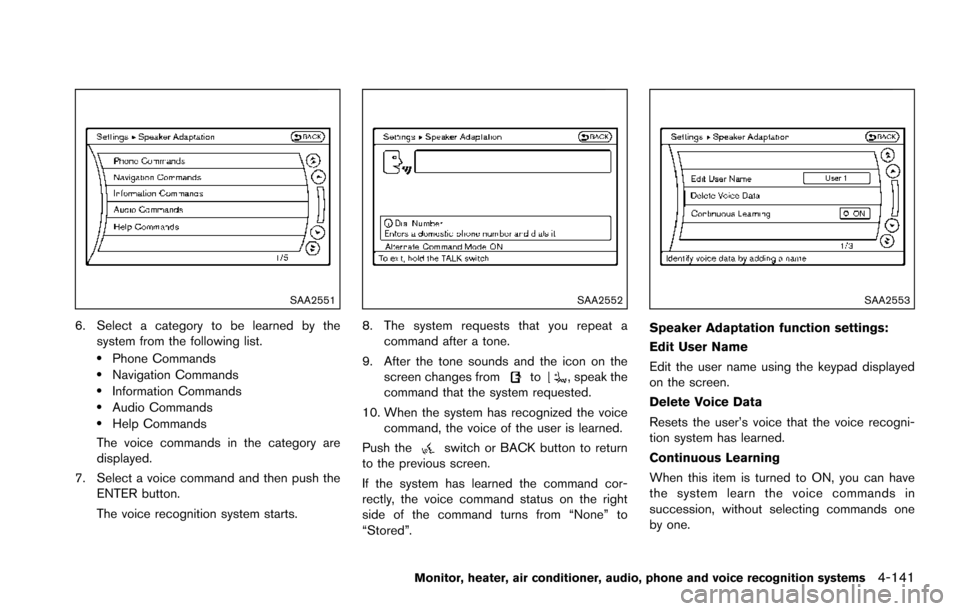
SAA2551
6. Select a category to be learned by thesystem from the following list.
.Phone Commands.Navigation Commands.Information Commands.Audio Commands.Help Commands
The voice commands in the category are
displayed.
7. Select a voice command and then push the ENTER button.
The voice recognition system starts.
SAA2552
8. The system requests that you repeat a
command after a tone.
9. After the tone sounds and the icon on the screen changes from
to, speak the
command that the system requested.
10. When the system has recognized the voice command, the voice of the user is learned.
Push the
switch or BACK button to return
to the previous screen.
If the system has learned the command cor-
rectly, the voice command status on the right
side of the command turns from “None” to
“Stored”.
SAA2553
Speaker Adaptation function settings:
Edit User Name
Edit the user name using the keypad displayed
on the screen.
Delete Voice Data
Resets the user’s voice that the voice recogni-
tion system has learned.
Continuous Learning
When this item is turned to ON, you can have
the system learn the voice commands in
succession, without selecting commands one
by one.
Monitor, heater, air conditioner, audio, phone and voice recognition systems4-141
Page 343 of 614
System malfunction .......................................................... 5-55
System maintenance ....................................................... 5-55
Back-up Collision Intervention (BCI) (if
so equipped) ........................................................................\
... 5-56
BCI system operation ..................................................... 5-58
Turning the BCI system ON/OFF ................................ 5-62
How to enable/disable the BCI system ..................... 5-62
BCI system precautions ................................................. 5-64
System temporarily unavailable ..................................... 5-65
System malfunction .......................................................... 5-66
System maintenance ....................................................... 5-66
Cruise control (if so equipped) .......................................... 5-67 Precautions on cruise control ....................................... 5-67
Cruise control operations ............................................... 5-67
Intelligent Cruise Control (ICC) (if so equipped) .......... 5-69 How to select the cruise control mode ...................... 5-71
Vehicle-to-vehicle distance control mode .................. 5-71
Conventional (fixed speed) cruise control mode ..... 5-87
Distance Control Assist (DCA) (if so equipped) ........... 5-91 DCA system operation .................................................. 5-93
Turning the DCA system ON/OFF .............................. 5-96
How to enable/disable the DCA system ................... 5-97
DCA system display and indicators ............................ 5-98
DCA system limitations ................................................... 5-98
System temporarily unavailable .................................. 5-102
System malfunction ....................................................... 5-104
System maintenance .................................................... 5-104 Forward Emergency Braking (FEB) (if
so equipped) ....................................................................... 5-105
FEB system operation ............................................... 5-107
Turning the FEB system ON/OFF .......................... 5-108
FEB system limitations .............................................. 5-109
System temporarily unavailable ............................... 5-110
System malfunction .................................................... 5-111
System maintenance .................................................. 5-111
Predictive Forward Collision Warning (PFCW) (if
so equipped) ....................................................................... 5-112 PFCW system operation ........................................... 5-114
Turning the PFCW system ON/OFF ...................... 5-115
PFCW system limitations .......................................... 5-118
System temporarily unavailable ............................... 5-119
System malfunction .................................................... 5-119
System maintenance .................................................. 5-120
Break-in schedule .............................................................. 5-121
Fuel efficient driving tips .................................................. 5-121
Increasing fuel economy ................................................... 5-122
NISSAN all-mode 4WD
Š(if so equipped) ................. 5-123
NISSAN all-mode 4WDŠsystem ........................... 5-123
4WD shift switch ........................................................ 5-127
4WD shift indicator .................................................... 5-128
4WD warning light ..................................................... 5-128
Hill Start Assist system ..................................................... 5-130
Parking/parking on hills ..................................................... 5-131
TOW mode ........................................................................\
.. 5-132
Page 347 of 614
5-6Starting and driving
Additional information
.Since the spare tire is not equipped with the
TPMS, the TPMS does not monitor the tire
pressure of the spare tire.
. The TPMS will activate only when the
vehicle is driven at speeds above 16 MPH
(25 km/h) . Also, this system may not detect
a sudden drop in tire pressure (for example,
a flat tire while driving) .
. The low tire pressure warning light does not
automatically turn off when the tire pressure
is adjusted. After the tire is inflated to the
recommended pressure, the vehicle must be
driven at speeds above 16 MPH (25 km/h)
to activate the TPMS and turn off the low tire
pressure warning light. Use a tire pressure
gauge to check the tire pressure.
. The CHECK TIRE PRESSURE warning
appears in the vehicle information display
when the low tire pressure warning light is
illuminated and low tire pressure is detected.
The CHECK TIRE PRESSURE warning
turns off when the low tire pressure warning
light turns off.
The CHECK TIRE PRESSURE warning
appears each time the ignition switch is
placed in the ON position as long as the low
tire pressure warning light remains illumi-
nated. The CHECK TIRE PRESSURE warning
does not appear if the low tire pressure
warning light illuminates to indicate a TPMS
malfunction.
. Tire pressure rises and falls depending on
the heat caused by the vehicle’s operation
and the outside temperature. Do not reduce
the tire pressure after driving because the
tire pressure rises after driving. Low outside
temperature can lower the temperature of
the air inside the tire which can cause a
lower tire inflation pressure. This may cause
the low tire pressure warning light to
illuminate. If the warning light illuminates in
low ambient temperature, check the tire
pressure for all four tires.
. You can also check the pressure of all tires
(except the spare tire) on the display screen.
The order of the tire pressure figures
displayed on the screen does not corre-
spond with the actual order of the tire
position. See “TIRE PRESSURE informa-
tion” (P.4-10) .
For additional information, see “Low tire pres-
sure warning light” (P.2-15) and “Tire Pressure
Monitoring System (TPMS) ” (P.6-3) .WARNING
. If the low tire pressure warning light
illuminates or LOW PRESSURE in-
formation is displayed on the moni-
tor screen while driving, avoid
sudden steering maneuvers or
abrupt braking, reduce vehicle
speed, pull off the road to a safe
location and stop the vehicle as
soon as possible. Driving with un-
der-inflated tires may permanently
damage the tires and increase the
likelihood of tire failure. Serious
vehicle damage could occur and
may lead to an accident and could
result in serious personal injury.
Check the tire pressure for all four
tires. Adjust the tire pressure to the
recommended COLD tire pressure
shown on the Tire and Loading
Information label to turn the low
tire pressure warning light OFF. If
the light still illuminates while driv-
ing after adjusting the tire pressure,
a tire may be flat or the TPMS may
be malfunctioning. If you have a flat
tire, replace it with a spare tire as
soon as possible. If no tire is flat
Page 354 of 614
SSD0436
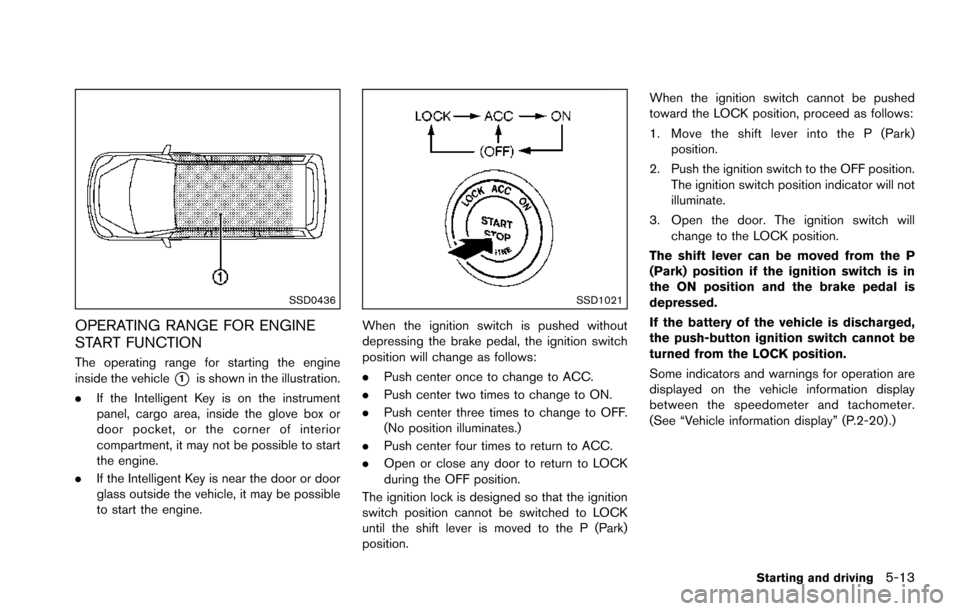
OPERATING RANGE FOR ENGINE
START FUNCTION
The operating range for starting the engine
inside the vehicle
*1is shown in the illustration.
. If the Intelligent Key is on the instrument
panel, cargo area, inside the glove box or
door pocket, or the corner of interior
compartment, it may not be possible to start
the engine.
. If the Intelligent Key is near the door or door
glass outside the vehicle, it may be possible
to start the engine.
SSD1021
When the ignition switch is pushed without
depressing the brake pedal, the ignition switch
position will change as follows:
.Push center once to change to ACC.
. Push center two times to change to ON.
. Push center three times to change to OFF.
(No position illuminates.)
. Push center four times to return to ACC.
. Open or close any door to return to LOCK
during the OFF position.
The ignition lock is designed so that the ignition
switch position cannot be switched to LOCK
until the shift lever is moved to the P (Park)
position. When the ignition switch cannot be pushed
toward the LOCK position, proceed as follows:
1. Move the shift lever into the P (Park)
position.
2. Push the ignition switch to the OFF position. The ignition switch position indicator will not
illuminate.
3. Open the door. The ignition switch will change to the LOCK position.
The shift lever can be moved from the P
(Park) position if the ignition switch is in
the ON position and the brake pedal is
depressed.
If the battery of the vehicle is discharged,
the push-button ignition switch cannot be
turned from the LOCK position.
Some indicators and warnings for operation are
displayed on the vehicle information display
between the speedometer and tachometer.
(See “Vehicle information display” (P.2-20) .)
Starting and driving5-13
Page 356 of 614
JVS0404X
INTELLIGENT KEY BATTERY DIS-
CHARGE
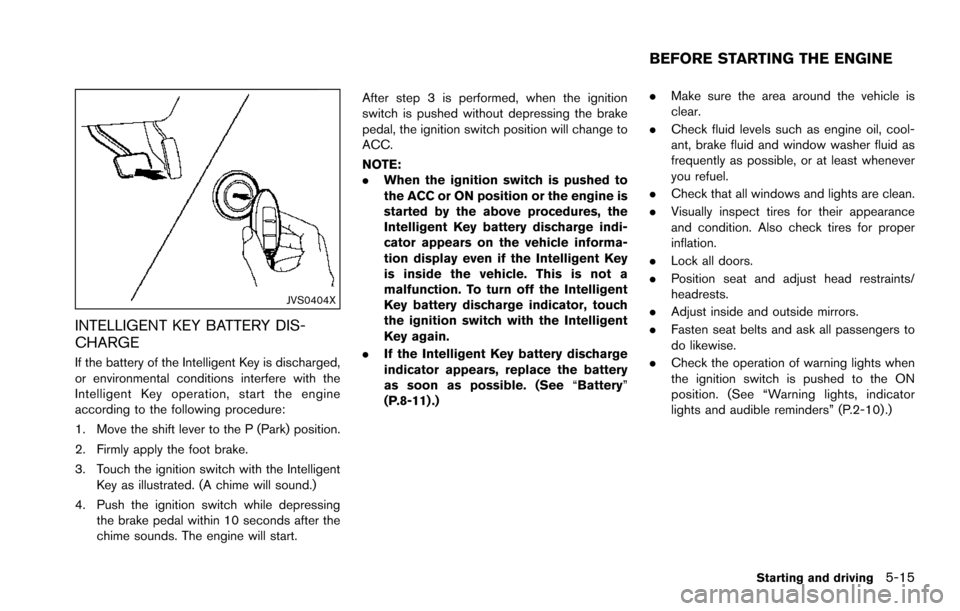
If the battery of the Intelligent Key is discharged,
or environmental conditions interfere with the
Intelligent Key operation, start the engine
according to the following procedure:
1. Move the shift lever to the P (Park) position.
2. Firmly apply the foot brake.
3. Touch the ignition switch with the IntelligentKey as illustrated. (A chime will sound.)
4. Push the ignition switch while depressing the brake pedal within 10 seconds after the
chime sounds. The engine will start. After step 3 is performed, when the ignition
switch is pushed without depressing the brake
pedal, the ignition switch position will change to
ACC.
NOTE:
.
When the ignition switch is pushed to
the ACC or ON position or the engine is
started by the above procedures, the
Intelligent Key battery discharge indi-
cator appears on the vehicle informa-
tion display even if the Intelligent Key
is inside the vehicle. This is not a
malfunction. To turn off the Intelligent
Key battery discharge indicator, touch
the ignition switch with the Intelligent
Key again.
. If the Intelligent Key battery discharge
indicator appears, replace the battery
as soon as possible. (See “Battery”
(P.8-11) .) .
Make sure the area around the vehicle is
clear.
. Check fluid levels such as engine oil, cool-
ant, brake fluid and window washer fluid as
frequently as possible, or at least whenever
you refuel.
. Check that all windows and lights are clean.
. Visually inspect tires for their appearance
and condition. Also check tires for proper
inflation.
. Lock all doors.
. Position seat and adjust head restraints/
headrests.
. Adjust inside and outside mirrors.
. Fasten seat belts and ask all passengers to
do likewise.
. Check the operation of warning lights when
the ignition switch is pushed to the ON
position. (See “Warning lights, indicator
lights and audible reminders” (P.2-10) .)
Starting and driving5-15
BEFORE STARTING THE ENGINE
Page 361 of 614
5-20Starting and driving
N (Neutral) position or any drive position to
the P (Park) position.Apply the parking brake.
When parking on a hill, apply the parking brake
first, then move the shift lever to the P (Park)
position.
CAUTION
Use this position only when the vehicle
is completely stopped.
R (Reverse):
Use this position to back up. Always be sure the
vehicle is completely stopped before selecting
the R (Reverse) position. The brake pedal
must be depressed and the shift lever
button pushed in to move the shift lever
from the P (Park) position, the N (Neutral)
position or any drive position to the R
(Reverse) position.
N (Neutral):
Neither forward nor reverse gear is engaged.
The engine can be started in this position. You
may shift to the N (Neutral) position and restart a
stalled engine while the vehicle is moving.
D (Drive):
Use this position for all normal forward driving.
Manual shift mode
When the shift lever is in the manual shift gate,
the transmission is ready for the manual shift
mode. Shift ranges can be selected manually by
moving the shift lever up or down.
When shifting up, move the shift lever to the +
(up) side. The transmission shifts to the higher
range.
When shifting down, move the shift lever to the
í (down) side. The transmission shifts to the
lower range.
When canceling the manual shift mode, return
the shift lever to the D (Drive) position. The
transmission returns to the normal driving mode.
In the manual shift mode, the shift range is
displayed on the position indicator in the meter. Shift ranges up or down one by one as follows:M1
?
/M2?
/M3?
/M4?
/M5?
/M6?
/M7
M7 (7th):
Use this position for all normal forward driving at
highway speeds.
M6 (6th) andM5 (5th):
Use these positions when driving up long
slopes, or for engine braking when driving down
long slopes.
M4 (4th) ,M3 (3rd) andM2 (2nd):
Use these positions for hill climbing or engine
braking on downhill grades.
M1 (1st):
Use this position when climbing steep hills
slowly or driving slowly through deep snow, or
for maximum engine braking on steep downhill
grades.
. Remember not to drive at high speeds for
extended periods of time in lower than 7th
gear. This reduces fuel economy.
. Moving the shift lever rapidly to the same
side twice will shift the ranges in succes-
sion.
. In the manual shift mode, the transmis-
sion may not shift to the selected gear
or may automatically shift to the other