display NISSAN ARMADA 2017 2.G Owners Manual
[x] Cancel search | Manufacturer: NISSAN, Model Year: 2017, Model line: ARMADA, Model: NISSAN ARMADA 2017 2.GPages: 614, PDF Size: 2.87 MB
Page 365 of 614
5-24Starting and driving
JVS0879X
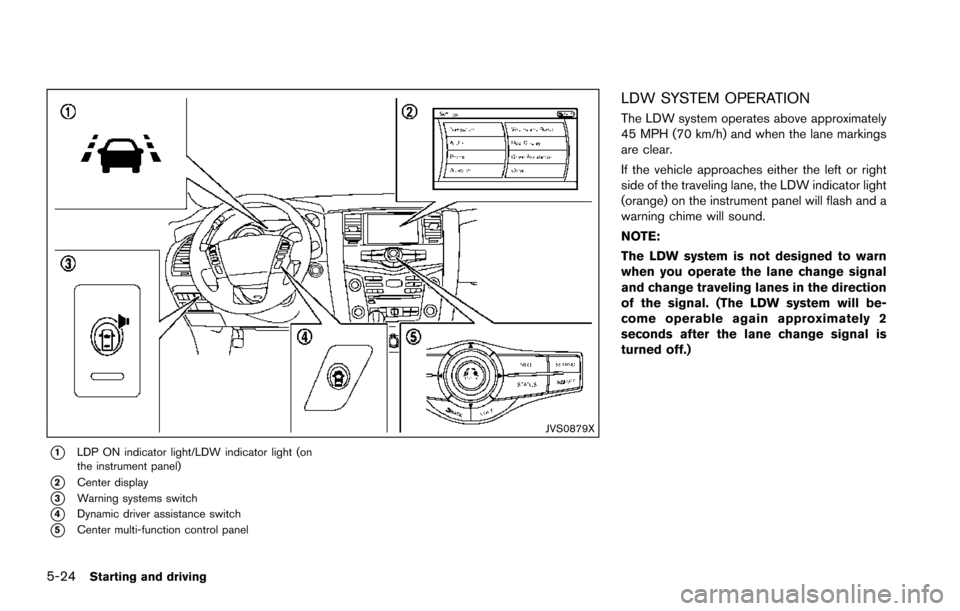
*1LDP ON indicator light/LDW indicator light (on
the instrument panel)
*2Center display
*3Warning systems switch
*4Dynamic driver assistance switch
*5Center multi-function control panel
LDW SYSTEM OPERATION
The LDW system operates above approximately
45 MPH (70 km/h) and when the lane markings
are clear.
If the vehicle approaches either the left or right
side of the traveling lane, the LDW indicator light
(orange) on the instrument panel will flash and a
warning chime will sound.
NOTE:
The LDW system is not designed to warn
when you operate the lane change signal
and change traveling lanes in the direction
of the signal. (The LDW system will be-
come operable again approximately 2
seconds after the lane change signal is
turned off.)
Page 366 of 614
JVS0880X
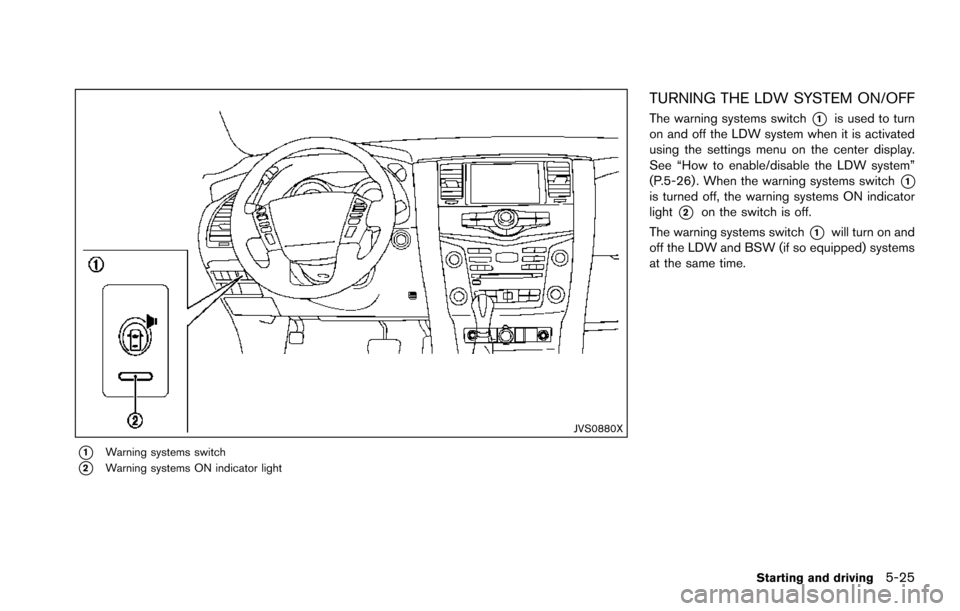
*1Warning systems switch
*2Warning systems ON indicator light
TURNING THE LDW SYSTEM ON/OFF
The warning systems switch*1is used to turn
on and off the LDW system when it is activated
using the settings menu on the center display.
See “How to enable/disable the LDW system”
(P.5-26) . When the warning systems switch
*1is turned off, the warning systems ON indicator
light
*2on the switch is off.
The warning systems switch
*1will turn on and
off the LDW and BSW (if so equipped) systems
at the same time.
Starting and driving5-25
Page 367 of 614
5-26Starting and driving
SSD0959
SSD1102
HOW TO ENABLE/DISABLE THE LDW
SYSTEM
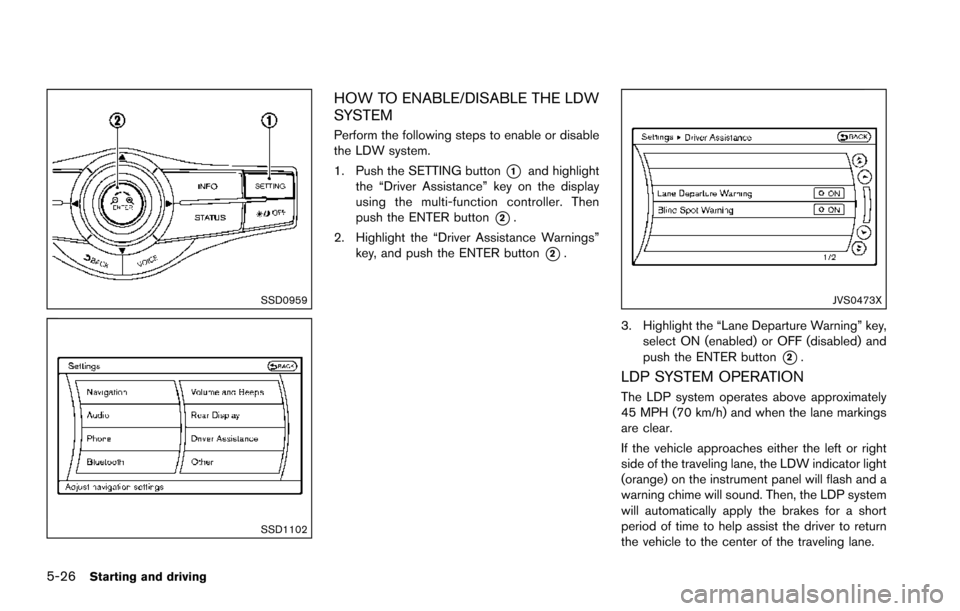
Perform the following steps to enable or disable
the LDW system.
1. Push the SETTING button
*1and highlight
the “Driver Assistance” key on the display
using the multi-function controller. Then
push the ENTER button
*2.
2. Highlight the “Driver Assistance Warnings” key, and push the ENTER button
*2.
JVS0473X
3. Highlight the “Lane Departure Warning” key,
select ON (enabled) or OFF (disabled) and
push the ENTER button
*2.
LDP SYSTEM OPERATION
The LDP system operates above approximately
45 MPH (70 km/h) and when the lane markings
are clear.
If the vehicle approaches either the left or right
side of the traveling lane, the LDW indicator light
(orange) on the instrument panel will flash and a
warning chime will sound. Then, the LDP system
will automatically apply the brakes for a short
period of time to help assist the driver to return
the vehicle to the center of the traveling lane.
Page 368 of 614
NOTE:
.The LDP system is not designed to
work when you operate the lane
change signal and change traveling
lanes in the direction of the signal.
(The LDP system will become operable
again approximately 2 seconds after
the lane change signal is turned off.)
. The LDP braking assist will not operate
or will stop operating and only a
warning chime will sound under the
following conditions.
—When the brake pedal is depressed.
— When the steering wheel is turned
as far as necessary for the vehicle to
change lanes.
— When the accelerator pedal is de-
pressed while brake control assist is
provided.
— When the ICC, DCA, BSI, BSW,
PFCW or FEB warnings sound.
— When the hazard warning flashers
are operated.
— When driving on a curve at a high
speed.
. While the LDP system is operating, you
may hear a sound of brake operation.
This is normal and indicates that the
LDP system is operating properly.
JVS0881X
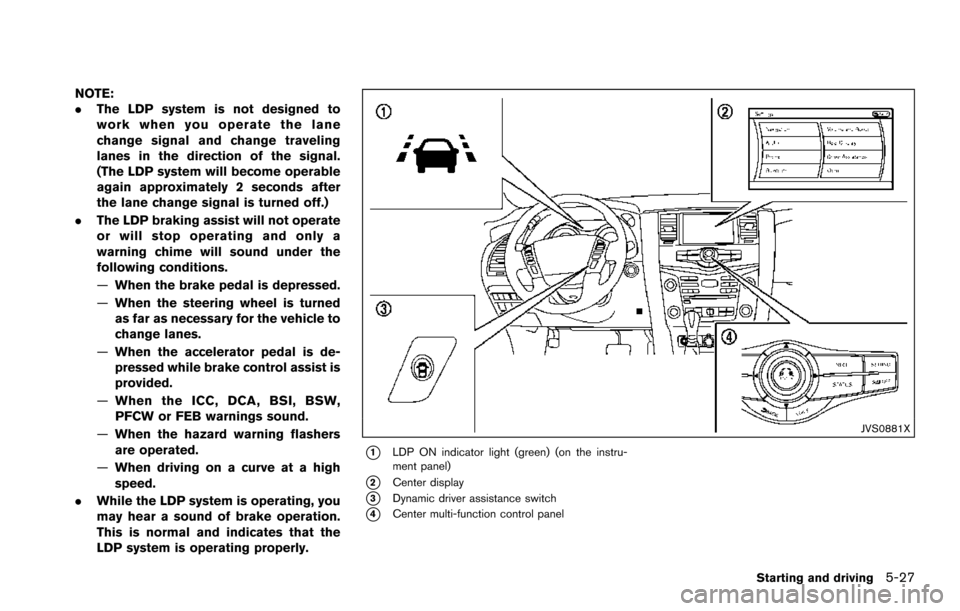
*1LDP ON indicator light (green) (on the instru-
ment panel)
*2Center display
*3Dynamic driver assistance switch
*4Center multi-function control panel
Starting and driving5-27
Page 369 of 614
5-28Starting and driving
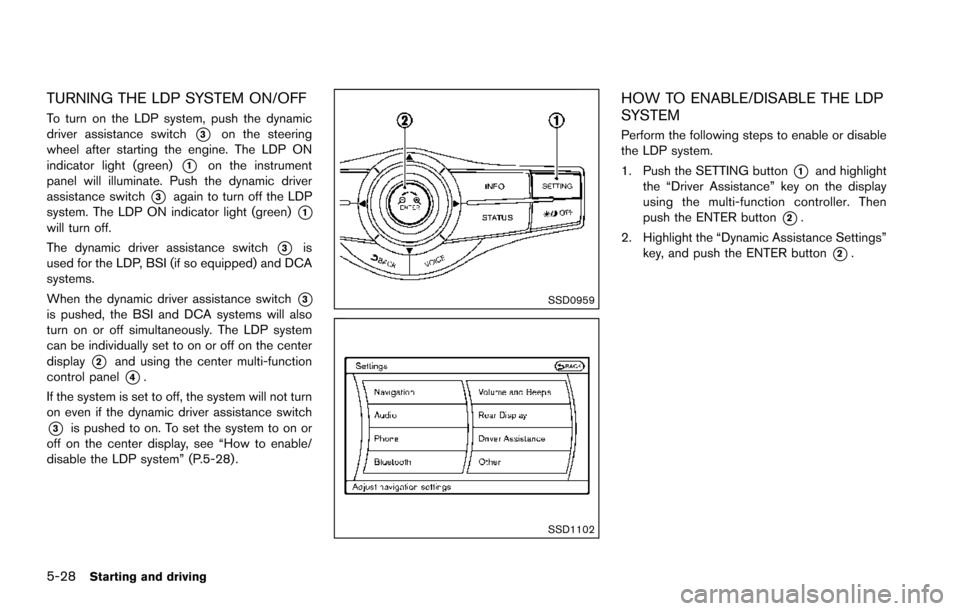
TURNING THE LDP SYSTEM ON/OFF
To turn on the LDP system, push the dynamic
driver assistance switch
*3on the steering
wheel after starting the engine. The LDP ON
indicator light (green)
*1on the instrument
panel will illuminate. Push the dynamic driver
assistance switch
*3again to turn off the LDP
system. The LDP ON indicator light (green)
*1will turn off.
The dynamic driver assistance switch
*3is
used for the LDP, BSI (if so equipped) and DCA
systems.
When the dynamic driver assistance switch
*3is pushed, the BSI and DCA systems will also
turn on or off simultaneously. The LDP system
can be individually set to on or off on the center
display
*2and using the center multi-function
control panel
*4.
If the system is set to off, the system will not turn
on even if the dynamic driver assistance switch
*3is pushed to on. To set the system to on or
off on the center display, see “How to enable/
disable the LDP system” (P.5-28) .
SSD0959
SSD1102
HOW TO ENABLE/DISABLE THE LDP
SYSTEM
Perform the following steps to enable or disable
the LDP system.
1. Push the SETTING button
*1and highlight
the “Driver Assistance” key on the display
using the multi-function controller. Then
push the ENTER button
*2.
2. Highlight the “Dynamic Assistance Settings” key, and push the ENTER button
*2.
Page 375 of 614
5-34Starting and driving
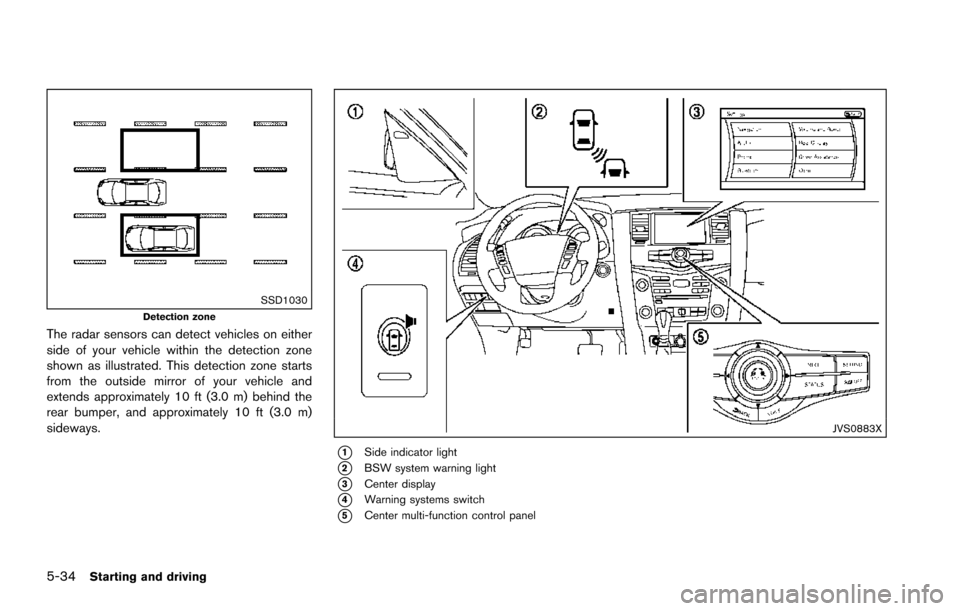
SSD1030Detection zone
The radar sensors can detect vehicles on either
side of your vehicle within the detection zone
shown as illustrated. This detection zone starts
from the outside mirror of your vehicle and
extends approximately 10 ft (3.0 m) behind the
rear bumper, and approximately 10 ft (3.0 m)
sideways.
JVS0883X
*1Side indicator light
*2BSW system warning light
*3Center display
*4Warning systems switch
*5Center multi-function control panel
Page 377 of 614
5-36Starting and driving
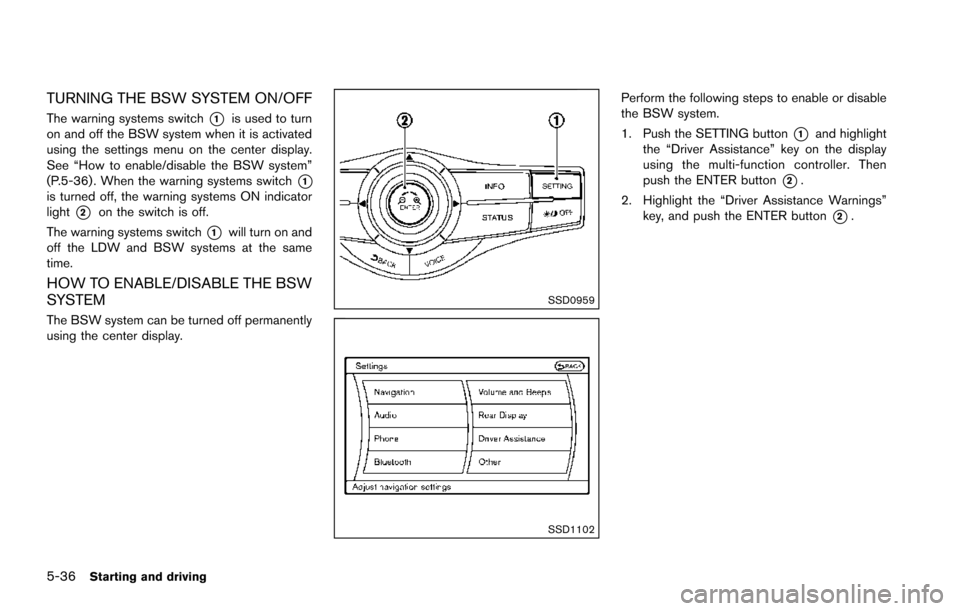
TURNING THE BSW SYSTEM ON/OFF
The warning systems switch*1is used to turn
on and off the BSW system when it is activated
using the settings menu on the center display.
See “How to enable/disable the BSW system”
(P.5-36) . When the warning systems switch
*1is turned off, the warning systems ON indicator
light
*2on the switch is off.
The warning systems switch
*1will turn on and
off the LDW and BSW systems at the same
time.
HOW TO ENABLE/DISABLE THE BSW
SYSTEM
The BSW system can be turned off permanently
using the center display.
SSD0959
SSD1102
Perform the following steps to enable or disable
the BSW system.
1. Push the SETTING button
*1and highlight
the “Driver Assistance” key on the display
using the multi-function controller. Then
push the ENTER button
*2.
2. Highlight the “Driver Assistance Warnings” key, and push the ENTER button
*2.
Page 385 of 614
5-44Starting and driving
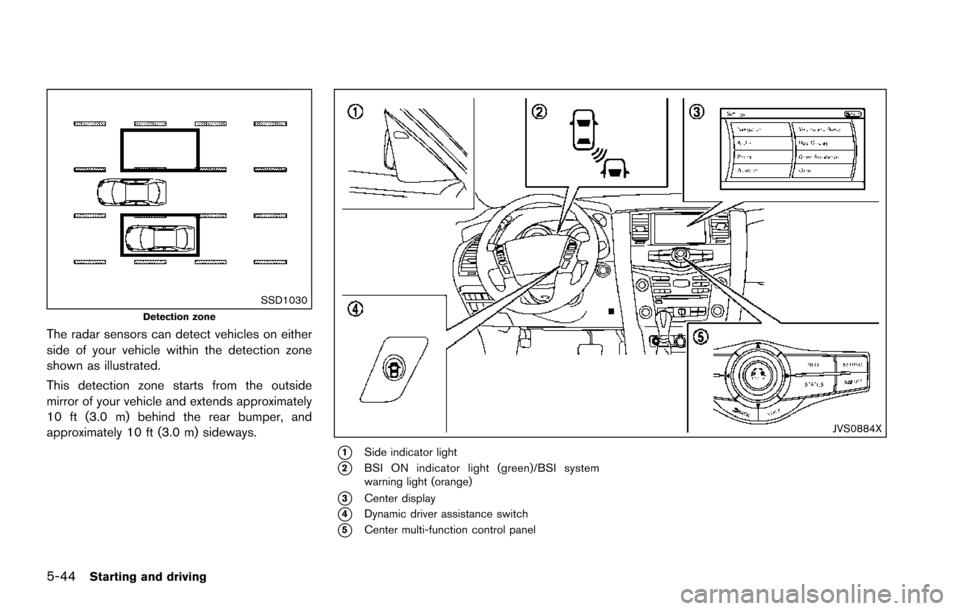
SSD1030Detection zone
The radar sensors can detect vehicles on either
side of your vehicle within the detection zone
shown as illustrated.
This detection zone starts from the outside
mirror of your vehicle and extends approximately
10 ft (3.0 m) behind the rear bumper, and
approximately 10 ft (3.0 m) sideways.
JVS0884X
*1Side indicator light
*2BSI ON indicator light (green)/BSI system
warning light (orange)
*3Center display
*4Dynamic driver assistance switch
*5Center multi-function control panel
Page 387 of 614
5-46Starting and driving
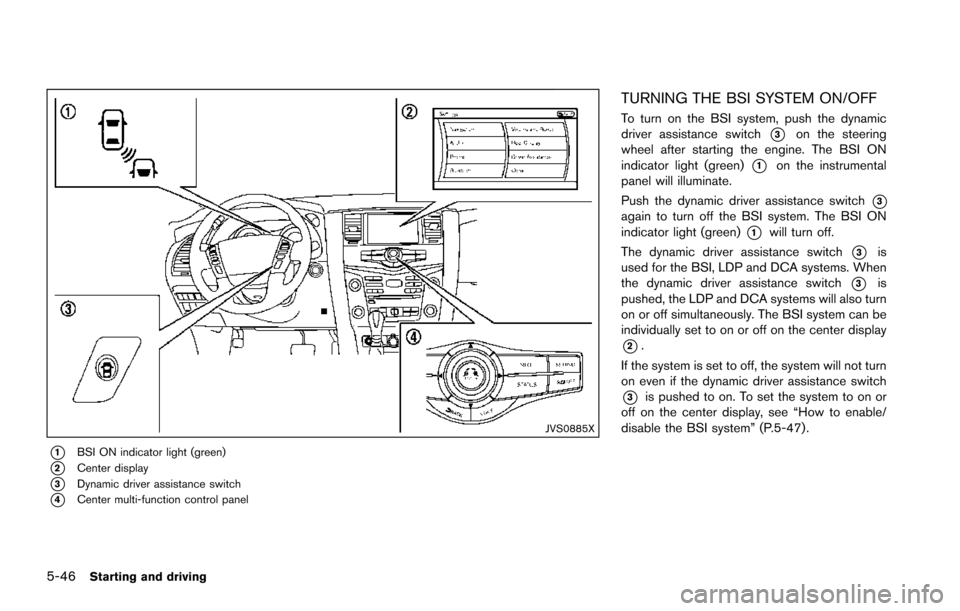
JVS0885X
*1BSI ON indicator light (green)
*2Center display
*3Dynamic driver assistance switch
*4Center multi-function control panel
TURNING THE BSI SYSTEM ON/OFF
To turn on the BSI system, push the dynamic
driver assistance switch
*3on the steering
wheel after starting the engine. The BSI ON
indicator light (green)
*1on the instrumental
panel will illuminate.
Push the dynamic driver assistance switch
*3again to turn off the BSI system. The BSI ON
indicator light (green)
*1will turn off.
The dynamic driver assistance switch
*3is
used for the BSI, LDP and DCA systems. When
the dynamic driver assistance switch
*3is
pushed, the LDP and DCA systems will also turn
on or off simultaneously. The BSI system can be
individually set to on or off on the center display
*2.
If the system is set to off, the system will not turn
on even if the dynamic driver assistance switch
*3is pushed to on. To set the system to on or
off on the center display, see “How to enable/
disable the BSI system” (P.5-47).
Page 388 of 614
SSD0959
SSD1102
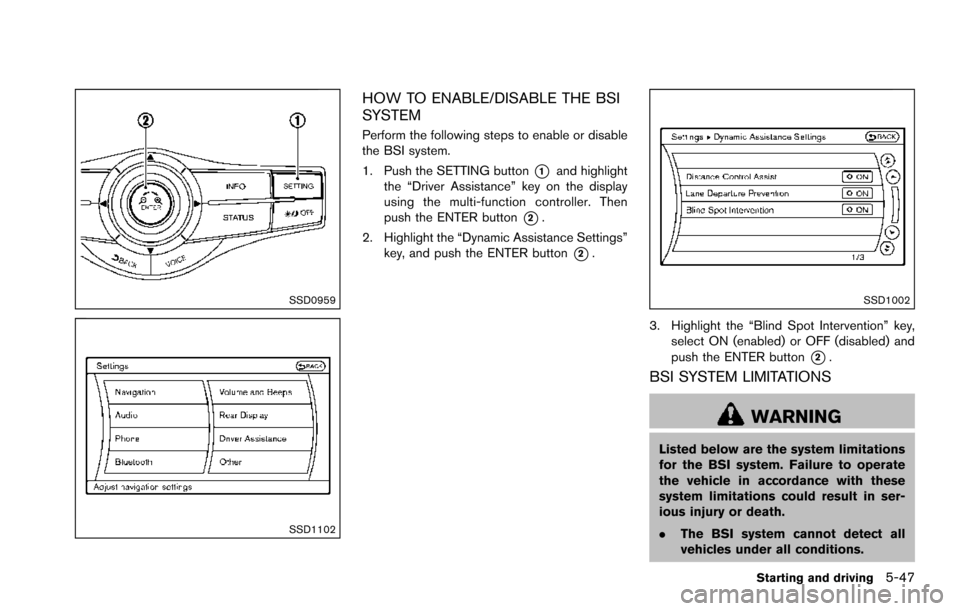
HOW TO ENABLE/DISABLE THE BSI
SYSTEM
Perform the following steps to enable or disable
the BSI system.
1. Push the SETTING button
*1and highlight
the “Driver Assistance” key on the display
using the multi-function controller. Then
push the ENTER button
*2.
2. Highlight the “Dynamic Assistance Settings” key, and push the ENTER button
*2.
SSD1002
3. Highlight the “Blind Spot Intervention” key,
select ON (enabled) or OFF (disabled) and
push the ENTER button
*2.
BSI SYSTEM LIMITATIONS
WARNING
Listed below are the system limitations
for the BSI system. Failure to operate
the vehicle in accordance with these
system limitations could result in ser-
ious injury or death.
.The BSI system cannot detect all
vehicles under all conditions.
Starting and driving5-47