Sonar NISSAN ARMADA 2017 2.G User Guide
[x] Cancel search | Manufacturer: NISSAN, Model Year: 2017, Model line: ARMADA, Model: NISSAN ARMADA 2017 2.GPages: 614, PDF Size: 2.87 MB
Page 239 of 614
4-42Monitor, heater, air conditioner, audio, phone and voice recognition systems
WARNING
Failure to follow the warnings and
instructions for proper use of the sonar
function as outlined in this section
could result in serious injury or death.
.The sonar is a convenience feature.
It is not a substitute for proper
parking.
. This function is designed as an aid
to the driver in detecting large
stationary objects to help avoid
damaging the vehicle.
. The driver is always responsible for
safety during parking and other
maneuvers.
. Always look around and check that
it is safe to move before parking.
. Read and understand the limita-
tions of the sonar as contained in
this section.
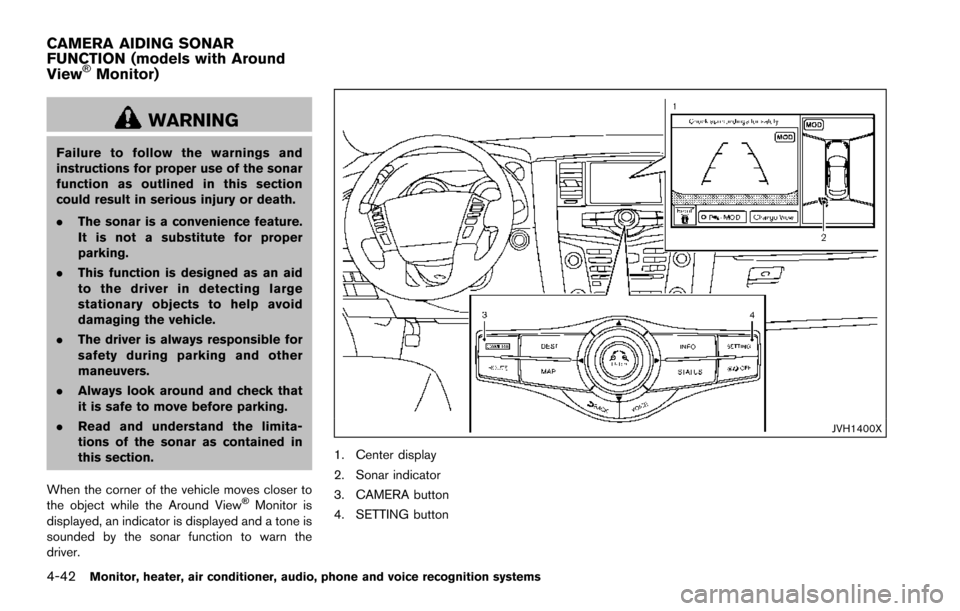
When the corner of the vehicle moves closer to
the object while the Around View
ŠMonitor is
displayed, an indicator is displayed and a tone is
sounded by the sonar function to warn the
driver.
JVH1400X
1. Center display
2. Sonar indicator
3. CAMERA button
4. SETTING button
CAMERA AIDING SONAR
FUNCTION (models with Around
View
ŠMonitor)
Page 240 of 614
SONAR SYSTEM OPERATION
The system gives the tone for front objects when
the shift lever is in the D (Drive) position and
both front and rear objects when the shift lever is
in the R (Reverse) position.
When the camera image is shown on the center
display, the system shows the sonar indicator
regardless of the shift lever position.
The system is deactivated at speeds above 6
MPH (10 km/h) . It is reactivated at lower
speeds.
The colors of the sonar indicators and the
distance guide lines in the front, front-wide, rear
and rear-wide views indicate different distances
to the object.
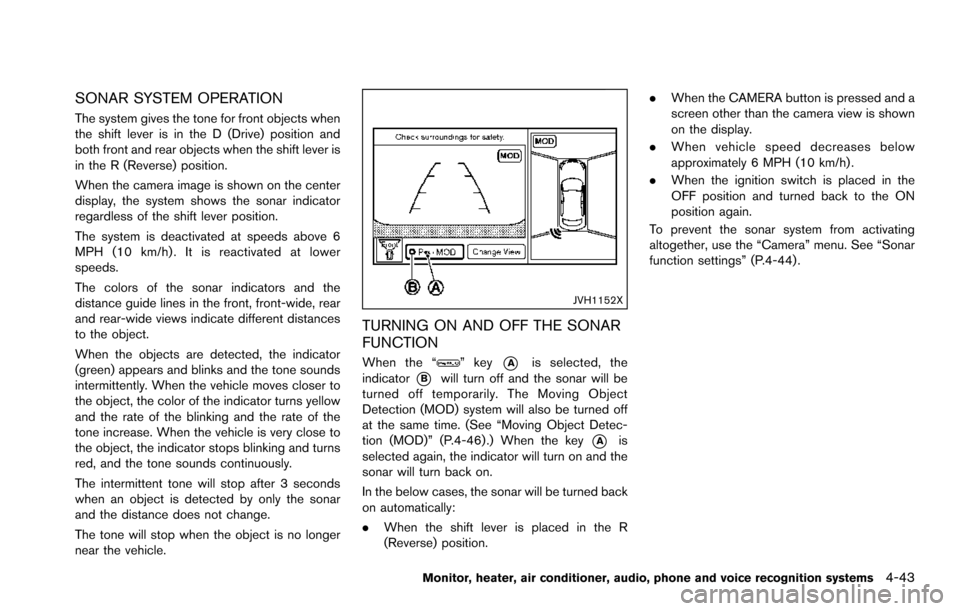
When the objects are detected, the indicator
(green) appears and blinks and the tone sounds
intermittently. When the vehicle moves closer to
the object, the color of the indicator turns yellow
and the rate of the blinking and the rate of the
tone increase. When the vehicle is very close to
the object, the indicator stops blinking and turns
red, and the tone sounds continuously.
The intermittent tone will stop after 3 seconds
when an object is detected by only the sonar
and the distance does not change.
The tone will stop when the object is no longer
near the vehicle.
JVH1152X
TURNING ON AND OFF THE SONAR
FUNCTION
When the “” key*Ais selected, the
indicator
*Bwill turn off and the sonar will be
turned off temporarily. The Moving Object
Detection (MOD) system will also be turned off
at the same time. (See “Moving Object Detec-
tion (MOD)” (P.4-46) .) When the key
*Ais
selected again, the indicator will turn on and the
sonar will turn back on.
In the below cases, the sonar will be turned back
on automatically:
. When the shift lever is placed in the R
(Reverse) position. .
When the CAMERA button is pressed and a
screen other than the camera view is shown
on the display.
. When vehicle speed decreases below
approximately 6 MPH (10 km/h) .
. When the ignition switch is placed in the
OFF position and turned back to the ON
position again.
To prevent the sonar system from activating
altogether, use the “Camera” menu. See “Sonar
function settings” (P.4-44) .
Monitor, heater, air conditioner, audio, phone and voice recognition systems4-43
Page 241 of 614
4-44Monitor, heater, air conditioner, audio, phone and voice recognition systems
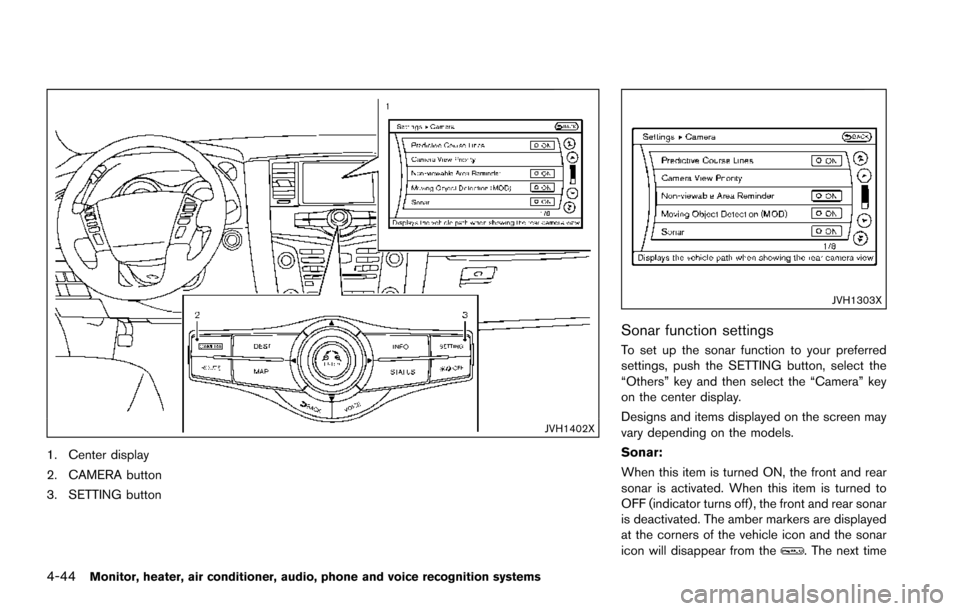
JVH1402X
1. Center display
2. CAMERA button
3. SETTING button
JVH1303X
Sonar function settings
To set up the sonar function to your preferred
settings, push the SETTING button, select the
“Others” key and then select the “Camera” key
on the center display.
Designs and items displayed on the screen may
vary depending on the models.
Sonar:
When this item is turned ON, the front and rear
sonar is activated. When this item is turned to
OFF (indicator turns off) , the front and rear sonar
is deactivated. The amber markers are displayed
at the corners of the vehicle icon and the sonar
icon will disappear from the
. The next time
Page 242 of 614
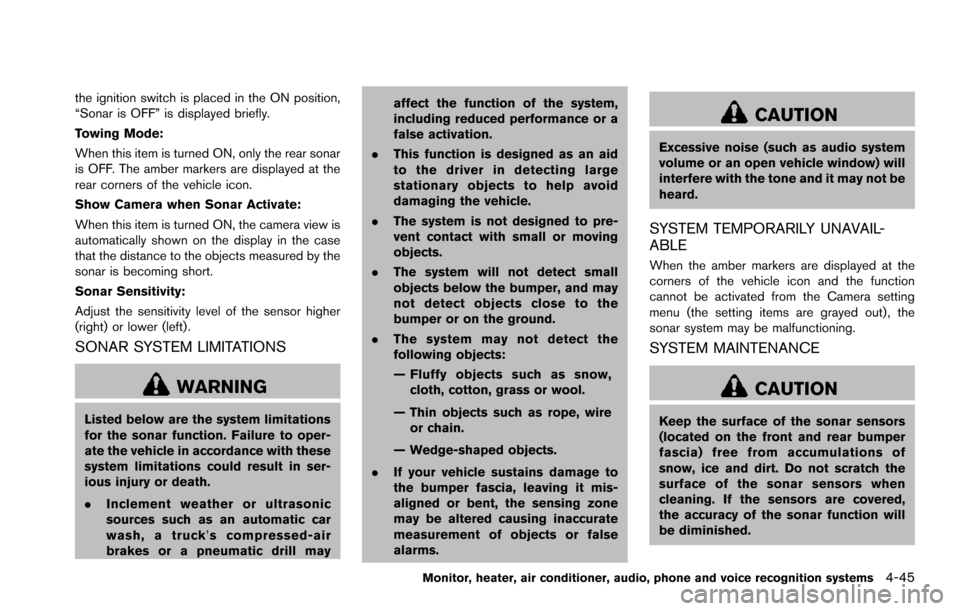
the ignition switch is placed in the ON position,
“Sonar is OFF” is displayed briefly.
Towing Mode:
When this item is turned ON, only the rear sonar
is OFF. The amber markers are displayed at the
rear corners of the vehicle icon.
Show Camera when Sonar Activate:
When this item is turned ON, the camera view is
automatically shown on the display in the case
that the distance to the objects measured by the
sonar is becoming short.
Sonar Sensitivity:
Adjust the sensitivity level of the sensor higher
(right) or lower (left) .
SONAR SYSTEM LIMITATIONS
WARNING
Listed below are the system limitations
for the sonar function. Failure to oper-
ate the vehicle in accordance with these
system limitations could result in ser-
ious injury or death.
.Inclement weather or ultrasonic
sources such as an automatic car
wash, a truck’ s compressed-air
brakes or a pneumatic drill may affect the function of the system,
including reduced performance or a
false activation.
. This function is designed as an aid
to the driver in detecting large
stationary objects to help avoid
damaging the vehicle.
. The system is not designed to pre-
vent contact with small or moving
objects.
. The system will not detect small
objects below the bumper, and may
not detect objects close to the
bumper or on the ground.
. The system may not detect the
following objects:
— Fluffy objects such as snow,
cloth, cotton, grass or wool.
— Thin objects such as rope, wire or chain.
— Wedge-shaped objects.
. If your vehicle sustains damage to
the bumper fascia, leaving it mis-
aligned or bent, the sensing zone
may be altered causing inaccurate
measurement of objects or false
alarms.
CAUTION
Excessive noise (such as audio system
volume or an open vehicle window) will
interfere with the tone and it may not be
heard.
SYSTEM TEMPORARILY UNAVAIL-
ABLE
When the amber markers are displayed at the
corners of the vehicle icon and the function
cannot be activated from the Camera setting
menu (the setting items are grayed out) , the
sonar system may be malfunctioning.
SYSTEM MAINTENANCE
CAUTION
Keep the surface of the sonar sensors
(located on the front and rear bumper
fascia) free from accumulations of
snow, ice and dirt. Do not scratch the
surface of the sonar sensors when
cleaning. If the sensors are covered,
the accuracy of the sonar function will
be diminished.
Monitor, heater, air conditioner, audio, phone and voice recognition systems4-45
Page 245 of 614
4-48Monitor, heater, air conditioner, audio, phone and voice recognition systems
When the MOD system detects moving objects
near the vehicle, the yellow frame will be
displayed on the view where the objects are
detected and a chime will sound once. While the
MOD system continues to detect moving
objects, the yellow frame continues to be
displayed.
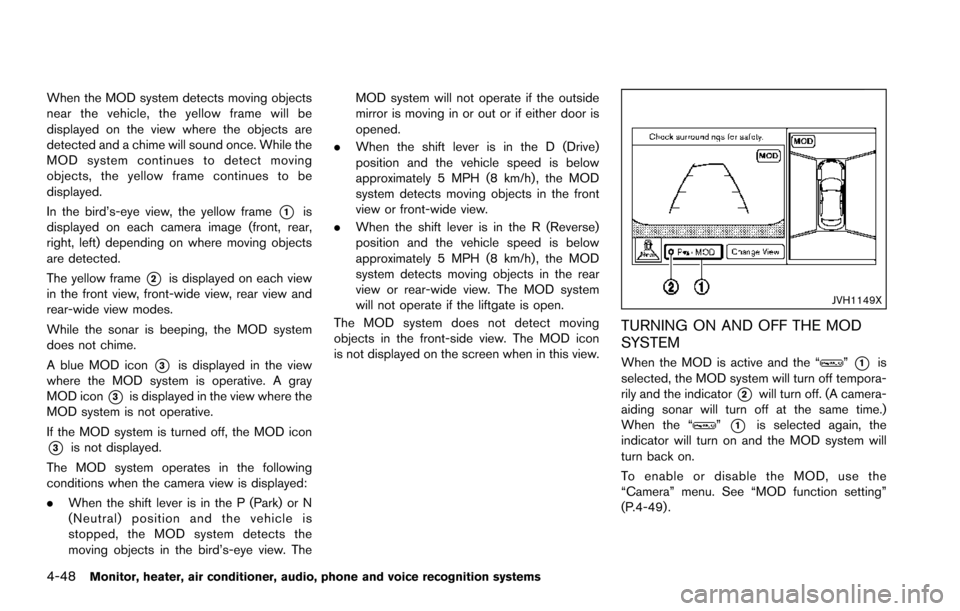
In the bird’s-eye view, the yellow frame
*1is
displayed on each camera image (front, rear,
right, left) depending on where moving objects
are detected.
The yellow frame
*2is displayed on each view
in the front view, front-wide view, rear view and
rear-wide view modes.
While the sonar is beeping, the MOD system
does not chime.
A blue MOD icon
*3is displayed in the view
where the MOD system is operative. A gray
MOD icon
*3is displayed in the view where the
MOD system is not operative.
If the MOD system is turned off, the MOD icon
*3is not displayed.
The MOD system operates in the following
conditions when the camera view is displayed:
. When the shift lever is in the P (Park) or N
(Neutral) position and the vehicle is
stopped, the MOD system detects the
moving objects in the bird’s-eye view. The MOD system will not operate if the outside
mirror is moving in or out or if either door is
opened.
. When the shift lever is in the D (Drive)
position and the vehicle speed is below
approximately 5 MPH (8 km/h) , the MOD
system detects moving objects in the front
view or front-wide view.
. When the shift lever is in the R (Reverse)
position and the vehicle speed is below
approximately 5 MPH (8 km/h) , the MOD
system detects moving objects in the rear
view or rear-wide view. The MOD system
will not operate if the liftgate is open.
The MOD system does not detect moving
objects in the front-side view. The MOD icon
is not displayed on the screen when in this view.
JVH1149X
TURNING ON AND OFF THE MOD
SYSTEM
When the MOD is active and the “”*1is
selected, the MOD system will turn off tempora-
rily and the indicator
*2will turn off. (A camera-
aiding sonar will turn off at the same time.)
When the “
”*1is selected again, the
indicator will turn on and the MOD system will
turn back on.
To enable or disable the MOD, use the
“Camera” menu. See “MOD function setting”
(P.4-49) .
Page 246 of 614
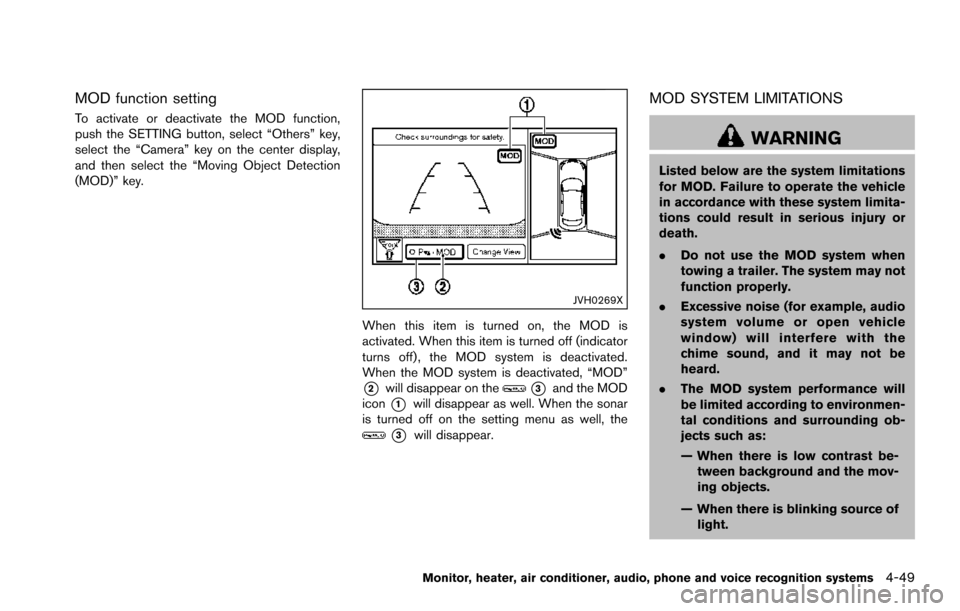
MOD function setting
To activate or deactivate the MOD function,
push the SETTING button, select “Others” key,
select the “Camera” key on the center display,
and then select the “Moving Object Detection
(MOD)” key.
JVH0269X
When this item is turned on, the MOD is
activated. When this item is turned off (indicator
turns off) , the MOD system is deactivated.
When the MOD system is deactivated, “MOD”
*2will disappear on the*3and the MOD
icon
*1will disappear as well. When the sonar
is turned off on the setting menu as well, the
*3will disappear.
MOD SYSTEM LIMITATIONS
WARNING
Listed below are the system limitations
for MOD. Failure to operate the vehicle
in accordance with these system limita-
tions could result in serious injury or
death.
. Do not use the MOD system when
towing a trailer. The system may not
function properly.
. Excessive noise (for example, audio
system volume or open vehicle
window) will interfere with the
chime sound, and it may not be
heard.
. The MOD system performance will
be limited according to environmen-
tal conditions and surrounding ob-
jects such as:
— When there is low contrast be-
tween background and the mov-
ing objects.
— When there is blinking source of light.
Monitor, heater, air conditioner, audio, phone and voice recognition systems4-49
Page 344 of 614
SNOW mode ....................................................................... 5-132
Sonar system (if so equipped) ........................................ 5-133Sonar indicator ............................................................... 5-134
Sonar system OFF switch .......................................... 5-135
Power steering ..................................................................... 5-135
Brake system ........................................................................\
5-136 Braking precautions ...................................................... 5-136
Parking brake break-in ................................................. 5-136
Brake assist ........................................................................\
.. 5-137 Brake assist .................................................................... 5-137
Anti-lock Braking System (ABS) ............................... 5-137 Vehicle Dynamic Control (VDC) system ...................... 5-138
Vehicle Dynamic Control (VDC) OFF switch ...... 5-140
Cold weather driving ......................................................... 5-140 Freeing a frozen door lock ........................................ 5-140
Antifreeze ...................................................................... 5-140
Battery ........................................................................\
.... 5-140
Draining of coolant water .......................................... 5-140
Tire equipment ............................................................. 5-141
Special winter equipment ......................................... 5-141
Driving on snow or ice .............................................. 5-141
Engine block heater (if so equipped) .................... 5-141
Page 397 of 614
5-56Starting and driving
Radio frequency statement
This device complies with part 15 of the FCC
Rules and RSS-310 of Industry Canada.
Operation is subject to the following two
conditions:
1. This device may not cause harmful inter-ference.
2. This device must accept any interference received, including interference that may
cause undesired operation.
Frequency of operation: 24.05GHz —
24.25GHz
Field Strength: Not greater than 2.5V/m peak
(0.25V/m average) at a distance of 3 m
The manufacturer is not responsible for any
radio or TV interference caused by unauthorized
modifications to this equipment. Such modifica-
tions could void the user’s authority to operate
the equipment.WARNING
Failure to follow the warnings and
instructions for proper use of the BCI
system could result in serious injury or
death.
. The BCI system is not a replacement
for proper driving procedure, is not
designed to prevent contact with
vehicles or objects and does not
provide full brake power. When
backing out of parking spaces, al-
ways use the inside and rear mirrors
and turn and look in the direction
you will move. Never rely solely on
the BCI system.
. There is a limitation to the detection
capability of the radar or the sonar.
Using the BCI system under some
road, ground, traffic or weather
conditions could lead to improper
system operation. Always rely on
your own operation to avoid acci-
dents.
The BCI system can help alert the driver of an
approaching vehicle or objects behind the
vehicle when the driver is backing out of a parking space.
BACK-UP COLLISION
INTERVENTION (BCI) (if so
equipped)
Page 398 of 614
JVS0912X
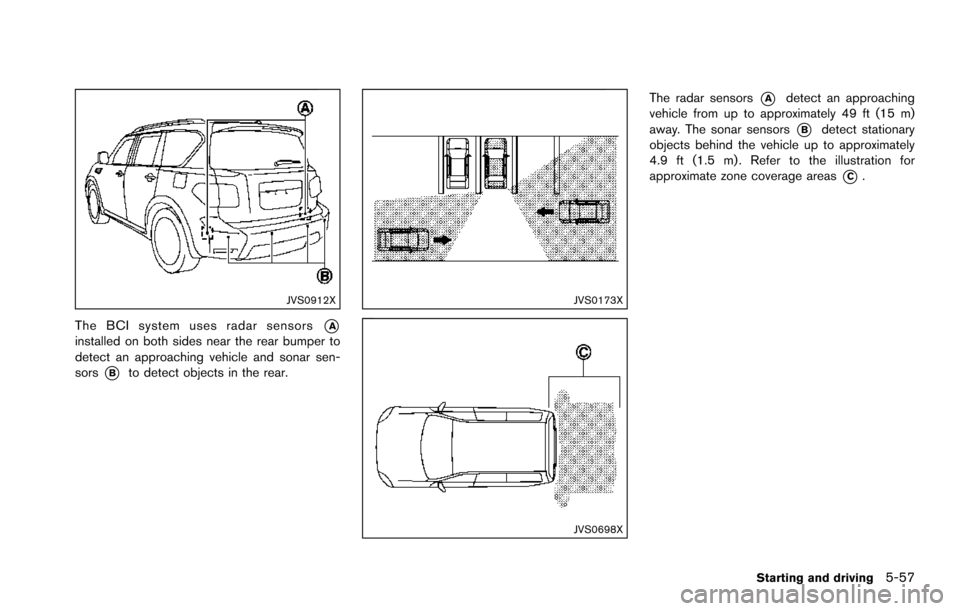
The BCI system uses radar sensors*Ainstalled on both sides near the rear bumper to
detect an approaching vehicle and sonar sen-
sors
*Bto detect objects in the rear.
JVS0173X
JVS0698X
The radar sensors*Adetect an approaching
vehicle from up to approximately 49 ft (15 m)
away. The sonar sensors
*Bdetect stationary
objects behind the vehicle up to approximately
4.9 ft (1.5 m) . Refer to the illustration for
approximate zone coverage areas
*C.
Starting and driving5-57
Page 399 of 614
5-58Starting and driving
JVS0886X
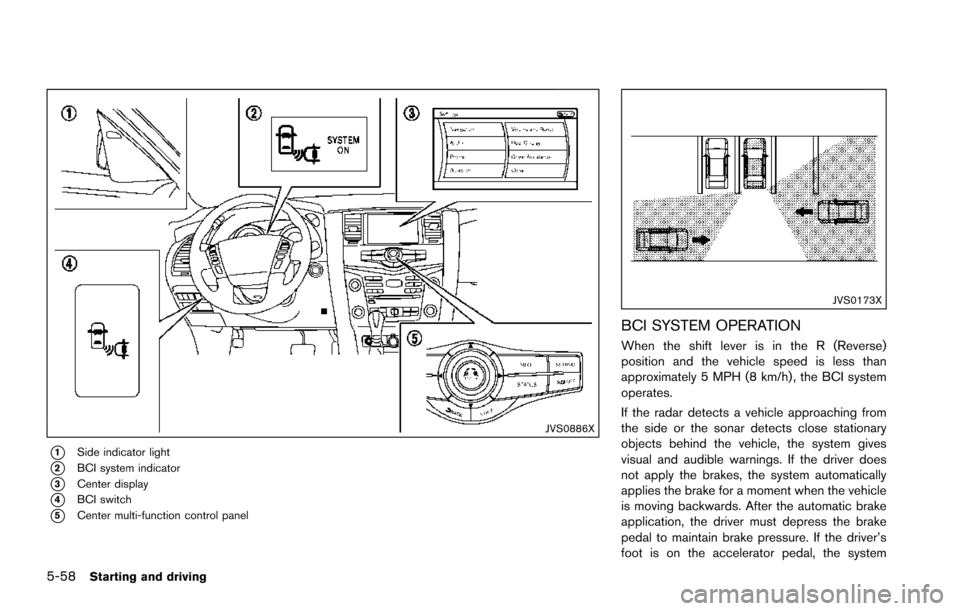
*1Side indicator light
*2BCI system indicator
*3Center display
*4BCI switch
*5Center multi-function control panel
JVS0173X
BCI SYSTEM OPERATION
When the shift lever is in the R (Reverse)
position and the vehicle speed is less than
approximately 5 MPH (8 km/h) , the BCI system
operates.
If the radar detects a vehicle approaching from
the side or the sonar detects close stationary
objects behind the vehicle, the system gives
visual and audible warnings. If the driver does
not apply the brakes, the system automatically
applies the brake for a moment when the vehicle
is moving backwards. After the automatic brake
application, the driver must depress the brake
pedal to maintain brake pressure. If the driver’s
foot is on the accelerator pedal, the system