Sonar NISSAN ARMADA 2017 2.G Owners Manual
[x] Cancel search | Manufacturer: NISSAN, Model Year: 2017, Model line: ARMADA, Model: NISSAN ARMADA 2017 2.GPages: 614, PDF Size: 2.87 MB
Page 10 of 614
JVC0953X
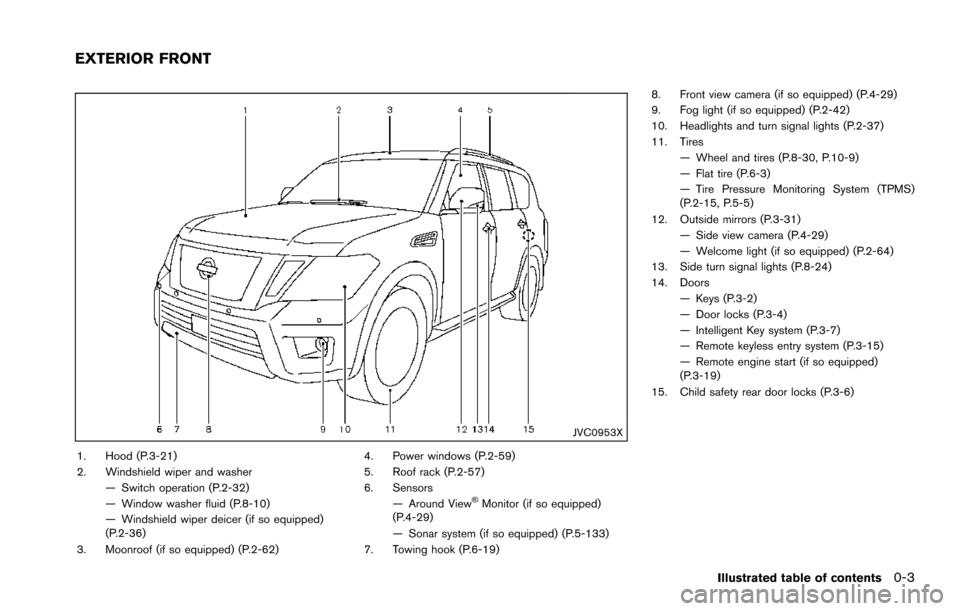
1. Hood (P.3-21)
2. Windshield wiper and washer— Switch operation (P.2-32)
— Window washer fluid (P.8-10)
— Windshield wiper deicer (if so equipped)
(P.2-36)
3. Moonroof (if so equipped) (P.2-62) 4. Power windows (P.2-59)
5. Roof rack (P.2-57)
6. Sensors
— Around View
ŠMonitor (if so equipped)
(P.4-29)
— Sonar system (if so equipped) (P.5-133)
7. Towing hook (P.6-19) 8. Front view camera (if so equipped) (P.4-29)
9. Fog light (if so equipped) (P.2-42)
10. Headlights and turn signal lights (P.2-37)
11. Tires
— Wheel and tires (P.8-30, P.10-9)
— Flat tire (P.6-3)
— Tire Pressure Monitoring System (TPMS)
(P.2-15, P.5-5)
12. Outside mirrors (P.3-31) — Side view camera (P.4-29)
— Welcome light (if so equipped) (P.2-64)
13. Side turn signal lights (P.8-24)
14. Doors
— Keys (P.3-2)
— Door locks (P.3-4)
— Intelligent Key system (P.3-7)
— Remote keyless entry system (P.3-15)
— Remote engine start (if so equipped)
(P.3-19)
15. Child safety rear door locks (P.3-6)
Illustrated table of contents0-3
EXTERIOR FRONT
Page 11 of 614
0-4Illustrated table of contents
JVC0954X
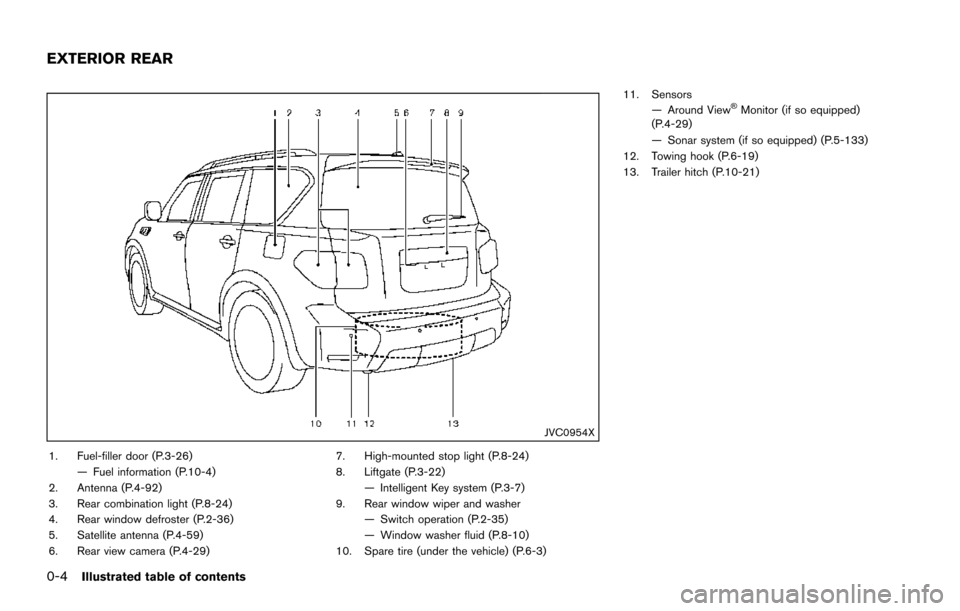
1. Fuel-filler door (P.3-26)— Fuel information (P.10-4)
2. Antenna (P.4-92)
3. Rear combination light (P.8-24)
4. Rear window defroster (P.2-36)
5. Satellite antenna (P.4-59)
6. Rear view camera (P.4-29) 7. High-mounted stop light (P.8-24)
8. Liftgate (P.3-22)
— Intelligent Key system (P.3-7)
9. Rear window wiper and washer — Switch operation (P.2-35)
— Window washer fluid (P.8-10)
10. Spare tire (under the vehicle) (P.6-3) 11. Sensors
— Around View
ŠMonitor (if so equipped)
(P.4-29)
— Sonar system (if so equipped) (P.5-133)
12. Towing hook (P.6-19)
13. Trailer hitch (P.10-21)
EXTERIOR REAR
Page 13 of 614
0-6Illustrated table of contents
JVC0956X
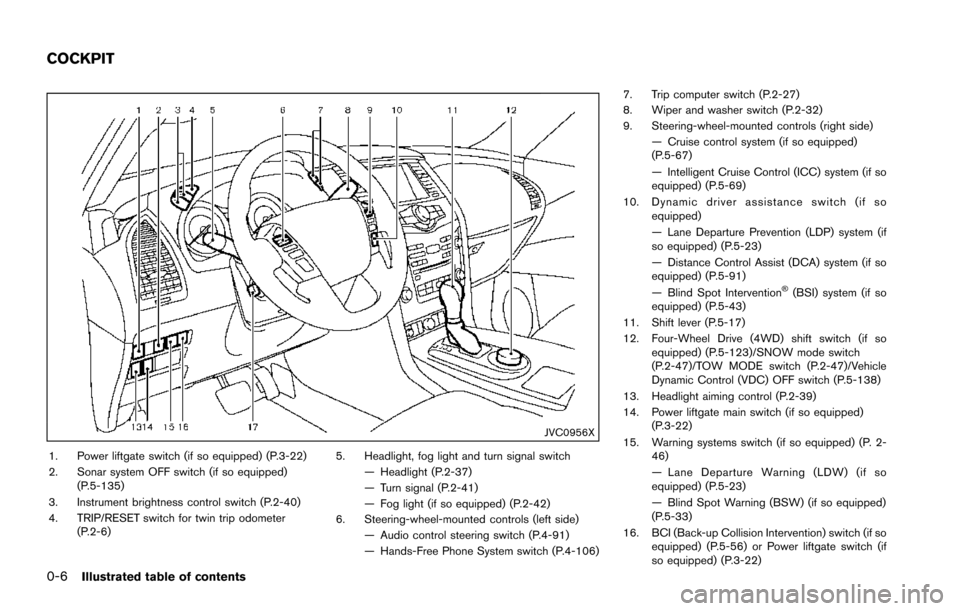
1. Power liftgate switch (if so equipped) (P.3-22)
2. Sonar system OFF switch (if so equipped)(P.5-135)
3. Instrument brightness control switch (P.2-40)
4. TRIP/RESET switch for twin trip odometer (P.2-6) 5. Headlight, fog light and turn signal switch
— Headlight (P.2-37)
— Turn signal (P.2-41)
— Fog light (if so equipped) (P.2-42)
6. Steering-wheel-mounted controls (left side) — Audio control steering switch (P.4-91)
— Hands-Free Phone System switch (P.4-106) 7. Trip computer switch (P.2-27)
8. Wiper and washer switch (P.2-32)
9. Steering-wheel-mounted controls (right side)
— Cruise control system (if so equipped)
(P.5-67)
— Intelligent Cruise Control (ICC) system (if so
equipped) (P.5-69)
10. Dynamic driver assistance switch (if so equipped)
— Lane Departure Prevention (LDP) system (if
so equipped) (P.5-23)
— Distance Control Assist (DCA) system (if so
equipped) (P.5-91)
— Blind Spot Intervention
Š(BSI) system (if so
equipped) (P.5-43)
11. Shift lever (P.5-17)
12. Four-Wheel Drive (4WD) shift switch (if so equipped) (P.5-123)/SNOW mode switch
(P.2-47)/TOW MODE switch (P.2-47)/Vehicle
Dynamic Control (VDC) OFF switch (P.5-138)
13. Headlight aiming control (P.2-39)
14. Power liftgate main switch (if so equipped) (P.3-22)
15. Warning systems switch (if so equipped) (P. 2- 46)
— Lane Departure Warning (LDW) (if so
equipped) (P.5-23)
— Blind Spot Warning (BSW) (if so equipped)
(P.5-33)
16. BCI (Back-up Collision Intervention) switch (if so equipped) (P.5-56) or Power liftgate switch (if
so equipped) (P.3-22)
COCKPIT
Page 90 of 614

2 Instruments and controls
Cockpit ........................................................................\
................ 2-3
Instrument panel ........................................................................\
2-4
Meters and gauges ................................................................... 2-5Speedometer and odometer ............................................ 2-6
Tachometer ........................................................................\
... 2-7
Engine coolant temperature gauge ................................ 2-7
Fuel gauge ........................................................................\
.... 2-8
Engine oil pressure gauge ................................................ 2-8
Voltmeter ........................................................................\
........ 2-9
Meter/ring illumination and needle sweep .................... 2-9
Warning lights, indicator lights and
audible reminders ................................................................... 2-10 Checking lights ................................................................. 2-11
Warning lights ................................................................... 2-11
Indicator lights ................................................................... 2-17
Audible reminders ............................................................ 2-20
Vehicle information display .................................................. 2-20 Operational indicators ..................................................... 2-23
Maintenance indicators ................................................... 2-26
Trip computer .................................................................... 2-27
Security systems .................................................................... 2-30 Vehicle Security System ................................................. 2-30
NISSAN Vehicle Immobilizer System .......................... 2-31 Wiper and washer switch ................................................... 2-32
Windshield wiper and washer operation ................. 2-33
Rain-sensing auto wiper system (if
so equipped) ................................................................... 2-34
Rear window wiper and washer operation .............. 2-35
Rear window and outside mirror (if so equipped)
defroster switch ..................................................................... 2-36
Windshield deicer switch (if so equipped) .................... 2-36
Headlight and turn signal switch ....................................... 2-37 Headlight switch ............................................................ 2-37
Instrument brightness control ..................................... 2-40
Turn signal switch .......................................................... 2-41
Fog light switch (if so equipped) .............................. 2-42
Heated steering wheel (if so equipped) ......................... 2-42
Horn ........................................................................\
.................. 2-43
Heated seats ........................................................................\
.. 2-43 Front (if so equipped) ................................................... 2-44
Rear (if so equipped) .................................................... 2-44
Climate controlled seats (if so equipped) ...................... 2-45
Warning systems switch (if so equipped) ...................... 2-46
Sonar system OFF switch (if so equipped) ................... 2-47
SNOW mode switch ............................................................ 2-47
TOW mode switch ................................................................ 2-47
Page 92 of 614
JVC0956X
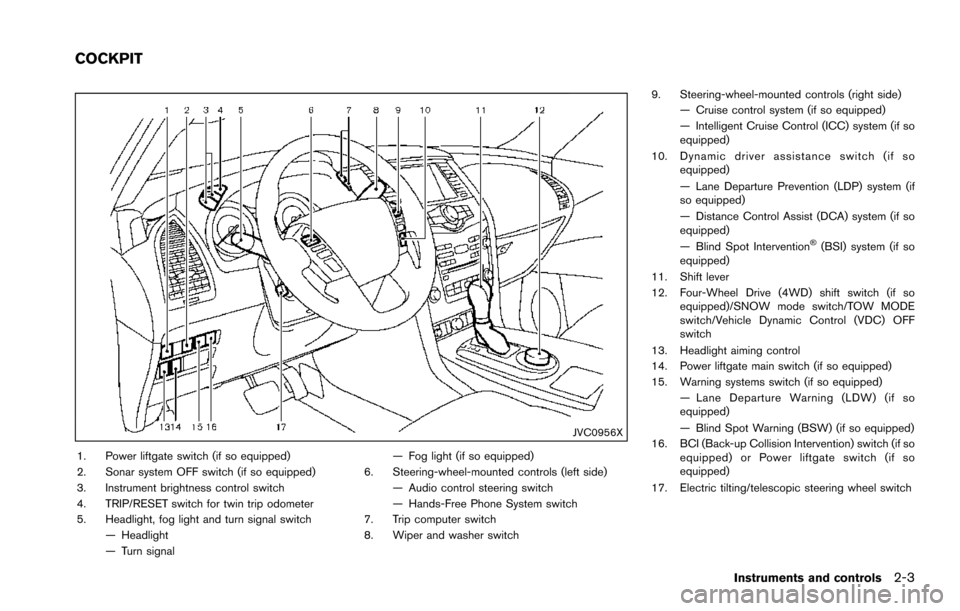
1. Power liftgate switch (if so equipped)
2. Sonar system OFF switch (if so equipped)
3. Instrument brightness control switch
4. TRIP/RESET switch for twin trip odometer
5. Headlight, fog light and turn signal switch— Headlight
— Turn signal — Fog light (if so equipped)
6. Steering-wheel-mounted controls (left side) — Audio control steering switch
— Hands-Free Phone System switch
7. Trip computer switch
8. Wiper and washer switch 9. Steering-wheel-mounted controls (right side)
— Cruise control system (if so equipped)
— Intelligent Cruise Control (ICC) system (if so
equipped)
10. Dynamic driver assistance switch (if so equipped)
— Lane Departure Prevention (LDP) system (if
so equipped)
— Distance Control Assist (DCA) system (if so
equipped)
— Blind Spot Intervention
Š(BSI) system (if so
equipped)
11. Shift lever
12. Four-Wheel Drive (4WD) shift switch (if so equipped)/SNOW mode switch/TOW MODE
switch/Vehicle Dynamic Control (VDC) OFF
switch
13. Headlight aiming control
14. Power liftgate main switch (if so equipped)
15. Warning systems switch (if so equipped) — Lane Departure Warning (LDW) (if so
equipped)
— Blind Spot Warning (BSW) (if so equipped)
16. BCI (Back-up Collision Intervention) switch (if so equipped) or Power liftgate switch (if so
equipped)
17. Electric tilting/telescopic steering wheel switch
Instruments and controls2-3
COCKPIT
Page 136 of 614
SSD0972
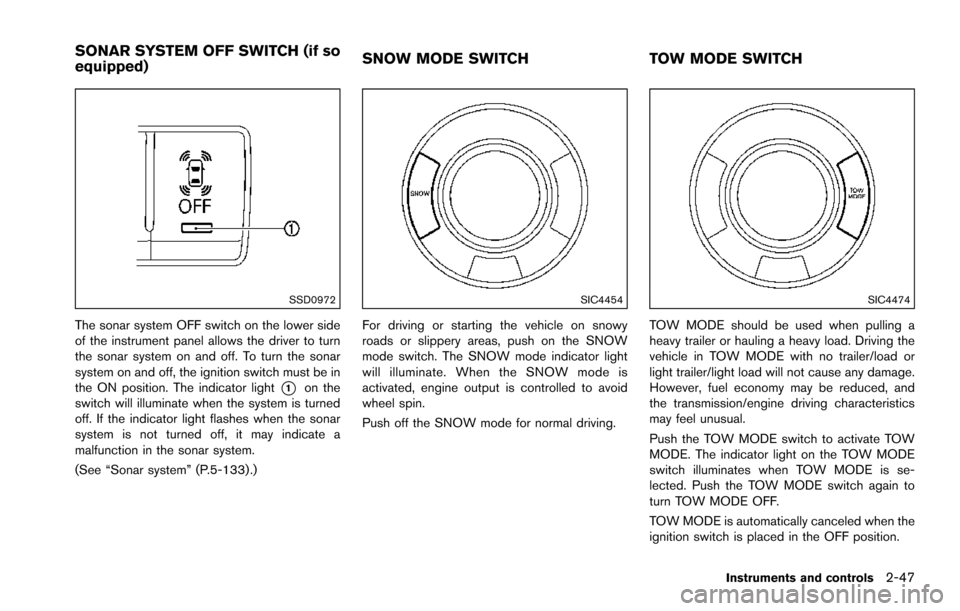
The sonar system OFF switch on the lower side
of the instrument panel allows the driver to turn
the sonar system on and off. To turn the sonar
system on and off, the ignition switch must be in
the ON position. The indicator light
*1on the
switch will illuminate when the system is turned
off. If the indicator light flashes when the sonar
system is not turned off, it may indicate a
malfunction in the sonar system.
(See “Sonar system” (P.5-133) .)
SIC4454
For driving or starting the vehicle on snowy
roads or slippery areas, push on the SNOW
mode switch. The SNOW mode indicator light
will illuminate. When the SNOW mode is
activated, engine output is controlled to avoid
wheel spin.
Push off the SNOW mode for normal driving.
SIC4474
TOW MODE should be used when pulling a
heavy trailer or hauling a heavy load. Driving the
vehicle in TOW MODE with no trailer/load or
light trailer/light load will not cause any damage.
However, fuel economy may be reduced, and
the transmission/engine driving characteristics
may feel unusual.
Push the TOW MODE switch to activate TOW
MODE. The indicator light on the TOW MODE
switch illuminates when TOW MODE is se-
lected. Push the TOW MODE switch again to
turn TOW MODE OFF.
TOW MODE is automatically canceled when the
ignition switch is placed in the OFF position.
Instruments and controls2-47
SONAR SYSTEM OFF SWITCH (if so
equipped) SNOW MODE SWITCH
TOW MODE SWITCH
Page 198 of 614

4 Monitor, heater, air conditioner, audio, phoneand voice recognition systems
Safety note ........................................................................\
.......... 4-3
Center multi-function control panel ...................................... 4-4
How to use multi-function controller .............................. 4-5
How to use touch screen ................................................. 4-5
Menu options ........................................................................\
4-7
How to select menus on the screen .............................. 4-8
Vehicle information and settings ........................................... 4-8 How to use STATUS button ............................................. 4-8
How to use brightness control and display
ON/OFF button ................................................................... 4-8
How to use CAMERA button (if so equipped) ........... 4-8
How to use DISP button (if so equipped) ................... 4-8
How to use INFO button .................................................. 4-9
How to use SETTING button ....................................... 4-13
RearView Monitor (if so equipped) ................................... 4-21 RearView Monitor system operation ........................... 4-22
How to read the displayed lines .................................. 4-22
How to park with predictive course lines .................. 4-23
Adjusting the screen ....................................................... 4-25
Predictive course line settings ...................................... 4-26
RearView Monitor system limitations .......................... 4-26
Sonar settings ................................................................... 4-27
Sonar indicator .................................................................. 4-27
System maintenance ....................................................... 4-28 Around ViewŠMonitor (if so equipped) .......................... 4-29
Around ViewŠMonitor system operation ................. 4-30
How to adjust the screen view ................................... 4-37
Around View
ŠMonitor settings .................................. 4-38
Around ViewŠMonitor system limitations ................ 4-38
System maintenance ..................................................... 4-41
Camera aiding sonar function (models with Around
View
ŠMonitor) ....................................................................... 4-42
Sonar system operation ............................................... 4-43
Turning on and off the sonar function ...................... 4-43
Sonar system limitations .............................................. 4-45
System temporarily unavailable .................................. 4-45
System maintenance ..................................................... 4-45
Moving Object Detection (MOD) ..................................... 4-46 MOD system operation ................................................ 4-47
Turning on and off the MOD system ........................ 4-48
MOD system limitations ............................................... 4-49
System maintenance ..................................................... 4-50
Ventilators ........................................................................\
........ 4-51
Center ventilators ........................................................... 4-51
Side ventilators ............................................................... 4-51
Rear ventilators ............................................................... 4-52
Heater and air conditioner .................................................. 4-52
Automatic air conditioner ............................................. 4-54
Operating tips ................................................................. 4-58
Page 216 of 614
SAA3007
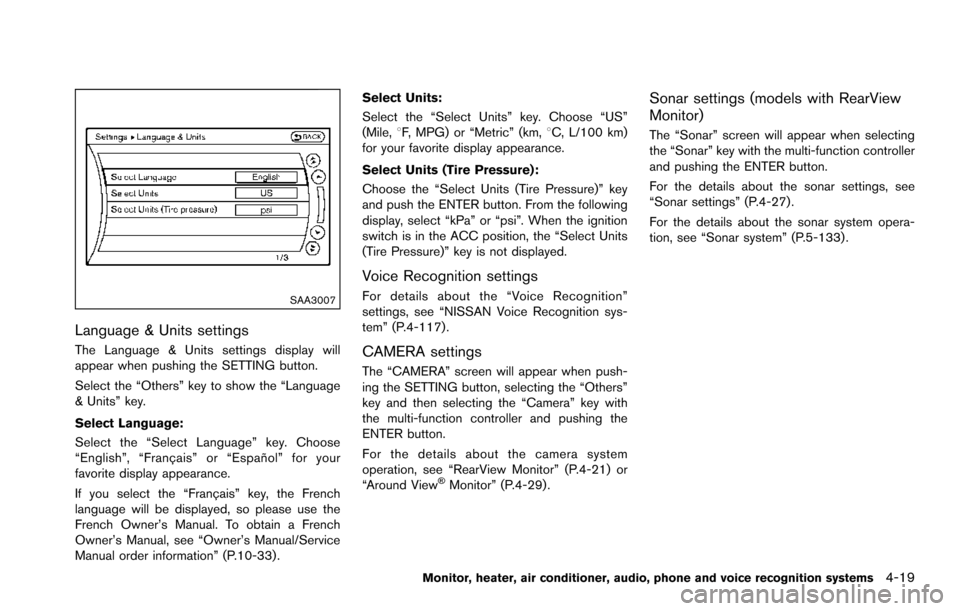
Language & Units settings
The Language & Units settings display will
appear when pushing the SETTING button.
Select the “Others” key to show the “Language
& Units” key.
Select Language:
Select the “Select Language” key. Choose
“English”, “Franc¸ ais” or “Espan˜
ol” for your
favorite display appearance.
If you select the “Franc¸ ais” key, the French
language will be displayed, so please use the
French Owner’s Manual. To obtain a French
Owner’s Manual, see “Owner’s Manual/Service
Manual order information” (P.10-33) . Select Units:
Select the “Select Units” key. Choose “US”
(Mile,
8F, MPG) or “Metric” (km, 8C, L/100 km)
for your favorite display appearance.
Select Units (Tire Pressure):
Choose the “Select Units (Tire Pressure)” key
and push the ENTER button. From the following
display, select “kPa” or “psi”. When the ignition
switch is in the ACC position, the “Select Units
(Tire Pressure)” key is not displayed.
Voice Recognition settings
For details about the “Voice Recognition”
settings, see “NISSAN Voice Recognition sys-
tem” (P.4-117).
CAMERA settings
The “CAMERA” screen will appear when push-
ing the SETTING button, selecting the “Others”
key and then selecting the “Camera” key with
the multi-function controller and pushing the
ENTER button.
For the details about the camera system
operation, see “RearView Monitor” (P.4-21) or
“Around View
ŠMonitor” (P.4-29).
Sonar settings (models with RearView
Monitor)
The “Sonar” screen will appear when selecting
the “Sonar” key with the multi-function controller
and pushing the ENTER button.
For the details about the sonar settings, see
“Sonar settings” (P.4-27).
For the details about the sonar system opera-
tion, see “Sonar system” (P.5-133) .
Monitor, heater, air conditioner, audio, phone and voice recognition systems4-19
Page 224 of 614
.When strong light is directly coming on the
camera, objects may not be displayed
clearly.
. Vertical lines may be seen in objects on the
screen. This is due to strong reflected light
from the bumper.
. The screen may flicker under fluorescent
light.
. The colors of objects on the RearView
Monitor may differ somewhat from the actual
color of objects.
. Objects on the monitor may not be clear in a
dark environment.
. There may be a delay when switching to the
RearView Monitor.
. If dirt, rain or snow accumulates on the
camera, the RearView Monitor may not
display object clearly. Clean the camera.
. Do not use wax on the camera window.
Wipe off any wax with a clean cloth
dampened with mild detergent diluted with
water.
JVH1497X
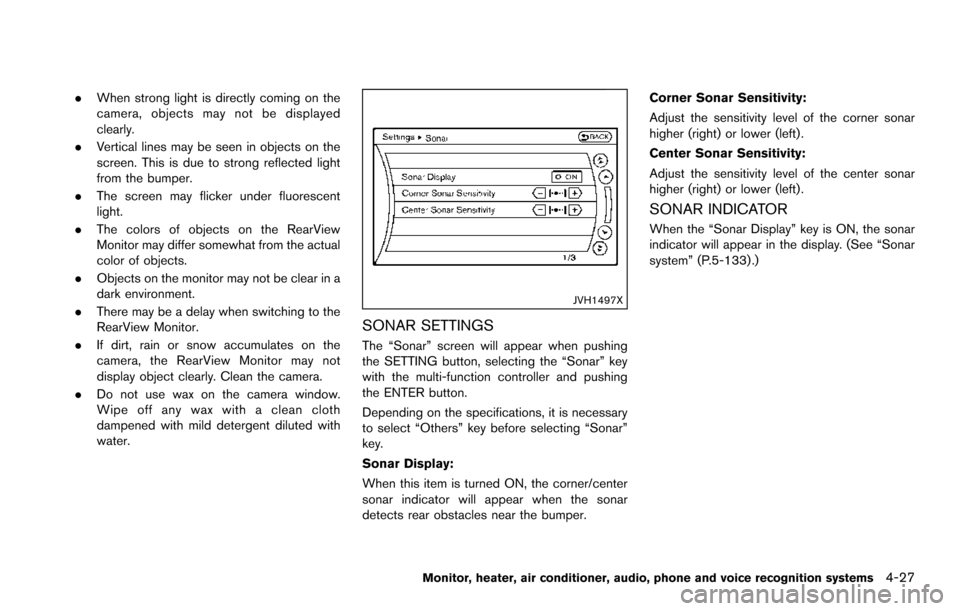
SONAR SETTINGS
The “Sonar” screen will appear when pushing
the SETTING button, selecting the “Sonar” key
with the multi-function controller and pushing
the ENTER button.
Depending on the specifications, it is necessary
to select “Others” key before selecting “Sonar”
key.
Sonar Display:
When this item is turned ON, the corner/center
sonar indicator will appear when the sonar
detects rear obstacles near the bumper. Corner Sonar Sensitivity:
Adjust the sensitivity level of the corner sonar
higher (right) or lower (left) .
Center Sonar Sensitivity:
Adjust the sensitivity level of the center sonar
higher (right) or lower (left) .
SONAR INDICATOR
When the “Sonar Display” key is ON, the sonar
indicator will appear in the display. (See “Sonar
system” (P.5-133) .)
Monitor, heater, air conditioner, audio, phone and voice recognition systems4-27
Page 235 of 614
4-38Monitor, heater, air conditioner, audio, phone and voice recognition systems
2. Select the “Display” key.
3. Select an item you wish to adjust.
4. Adjust the level of the setting item using themulti-function controller.
NOTE:
Do not adjust any of the display settings of
the Around View
ŠMonitor while the vehi-
cle is moving. Make sure the parking brake
is firmly applied.
JVH1303X
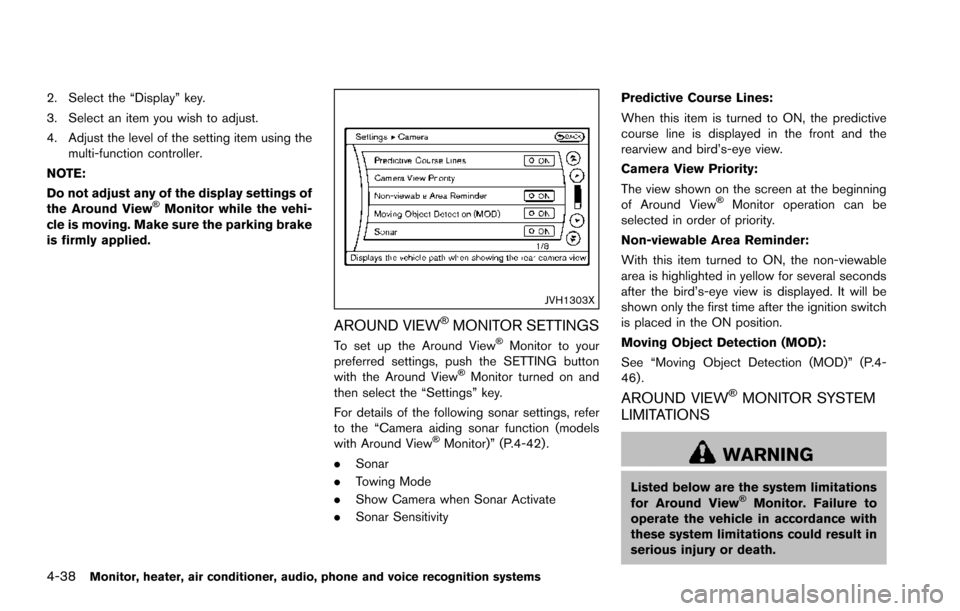
AROUND VIEWŠMONITOR SETTINGS
To set up the Around ViewŠMonitor to your
preferred settings, push the SETTING button
with the Around View
ŠMonitor turned on and
then select the “Settings” key.
For details of the following sonar settings, refer
to the “Camera aiding sonar function (models
with Around View
ŠMonitor)” (P.4-42) .
. Sonar
. Towing Mode
. Show Camera when Sonar Activate
. Sonar Sensitivity Predictive Course Lines:
When this item is turned to ON, the predictive
course line is displayed in the front and the
rearview and bird’s-eye view.
Camera View Priority:
The view shown on the screen at the beginning
of Around View
ŠMonitor operation can be
selected in order of priority.
Non-viewable Area Reminder:
With this item turned to ON, the non-viewable
area is highlighted in yellow for several seconds
after the bird’s-eye view is displayed. It will be
shown only the first time after the ignition switch
is placed in the ON position.
Moving Object Detection (MOD):
See “Moving Object Detection (MOD)” (P.4-
46) .
AROUND VIEWŠMONITOR SYSTEM
LIMITATIONS
WARNING
Listed below are the system limitations
for Around ViewŠMonitor. Failure to
operate the vehicle in accordance with
these system limitations could result in
serious injury or death.