Sonar NISSAN ARMADA 2017 2.G Owner's Manual
[x] Cancel search | Manufacturer: NISSAN, Model Year: 2017, Model line: ARMADA, Model: NISSAN ARMADA 2017 2.GPages: 614, PDF Size: 2.87 MB
Page 401 of 614
5-60Starting and driving
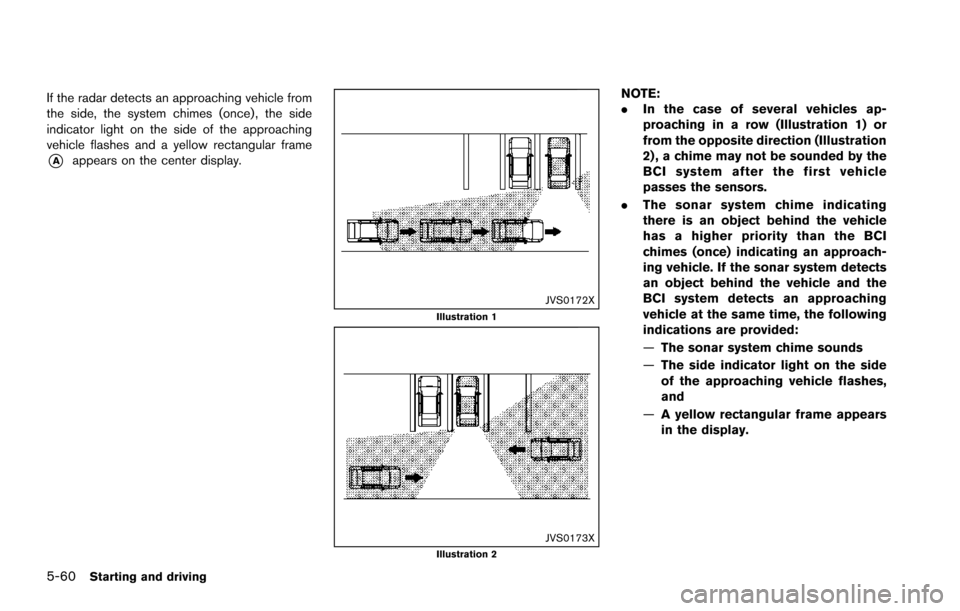
If the radar detects an approaching vehicle from
the side, the system chimes (once) , the side
indicator light on the side of the approaching
vehicle flashes and a yellow rectangular frame
*Aappears on the center display.
JVS0172XIllustration 1
JVS0173XIllustration 2
NOTE:
.In the case of several vehicles ap-
proaching in a row (Illustration 1) or
from the opposite direction (Illustration
2) , a chime may not be sounded by the
BCI system after the first vehicle
passes the sensors.
. The sonar system chime indicating
there is an object behind the vehicle
has a higher priority than the BCI
chimes (once) indicating an approach-
ing vehicle. If the sonar system detects
an object behind the vehicle and the
BCI system detects an approaching
vehicle at the same time, the following
indications are provided:
—The sonar system chime sounds
— The side indicator light on the side
of the approaching vehicle flashes,
and
— A yellow rectangular frame appears
in the display.
Page 406 of 614
.The following conditions may re-
duce the ability of the radar sensors
to detect other vehicles:
— Severe weather
— Road spray
— Ice/frost/dirt build up on the
vehicle
. Do not attach stickers (including
transparent material) , install acces-
sories or apply additional paint near
the radar sensors. These conditions
may reduce the ability of the radar
sensors to detect other vehicles.
. The sonar sensors detect stationary
objects behind the vehicle. The
sonar sensor may not detect:
— Small or moving objects
— Wedge-shaped objects
— Object close to the bumper (less
than approximately 1 ft (30 cm))
— Thin objects such as rope, wire and chain, etc.
. The brake engagement by the BCI
system is not as effective on a slope
as it is on flat ground. When on a
steep slope the system may not function properly.
. Do not use the BCI system under the
following conditions because the
system may not function properly.
— When driving with a tire that is
not within normal tire conditions
(for example, tire wear, low tire
pressure, installation of spare
tire, tire chains, non-standard
wheels) .
— When the vehicle is equipped with non-original brake parts or
suspension parts.
— When towing a trailer or other vehicle.
. Excessive noise (for example, audio
system volume, open vehicle win-
dow) will interfere with the chime
sound, and it may not be heard.
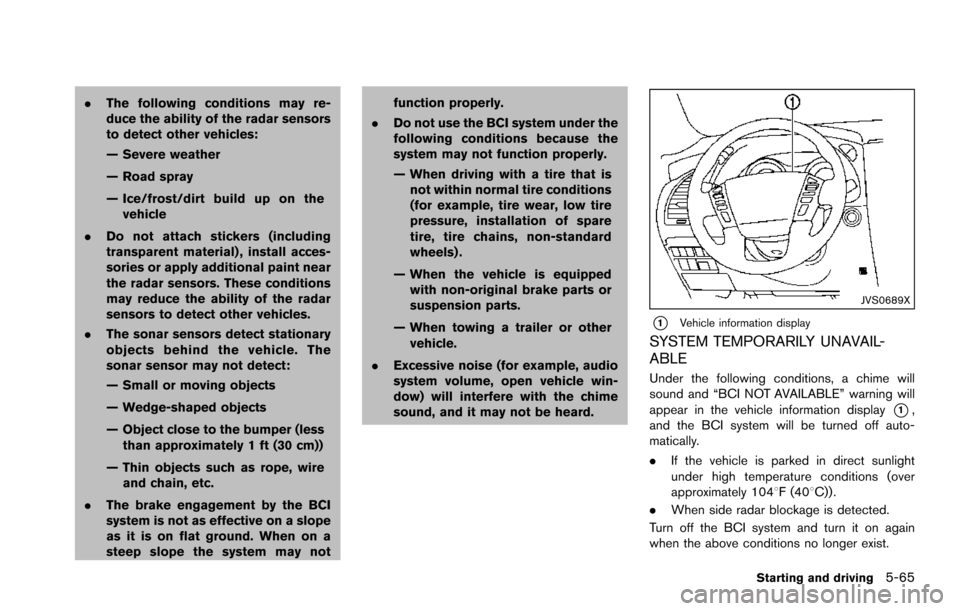
JVS0689X
*1Vehicle information display
SYSTEM TEMPORARILY UNAVAIL-
ABLE
Under the following conditions, a chime will
sound and “BCI NOT AVAILABLE” warning will
appear in the vehicle information display
*1,
and the BCI system will be turned off auto-
matically.
. If the vehicle is parked in direct sunlight
under high temperature conditions (over
approximately 1048F (408C)) .
. When side radar blockage is detected.
Turn off the BCI system and turn it on again
when the above conditions no longer exist.
Starting and driving5-65
Page 474 of 614
SSD0622
WARNING
.The sonar system is a convenience
but it is not a substitute for proper
parking. Always look around and
check that it is safe to do so before
parking. Always move slowly.
. Read and understand the limita-
tions of the sonar system as con-
tained in this section. Inclement
weather may affect the function of
the sonar system; this may include
reduced performance or a false
activation. .
This system is not designed to
prevent contact with small or mov-
ing objects.
. The system is designed as an aid to
the driver in detecting large station-
ary objects to help avoid damaging
the vehicle. The system will not
detect small objects below the
bumper, and may not detect objects
that are too close to the bumper or
on the ground.
. If your vehicle sustains damage to
the bumper fascia, leaving it mis-
aligned or bent, the sensing zone may be altered causing inaccurate
measurement of obstacles or false
alarms.
CAUTION
Keep the interior of the vehicle as quiet
as possible to hear the tone clearly.
The sonar system sounds a tone to warn the
driver of obstacles near the bumper. When the
“Sonar Display” key is ON, the sonar indicator
will also appear in the center display. (See
“Sonar indicator” (P.5-134) .) The system de-
tects front obstacles when the shift lever is in the
D (Drive) position or N (Neutral) position. The
system detects both front and rear obstacles
when the shift lever is in the R (Reverse)
position.
The system may not detect objects at speeds
above 6 MPH (10 km/h) and may not detect
certain angular or moving objects.
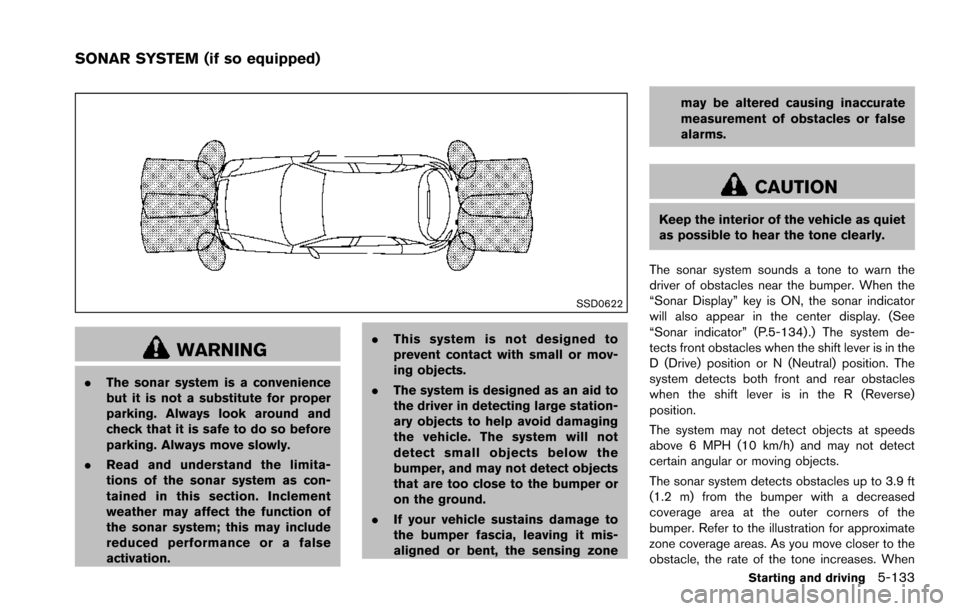
The sonar system detects obstacles up to 3.9 ft
(1.2 m) from the bumper with a decreased
coverage area at the outer corners of the
bumper. Refer to the illustration for approximate
zone coverage areas. As you move closer to the
obstacle, the rate of the tone increases. When
Starting and driving5-133
SONAR SYSTEM (if so equipped)
Page 475 of 614
5-134Starting and driving
the obstacle is less than 11.8 in (30 cm) away,
the tone will sound continuously.
Keep the corner/center sensors (located on the
bumper fascia) free from snow, ice and large
accumulations of dirt (do not clean the sensors
with sharp objects) . If the sensors are covered, it
will affect the accuracy of the sonar system.
The sensitivity level of the corner/center sensors
can be adjusted (higher or lower) in the Sonar
setting display. (See “Sonar settings” (P.4-27) .)
The intermittent tone will stop in 3 seconds
when an obstacle is detected by only the corner
sensor and the distance does not change.
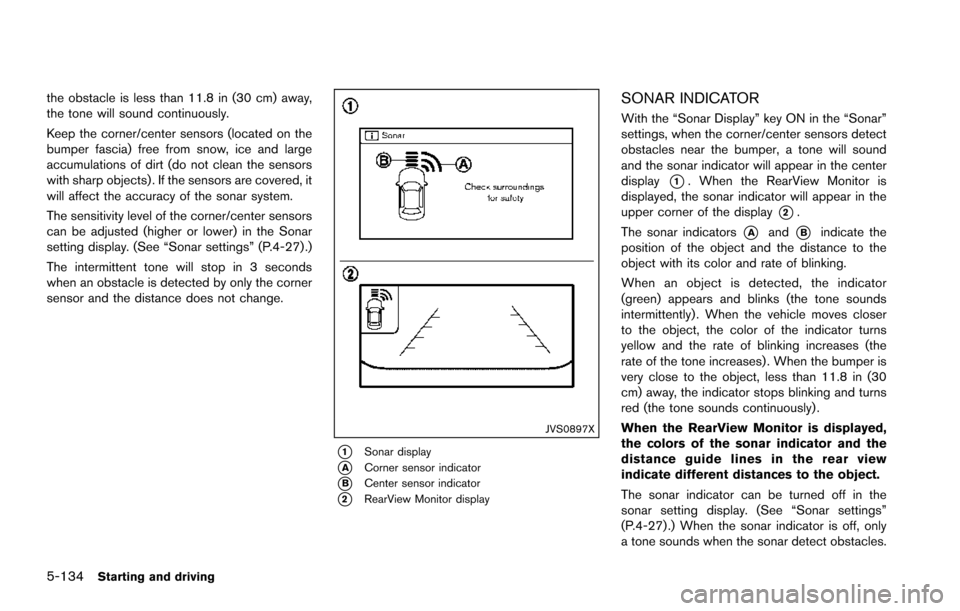
JVS0897X
*1Sonar display
*ACorner sensor indicator
*BCenter sensor indicator
*2RearView Monitor display
SONAR INDICATOR
With the “Sonar Display” key ON in the “Sonar”
settings, when the corner/center sensors detect
obstacles near the bumper, a tone will sound
and the sonar indicator will appear in the center
display
*1. When the RearView Monitor is
displayed, the sonar indicator will appear in the
upper corner of the display
*2.
The sonar indicators
*Aand*Bindicate the
position of the object and the distance to the
object with its color and rate of blinking.
When an object is detected, the indicator
(green) appears and blinks (the tone sounds
intermittently) . When the vehicle moves closer
to the object, the color of the indicator turns
yellow and the rate of blinking increases (the
rate of the tone increases) . When the bumper is
very close to the object, less than 11.8 in (30
cm) away, the indicator stops blinking and turns
red (the tone sounds continuously) .
When the RearView Monitor is displayed,
the colors of the sonar indicator and the
distance guide lines in the rear view
indicate different distances to the object.
The sonar indicator can be turned off in the
sonar setting display. (See “Sonar settings”
(P.4-27) .) When the sonar indicator is off, only
a tone sounds when the sonar detect obstacles.
Page 476 of 614
SSD0972
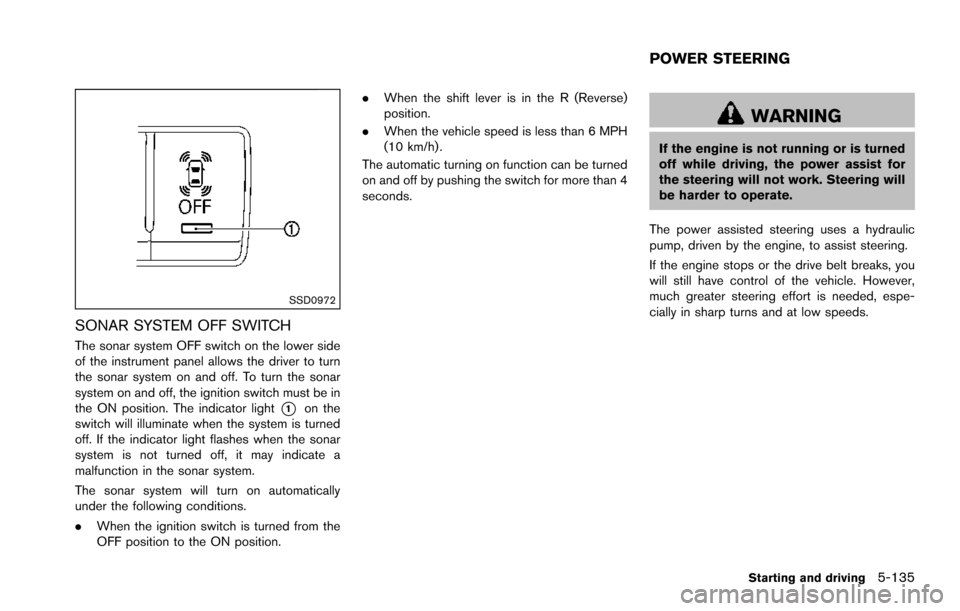
SONAR SYSTEM OFF SWITCH
The sonar system OFF switch on the lower side
of the instrument panel allows the driver to turn
the sonar system on and off. To turn the sonar
system on and off, the ignition switch must be in
the ON position. The indicator light
*1on the
switch will illuminate when the system is turned
off. If the indicator light flashes when the sonar
system is not turned off, it may indicate a
malfunction in the sonar system.
The sonar system will turn on automatically
under the following conditions.
. When the ignition switch is turned from the
OFF position to the ON position. .
When the shift lever is in the R (Reverse)
position.
. When the vehicle speed is less than 6 MPH
(10 km/h) .
The automatic turning on function can be turned
on and off by pushing the switch for more than 4
seconds.
WARNING
If the engine is not running or is turned
off while driving, the power assist for
the steering will not work. Steering will
be harder to operate.
The power assisted steering uses a hydraulic
pump, driven by the engine, to assist steering.
If the engine stops or the drive belt breaks, you
will still have control of the vehicle. However,
much greater steering effort is needed, espe-
cially in sharp turns and at low speeds.
Starting and driving5-135
POWER STEERING
Page 610 of 614
Parking brake operation ..................................... 5-22
Parking on hills ................................................... 5-131
Phone Bluetooth
ŠHands-Free Phone System ....... 4-106
Car phone or CB radio .................................... 4-106
Pocket ........................................................................... 2-55
Power Front seat adjustment ............................................ 1-3
Moonroof ............................................................... 2-62
Power door lock ..................................................... 3-4
Power outlet .......................................................... 2-48
Power steering ................................................... 5-135
Power steering fluid ............................................... 8-8
Power windows .................................................... 2-59
Precautions Audio operation .................................................... 4-59
Braking precautions .......................................... 5-136
Child restraints ..................................................... 1-31
Cruise control ....................................................... 5-67
Driving safety ........................................................ 5-10
Maintenance ............................................................. 8-2
On-pavement and off-road driving ..................... 5-9
Seat belt usage .................................................... 1-18
Supplemental restraint system ......................... 1-52
When starting and driving .................................... 5-4
Predictive Forward Collision
Warning (PFCW) .................................................... 5-112
Push starting ................................................................ 6-14
Push-button ignition switch ..................................... 5-12
R
Radio ............................................................................. 4-59 Car phone or CB radio .................................... 4-106
FM-AM-SAT radio with Compact Disc
(CD) player ............................................................ 4-70
Rain-sensing auto wiper system ............................ 2-34 Rapid air pressure loss ............................................... 5-9
Readiness for Inspection/Maintenance
(I/M) test .................................................................... 10-32
Rear bumper cover .................................................... 2-58
Rear door lock, Child safety rear door lock .......... 3-6
Rear personal lights ................................................... 2-65
Rear window wiper and washer switch ............... 2-35
Rear window wiper blades ...................................... 8-17
RearView Monitor ....................................................... 4-21
RearView Monitor system operation ...................... 4-22
Recorders, Event data ............................................ 10-33
Registering your vehicle in another country ..... 10-10
Remote controller (DVD) ....................................... 4-103
Remote engine start .................................................. 3-19
Remote keyless entry system .................................. 3-15
Reporting safety defects ....................................... 10-31
Roadside assistance program ................................... 6-2
Rollover ........................................................................... 5-8
Roof
Moonroof ............................................................... 2-63
Roof rack ............................................................... 2-57
S
SafetyChild seat belts .................................................... 1-28
Towing safety ...................................................... 10-21
Satellite radio operation ............................................ 4-71
Seat adjustment Front power seat adjustment .............................. 1-3
Front seats ................................................... 1-3, 1-10
Seat belt(s) Child safety ........................................................... 1-28
Infants ..................................................................... 1-29
Injured persons .................................................... 1-21
Larger children ..................................................... 1-29
Precautions on seat belt usage ....................... 1-18 Pregnant women .................................................. 1-21
Seat belt cleaning .................................................. 7-6
Seat belt extenders ............................................. 1-27
Seat belt maintenance ....................................... 1-27
Seat belt warning light and chime .................. 2-16
Seat belts .............................................................. 1-18
Seat belts with pretensioners .......................... 1-67
Small children ....................................................... 1-29
Three-point type .................................................. 1-21
Seat(s) Climate controlled seats .................................... 2-45
Driver-side memory ............................................. 3-33
Heated seats ........................................................ 2-43
Seats .......................................................................... 1-2
Security system (NISSAN Vehicle Immobilizer
System) , Engine start ................................................ 2-31
Security system, Vehicle security system ............. 2-30
Servicing air conditioner ........................................... 4-58
SETTING button ......................................................... 4-13
Setting memory function, Automatic
drive positioner ............................................................ 3-35
Shift lever, Shift lock release ................................... 5-21
Shift lock release Transmission ......................................................... 5-21
Shifting, Automatic transmission ............................ 5-18
SNOW mode ........................................................... 5-132
SNOW mode switch ................................................. 2-47
Sonar system ............................................................ 5-133
Spare tire .......................................................... 8-40, 10-9
Spark plugs .................................................................. 8-14
Speedometer ................................................................. 2-6
Standard maintenance ................................................ 9-7
Starting Before starting the engine ................................ 5-15
Jump starting ........................................................ 6-12
Precautions when starting and driving ............. 5-4
Push starting ......................................................... 6-14
11-5