sensor NISSAN ARMADA 2017 2.G Owner's Manual
[x] Cancel search | Manufacturer: NISSAN, Model Year: 2017, Model line: ARMADA, Model: NISSAN ARMADA 2017 2.GPages: 614, PDF Size: 2.87 MB
Page 242 of 614
the ignition switch is placed in the ON position,
“Sonar is OFF” is displayed briefly.
Towing Mode:
When this item is turned ON, only the rear sonar
is OFF. The amber markers are displayed at the
rear corners of the vehicle icon.
Show Camera when Sonar Activate:
When this item is turned ON, the camera view is
automatically shown on the display in the case
that the distance to the objects measured by the
sonar is becoming short.
Sonar Sensitivity:
Adjust the sensitivity level of the sensor higher
(right) or lower (left) .
SONAR SYSTEM LIMITATIONS
WARNING
Listed below are the system limitations
for the sonar function. Failure to oper-
ate the vehicle in accordance with these
system limitations could result in ser-
ious injury or death.
.Inclement weather or ultrasonic
sources such as an automatic car
wash, a truck’ s compressed-air
brakes or a pneumatic drill may affect the function of the system,
including reduced performance or a
false activation.
. This function is designed as an aid
to the driver in detecting large
stationary objects to help avoid
damaging the vehicle.
. The system is not designed to pre-
vent contact with small or moving
objects.
. The system will not detect small
objects below the bumper, and may
not detect objects close to the
bumper or on the ground.
. The system may not detect the
following objects:
— Fluffy objects such as snow,
cloth, cotton, grass or wool.
— Thin objects such as rope, wire or chain.
— Wedge-shaped objects.
. If your vehicle sustains damage to
the bumper fascia, leaving it mis-
aligned or bent, the sensing zone
may be altered causing inaccurate
measurement of objects or false
alarms.
CAUTION
Excessive noise (such as audio system
volume or an open vehicle window) will
interfere with the tone and it may not be
heard.
SYSTEM TEMPORARILY UNAVAIL-
ABLE
When the amber markers are displayed at the
corners of the vehicle icon and the function
cannot be activated from the Camera setting
menu (the setting items are grayed out) , the
sonar system may be malfunctioning.
SYSTEM MAINTENANCE
CAUTION
Keep the surface of the sonar sensors
(located on the front and rear bumper
fascia) free from accumulations of
snow, ice and dirt. Do not scratch the
surface of the sonar sensors when
cleaning. If the sensors are covered,
the accuracy of the sonar function will
be diminished.
Monitor, heater, air conditioner, audio, phone and voice recognition systems4-45
Page 255 of 614
4-58Monitor, heater, air conditioner, audio, phone and voice recognition systems
SAA3088
SAA3058
OPERATING TIPS
When the engine coolant temperature and
outside air temperature are low, the air flow
from the foot outlets may not operate. However,
this is not a malfunction. After the coolant
temperature warms up, the air flow from the
foot outlets will operate normally.
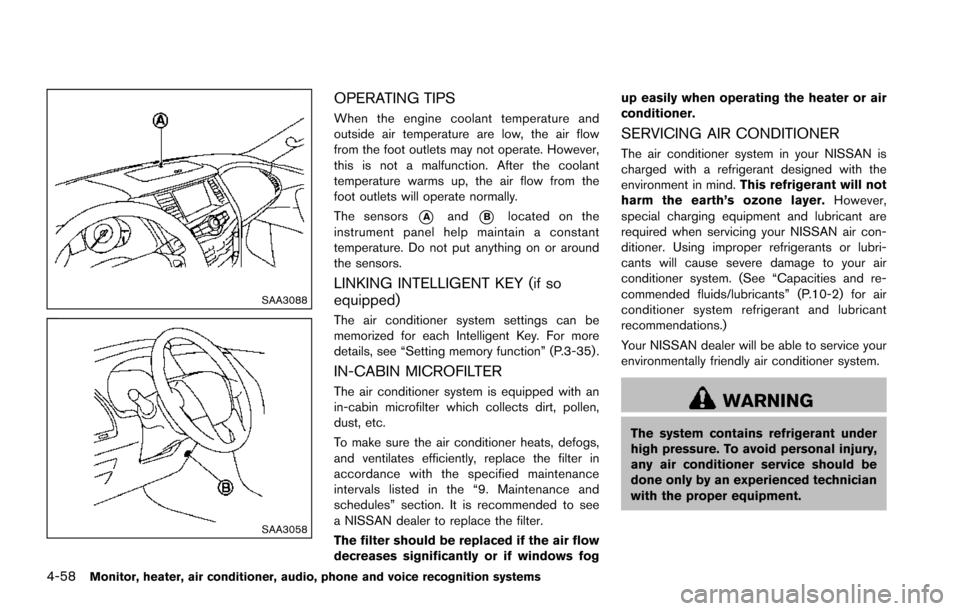
The sensors
*Aand*Blocated on the
instrument panel help maintain a constant
temperature. Do not put anything on or around
the sensors.
LINKING INTELLIGENT KEY (if so
equipped)
The air conditioner system settings can be
memorized for each Intelligent Key. For more
details, see “Setting memory function” (P.3-35) .
IN-CABIN MICROFILTER
The air conditioner system is equipped with an
in-cabin microfilter which collects dirt, pollen,
dust, etc.
To make sure the air conditioner heats, defogs,
and ventilates efficiently, replace the filter in
accordance with the specified maintenance
intervals listed in the “9. Maintenance and
schedules” section. It is recommended to see
a NISSAN dealer to replace the filter.
The filter should be replaced if the air flow
decreases significantly or if windows fog up easily when operating the heater or air
conditioner.
SERVICING AIR CONDITIONER
The air conditioner system in your NISSAN is
charged with a refrigerant designed with the
environment in mind.
This refrigerant will not
harm the earth’s ozone layer. However,
special charging equipment and lubricant are
required when servicing your NISSAN air con-
ditioner. Using improper refrigerants or lubri-
cants will cause severe damage to your air
conditioner system. (See “Capacities and re-
commended fluids/lubricants” (P.10-2) for air
conditioner system refrigerant and lubricant
recommendations.)
Your NISSAN dealer will be able to service your
environmentally friendly air conditioner system.
WARNING
The system contains refrigerant under
high pressure. To avoid personal injury,
any air conditioner service should be
done only by an experienced technician
with the proper equipment.
Page 348 of 614
and all tires are properly inflated, it
is recommended you consult a
NISSAN dealer.
. Since the spare tire is not equipped
with the TPMS, when a spare tire is
mounted or a wheel is replaced, the
TPMS will not function and the low
tire pressure warning light will flash
for approximately 1 minute. The
light will remain on after 1 minute.
Have your tires replaced and/or
TPMS system reset as soon as
possible. It is recommended you
visit a NISSAN dealer for these
services.
. Replacing tires with those not ori-
ginally specified by NISSAN could
affect the proper operation of the
TPMS.
. Do not inject any tire liquid or
aerosol tire sealant into the tires,
as this may cause a malfunction of
the tire pressure sensors.CAUTION
.The TPMS may not function properly
when the wheels are equipped with
tire chains or the wheels are buried
in snow.
. Do not place metalized film or any
metal parts (antenna, etc.) on the
windows. This may cause poor re-
ception of the signals from the tire
pressure sensors, and the TPMS will
not function properly.
Some devices and transmitters may temporarily
interfere with the operation of the TPMS and
cause the low tire pressure warning light to
illuminate. Some examples are:
. Facilities or electric devices using similar
radio frequencies are near the vehicle.
. If a transmitter set to similar frequencies is
being used in or near the vehicle.
. If a computer (or similar equipment) or a DC/
AC converter is being used in or near the
vehicle.
Low tire pressure warning light may illuminate in
the following cases.
. If the vehicle is equipped with a wheel and
tire without TPMS. .
If the TPMS has been replaced and the ID
has not been registered.
. If the wheel is not originally specified by
NISSAN.
FCC Notice:
For USA:
This device complies with Part 15 of the
FCC Rules. Operation is subject to the
following two conditions: (1) This device
may not cause harmful interference, and
(2) this device must accept any interfer-
ence received, including interference that
may cause undesired operation.
Note: Changes or modifications not ex-
pressly approved by the party responsible
for compliance could void the user’s
authority to operate the equipment.
For Canada:
This device complies with Industry Canada
licence-exempt RSS standard(s) . Opera-
tion is subject to the following two condi-
tions: (1) this device may not cause
interference, and (2) this device must
accept any interference, including interfer-
ence that may cause undesired operation
of the device.
Starting and driving5-7
Page 374 of 614
detecting the lane markers.
. Do not strike or damage the areas around
the camera unit. Do not touch the camera
lens or remove the screw located on the
camera unit. It is recommended you contact
a NISSAN dealer if the camera unit is
damaged due to an accident.
WARNING
Failure to follow the warnings and
instructions for proper use of the BSW
system could result in serious injury or
death.
. The BSW system is not a replace-
ment for proper driving procedure
and is not designed to prevent
contact with vehicles or objects.
When changing lanes, always use
the side and rear mirrors and turn
and look in the direction your vehi-
cle will move to ensure it is safe to
change lanes. Never rely solely on
the BSW system.
. There is a limitation to the detection
capability of the radar. Not every
moving object or vehicle will be
detected. Using the BSW system
under some road, ground, lane mar-
ker, traffic or weather conditions
could lead to improper system op-
eration. Always rely on your own
operation to avoid accidents.
The BSW system helps alert the driver of other
vehicles in adjacent lanes when changing lanes.
JVS0908X
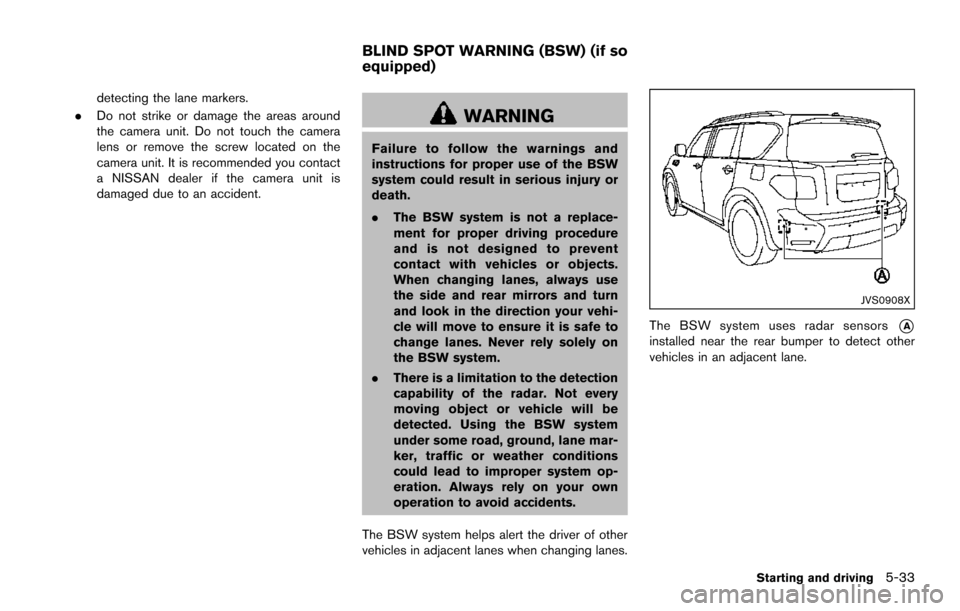
The BSW system uses radar sensors*Ainstalled near the rear bumper to detect other
vehicles in an adjacent lane.
Starting and driving5-33
BLIND SPOT WARNING (BSW) (if so
equipped)
Page 375 of 614
5-34Starting and driving
SSD1030Detection zone
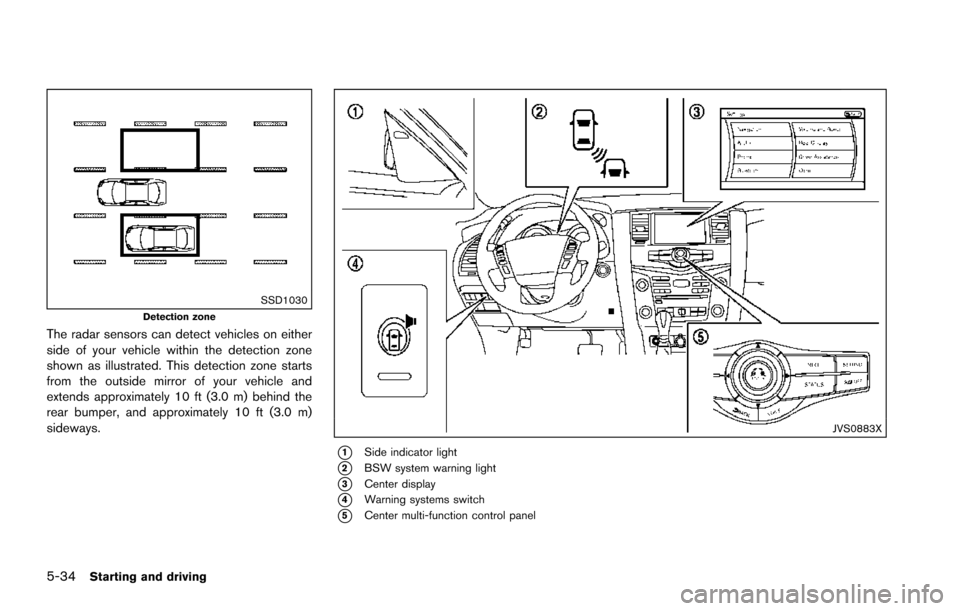
The radar sensors can detect vehicles on either
side of your vehicle within the detection zone
shown as illustrated. This detection zone starts
from the outside mirror of your vehicle and
extends approximately 10 ft (3.0 m) behind the
rear bumper, and approximately 10 ft (3.0 m)
sideways.
JVS0883X
*1Side indicator light
*2BSW system warning light
*3Center display
*4Warning systems switch
*5Center multi-function control panel
Page 376 of 614
BSW SYSTEM OPERATION
The BSW system operates above approximately
20 MPH (32 km/h) .
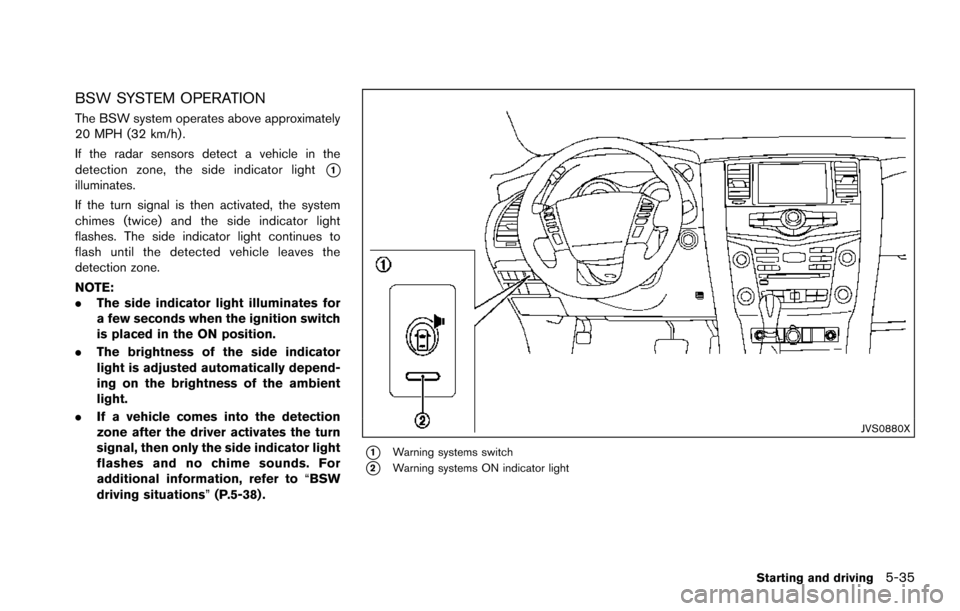
If the radar sensors detect a vehicle in the
detection zone, the side indicator light
*1illuminates.
If the turn signal is then activated, the system
chimes (twice) and the side indicator light
flashes. The side indicator light continues to
flash until the detected vehicle leaves the
detection zone.
NOTE:
.The side indicator light illuminates for
a few seconds when the ignition switch
is placed in the ON position.
. The brightness of the side indicator
light is adjusted automatically depend-
ing on the brightness of the ambient
light.
. If a vehicle comes into the detection
zone after the driver activates the turn
signal, then only the side indicator light
flashes and no chime sounds. For
additional information, refer to “BSW
driving situations” (P.5-38) .
JVS0880X
*1Warning systems switch
*2Warning systems ON indicator light
Starting and driving5-35
Page 378 of 614
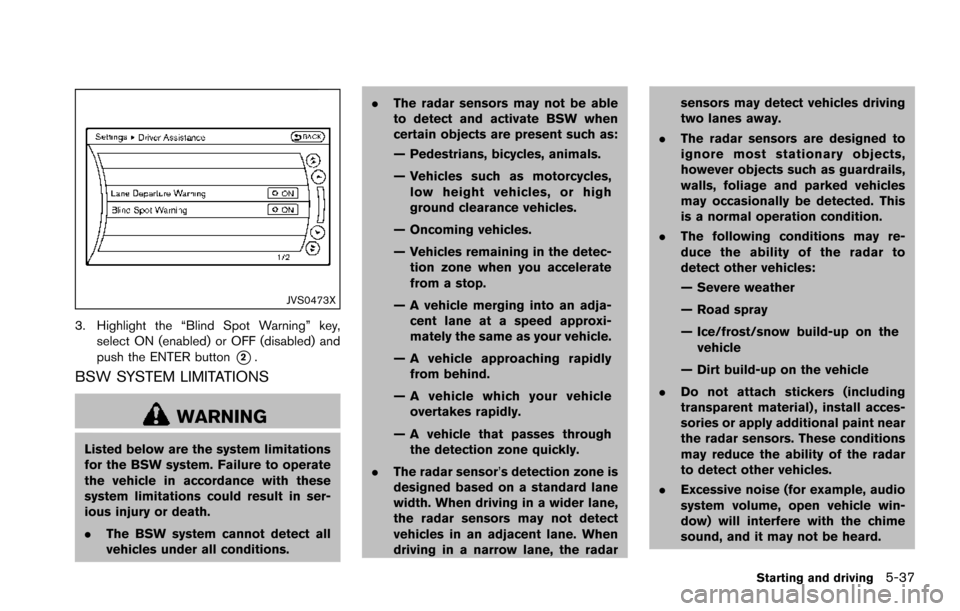
JVS0473X
3. Highlight the “Blind Spot Warning” key,select ON (enabled) or OFF (disabled) and
push the ENTER button
*2.
BSW SYSTEM LIMITATIONS
WARNING
Listed below are the system limitations
for the BSW system. Failure to operate
the vehicle in accordance with these
system limitations could result in ser-
ious injury or death.
.The BSW system cannot detect all
vehicles under all conditions. .
The radar sensors may not be able
to detect and activate BSW when
certain objects are present such as:
— Pedestrians, bicycles, animals.
— Vehicles such as motorcycles,
low height vehicles, or high
ground clearance vehicles.
— Oncoming vehicles.
— Vehicles remaining in the detec- tion zone when you accelerate
from a stop.
— A vehicle merging into an adja- cent lane at a speed approxi-
mately the same as your vehicle.
— A vehicle approaching rapidly from behind.
— A vehicle which your vehicle overtakes rapidly.
— A vehicle that passes through the detection zone quickly.
. The radar sensor’s detection zone is
designed based on a standard lane
width. When driving in a wider lane,
the radar sensors may not detect
vehicles in an adjacent lane. When
driving in a narrow lane, the radar sensors may detect vehicles driving
two lanes away.
. The radar sensors are designed to
ignore most stationary objects,
however objects such as guardrails,
walls, foliage and parked vehicles
may occasionally be detected. This
is a normal operation condition.
. The following conditions may re-
duce the ability of the radar to
detect other vehicles:
— Severe weather
— Road spray
— Ice/frost/snow build-up on the
vehicle
— Dirt build-up on the vehicle
. Do not attach stickers (including
transparent material) , install acces-
sories or apply additional paint near
the radar sensors. These conditions
may reduce the ability of the radar
to detect other vehicles.
. Excessive noise (for example, audio
system volume, open vehicle win-
dow) will interfere with the chime
sound, and it may not be heard.
Starting and driving5-37
Page 379 of 614
5-38Starting and driving
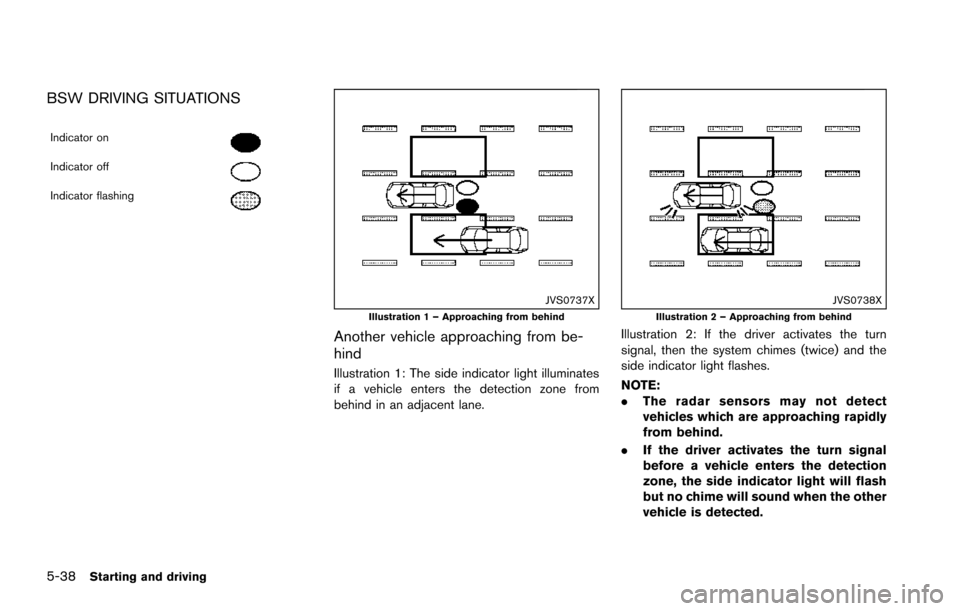
BSW DRIVING SITUATIONS
Indicator on
Indicator off
Indicator flashing
JVS0737XIllustration 1 – Approaching from behind
Another vehicle approaching from be-
hind
Illustration 1: The side indicator light illuminates
if a vehicle enters the detection zone from
behind in an adjacent lane.
JVS0738XIllustration 2 – Approaching from behind
Illustration 2: If the driver activates the turn
signal, then the system chimes (twice) and the
side indicator light flashes.
NOTE:
.The radar sensors may not detect
vehicles which are approaching rapidly
from behind.
. If the driver activates the turn signal
before a vehicle enters the detection
zone, the side indicator light will flash
but no chime will sound when the other
vehicle is detected.
Page 380 of 614
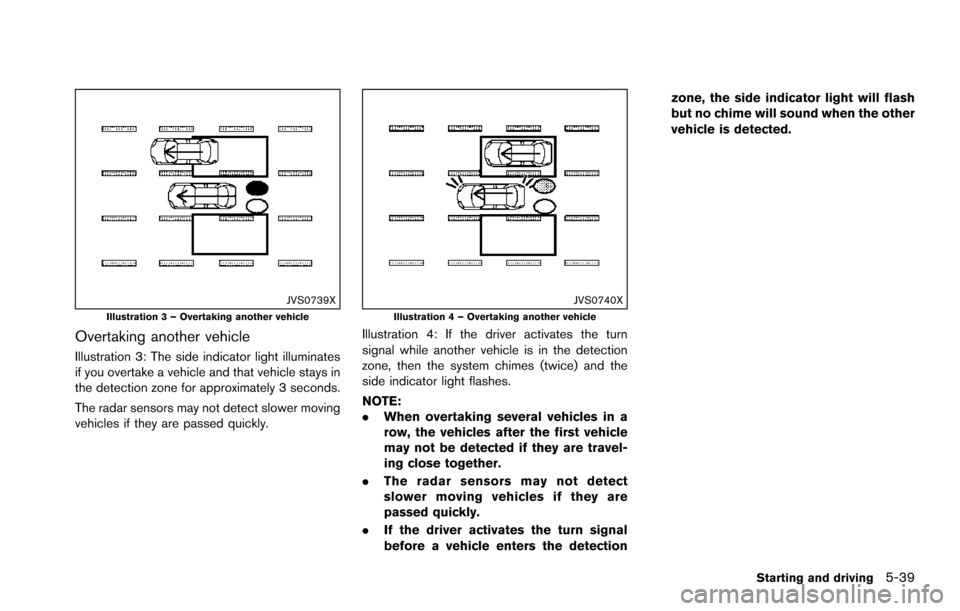
JVS0739XIllustration 3 – Overtaking another vehicle
Overtaking another vehicle
Illustration 3: The side indicator light illuminates
if you overtake a vehicle and that vehicle stays in
the detection zone for approximately 3 seconds.
The radar sensors may not detect slower moving
vehicles if they are passed quickly.
JVS0740XIllustration 4 – Overtaking another vehicle
Illustration 4: If the driver activates the turn
signal while another vehicle is in the detection
zone, then the system chimes (twice) and the
side indicator light flashes.
NOTE:
.When overtaking several vehicles in a
row, the vehicles after the first vehicle
may not be detected if they are travel-
ing close together.
. The radar sensors may not detect
slower moving vehicles if they are
passed quickly.
. If the driver activates the turn signal
before a vehicle enters the detection zone, the side indicator light will flash
but no chime will sound when the other
vehicle is detected.
Starting and driving5-39
Page 381 of 614
5-40Starting and driving
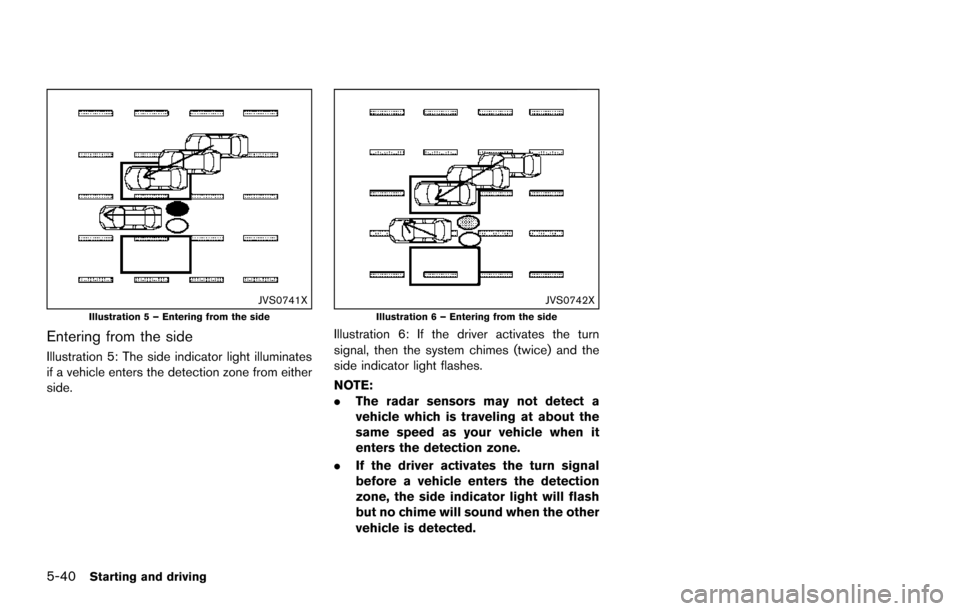
JVS0741XIllustration 5 – Entering from the side
Entering from the side
Illustration 5: The side indicator light illuminates
if a vehicle enters the detection zone from either
side.
JVS0742XIllustration 6 – Entering from the side
Illustration 6: If the driver activates the turn
signal, then the system chimes (twice) and the
side indicator light flashes.
NOTE:
.The radar sensors may not detect a
vehicle which is traveling at about the
same speed as your vehicle when it
enters the detection zone.
. If the driver activates the turn signal
before a vehicle enters the detection
zone, the side indicator light will flash
but no chime will sound when the other
vehicle is detected.