Passenger NISSAN ARMADA 2017 2.G Workshop Manual
[x] Cancel search | Manufacturer: NISSAN, Model Year: 2017, Model line: ARMADA, Model: NISSAN ARMADA 2017 2.GPages: 614, PDF Size: 2.87 MB
Page 166 of 614
OPENING AND CLOSING WINDOWS
WITH THE MECHANICAL KEY
The driver’s door key operation also allows you
to open and close all door windows.
To open the windows, turn the driver’s door key
cylinder to the rear of the vehicle forlonger
than 1 second. The door is unlocked and the
window keeps opening while turning the key.
This function can also be performed by pushing
and holding the door UNLOCK button of the
Intelligent Key. (See “Remote keyless entry
system” (P.3-15) .)
To close the windows, turn the driver’s door key
cylinder to the front of the vehicle for longer
than 1 second. The door is locked and the
window keeps closing while turning the key.
SPA2744
LOCKING WITH INSIDE LOCK KNOB
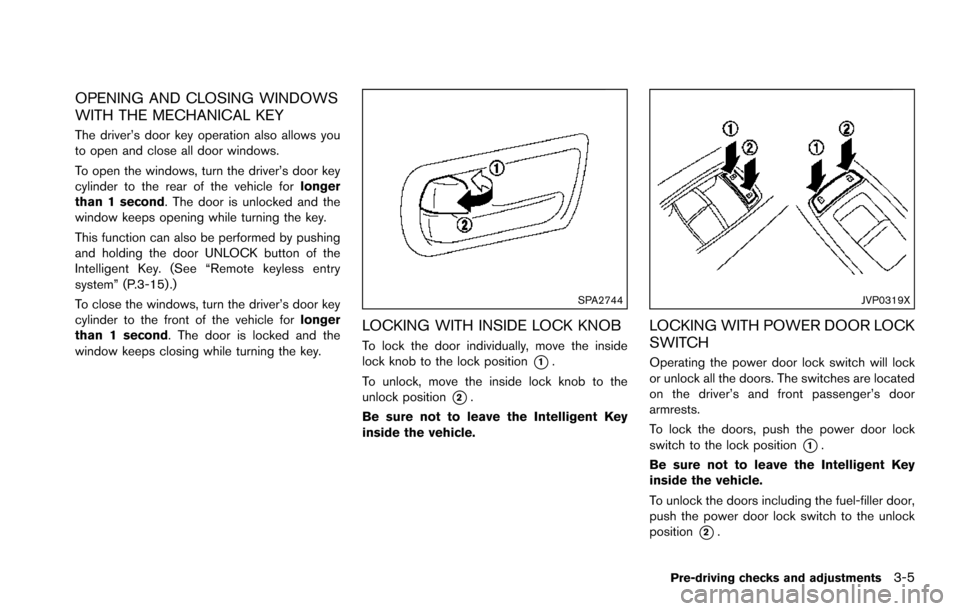
To lock the door individually, move the inside
lock knob to the lock position
*1.
To unlock, move the inside lock knob to the
unlock position
*2.
Be sure not to leave the Intelligent Key
inside the vehicle.
JVP0319X
LOCKING WITH POWER DOOR LOCK
SWITCH
Operating the power door lock switch will lock
or unlock all the doors. The switches are located
on the driver’s and front passenger’s door
armrests.
To lock the doors, push the power door lock
switch to the lock position
*1.
Be sure not to leave the Intelligent Key
inside the vehicle.
To unlock the doors including the fuel-filler door,
push the power door lock switch to the unlock
position
*2.
Pre-driving checks and adjustments3-5
Page 167 of 614
3-6Pre-driving checks and adjustments
Lockout protection
When the power door lock switch (driver or front
passenger) is moved to the lock position with
any door open, all doors will lock and unlock
automatically. With the Intelligent Key left in the
vehicle and any door open, all doors will unlock
automatically and a chime will sound after the
door is closed.
These functions help to prevent the Intelligent
Key from being accidentally locked inside the
vehicle.
AUTOMATIC DOOR LOCKS
.All doors lock automatically when the vehicle
speed reaches 15 MPH (24 km/h) .
. All doors unlock automatically when the
ignition switch is placed in the OFF position.
The automatic unlock function can be
deactivated or activated. To deactivate or
activate the automatic door unlock system,
perform the following procedure:
1. Close all doors.
2. Place the ignition switch in the ON position.
3. Within 20 seconds of performing Step 2, push and hold the power door lock switch to
the
position (UNLOCK) for more than 5
seconds. 4. When activated, the hazard indicator will
flash twice. When deactivated, the hazard
indicator will flash once.
5. The ignition switch must be placed in the OFF and ON position again between each
setting change.
When the automatic door unlock system is
deactivated, the doors do not unlock when the
ignition switch is placed in the OFF position. To
unlock the door manually, use the inside lock
knob or the power door lock switch (driver’s or
front passenger’s side) .
SPA2745
CHILD SAFETY REAR DOOR LOCK
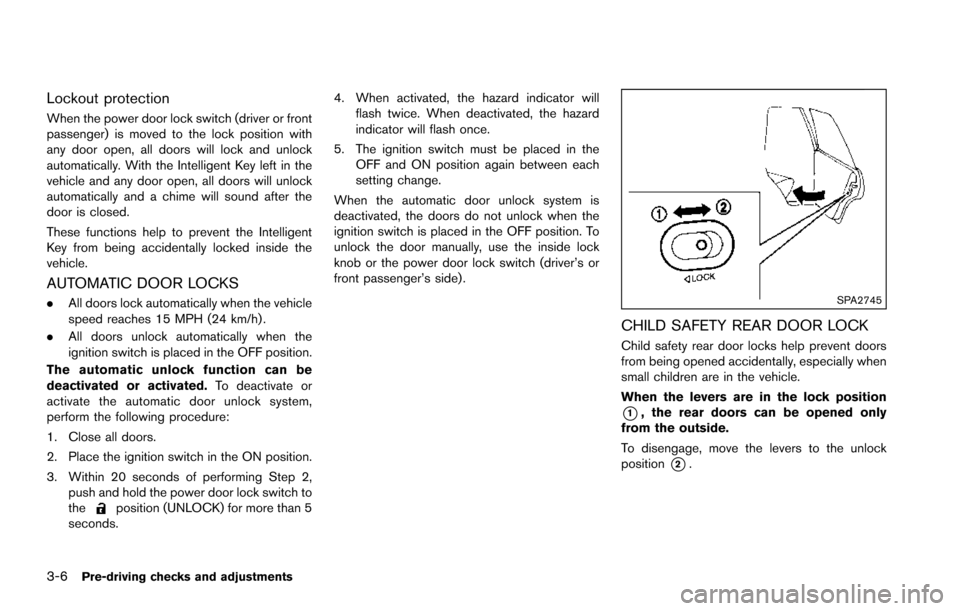
Child safety rear door locks help prevent doors
from being opened accidentally, especially when
small children are in the vehicle.
When the levers are in the lock position
*1, the rear doors can be opened only
from the outside.
To disengage, move the levers to the unlock
position
*2.
Page 172 of 614
When you carry the Intelligent Key with you, you
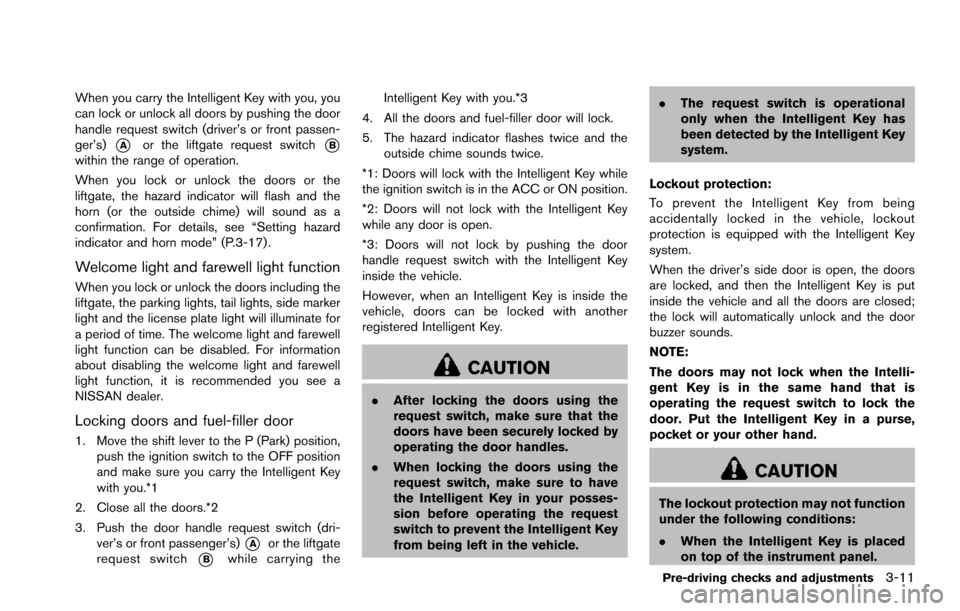
can lock or unlock all doors by pushing the door
handle request switch (driver’s or front passen-
ger’s)
*Aor the liftgate request switch*Bwithin the range of operation.
When you lock or unlock the doors or the
liftgate, the hazard indicator will flash and the
horn (or the outside chime) will sound as a
confirmation. For details, see “Setting hazard
indicator and horn mode” (P.3-17) .
Welcome light and farewell light function
When you lock or unlock the doors including the
liftgate, the parking lights, tail lights, side marker
light and the license plate light will illuminate for
a period of time. The welcome light and farewell
light function can be disabled. For information
about disabling the welcome light and farewell
light function, it is recommended you see a
NISSAN dealer.
Locking doors and fuel-filler door
1. Move the shift lever to the P (Park) position,push the ignition switch to the OFF position
and make sure you carry the Intelligent Key
with you.*1
2. Close all the doors.*2
3. Push the door handle request switch (dri- ver’s or front passenger’s)
*Aor the liftgate
request switch
*Bwhile carrying the Intelligent Key with you.*3
4. All the doors and fuel-filler door will lock.
5. The hazard indicator flashes twice and the outside chime sounds twice.
*1: Doors will lock with the Intelligent Key while
the ignition switch is in the ACC or ON position.
*2: Doors will not lock with the Intelligent Key
while any door is open.
*3: Doors will not lock by pushing the door
handle request switch with the Intelligent Key
inside the vehicle.
However, when an Intelligent Key is inside the
vehicle, doors can be locked with another
registered Intelligent Key.
CAUTION
. After locking the doors using the
request switch, make sure that the
doors have been securely locked by
operating the door handles.
. When locking the doors using the
request switch, make sure to have
the Intelligent Key in your posses-
sion before operating the request
switch to prevent the Intelligent Key
from being left in the vehicle. .
The request switch is operational
only when the Intelligent Key has
been detected by the Intelligent Key
system.
Lockout protection:
To prevent the Intelligent Key from being
accidentally locked in the vehicle, lockout
protection is equipped with the Intelligent Key
system.
When the driver’s side door is open, the doors
are locked, and then the Intelligent Key is put
inside the vehicle and all the doors are closed;
the lock will automatically unlock and the door
buzzer sounds.
NOTE:
The doors may not lock when the Intelli-
gent Key is in the same hand that is
operating the request switch to lock the
door. Put the Intelligent Key in a purse,
pocket or your other hand.
CAUTION
The lockout protection may not function
under the following conditions:
. When the Intelligent Key is placed
on top of the instrument panel.
Pre-driving checks and adjustments3-11
Page 173 of 614
3-12Pre-driving checks and adjustments
.When the Intelligent Key is placed
inside the glove box or a storage
bin.
. When the Intelligent Key is placed
inside the door pockets.
. When the Intelligent Key is placed
inside or near metallic materials.
Unlocking doors and fuel-filler door
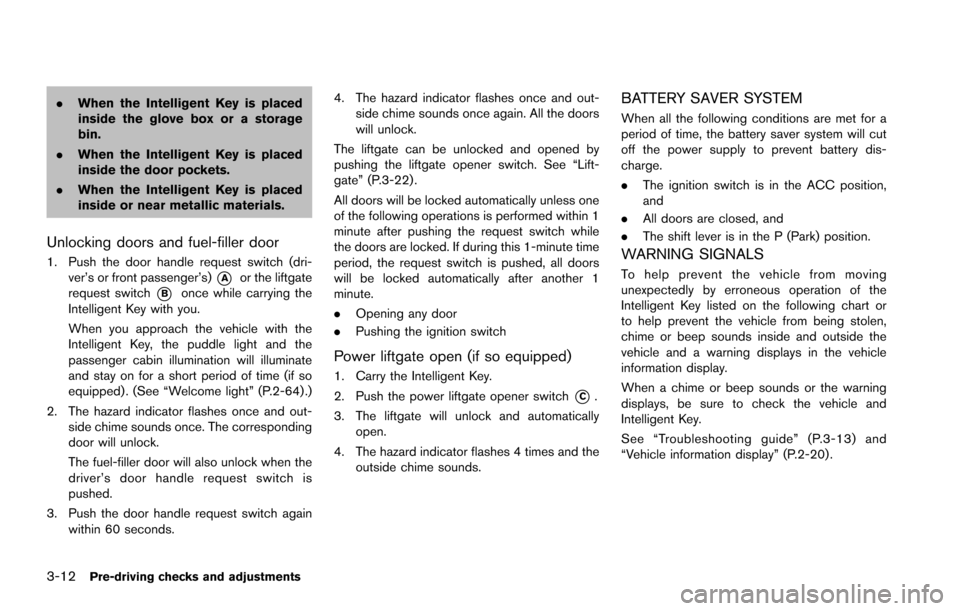
1. Push the door handle request switch (dri-
ver’s or front passenger’s)
*Aor the liftgate
request switch
*Bonce while carrying the
Intelligent Key with you.
When you approach the vehicle with the
Intelligent Key, the puddle light and the
passenger cabin illumination will illuminate
and stay on for a short period of time (if so
equipped) . (See “Welcome light” (P.2-64) .)
2. The hazard indicator flashes once and out- side chime sounds once. The corresponding
door will unlock.
The fuel-filler door will also unlock when the
driver’s door handle request switch is
pushed.
3. Push the door handle request switch again within 60 seconds. 4. The hazard indicator flashes once and out-
side chime sounds once again. All the doors
will unlock.
The liftgate can be unlocked and opened by
pushing the liftgate opener switch. See “Lift-
gate” (P.3-22) .
All doors will be locked automatically unless one
of the following operations is performed within 1
minute after pushing the request switch while
the doors are locked. If during this 1-minute time
period, the request switch is pushed, all doors
will be locked automatically after another 1
minute.
. Opening any door
. Pushing the ignition switch
Power liftgate open (if so equipped)
1. Carry the Intelligent Key.
2. Push the power liftgate opener switch
*C.
3. The liftgate will unlock and automatically open.
4. The hazard indicator flashes 4 times and the outside chime sounds.
BATTERY SAVER SYSTEM
When all the following conditions are met for a
period of time, the battery saver system will cut
off the power supply to prevent battery dis-
charge.
.The ignition switch is in the ACC position,
and
. All doors are closed, and
. The shift lever is in the P (Park) position.
WARNING SIGNALS
To help prevent the vehicle from moving
unexpectedly by erroneous operation of the
Intelligent Key listed on the following chart or
to help prevent the vehicle from being stolen,
chime or beep sounds inside and outside the
vehicle and a warning displays in the vehicle
information display.
When a chime or beep sounds or the warning
displays, be sure to check the vehicle and
Intelligent Key.
See “Troubleshooting guide” (P.3-13) and
“Vehicle information display” (P.2-20) .
Page 177 of 614
3-16Pre-driving checks and adjustments
SPA1926BType C (if so equipped)
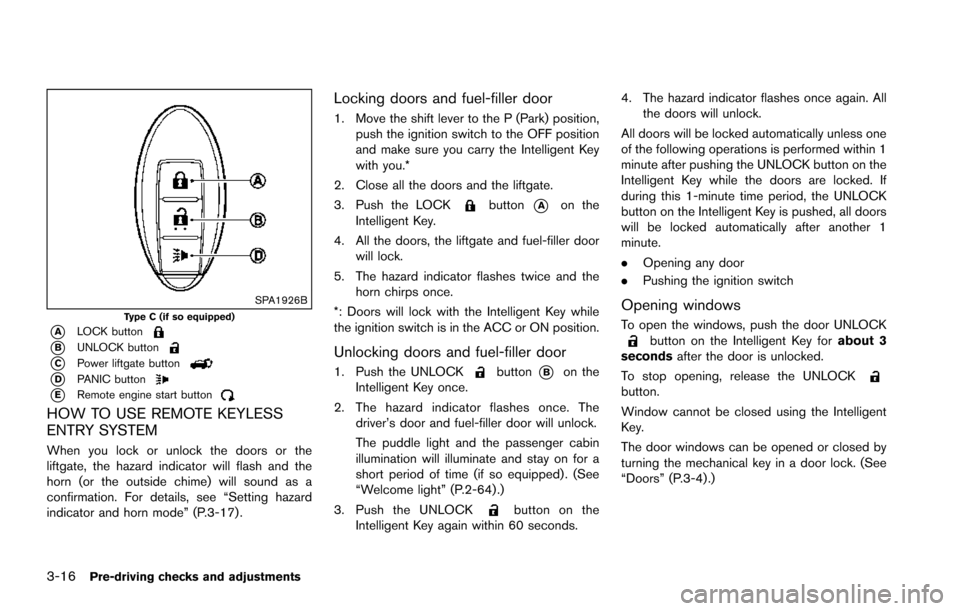
*ALOCK button
*BUNLOCK button
*CPower liftgate button
*DPANIC button
*ERemote engine start button
HOW TO USE REMOTE KEYLESS
ENTRY SYSTEM
When you lock or unlock the doors or the
liftgate, the hazard indicator will flash and the
horn (or the outside chime) will sound as a
confirmation. For details, see “Setting hazard
indicator and horn mode” (P.3-17) .
Locking doors and fuel-filler door
1. Move the shift lever to the P (Park) position,push the ignition switch to the OFF position
and make sure you carry the Intelligent Key
with you.*
2. Close all the doors and the liftgate.
3. Push the LOCK
button*Aon the
Intelligent Key.
4. All the doors, the liftgate and fuel-filler door will lock.
5. The hazard indicator flashes twice and the horn chirps once.
*: Doors will lock with the Intelligent Key while
the ignition switch is in the ACC or ON position.
Unlocking doors and fuel-filler door
1. Push the UNLOCKbutton*Bon the
Intelligent Key once.
2. The hazard indicator flashes once. The driver’s door and fuel-filler door will unlock.
The puddle light and the passenger cabin
illumination will illuminate and stay on for a
short period of time (if so equipped) . (See
“Welcome light” (P.2-64) .)
3. Push the UNLOCK
button on the
Intelligent Key again within 60 seconds. 4. The hazard indicator flashes once again. All
the doors will unlock.
All doors will be locked automatically unless one
of the following operations is performed within 1
minute after pushing the UNLOCK button on the
Intelligent Key while the doors are locked. If
during this 1-minute time period, the UNLOCK
button on the Intelligent Key is pushed, all doors
will be locked automatically after another 1
minute.
. Opening any door
. Pushing the ignition switch
Opening windows
To open the windows, push the door UNLOCKbutton on the Intelligent Key for about 3
seconds after the door is unlocked.
To stop opening, release the UNLOCK
button.
Window cannot be closed using the Intelligent
Key.
The door windows can be opened or closed by
turning the mechanical key in a door lock. (See
“Doors” (P.3-4).)
Page 187 of 614
3-26Pre-driving checks and adjustments
SPA2751
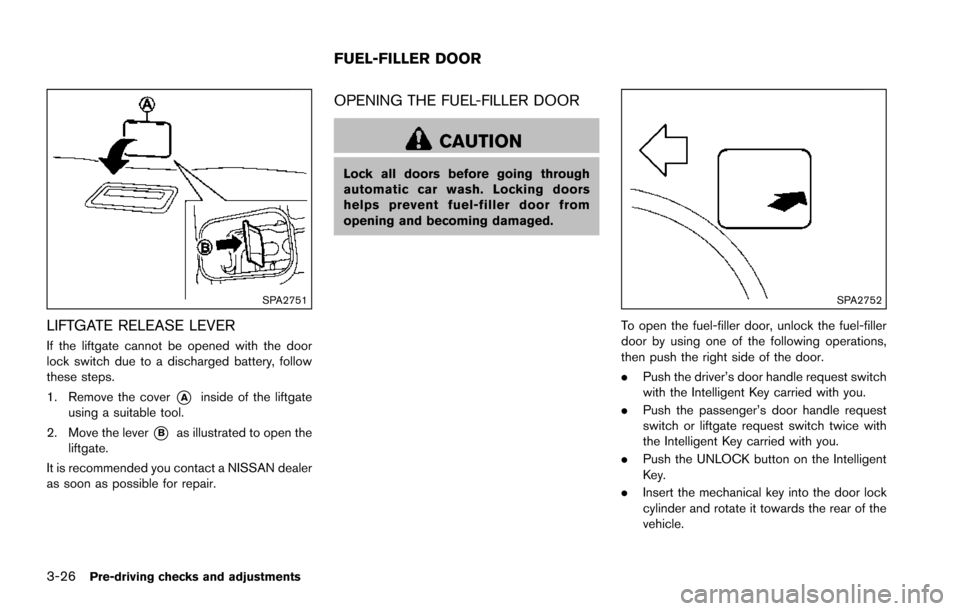
LIFTGATE RELEASE LEVER
If the liftgate cannot be opened with the door
lock switch due to a discharged battery, follow
these steps.
1. Remove the cover
*Ainside of the liftgate
using a suitable tool.
2. Move the lever
*Bas illustrated to open the
liftgate.
It is recommended you contact a NISSAN dealer
as soon as possible for repair.
OPENING THE FUEL-FILLER DOOR
CAUTION
Lock all doors before going through
automatic car wash. Locking doors
helps prevent fuel-filler door from
opening and becoming damaged.
SPA2752
To open the fuel-filler door, unlock the fuel-filler
door by using one of the following operations,
then push the right side of the door.
. Push the driver’s door handle request switch
with the Intelligent Key carried with you.
. Push the passenger’s door handle request
switch or liftgate request switch twice with
the Intelligent Key carried with you.
. Push the UNLOCK button on the Intelligent
Key.
. Insert the mechanical key into the door lock
cylinder and rotate it towards the rear of the
vehicle.
FUEL-FILLER DOOR
Page 192 of 614
SPA2450-A
Automatic anti-glare type
The inside mirror is designed so that it
automatically changes reflection according to
the intensity of the headlights of the following
vehicle.
The anti-glare system will be automatically
turned on when the ignition switch is placed in
the ON position.
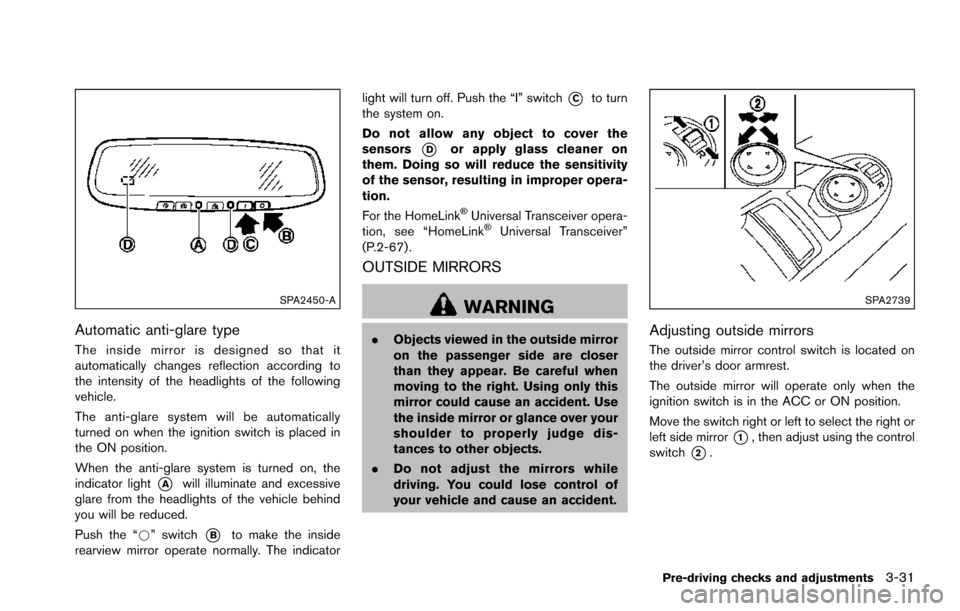
When the anti-glare system is turned on, the
indicator light
*Awill illuminate and excessive
glare from the headlights of the vehicle behind
you will be reduced.
Push the “*” switch
*Bto make the inside
rearview mirror operate normally. The indicator light will turn off. Push the “I” switch
*Cto turn
the system on.
Do not allow any object to cover the
sensors
*Dor apply glass cleaner on
them. Doing so will reduce the sensitivity
of the sensor, resulting in improper opera-
tion.
For the HomeLink
ŠUniversal Transceiver opera-
tion, see “HomeLinkŠUniversal Transceiver”
(P.2-67) .
OUTSIDE MIRRORS
WARNING
. Objects viewed in the outside mirror
on the passenger side are closer
than they appear. Be careful when
moving to the right. Using only this
mirror could cause an accident. Use
the inside mirror or glance over your
shoulder to properly judge dis-
tances to other objects.
. Do not adjust the mirrors while
driving. You could lose control of
your vehicle and cause an accident.
SPA2739
Adjusting outside mirrors
The outside mirror control switch is located on
the driver’s door armrest.
The outside mirror will operate only when the
ignition switch is in the ACC or ON position.
Move the switch right or left to select the right or
left side mirror
*1, then adjust using the control
switch
*2.
Pre-driving checks and adjustments3-31
Page 214 of 614
When any mode button is pushed with the
screen off, the screen turns on for further
operation. The screen will turn off automatically
5 seconds after the operation is finished.
To turn on the screen, set this item to the ON
position, or push the
OFF button.
. Brightness/Contrast/Background Color
To adjust the brightness and contrast of the
screen, select the “Brightness” or “Contrast”
key.
Then, you can adjust the brightness and the
contrast using the multi-function controller.
For information on the “Background Color” key,
refer to the separate Navigation System Own-
er’s Manual.
Color Theme:
Choose the theme color of the menu screen.
SAA3151
Comfort settings (if so equipped)
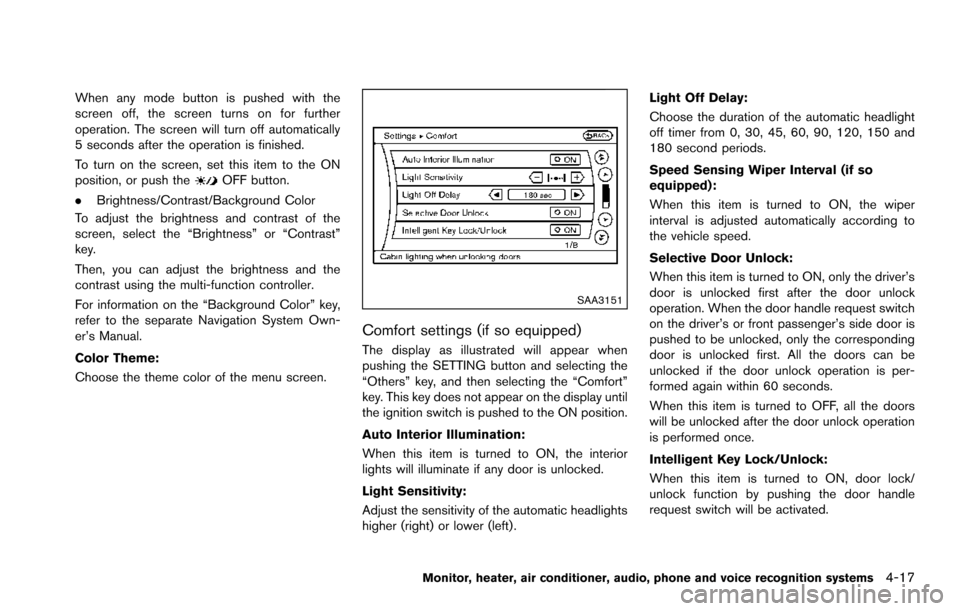
The display as illustrated will appear when
pushing the SETTING button and selecting the
“Others” key, and then selecting the “Comfort”
key. This key does not appear on the display until
the ignition switch is pushed to the ON position.
Auto Interior Illumination:
When this item is turned to ON, the interior
lights will illuminate if any door is unlocked.
Light Sensitivity:
Adjust the sensitivity of the automatic headlights
higher (right) or lower (left) . Light Off Delay:
Choose the duration of the automatic headlight
off timer from 0, 30, 45, 60, 90, 120, 150 and
180 second periods.
Speed Sensing Wiper Interval (if so
equipped):
When this item is turned to ON, the wiper
interval is adjusted automatically according to
the vehicle speed.
Selective Door Unlock:
When this item is turned to ON, only the driver’s
door is unlocked first after the door unlock
operation. When the door handle request switch
on the driver’s or front passenger’s side door is
pushed to be unlocked, only the corresponding
door is unlocked first. All the doors can be
unlocked if the door unlock operation is per-
formed again within 60 seconds.
When this item is turned to OFF, all the doors
will be unlocked after the door unlock operation
is performed once.
Intelligent Key Lock/Unlock:
When this item is turned to ON, door lock/
unlock function by pushing the door handle
request switch will be activated.
Monitor, heater, air conditioner, audio, phone and voice recognition systems4-17
Page 227 of 614
4-30Monitor, heater, air conditioner, audio, phone and voice recognition systems
Available views:
.Front view
An approximately 150-degree view of the
front of the vehicle.
. Rear view
An approximately 150-degree view of the
rear of the vehicle.
. Bird’s-eye view
The surrounding view of the vehicle from
above.
. Front-side view
The view around and ahead of the front
passenger’s side wheel.
. Front-wide view
An approximately 180-degree view of the
front of the vehicle.
. Rear-wide view
An approximately 180-degree view of the
rear of the vehicle.
JVH1397X
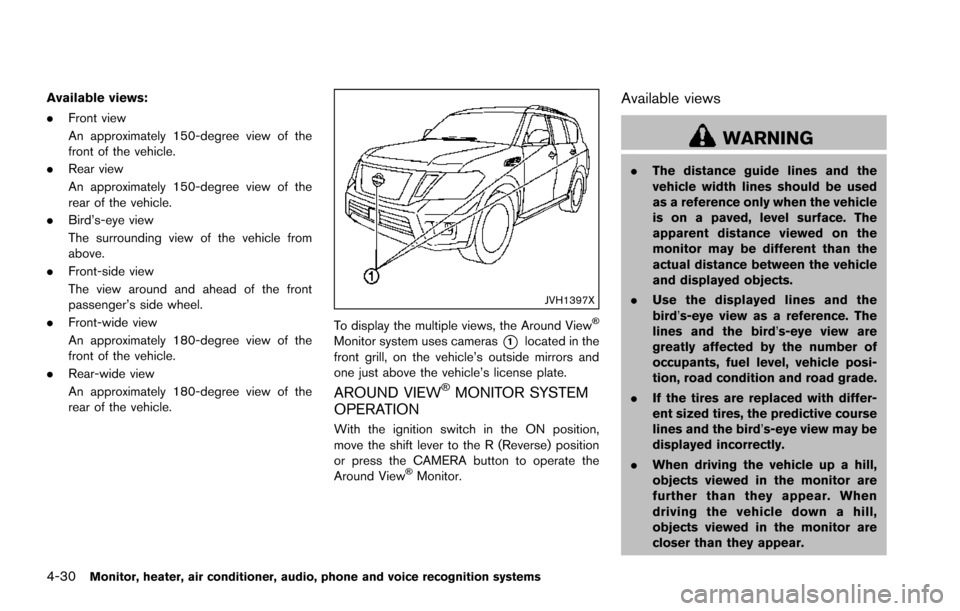
To display the multiple views, the Around ViewŠ
Monitor system uses cameras*1located in the
front grill, on the vehicle’s outside mirrors and
one just above the vehicle’s license plate.
AROUND VIEWŠMONITOR SYSTEM
OPERATION
With the ignition switch in the ON position,
move the shift lever to the R (Reverse) position
or press the CAMERA button to operate the
Around View
ŠMonitor.
Available views
WARNING
. The distance guide lines and the
vehicle width lines should be used
as a reference only when the vehicle
is on a paved, level surface. The
apparent distance viewed on the
monitor may be different than the
actual distance between the vehicle
and displayed objects.
. Use the displayed lines and the
bird’s-eye view as a reference. The
lines and the bird’s-eye view are
greatly affected by the number of
occupants, fuel level, vehicle posi-
tion, road condition and road grade.
. If the tires are replaced with differ-
ent sized tires, the predictive course
lines and the bird’s-eye view may be
displayed incorrectly.
. When driving the vehicle up a hill,
objects viewed in the monitor are
further than they appear. When
driving the vehicle down a hill,
objects viewed in the monitor are
closer than they appear.
Page 250 of 614
NOTE:
.Odors from inside and outside the
vehicle can build up in the air condi-
tioner unit. Odor can enter the passen-
ger compartment through the vents.
. When parking, set the heater and air
conditioner controls to turn off air
recirculation to allow fresh air into the
passenger compartment. This should
help reduce odors inside the vehicle.
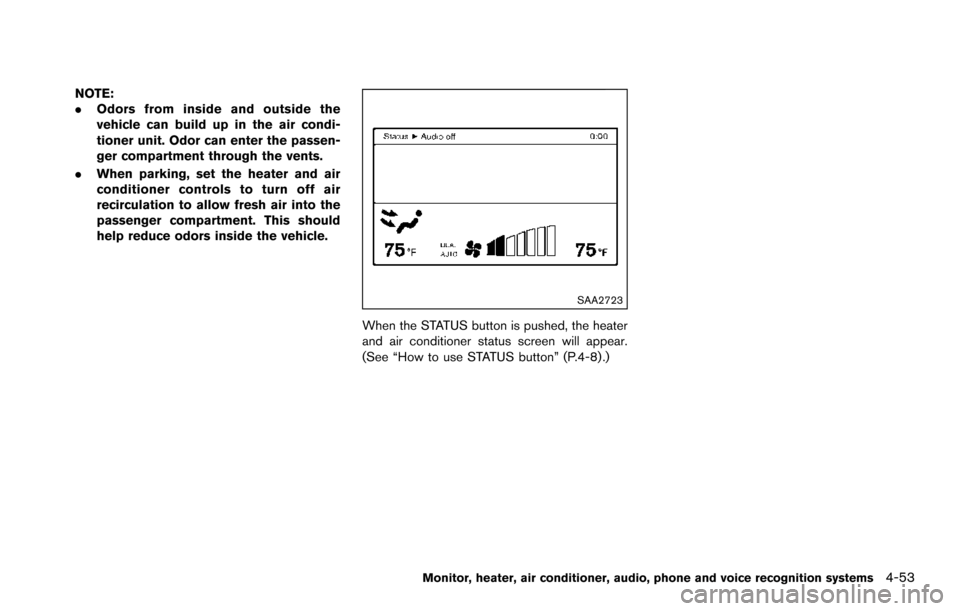
SAA2723
When the STATUS button is pushed, the heater
and air conditioner status screen will appear.
(See “How to use STATUS button” (P.4-8) .)
Monitor, heater, air conditioner, audio, phone and voice recognition systems4-53