warning NISSAN ARMADA 2019 Owner´s Manual
[x] Cancel search | Manufacturer: NISSAN, Model Year: 2019, Model line: ARMADA, Model: NISSAN ARMADA 2019Pages: 536, PDF Size: 2.56 MB
Page 317 of 536
Radio frequency statement
This device complies with part 15 of the
FCC Rules and RSS-310 of Industry Cana-
da.
Operation is subject to the following two
conditions:
1. This device may not cause harmfulinterference.
2. This device must accept any interfer- ence received, including interference
that may cause undesired operation.
Frequency of operation: 24.05GHz —
24.25GHz
Field Strength: Not greater than 2.5V/m
peak (0.25V/m average) at a distance of 3
m
The manufacturer is not responsible for
any radio or TV interference caused by
unauthorized modifications to this equip-
ment. Such modifications could void the
user’s authority to operate the equip-
ment.WARNING
Failure to follow the warnings and
instructions for proper use of the I-BI
system could result in serious injury
or death.
. The I-BI system is not a replace-
ment for proper driving proce-
dure, is not designed to prevent
contact with vehicles or objects
and does not provide full brake
power. When backing out of park-
ing spaces, always use the inside
and rear mirrors and turn and
look in the direction you will
move. Never rely solely on the I-
BI system.
. There is a limitation to the detec-
tion capability of the radar or the
sonar. Using the I-BI system un-
der some road, ground, traffic or
weather conditions could lead to
improper system operation. Al-
ways rely on your own operation
to avoid accidents.
The I-BI system can help alert the driver of
an approaching vehicle or objects behind
the vehicle when the driver is backing out
of a parking space.
JVS0912X
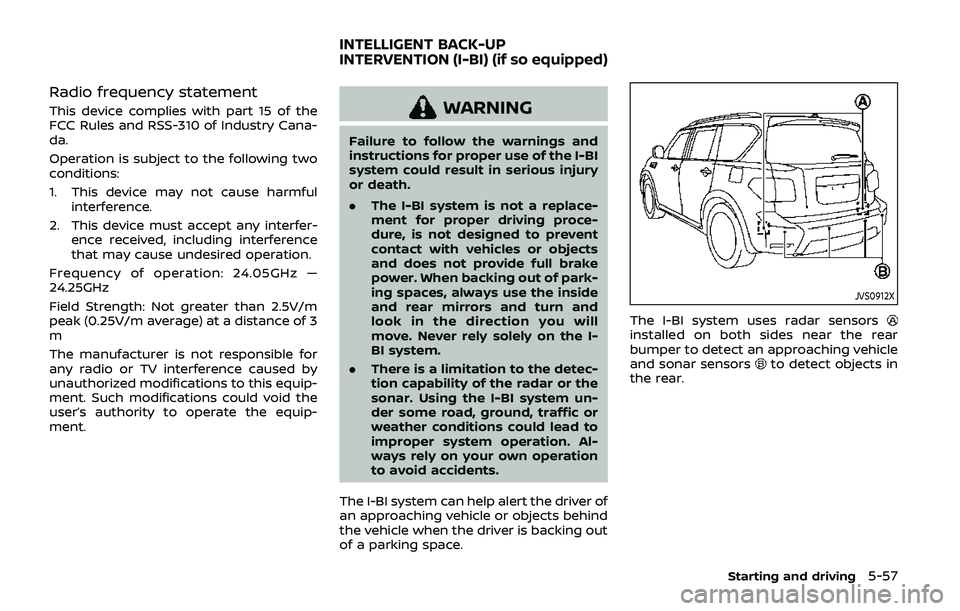
The I-BI system uses radar sensorsinstalled on both sides near the rear
bumper to detect an approaching vehicle
and sonar sensors
to detect objects in
the rear.
Starting and driving5-57
INTELLIGENT BACK-UP
INTERVENTION (I-BI) (if so equipped)
Page 319 of 536
JVS1099X
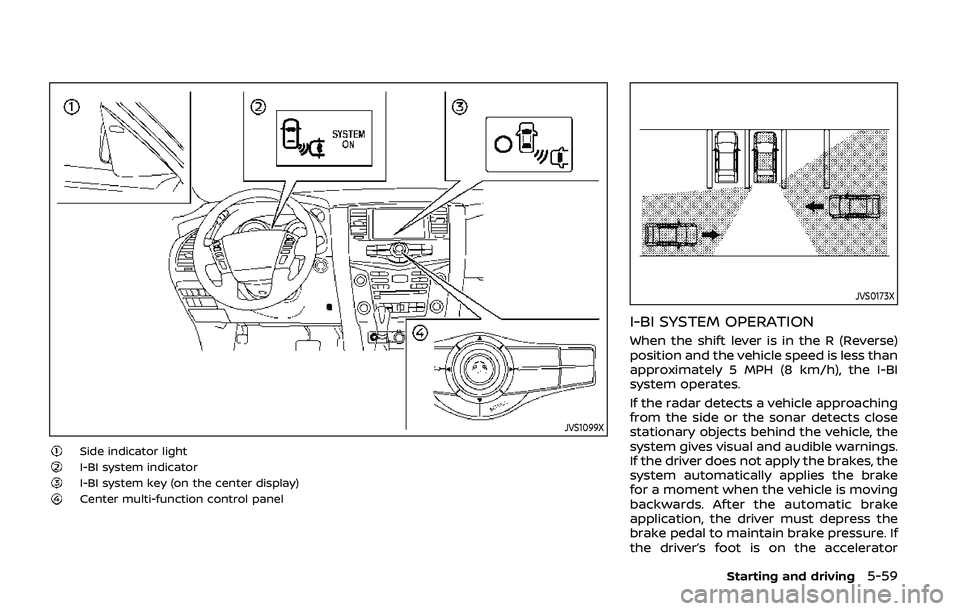
Side indicator lightI-BI system indicatorI-BI system key (on the center display)Center multi-function control panel
JVS0173X
I-BI SYSTEM OPERATION
When the shift lever is in the R (Reverse)
position and the vehicle speed is less than
approximately 5 MPH (8 km/h), the I-BI
system operates.
If the radar detects a vehicle approaching
from the side or the sonar detects close
stationary objects behind the vehicle, the
system gives visual and audible warnings.
If the driver does not apply the brakes, the
system automatically applies the brake
for a moment when the vehicle is moving
backwards. After the automatic brake
application, the driver must depress the
brake pedal to maintain brake pressure. If
the driver’s foot is on the accelerator
Starting and driving5-59
Page 324 of 536
5-64Starting and driving
JVS0479X
I-BI SYSTEM PRECAUTIONS
WARNING
Listed below are the system limita-
tions for the I-BI system. Failure to
operate the vehicle in accordancewith these system limitations could
result in serious injury or death.
.
Always check your surroundings
and turn to check what is behind
you before backing up. .
The radar sensors detect ap-
proaching (moving) vehicles. The
radar sensors cannot detect
every object such as:
— Pedestrians, bicycles, animals
or child operated toy vehicles
— A vehicle that passing at speeds greater than approxi-
mately 15 MPH (24 km/h)
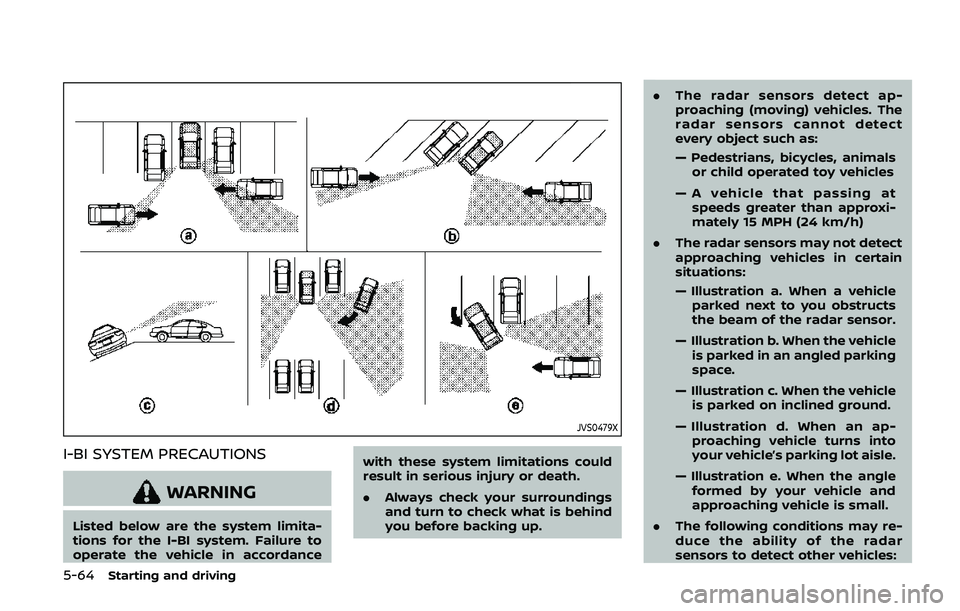
. The radar sensors may not detect
approaching vehicles in certain
situations:
— Illustration a. When a vehicle
parked next to you obstructs
the beam of the radar sensor.
— Illustration b. When the vehicle is parked in an angled parking
space.
— Illustration c. When the vehicle is parked on inclined ground.
— Illustration d. When an ap- proaching vehicle turns into
your vehicle’s parking lot aisle.
— Illustration e. When the angle formed by your vehicle and
approaching vehicle is small.
. The following conditions may re-
duce the ability of the radar
sensors to detect other vehicles:
Page 325 of 536
— Severe weather
— Road spray
— Ice/frost/dirt build up on thevehicle
. Do not attach stickers (including
transparent material), install ac-
cessories or apply additional
paint near the radar sensors.
These conditions may reduce the
ability of the radar sensors to
detect other vehicles.
. The sonar sensors detect station-
ary objects behind the vehicle.
The sonar sensor may not detect:
— Small or moving objects
— Wedge-shaped objects
— Object close to the bumper
(less than approximately 1 ft
(30 cm))
— Thin objects such as rope, wire and chain, etc.
. The brake engagement by the I-
BI system is not as effective on a
slope as it is on flat ground. When
on a steep slope the system may
not function properly.
. Do not use the I-BI system under
the following conditions because
the system may not function properly.
— When driving with a tire that is
not within normal tire condi-
tions (for example, tire wear,
low tire pressure, installation
of spare tire, tire chains, non-
standard wheels).
— When the vehicle is equipped with non-original brake parts
or suspension parts.
— When towing a trailer or other vehicle.
. Excessive noise (for example,
audio system volume, open vehi-
cle window) will interfere with the
chime sound, and it may not be
heard.
JVS0689X
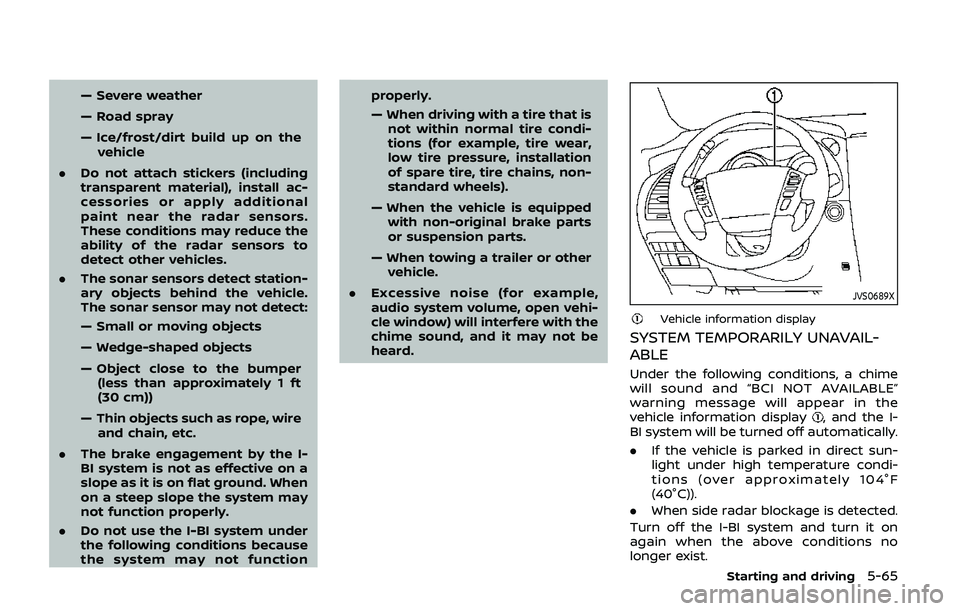
Vehicle information display
SYSTEM TEMPORARILY UNAVAIL-
ABLE
Under the following conditions, a chime
will sound and “BCI NOT AVAILABLE”
warning message will appear in the
vehicle information display
, and the I-
BI system will be turned off automatically.
. If the vehicle is parked in direct sun-
light under high temperature condi-
tions (over approximately 104°F
(40°C)).
. When side radar blockage is detected.
Turn off the I-BI system and turn it on
again when the above conditions no
longer exist.
Starting and driving5-65
Page 326 of 536
5-66Starting and driving
SYSTEM MALFUNCTION
If the I-BI system malfunctions, it will turn
off automatically, a chime will sound and
“BCI MALFUNCTION” warning message will
appear in the vehicle information display
.
Action to take
Stop the vehicle in a safe location and
place the shift lever in the P (Park)
position. Turn the engine off and restart
the engine. If the warning message con-
tinues to appear, have the system
checked. It is recommended you visit a
NISSAN dealer for this service.
JVS0908X
SYSTEM MAINTENANCE
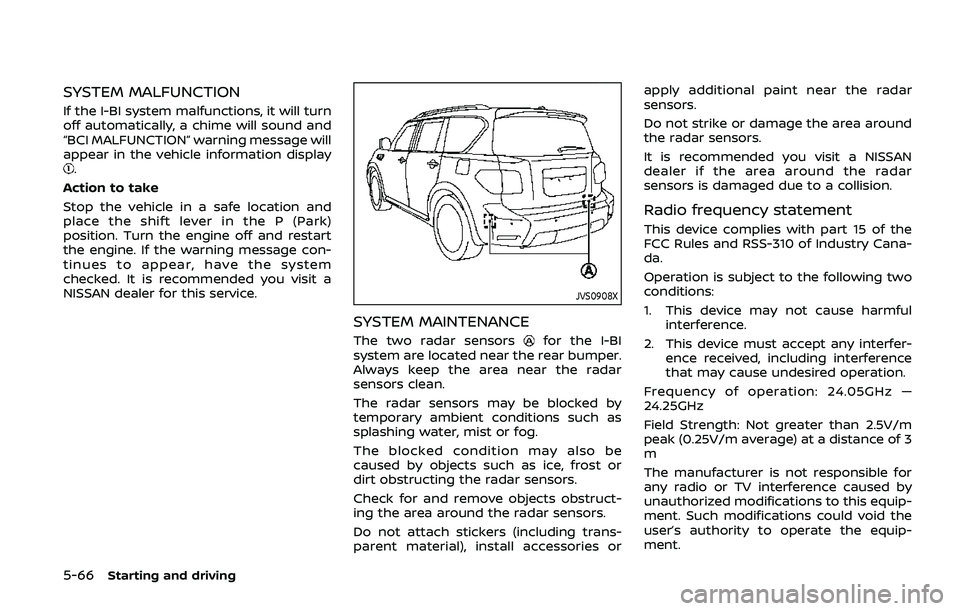
The two radar sensorsfor the I-BI
system are located near the rear bumper.
Always keep the area near the radar
sensors clean.
The radar sensors may be blocked by
temporary ambient conditions such as
splashing water, mist or fog.
The blocked condition may also be
caused by objects such as ice, frost or
dirt obstructing the radar sensors.
Check for and remove objects obstruct-
ing the area around the radar sensors.
Do not attach stickers (including trans-
parent material), install accessories or apply additional paint near the radar
sensors.
Do not strike or damage the area around
the radar sensors.
It is recommended you visit a NISSAN
dealer if the area around the radar
sensors is damaged due to a collision.
Radio frequency statement
This device complies with part 15 of the
FCC Rules and RSS-310 of Industry Cana-
da.
Operation is subject to the following two
conditions:
1. This device may not cause harmful
interference.
2. This device must accept any interfer- ence received, including interference
that may cause undesired operation.
Frequency of operation: 24.05GHz —
24.25GHz
Field Strength: Not greater than 2.5V/m
peak (0.25V/m average) at a distance of 3
m
The manufacturer is not responsible for
any radio or TV interference caused by
unauthorized modifications to this equip-
ment. Such modifications could void the
user’s authority to operate the equip-
ment.
Page 327 of 536
WARNING
Failure to follow the warnings and
instructions for proper use of the ICC
system could result in serious injury
or death.
.ICC is not a collision avoidance or
warning device. For highway use
only and it is not intended for
congested areas or city driving.
Failure to apply the brakes could
result in an accident.
. Always observe posted speed
limits and do not set the speed
over them.
. Always drive carefully and atten-
tively when using either cruise
control mode. Read and under-
stand the Owner’s Manual thor-
oughly before using the cruise
control. To avoid serious injury
or death, do not rely on the
system to prevent accidents or
to control the vehicle’s speed in
emergency situations. Do not use
cruise control except in appropri-
ate road and traffic conditions.
. In the conventional (fixed speed)
cruise control mode, a warning
chime will not sound to warn you if you are too close to the vehicle
ahead. Pay special attention to
the distance between your vehi-
cle and the vehicle ahead of you
or a collision could occur.
The ICC system maintains a selected
distance from the vehicle in front of you
within the speed range of 0 to 90 MPH (0
to 144 km/h) up to the set speed. The set
speed can be selected by the driver
between 20 to 90 MPH (32 to 144 km/h).
The vehicle travels at a set speed when
the road ahead is clear.
The ICC system can be set to one of two
cruise control modes.
. Vehicle-to-vehicle distance control
mode:
For maintaining a selected distance
between your vehicle and the vehicle
in front of you up to the preset speed.
. Conventional (fixed speed) cruise con-
trol mode:
For cruising at a preset speed.
Starting and driving5-67
INTELLIGENT CRUISE CONTROL (ICC)
Page 330 of 536
5-70Starting and driving
Vehicle-to-vehicle distance control
mode operation
The vehicle-to-vehicle distance control
mode is designed to maintain a selected
distance and reduce the speed to match
the slower vehicle ahead; the system will
decelerate the vehicle as necessary and if
the vehicle ahead comes to a stop, the
vehicle decelerates to a standstill. How-
ever, the ICC system can only apply up to
approximately 40% of the vehicle’s total
braking power. This system should only
be used when traffic conditions allow
vehicle speeds to remain fairly constant
or when vehicle speeds change gradually.
If a vehicle moves into the traveling lane
ahead or if a vehicle traveling ahead
rapidly decelerates, the distance between
vehicles may become closer because the
ICC system cannot decelerate the vehicle
quickly enough. If this occurs, the ICC
system will sound a warning chime and
blink the system display to notify the
driver to take necessary action.
The system will cancel and a warning
chime will sound if the speed is below
approximately 15 MPH (24 km/h) and a
vehicle is not detected ahead. The system
will also disengage when the vehicle goes
above the maximum set speed.
See “Approach warning” (P.5-78).The following items are controlled in the
vehicle-to-vehicle distance control mode:
.
When there are no vehicles traveling
ahead, the vehicle-to-vehicle distance
control mode maintains the speed set
by the driver. The set speed range is
between approximately 20 and 90
MPH (32 and 144 km/h).
. When there is a vehicle traveling
ahead, the vehicle-to-vehicle distance
control mode adjusts the speed to
maintain the distance, selected by
driver, from the vehicle ahead. The
adjusting speed range is up to the set
speed. If the vehicle ahead comes to a
stop, the vehicle decelerates to a
standstill within the limitations of the
system. The system will cancel once it
judges a standstill with a warning
chime.
. When the vehicle traveling ahead has
moved out from its lane of travel, the
vehicle-to-vehicle distance control
mode accelerates and maintains ve-
hicle speed up to the set speed.
The ICC system does not control vehicle
speed or warn you when you approach
stationary and slow moving vehicles. You
must pay attention to vehicle operation
to maintain proper distance from vehicles
ahead when approaching toll gates or
traffic congestion.
SSD0254
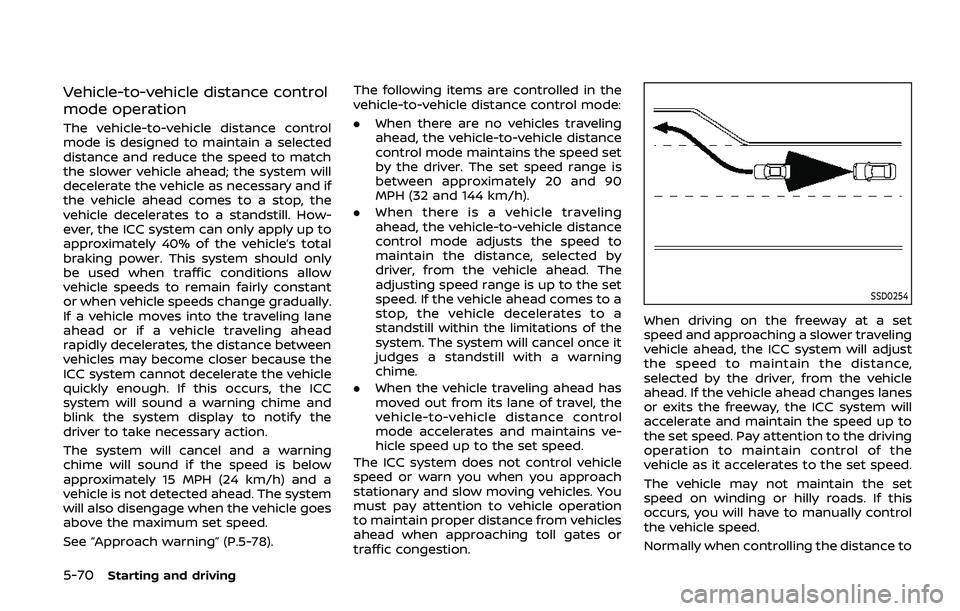
When driving on the freeway at a set
speed and approaching a slower traveling
vehicle ahead, the ICC system will adjust
the speed to maintain the distance,
selected by the driver, from the vehicle
ahead. If the vehicle ahead changes lanes
or exits the freeway, the ICC system will
accelerate and maintain the speed up to
the set speed. Pay attention to the driving
operation to maintain control of the
vehicle as it accelerates to the set speed.
The vehicle may not maintain the set
speed on winding or hilly roads. If this
occurs, you will have to manually control
the vehicle speed.
Normally when controlling the distance to
Page 332 of 536
5-72Starting and driving
SSD1104
Vehicle-to-vehicle distance control
mode display and indicators
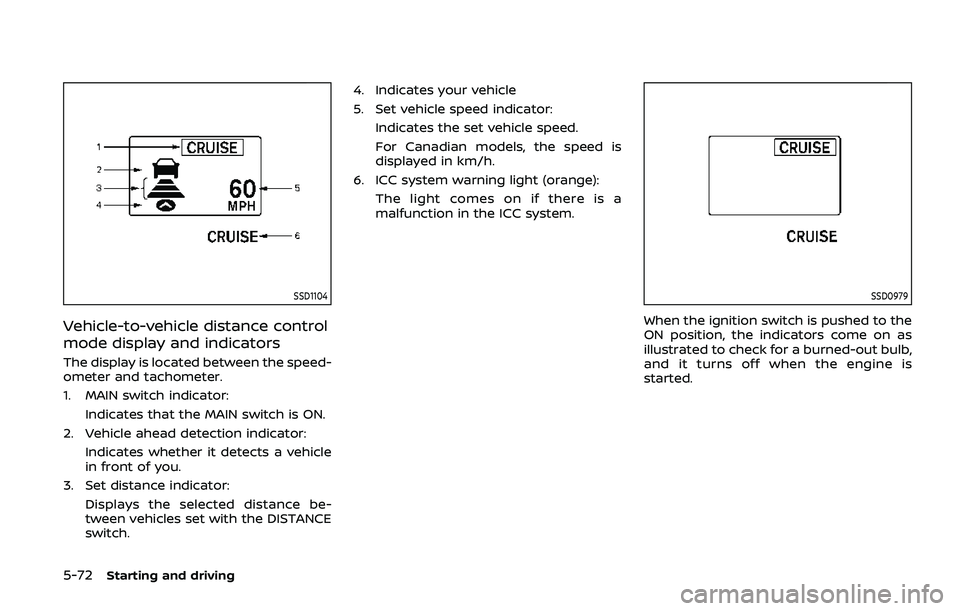
The display is located between the speed-
ometer and tachometer.
1. MAIN switch indicator:Indicates that the MAIN switch is ON.
2. Vehicle ahead detection indicator: Indicates whether it detects a vehicle
in front of you.
3. Set distance indicator: Displays the selected distance be-
tween vehicles set with the DISTANCE
switch. 4. Indicates your vehicle
5. Set vehicle speed indicator:
Indicates the set vehicle speed.
For Canadian models, the speed is
displayed in km/h.
6. ICC system warning light (orange): The light comes on if there is a
malfunction in the ICC system.
SSD0979
When the ignition switch is pushed to the
ON position, the indicators come on as
illustrated to check for a burned-out bulb,
and it turns off when the engine is
started.
Page 334 of 536
5-74Starting and driving
SSD1106
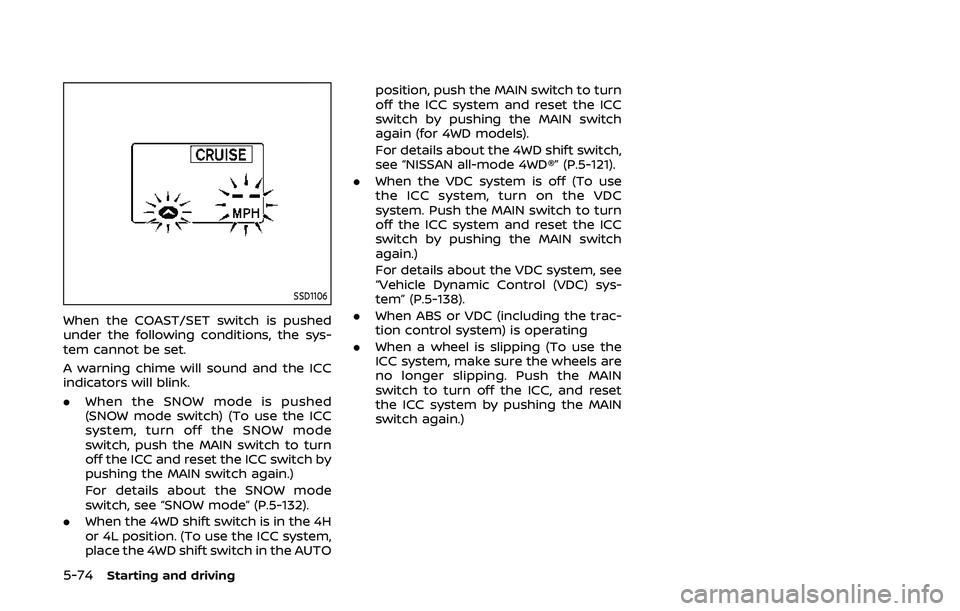
When the COAST/SET switch is pushed
under the following conditions, the sys-
tem cannot be set.
A warning chime will sound and the ICC
indicators will blink.
.When the SNOW mode is pushed
(SNOW mode switch) (To use the ICC
system, turn off the SNOW mode
switch, push the MAIN switch to turn
off the ICC and reset the ICC switch by
pushing the MAIN switch again.)
For details about the SNOW mode
switch, see “SNOW mode” (P.5-132).
. When the 4WD shift switch is in the 4H
or 4L position. (To use the ICC system,
place the 4WD shift switch in the AUTO position, push the MAIN switch to turn
off the ICC system and reset the ICC
switch by pushing the MAIN switch
again (for 4WD models).
For details about the 4WD shift switch,
see “NISSAN all-mode 4WD®” (P.5-121).
. When the VDC system is off (To use
the ICC system, turn on the VDC
system. Push the MAIN switch to turn
off the ICC system and reset the ICC
switch by pushing the MAIN switch
again.)
For details about the VDC system, see
“Vehicle Dynamic Control (VDC) sys-
tem” (P.5-138).
. When ABS or VDC (including the trac-
tion control system) is operating
. When a wheel is slipping (To use the
ICC system, make sure the wheels are
no longer slipping. Push the MAIN
switch to turn off the ICC, and reset
the ICC system by pushing the MAIN
switch again.)
Page 338 of 536
5-78Starting and driving
Approach warning
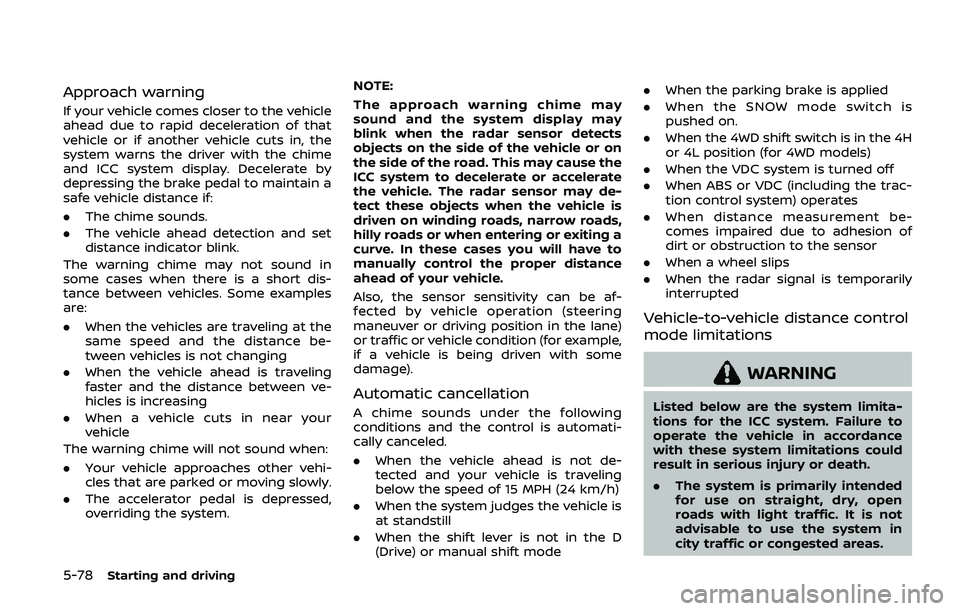
If your vehicle comes closer to the vehicle
ahead due to rapid deceleration of that
vehicle or if another vehicle cuts in, the
system warns the driver with the chime
and ICC system display. Decelerate by
depressing the brake pedal to maintain a
safe vehicle distance if:
.The chime sounds.
. The vehicle ahead detection and set
distance indicator blink.
The warning chime may not sound in
some cases when there is a short dis-
tance between vehicles. Some examples
are:
. When the vehicles are traveling at the
same speed and the distance be-
tween vehicles is not changing
. When the vehicle ahead is traveling
faster and the distance between ve-
hicles is increasing
. When a vehicle cuts in near your
vehicle
The warning chime will not sound when:
. Your vehicle approaches other vehi-
cles that are parked or moving slowly.
. The accelerator pedal is depressed,
overriding the system. NOTE:
The approach warning chime may
sound and the system display may
blink when the radar sensor detects
objects on the side of the vehicle or on
the side of the road. This may cause the
ICC system to decelerate or accelerate
the vehicle. The radar sensor may de-
tect these objects when the vehicle is
driven on winding roads, narrow roads,
hilly roads or when entering or exiting a
curve. In these cases you will have to
manually control the proper distance
ahead of your vehicle.
Also, the sensor sensitivity can be af-
fected by vehicle operation (steering
maneuver or driving position in the lane)
or traffic or vehicle condition (for example,
if a vehicle is being driven with some
damage).
Automatic cancellation
A chime sounds under the following
conditions and the control is automati-
cally canceled.
.
When the vehicle ahead is not de-
tected and your vehicle is traveling
below the speed of 15 MPH (24 km/h)
. When the system judges the vehicle is
at standstill
. When the shift lever is not in the D
(Drive) or manual shift mode .
When the parking brake is applied
. When the SNOW mode switch is
pushed on.
. When the 4WD shift switch is in the 4H
or 4L position (for 4WD models)
. When the VDC system is turned off
. When ABS or VDC (including the trac-
tion control system) operates
. When distance measurement be-
comes impaired due to adhesion of
dirt or obstruction to the sensor
. When a wheel slips
. When the radar signal is temporarily
interrupted
Vehicle-to-vehicle distance control
mode limitations
WARNING
Listed below are the system limita-
tions for the ICC system. Failure to
operate the vehicle in accordance
with these system limitations could
result in serious injury or death.
.The system is primarily intended
for use on straight, dry, open
roads with light traffic. It is not
advisable to use the system in
city traffic or congested areas.