homelink NISSAN ARMADA 2019 Owner´s Manual
[x] Cancel search | Manufacturer: NISSAN, Model Year: 2019, Model line: ARMADA, Model: NISSAN ARMADA 2019Pages: 536, PDF Size: 2.56 MB
Page 173 of 536
2. Release both buttons.
HomeLink® is now in the programming
mode and can be programmed at any
time beginning with “Programming
HomeLink®” - Step 1.
REPROGRAMMING A SINGLE
HomeLink® BUTTON
To reprogram a HomeLink® button, com-
plete the following.
1. Press and hold the desired HomeLink®button. DO NOT release the button.
2. The indicator light will illuminate in green, and after 20 seconds it will
begin to flash in orange and “TRAIN-
ING” is displayed on the mirror.
3. Release the HomeLink® button and proceed with “Programming
HomeLink®” — Step 3.
For questions or comments, contact
HomeLink® at: www.homelink.com/
nissan or 1-800-355-3515.
The HomeLink® button has now been
reprogrammed. The new device can be
activated by pressing the HomeLink®
button that was just programmed. This
procedure will not affect any other pro-
grammed HomeLink® buttons.
If a new device is not programmed to the
HomeLink® button, it will revert to the
previously stored programming.
USING THE GARAGE DOOR TWO-
WAY COMMUNICATION
HomeLink® has the function of commu-
nicating with garage door opener sys-
tems. If your garage door openers are
compatible with HomeLink®, the
HomeLink® can:
. receive and display “closing” or “open-
ing” status from your garage door
opener.
. recall and display the garage door
being “closed” or “opened”.
HomeLink® can receive the status from a
garage door opener at a range up to 820
ft (250 m), but it varies depending on the
environment. You may need to reduce
vehicle speed to successfully receive the
garage door opener communication.
Programming two-way communi-
cation
After programming a new HomeLink®
button, proceed with “Programming
HomeLink®” Step 6 to enable two-way
communication. If the garage door status
indicator appears on the left side on the
mirror when pressing the programmed
HomeLink® button, the two-way commu-
nication programming is complete.
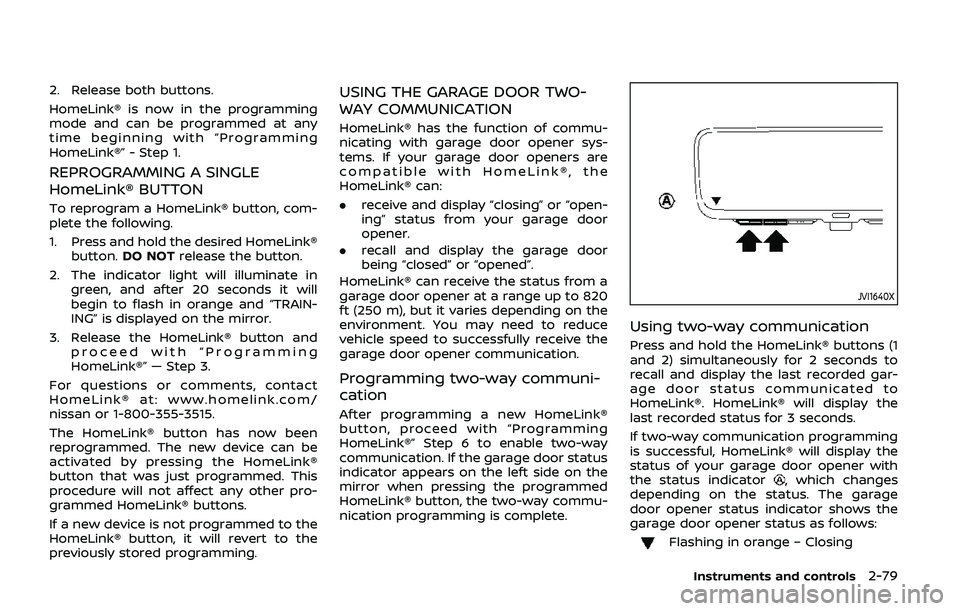
JVI1640X
Using two-way communication
Press and hold the HomeLink® buttons (1
and 2) simultaneously for 2 seconds to
recall and display the last recorded gar-
age door status communicated to
HomeLink®. HomeLink® will display the
last recorded status for 3 seconds.
If two-way communication programming
is successful, HomeLink® will display the
status of your garage door opener with
the status indicator
, which changes
depending on the status. The garage
door opener status indicator shows the
garage door opener status as follows:
Flashing in orange – Closing
Instruments and controls2-79
Page 174 of 536
2-80Instruments and controls
Flashing in orange – Opening
Illuminating in green – Closed
Illuminating in green – Opened
The status indicator stops to flash after
an open/close signal is received or no
signal is received within 30 seconds from
the garage door opener.
IF YOUR VEHICLE IS STOLEN
If your vehicle is stolen, you should
change the codes of any non-rolling code
device that has been programmed into
HomeLink®. Consult the Owner’s Manual
of each device or call the manufacturer or
dealer of those devices for additional
information.
When your vehicle is recovered, you will
need to reprogram the HomeLink® Uni-
versal Transceiver with your new trans-
mitter information.
FCC Notice:
For USA:
This device complies with Part 15 of the
FCC Rules. Operation is subject to the
following two conditions: (1) This device
may not cause harmful interference,
and (2) this device must accept any
interference received, including inter-
ference that may cause undesired op-
eration. NOTE:
Changes or modifications not expressly
approved by the party responsible for
compliance could void the user’s
authority to operate the equipment.
For Canada:
This device complies with Industry Ca-
nada licence-exempt RSS standard(s).
Operation is subject to the following
two conditions: (1) this device may not
cause interference, and (2) this device
must accept any interference, including
interference that may cause undesired
operation of the device.
Page 206 of 536
3-32Pre-driving checks and adjustments
indicator light will turn off. Push the “I”
switchto turn the system on.
Do not allow any object to cover the
sensors
or apply glass cleaner on
them. Doing so will reduce the sensitiv-
ity of the sensor, resulting in improper
operation.
For the HomeLink® Universal Transceiver
operation, see “HomeLink® Universal
Transceiver (Type A)” (P.2-71).
Intelligent Rear View Mirror (if so
equipped)
WARNING
Failure to follow the warnings and
instructions for proper use of the
Intelligent Rear View Mirror could
result in serious injury or death.
. The Intelligent Rear View Mirror is
a convenience feature but it is not
a substitute for proper vehicle
operation. The system has areas
where objects cannot be viewed.
Check the blind spot of the In-
telligent Rear View Mirror before
vehicle operation. The driver is
always responsible for safe driv-
ing. .
Do not disassemble or modify the
Intelligent Rear View Mirror, the
camera unit or wirings. If you do,
it may result in accidents or fire.
In case you notice smoke or smell
coming from the Intelligent Rear
View Mirror, stop using the sys-
tem immediately. It is recom-
mended that you see a NISSAN
dealer for servicing.
. Do not operate the Intelligent
Rear View Mirror while driving.
Doing so can be a distraction
and it could lose control of your
vehicle and cause an accident or
serious injury.
. Do not gaze into the Intelligent
Rear View Mirror display during
driving. It may cause a distraction
and it could lose control of your
vehicle and cause an accident or
serious injury.
. Do not put a cigarette or flames
to the Intelligent Rear View Mir-
ror, the camera unit or wirings. It
may cause a fire.
. Be sure to adjust the Intelligent
Rear View Mirror before driving.
Switch the system to the conven-
tional rearview mirror mode and
be properly seated on the driver’s seat. Then adjust the mirror so as
to see the rear window properly.
Driving without adjusting the mir-
ror may cause difficulty in watch-
ing the display at Intelligent Rear
View Mirror mode (camera view
mode) due to the reflection from
the surface of the mirror.
. If the Intelligent Rear View Mirror
malfunctions, immediately switch
the system to the conventional
rearview mirror mode.
. When strong light (for example,
sunlight or high beams from fol-
lowing vehicles) enters the cam-
era, a light beam or a glaring light
may appear on the monitor
screen of the Intelligent Rear
View Mirror. In that case, switch
the system to the conventional
rearview mirror mode appropri-
ately.
. If dirt, rain or snow accumulates
on the exterior glass surface cov-
ering the camera, the Intelligent
Rear View Mirror may not display
objects clearly. Use of the rear
window wiper/washer may im-
prove visibility, but if not, switch
the Intelligent Rear View Mirror to
the conventional rearview mirror
mode until a time the glass cov-
Page 207 of 536
ering the camera can be cleaned.
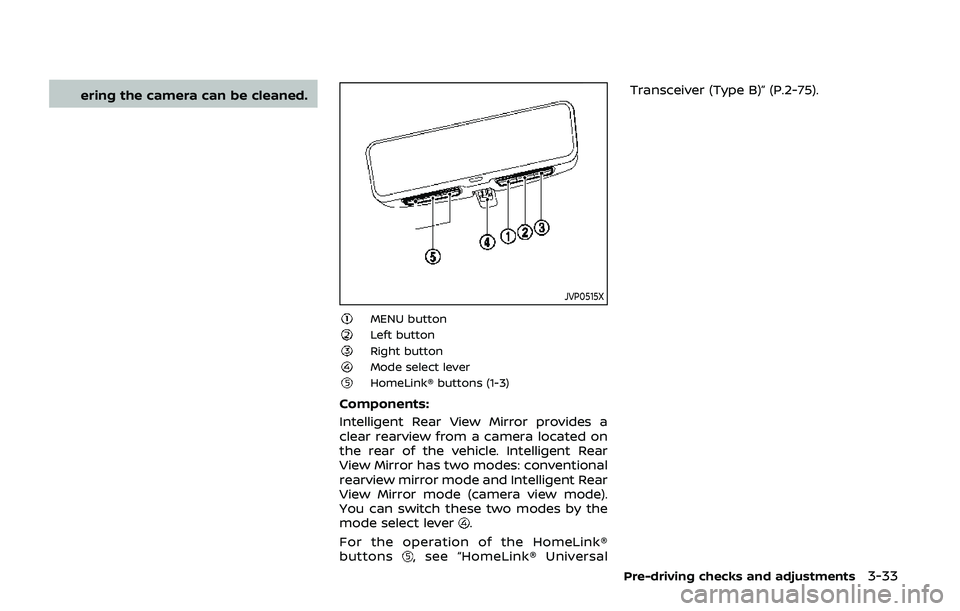
JVP0515X
MENU buttonLeft buttonRight buttonMode select leverHomeLink® buttons (1-3)
Components:
Intelligent Rear View Mirror provides a
clear rearview from a camera located on
the rear of the vehicle. Intelligent Rear
View Mirror has two modes: conventional
rearview mirror mode and Intelligent Rear
View Mirror mode (camera view mode).
You can switch these two modes by the
mode select lever
.
For the operation of the HomeLink®
buttons
, see “HomeLink® Universal Transceiver (Type B)” (P.2-75).
Pre-driving checks and adjustments3-33
Page 208 of 536
3-34Pre-driving checks and adjustments
JVP0489X
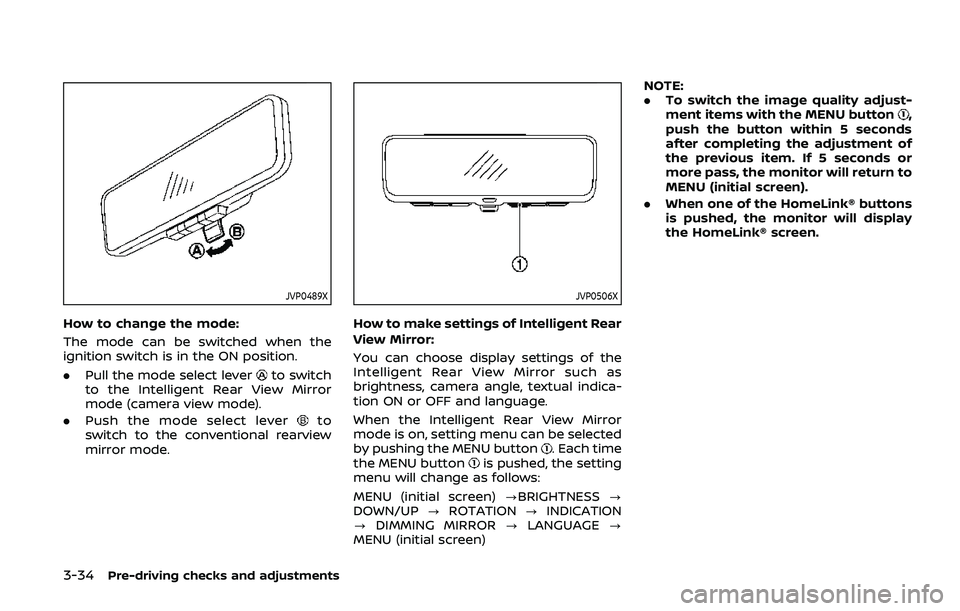
How to change the mode:
The mode can be switched when the
ignition switch is in the ON position.
.Pull the mode select lever
to switch
to the Intelligent Rear View Mirror
mode (camera view mode).
. Push the mode select lever
to
switch to the conventional rearview
mirror mode.
JVP0506X
How to make settings of Intelligent Rear
View Mirror:
You can choose display settings of the
Intelligent Rear View Mirror such as
brightness, camera angle, textual indica-
tion ON or OFF and language.
When the Intelligent Rear View Mirror
mode is on, setting menu can be selected
by pushing the MENU button
. Each time
the MENU buttonis pushed, the setting
menu will change as follows:
MENU (initial screen) ?BRIGHTNESS ?
DOWN/UP ?ROTATION ?INDICATION
? DIMMING MIRROR ?LANGUAGE ?
MENU (initial screen) NOTE:
.
To switch the image quality adjust-
ment items with the MENU button
,
push the button within 5 seconds
after completing the adjustment of
the previous item. If 5 seconds or
more pass, the monitor will return to
MENU (initial screen).
. When one of the HomeLink® buttons
is pushed, the monitor will display
the HomeLink® screen.
Page 529 of 536
Fuel-filler cap............................................................ 3-26
Fuel-filler door......................................................... 3-26
Gauge........................................................................\
........ 2-8
LOOSE FUEL CAP warning............................. 3-29
Fuel efficient driving tips .................................... 5-120
Fuses........................................................................\
.............. 8-18
Fusible links...................................................................... 8-19
G
Garage door opener HomeLink®
Universal Transceiver ......................... 2-71, 2-75
Gas cap........................................................................\
........ 3-26
Gauge........................................................................\
................ 2-5 Engine coolant temperature gauge......... 2-7
Engine oil pressure gauge ............................... 2-8
Fuel gauge .................................................................... 2-8
Odometer....................................................................... 2-6
Speedometer .............................................................. 2-6
Tachometer.................................................................. 2-7
Trip computer ......................................................... 2-28
General maintenance................................................... 9-2
Glove box ........................................................................\
... 2-57
H
Hazard warning flasher switch ............................ 6-2
Head restraints/headrests................................... 1-14
Headlights Aiming control ........................................................ 2-40
Bulb replacement ................................................. 8-24
Headlight switch ................................................... 2-37
Heated seats ................................................................... 2-43
Heated steering wheel ............................................ 2-42
Heater Automatic air conditioner ............................. 4-35 Engine block heater ....................................... 5-141
Heater and air
conditioner operation....................................... 4-34
Hill start assist system ......................................... 5-129
HomeLink® Universal Transceiver ..... 2-71, 2-75
Hood release ................................................................... 3-21
Hook Coat hooks ................................................................ 2-60
Luggage hook ......................................................... 2-60
Horn........................................................................\
................ 2-43
I
Ignition switch (Push-button)............................ 5-13
Immobilizer system.................................................... 2-32
In-cabin microfilter ..................................................... 4-42
Indicator Lights..................................................................\
............ 2-17
Vehicle information display.......................... 2-20
Inside mirror .................................................................... 3-31
Inspection/Maintenance (I/M) test............. 10-32
Instrument brightness control ......................... 2-41
Instrument panel ............................................................. 2-4
Intelligent Around View Monitor ..................... 4-10
Intelligent Auto Headlight system ................. 2-38
Intelligent Back-up Intervention (I-BI) ......... 5-57
Intelligent Blind Spot
Intervention (I-BSI) ...................................................... 5-43
Intelligent Blind Spot Intervention (I-BSI)
ON indicator light ........................................................ 2-18
Intelligent Cruise Control (ICC) ........................ 5-67
Intelligent Cruise Control (ICC) system main switch indicator ....................................... 2-25
Intelligent Cruise Control (ICC) system
warning light ................................................................... 2-14
Intelligent Distance Control (I-DC) ................. 5-89 Intelligent Distance Control (I-DC) system
warning light ................................................................... 2-13
Intelligent Forward Collision
Warning (I-FCW).......................................................... 5-111
Intelligent Key..................................................................... 3-2
Intelligent Key system ................................................. 3-7
Battery replacement.......................................... 8-21
Key operating range ............................................. 3-9
Key operation .......................................................... 3-10
Warning light............................................................ 2-14
Warning signals...................................................... 3-12
Intelligent Key warning light .............................. 2-14
Intelligent Lane Intervention (I-LI) .................. 5-23
Intelligent Lane Intervention (I-LI) ON
indicator light (green) .............................................. 2-18
Intelligent Rear View Mirror................................. 3-32
Interior light replacement..................................... 8-26
Interior light switch.................................................... 2-69
Interior lights................................................................... 2-69
ISOFIX child restraint ................................................ 1-35
J
Jump starting ................................................................. 6-12
K
Keyless entry (See remote keyless
entry system) .................................................................. 3-15
Keys ........................................................................\
.................... 3-2 For Intelligent Key system................................ 3-7
L
LabelsAir bag warning labels ..................................... 1-71
Air conditioner specification label....... 10-12
11-3
Page 532 of 536
11-6
Precautions when starting
and driving.................................................................... 5-4
Push starting............................................................ 6-14
Starting the engine............................................. 5-16
Status light, Front passenger air bag ......... 1-63
Steering Heated steering wheel ..................................... 2-42
Power steering ................................................... 5-135
Power steering fluid .............................................. 8-8
Tilt/telescopic steering .................................... 3-29
Storage ........................................................................\
........ 2-54
Sun visors ........................................................................\
.. 3-30
Sunglasses holder....................................................... 2-56
Supplemental air bag warning labels ......... 1-71
Supplemental air bag
warning light .................................................... 1-72, 2-17
Supplemental restraint system........................ 1-55 Precautions on supplemental
restraint system .................................................... 1-55
Switch Fog light switch ..................................................... 2-42
Hazard warning flasher switch .................... 6-2
Headlight aiming control ............................... 2-40
Headlight switch ................................................... 2-37
Ignition switch ........................................................ 5-18
Intelligent Auto Headlight switch ............ 2-38
Power door lock switch ..................................... 3-5
SNOW mode switch ............................................ 2-47
Turn signal switch ............................................... 2-41
Vehicle Dynamic Control (VDC)
OFF switch ................................................................. 2-48
T
Tachometer........................................................................\
.. 2-7
Temperature gauge, Engine coolant
temperature gauge ....................................................... 2-7 Theft (NISSAN Vehicle Immobilizer
System), Engine start ............................................... 2-32
Three-way catalyst......................................................... 5-4
Tilt/telescopic steering ........................................... 3-29
Tire
Pressure, Low tire pressure
warning light ............................................................ 2-15
Tire replacement indicator ........................... 2-26
Tires Flat tire........................................................................\
..... 6-3
Tire and Loading
information label................................ 8-32, 10-12
Tire chains.................................................................. 8-37
Tire dressing................................................................ 7-4
Tire pressure ............................................................ 8-30
Tire Pressure Monitoring
System (TPMS) ................................................ 5-5, 6-3
Tire rotation.............................................................. 8-37
Types of tires ........................................................... 8-36
Uniform tire quality grading .................... 10-30
Wheel/tire size ........................................................ 10-8
Wheels and tires .................................................... 8-30
Top Tether strap child restraints........................ 1-38
TOW mode ..................................................................... 5-131
TOW mode switch....................................................... 2-47
Towing Flat towing............................................................. 10-29
Tow truck towing................................................. 6-16
Towing a trailer.................................................. 10-17
Towing safety...................................................... 10-22
TPMS, Tire Pressure
Monitoring System ............................................. 5-5, 6-3 TPMS with Easy Fill Tire Alert......................... 5-8
Trailer towing .............................................................. 10-17 Transceiver
HomeLink®
Universal Transceiver ......................... 2-71, 2-75
Transmission Automatic Transmission Fluid (ATF) ........ 8-8
Driving with
automatic transmission .................................. 5-18
Transmission shift lever lock release ..... 5-22
Transmitter (See remote keyless
entry system) .................................................................. 3-15
Traveling or registering your vehicle in
another country ........................................................ 10-10
Trip computer ................................................................ 2-28
Trip odometer ................................................................ 2-28
Turn signal switch ...................................................... 2-41
U
Underbody cleaning ...................................................... 7-3
Uniform tire quality grading ............................ 10-30
USB (Universal Serial Bus)
charging connector................................................... 2-54
V
Vanity mirror ................................................................... 3-40
Vanity mirror lights .................................................... 2-71
Variable voltage control system ..................... 8-13
Vehicle Dimensions ................................................................ 10-9
Identification number (VIN)....................... 10-10
Loading information ...................................... 10-13
Recovery (freeing a stuck vehicle) .......... 6-19
Security system...................................................... 2-30
Vehicle Dynamic Control (VDC)
OFF switch ................................................................. 2-48