remote control NISSAN ARMADA 2021 Owner´s Manual
[x] Cancel search | Manufacturer: NISSAN, Model Year: 2021, Model line: ARMADA, Model: NISSAN ARMADA 2021Pages: 603, PDF Size: 3.16 MB
Page 3 of 603
safety features to all occupants
of the vehicle.
. ALWAYS review this Owner’s Man-
ual for important safety informa-
tion.
ON-PAVEMENT AND OFF-ROAD
DRIVING
This vehicle will handle and maneuver
differently from an ordinary passenger
car because it has a higher center of
gravity for off-road use. As with other
vehicles with features of this type,
failure to operate this vehicle correctly
may result in loss of control or an
accident. Be sure to read “On-pave-
ment and off-road driving precau-
tions”, “Avoiding collision and rollover”
and “Driving safety precautions” in the
“5. Starting and driving” section of this
manual.
MODIFICATION OF YOUR VEHI-
CLE
This vehicle should not be modified.
Modification could affect its perfor-
mance, safety or durability, and may
even violate governmental regula-
tions. In addition, damage or perfor-
mance problems resulting from
modification will not be covered under
the NISSAN warranties.
WARNING
Installing an aftermarket On-Board
Diagnostic (OBD) plug-in device that
uses the port during normal driving,
for example remote insurance com-
pany monitoring, remote vehicle di-
agnostics, telematics or engine
reprogramming, may cause interfer-
ence or damage to vehicle systems.
We do not recommend or endorse
the use of any aftermarket OBD
plug-in devices, unless specifically
approved by NISSAN. The vehicle
warranty may not cover damage
caused by any aftermarket plug-in
device.
WHEN READING THE MANUAL
This manual includes information for all
features and equipment available on
this model. Features and equipment in
your vehicle may vary depending on
model, trim level, options selected, or-
der, date of production, region or avail-
ability. Therefore, you may find
information about features or equip-
ment that are not included or installed
on your vehicle.
All information, specifications and illustra-
tions in this manual are those in effect at
the time of printing. NISSAN reserves the
right to change specifications, perfor-
mance, design or component suppliers
without notice and without obligation.
From time to time, NISSAN may update
or revise this manual to provide owners
with the most accurate information cur-
rently available. Please carefully read and
retain with this manual all revision up-
dates sent to you by NISSAN to ensure
you have access to accurate and up-to-
date information regarding your vehicle.
Current versions of vehicle Owner’s Man-
uals and any updates can also be found in
the Owner section of the NISSAN website
at https://owners.nissanusa.com/now-
ners/navigation/manualsGuide. If you
have questions concerning any informa-
tion in your Owner’s Manual, contact
Page 13 of 603
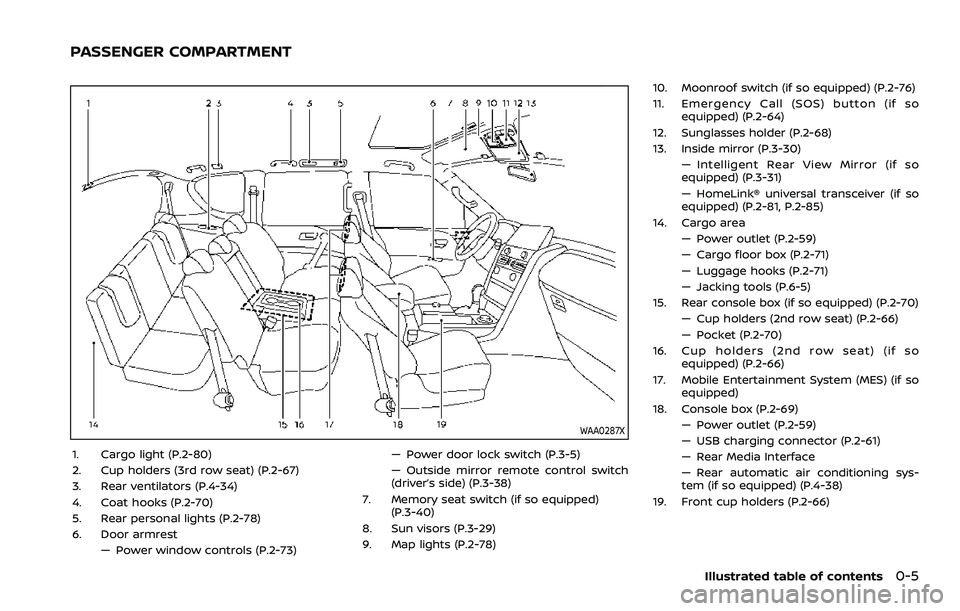
WAA0287X
1. Cargo light (P.2-80)
2. Cup holders (3rd row seat) (P.2-67)
3. Rear ventilators (P.4-34)
4. Coat hooks (P.2-70)
5. Rear personal lights (P.2-78)
6. Door armrest— Power window controls (P.2-73) — Power door lock switch (P.3-5)
— Outside mirror remote control switch
(driver’s side) (P.3-38)
7. Memory seat switch (if so equipped) (P.3-40)
8. Sun visors (P.3-29)
9. Map lights (P.2-78) 10. Moonroof switch (if so equipped) (P.2-76)
11. Emergency Call (SOS) button (if so
equipped) (P.2-64)
12. Sunglasses holder (P.2-68)
13. Inside mirror (P.3-30) — Intelligent Rear View Mirror (if so
equipped) (P.3-31)
— HomeLink® universal transceiver (if so
equipped) (P.2-81, P.2-85)
14. Cargo area — Power outlet (P.2-59)
— Cargo floor box (P.2-71)
— Luggage hooks (P.2-71)
— Jacking tools (P.6-5)
15. Rear console box (if so equipped) (P.2-70)
— Cup holders (2nd row seat) (P.2-66)
— Pocket (P.2-70)
16. Cup holders (2nd row seat) (if so equipped) (P.2-66)
17. Mobile Entertainment System (MES) (if so equipped)
18. Console box (P.2-69) — Power outlet (P.2-59)
— USB charging connector (P.2-61)
— Rear Media Interface
— Rear automatic air conditioning sys-
tem (if so equipped) (P.4-38)
19. Front cup holders (P.2-66)
Illustrated table of contents0-5
PASSENGER COMPARTMENT
Page 178 of 603

2-86Instruments and controls
WAC0378X
HomeLink® buttons (1-3)Indicator light (appears above each
HomeLink® button)
Status display (where the current condi-
tion of the HomeLink® is displayed)
WAC0381X
1. Press and release the HomeLink®button that you would like to pro-
gram. The HomeLink® indicator light
will flash in orange slowly and “TRAIN-
ING” is displayed on the lower right of
the mirror (if not, refer to “Clearing the
programmed information” (P.2-89).).
2. Position the hand-held transmitter (garage door opener remote) 1-3
inches (2-8 cm) away from the
HomeLink® button that you would
light to program.
NOTE:
Some hand-held transmitter (gar-
age door opener remotes) may ac-
tually train better at a distance of 6- 12 inches (15-20 cm). Keep this in
mind if you have difficulty with the
programming process.
3. While the HomeLink® indicator light is flashing in orange, press and hold the
hand-held transmitter button. Con-
tinue pressing the hand-held trans-
mitter button until the HomeLink®
indicator light changes from orange
to green and “TRAINED” is displayed on
the lower right of the mirror. You may
now release the hand-held transmit-
ter button.
NOTE:
Some devices to be programmed
may require you to replace the Step
3 with the cycling procedure noted
in “Programming HomeLink® for Ca-
nadian customers and gate open-
ers” (P.2-89).
4. Wait until your garage door has
stopped moving before completing
the next steps.
5. Press the HomeLink® button and ob- serve the indicator light.
.If the indicator light remains con-stant green, your device should
operate when the HomeLink® but-
ton is pressed. At this point, if your
device operates, programming is
complete.
Page 189 of 603
WARNING
.Radio waves could adversely af-
fect electric medical equipment.
Those who use a pacemaker
should contact the electric med-
ical equipment manufacturer for
the possible influences before
use.
. The Intelligent Key transmits
radio waves when the buttons
are pushed. The FAA advises that
the radio waves may affect air-
craft navigation and communica-
tion systems. Do not operate the
Intelligent Key while on an air-
plane. Make sure the buttons are
not operated unintentionally
when the unit is stored during a
flight.
The Intelligent Key system can operate all
the door locks using the remote control-
ler function or pushing the request switch
on the vehicle without taking the key out
from a pocket or purse. The operating
environment and/or conditions may af-
fect the Intelligent Key system operation.
Be sure to read the following before using
the Intelligent Key system.
CAUTION
. Be sure to carry the Intelligent
Key with you when operating the
vehicle.
. Never leave the Intelligent Key in
the vehicle when you leave the
vehicle.
The Intelligent Key is always communi-
cating with the vehicle as it receives radio
waves. The Intelligent Key system trans-
mits weak radio waves. Environmental
conditions may interfere with the opera-
tion of the Intelligent Key system under
the following operating conditions.
. When operating near a location where
strong radio waves are transmitted,
such as a TV tower, power station and
broadcasting station.
. When in possession of wireless equip-
ment, such as a cellular telephone,
transceiver, and CB radio.
. When the Intelligent Key is in contact
with or covered by metallic materials.
. When any type of radio wave remote
control is used nearby.
. When the Intelligent Key is placed near
an electric appliance such as a perso-
nal computer. .
When the vehicle is parked near a
parking meter.
In such cases, correct the operating
conditions before using the Intelligent
Key function or use the mechanical key.
Although the life of the battery varies
depending on the operating conditions,
the battery’s life is approximately 2 years.
If the battery is discharged, replace it with
a new one.
Since the Intelligent Key is continuously
receiving radio waves, if the key is left
near equipment which transmits strong
radio waves, such as signals from a TV
and personal computer, the battery life
may become shorter.
For information regarding replacement of
a battery, see “Intelligent Key battery
replacement” (P.8-21).
As many as 4 Intelligent Keys can be
registered and used with one vehicle. For
information about the purchase and use
of additional Intelligent Keys, contact a
NISSAN dealer.
CAUTION
. Do not allow the Intelligent Key,
which contains electrical compo-
nents, to come into contact with
water or salt water. This could
Pre-driving checks and adjustments3-7
INTELLIGENT KEY SYSTEM
Page 221 of 603
Defrosting outside mirrors
The outside mirrors will be heated when
the rear window defroster switch is
operated. (See “Rear window and outside
mirror defroster switch” (P.2-44).)
SPA2738
Power foldable outside mirrors
CAUTION
.Do not touch the mirrors while
they are moving. Your hand may
be pinched, and the mirror may
malfunction.
. Do not drive with the mirrors
stored. You will be unable to see
behind the vehicle.
. If the mirrors were folded or
unfolded by hand, there is a
chance that the mirror will move
forward or backward during driv- ing. If the mirrors were folded or
unfolded by hand, be sure to
adjust them again electrically be-
fore driving.
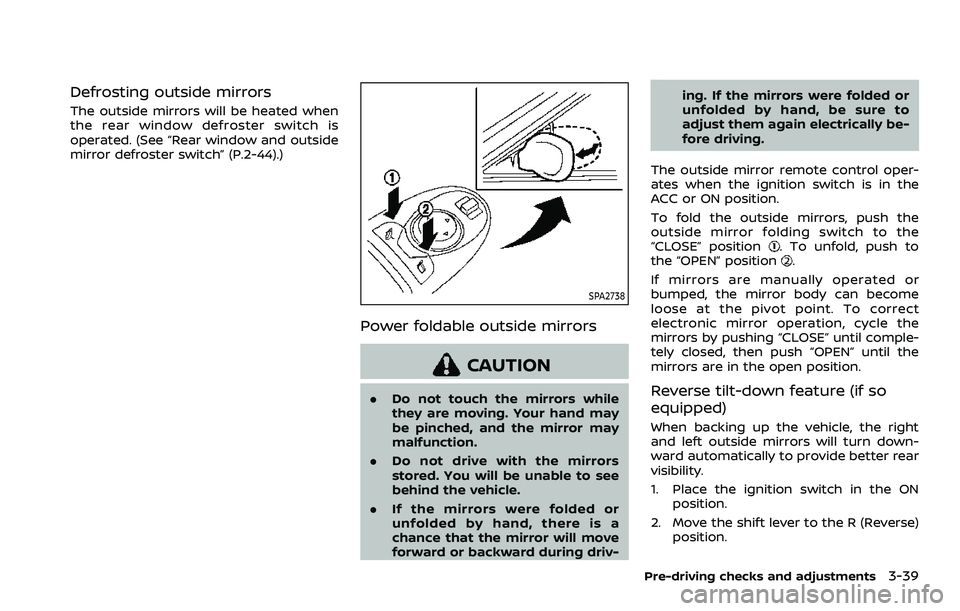
The outside mirror remote control oper-
ates when the ignition switch is in the
ACC or ON position.
To fold the outside mirrors, push the
outside mirror folding switch to the
“CLOSE” position
. To unfold, push to
the “OPEN” position.
If mirrors are manually operated or
bumped, the mirror body can become
loose at the pivot point. To correct
electronic mirror operation, cycle the
mirrors by pushing “CLOSE” until comple-
tely closed, then push “OPEN” until the
mirrors are in the open position.
Reverse tilt-down feature (if so
equipped)
When backing up the vehicle, the right
and left outside mirrors will turn down-
ward automatically to provide better rear
visibility.
1. Place the ignition switch in the ON position.
2. Move the shift lever to the R (Reverse) position.
Pre-driving checks and adjustments3-39
Page 283 of 603
fuel cut mode.
5. To stop the engine, shift the shift lever to the P (Park) position and push the
ignition switch to the OFF position.
In preparation for the next engine start,
the engine may have a slightly delayed
shutoff after placing the ignition switch in
the OFF position, depending on the driv-
ing conditions.
NOTE:
Care should be taken to avoid situations
that can lead to potential battery dis-
charge and potential no-start condi-
tions such as:
1. Installation or extended use of elec-
tronic accessories that consume
battery power when the engine is
not running (Phone chargers, GPS,
DVD players, etc.)
2. Vehicle is not driven regularly and/
or only driven short distances.
In these cases, the battery may need to
be charged to maintain battery health.
REMOTE ENGINE START (if so
equipped)
Vehicles started with the remote engine
start function require the ignition switch
to be placed in the ON position before the
shift lever can be moved from the P (Park)
position. To place the ignition switch in the ON position, perform the following
steps:
1. Make sure that the Intelligent Key is
on you.
2. Firmly depress the brake pedal.
3. Push the ignition switch once to the ON position.
For additional information about the
remote engine start function, see “Re-
mote engine start” (P.3-19).
ENGINE PROTECTION MODE
The engine has an engine protection
mode to reduce the chance of damage
if the coolant temperature becomes too
high (for example, when climbing steep
grades in high temperature with heavy
loads, such as when towing a trailer).
When the engine temperature reaches a
certain level:
. The engine coolant temperature
gauge will move toward the H posi-
tion.
. Engine power may be reduced.
. The air conditioning cooling function
may be automatically turned OFF for a
short time (the blower will continue to
operate).
Engine power and, under some condi-
tions, vehicle speed will decrease. Vehicle
speed can be controlled with the accel-
erator pedal, but the vehicle may not
accelerate at the desired speed. The
transmission will downshift or upshift as
it reaches prescribed shift points. You can
also shift manually.
As driving conditions change and engine
coolant temperature is reduced, vehicle
speed can be increased using the accel-
erator pedal, and air conditioning cooling
function will automatically be turned
back ON.
Starting and driving5-17
DRIVING THE VEHICLE
Page 553 of 603
Front seatFront seat adjustment ......................... 1-4, 1-11
Front-seat active head restraint..................... 1-19
Fuel Capacities and
recommended fluids/lubricants............... 10-2
Fuel economy...................................................... 5-124
Fuel information.................................................... 10-4
Fuel octane rating ............................................... 10-4
Fuel-filler cap............................................................ 3-26
Fuel-filler door......................................................... 3-26
Gauge........................................................................\
........ 2-8
Loose Fuel Cap warning................................. 3-28
Fuel efficient driving tips .................................... 5-123
Fuses........................................................................\
.............. 8-18
Fusible links...................................................................... 8-19
G
Garage door opener HomeLink®
Universal Transceiver ......................... 2-81, 2-85
Gas cap........................................................................\
........ 3-26
Gauge........................................................................\
................ 2-5 Engine coolant temperature gauge......... 2-7
Engine oil pressure gauge ............................... 2-8
Fuel gauge .................................................................... 2-8
Odometer....................................................................... 2-6
Speedometer .............................................................. 2-6
Tachometer.................................................................. 2-7
Trip computer ......................................................... 2-36
General maintenance................................................... 9-2
Glove box ........................................................................\
... 2-69
H
Hazard warning flasher switch ............................ 6-2
Head restraints/headrests................................... 1-14
Headlights Bulb replacement ................................................. 8-26
Headlight switch ................................................... 2-46
Heated seats ................................................................... 2-53
Heated steering wheel ............................................ 2-52
Heater Automatic air conditioner ............................. 4-36
Engine block heater ....................................... 5-148
Heater and air
conditioner operation....................................... 4-35
High beam assist ......................................................... 2-47
Hill start assist system ......................................... 5-132
HomeLink® Universal Transceiver ..... 2-81, 2-85
Hood release ................................................................... 3-21
Hook Coat hooks ................................................................ 2-70
Luggage hook ......................................................... 2-71
Horn........................................................................\
................ 2-53
I
Ignition switch (Push-button)............................ 5-13
Immobilizer system.................................................... 2-40
In-cabin microfilter ..................................................... 4-41
Indicator Lights..................................................................\
............ 2-14
Vehicle information display.......................... 2-19
Inside mirror .................................................................... 3-30
Inspection/Maintenance (I/M) test............. 10-38
Instrument brightness control ......................... 2-50
Instrument panel ............................................................. 2-4
Intelligent Around View® Monitor................... 4-10
Intelligent Auto Headlight system ................. 2-46 Intelligent Back-up Intervention (I-BI) ......... 5-63
Intelligent Blind Spot
Intervention (I-BSI) ...................................................... 5-46
Intelligent Cruise Control (ICC) ........................ 5-74
Intelligent Driver Alertness (I-DA) ................. 5-114
Intelligent Forward Collision
Warning (I-FCW).......................................................... 5-106
Intelligent Key..................................................................... 3-2
Intelligent Key system ................................................. 3-7
Battery replacement.......................................... 8-21
Key operating range ............................................. 3-9
Key operation .......................................................... 3-10
Warning signals...................................................... 3-12
Intelligent Lane Intervention (I-LI) .................. 5-31
Intelligent Rear View Mirror................................. 3-31
Interior light replacement..................................... 8-26
Interior light switch.................................................... 2-78
Interior lights................................................................... 2-78
ISOFIX child restraint ................................................ 1-35
J
Jump starting ................................................................. 6-12
K
Keyless entry (See remote keyless
entry system) .................................................................. 3-15
Keys ........................................................................\
.................... 3-2 For Intelligent Key system................................ 3-7
L
LabelsAir bag warning labels ..................................... 1-72
Air conditioner specification label....... 10-13
Emission control information label .... 10-12
11-3
Page 555 of 603

PhoneCar phone or CB radio ..................................... 4-42
Pocket........................................................................\
........... 2-70
Power Front seat adjustment ........................................ 1-4
Moonroof..................................................................... 2-76
Power door lock ....................................................... 3-4
Power outlet............................................................. 2-59
Power steering ................................................... 5-141
Power steering fluid .............................................. 8-8
Power windows ..................................................... 2-73
Precautions Braking precautions....................................... 5-142
Child restraints ....................................................... 1-33
Driving safety ........................................................... 5-10
Maintenance................................................................ 8-2
On-pavement and off-road driving .......... 5-9
Seat belt usage ...................................................... 1-20
Supplemental restraint system................. 1-54
When starting and driving................................ 5-4
Push starting................................................................\
... 6-14
Push-button ignition switch............................... 5-13
R
RAB system ................................................................... 5-116
Radio Car phone or CB radio ..................................... 4-42
Rain-sensing auto wiper system .................... 2-43
Rapid air pressure loss................................................ 5-9
Readiness for Inspection/Maintenance
(I/M) test........................................................................\
... 10-38
Rear Automatic Braking (RAB) ....................... 5-116
Rear Automatic Braking (RAB) system
warning light ................................................................... 2-17
Rear Cross Traffic Alert (RCTA)......................... 5-57
Rear Door Alert.............................................................. 2-58 Rear door lock, Child safety rear
door lock ........................................................................\
........ 3-6
Rear personal lights .................................................. 2-80
Rear view monitor settings..................................... 4-8
Rear window wiper and washer switch .... 2-44
Rear window wiper blades .................................. 8-17
RearView Monitor............................................................ 4-3
RearView Monitor system operation ............... 4-4
Recorders, Event data .......................................... 10-39
Registering your vehicle in
another country ........................................................ 10-11
Remote engine start................................................. 3-19
Remote keyless entry system ........................... 3-15
Reporting safety defects .................................... 10-37
Roadside assistance program .............................. 6-2
Rollover ........................................................................\
............ 5-8
Roof
Moonroof..................................................................... 2-77
Roof rack ..................................................................... 2-72
S
SafetyChild seat belts....................................................... 1-30
Towing safety...................................................... 10-24
Seat adjustment Front power seat adjustment ....................... 1-4
Front seats..................................................... 1-4, 1-11
Seat belt(s) Child safety................................................................ 1-30
Infants.................................................................\
........... 1-31
Injured persons ...................................................... 1-22
Larger children ....................................................... 1-31
Precautions on seat belt usage................ 1-20
Pregnant women.................................................. 1-22
Seat belt cleaning ................................................... 7-7
Seat belt extenders............................................. 1-29 Seat belt maintenance..................................... 1-29
Seat belt warning light and chime......... 2-13
Seat belts .................................................................... 1-20
Seat belts with pretensioners .................... 1-71
Small children .......................................................... 1-31
Three-point type ................................................... 1-22
Seat(s) Climate controlled seats................................. 2-55
Driver-side memory ............................................ 3-40
Heated seats ............................................................ 2-53
Seats ........................................................................\
.......... 1-3
Security system (NISSAN Vehicle
Immobilizer System), Engine start ................. 2-40
Security system, Vehicle
security system ............................................................. 2-38
Servicing air conditioner........................................ 4-41
Setting memory function,
memory seat................................................................... 3-42
Shift lever, Shift lock release............................... 5-22
Shift lock release Transmission............................................................ 5-22
Shifting, Automatic transmission ................... 5-18
SNOW mode.................................................................. 5-135
SNOW mode switch ................................................... 2-57
Sonar Rear Automatic Braking (RAB) ............... 5-116
SOS button (See Emergency Call
(SOS) button)................................................................... 2-64
Spare tire............................................................. 8-39, 10-9
Spark plugs....................................................................... 8-14
Speedometer ...................................................................... 2-6
Standard maintenance ............................................... 9-8
Starting Before starting the engine............................ 5-16
Jump starting .......................................................... 6-12
Precautions when starting
and driving.................................................................... 5-4
11-5
Page 556 of 603
11-6
Push starting............................................................ 6-14
Starting the engine............................................. 5-16
Status light, Front passenger air bag ......... 1-62
Steering Heated steering wheel ..................................... 2-52
Power steering ................................................... 5-141
Power steering fluid .............................................. 8-8
Tilt/telescopic steering .................................... 3-29
Storage ........................................................................\
........ 2-66
Sun visors ........................................................................\
.. 3-29
Sunglasses holder....................................................... 2-68
Supplemental air bag warning labels ......... 1-72
Supplemental air bag
warning light .................................................... 1-73, 2-13
Supplemental restraint system........................ 1-54 Precautions on supplemental
restraint system .................................................... 1-54
Switch Emergency Call (SOS) button ..................... 2-64
Fog light switch ..................................................... 2-52
Hazard warning flasher switch .................... 6-2
Headlight switch ................................................... 2-46
Ignition switch ........................................................ 5-18
Intelligent Auto Headlight switch ............ 2-46
Power door lock switch ..................................... 3-5
SNOW mode switch ............................................ 2-57
Turn signal switch ............................................... 2-51
Vehicle Dynamic Control (VDC)
OFF switch ................................................................. 2-57
T
Tachometer........................................................................\
.. 2-7
Temperature gauge, Engine coolant
temperature gauge ....................................................... 2-7
Theft (NISSAN Vehicle Immobilizer System),
Engine start...................................................................\
... 2-40 Three-way catalyst......................................................... 5-4
Tilt/telescopic steering ........................................... 3-29
Tire
Pressure, Low tire pressure
warning light ............................................................ 2-15
Tires Flat tire........................................................................\
..... 6-3
Tire and Loading
information label................................ 8-30, 10-13
Tire chains.................................................................. 8-35
Tire dressing................................................................ 7-4
Tire pressure ............................................................ 8-28
Tire Pressure Monitoring
System (TPMS) ................................................ 5-5, 6-3
Tire rotation.............................................................. 8-36
Types of tires ........................................................... 8-34
Uniform tire quality grading .................... 10-36
Wheel/tire size ........................................................ 10-9
Wheels and tires .................................................... 8-28
Top Tether strap child restraints........................ 1-37
TOW mode ..................................................................... 5-134
TOW mode switch....................................................... 2-57
Towing Flat towing............................................................. 10-35
Tow truck towing................................................. 6-16
Towing a trailer.................................................. 10-19
Towing safety...................................................... 10-24
TPMS, Tire Pressure
Monitoring System ............................................. 5-5, 6-3 TPMS with Easy Fill Tire Alert......................... 5-8
Traffic Sign Recognition (TSR)........................... 5-23
Trailer Brake Controller Unit (TBCU) ............ 2-58
Trailer towing .............................................................. 10-19
Transceiver HomeLink®
Universal Transceiver ......................... 2-81, 2-85 Transmission
Automatic Transmission Fluid (ATF) ........ 8-8
Driving with
automatic transmission .................................. 5-18
Transmission shift lever lock release ..... 5-22
Transmitter (See remote keyless
entry system) .................................................................. 3-15
Traveling or registering your vehicle in
another country ........................................................ 10-11
Trip computer ................................................................ 2-36
Trip odometer ................................................................ 2-36
Turn signal switch ...................................................... 2-51
U
Underbody cleaning ...................................................... 7-3
Uniform tire quality grading ............................ 10-36
USB (Universal Serial Bus)
charging connector................................................... 2-61
V
Vanity mirror ................................................................... 3-40
Vanity mirror lights .................................................... 2-80
Variable voltage control system ..................... 8-13
Vehicle Dimensions ............................................................ 10-10
Identification number (VIN)....................... 10-11
Loading information ...................................... 10-15
Recovery (freeing a stuck vehicle) .......... 6-19
Security system...................................................... 2-38
Vehicle Dynamic Control (VDC)
OFF switch ................................................................. 2-57
Vehicle Dynamic Control
(VDC) system ........................................................ 5-144
Vehicle Dynamic Control (VDC)
warning light ............................................................ 2-18
Page 566 of 603
WARNING
•It is unlawful in most jurisdictions for
a person to drive a motor vehicle
which is equipped with a television
monitor or screen that is visible, di-
rectly or indirectly, to the driver while
operating the vehicle. In the interest
of safety, the unit should never be
installed where it will be directly or
indirectly visible, by the operator of
the motor vehicle.
•If your vehicle is equipped with a
wireless rear seat audio system or
any other wireless infrared device,
make sure it is powered off when op-
erating the RSI system. If both sys-
tems are powered on at the same
time, the two systems may obstruct
each other, possibly creating unde-
sirable audio interference through
the wireless headphones.
•For safety reasons when changing
discs, it is recommended that the ve-
hicle is not in motion, and that you do
not allow children to unfasten safety
belts to change discs or make any
adjustments to the system. System
adjustments can be accomplished
using the remote control, while
safety belts remain fastened.•Enjoy your RSI system but remember
that safety of all passengers remains
the number one priority. Devices in-
stalled in the USB, HDMI, or head-
phone jack may protrude and create
a potential eye impact hazard for un-
belted passengers during a vehicle
accident. To reduce the risk of injury,
use only SD cards (hidden on lef t side
of driver side monitor) or low-profile
USB storage devices.
CAUTION
•Do not touch the inner pins of the
jacks on the front panel. Electrostatic
discharge may cause permanent
damage to the device.
•The LCD display screen is not touch-
screen. Do not put pressure or add
suction cups on the screen.
•Caution children to avoid touching or
scratching the screen, as it may be-
come dirty or damaged.•Be sure to run the vehicle engine
while using the system. Using this
system without running the engine
can result in battery drain. To avoid
the risk of battery drain, please re-
member to turn off the system when
the vehicle is not in use.
WELCOME
Thank you for purchasing this advanced
Rear Seat Infotainment (RSI) system with
built-in Wi-Fi. Before operating this system,
read this section thoroughly and retain it
for future reference.
System features
• Twin 8-inch Color TFT-LCD Panels with
1024x600 Resolution
• Internal Wi-Fi Network
• Bluetooth® 4.1 Audio Streaming
• Miracast®/Smart View Capability
• SmartStream Content Sharing
• USB 2.0 Port, SDXC Card Input
• HDMI 1.4 Input with MHL 2.0 Support
• Exclusive Slingplayer® Application
• 3.5mm Stereo Headphone Output
• Front Panel Capacitive Touch Controls
• Infrared Wireless Headphones
REAR SEAT INFOTAINMENT (RSI) (if
so equipped)