ECO mode NISSAN ARMADA 2022 Owner´s Manual
[x] Cancel search | Manufacturer: NISSAN, Model Year: 2022, Model line: ARMADA, Model: NISSAN ARMADA 2022Pages: 604, PDF Size: 2.97 MB
Page 231 of 604
4 Monitor, heater, air conditioner, audio,phone and voice recognition systems
NissanConnect® Owner’s Manual .................................... 4-3
Safety note ........................................................................\
................ 4-3
RearView Monitor (if so equipped) ................................. 4-4
RearView Monitor system operation ..................... 4-5
How to read the displayed lines ................................ 4-5
Difference between predictive and
actual distances ...................................................................... 4-6
How to park with predictive course lines .......... 4-7
RearView Monitor settings ............................................. 4-9
RearView Monitor system limitations ................. 4-10
System maintenance ....................................................... 4-11
Intelligent Around View® Monitor (if
so equipped) ........................................................................\
.......... 4-12
Intelligent Around View® Monitor
system operation ................................................................ 4-13
Intelligent Around View® Monitor settings ...... 4-21
Intelligent Around View® Monitor
system limitations .............................................................. 4-23
System maintenance ....................................................... 4-25
Camera aiding sonar function (models with
Intelligent Around View® Monitor) ............................... 4-26 Sonar system operation ................................................ 4-26
Turning on and off the sonar function ............. 4-27
Sonar function settings ................................................. 4-28
Sonar system limitations .............................................. 4-30
System maintenance ....................................................... 4-30 Moving Object Detection (MOD) ................................... 4-31
MOD system operation ................................................ 4-32
Turning on and off the MOD system ............... 4-33
MOD function settings ................................................. 4-34
MOD system limitations .............................................. 4-34
System maintenance .................................................... 4-35
Ventilators ........................................................................\
.............. 4-36 Center ventilators ............................................................ 4-36
Side ventilators .................................................................. 4-36
Rear ventilators .................................................................. 4-36
Heater and air conditioner ................................................ 4-37 Automatic air conditioner ......................................... 4-38
Rear automatic air conditioning system ....... 4-40
Operating tips ..................................................................... 4-43
Linking Intelligent Key (if so equipped) ........... 4-43
In-cabin microfilter .......................................................... 4-43
Servicing air conditioner ............................................. 4-43
Antenna ........................................................................\
.................... 4-43 Window antenna ............................................................... 4-43
Satellite antenna ............................................................... 4-44
Car phone or CB radio ......................................................... 4-44
Rear Seat Infotainment (RSI) (if so equipped) ...... 4-45 Welcome ........................................................................\
.......... 4-45
Getting started ................................................................... 4-46
Control description ......................................................... 4-50
Page 233 of 604
For models with NissanConnect® and
Services, refer to the NissanConnect®
Owner’s Manual regarding the following
information.
.Audio system
. Bluetooth® Hands-Free Phone
. NissanConnect® Services
. SiriusXM Traffic
TM
.SiriusXM® Travel Link
. SiriusXM® Radio
. Navigation system
. Voice Recognition System
. Information and settings viewable on
NissanConnect®
. Android Auto
TM
.Apple CarPlay®
WARNING
.Do not disassemble or modify
this system. If you do, it may
result in accidents, fire, or electric
shock.
. Do not use this system if you
notice any abnormality, such as
a frozen screen or lack of sound.
Continued use of the system may
result in accident, fire or electric
shock.
. In case you notice any foreign
object in the system hardware,
spill liquid on it, or notice smoke
or smell coming from it, stop
using the system immediately. It
is recommended you visit a
NISSAN dealer for servicing.
Ignoring such conditions may
lead to accidents, fire, or electric
shock.
. Park the vehicle in a safe location
and apply the parking brake to
view the images on the touch
screen display.
CAUTION
Do not use the system when the
engine is not running for extended
periods of time to prevent battery
discharge.
Do not attempt to operate the system in
extreme temperature conditions [below
−4°F (−20°C) and above 158°F (70°C)].
Operating this system under these con-
ditions may result in system malfunc-
tions.
Monitor, heater, air conditioner, audio, phone and voice recognition systems4-3
NISSANCONNECT® OWNER’S MANUALSAFETY NOTE
Page 247 of 604
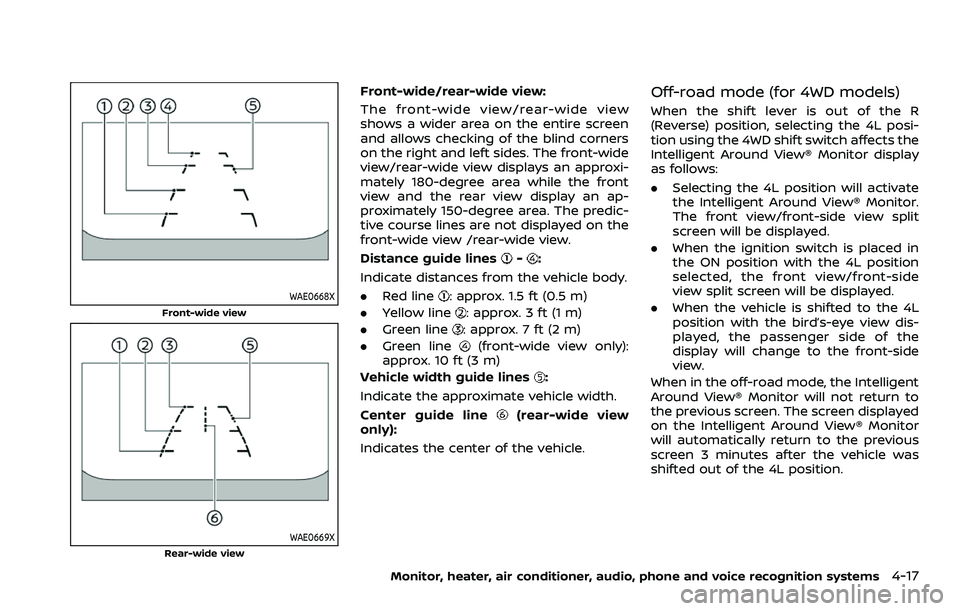
WAE0668X
Front-wide view
WAE0669X
Rear-wide view
Front-wide/rear-wide view:
The front-wide view/rear-wide view
shows a wider area on the entire screen
and allows checking of the blind corners
on the right and left sides. The front-wide
view/rear-wide view displays an approxi-
mately 180-degree area while the front
view and the rear view display an ap-
proximately 150-degree area. The predic-
tive course lines are not displayed on the
front-wide view /rear-wide view.
Distance guide lines
-:
Indicate distances from the vehicle body.
. Red line
: approx. 1.5 ft (0.5 m)
. Yellow line
: approx. 3 ft (1 m)
. Green line
: approx. 7 ft (2 m)
. Green line
(front-wide view only):
approx. 10 ft (3 m)
Vehicle width guide lines
:
Indicate the approximate vehicle width.
Center guide line
(rear-wide view
only):
Indicates the center of the vehicle.
Off-road mode (for 4WD models)
When the shift lever is out of the R
(Reverse) position, selecting the 4L posi-
tion using the 4WD shift switch affects the
Intelligent Around View® Monitor display
as follows:
. Selecting the 4L position will activate
the Intelligent Around View® Monitor.
The front view/front-side view split
screen will be displayed.
. When the ignition switch is placed in
the ON position with the 4L position
selected, the front view/front-side
view split screen will be displayed.
. When the vehicle is shifted to the 4L
position with the bird’s-eye view dis-
played, the passenger side of the
display will change to the front-side
view.
When in the off-road mode, the Intelligent
Around View® Monitor will not return to
the previous screen. The screen displayed
on the Intelligent Around View® Monitor
will automatically return to the previous
screen 3 minutes after the vehicle was
shifted out of the 4L position.
Monitor, heater, air conditioner, audio, phone and voice recognition systems4-17
Page 256 of 604
4-26Monitor, heater, air conditioner, audio, phone and voice recognition systems
WARNING
Failure to follow the warnings and
instructions for proper use of the
sonar function as outlined in this
section could result in serious injury
or death.
.The sonar is a convenience fea-
ture. It is not a substitute for
proper parking.
. This function is designed as an
aid to the driver in detecting large
stationary objects to help avoid
damaging the vehicle.
. The driver is always responsible
for safety during parking and
other maneuvers.
. Always look around and check
that it is safe to move before
parking.
. Read and understand the limita-
tions of the sonar as contained in
this section.
The sonar function helps to inform the
driver of large stationary objects around
the vehicle when parking by issuing an
audible and visual alert.
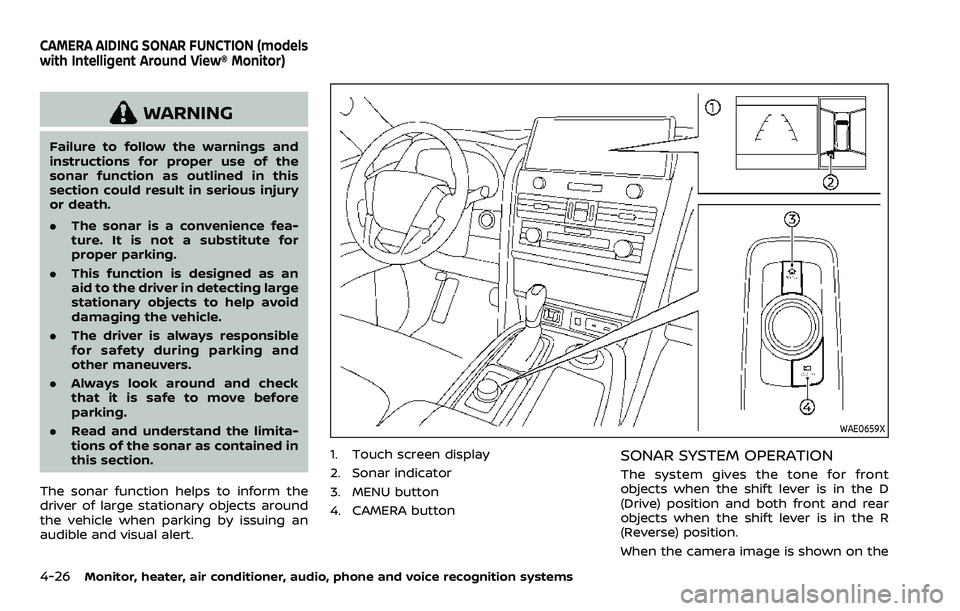
WAE0659X
1. Touch screen display
2. Sonar indicator
3. MENU button
4. CAMERA buttonSONAR SYSTEM OPERATION
The system gives the tone for front
objects when the shift lever is in the D
(Drive) position and both front and rear
objects when the shift lever is in the R
(Reverse) position.
When the camera image is shown on the
CAMERA AIDING SONAR FUNCTION (models
with Intelligent Around View® Monitor)
Page 263 of 604
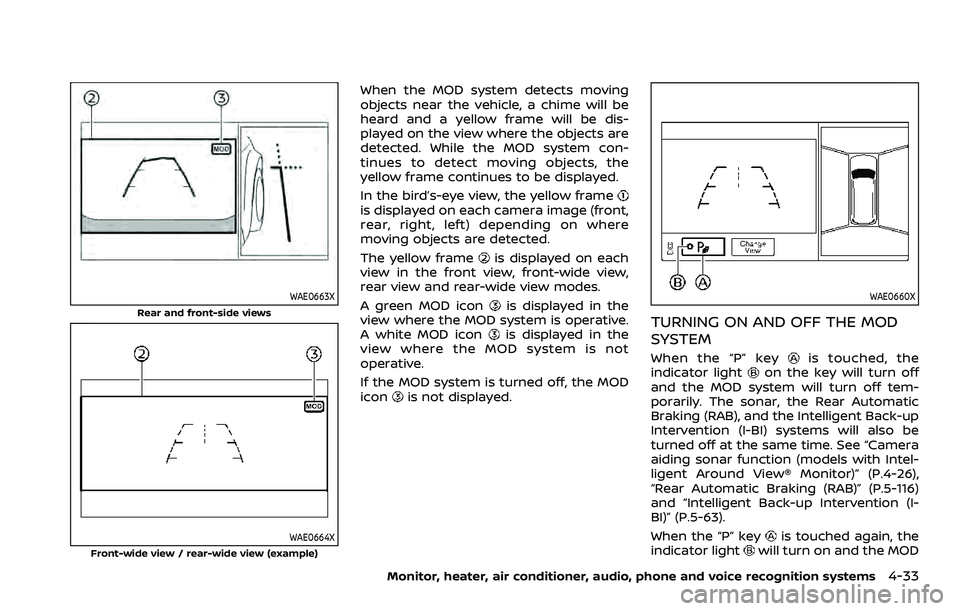
WAE0663X
Rear and front-side views
WAE0664X
Front-wide view / rear-wide view (example)
When the MOD system detects moving
objects near the vehicle, a chime will be
heard and a yellow frame will be dis-
played on the view where the objects are
detected. While the MOD system con-
tinues to detect moving objects, the
yellow frame continues to be displayed.
In the bird’s-eye view, the yellow frame
is displayed on each camera image (front,
rear, right, left) depending on where
moving objects are detected.
The yellow frame
is displayed on each
view in the front view, front-wide view,
rear view and rear-wide view modes.
A green MOD icon
is displayed in the
view where the MOD system is operative.
A white MOD icon
is displayed in the
view where the MOD system is not
operative.
If the MOD system is turned off, the MOD
icon
is not displayed.
WAE0660X
TURNING ON AND OFF THE MOD
SYSTEM
When the “P” keyis touched, the
indicator lighton the key will turn off
and the MOD system will turn off tem-
porarily. The sonar, the Rear Automatic
Braking (RAB), and the Intelligent Back-up
Intervention (I-BI) systems will also be
turned off at the same time. See “Camera
aiding sonar function (models with Intel-
ligent Around View® Monitor)” (P.4-26),
“Rear Automatic Braking (RAB)” (P.5-116)
and “Intelligent Back-up Intervention (I-
BI)” (P.5-63).
When the “P” key
is touched again, the
indicator lightwill turn on and the MOD
Monitor, heater, air conditioner, audio, phone and voice recognition systems4-33
Page 267 of 604
WARNING
.The air conditioner cooling func-
tion operates only when the en-
gine is running.
. Do not leave children or adults
who would normally require the
support of others alone in your
vehicle. Pets should not be left
alone either. On hot, sunny days,
temperatures in a closed vehicle
could quickly become high en-
ough to cause severe or possibly
fatal injuries to people or animals.
. Do not use the recirculation mode
for long periods as it may cause
the interior air to become stale
and the windows to fog up.
. Do not adjust the heating and air
conditioning controls while driv-
ing so that full attention may be
given to vehicle operation.
Start the engine and operate the heater
and air conditioner system.
NOTE:
. Odors from inside and outside the
vehicle can build up in the air condi-
tioner unit. Odor can enter the pas-
senger compartment through the vents.
. When parking, set the heater and air
conditioner controls to turn off air
recirculation to allow fresh air into
the passenger compartment. This
should help reduce odors inside the
vehicle.
Monitor, heater, air conditioner, audio, phone and voice recognition systems4-37
HEATER AND AIR CONDITIONER
Page 268 of 604
4-38Monitor, heater, air conditioner, audio, phone and voice recognition systems
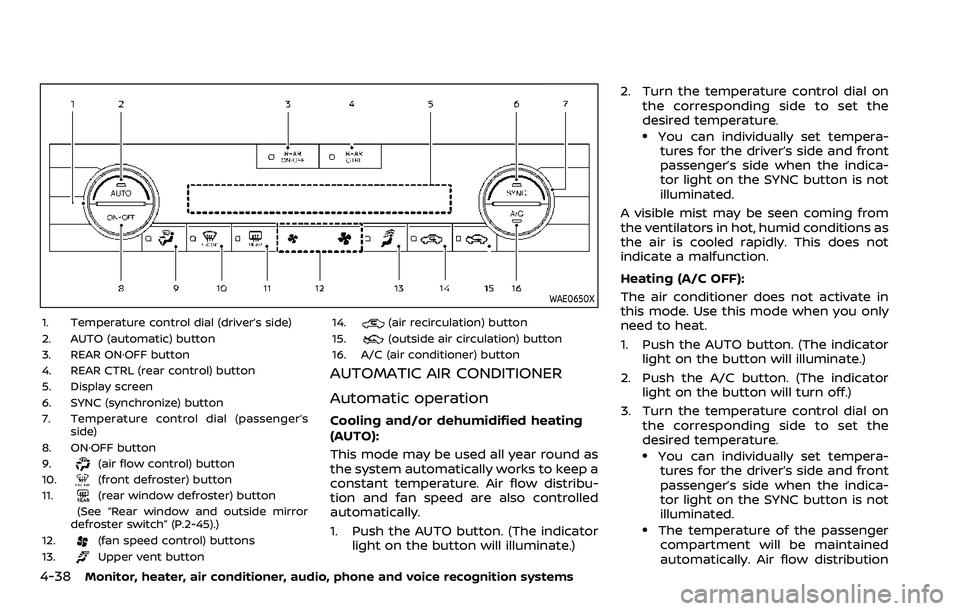
WAE0650X
1. Temperature control dial (driver’s side)
2. AUTO (automatic) button
3. REAR ON·OFF button
4. REAR CTRL (rear control) button
5. Display screen
6. SYNC (synchronize) button
7. Temperature control dial (passenger’sside)
8. ON·OFF button
9.
(air flow control) button
10.(front defroster) button
11.(rear window defroster) button
(See “Rear window and outside mirror
defroster switch” (P.2-45).)
12.
(fan speed control) buttons
13.Upper vent button 14.
(air recirculation) button
15.(outside air circulation) button
16. A/C (air conditioner) button
AUTOMATIC AIR CONDITIONER
Automatic operation
Cooling and/or dehumidified heating
(AUTO):
This mode may be used all year round as
the system automatically works to keep a
constant temperature. Air flow distribu-
tion and fan speed are also controlled
automatically.
1. Push the AUTO button. (The indicator light on the button will illuminate.) 2. Turn the temperature control dial on
the corresponding side to set the
desired temperature.
.You can individually set tempera-tures for the driver’s side and front
passenger’s side when the indica-
tor light on the SYNC button is not
illuminated.
A visible mist may be seen coming from
the ventilators in hot, humid conditions as
the air is cooled rapidly. This does not
indicate a malfunction.
Heating (A/C OFF):
The air conditioner does not activate in
this mode. Use this mode when you only
need to heat.
1. Push the AUTO button. (The indicator light on the button will illuminate.)
2. Push the A/C button. (The indicator light on the button will turn off.)
3. Turn the temperature control dial on the corresponding side to set the
desired temperature.
.You can individually set tempera-tures for the driver’s side and front
passenger’s side when the indica-
tor light on the SYNC button is not
illuminated.
.The temperature of the passengercompartment will be maintained
automatically. Air flow distribution
Page 269 of 604
and fan speed are also controlled
automatically.
NOTE:
. Do not set the temperature lower
than the outside air temperature or
the system may not work properly.
. Not recommended if windows fog
up.
Dehumidified defrosting or defogging:
1. Push the
button. (The indicator
light on the button will illuminate.)
2. Turn the temperature control dial on the corresponding side to set the
desired temperature.
.To quickly remove ice from theoutside of the windows, use the
button to set the fan speed to
maximum.
.As soon as possible after the wind- shield is cleared, push the AUTO
button to return to the automatic
mode.
Manual operation
Fan speed control:
Push the
buttons to manually control
the fan speed.
Air intake control:
. Push the
button to recirculate
interior air inside the vehicle. (The
indicator light on the button will
illuminate.)
. Push the
button to draw outside
air into the passenger compartment.
(The indicator light on the button will
illuminate.)
. To control the air intake automatically,
push and hold either the
button
or thebutton. The indicator light
will blink, and then the air intake will
switch to automatic control. When the
automatic control is set, the system
automatically alternates between the
outside air circulation and the air
recirculation modes. (The indicator
light of the active mode will illumi-
nate.) Air flow control:
Pushing the
button manually con-
trols air flow and selects the air outlet:
— Air flows mainly from center and side
ventilators.
— Air flows mainly from center and sideventilators and foot outlets.
— Air flows mainly from the foot outletand partly from the defroster.
— Air flows mainly from the defrosterand foot outlets.
Synchronize temperature settings:
Push the SYNC button to turn on the
SYNC mode. (The indicator light on the
button will illuminate.)
When the SYNC mode is active, the
driver’s side temperature control dial will
control the driver’s side, front passenger’s
side and rear temperatures.
When the passenger’s side temperature
setting or the rear temperature setting is
changed, it will cancel the SYNC mode of
the operated individual zone. (The indica-
tor light on the SYNC button will turn off.)
Changing both the passenger’s side tem-
perature setting and the rear tempera-
ture setting will completely turn off the
SYNC mode.
Monitor, heater, air conditioner, audio, phone and voice recognition systems4-39
Page 271 of 604
Cooling and dehumidified heating:
1. Push the REAR ON·OFF button to turnon the rear automatic air conditioning
system. (The indicator light on the
button will illuminate.) Push the REAR
CTRL button to operate the rear
automatic air conditioning system.
(The indicator light on the button will
illuminate.)
2. Turn the temperature control dial (driver’s side) to set the desired tem-
perature.
3. Switch the air flow mode to
by
pushing thebutton.
4. Push the A/C button. (The indicator light on the button will illuminate.)
NOTE:
When the front air conditioner is off, the
rear automatic air conditioning system
only operates the fan. When you would
like to use the air conditioner, be sure to
push the A/C button on the front air
conditioner control panel to turn on the
A/C indicator light.
Manual operation:
Perform the following when the indicator
lights on the REAR ON·OFF button and the
REAR CTRL button are illuminated.
. Temperature control
Turn the temperature control dial (driver’s side) to set the desired tem-
perature.
. Fan speed control
Push the fan speed control
but-
tons to manually control the fan
speed.
. Air flow control
Push the
button to change the air
flow mode.
: The air outlet is fixed at foot level.
: The air outlet is fixed at both the head and foot levels.
: The air outlet is fixed at the head level.
WAE0470X
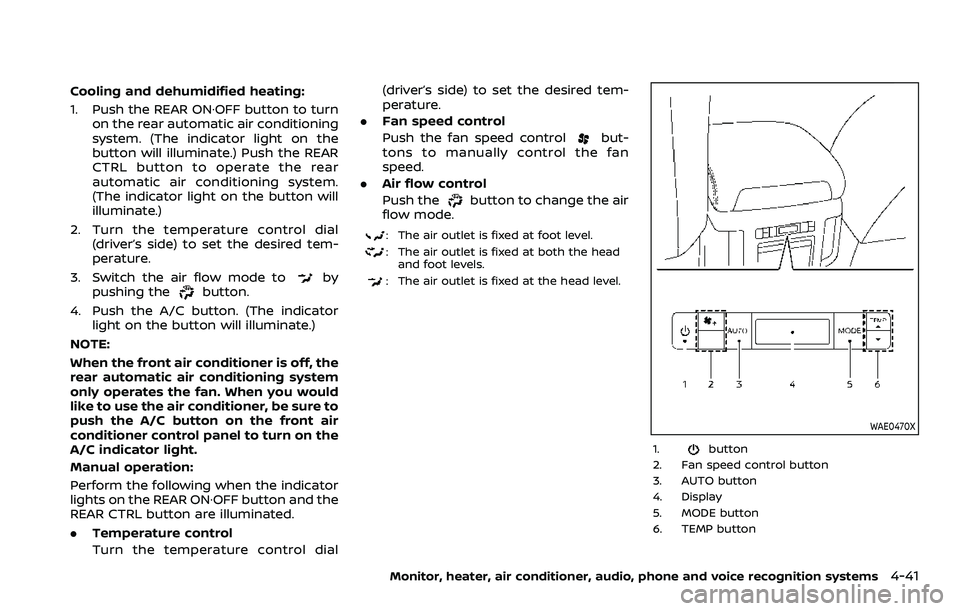
1.button
2. Fan speed control button
3. AUTO button
4. Display
5. MODE button
6. TEMP button
Monitor, heater, air conditioner, audio, phone and voice recognition systems4-41
Page 272 of 604
4-42Monitor, heater, air conditioner, audio, phone and voice recognition systems
Rear air conditioner control panel
operation
Rear control buttons:
When the indicator light on the REAR
CTRL button on the front air conditioner
control panel is turned off, the rear seat
passengers can adjust the rear automatic
air conditioning system using the control
switches on the rear of the center con-
sole.
.
button:
Rear automatic air conditioning sys-
tem on/off.
.
button:
Rear fan speed control up/down
. AUTO button:
Rear automatic air conditioning sys-
tem on, AUTO mode on
. MODE button:
Rear air flow control change
. TEMP button:
Rear temperature control up/down
Turning the system on/off
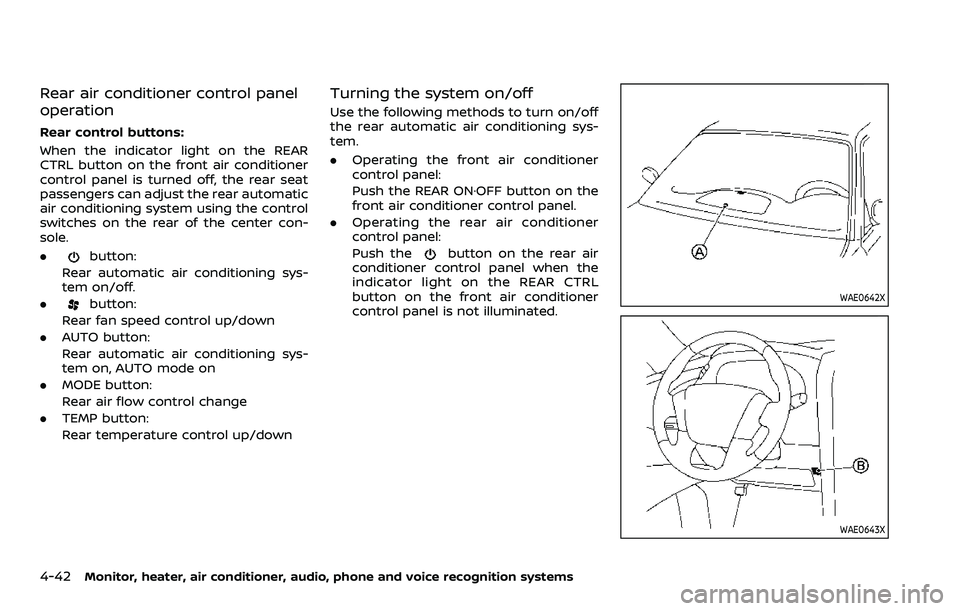
Use the following methods to turn on/off
the rear automatic air conditioning sys-
tem.
.Operating the front air conditioner
control panel:
Push the REAR ON·OFF button on the
front air conditioner control panel.
. Operating the rear air conditioner
control panel:
Push the
button on the rear air
conditioner control panel when the
indicator light on the REAR CTRL
button on the front air conditioner
control panel is not illuminated.
WAE0642X
WAE0643X