ECO mode NISSAN ARMADA 2022 Owner´s Manual
[x] Cancel search | Manufacturer: NISSAN, Model Year: 2022, Model line: ARMADA, Model: NISSAN ARMADA 2022Pages: 604, PDF Size: 2.97 MB
Page 388 of 604
5-76Starting and driving
WAF0746X
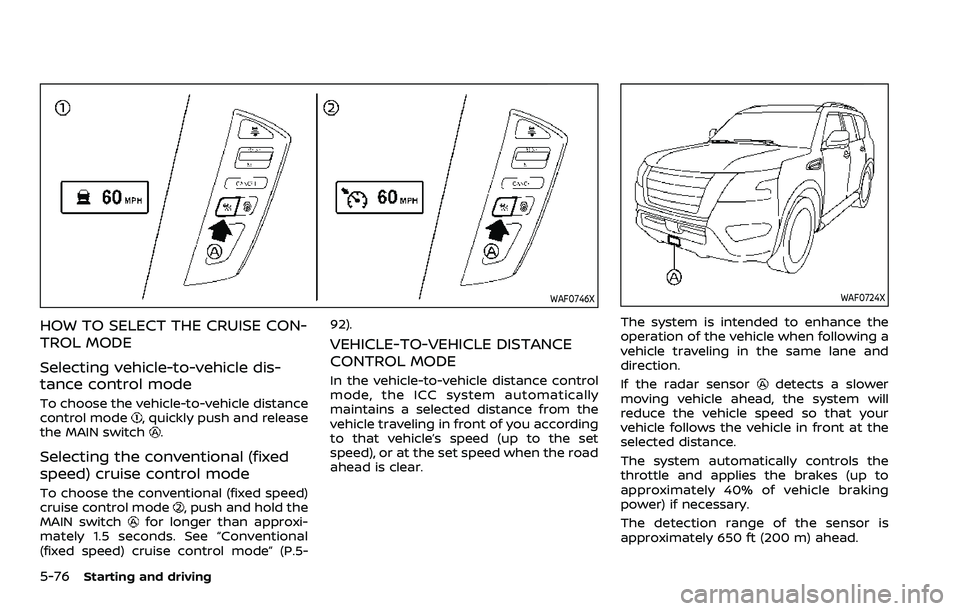
HOW TO SELECT THE CRUISE CON-
TROL MODE
Selecting vehicle-to-vehicle dis-
tance control mode
To choose the vehicle-to-vehicle distance
control mode, quickly push and release
the MAIN switch.
Selecting the conventional (fixed
speed) cruise control mode
To choose the conventional (fixed speed)
cruise control mode, push and hold the
MAIN switchfor longer than approxi-
mately 1.5 seconds. See “Conventional
(fixed speed) cruise control mode” (P.5- 92).
VEHICLE-TO-VEHICLE DISTANCE
CONTROL MODE
In the vehicle-to-vehicle distance control
mode, the ICC system automatically
maintains a selected distance from the
vehicle traveling in front of you according
to that vehicle’s speed (up to the set
speed), or at the set speed when the road
ahead is clear.
WAF0724X
The system is intended to enhance the
operation of the vehicle when following a
vehicle traveling in the same lane and
direction.
If the radar sensor
detects a slower
moving vehicle ahead, the system will
reduce the vehicle speed so that your
vehicle follows the vehicle in front at the
selected distance.
The system automatically controls the
throttle and applies the brakes (up to
approximately 40% of vehicle braking
power) if necessary.
The detection range of the sensor is
approximately 650 ft (200 m) ahead.
Page 389 of 604
Vehicle-to-vehicle distance control
mode operation
The vehicle-to-vehicle distance control
mode is designed to maintain a selected
distance and reduce the speed to match
the slower vehicle ahead; the system will
decelerate the vehicle as necessary and if
the vehicle ahead comes to a stop, the
vehicle decelerates to a standstill. How-
ever, the ICC system can only apply up to
approximately 40% of the vehicle’s total
braking power. This system should only
be used when traffic conditions allow
vehicle speeds to remain fairly constant
or when vehicle speeds change gradually.
If a vehicle moves into the traveling lane
ahead or if a vehicle traveling ahead
rapidly decelerates, the distance between
vehicles may become closer because the
ICC system cannot decelerate the vehicle
quickly enough. If this occurs, the ICC
system will sound a warning chime and
blink the system display to notify the
driver to take necessary action.
The system will cancel and a warning
chime will sound if the speed is below
approximately 15 MPH (25 km/h) and a
vehicle is not detected ahead. The system
will also disengage when the vehicle goes
above the maximum set speed.
See “Approach warning” (P.5-84).The following items are controlled in the
vehicle-to-vehicle distance control mode:
.
When there are no vehicles traveling
ahead, the vehicle-to-vehicle distance
control mode maintains the speed set
by the driver. The set speed range is
between approximately 20 and 90
MPH (30 and 144 km/h).
. When there is a vehicle traveling
ahead, the vehicle-to-vehicle distance
control mode adjusts the speed to
maintain the distance, selected by
driver, from the vehicle ahead. The
adjusting speed range is up to the set
speed. If the vehicle ahead comes to a
stop, the vehicle decelerates to a
standstill within the limitations of the
system. The system will cancel once it
judges a standstill with a warning
chime.
. When the vehicle traveling ahead has
moved out from its lane of travel, the
vehicle-to-vehicle distance control
mode accelerates and maintains ve-
hicle speed up to the set speed.
The ICC system does not control vehicle
speed or warn you when you approach
stationary and slow moving vehicles. You
must pay attention to vehicle operation
to maintain proper distance from vehicles
ahead when approaching toll gates or
traffic congestion.
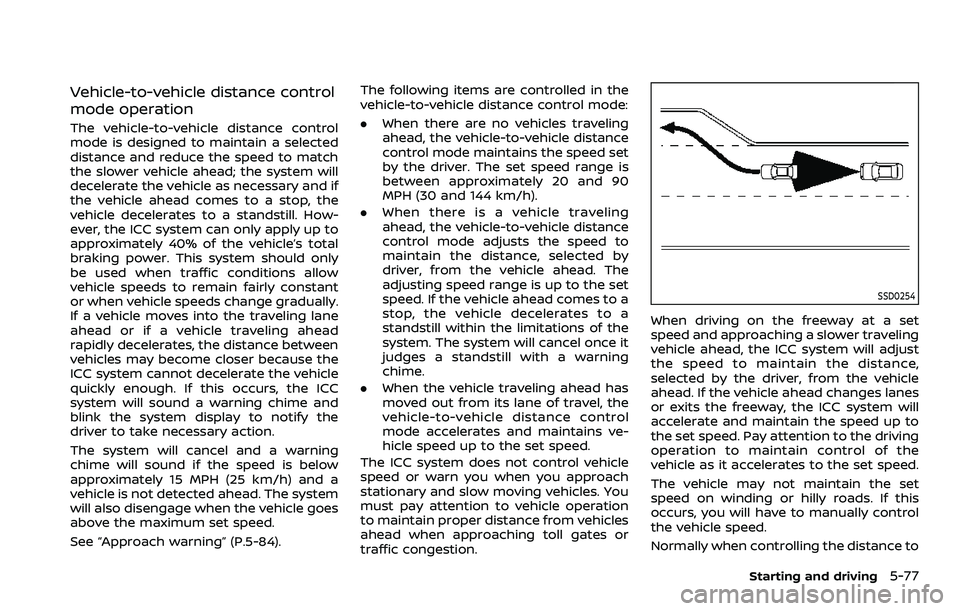
SSD0254
When driving on the freeway at a set
speed and approaching a slower traveling
vehicle ahead, the ICC system will adjust
the speed to maintain the distance,
selected by the driver, from the vehicle
ahead. If the vehicle ahead changes lanes
or exits the freeway, the ICC system will
accelerate and maintain the speed up to
the set speed. Pay attention to the driving
operation to maintain control of the
vehicle as it accelerates to the set speed.
The vehicle may not maintain the set
speed on winding or hilly roads. If this
occurs, you will have to manually control
the vehicle speed.
Normally when controlling the distance to
Starting and driving5-77
Page 392 of 604
5-80Starting and driving
WAF0749X
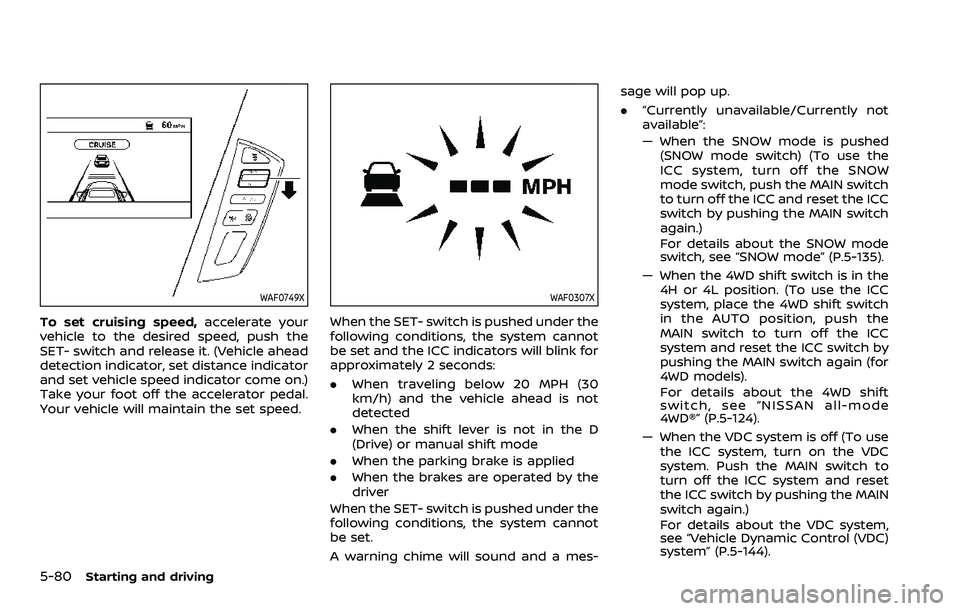
To set cruising speed,accelerate your
vehicle to the desired speed, push the
SET- switch and release it. (Vehicle ahead
detection indicator, set distance indicator
and set vehicle speed indicator come on.)
Take your foot off the accelerator pedal.
Your vehicle will maintain the set speed.
WAF0307X
When the SET- switch is pushed under the
following conditions, the system cannot
be set and the ICC indicators will blink for
approximately 2 seconds:
. When traveling below 20 MPH (30
km/h) and the vehicle ahead is not
detected
. When the shift lever is not in the D
(Drive) or manual shift mode
. When the parking brake is applied
. When the brakes are operated by the
driver
When the SET- switch is pushed under the
following conditions, the system cannot
be set.
A warning chime will sound and a mes- sage will pop up.
.
“Currently unavailable/Currently not
available”:
— When the SNOW mode is pushed
(SNOW mode switch) (To use the
ICC system, turn off the SNOW
mode switch, push the MAIN switch
to turn off the ICC and reset the ICC
switch by pushing the MAIN switch
again.)
For details about the SNOW mode
switch, see “SNOW mode” (P.5-135).
— When the 4WD shift switch is in the 4H or 4L position. (To use the ICC
system, place the 4WD shift switch
in the AUTO position, push the
MAIN switch to turn off the ICC
system and reset the ICC switch by
pushing the MAIN switch again (for
4WD models).
For details about the 4WD shift
switch, see “NISSAN all-mode
4WD®” (P.5-124).
— When the VDC system is off (To use the ICC system, turn on the VDC
system. Push the MAIN switch to
turn off the ICC system and reset
the ICC switch by pushing the MAIN
switch again.)
For details about the VDC system,
see “Vehicle Dynamic Control (VDC)
system” (P.5-144).
Page 399 of 604
the distance from other vehicles
using the accelerator pedal. Al-
ways stay alert and avoid using
the ICC system when it is not
recommended in this section.
The radar sensor will not detect the
following objects:
. Stationary and slow moving vehicles
. Pedestrians or objects in the roadway
. Oncoming vehicles in the same lane
. Motorcycles traveling offset in the
travel lane
The sensor generally detects the signals
returned from the vehicle ahead. There-
fore, if the sensor cannot detect the
reflection from the vehicle ahead, the
ICC system may not maintain the se-
lected distance.
The following are some conditions in
which the sensor cannot detect the
signals:
. When the snow or road spray from
traveling vehicles reduces the sensor’s
visibility
. When excessively heavy baggage is
loaded in the rear seat or the luggage
area of your vehicle
. When your vehicle is towing a trailer,
etc. The ICC system is designed to automati-
cally check the sensor’s operation within
the limitation of the system. When the
sensor is covered with dirt or is ob-
structed, the system will automatically
be canceled. If the sensor is covered with
ice, a transparent or translucent vinyl bag,
etc., the ICC system may not detect them.
In these instances, the vehicle-to-vehicle
distance control mode may not cancel
and may not be able to maintain the
selected following distance from the ve-
hicle ahead. Be sure to check and clean
the sensor regularly.
Starting and driving5-87
Page 404 of 604
5-92Starting and driving
WAF0724X
System maintenance
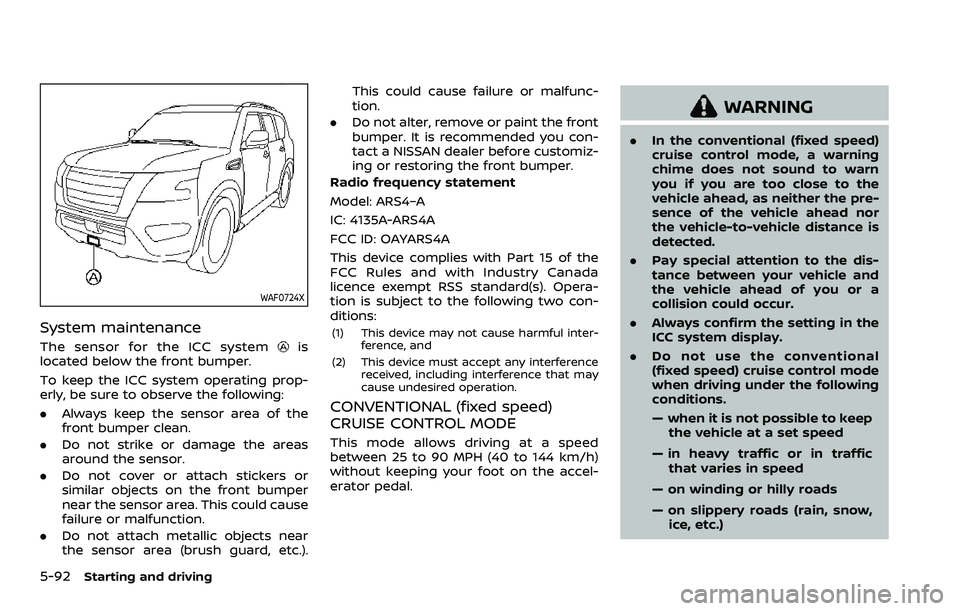
The sensor for the ICC systemis
located below the front bumper.
To keep the ICC system operating prop-
erly, be sure to observe the following:
. Always keep the sensor area of the
front bumper clean.
. Do not strike or damage the areas
around the sensor.
. Do not cover or attach stickers or
similar objects on the front bumper
near the sensor area. This could cause
failure or malfunction.
. Do not attach metallic objects near
the sensor area (brush guard, etc.). This could cause failure or malfunc-
tion.
. Do not alter, remove or paint the front
bumper. It is recommended you con-
tact a NISSAN dealer before customiz-
ing or restoring the front bumper.
Radio frequency statement
Model: ARS4–A
IC: 4135A-ARS4A
FCC ID: OAYARS4A
This device complies with Part 15 of the
FCC Rules and with Industry Canada
licence exempt RSS standard(s). Opera-
tion is subject to the following two con-
ditions:(1) This device may not cause harmful inter- ference, and
(2) This device must accept any interference received, including interference that may
cause undesired operation.
CONVENTIONAL (fixed speed)
CRUISE CONTROL MODE
This mode allows driving at a speed
between 25 to 90 MPH (40 to 144 km/h)
without keeping your foot on the accel-
erator pedal.
WARNING
.In the conventional (fixed speed)
cruise control mode, a warning
chime does not sound to warn
you if you are too close to the
vehicle ahead, as neither the pre-
sence of the vehicle ahead nor
the vehicle-to-vehicle distance is
detected.
. Pay special attention to the dis-
tance between your vehicle and
the vehicle ahead of you or a
collision could occur.
. Always confirm the setting in the
ICC system display.
. Do not use the conventional
(fixed speed) cruise control mode
when driving under the following
conditions.
— when it is not possible to keep
the vehicle at a set speed
— in heavy traffic or in traffic that varies in speed
— on winding or hilly roads
— on slippery roads (rain, snow, ice, etc.)
Page 406 of 604
5-94Starting and driving
.Cruise control system warning (yel-low):
Indicates that there is a malfunc-
tion in the ICC system.
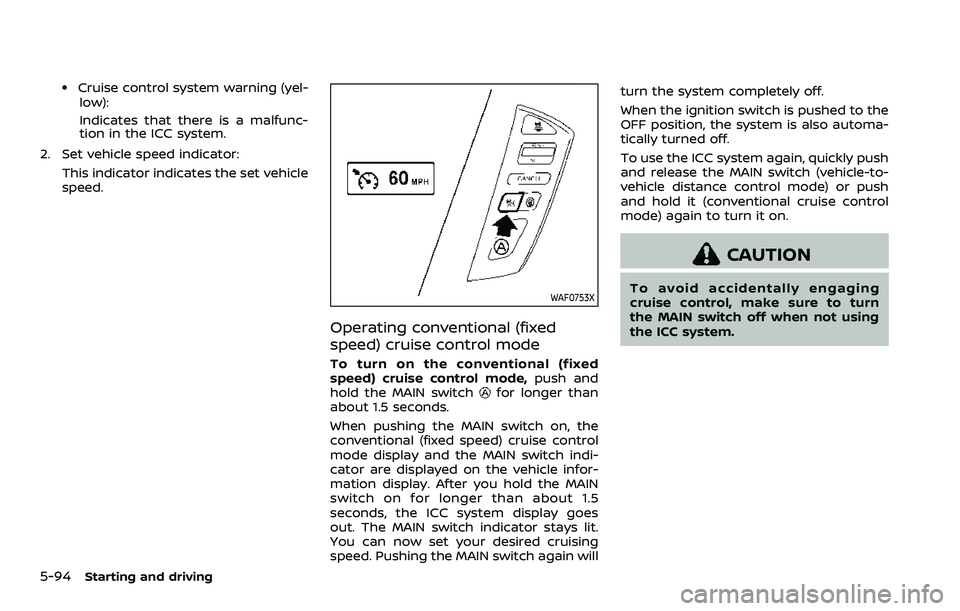
2. Set vehicle speed indicator: This indicator indicates the set vehicle
speed.
WAF0753X
Operating conventional (fixed
speed) cruise control mode
To turn on the conventional (fixed
speed) cruise control mode, push and
hold the MAIN switch
for longer than
about 1.5 seconds.
When pushing the MAIN switch on, the
conventional (fixed speed) cruise control
mode display and the MAIN switch indi-
cator are displayed on the vehicle infor-
mation display. After you hold the MAIN
switch on for longer than about 1.5
seconds, the ICC system display goes
out. The MAIN switch indicator stays lit.
You can now set your desired cruising
speed. Pushing the MAIN switch again will turn the system completely off.
When the ignition switch is pushed to the
OFF position, the system is also automa-
tically turned off.
To use the ICC system again, quickly push
and release the MAIN switch (vehicle-to-
vehicle distance control mode) or push
and hold it (conventional cruise control
mode) again to turn it on.
CAUTION
To avoid accidentally engaging
cruise control, make sure to turn
the MAIN switch off when not using
the ICC system.
Page 417 of 604
SYSTEM MALFUNCTION
If the AEB with pedestrian detection
system malfunctions, it will be turned off
automatically, a chime will sound, the AEB
system warning light will (orange) will
illuminate and the “Malfunction” warning
message will appear in the vehicle infor-
mation display.
Action to take:
If the warning light (orange) comes on,
stop the vehicle in a safe location. Turn
the engine off and restart the engine. If
the warning light continues to illuminate,
have the AEB with pedestrian detection
system checked. It is recommended that
you visit a NISSAN dealer for this service.
WAF0773X
SYSTEM MAINTENANCE
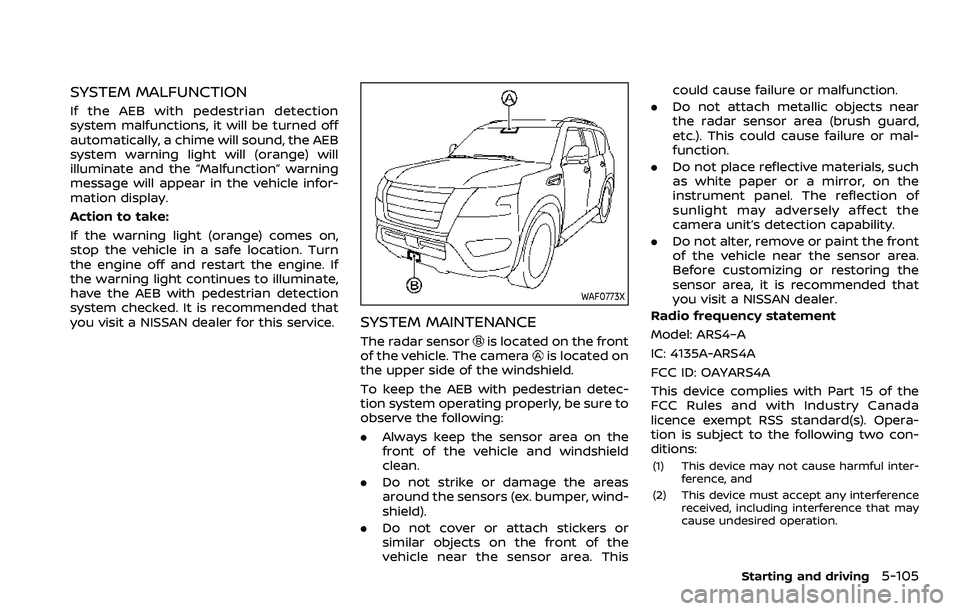
The radar sensoris located on the front
of the vehicle. The camerais located on
the upper side of the windshield.
To keep the AEB with pedestrian detec-
tion system operating properly, be sure to
observe the following:
. Always keep the sensor area on the
front of the vehicle and windshield
clean.
. Do not strike or damage the areas
around the sensors (ex. bumper, wind-
shield).
. Do not cover or attach stickers or
similar objects on the front of the
vehicle near the sensor area. This could cause failure or malfunction.
. Do not attach metallic objects near
the radar sensor area (brush guard,
etc.). This could cause failure or mal-
function.
. Do not place reflective materials, such
as white paper or a mirror, on the
instrument panel. The reflection of
sunlight may adversely affect the
camera unit’s detection capability.
. Do not alter, remove or paint the front
of the vehicle near the sensor area.
Before customizing or restoring the
sensor area, it is recommended that
you visit a NISSAN dealer.
Radio frequency statement
Model: ARS4–A
IC: 4135A-ARS4A
FCC ID: OAYARS4A
This device complies with Part 15 of the
FCC Rules and with Industry Canada
licence exempt RSS standard(s). Opera-
tion is subject to the following two con-
ditions:
(1) This device may not cause harmful inter- ference, and
(2) This device must accept any interference received, including interference that may
cause undesired operation.
Starting and driving5-105
Page 426 of 604
5-114Starting and driving
tion.
. Do not alter, remove or paint the front
bumper. It is recommended you con-
tact a NISSAN dealer before customiz-
ing or restoring the front bumper.
Radio frequency statement
Model: ARS4–A
IC: 4135A-ARS4A
FCC ID: OAYARS4A
This device complies with Part 15 of the
FCC Rules and with Industry Canada
licence exempt RSS standard(s). Opera-
tion is subject to the following two con-
ditions:
(1) This device may not cause harmful inter-
ference, and
(2) This device must accept any interference received, including interference that may
cause undesired operation.
WARNING
Failure to follow the warnings and
instructions for proper use of the I-
DA system could result in serious
injury or death.
.The I–DA system is only a warning
to inform the driver of a potential
lack of driver attention or drowsi-
ness. It will not steer the vehicle
or prevent loss of control.
. The I–DA system does not detect
and provide an alert of the dri-
ver’s lack of attention or fatigue
in every situation.
. It is the driver’s responsibility to:
— Stay alert.
— Drive safely.
— Keep the vehicle in the travel-
ing lane.
— Be in control of the vehicle at all times.
— Avoid driving when tired.
— Avoid distractions (texting, etc). The I–DA system helps alert the driver if
the system detects a lack of attention or
driving fatigue.
The system monitors driving style and
steering behavior over a period of time,
and it detects changes from the normal
pattern. If the system detects that driver
attention is decreasing over a period of
time, the system uses audible and visual
warnings to suggest that the driver take a
break.
INTELLIGENT DRIVER ALERTNESS (I-DA)
Page 436 of 604
5-124Starting and driving
.Keep your engine tuned up.
. Follow the recommended scheduled
maintenance.
. Keep the tires inflated to the correct
pressure. Low tire pressure increases
tire wear and lowers fuel economy.
. Keep the wheels in correct alignment.
Improper alignment increases tire
wear and lowers fuel economy.
. Use the recommended viscosity en-
gine oil. (See “Engine oil and oil filter
recommendation” (P.10-6).)
WARNING
.Do not attempt to raise two
wheels off the ground and shift
the transmission to any drive or
reverse position with the engine
running. Doing so may result in
drivetrain damage or unexpected
vehicle movement which could
result in serious vehicle damage
or personal injury.
. Do not attempt to test a 4WD
equipped vehicle on a 2-wheel
dynamometer or similar equip-
ment even if the other two
wheels are raised off the ground.
Make sure you inform test facility
personnel that your vehicle is
equipped with 4WD before it is
placed on a dynamometer. Using
the wrong test equipment may
result in drivetrain damage or
unexpected vehicle movement
which could result in serious ve-
hicle damage or personal injury.
CAUTION
.Do not drive the vehicle in the 4HI
or 4LO position on dry hard sur-
face roads. Driving on dry, hard
surfaces in 4HI or 4LO may cause
unnecessary noise, tire wear and
increased fuel consumption.
If the Four-Wheel Drive (4WD)
warning light turns on when driv-
ing on dry hard surface roads:
— in the 4HI position, shift the
4WD shift switch to AUTO.
— in the 4LO position, stop the vehicle and shift the transmis-
sion lever to the N (Neutral)
position with the brake pedal
depressed and shift the 4WD
shift switch to AUTO.
If the 4WD warning light is still
on after the above operation,
have your vehicle checked as
soon as possible. It is recom-
mended you visit a NISSAN
dealer for this service.
. The transfer case may be da-
maged if you continue driving
with the 4WD warning light blink-
ing.
INCREASING FUEL ECONOMYNISSAN ALL-MODE 4WD® (if so equipped)
Page 440 of 604
5-128Starting and driving
The 4WD shift switch is used to select the
4WD mode depending on the driving
conditions. There are 3 types of drive
modes available, AUTO, 4HI and 4LO.
The 4WD shift switch electronically con-
trols the transfer case operation. Rotate
the switch to move between each mode,
AUTO, 4H and 4L.
You must depress the 4WD shift switch
to select 4L, and the vehicle MUST be
stationary and the shift lever in the N
(Neutral) position when changing into
or out of 4L.
WARNING
.When parking, apply the parking
brake before stopping the engine
and make sure that the 4WD shift
indicator is on and the ATP warn-
ing light turns off. Otherwise, the
vehicle could unexpectedly move
even if the automatic transmis-
sion is in the P (Park) position.
. The 4LO and 4HI indicators must
stop blinking and the 4LO or 4HI
indicator must remain illumi-
nated or turn off before shifting
the transmission into gear. If the
shift lever is shifted from the N
(Neutral) position to any other gear while the 4LO and 4HI in-
dicators are blinking alternately,
the vehicle may move unexpect-
edly.
CAUTION
.
Never shift the 4WD shift switch
between 4L and 4H while driving.
. The 4HI position provides greater
traction. Avoid excessive speed,
as it will cause increased fuel
consumption and higher oil tem-
peratures, and could damage dri-
vetrain component. Speeds over
62 MPH (100 km/h) in 4HI is not
recommended.
. The 4LO position provides max-
imum traction. Avoid raising ve-
hicle speed excessively, as the
maximum speed is approxi-
mately 31 MPH (50 km/h).
. When driving straight, shift the
4WD shift switch to the AUTO or
4H position. Do not move the 4WD
shift switch when making a turn
or reversing.
. Do not shift the 4WD shift switch
(between AUTO and 4H) while
driving on steep downhill grades. Use the engine brake and low
automatic transmission gears
for engine braking.
. Do not operate the 4WD shift
switch (between AUTO and 4H)
with the rear wheels spinning.
. Do not drive on dry hard surface
roads in the 4HI or 4LO position.
Driving on dry hard surfaces in
4HI or 4LO may cause unneces-
sary noise and tire wear. NISSAN
recommends driving in the AUTO
position under these conditions.
. The 4WD transfer case may not
be shifted between 4HI and 4LO
at low ambient temperatures and
the 4LO and 4HI indicators may
blink even when the 4WD shift
switch is shifted. After driving for
a while you can change the 4WD
shift switch between 4H and 4L.
When driving on rough roads,
. Drive carefully according to the road
surface conditions.
When the vehicle is stuck,
. Place stones or wooden blocks under
the tires to free the vehicle.
. Set the 4WD shift switch to 4H or 4L.