battery NISSAN CUBE 2009 User Guide
[x] Cancel search | Manufacturer: NISSAN, Model Year: 2009, Model line: CUBE, Model: NISSAN CUBE 2009Pages: 321, PDF Size: 4.99 MB
Page 128 of 321
Black plate (126,1)
Model "Z12-D" EDITED: 2009/ 1/ 28
Locking doors1. Place the ignition switch in the OFF position
and carry the Intelligent Key with you.*1
2. Close all the doors.*2
3. Push the door handle request switch (dri-
ver’s or front passenger’s)
*A
or the back
door request switch
*B
while carrying the
Intelligent Key with you.*3
4. All the doors and the back door will lock.
5. The hazard indicator flashes twice and the
outside chime sounds twice.
*1: Doors will lock with the request switch while
the ignition switch is in the ACC or ON
position.
*2: Doors will not lock with the request switch
while any door is open.
*3: Doors will not lock with the request switch
when the Intelligent Key is left inside the
vehicle. However, when an Intelligent Key is
inside the vehicle, doors can be locked with
another registered Intelligent Key.
Unlocking doors1. Push the door handle request switch
*A
or
the back door request switch
*B
while
carrying the Intelligent Key with you.
2. The hazard indicator flashes once and out-side chime sounds once. The corresponding
door or the back door will unlock.
3. Push the request switch again within 1
minute.
4. The hazard indicator flashes once and out-
side chime sounds once again. All the doors
and the back door will unlock.
All doors will be locked automatically unless one
of the following operations is performed within 1
minute after pushing the request switch while
the doors are locked.
.Opening any door.
.Pushing the ignition switch.
During this 1-minute time period, if the UNLOCK
button on the Intelligent Key is pushed, all
doors will be locked automatically after another
1 minute.
BATTERY SAVER SYSTEMWhen all the following conditions are met for 60
minutes, the battery saver system will cut off the
power supply to prevent battery discharge.
.The ignition switch is in the ACC position,
and
.All doors are closed, and
.The selector lever is in the P (Park) position.
WARNING LIGHTS AND AUDIBLE
REMINDERSTo help prevent the vehicle from moving
unexpectedly by erroneous operation of the
Intelligent Key listed on the following chart or
to help prevent the vehicle from being stolen,
chime or beep sounds inside and outside the
vehicle and a warning light illuminates or blinks.
When a chime or beep sounds or the warning
light illuminates or blinks, be sure to check the
vehicle and Intelligent Key.
See “TROUBLESHOOTING GUIDE” later in
this section and “WARNING/INDICATOR
LIGHTS AND AUDIBLE REMINDERS” in the
“2. Instruments and controls” section.
Intelligent Key system warning light:P position selecting warning light:
3-14
Pre-driving checks and adjustments
ProCarManuals.com
Page 129 of 321

Black plate (127,1)
Model "Z12-D" EDITED: 2009/ 1/ 28
TROUBLESHOOTING GUIDE
Symptom Possible cause Action to take
When pushing the ignition switch
to stop the engineThe P position selecting warning light in the
meter illuminates and the inside warning chime
sounds continuously.The selector lever is not in the P (Park)
position.Shift the selector lever to the P (Park)
position.
When shifting the selector lever
to the P (Park) position.The inside warning chime sounds continuously.The ignition switch is in the ACC or ON
position.Push the ignition switch to the OFF posi-
tion.
When opening the driver’s door
to get out of the vehicleThe inside warning chime sounds continuously.The ignition switch is in the ACC
position.Push the ignition switch to the OFF posi-
tion.
When closing the door after get-
ting out of the vehicleThe Intelligent Key system warning light in the
meter blinks in yellow, and the outside chime
sounds 3 times and the inside warning chime
sounds for a few seconds.The ignition switch is in the ACC or ON
position.Push the ignition switch to the OFF posi-
tion.
The P position selecting warning light in the
meter illuminates and the outside chime
sounds continuously.The ignition switch is in the ACC or OFF
position and the selector lever is not in
the P (Park) position.Move the selector lever to the P (Park)
position and push the ignition switch to the
OFF position.
When closing the door with the
inside lock knob turned to LOCKThe outside chime sounds for a few seconds
and all the doors unlock.The Intelligent Key is inside the vehicle. Carry the Intelligent Key with you.
When pushing the request switch
or the LOCK
button on the
Intelligent Key to lock the doorThe outside chime sounds for a few seconds.The Intelligent Key is inside the vehicle. Carry the Intelligent Key with you.
A door is not closed securely. Close the door securely.
When pushing the ignition switch
to start the engineThe Intelligent Key system warning light in the
meter blinks in green.The battery charge is low.Replace the battery with a new one. (See
“KEY BATTERY REPLACEMENT” in the “8.
Maintenance and do-it-yourself” section.)
The Intelligent Key system warning light in the
meter blinks in yellow and the inside warning
chime sounds for a few seconds.The Intelligent Key is not in the vehicle. Carry the Intelligent Key with you.
Pre-driving checks and adjustments
3-15
ProCarManuals.com
Page 131 of 321
Black plate (129,1)
Model "Z12-D" EDITED: 2009/ 1/ 28
HOW TO USE REMOTE KEYLESS
ENTRY FUNCTION
WARNING
.Radio waves could adversely affect
electric medical equipment. Those
who use a pacemaker should con-
tact the electric medical equipment
manufacturer for the possible influ-
ences before use.
.The Intelligent Key transmits radio
waves when the buttons are
pushed. The FAA advises that the
radio waves may affect aircraft na-
vigation and communication sys-
tems. Do not operate the
Intelligent Key while on an airplane.
Makesurethebuttonsarenot
operated unintentionally when the
unit is stored during a flight.
CAUTION
.Do not allow the Intelligent Key,
which contains electrical compo-
nents, to come into contact with
water or salt water. This could affect
the system function..Do not drop the Intelligent Key.
.Do not strike the Intelligent Key
sharply against another object.
.Do not change or modify the Intel-
ligent Key.
.Wetting may damage the Intelligent
Key. If the Intelligent Key gets wet,
immediately wipe until it is comple-
tely dry.
.Do not place the Intelligent Key for
an extended period in an area where
temperatures exceed 1408F (608C) .
.Do not attach the Intelligent Key
with a key holder that contains a
magnet.
.Do not place the Intelligent Key near
equipment that produces a mag-
netic field, such as a TV, audio
equipment, personal computers or
cellular phone.
The remote keyless entry function can operate
all door locks using the remote keyless entry
function of the Intelligent Key. The remote
keyless entry function can operate at a distance
of approximately 33 ft (10 m) from the vehicle.
(The operating distance depends upon the
conditions around the vehicle.)The remote keyless entry function will not
operate:
.When the Intelligent Key is not within the
operational range.
.When the doors are open or not closed
securely.
.When the Intelligent Key battery is dis-
charged.
The remote keyless entry function can also
operate the vehicle alarm.
Pre-driving checks and adjustments
3-17
ProCarManuals.com
Page 154 of 321
Black plate (152,1)
Model "Z12-D" EDITED: 2009/ 1/ 28
SAA0306
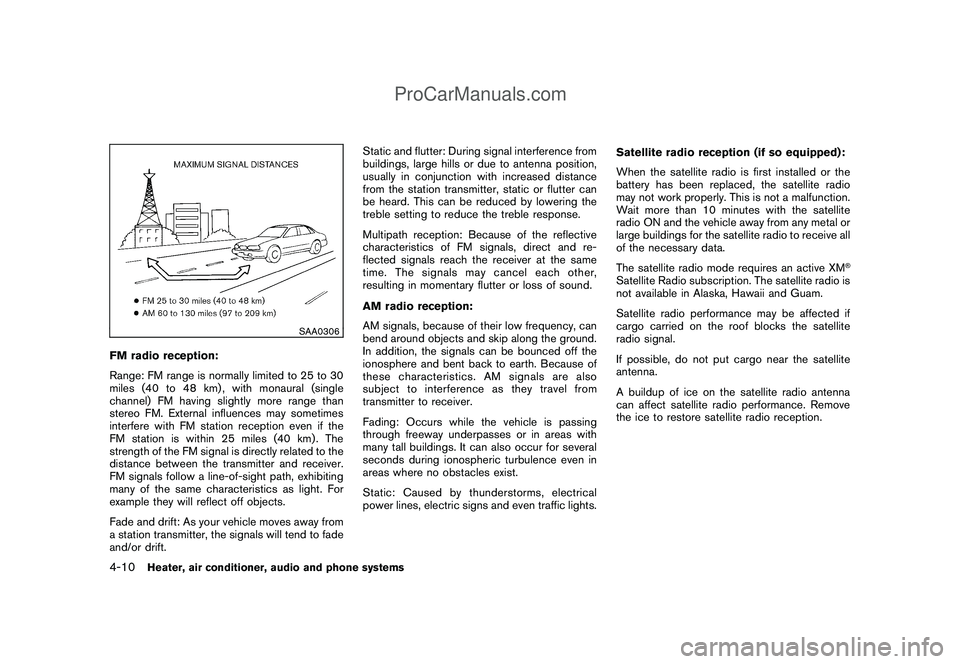
FM radio reception:
Range: FM range is normally limited to 25 to 30
miles (40 to 48 km) , with monaural (single
channel) FM having slightly more range than
stereo FM. External influences may sometimes
interfere with FM station reception even if the
FM station is within 25 miles (40 km). The
strength of the FM signal is directly related to the
distance between the transmitter and receiver.
FM signals follow a line-of-sight path, exhibiting
many of the same characteristics as light. For
example they will reflect off objects.
Fade and drift: As your vehicle moves away from
a station transmitter, the signals will tend to fade
and/or drift.Static and flutter: During signal interference from
buildings, large hills or due to antenna position,
usually in conjunction with increased distance
from the station transmitter, static or flutter can
be heard. This can be reduced by lowering the
treble setting to reduce the treble response.
Multipath reception: Because of the reflective
characteristics of FM signals, direct and re-
flected signals reach the receiver at the same
time. The signals may cancel each other,
resulting in momentary flutter or loss of sound.
AM radio reception:
AM signals, because of their low frequency, can
bend around objects and skip along the ground.
In addition, the signals can be bounced off the
ionosphere and bent back to earth. Because of
these characteristics. AM signals are also
subject to interference as they travel from
transmitter to receiver.
Fading: Occurs while the vehicle is passing
through freeway underpasses or in areas with
many tall buildings. It can also occur for several
seconds during ionospheric turbulence even in
areas where no obstacles exist.
Static: Caused by thunderstorms, electrical
power lines, electric signs and even traffic lights.Satellite radio reception (if so equipped):
When the satellite radio is first installed or the
battery has been replaced, the satellite radio
may not work properly. This is not a malfunction.
Wait more than 10 minutes with the satellite
radio ON and the vehicle away from any metal or
large buildings for the satellite radio to receive all
of the necessary data.
The satellite radio mode requires an active XM
®
Satellite Radio subscription. The satellite radio is
not available in Alaska, Hawaii and Guam.
Satellite radio performance may be affected if
cargo carried on the roof blocks the satellite
radio signal.
If possible, do not put cargo near the satellite
antenna.
A buildup of ice on the satellite radio antenna
can affect satellite radio performance. Remove
the ice to restore satellite radio reception.
4-10
Heater, air conditioner, audio and phone systems
ProCarManuals.com
Page 162 of 321

Black plate (160,1)
Model "Z12-D" EDITED: 2009/ 1/ 28
Push the TUNE
or
or SEEK
or
button to adjust Bass, Treble, Fade and
Balance to the desired level. Fade adjusts the
sound level between the front and rear speakers
and Balance adjusts the sound between the
right and left speakers.
Once you have adjusted the sound quality to the
desired level, push the MENU button repeatedly
until the radio or CD display reappears (normal
mode) . Otherwise, the radio or CD display will
automatically reappear after approximately 10
seconds.
For information about adjusting the clock dis-
play, see “CLOCK” in the “2. Instruments and
controls” section.
FM-AM radio operation
Radio (FM/AM) band select:
Pushing the radio band select button will
change the band as follows:
AM?FM1?FM2?AM
When the radio band select button is pushed
while the ignition switch is in the ACC or ON
position, the radio will come on at the station last
played.The last station played will also come on when
the PWR button is pushed to ON.
If another audio source is playing when the radio
band select button is pushed, the audio source
will automatically be turned off and the last radio
station played will come on.
When the stereo broadcast signal is weak, the
radio will automatically change from stereo to
monaural reception.
TUNE (Tuning):
Push the TUNE button
or
for manual
tuning.
SEEK tuning:
Push the SEEK button
or
to tune from
low to high or high to low frequencies and to
stop at the next broadcasting station.
SCAN tuning:
Push the SCAN tuning button to tune from low
to high frequencies and stops at each broad-
casting station for 5 seconds. Pushing the
button again during this 5 seconds period will
stop SCAN tuning and the radio will remain
tuned to that station.
If the SCAN tuning button is not pushed within 5
seconds, SCAN tuning moves to the nextstation.
to
Station memory operations:
Twelve stations can be set for the FM band (6
each for FM1 and FM2) and 6 stations can be
set for the AM band.
1. Choose the radio band AM, FM1 or FM2
using the radio band select button.
2. Tune to the desired station using the SEEK,
SCAN or TUNE button.
3. Select the desired station and push and
hold the desired station preset buttons 1 to
6 until a beep sound is heard. (The radio
mutes when the select button is pushed.)
4. The station indicator will then come on and
the sound will resume. Memorizing is now
complete.
5. Other buttons can be set in the same
manner.
If the battery cable is disconnected, or if the fuse
blows, the radio memory will be erased. In that
case, reset the desired stations.
Compact Disc (CD) player operationPlace the ignition switch in the ACC or ON
position, and insert the CD into the slot with the
label side facing up. The CD will be guided
automatically into the slot and start playing.
4-18
Heater, air conditioner, audio and phone systems
ProCarManuals.com
Page 167 of 321

Black plate (165,1)
Model "Z12-D" EDITED: 2009/ 1/ 28
When the stereo broadcast signal is weak, the
radio will automatically change from stereo to
monaural reception.
When the radio band select button is pushed
while the ignition switch is in the ACC or ON
position, the radio will come on at the station last
played.
SAT radio band select:
The last station played will also come on when
the PWR button is pushed to ON.
If another audio source is playing when the
satellite radio band select button is turned to
ON, the audio source will automatically be
turned off and the last radio station played will
come on.
TUNE (Tuning):
Push the TUNE button
or
for manual
tuning. To move quickly through the stations,
push and hold the TUNE button.
SEEK tuning:
.For AM and FM radio
Push the SEEK button
or
to tune
from low to high or high to low frequencies
and to stop at the next broadcasting station..For XM Satellite Radio (if so equipped)
Push the SEEK button
or
to tune
to the first channel of the next or previous
category.
SCAN tuning:
Push the SCAN button to tune from low to high
frequencies and stops at each broadcasting
station for 5 seconds. Pushing the button again
during this 5 seconds period will stop SCAN
tuning and the radio will remain tuned to that
station.
If the SCAN tuning button is not pushed within 5
seconds, SCAN tuning moves to the next
station.
to
Station memory operations:
Eighteen channels can be set for the SAT (if so
equipped) band (6 each for XM1, XM2 and
XM3) , 12 stations can be set for the FM band (6
each for FM1 and FM2) , and 6 can be set for the
AM band for easy access.
1. Choose the radio band using the radio band
select button.
2. Tune to the desired station using the SEEK,
SCAN or TUNE button.
3. Push and hold the desired radio station
preset button
to
until a beep sound isheard. (The radio mutes when the radio
station preset button is pushed.)
4. The station indicator will then come on and
the sound will resume. Memorizing is now
complete.
5. Other buttons can be set in the same
manner.
If the battery cable is disconnected, or if the fuse
opens, the radio memory will be erased. In that
case, reset the desired stations.
Radio Data System (RDS):
RDS stands for Radio Data System, and is a
data information service transmitted by some
radio stations on the FM band (not AM band)
encoded within a regular radio broadcast.
Currently, most RDS stations are in large cities,
but many stations are now considering broad-
casting RDS data.
RDS can display:
.Station call sign, such as “WHFR 98.3”.
.Station name, such as “The Groove”.
.Music or programming type such as “Clas-
sical”, “Country” or “Rock”.
.Traffic reports about delays or construction.
If the station broadcasts RDS information, the
RDS icon is displayed.
Heater, air conditioner, audio and phone systems
4-23
ProCarManuals.com
Page 169 of 321
Black plate (167,1)
Model "Z12-D" EDITED: 2009/ 1/ 28
will return to the normal play speed.
APS (Automatic Program
Search) FF, APS REW:
When the(APS FF) button is pushed while
the CD is being played, the program next to the
present one will start to play from its beginning.
Push several times to skip through programs.
The CD will advance the number of times the
button is pushed. (When the last program on the
CD is skipped through, the first program will be
played.)
When the(APS REW) button is pushed,
the program being played returns to its begin-
ning. Push several times to skip back through
programs. The CD will go back the number of
times the button is pushed.
SCAN tuning:
When the SCAN tuning button is pushed for
more than 1.5 seconds while the CD is being
played, the beginning of all the tracks of CD will
be played for 10 seconds in sequence.
Pushing the button again during this 10 second
period will stop SCAN tuning.
If the SCAN tuning button is not pushed within
10 seconds, SCAN tuning moves to the next
disc program.
RANDOM (RDM)/REPEAT (RPT):
When the RPT button is pushed for less than
1.5 seconds while the CD is being played, the
play pattern can be changed as follows:
CD:
CD with MP3 or WMA:
CD EJECT:
When the CD EJECT button is pushed with the
CD loaded, the CD will be ejected.
When this button is pushed while the CD is
being played, the CD will come out and the
system will turn off.
If the CD comes out and is not removed, it
will be pulled back into the slot to protect
it.
SAA2352
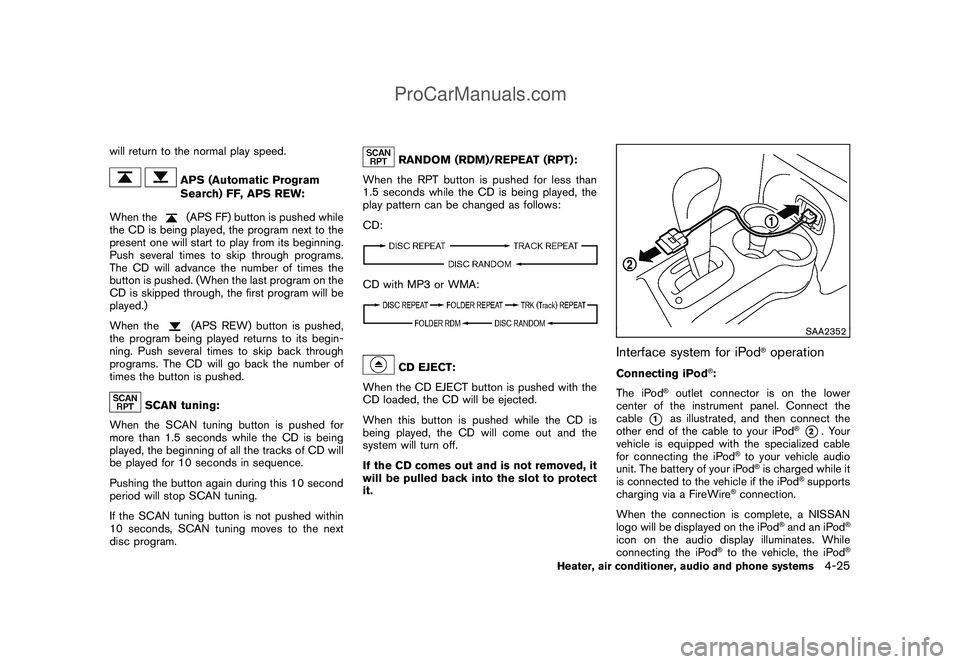
Interface system for iPod
®operation
Connecting iPod
®:
The iPod
®outlet connector is on the lower
center of the instrument panel. Connect the
cable
*1
as illustrated, and then connect the
other end of the cable to your iPod
®*2. Your
vehicle is equipped with the specialized cable
for connecting the iPod
®to your vehicle audio
unit. The battery of your iPod®is charged while it
is connected to the vehicle if the iPod
®supports
charging via a FireWire
®connection.
When the connection is complete, a NISSAN
logo will be displayed on the iPod
®and an iPod
®
icon on the audio display illuminates. While
connecting the iPod
®to the vehicle, the iPod
®
Heater, air conditioner, audio and phone systems
4-25
ProCarManuals.com
Page 177 of 321
Black plate (175,1)
Model "Z12-D" EDITED: 2009/ 1/ 28
surrounded by metal or far away from the in-
vehicle phone module to prevent tone quality
degradation and wireless connection dis-
ruption.
.While a cellular phone is connected through
the Bluetooth
®wireless connection, the
battery power of the cellular phone may
discharge quicker than usual.
.If the Bluetooth®Hands-Free Phone System
seems to be malfunctioning, please refer to
“Troubleshooting guide” later in this section.
You can also visit www.nissanusa.com/blue-
tooth for troubleshooting help.
.Some cellular phones or other devices may
cause interference or a buzzing noise to
come from the audio system speakers.
Storing the device in a different location
may reduce or eliminate the noise.
.Refer to the cellular phone Owner’s Manual
regarding the telephone charges, cellular
phone antenna and body, etc.
This device complies with Part 15 of the
FCC Rules. Operation is subject to the
following two conditions: (1) this device
may not cause harmful interference, and
(2) this device must accept any interfer-
ence received, including interference that
may cause undesired operation.FCC Radiation Exposure Statement:
This equipment complies with FCC radiation
exposure limits set forth for an uncontrolled
environment. This equipment should be installed
and operated with minimum distance 8 in (20
cm) between the radiator and your body. This
Transmitter must not be co-located or operating
in conjunction with any other antenna or
transmitter.
USING SYSTEMThe NISSAN Voice Recognition system allows
hands-free operation of the Bluetooth
®Hands-
Free Phone System.
If the vehicle is in motion, some commands may
not be available so full attention may be given to
vehicle operation.
InitializationWhen the ignition switch is placed in the ON
position, NISSAN Voice Recognition is initia-
lized, which takes a few seconds. If thebutton is pushed before the initialization com-
pletes, the system will announce “Hands-free
phone system not ready” and will not react to
voice commands.Operating tipsTo get the best performance out of the NISSAN
Voice Recognition system, observe the follow-
ing:.Wait until the tone sounds before speaking a
command. Otherwise, the command will not
be received properly.
.Start speaking a command within 5 seconds
after the tone sounds.
.Speak in a natural voice without pausing
between words.
Giving voice commandsTo operate NISSAN Voice Recognition, push
and release the
button located on the
steering wheel. After the tone sounds, speak a
command.
Thecommandgivenispickedupbythe
microphone, and voice feedback is given when
the command is accepted.
.If you need to hear the available commands
for the current menu again, say “Help” and
the system will repeat them.
.If a command is not recognized, the system
announces, “Command not recognized.
Please try again.” Repeat the command in
a clear voice.
.If you want to go back to the previous
command, you can say “Go back” or
“Correction” anytime the system is waiting
for a response.
.You can cancel a command when the
Heater, air conditioner, audio and phone systems
4-33
ProCarManuals.com
Page 191 of 321
Black plate (16,1)
5 Starting and driving
Model "Z12-D" EDITED: 2009/ 1/ 28
Precautions when starting and driving..................... 5-2
Exhaust gas (carbon monoxide)......................... 5-2
Three-way catalyst.......................................... 5-2
Tire Pressure Monitoring System (TPMS)............. 5-3
Avoiding collision and rollover........................... 5-5
Off-road recovery........................................... 5-5
Rapid air pressure loss.................................... 5-6
Drinking alcohol/drugs and driving...................... 5-6
Ignition switch
(models without Intelligent Key system)................... 5-7
Continuously Variable Transmission (CVT)............ 5-7
Manual Transmission (MT)................................ 5-8
Steering lock................................................. 5-8
Key positions................................................ 5-8
Push-button ignition switch
(models with Intelligent Key system)....................... 5-9
Operating range for engine start function............. 5-9
Push-button ignition switch operation................ 5-10
Push-button ignition switch positions................ 5-11
Intelligent Key battery discharge...................... 5-11
Before starting the engine.................................. 5-12
Starting the engine........................................... 5-12
Models without Intelligent Key system............... 5-12
Models with Intelligent Key system................... 5-13
Driving the vehicle............................................ 5-14Continuously Variable Transmission (CVT).......... 5-14
Manual Transmission (MT).............................. 5-18
Parking brake.................................................. 5-20
Cruise control (if so equipped)............................ 5-21
Precautions on cruise control.......................... 5-21
Cruise control operations............................... 5-21
Break-in schedule............................................ 5-23
Increasing fuel economy.................................... 5-23
Sonar system (if so equipped)............................. 5-24
Parking/parking on hills...................................... 5-25
Electric power steering system............................ 5-26
Brake system.................................................. 5-27
Braking precautions...................................... 5-27
Anti-lock Braking System (ABS)...................... 5-28
Vehicle Dynamic Control (VDC) system................. 5-29
Cold weather driving......................................... 5-30
Freeing a frozen door lock.............................. 5-30
Anti-freeze.................................................. 5-30
Battery...................................................... 5-30
Draining of coolant water............................... 5-30
Tire equipment............................................ 5-31
Special winter equipment............................... 5-31
Driving on snow or ice.................................. 5-31
Engine block heater (if so equipped)................. 5-31
ProCarManuals.com
Page 199 of 321

Black plate (197,1)
Model "Z12-D" EDITED: 2009/ 1/ 28
ON (3)The ignition system and the electrical accessory
power activate without the engine turned on.START (4)The engine starter activates and the engine will
start. The ignition switch, when released, will
automatically turn to the ON position.
CAUTION
As soon as the engine has started,
release the ignition switch immediately.
WARNING
Do not operate the push-button ignition
switch while driving the vehicle except
in an emergency. (The engine will stop
when the ignition switch is pushed 3
consecutive times or the ignition switch
is pushed and held for more than 2
seconds.) If the engine stops while the
vehicle is being driven, this could lead
to a crash and serious injury.
Before operating the push-button ignition
switch, be sure to move the selector lever to
the P (Park) position.
SSD0436
OPERATING RANGE FOR ENGINE
START FUNCTIONThe Intelligent Key can only be used for starting
the engine when the Intelligent Key is within the
specified operating range
*1.
When the Intelligent Key battery is almost
discharged or strong radio waves are present
near the operating location, the Intelligent Key
system’s operating range becomes narrower
and may not function properly.
If the Intelligent Key is within the operating
range, it is possible for anyone, even someone
who does not carry the Intelligent Key, to push
the ignition switch to start the engine.
PUSH-BUTTON IGNITION SWITCH
(models with Intelligent Key system)
Starting and driving
5-9
ProCarManuals.com