warning NISSAN FRONTIER 1996 D22 / 1.G User Guide
[x] Cancel search | Manufacturer: NISSAN, Model Year: 1996, Model line: FRONTIER, Model: NISSAN FRONTIER 1996 D22 / 1.GPages: 198, PDF Size: 1.3 MB
Page 22 of 198
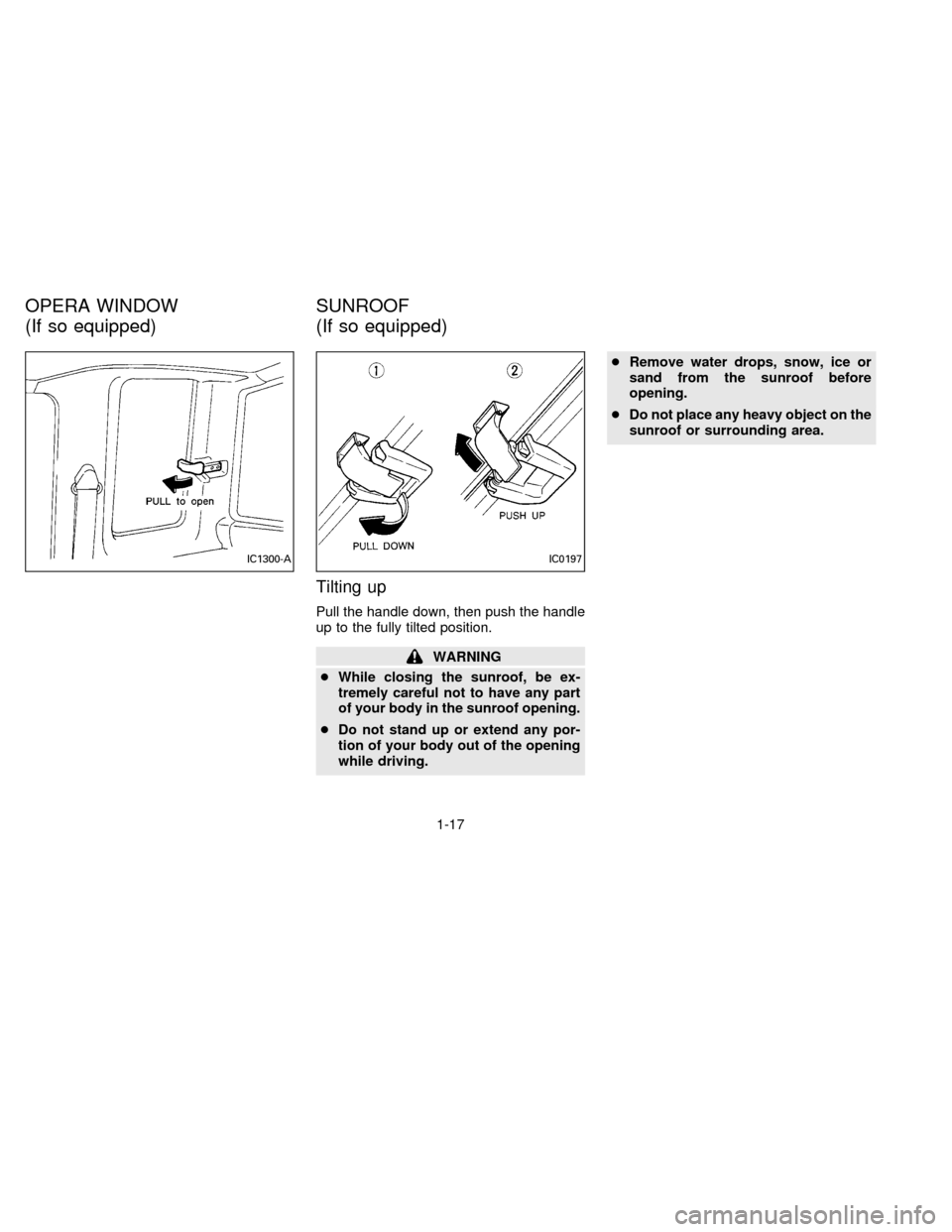
Tilting up
Pull the handle down, then push the handle
up to the fully tilted position.
WARNING
cWhile closing the sunroof, be ex-
tremely careful not to have any part
of your body in the sunroof opening.
cDo not stand up or extend any por-
tion of your body out of the opening
while driving.cRemove water drops, snow, ice or
sand from the sunroof before
opening.
cDo not place any heavy object on the
sunroof or surrounding area.
IC1300-AIC0197
OPERA WINDOW
(If so equipped)SUNROOF
(If so equipped)
1-17
ZX
Page 26 of 198

2 Pre-driving checks and adjustments
Key ..................................................................... 2-2
Door locks .......................................................... 2-2
Hood release ...................................................... 2-4
Glove box lock (If so equipped) ......................... 2-4
Fuel filler cap ...................................................... 2-5
Tailgate latch ...................................................... 2-5
Tie down hook .................................................... 2-7
Front separate seats ............................................ 2-8
Bench seat ....................................................... 2-10
Jump seat ......................................................... 2-11
Supplemental restraint system
(Supplemental air bag system) ........................ 2-12
Supplemental air bag system ........................... 2-13
Warning labels .................................................. 2-15
Supplemental air bag warning light .................. 2-15
Seat belts ......................................................... 2-17
Child restraints for infants and small children .. 2-22
Tilting steering wheel (If so equipped) ............. 2-26
Outside mirror remote control (If so equipped) . 2-26
Outside mirrors ................................................. 2-26
Inside mirror ..................................................... 2-27
Vanity mirror (If so equipped) .......................... 2-27
ZX
Page 27 of 198
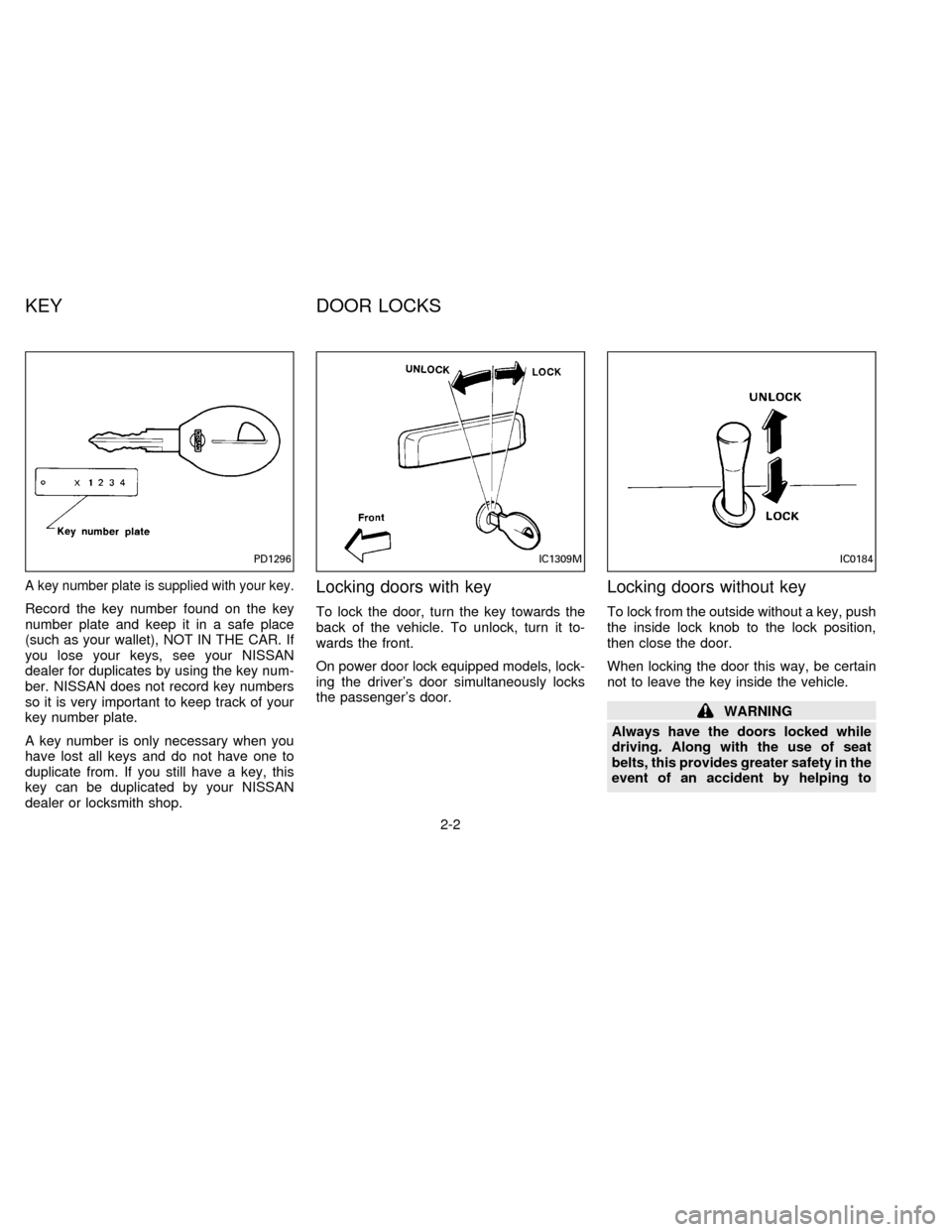
A key number plate is supplied with your key.
Record the key number found on the key
number plate and keep it in a safe place
(such as your wallet), NOT IN THE CAR. If
you lose your keys, see your NISSAN
dealer for duplicates by using the key num-
ber. NISSAN does not record key numbers
so it is very important to keep track of your
key number plate.
A key number is only necessary when you
have lost all keys and do not have one to
duplicate from. If you still have a key, this
key can be duplicated by your NISSAN
dealer or locksmith shop.
Locking doors with key
To lock the door, turn the key towards the
back of the vehicle. To unlock, turn it to-
wards the front.
On power door lock equipped models, lock-
ing the driver's door simultaneously locks
the passenger's door.
Locking doors without key
To lock from the outside without a key, push
the inside lock knob to the lock position,
then close the door.
When locking the door this way, be certain
not to leave the key inside the vehicle.
WARNING
Always have the doors locked while
driving. Along with the use of seat
belts, this provides greater safety in the
event of an accident by helping to
PD1296IC1309MIC0184
KEY DOOR LOCKS
2-2
ZX
Page 28 of 198
prevent persons from being thrown
from the vehicle. This also helps keep
children and others from unintention-
ally opening the doors, and will help
keep out intruders.
POWER DOOR LOCK
(If so equipped)
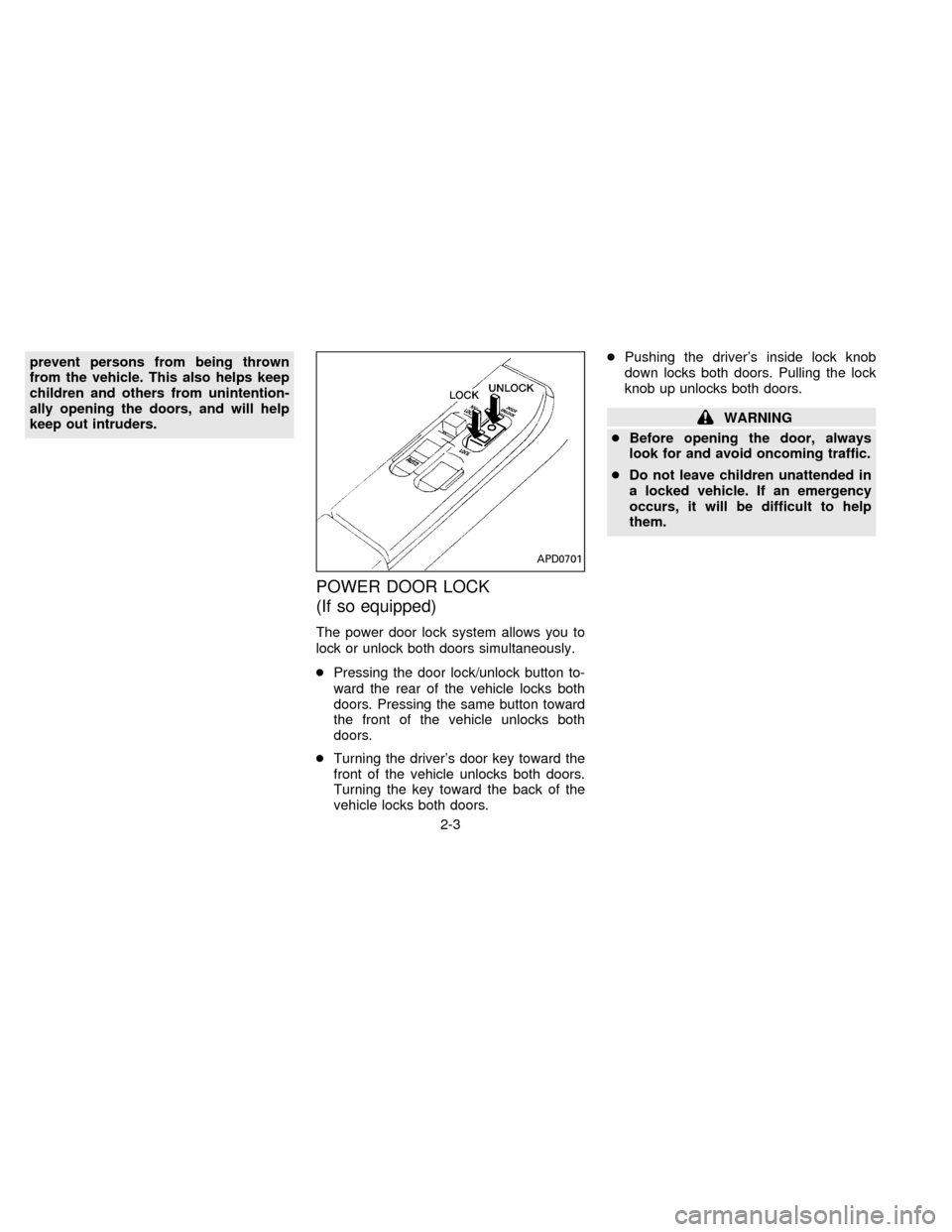
The power door lock system allows you to
lock or unlock both doors simultaneously.
cPressing the door lock/unlock button to-
ward the rear of the vehicle locks both
doors. Pressing the same button toward
the front of the vehicle unlocks both
doors.
cTurning the driver's door key toward the
front of the vehicle unlocks both doors.
Turning the key toward the back of the
vehicle locks both doors.cPushing the driver's inside lock knob
down locks both doors. Pulling the lock
knob up unlocks both doors.
WARNING
cBefore opening the door, always
look for and avoid oncoming traffic.
cDo not leave children unattended in
a locked vehicle. If an emergency
occurs, it will be difficult to help
them.
APD0701
2-3
ZX
Page 29 of 198
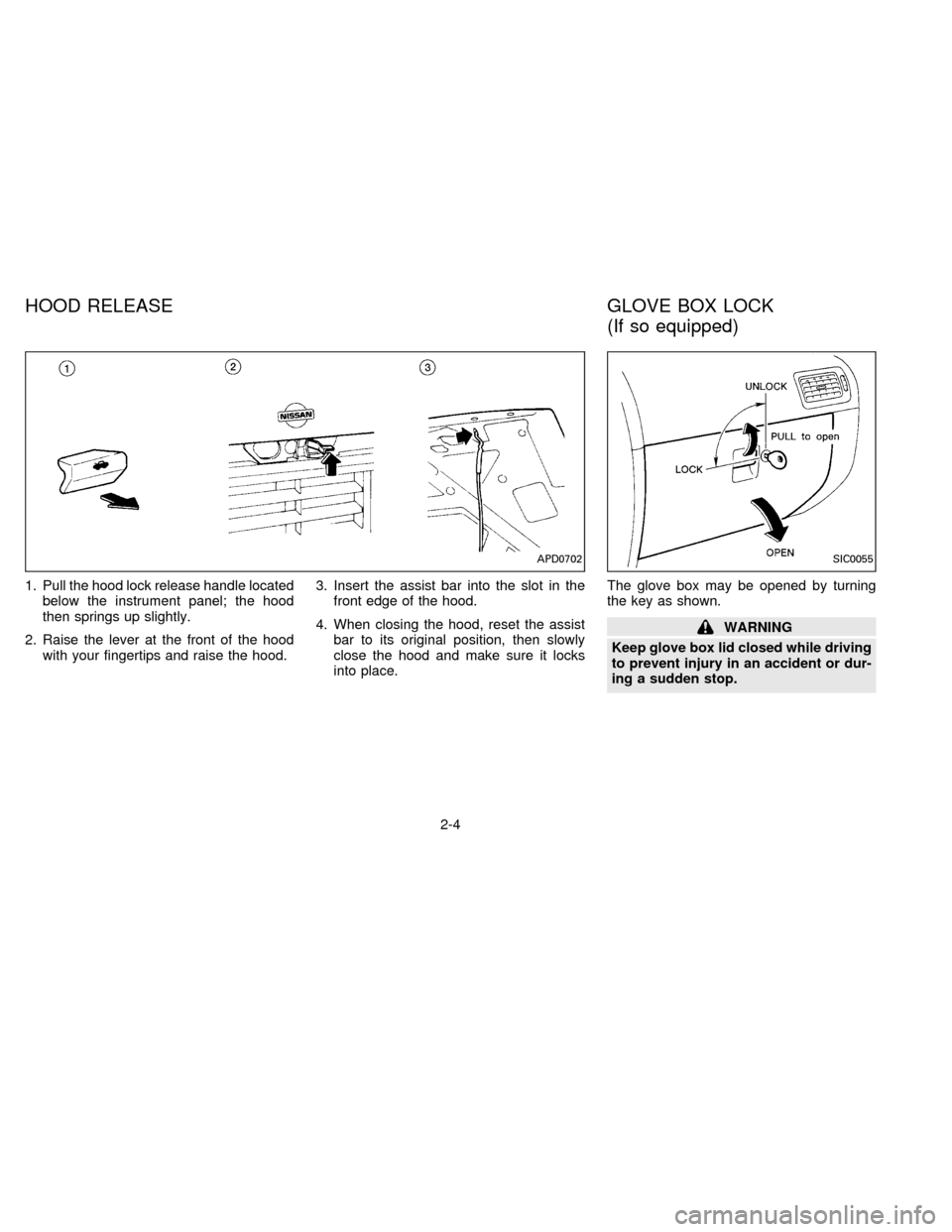
1. Pull the hood lock release handle located
below the instrument panel; the hood
then springs up slightly.
2. Raise the lever at the front of the hood
with your fingertips and raise the hood.3. Insert the assist bar into the slot in the
front edge of the hood.
4. When closing the hood, reset the assist
bar to its original position, then slowly
close the hood and make sure it locks
into place.The glove box may be opened by turning
the key as shown.
WARNING
Keep glove box lid closed while driving
to prevent injury in an accident or dur-
ing a sudden stop.
APD0702SIC0055
HOOD RELEASE GLOVE BOX LOCK
(If so equipped)
2-4
ZX
Page 30 of 198
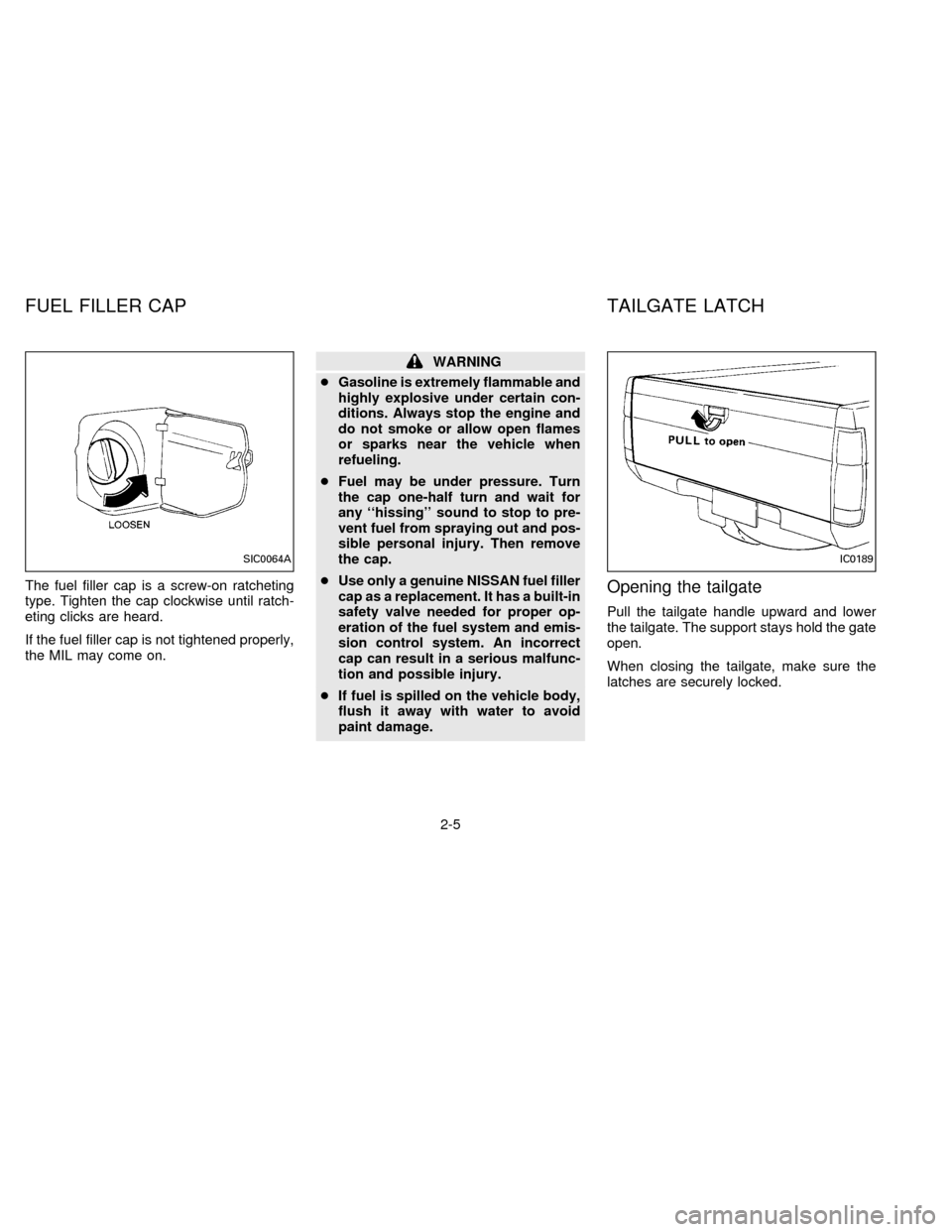
The fuel filler cap is a screw-on ratcheting
type. Tighten the cap clockwise until ratch-
eting clicks are heard.
If the fuel filler cap is not tightened properly,
the MIL may come on.
WARNING
cGasoline is extremely flammable and
highly explosive under certain con-
ditions. Always stop the engine and
do not smoke or allow open flames
or sparks near the vehicle when
refueling.
cFuel may be under pressure. Turn
the cap one-half turn and wait for
any ``hissing'' sound to stop to pre-
vent fuel from spraying out and pos-
sible personal injury. Then remove
the cap.
cUse only a genuine NISSAN fuel filler
cap as a replacement. It has a built-in
safety valve needed for proper op-
eration of the fuel system and emis-
sion control system. An incorrect
cap can result in a serious malfunc-
tion and possible injury.
cIf fuel is spilled on the vehicle body,
flush it away with water to avoid
paint damage.
Opening the tailgate
Pull the tailgate handle upward and lower
the tailgate. The support stays hold the gate
open.
When closing the tailgate, make sure the
latches are securely locked.
SIC0064AIC0189
FUEL FILLER CAP TAILGATE LATCH
2-5
ZX
Page 31 of 198
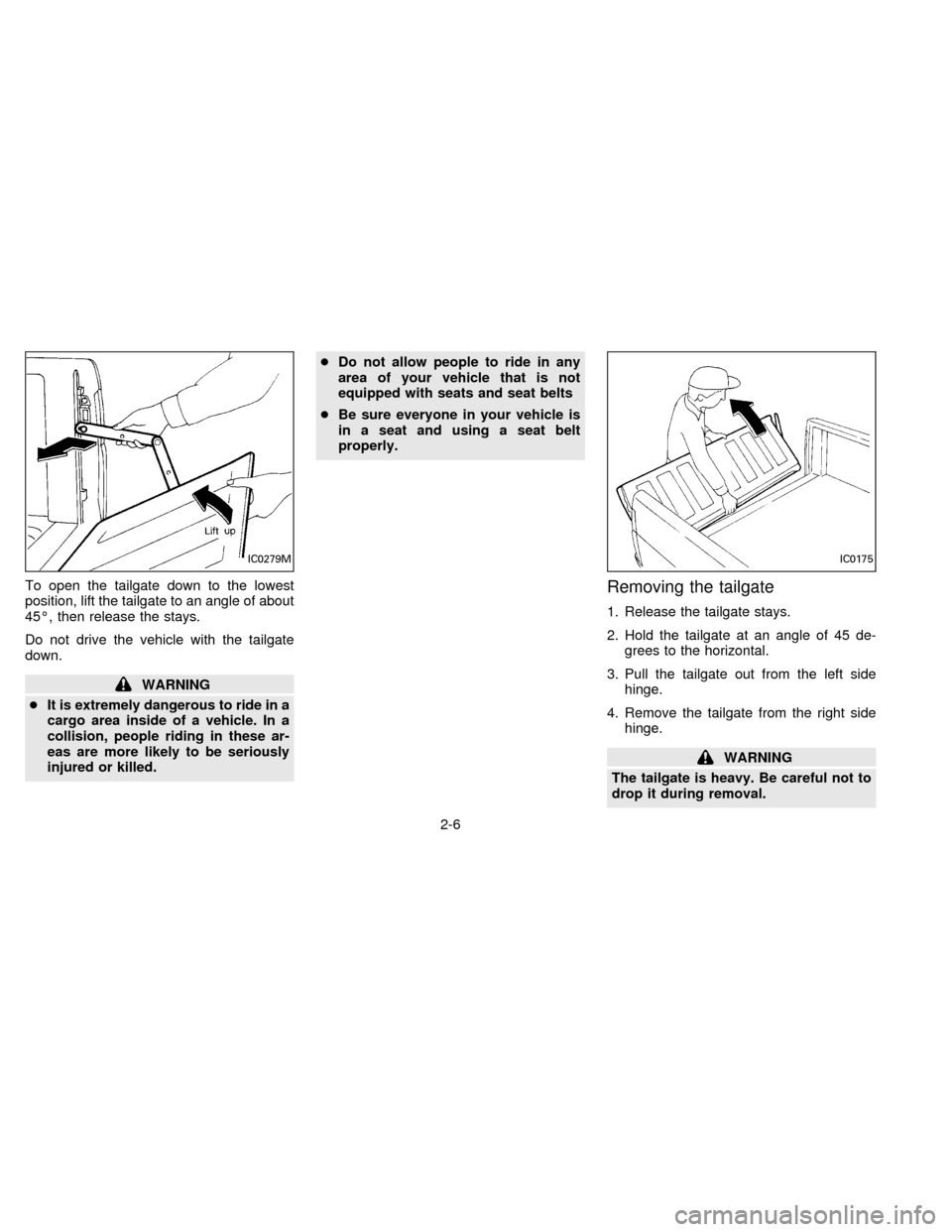
To open the tailgate down to the lowest
position, lift the tailgate to an angle of about
45É, then release the stays.
Do not drive the vehicle with the tailgate
down.
WARNING
cIt is extremely dangerous to ride in a
cargo area inside of a vehicle. In a
collision, people riding in these ar-
eas are more likely to be seriously
injured or killed.cDo not allow people to ride in any
area of your vehicle that is not
equipped with seats and seat belts
cBe sure everyone in your vehicle is
in a seat and using a seat belt
properly.
Removing the tailgate
1. Release the tailgate stays.
2. Hold the tailgate at an angle of 45 de-
grees to the horizontal.
3. Pull the tailgate out from the left side
hinge.
4. Remove the tailgate from the right side
hinge.
WARNING
The tailgate is heavy. Be careful not to
drop it during removal.
IC0279MIC0175
2-6
ZX
Page 33 of 198
SEAT ADJUSTMENT
WARNING
cDo not adjust the driver's seat while
driving. The seat may move sud-
denly and could cause loss of con-
trol of the vehicle.
c
After adjustment, gently rock in the
seat to make sure it is securely locked.
cThe seatback should not be reclined
any more than needed for comfort.
Seat belts are most effective when the
passenger sits well back andstraight up in the seat. If the seat is
reclined, the risk of sliding under the
lap belt and being injured is increased.
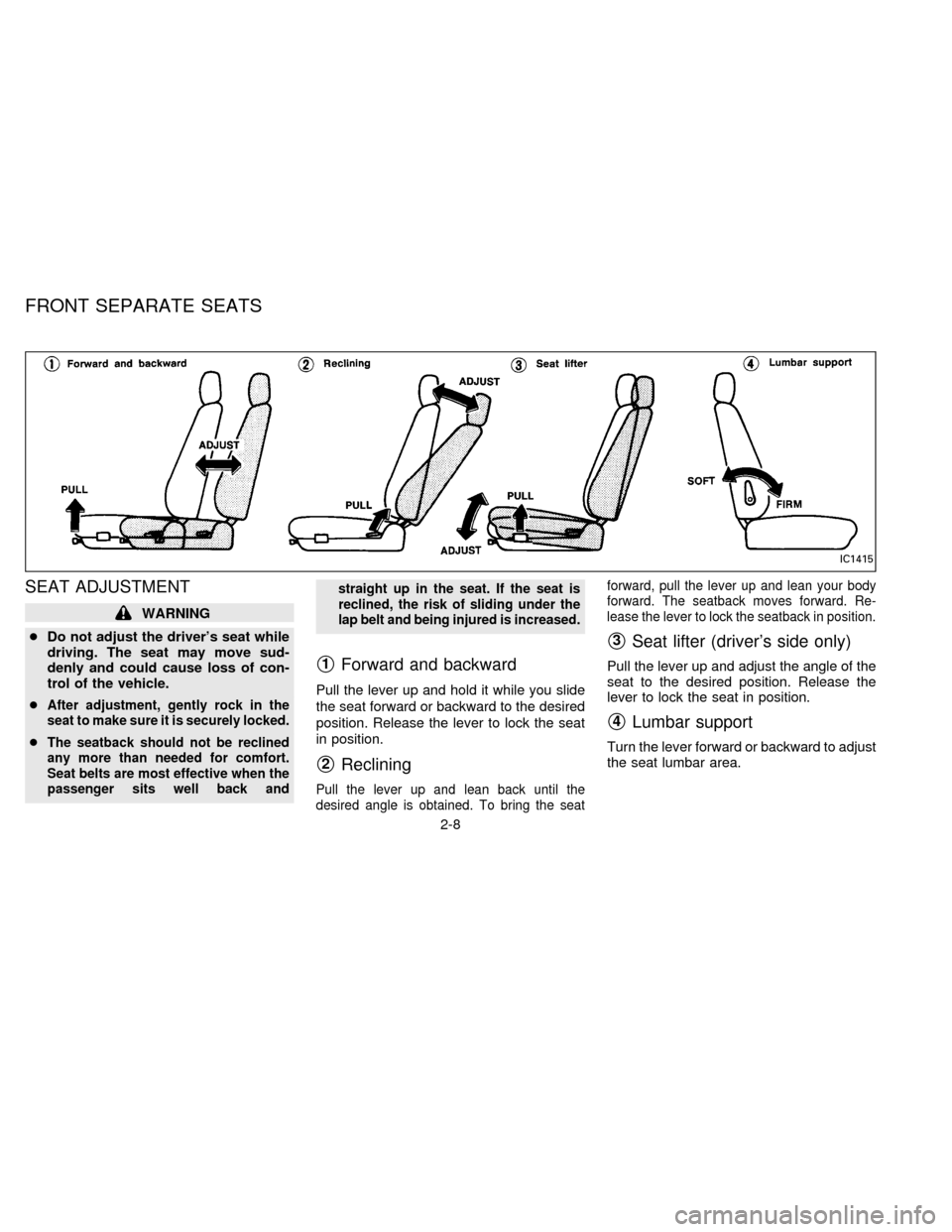
s1Forward and backward
Pull the lever up and hold it while you slide
the seat forward or backward to the desired
position. Release the lever to lock the seat
in position.
s2Reclining
Pull the lever up and lean back until the
desired angle is obtained. To bring the seatforward, pull the lever up and lean your body
forward. The seatback moves forward. Re-
lease the lever to lock the seatback in position.
s3Seat lifter (driver's side only)
Pull the lever up and adjust the angle of the
seat to the desired position. Release the
lever to lock the seat in position.
s4Lumbar support
Turn the lever forward or backward to adjust
the seat lumbar area.
IC1415
FRONT SEPARATE SEATS
2-8
ZX
Page 34 of 198
HEAD RESTRAINTS
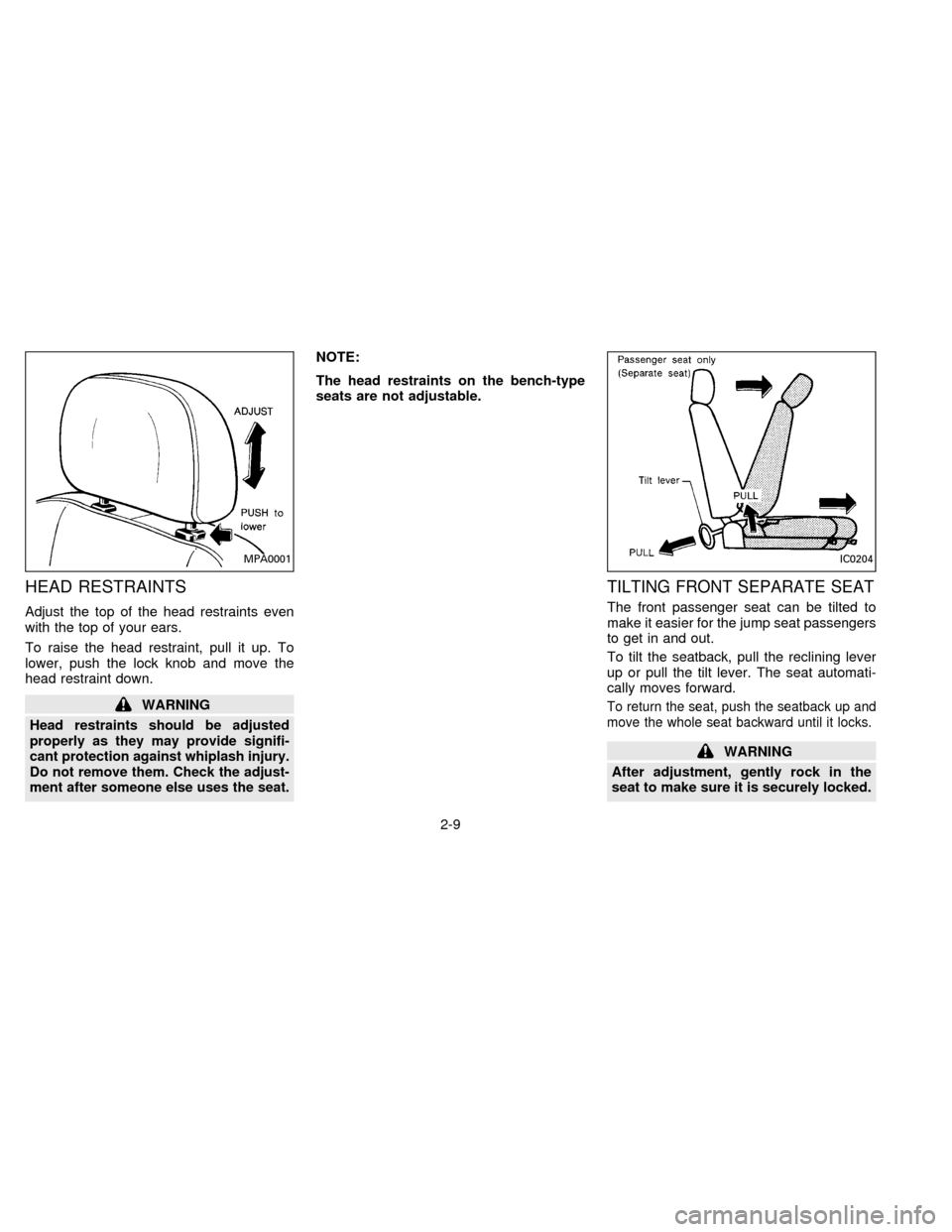
Adjust the top of the head restraints even
with the top of your ears.
To raise the head restraint, pull it up. To
lower, push the lock knob and move the
head restraint down.
WARNING
Head restraints should be adjusted
properly as they may provide signifi-
cant protection against whiplash injury.
Do not remove them. Check the adjust-
ment after someone else uses the seat.
NOTE:
The head restraints on the bench-type
seats are not adjustable.
TILTING FRONT SEPARATE SEAT
The front passenger seat can be tilted to
make it easier for the jump seat passengers
to get in and out.
To tilt the seatback, pull the reclining lever
up or pull the tilt lever. The seat automati-
cally moves forward.
To return the seat, push the seatback up and
move the whole seat backward until it locks.
WARNING
After adjustment, gently rock in the
seat to make sure it is securely locked.
MPA0001IC0204
2-9
ZX
Page 35 of 198
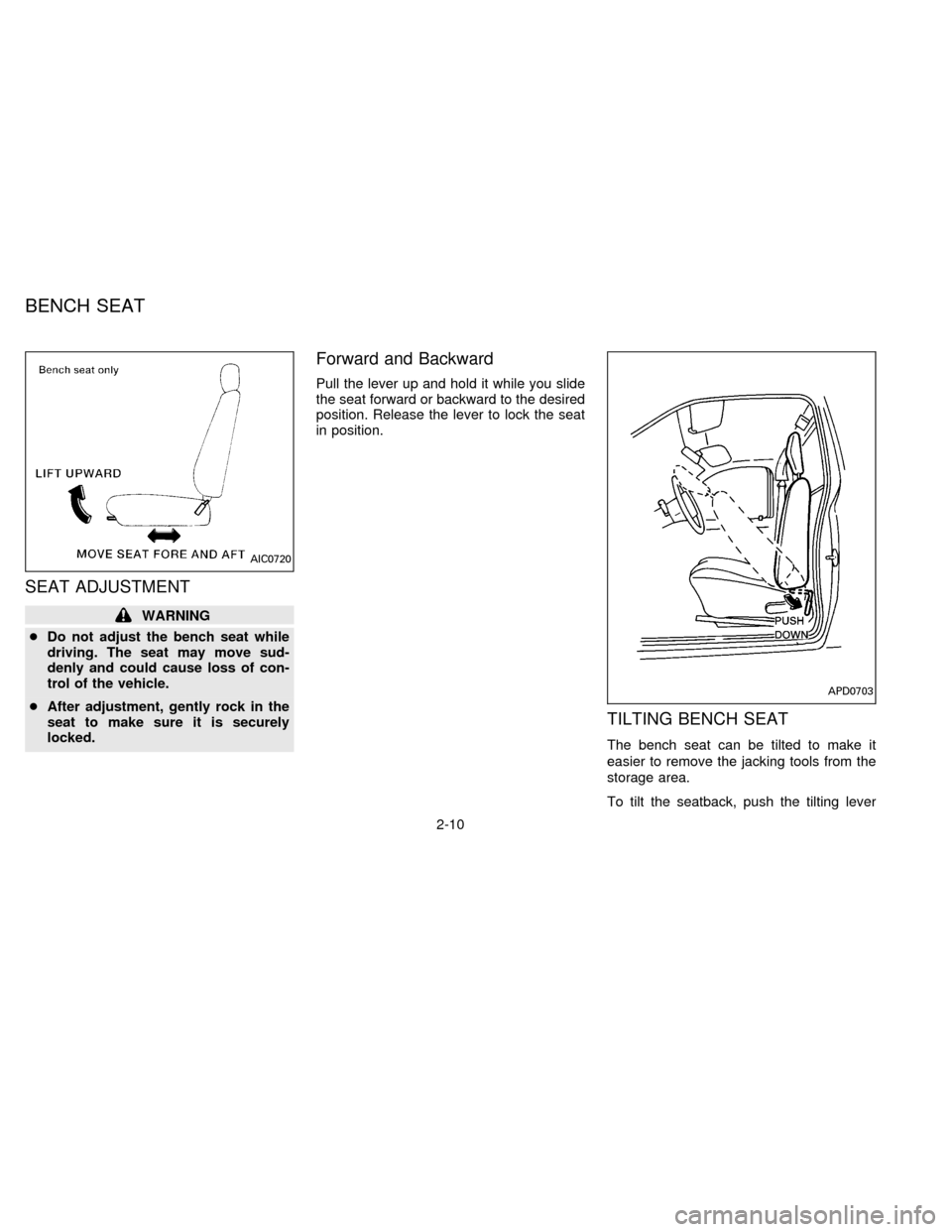
SEAT ADJUSTMENT
WARNING
cDo not adjust the bench seat while
driving. The seat may move sud-
denly and could cause loss of con-
trol of the vehicle.
cAfter adjustment, gently rock in the
seat to make sure it is securely
locked.
Forward and Backward
Pull the lever up and hold it while you slide
the seat forward or backward to the desired
position. Release the lever to lock the seat
in position.
TILTING BENCH SEAT
The bench seat can be tilted to make it
easier to remove the jacking tools from the
storage area.
To tilt the seatback, push the tilting lever
AIC0720
APD0703
BENCH SEAT
2-10
ZX