key NISSAN FRONTIER 1999 D22 / 1.G User Guide
[x] Cancel search | Manufacturer: NISSAN, Model Year: 1999, Model line: FRONTIER, Model: NISSAN FRONTIER 1999 D22 / 1.GPages: 247, PDF Size: 1.89 MB
Page 63 of 247
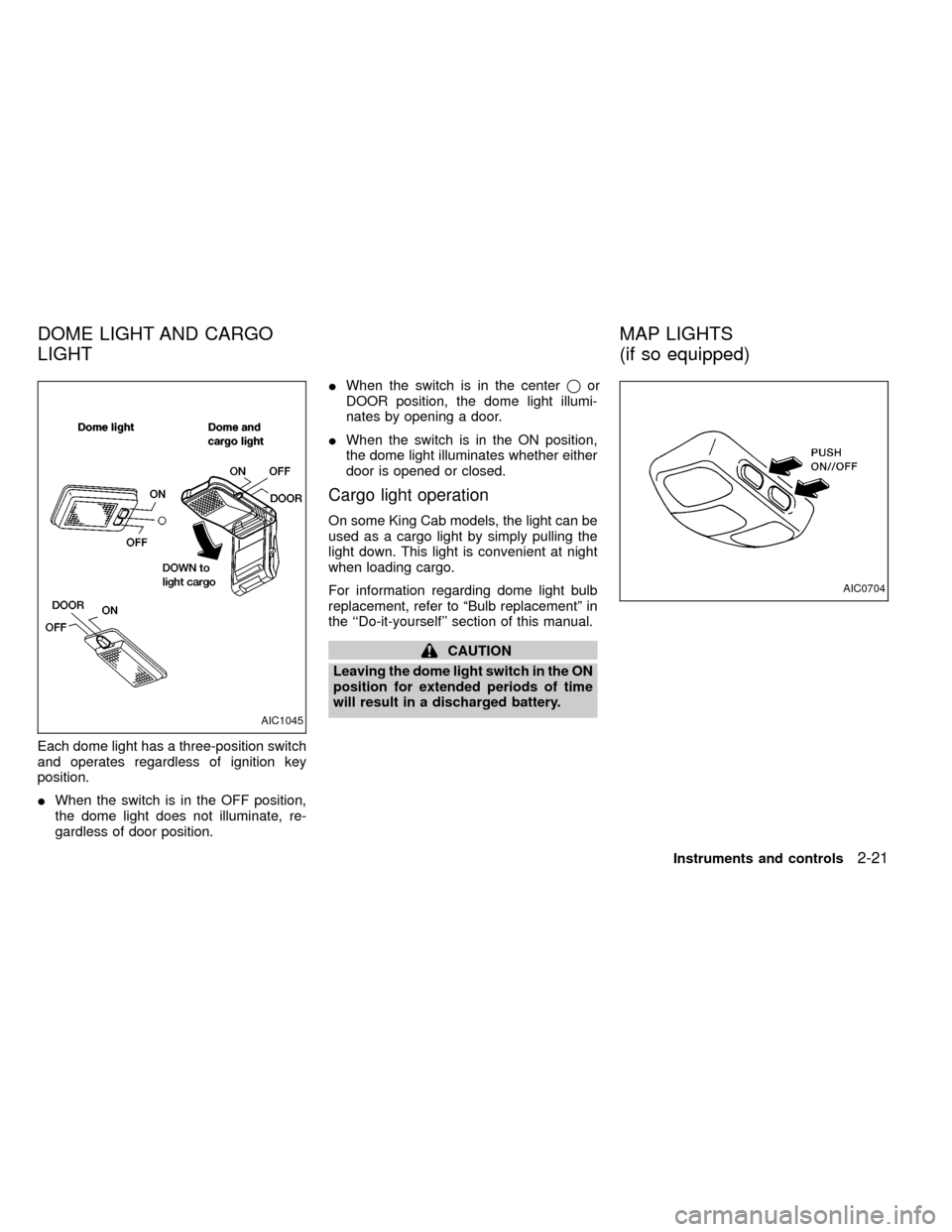
Each dome light has a three-position switch
and operates regardless of ignition key
position.
IWhen the switch is in the OFF position,
the dome light does not illuminate, re-
gardless of door position.IWhen the switch is in the centerqor
DOOR position, the dome light illumi-
nates by opening a door.
IWhen the switch is in the ON position,
the dome light illuminates whether either
door is opened or closed.
Cargo light operation
On some King Cab models, the light can be
used as a cargo light by simply pulling the
light down. This light is convenient at night
when loading cargo.
For information regarding dome light bulb
replacement, refer to ªBulb replacementº in
the ``Do-it-yourself'' section of this manual.
CAUTION
Leaving the dome light switch in the ON
position for extended periods of time
will result in a discharged battery.
AIC1045
AIC0704
DOME LIGHT AND CARGO
LIGHTMAP LIGHTS
(if so equipped)
Instruments and controls2-21
ZX
Page 64 of 247
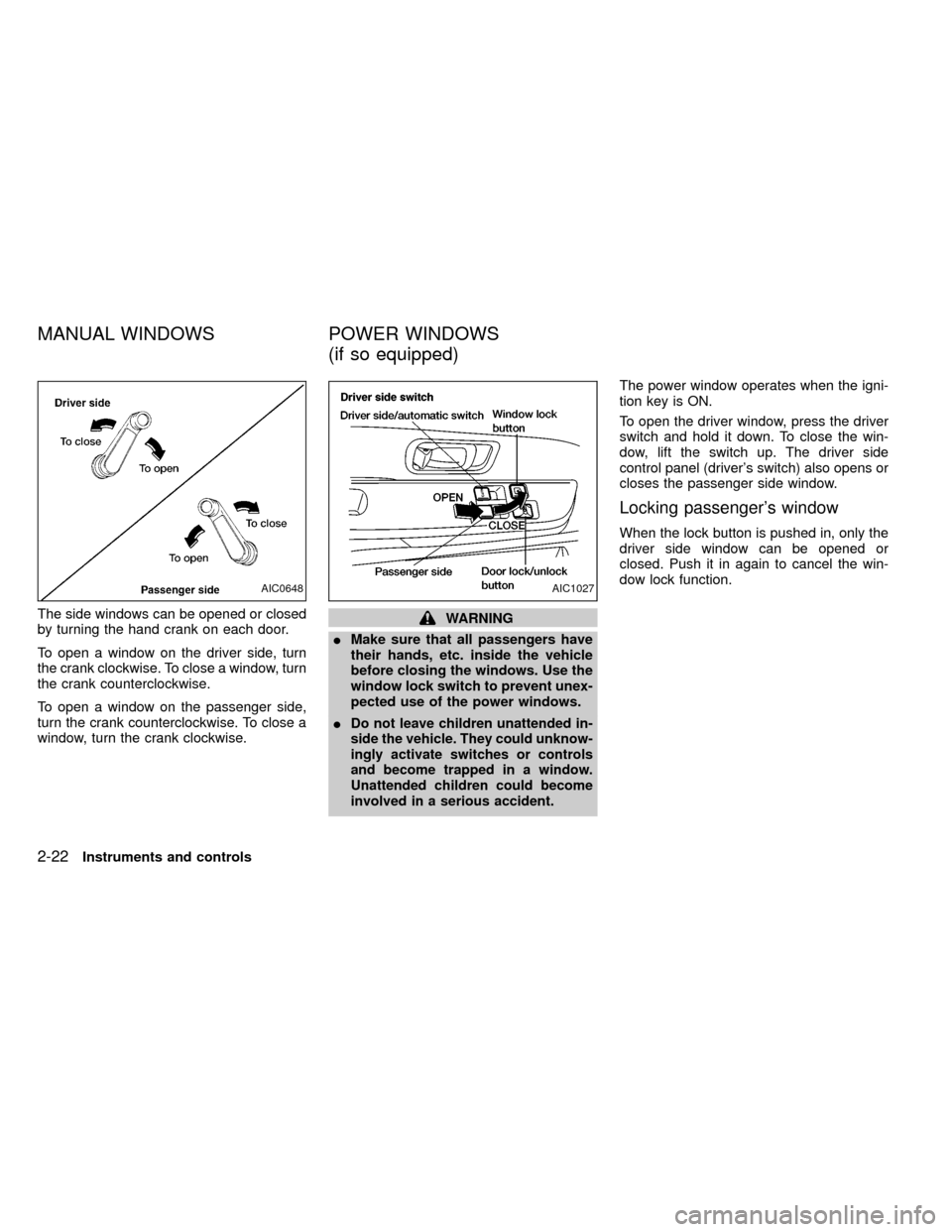
The side windows can be opened or closed
by turning the hand crank on each door.
To open a window on the driver side, turn
the crank clockwise. To close a window, turn
the crank counterclockwise.
To open a window on the passenger side,
turn the crank counterclockwise. To close a
window, turn the crank clockwise.WARNING
IMake sure that all passengers have
their hands, etc. inside the vehicle
before closing the windows. Use the
window lock switch to prevent unex-
pected use of the power windows.
I
Do not leave children unattended in-
side the vehicle. They could unknow-
ingly activate switches or controls
and become trapped in a window.
Unattended children could become
involved in a serious accident.
The power window operates when the igni-
tion key is ON.
To open the driver window, press the driver
switch and hold it down. To close the win-
dow, lift the switch up. The driver side
control panel (driver's switch) also opens or
closes the passenger side window.
Locking passenger's window
When the lock button is pushed in, only the
driver side window can be opened or
closed. Push it in again to cancel the win-
dow lock function.
AIC0648AIC1027
MANUAL WINDOWS POWER WINDOWS
(if so equipped)
2-22Instruments and controls
ZX
Page 69 of 247

3 Pre-driving checks and adjustments
Key .........................................................................3-2
Door locks ..............................................................3-2
Power door lock (if so equipped) ...........................3-3
Multi-remote control system (if so equipped).........3-4
Battery replacement ...............................................3-7
Hood release ..........................................................3-8
Glove box ...............................................................3-9
Fuel filler cap ..........................................................3-9Tailgate latch ........................................................3-10
Tie down hooks ....................................................3-12
Tilting steering wheel (if so equipped) .................3-13
Outside mirror remote control (if so equipped) ....3-13
Outside mirrors .....................................................3-14
Inside mirror .........................................................3-14
Vanity mirror (if so equipped)...............................3-15
ZX
Page 70 of 247
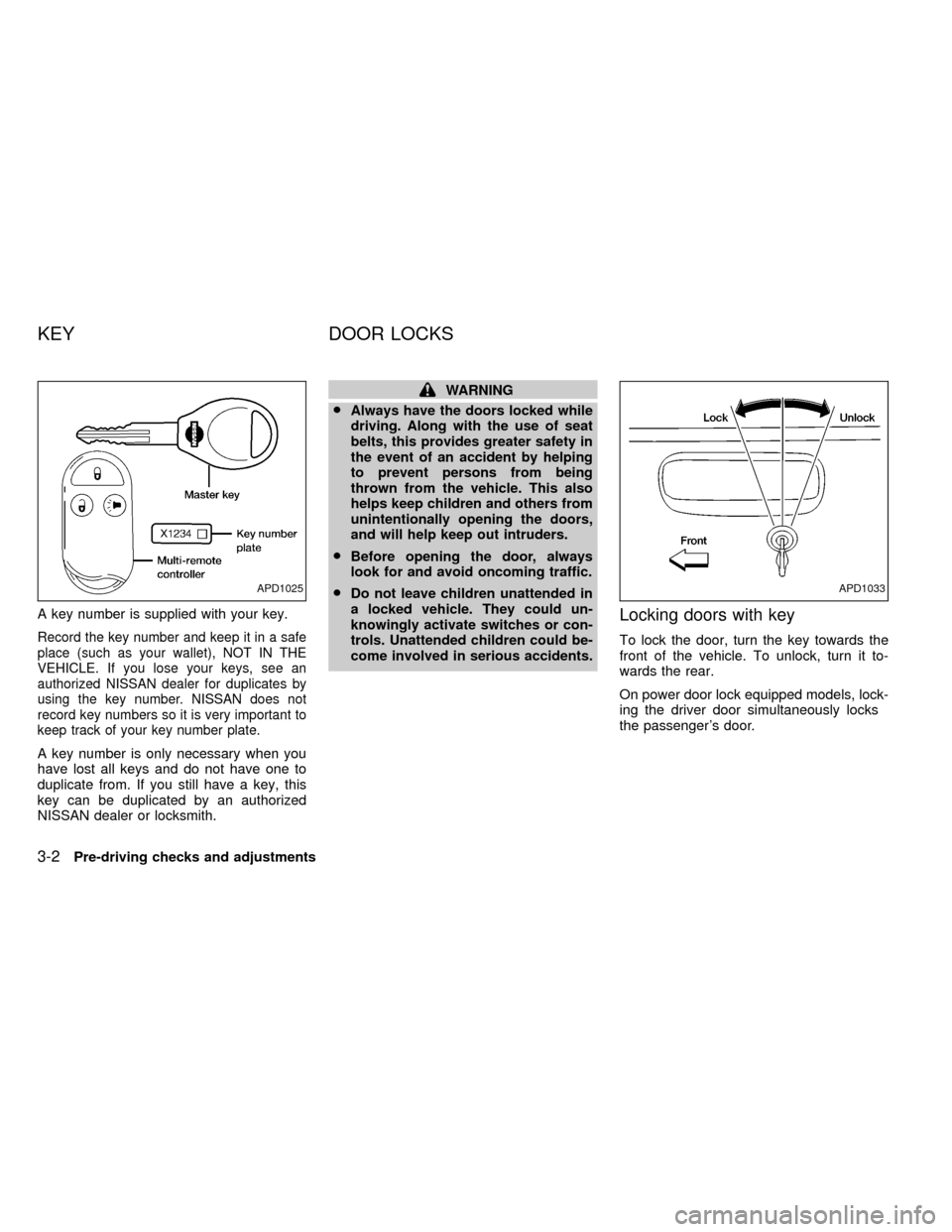
A key number is supplied with your key.
Record the key number and keep it in a safe
place (such as your wallet), NOT IN THE
VEHICLE. If you lose your keys, see an
authorized NISSAN dealer for duplicates by
using the key number. NISSAN does not
record key numbers so it is very important to
keep track of your key number plate.
A key number is only necessary when you
have lost all keys and do not have one to
duplicate from. If you still have a key, this
key can be duplicated by an authorized
NISSAN dealer or locksmith.
WARNING
I
Always have the doors locked while
driving. Along with the use of seat
belts, this provides greater safety in
the event of an accident by helping
to prevent persons from being
thrown from the vehicle. This also
helps keep children and others from
unintentionally opening the doors,
and will help keep out intruders.
I
Before opening the door, always
look for and avoid oncoming traffic.
I
Do not leave children unattended in
a locked vehicle. They could un-
knowingly activate switches or con-
trols. Unattended children could be-
come involved in serious accidents.
Locking doors with key
To lock the door, turn the key towards the
front of the vehicle. To unlock, turn it to-
wards the rear.
On power door lock equipped models, lock-
ing the driver door simultaneously locks
the passenger's door.
APD1025APD1033
KEY DOOR LOCKS
3-2Pre-driving checks and adjustments
ZX
Page 71 of 247
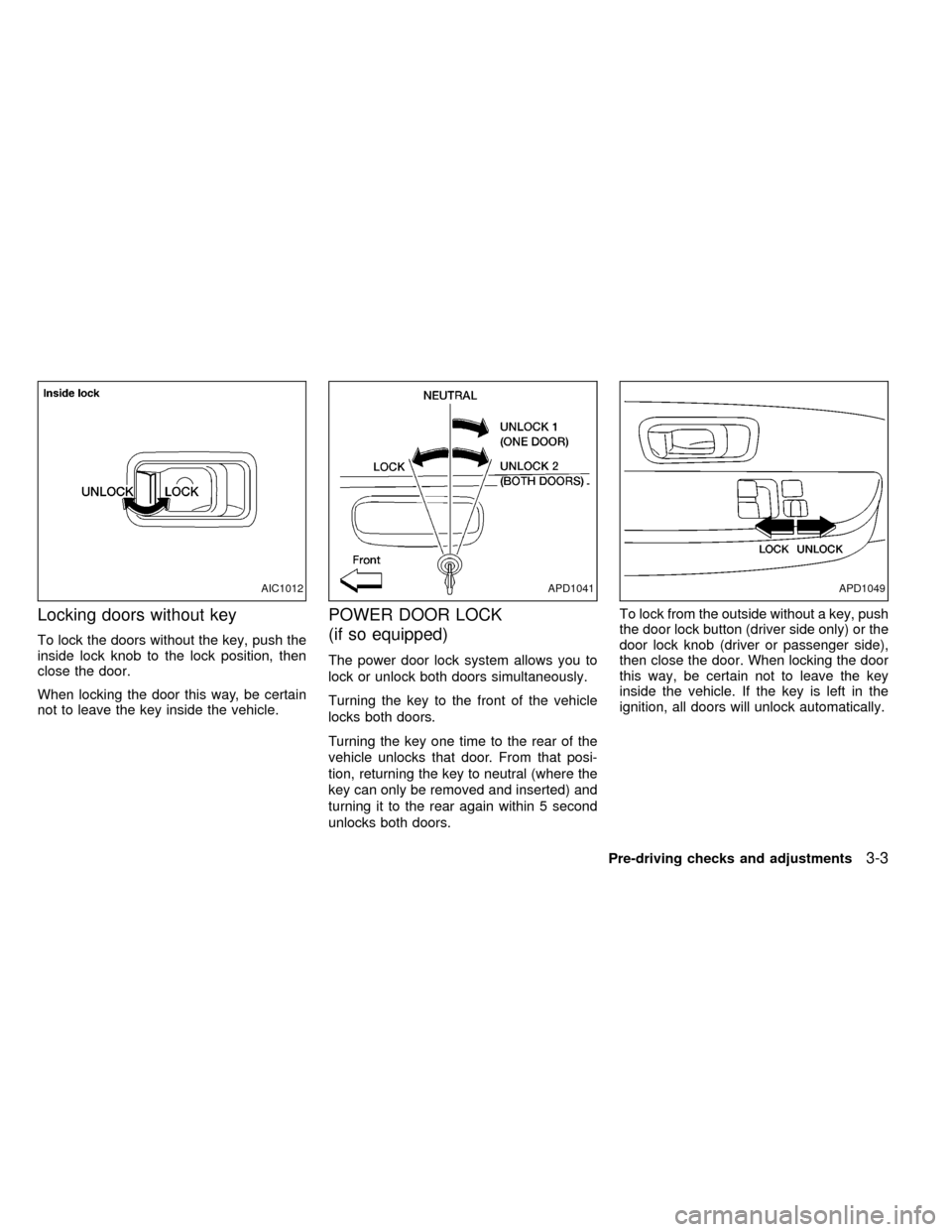
Locking doors without key
To lock the doors without the key, push the
inside lock knob to the lock position, then
close the door.
When locking the door this way, be certain
not to leave the key inside the vehicle.
POWER DOOR LOCK
(if so equipped)
The power door lock system allows you to
lock or unlock both doors simultaneously.
Turning the key to the front of the vehicle
locks both doors.
Turning the key one time to the rear of the
vehicle unlocks that door. From that posi-
tion, returning the key to neutral (where the
key can only be removed and inserted) and
turning it to the rear again within 5 second
unlocks both doors.To lock from the outside without a key, push
the door lock button (driver side only) or the
door lock knob (driver or passenger side),
then close the door. When locking the door
this way, be certain not to leave the key
inside the vehicle. If the key is left in the
ignition, all doors will unlock automatically.
AIC1012APD1041APD1049
Pre-driving checks and adjustments3-3
ZX
Page 72 of 247
MULTI-REMOTE CONTROL
SYSTEM (if so equipped)
It is possible to lock/unlock both doors, and
activate the panic alarm by using the remote
controller from outside the vehicle.
Be sure to remove the key from the
vehicle before locking the doors.
The remote controller can operate at a
distance of approximately 49 ft (15 m) from
the vehicle. The effective distance depends
on the conditions around the vehicle.
As many as four remote controllers can be
used with one vehicle. For information con-
cerning the purchase and use of additional
remote controllers, contact an authorized
NISSAN dealer.
CAUTION
Listed below are conditions or occur-
rences which will damage the remote
controller:
IDo not allow the remote controller to
become wet.
IDo not drop the remote controller.IDo not strike the remote controller
sharply against another object.
IDo not place the remote controller
for an extended period in an area
where temperatures exceed 140ÉF
(60ÉC).
Locking doors
1. Close all windows.
2. Remove the key from the ignition switch.
3. Close the hood and both doors.
4. Push the
button on the multi-remote
controller. Both doors lock. The hazard
lights flash twice and the horn beeps
once to indicate both doors are locked.
IWhen the
button is pushed with both
doors locked, the hazard lights flash
twice and the horn beeps once as a
reminder that the doors are already
locked. The horn may or may not beep
once. Refer to ªsilencing the horn beep
featureº later in this section.
3-4Pre-driving checks and adjustments
ZX
Page 73 of 247
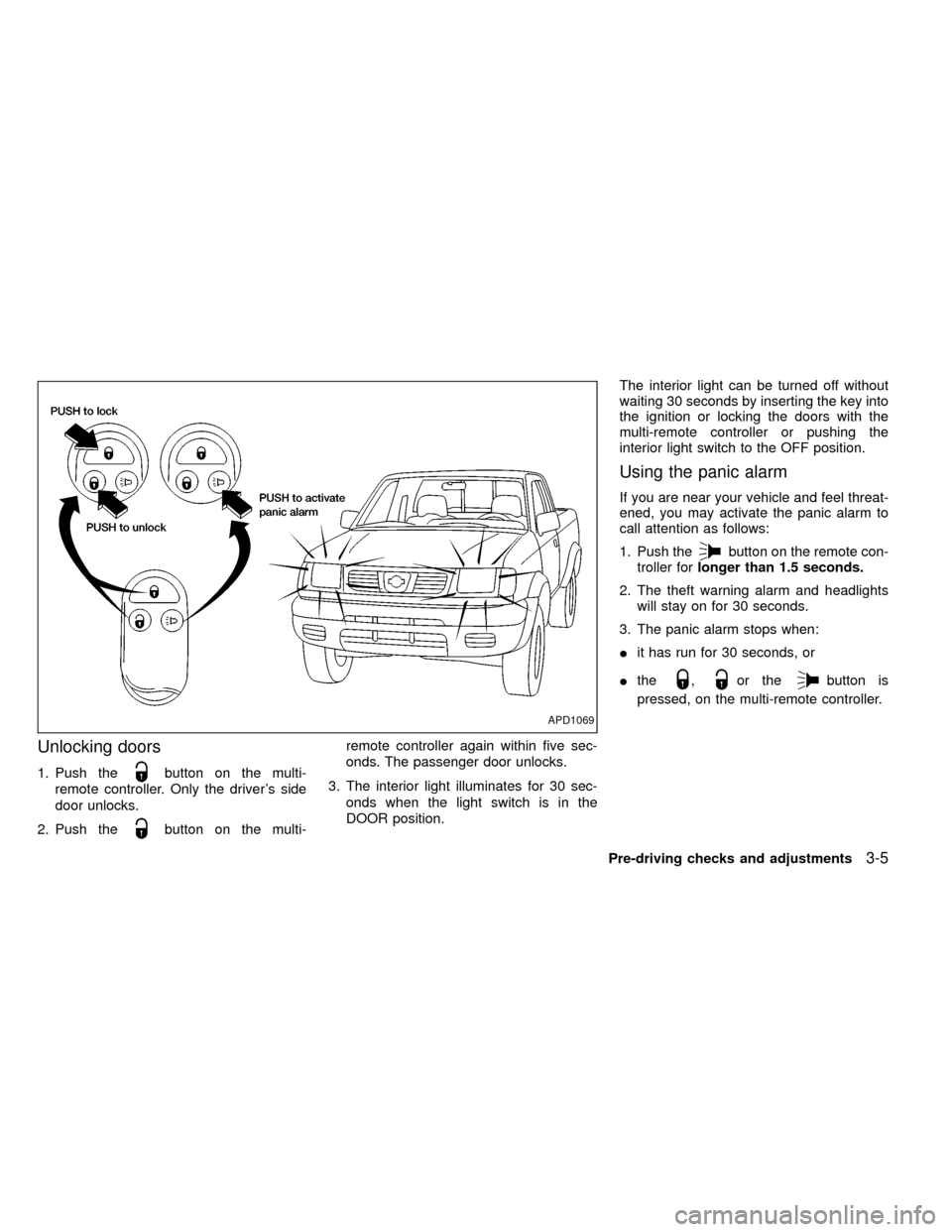
Unlocking doors
1. Push thebutton on the multi-
remote controller. Only the driver's side
door unlocks.
2. Push the
button on the multi-remote controller again within five sec-
onds. The passenger door unlocks.
3. The interior light illuminates for 30 sec-
onds when the light switch is in the
DOOR position.The interior light can be turned off without
waiting 30 seconds by inserting the key into
the ignition or locking the doors with the
multi-remote controller or pushing the
interior light switch to the OFF position.
Using the panic alarm
If you are near your vehicle and feel threat-
ened, you may activate the panic alarm to
call attention as follows:
1. Push the
button on the remote con-
troller forlonger than 1.5 seconds.
2. The theft warning alarm and headlights
will stay on for 30 seconds.
3. The panic alarm stops when:
Iit has run for 30 seconds, or
Ithe
,or thebutton is
pressed, on the multi-remote controller.
APD1069
Pre-driving checks and adjustments3-5
ZX
Page 95 of 247
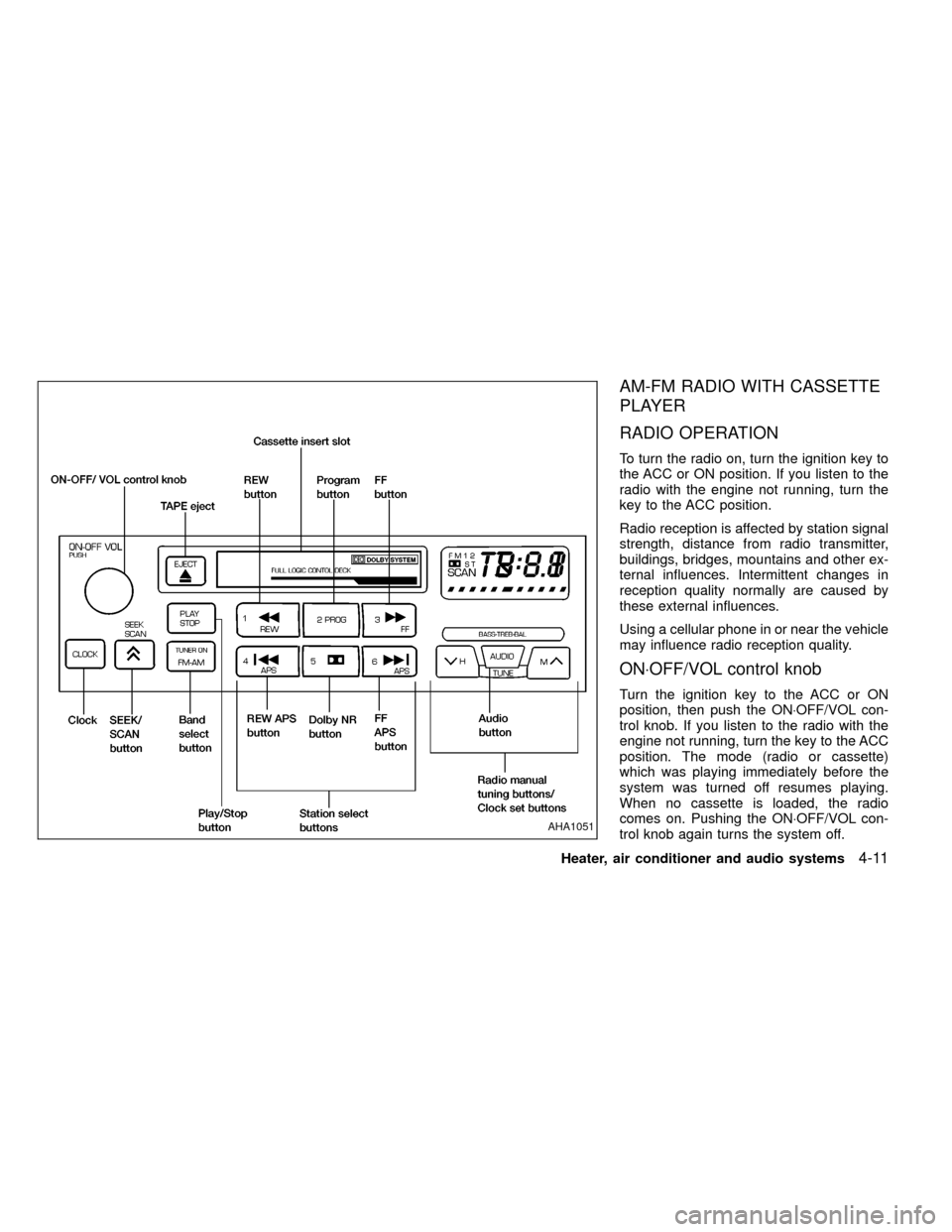
AM-FM RADIO WITH CASSETTE
PLAYER
RADIO OPERATION
To turn the radio on, turn the ignition key to
the ACC or ON position. If you listen to the
radio with the engine not running, turn the
key to the ACC position.
Radio reception is affected by station signal
strength, distance from radio transmitter,
buildings, bridges, mountains and other ex-
ternal influences. Intermittent changes in
reception quality normally are caused by
these external influences.
Using a cellular phone in or near the vehicle
may influence radio reception quality.
ON×OFF/VOL control knob
Turn the ignition key to the ACC or ON
position, then push the ON×OFF/VOL con-
trol knob. If you listen to the radio with the
engine not running, turn the key to the ACC
position. The mode (radio or cassette)
which was playing immediately before the
system was turned off resumes playing.
When no cassette is loaded, the radio
comes on. Pushing the ON×OFF/VOL con-
trol knob again turns the system off.
AHA1051
Heater, air conditioner and audio systems4-11
ZX
Page 98 of 247
is set to the desired level, press the AUDIO
button repeatedly until the radio or cassette
tape display appears.
CASSETTE TAPE OPERATION
Turn the ignition key to ACC or ON and
carefully insert a cassette tape into the tape
door. The cassette tape automatically pulls
into the player.
The word TAPE and moving digital squares
illuminate on the right side of the display
window. If the radio is already operating it
automatically turns off and the cassette tape
begins to play.
CAUTION
Do not force the cassette tape into the
tape door. This could cause player
damage.
The cassette tape automatically changes
directions to play the other side when the
first side is complete. At this time, the mov-
ing digital squares illuminate on the left side
of the display window.
Precautions on cassette player op-
erations
ITo maintain good quality sound, NIS-
SAN recommends using cassette tapes
of 60 minutes or shorter in length.
ICassette tapes should be removed
from the player when not in use. Store
cassettes in their protective cases
and away from direct sunlight, heat,
dust, moisture and magnetic sources.
IDirect sunlight can cause the cassette
to become deformed. The use of de-
formed cassettes may cause the cas-
sette to jam in the player.
IDo not use cassettes with labels
which are peeling and loose. If used,
the label could jam in the player.
IIf a cassette has loose tape, insert a
pencil through one of the cassette
hubs and rewind the tape firmly
around the hubs. Loose tape may
cause tape jamming and wavering
sound quality.
IOver a period of time, the playback
head, capstan and pinch roller may
collect a tape coating residue as thetape is played. This residue accumu-
lation can cause weak or wavering
sound, and should be removed peri-
odically with a head cleaning tape. If
the residue is not removed periodi-
cally, the player may need to be disas-
sembled for cleaning.Fast forwarding or rewinding the
tape
Push either theorbutton for
the desired direction.
The FF or REW symbol illuminates in the
display.
To stop the FF or REW function, press the
oragain, or thebutton.
Automatic Program Search (APS)
fast forwarding or APS rewinding
the tape
Push either theorbutton
while the cassette tape is playing. The tape
runs quickly, stops, then plays the next
selection from the beginning. Either the FF
or REW symbol flashes in the display while
searching for the selection.
4-14Heater, air conditioner and audio systems
ZX
Page 100 of 247
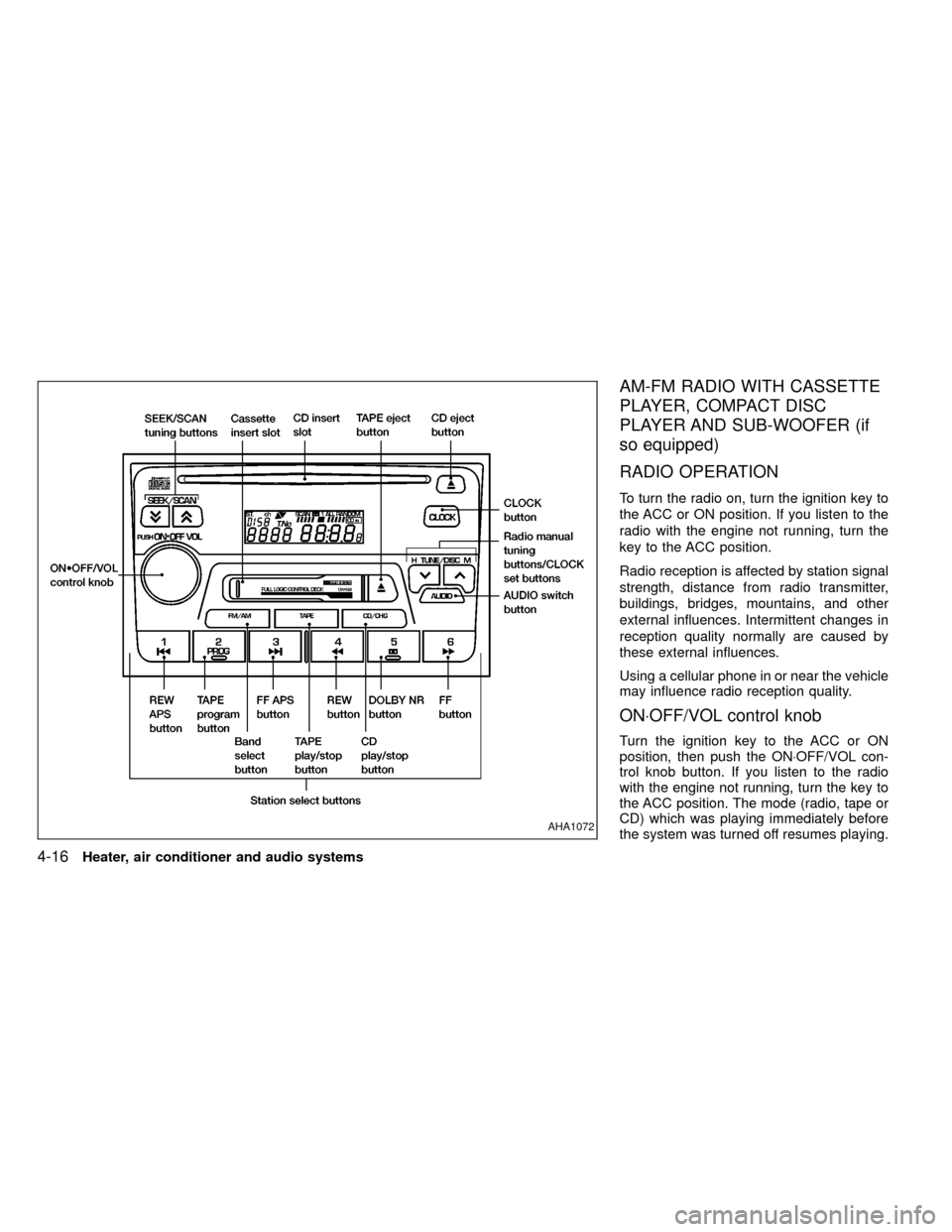
AM-FM RADIO WITH CASSETTE
PLAYER, COMPACT DISC
PLAYER AND SUB-WOOFER (if
so equipped)
RADIO OPERATION
To turn the radio on, turn the ignition key to
the ACC or ON position. If you listen to the
radio with the engine not running, turn the
key to the ACC position.
Radio reception is affected by station signal
strength, distance from radio transmitter,
buildings, bridges, mountains, and other
external influences. Intermittent changes in
reception quality normally are caused by
these external influences.
Using a cellular phone in or near the vehicle
may influence radio reception quality.
ON×OFF/VOL control knob
Turn the ignition key to the ACC or ON
position, then push the ON×OFF/VOL con-
trol knob button. If you listen to the radio
with the engine not running, turn the key to
the ACC position. The mode (radio, tape or
CD) which was playing immediately before
the system was turned off resumes playing.
AHA1072
4-16Heater, air conditioner and audio systems
ZX