phone NISSAN FRONTIER 2013 D40 / 2.G Quick Reference Guide
[x] Cancel search | Manufacturer: NISSAN, Model Year: 2013, Model line: FRONTIER, Model: NISSAN FRONTIER 2013 D40 / 2.GPages: 20, PDF Size: 2.38 MB
Page 3 of 20
TABLE OF
c
O
NTENTS
NEW SYSTEM FEATURES
Navigation System (if so equipped)................................2
Rear Sonar (if so equipped)......................................3
RearV
iew Monitor (if so equipped)
.................................3
E
S
SENT i A l iNF
o
RMAT io N
T
ire Pressure Monitoring System (TPMS)
...........................4
Loose Fuel
c ap
................................................4
c lock Set/Adjustment
...........................................5
Fi
R
ST
DRiv
E
F
EATURES
Remote
k
eyless Entry System (if so equipped)
......................
6
Opening the T
ailgate
............................................6
P
ower Seat Adjustments (if so equipped)
...........................6
Outside Mirror
c ontrol Switch
....................................7
St
arting/Stopping the Engine
.....................................7
Headlight
c ontrol Switch ........................................
8
W
indshield Wiper and Washer Switch .............................
9
Automatic
c limate c ontrols (if so equipped) ........................
9
F
M/AM/SiriusXM Satellite Radio with c
D Player (if so equipped)......11
USB/iPOD
® Interface (if so equipped)............................12
c
ruise
c
ontrol (if so equipped) ..................................
12
Fuel Filler Door................................................12
S
Y
STEM
G
U
i
DE
T
rip
c
omputer ................................................
13
Bluetooth
® Hands-free Phone System (if so equipped) ..............13
Bluetooth® System Operating Tips.............................13
Bluetooth® System without Navigation (if so equipped)............14
Bluetooth® System with Navigation (if so equipped) ..............15
HomeLink® Universal Transceiver (if so equipped)...................17
• A cellular telephone should not be used for any purpose while driving so full attention may be given to vehicle operation.
•
Always wear your seat belt.
• Supplemental
air bags do not replace proper seat belt usage.
•
Children
1
2 and under should always ride in the rear seat
properly secured in c
hild restraints or seat belts according to
their age and weight.
• Do
not drink and drive.
For more information, refer to the “Safety –– Seats, seat belts and
supplemental restraint system (section 1)”, the “Heater, air conditioner,
audio and phone systems (section 4)” and the “Starting and driving
(section 5)” of your Owner’s Manual.
Additional information about your vehicle is also available in your Owner’s Manual, Navigation System Owner’s Manual and at www.nissanusa.com.
To view detailed
instructional videos, go to
www.nissanownersinfo.mobi/2013/frontier or snap this barcode with an appropriate barcode reader.
1275631_13a_Frontier_QRG_102612.indd 510/26/12 3:55 PM
Page 4 of 20
To view detailed instructional videos regarding these and other features, please go to www.nissanownersinfo.mobi.
NAviGATio N SY STEM (if so equipped)
Your Navigation System can calculate a route from the current location to\
a preferred
destination. The real-time map display and turn-by-turn voice guidance will lead you a\
long
the route.
The Navigation System will continually update your vehicle’s position. If you have deviated from the original route, it will recalculate the route from your current\
location.
Your Navigation System, along with POIs (Point Of Interest) powered by Google * (if so
equipped), allows you to enter a destination using Google search results.
Using Google™ Send-to-car* (if so equipped) you can send a destination from Google Maps
to your vehicle’
s Navigation System.
Hands-free T ext Messaging – The system allows for the sending and receiving of text
messages through the vehicle interface.
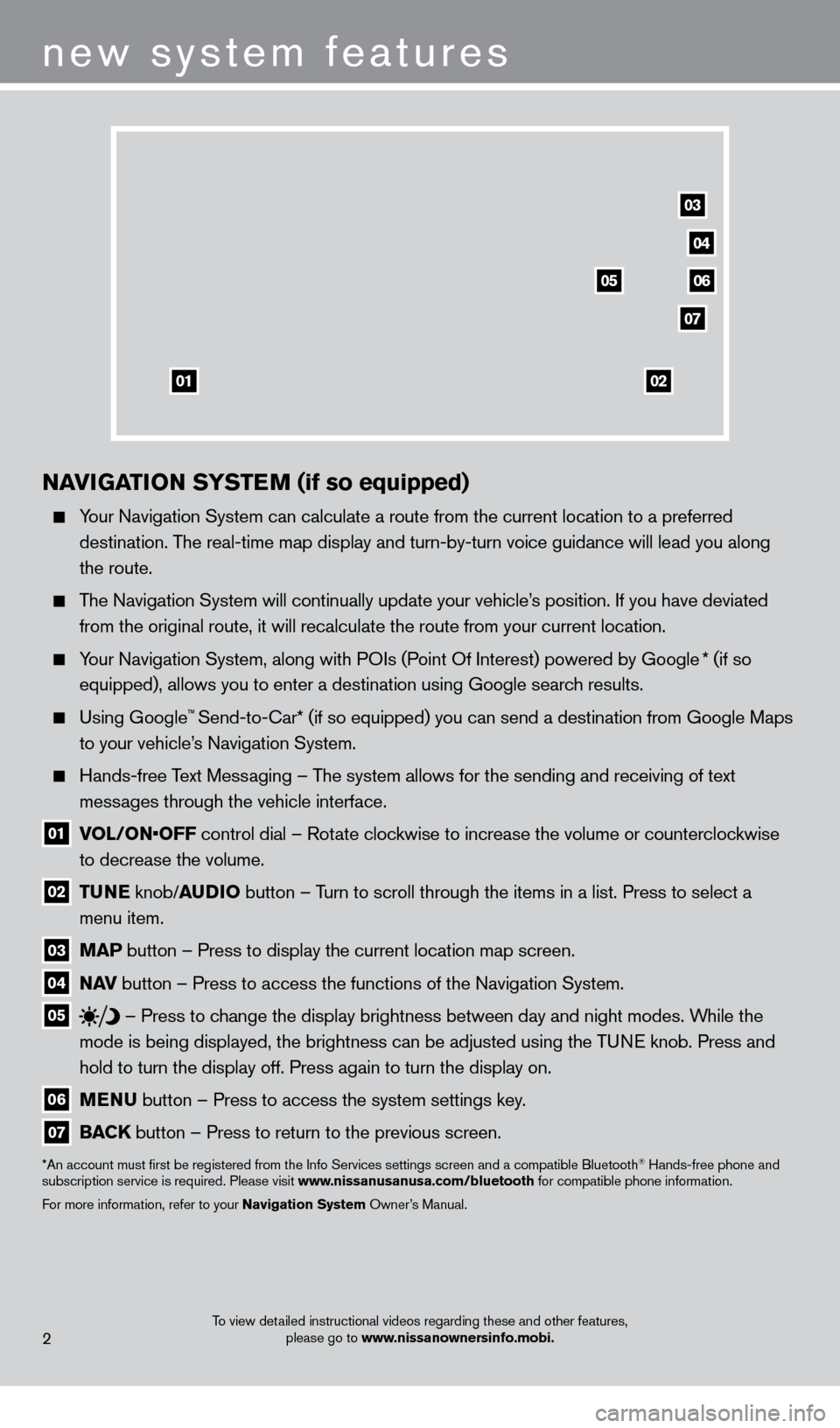
01 V OL/ON•OFF control dial – Rotate clockwise to increase the volume or counterclockwise
to decrease the volume.
02 T UNE
knob/AUD io button – T urn to scroll through the items in a list. Press to select a
menu item.
03 MAP button – Press to display the current location map screen.
04 NA v button – Press to access the functions of the Navigation System.
05
– Press to change the display brightness between day and night modes. While the
mode is being displayed, the brightness can be adjusted using the TUNE knob. Press and
hold to turn the display off. Press again to turn the display on.
06 MENU button – Press to access the system settings key .
07 BACK
button – Press to return to the previous screen.
*An account must first be registered from the Info Services settings s\
creen and a compatible Bluetooth® Hands-free phone and
subscription service is required. Please visit www.nissanusanusa.com/bluetooth for compatible phone information.
For more information, refer to your Navigation System Owner’s Manual.
new system features
2
04
03
06
07
05
0102
1275631_13a_Frontier_QRG_102612.indd 210/26/12 3:55 PM
Page 5 of 20
To view detailed instructional videos regarding these and other features, please go to www.nissanownersinfo.mobi.
REAR SoNAR SYSTEM (if so equipped)
With the shift lever in the R (RE v ERSE) position,
this system will sound a tone to alert you of obstacles
within up to 5.9 feet (1.8 m) from the bumper with
a decreased coverage area at the outer corners of
the bumper.
The system tones faster as the vehicle gets closer
to the obstacle. A continuous tone sounds when
an obstacle is less than 10 in (25 cm) from
the bumper.
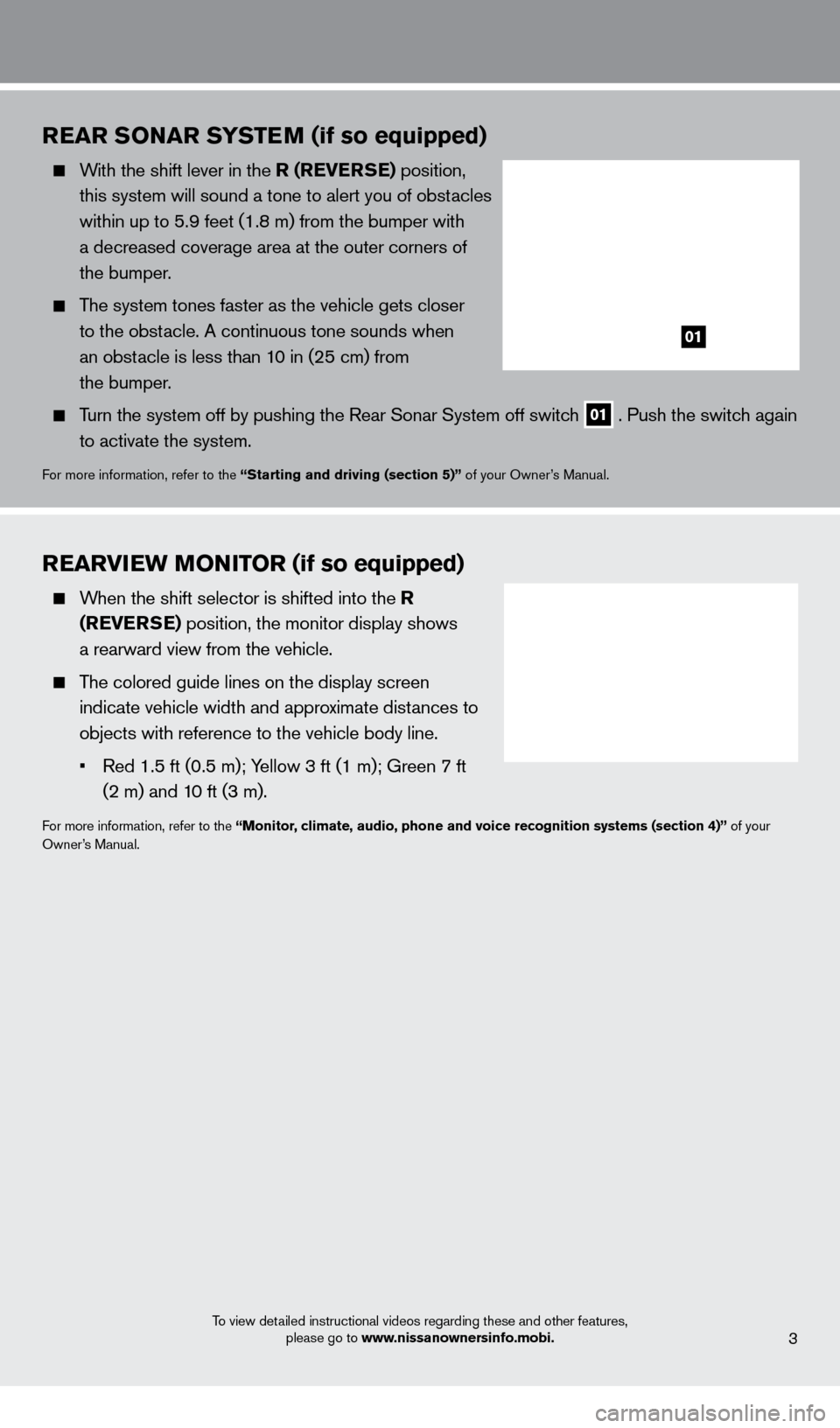
Turn the system off by pushing the Rear Sonar System off switch 01 . Push the switch again
to activate the system.
For more information, refer to the “Starting and driving (section 5)” of your Owner’s Manual.
REARviEW Mo Ni To R (if so equipped)
When the shift selector is shifted into the R
(RE v ERSE) position, the monitor display shows
a rearward view from the vehicle.
The colored guide lines on the display screen indicate vehicle width and approximate distances to
objects with reference to the vehicle body line.
•
Red
1.5 ft (0.5 m); Yellow 3 ft (1 m); Green 7 ft
(2 m) and 1
0 ft (3 m).
For more information, refer to the “Monitor, climate, audio, phone and voice recognition systems (section 4)” of your
Owner’s Manual.
3
01
1275631_13a_Frontier_QRG_102612.indd 310/26/12 3:55 PM
Page 7 of 20
CloCK SET/ADJUSTMENT
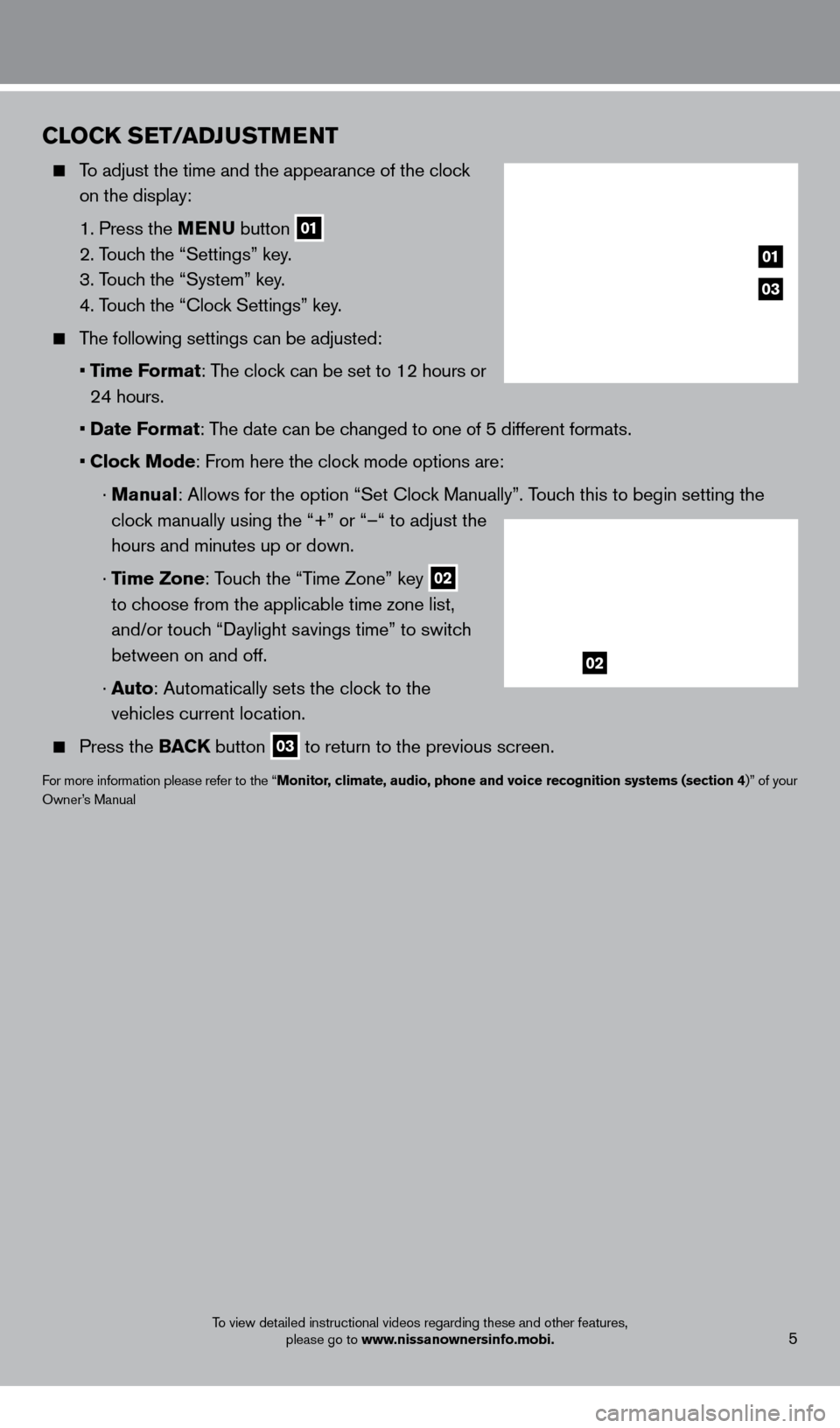
To adjust the time and the appearance of the clock on the display:
1. Press the
MENU button
01
2. T
ouch the “Settings” key.
3. T
ouch the “System” key.
4. T
ouch the “
c
lock Settings” key.
The following settings can be adjusted:
•
T
ime Format: The clock can be set to 12 hours or
24 hours.
•
Date F
ormat: The date can be changed to one of 5 different formats.
•
Clock Mode: From here the clock mode options are:
·
Manual: Allows for the option “Set c lock Manually”. Touch this to begin setting the
clock manually using the “+” or “–“ to adjust the
hours and minutes up or down.
·
Time Zone: Touch the “Time Zone” key
02
to choose from the applicable time zone list,
and/or touch “Daylight savings time” to switch
between on and off.
·
Auto: Automatically sets the clock to the
vehicles current location.
Press the BAC K button
03 to return to the previous screen.
For more information please refer to the “Monitor, climate, audio, phone and voice recognition systems (section 4)” of your
Owner’s Manual
To view detailed instructional videos regarding these and other features, please go to www.nissanownersinfo.mobi.
03
01
02
5
1275631_13a_Frontier_QRG_102612.indd 510/26/12 3:55 PM
Page 12 of 20
first drive features
To view detailed instructional videos regarding these and other features, please go to www.nissanownersinfo.mobi.
03 FAN SPEED C o NTRol Di A l / o FF BUTTo N
Turn the dial to the left to decrease fan speed or to the right to increa\
se fan speed.
Push the button to turn the system off.
To stop air from coming through vents with blower off, turn air recircula\
tion button 07 on.
04 AiR F loW C o NTRol BUTTo NS
Press the air flow control buttons to manually control air flow:
Air flows from the center and side vents.
Air flows from the center , side, and foot vents.
Air flows mainly from the foot vents.
Air flows from the defroster and foot vents.
Air flows from defroster outlets.
05 D EFRo ST iN G/DEFo GGiN G FRo NT AND SiD E W iN DoWS
Press the front window defroster button
to turn the system on. The A/ c automatically
turns on when the defroster mode is selected. This feature removes humidity from the air.
Set the temperature control dial 01 and the fan speed control dial 03 to their
maximum settings.
06 R EAR W iN DoW AN D o UTSiD E MiR Ro R (if so equipped) DEFRo STER SW i TCH
Push the rear window defroster switc
h
to turn the system on or off.
The rear window defroster automatically turns off after approximately 15 minutes.
07 A iR R EC iR CUl AT io N BUTTo N
Press the air recirculation button
to recirculate air inside the vehicle. The indicator light
on the button will illuminate. This system is used to avoid certain outside odors and helps
to adjust the inside vehicle temperature more effectively.
Press the air recirculation button again to turn air recirculation off. This allows outside
air to be drawn into the passenger compartment to prevent fogging in def\
rost, floor or
defrost/floor modes.
The air recirculation mode can only be selected if the air flow control\
mode is in the
or
position.
08 A/C B UTTo N
Press the
A/C button to manually turn the A/ c on or off.
For more information, refer to the “instruments and controls (section 2)” and the “Monitor, climate, audio, phone and
voice recognition systems (section 4)” of your Owner’s Manual.
10
1275631_13a_Frontier_QRG_102612.indd 1010/26/12 3:55 PM
Page 13 of 20
To view detailed instructional videos regarding these and other features, please go to www.nissanownersinfo.mobi.11
0506
03
01
04
02
FM/AM/SiriusXM* SATElli TE RADi o W i TH CD P l AYER
(if so equipped)
01 V OL/ON•OFF CONTROL DIAL
Press the VOL/ON•OFF control dial to turn the system on or off.
Turn the VOL/ON•OFF control dial to the right or left to increase or decrease the volume.
02 TUNE KNo B/AUDi o BUTTo N
To manually tune the radio, turn the TUNE knob left or right.
03 SEEK BUTToNS
To tune and stop at the next or previous broadcasting station, press the seek
buttons
or .
For SiriusXM Satellite Radio, to switch to the first channel of the previous or next category, press the seek buttons
or .
To change tracks on a cD, press the seek buttons or .
When the seek buttons or are pressed and held while a cD is playing, the cD will
rewind or fast forward. When the button is released, the c
D will play at normal speed.
04 STAT io N MEMo RY KEYS
T welve stations can be set for the FM band, six for the AM band and eighteen for SiriusXM
Satellite Radio.
To store a station in a preset first select a radio band by pressing the FM•AM 05 or
XM
button 06, then tune to the desired FM, AM or SiriusXM Satellite Radio station.
Now select and hold the desired st ation memory key (1-6 ) until the preset number is
updated on the display and a beep is heard. Programming is now complete.\
To retrieve a previously set station, select the radio band where the preset was stored then press the corresponding station memory key (1 -6 ).
*SiriusXM Satellite Radio is only available on vehicles equipped with optional Siri\
usXM Satellite Radio subscription service.
For more information, refer to the “Monitor, climate, audio, phone and voice recognition systems (section 4)” of your
Owner’s Manual.
1275631_13a_Frontier_QRG_102612.indd 1110/26/12 3:55 PM
Page 14 of 20
FUEl-F ill ER Doo R
The fuel-filler door
01 is located on the driver’s side
of the vehicle.
To open the fuel-filler door, pull the lid open.
For more information, refer to the “Pre-driving checks and adjustments
(section 3)” of your Owner’s Manual.
To view detailed instructional videos regarding these and other features, please go to www.nissanownersinfo.mobi.
CRUiSE Co NTRol (if so equipped)
The cruise control system enables you to set a
constant cruising speed once the vehicle has
reached 25 MPH (40 km/h).
The system will automatically maintain the set speed until you tap the brake pedal, accelerate, cancel or
turn the system off.
To activate the cruise control, push the ON•OFF
switch
01 . The CRU i SE
indicator light in the
instrument panel will illuminate.
To set cruising speed, accelerate the vehicle to the desired speed, push \
the C oAST/ SET
switch
02 and release. The SET indicator light in the instrument panel will illuminate. Take
your foot off the accelerator pedal. Your vehicle will maintain the set speed.
To reset at a faster cruising speed, push and hold the ACCE l/RES switc h
03 .
When the vehicle attains the desired speed, release the switch.
To reset at a slower cruising speed, push and hold the C oAST/ SET switch
02 .
Release the switch when the vehicle slows to the desired speed.
To cancel the preset speed, tap the brake pedal or push the CANCEl switch
04 .
To turn off cruise control, push the ON•OFF switch 01 . Both the CRU i SE
indicator light
and SET indicator light in the instrument panel will turn off.
For more information, refer to the “Starting and driving (section 5)” of your Owner’s Manual.
03
02
01
04
USB/ iPo D® iNTERFACE (if so equipped)
The USB jack
01 is located inside the center
console storage bo x.
When a compatible USB memory device or iPod®
is plugged into the USB jack, compatible audio files
stored on the device can be played through the
vehicle’s audio system.
For more information, refer to the “Monitor, climate, audio, phone and
voice recognition systems (section 4)” of your Owner’s Manual.
12
first drive features
01
1275631_13a_Frontier_QRG_102612.indd 1210/26/12 3:55 PM
Page 15 of 20
TRiP Co MPUTER
With the ignition switch in the o N position, modes
of the trip computer
01 can be selected by pressing
the trip computer change button 02 on the
instrument panel.
The following modes can be selected in the display:
• Trip A – measures the distance of one specific trip.
•
T
rip B – measures the distance of a second specific trip.
•
dte
(distance to empty) – displays the estimated distance to empty (dte) the vehicle can
be driven before refueling.
• mph – displays the average speed since the last reset.
• mpg – displays the average fuel consumption since the last reset.
• (Journey
time) – displays the elapsed time since the last reset.
To reset Trip A, Trip B, mph, mpg, and (Journey time) go to the desired mode on the trip
computer and hold the trip computer change button
02 for more than 3 seconds.
For more information, refer to the “instruments and controls (section 2)” of your Owner’s Manual.
01
Bl
UETooTH® HANDS-FREE PHo NE SYSTEM (if so equipped)
A cellular telephone should not be used while driving
so full attention may be given to vehicle operation.*
SYSTEM OPERATING TIPS
The “Help” command can be used to hear a list of available commands at any time.
Reduce bac kground noise as much as possible by
closing windows and pointing HVA
c
vents away from
the ceiling.
Say commands after the tone, or press the
button to say a command at any time .
Speak naturally without long pauses and without
raising your voice.
When speaking phonebook names, please be aware some phones require the last name to be spoken
before the first name. For example, “Michael Smith” may be spoken as “Smith Michael”.
To cancel a voice recognition session, simply wait 5 seconds, say “ c ancel” or “Quit,” or press
and hold the
button for 5 seconds.
To increase or decrease the volume of the voice prompts, push the volume \
control switches
+ or -
on the steering wheel or turn the control dial on the audio system while\
the audio system
is responding.
system guide
To view detailed instructional videos regarding these and other features, please go to www.nissanownersinfo.mobi.
*Some jurisdictions prohibit the use of cellular telephones while drivin\
g.13
02
1275631_13a_Frontier_QRG_102612.indd 1310/26/12 3:55 PM
Page 16 of 20
system guide
To view detailed instructional videos regarding these and other features, please go to www.nissanownersinfo.mobi.
If the Voice Recognition system does not recognize your voice commands, train th\
e system
using the Voice Adaptation Mode. See your Owner’s Manual for detailed information.
For more detailed information and instructions, refer to your cellular phone Owner’s Manual and visit www.nissanusa.com/bluetooth.
BlUETooTH® SYSTEM W i THo UT N AviGA T io N (if so equipped)
cONNEcTING PRO c EDURE
NOTE: The vehicle must be stationary when connecting the phone.
1.
Press the
button on the steering wheel. The system announces the available commands. 2.
S
ay: “
c
onnect phone”. The system acknowledges the command and announces the next set
of available commands.
3.
S
ay: “Add phone”. The system acknowledges the
command and asks you to initiate connecting from the
phone handset.
4.
Initiate connecting from the phone:
•
T
he
connecting procedure varies according to
eac
h cellular phone model. For detailed connecting
instructions and compatible phones, please visit
www.nissanusa.com/bluetooth.
•
W
hen
prompted for a PIN code, enter “1234”
from the handset. (T
he PIN code is assigned by NISSAN and cannot be changed.)
5.
S
ay a name for the phone when the system asks you to provide one. You can give the phone
a name of your choice.
PHONEBOO
k
SE
TUP
The phonebook stores up to 1,000 names for each phone paired with the system.
Depending on your cell phone, the system may automatically download your\
cell phone’ s
entire phonebook to the vehicle’s Bluetooth system.
If the phonebook does not download automatically , entries can be individually downloaded.
To manually download entries:
1.
Push the button on the steering wheel.
2.
After the tone, s ay “Phonebook”.
3.
After the next tone, s
ay “Transfer Entry”. The system acknowledges the command and
asks you to initiate the transfer from the phone handset. The new contact phone number
will be transferred from the cellular phone to the vehicle.
•
T
he
transfer
procedure varies according to each cellular phone.
See your cellular phone’
s owner’s manual for details. You can also visit
www.nissanusa.com/bluetooth for instructions on transferring phone
numbers from NISSAN recommended cellular phones.
4.
T
he system repeats the number and prompts you for the next command. When you have
finished entering numbers or transferring an entry, choose “Store.”
5.
T
he system confirms the name, location and number.
14
1275631_13a_Frontier_QRG_102612.indd 1410/26/12 3:55 PM
Page 17 of 20
To view detailed instructional videos regarding these and other features, please go to www.nissanownersinfo.mobi.
MAkING A cALL F ROM THE PHONEBOOk
1.
Press the button.
2.
After waiting for the tone, s ay “ c all”.
3.
After the next tone, speak a name of a phonebook entry
. For example “Michael Smith”.
4.
c
onfirm the correct name is recognized by saying “Dial” after the tone.
NOTE: In some cases, names stored using all UPPER
cA
SE letters may not be recognized by
the Voice Recognition system.
MA
k
I
NG A
c
ALL B
Y PHONE NUMBER
1.
Press the button. A tone will sound. 2.
S
ay: “
c
all”. The system acknowledges the command and announces the next set of
available commands.
3.
S
ay: “Phone Number”. The system acknowledges the command and announces the next
set of available commands.
4.
S
ay the number you wish to call starting with the area code in single digit format.
5.
W
hen you have finished speaking the phone number, the system repeats it back and
announces the available commands.
6.
S
ay: “Dial”. The system acknowledges the command and makes the call.
RE
cEI
VING/ENDING A c
A
LL
When you receive a phone call, a ring tone sounds through the audio syste\
m.
To accept the call, press the button.
To reject the call, press the button.
To hang up the phone at the end of a call or to disconnect during call pl\
acement,
press the
button.
For more information, refer to the “Monitor, climate, audio, phone and voice recognition systems (section 4)” of your
Owner’s Manual or please visit www.nissanusa.com/bluetooth.
BlUETooTH® SYSTEM W i TH N AviGA T io N (if so equipped)
Send predefined or custom text mess ages* through your vehicle’s Bluetooth® system.
Receive texts through your vehicle’s Bluetooth® system that can be read to you.
Bluetooth® Streaming Audio allows you to use a
compatible Bluetooth® phone to play audio files on
your device. Your compatible cellular phone can
be connected to the vehicle’s audio system, allowing
audio files to play through the vehicle’s speakers.
cONNEcTING PRO c EDURE
1. Press the MENU button on the control panel.
2.
Select the “Settings” key 01. 3.
Select the “Phone & Bluetooth” key 02.
15
01
02
1275631_13a_Frontier_QRG_102612.indd 1510/26/12 3:55 PM