navigation system NISSAN FRONTIER 2018 Owner´s Manual
[x] Cancel search | Manufacturer: NISSAN, Model Year: 2018, Model line: FRONTIER, Model: NISSAN FRONTIER 2018Pages: 502, PDF Size: 4.85 MB
Page 276 of 502
REQUIREMENTS
Siri is only available on the iPhone® 4S or
later. Devices released before iPhone® 4S
are not supported by the Siri Eyes Free sys-
tem. Visit www.apple.com/ios/siri for de-
tails about device compatibility.
Siri must be enabled on the phone. Please
check phone settings.
If the device has a lock screen, Siri must be
accessible from the lock screen. Please
check phone settings.
For best results, always update your device
to the latest sof tware version.
SIRI® ACTIVATION
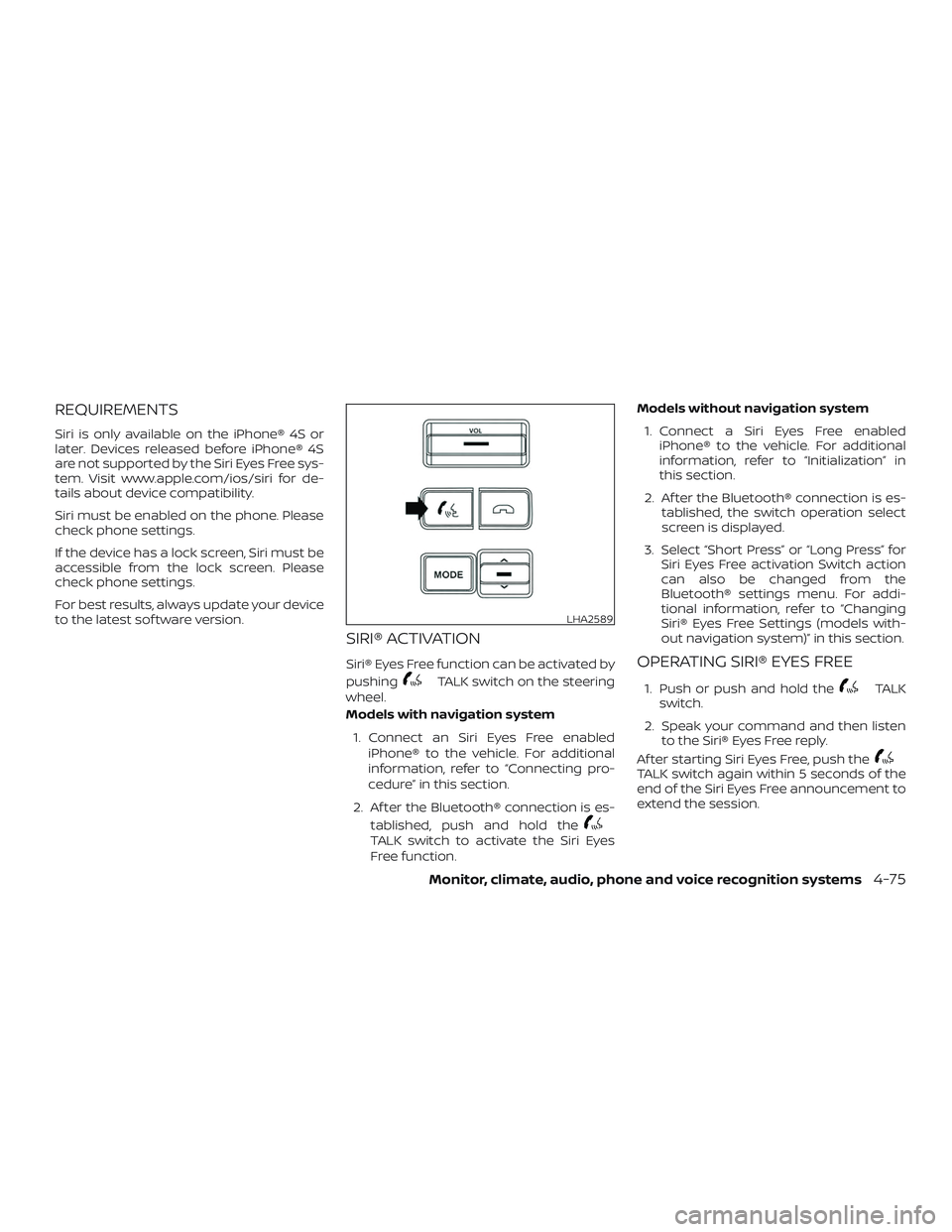
Siri® Eyes Free function can be activated by
pushing
TALK switch on the steering
wheel.
Models with navigation system
1. Connect an Siri Eyes Free enabled iPhone® to the vehicle. For additional
information, refer to “Connecting pro-
cedure” in this section.
2. Af ter the Bluetooth® connection is es- tablished, push and hold the
TALK switch to activate the Siri Eyes
Free function. Models without navigation system
1. Connect a Siri Eyes Free enabled iPhone® to the vehicle. For additional
information, refer to “Initialization” in
this section.
2. Af ter the Bluetooth® connection is es- tablished, the switch operation select
screen is displayed.
3. Select “Short Press” or “Long Press” for Siri Eyes Free activation Switch action
can also be changed from the
Bluetooth® settings menu. For addi-
tional information, refer to “Changing
Siri® Eyes Free Settings (models with-
out navigation system)” in this section.
OPERATING SIRI® EYES FREE
1. Push or push and hold theTALK
switch.
2. Speak your command and then listen to the Siri® Eyes Free reply.
Af ter starting Siri Eyes Free, push the
TALK switch again within 5 seconds of the
end of the Siri Eyes Free announcement to
extend the session.
LHA2589
Monitor, climate, audio, phone and voice recognition systems4-75
Page 277 of 502
Example 1 – Playing music1. Push or push and hold the
TALK
switch.
2. Say “Play (artist name, song name, etc.)”.
3. Your vehicle will automatically change to Bluetooth® Audio or iPod® mode*
when the music starts playing. Mode
selection is determined by the phone.
* If the iPhone® is also connected with the
USB cable.
If the audio track does not start playing
automatically af ter Siri Eyes Free ends, try
changing the track or audio source to re-
sume playback.
NOTE:
For best results, use the native music
app. Performance of music control func-
tion while using Podcasts, Audiobook or
other 3rd party music apps may vary and
is controlled by the iPhone®. Example2–Repl
ying to text messages
1. If a compatible iPhone® is connected and “Show Notifications” of the iPhone®
settings is enabled, the vehicle will dis-
play a notification for new incoming
text messages.
2. Af ter reading the message, push or push and hold the
TALK switch to
reply using Siri Eyes Free.
3. Af ter a beep sounds, say “Text mes- sage” or a similar command to reply
using Siri Eyes Free.
CHANGING SIRI® EYES FREE
SETTINGS (models without
navigation system)
Settings for Siri® Eyes Free can be found in
the Bluetooth settings menu. For addi-
tional information, refer to “Bluetooth® set-
tings” in this section.
1. Press the ENTER/SETTING button.
2.
Use the TUNE/FOLDER or TUNE/SCROLL
knob to select “Bluetooth” and then press
the ENTER/SETTING button.
3.Use the TUNE/FOLDER or TUNE/SCROLL
knob to select “Siri” and then press the
ENTER/SETTING button.
4. Select “Short Press” or “Long Press” us- ing the TUNE/SCROLL knob and then
press the ENTER/SETTING button.
CHANGING SIRI® EYES FREE
SETTINGS (models with
navigation system)
Settings for Siri® Eyes Free can be found in
the Bluetooth® settings menu. For addi-
tional information, refer to “Bluetooth® set-
tings” in this section.
1. Press the [
] button.
2. Touch the “Settings” key.
3. Touch the “Phone & Bluetooth” key.
4. Touch the “Phone settings” key.
5. Select “Short Press” or “Long Press” to set the activation.
4-76Monitor, climate, audio, phone and voice recognition systems
Page 278 of 502
TROUBLESHOOTING GUIDE
SymptomCause and Countermeasure
Cannot access Siri Eyes Free
from switch on the steering
wheel Check if a Bluetooth® connection is established between the iPhone® and the system.
Check if Siri is enabled on the device. On your phone, go to Siri setting.
Check that Siri can be accessed from the device lock screen. This can be set in the settings menu of your phone.
Models without navigation system:
Check the settings for Siri Eyes Free activation on the vehicle audio system. If the setting is “Long Press”, you must push and
hold the
TALK switch on the steering wheel for more than 1.5 seconds to start Siri Eyes Free. If the setting is “Short Press”,
a short push and release of the switch should start Siri Eyes Free.
Audio Source does not change
automatically to iPod® or
Bluetooth®
Audio mode For best results, use the native Music app. Performance of music control function while using Podcasts, Audiobook or other 3rd
party music apps may vary.
For best results, play media already stored on your device. Streaming music or playback from cloud storage may degrade
performance.
Switch the source manually by pressing the AUX or MEDIA button on the vehicle audio system or the MODE select switch on
the steering wheel.
Play, pause, next track, previous
track or play timer does not
work For best results, use the native Music app. Performance of music control function while using Podcasts, Audiobook or other 3rd
party music apps may vary and is controlled by the device.
Cannot hear any music/audio
being played back from a con-
nected iPhone® Check that the audio source is set to Bluetooth® Audio or iPod® mode. A USB connection is required for iPod® mode.
Cannot hear map
turn-by-turn direction guidance
from a
connected iPhone® Check that the audio source is set to Bluetooth® Audio or iPod® mode. A USB connection is required for iPod® mode.
Monitor, climate, audio, phone and voice recognition systems4-77
Page 281 of 502
WARNING
∙ Use a phone af ter stopping your ve-hicle in a safe location. If you have to
use a phone while driving, exercise ex-
treme caution at all times so full at-
tention may be given to vehicle
operation.
∙ If you are unable to devote full atten- tion to vehicle operation while talking
on the phone, pull off the road to a
safe location and stop your vehicle.
CAUTION
To avoid discharging the vehicle bat-
tery, use a phone af ter starting the
engine.
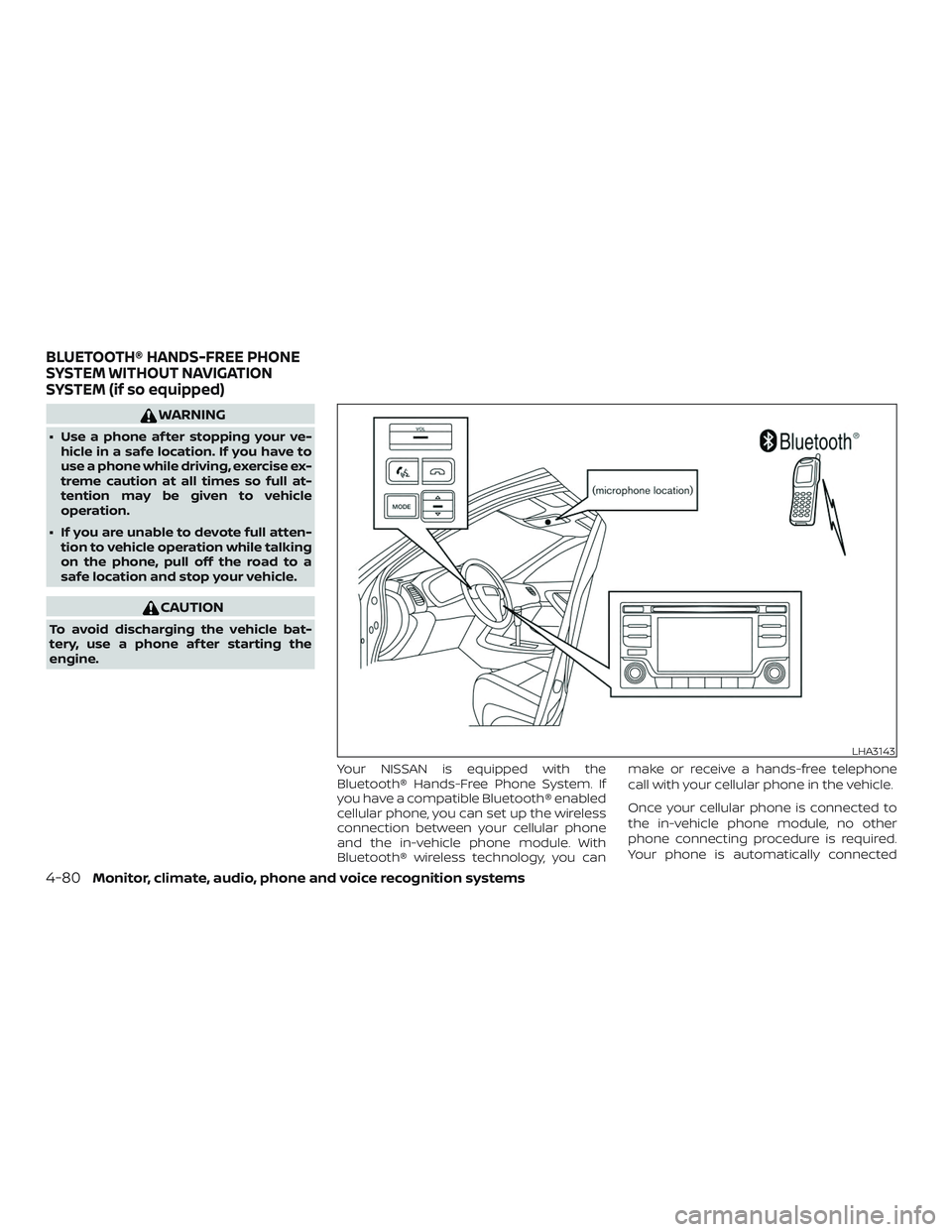
Your NISSAN is equipped with the
Bluetooth® Hands-Free Phone System. If
you have a compatible Bluetooth® enabled
cellular phone, you can set up the wireless
connection between your cellular phone
and the in-vehicle phone module. With
Bluetooth® wireless technology, you can make or receive a hands-free telephone
call with your cellular phone in the vehicle.
Once your cellular phone is connected to
the in-vehicle phone module, no other
phone connecting procedure is required.
Your phone is automatically connected
LHA3143
BLUETOOTH® HANDS-FREE PHONE
SYSTEM WITHOUT NAVIGATION
SYSTEM (if so equipped)
4-80Monitor, climate, audio, phone and voice recognition systems
Page 293 of 502
WARNING
∙ Use a phone af ter stopping your ve-hicle in a safe location. If you have to
use a phone while driving, exercise ex-
treme caution at all times so full at-
tention may be given to vehicle
operation.
∙ If you are unable to devote full atten- tion to vehicle operation while talking
on the phone, pull off the road to a
safe location and stop your vehicle.
CAUTION
To avoid discharging the vehicle bat-
tery, use a phone af ter starting the
engine.
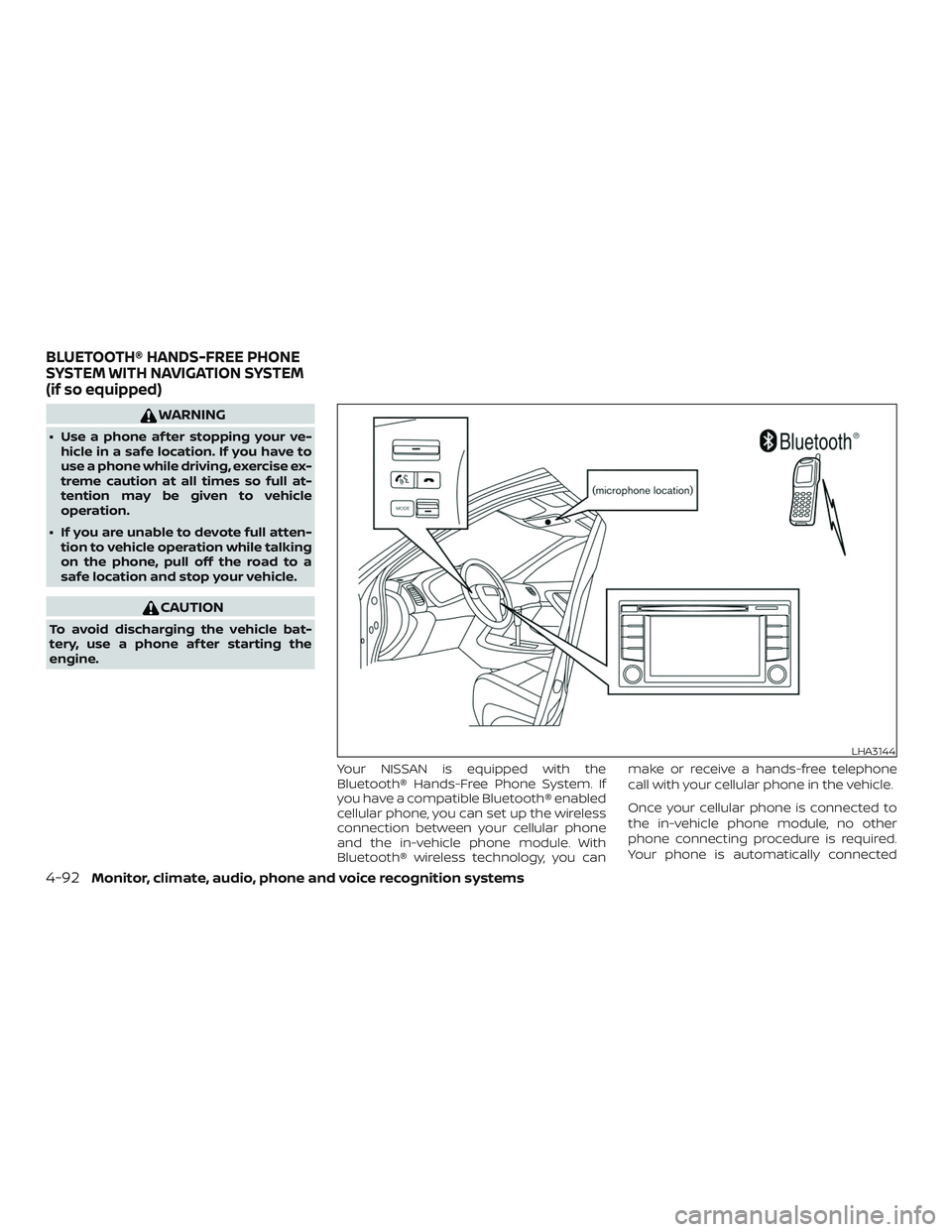
Your NISSAN is equipped with the
Bluetooth® Hands-Free Phone System. If
you have a compatible Bluetooth® enabled
cellular phone, you can set up the wireless
connection between your cellular phone
and the in-vehicle phone module. With
Bluetooth® wireless technology, you can make or receive a hands-free telephone
call with your cellular phone in the vehicle.
Once your cellular phone is connected to
the in-vehicle phone module, no other
phone connecting procedure is required.
Your phone is automatically connected
LHA3144
BLUETOOTH® HANDS-FREE PHONE
SYSTEM WITH NAVIGATION SYSTEM
(if so equipped)
4-92Monitor, climate, audio, phone and voice recognition systems
Page 302 of 502
The NISSAN Voice Recognition System al-
lows hands-free operation of the systems
equipped on this vehicle, such as the
phone and navigation systems.
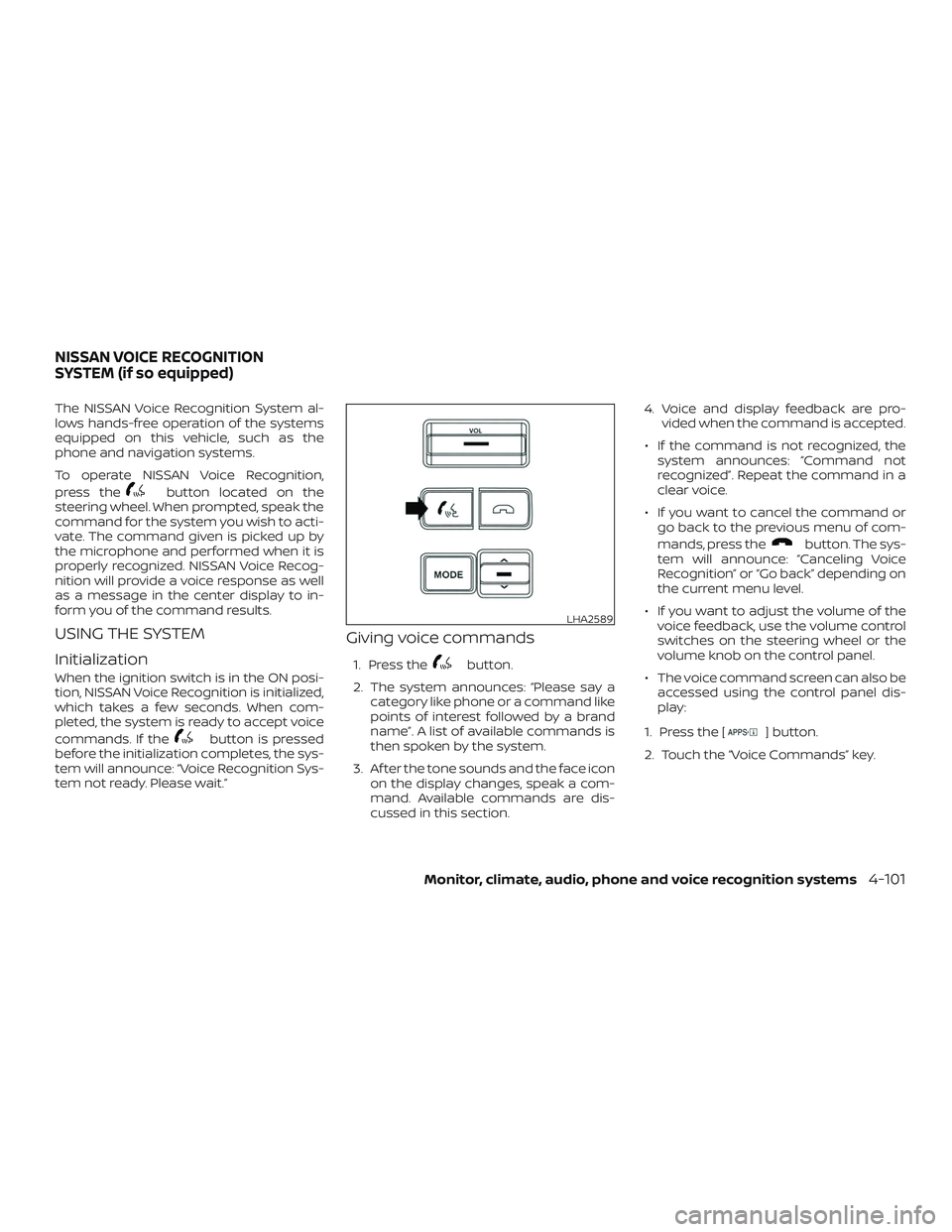
To operate NISSAN Voice Recognition,
press the
button located on the
steering wheel. When prompted, speak the
command for the system you wish to acti-
vate. The command given is picked up by
the microphone and performed when it is
properly recognized. NISSAN Voice Recog-
nition will provide a voice response as well
as a message in the center display to in-
form you of the command results.
USING THE SYSTEM
Initialization
When the ignition switch is in the ON posi-
tion, NISSAN Voice Recognition is initialized,
which takes a few seconds. When com-
pleted, the system is ready to accept voice
commands. If the
button is pressed
before the initialization completes, the sys-
tem will announce: “Voice Recognition Sys-
tem not ready. Please wait.”
Giving voice commands
1. Press thebutton.
2. The system announces: “Please say a category like phone or a command like
points of interest followed by a brand
name”. A list of available commands is
then spoken by the system.
3. Af ter the tone sounds and the face icon on the display changes, speak a com-
mand. Available commands are dis-
cussed in this section. 4. Voice and display feedback are pro-
vided when the command is accepted.
∙ If the command is not recognized, the system announces: “Command not
recognized”. Repeat the command in a
clear voice.
∙ If you want to cancel the command or go back to the previous menu of com-
mands, press the
button. The sys-
tem will announce: “Canceling Voice
Recognition” or “Go back” depending on
the current menu level.
∙ If you want to adjust the volume of the voice feedback, use the volume control
switches on the steering wheel or the
volume knob on the control panel.
∙ The voice command screen can also be accessed using the control panel dis-
play:
1. Press the [
] button.
2. Touch the “Voice Commands” key.
LHA2589
NISSAN VOICE RECOGNITION
SYSTEM (if so equipped)
Monitor, climate, audio, phone and voice recognition systems4-101
Page 303 of 502
Operating tips
To get the best performance out of NISSAN
Voice Recognition, observe the following:∙ Keep the interior of the vehicle as quiet as possible. Close the windows to elimi-
nate the surrounding noises (traffic
noises, vibration sounds, etc.), which
may prevent the system from recogniz-
ing the voice commands correctly.
∙ Wait until a tone sounds before speak- ing a command. Otherwise, the com-
mand will not be received properly.
∙ Start speaking a command within 3.5 seconds af ter the tone sounds.
∙ Speak in a natural voice without paus- ing between words.
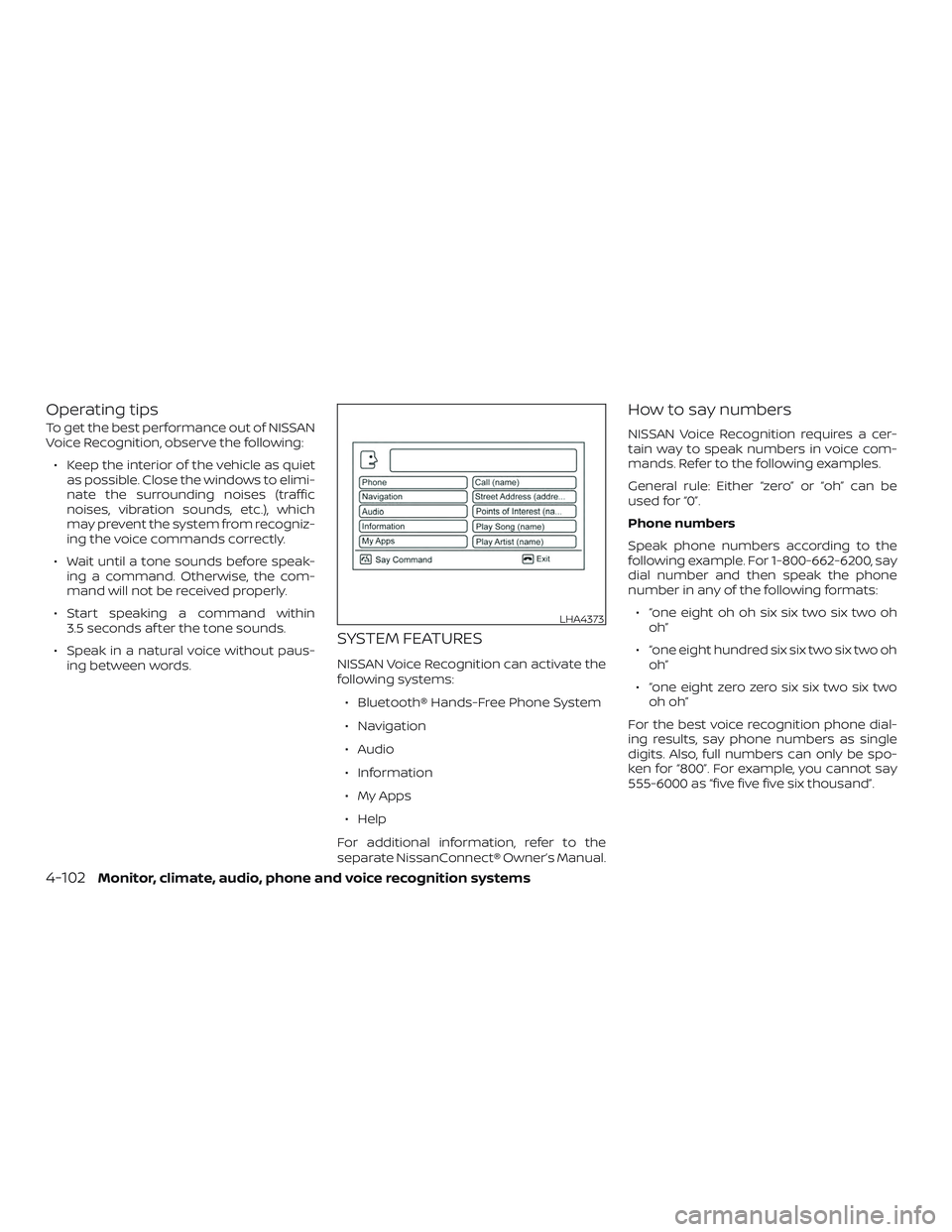
SYSTEM FEATURES
NISSAN Voice Recognition can activate the
following systems:
∙ Bluetooth® Hands-Free Phone System
∙ Navigation
∙ Audio
∙ Information
∙ My Apps
∙ Help
For additional information, refer to the
separate NissanConnect® Owner’s Manual.
How to say numbers
NISSAN Voice Recognition requires a cer-
tain way to speak numbers in voice com-
mands. Refer to the following examples.
General rule: Either “zero” or “oh” can be
used for “0”.
Phone numbers
Speak phone numbers according to the
following example. For 1-800-662-6200, say
dial number and then speak the phone
number in any of the following formats: ∙ “one eight oh oh six six two six two oh oh”
∙ “one eight hundred six six two six two oh oh”
∙ “one eight zero zero six six two six two oh oh”
For the best voice recognition phone dial-
ing results, say phone numbers as single
digits. Also, full numbers can only be spo-
ken for “800”. For example, you cannot say
555-6000 as “five five five six thousand”.
LHA4373
4-102Monitor, climate, audio, phone and voice recognition systems
Page 304 of 502
BLUETOOTH® HANDS-FREE
PHONE SYSTEM VOICE
COMMANDS
To access the Bluetooth® Hands-Free
Phone System voice commands:1. Press the
button.
2. Say “Call” and then a name in the ve- hicle phonebook to call that entry. Oth-
erwise, say “Phone” to access various
phone commands.
If the Bluetooth® has been set to “Off ”, the
system announces: “Bluetooth® is off.
Would you like to turn Bluetooth® on?”
If no phone is connected to the system and
the vehicle is stationary, the system an-
nounces: “There is no phone connected.
Would you like to connect a phone now?”
Say “Yes” to connect a phone. All further
Bluetooth® Hands-Free Phone System
voice commands are only available if a
phone is connected.
If a phone is connected and Bluetooth® is
set to “On”, the following voice commands
are available:
∙ Call (a name) Speak the name of the contact in
which you are trying to call. System will
confirm correct contact. Say “Dial” to
initiate dialing.
∙ Dial Number Allows for up to 24 digits to be dialed.
Af ter the number is entered, say “Dial”
to initiate dialing. Say “Correction” to
correct the number entered. Say “Go
Back” to return to the main menu.
∙ List Phonebook Starting with the first alphabetical en-
try in the vehicle phonebook, the sys-
tem prompts for an additional com-
mand. Say “Dial” to call the number of
the phonebook entry. Say “Send Text”
to send a text message to the number
of the phonebook entry. Say “Next En-
try” to skip to the next alphabetical en-
try in the vehicle phonebook, where
the same options will then be available.
∙ Recent Calls The system prompts for an additional
command. Say “Missed Calls”, “Incom-
ing Calls” or “Outgoing Calls” to display
a list of such calls on the screen. Speak the number of the entry dis-
played on the screen to dial that num-
ber or say “Next Page” to view entries
on the next page (if available).
∙ Redial Redials the last called number.
∙ Read Text Reads an incoming text message.
∙ Send Text Sends a text message.
∙ Select Phone The system replies “Please use manual
controls to continue”. Use manual con-
trols to change the active phone from
among the listed phones connected
to the vehicle.
∙ Siri (if so equipped) The system replies “starting Siri”. For
additional information, refer to “Oper-
ating Siri® Eyes Free” in this section.
For additional information, refer to
“Bluetooth® Hands-Free Phone System
with Navigation System” in this section.
Monitor, climate, audio, phone and voice recognition systems4-103
Page 305 of 502
NAVIGATION SYSTEM
VOICE COMMANDS
The following voice commands are avail-
able for the navigation system:∙ Street Address (address)
∙ Points of Interest (name)
∙ POI by Category
∙ Home
∙ Address Book
∙ Previous Destinations
∙ Enter Address in Steps
∙ Cancel Route
For additional information, refer to the
separate NissanConnect® Owner’s Manual.
AUDIO SYSTEM VOICE COMMANDS
To access the audio system voice commands:
1. Press thebutton.
2. Say “Audio”
3. Speak a command from the following available commands:
∙ Play (AM, FM, etc.) Allows user to select radio band ∙ Tune AM (number)
Allows user to tune directly to a desired
AM frequency
∙ Tune FM (number) Allows user to tune directly to a desired
FM frequency
∙ SXM channel (number) Allows user to tune directly to a desired
SXM station (if so equipped)
∙ CD Track (number) Allows user to select track to be played
∙ Play Song (name) Allows user to select song name to be
played
∙ Play Artist (name) Allows user to select artist to be played
∙ Play Album (name) Allows user to select album name to
be played
For additional information, refer to “Audio
system” in this section.
INFORMATION VOICE COMMANDS
The following voice commands are avail-
able for the information functions of the
navigation system:
∙ Traffic
∙ Fuel Prices
∙ Stocks
∙ Movie Listings
∙ Current Weather
∙ Weather Map
∙ 5—dayForecast
∙ 6 — hour Forecast
For additional information, refer to the
separate NissanConnect® Owner’s Manual.
MY APPS VOICE COMMANDS
Many Apps can be accessed using this
voice command. For additional informa-
tion, refer to “NissanConnect® Mobile Apps”
in this section.
4-104Monitor, climate, audio, phone and voice recognition systems
Page 332 of 502
5.Use Cruise Control
∙ Using cruise control during highway driving helps maintain a steady
speed.
∙ Cruise control is particularly effective in providing fuel savings when driving
on flat terrains.
6. Plan for the Shortest Route
∙ Utilize a map or navigation system to determine the best route to save
time.
7. Avoid Idling
∙ Shutting off your engine when safe for stops exceeding 30–60 seconds
saves fuel and reduces emissions.
8. Buy an Automated Pass for Toll
Roads
∙ Automated passes permit drivers to use special lanes to maintain cruis-
ing speed through the toll and avoid
stopping and starting. 9.
Winter Warm Up
∙ Limit idling time to minimize impact to fuel economy.
∙ Vehicles typically need no more than 30 seconds of idling at start-up to
effectively circulate the engine oil be-
fore driving.
∙ Your vehicle will reach its ideal oper- ating temperature more quickly
while driving versus idling.
10. Keeping your Vehicle Cool
∙ Park your vehicle in a covered parking area or in the shade whenever pos-
sible.
∙ When entering a hot vehicle, opening the windows will help to reduce the
inside temperature faster, resulting in
reduced demand on your A/C sys-
tem. ∙ Keep your engine tuned up.
∙ Follow the recommended scheduled
maintenance.
∙ Keep the tires inflated to the correct pressure. Low tire pressure increases
tire wear and lowers fuel economy.
∙ Keep the wheels in correct alignment. Improper alignment increases tire wear
and lowers fuel economy.
∙ For vehicles equipped with
, use
4H or 4L position only when necessary.
4-wheel drive operation lowers fuel
economy.
∙ Use the recommended viscosity engine oil. For additional information, refer to
“Engine oil and oil filter recommenda-
tions” in the “Technical and consumer
information” section of this manual.
INCREASING FUEL ECONOMY
Starting and driving5-25