air condition NISSAN FRONTIER 2020 Owner´s Manual
[x] Cancel search | Manufacturer: NISSAN, Model Year: 2020, Model line: FRONTIER, Model: NISSAN FRONTIER 2020Pages: 492, PDF Size: 3.05 MB
Page 178 of 492
WARNING
• Radio waves could adversely affect
electric medical equipment. Those
who use a pacemaker should contact
the electric medical equipment
manufacturer for the possible influ-
ences before use.
• The Intelligent Key transmits radio
waves when the buttons are pressed.
The FAA advises the radio waves may
affect aircraf t navigation and com-
munication systems. Do not operate
the Intelligent Key while on an air-
plane. Make sure the buttons are not
operated unintentionally when the
unit is stored for a flight.
The Intelligent Key can operate all the door
locks using the remote control function. The
operating environment and/or conditions
may affect the Intelligent Key operation.
Be sure to read the following before using
the Intelligent Key.
CAUTION
• Be sure to carry the Intelligent Key
with you when operating the vehicle.
• Never leave the Intelligent Key in the
vehicle when you leave the vehicle. The Intelligent Key is always communicat-
ing with the vehicle as it receives radio
waves. The Intelligent Key transmits weak
radio waves. Environmental conditions
may interfere with the operation of the In-
telligent Key under the following operating
conditions:
• When operating near a location where
strong radio waves are transmitted, such
as a TV tower, power station and broad-
casting station.
• When in possession of wireless equip- ment, such as a cellular telephone, trans-
ceiver, or a CB radio.
• When the Intelligent Key is in contact with or covered by metallic materials.
• When any type of radio wave remote con- trol is used nearby.
• When the Intelligent Key is placed near an electric appliance such as a personal
computer.
• When the vehicle is parked near a parking meter.
In such cases, correct the operating condi-
tions before using the Intelligent Key func-
tion or use the mechanical key.
Although the life of the battery varies de-
pending on the operating conditions, the battery’s life is approximately two years. If
the battery is discharged, replace it with a
new one.
When the Intelligent Key battery is low, the
NISSAN Intelligent Key® warning light will
blink af ter the ignition switch is placed in
the ON position.
Since the Intelligent Key is continuously re-
ceiving radio waves, if the key is lef t near
equipment which transmits strong radio
waves, such as signals from a TV and per-
sonal computer, the battery life may be-
come shorter.
When the battery is discharged, firmly apply
the foot brake and touch the ignition switch
with the Intelligent Key. Then push the igni-
tion switch while depressing the brake pedal
within 10 seconds af ter the chime sound. For
additional information, refer to “Push-button
ignition switch” in the “Starting and driving”
section of this manual.
For additional information, refer to “Battery
replacement” in the “Do-it-yourself ” section
of this manual.
As many as four Intelligent Keys can be
registered and used with one vehicle. For
information about the purchase and use of
additional Intelligent Keys, it is recom-
mended that you visit a NISSAN dealer.
NISSAN INTELLIGENT KEY®
3-8Pre-driving checks and adjustments
Page 197 of 492
4 Monitor, climate, audio, phone and
voice recognition systems
Control panel buttons — models without
Navigation System (if so equipped)..............4-5
How to use the touch-screen ................4-5
How to use the
MENU button ...........4-7(brightness control) button .............4-9
How to use the VOL (volume) knob /
PUSH
(power)button....................4-9
Selecting menu from launch bar .............4-9
Control panel buttons — models with
Navigation System (if so equipped) .............4-10
How to use the touch-screen ................4-11
HowtousetheBACKbutton ................ 4-13
How to use the
button ............... 4-13button................................. 4-15
How to use the ON-OFF button/VOL
(volume) control knob ....................... 4-15
How to use the CAMERA button .............4-15
RearView Monitor .............................. 4-16
RearView Monitor system operation .........4-17
How to read the displayed lines .............4-17
Difference between predicted and
actual distances ............................ 4-18
Adjusting the screen ........................ 4-20RearView Monitor system limitations
........4-20
System maintenance ....................... 4-21
Vents .......................................... 4-22
Heater and air conditioner (manual)
(if so equipped) ................................. 4-22
Controls ..................................... 4-23
Controls ..................................... 4-24
Heater operation ............................ 4-25
Air conditioner operation ....................4-26
Air flow charts ............................... 4-27
Heater and air conditioner (automatic)
(if so equipped) ................................. 4-31
Automatic operation ........................ 4-34
Manual operation ........................... 4-35
Operating tips ............................... 4-35
Servicing air conditioner ........................4-36
Audio system .................................. 4-36
Radio ....................................... 4-36
FM radio reception .......................... 4-36
AM radio reception .......................... 4-37
Satellite radio reception (if so equipped) .....4-37
Audio operation precautions ................4-37
Page 200 of 492
WARNING
• Positioning of the heating or air con-
ditioning controls and display con-
trols should not be done while driv-
ing in order that full attention may be
given to the driving operation.
• Do not disassemble or modif y this
system. If you do, it may result in ac-
cidents, fire, or electrical shock.
• Do not use this system if you notice
any abnormality, such as a frozen
screen or lack of sound. Continued
use of the system may result in acci-
dent, fire or electric shock.
• In case you notice any foreign object
in the system hardware, spill liquid
on it, or notice smoke or smell com-
ing from it, stop using the system im-
mediately. Ignoring such conditions
may lead to accidents, fire or electri-
cal shock. It is recommended that
you visit a NISSAN dealer for
servicing.
4-4Monitor, climate, audio, phone and voice recognition systems
Page 218 of 492
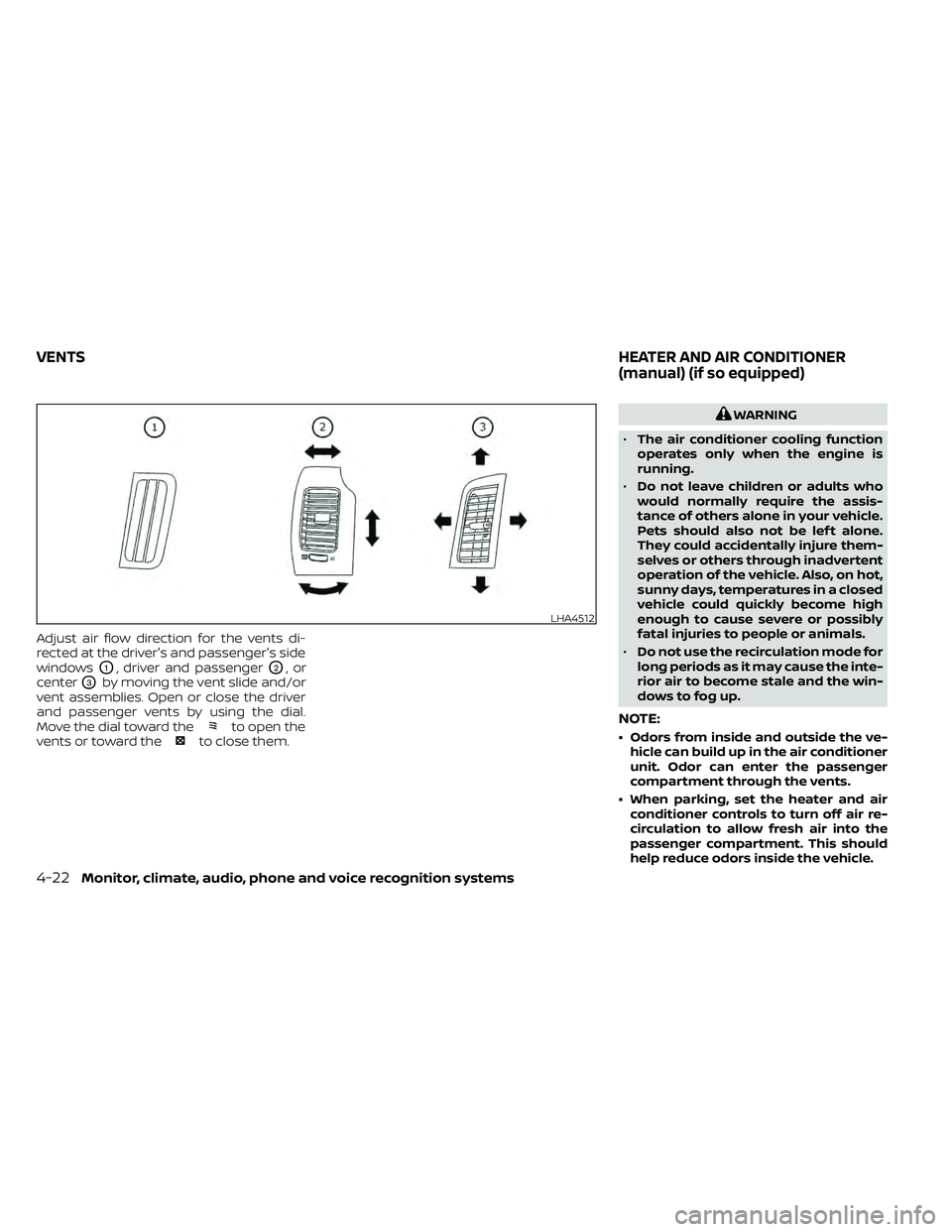
Adjust air flow direction for the vents di-
rected at the driver's and passenger's side
windows
O1, driver and passengerO2,or
center
O3by moving the vent slide and/or
vent assemblies. Open or close the driver
and passenger vents by using the dial.
Move the dial toward the
to open the
vents or toward theto close them.
WARNING
• The air conditioner cooling function
operates only when the engine is
running.
• Do not leave children or adults who
would normally require the assis-
tance of others alone in your vehicle.
Pets should also not be lef t alone.
They could accidentally injure them-
selves or others through inadvertent
operation of the vehicle. Also, on hot,
sunny days, temperatures in a closed
vehicle could quickly become high
enough to cause severe or possibly
fatal injuries to people or animals.
• Do not use the recirculation mode for
long periods as it may cause the inte-
rior air to become stale and the win-
dows to fog up.
NOTE:
• Odors from inside and outside the ve- hicle can build up in the air conditioner
unit. Odor can enter the passenger
compartment through the vents.
• When parking, set the heater and air conditioner controls to turn off air re-
circulation to allow fresh air into the
passenger compartment. This should
help reduce odors inside the vehicle.
LHA4512
VENTS HEATER AND AIR CONDITIONER
(manual) (if so equipped)
4-22Monitor, climate, audio, phone and voice recognition systems
Page 219 of 492
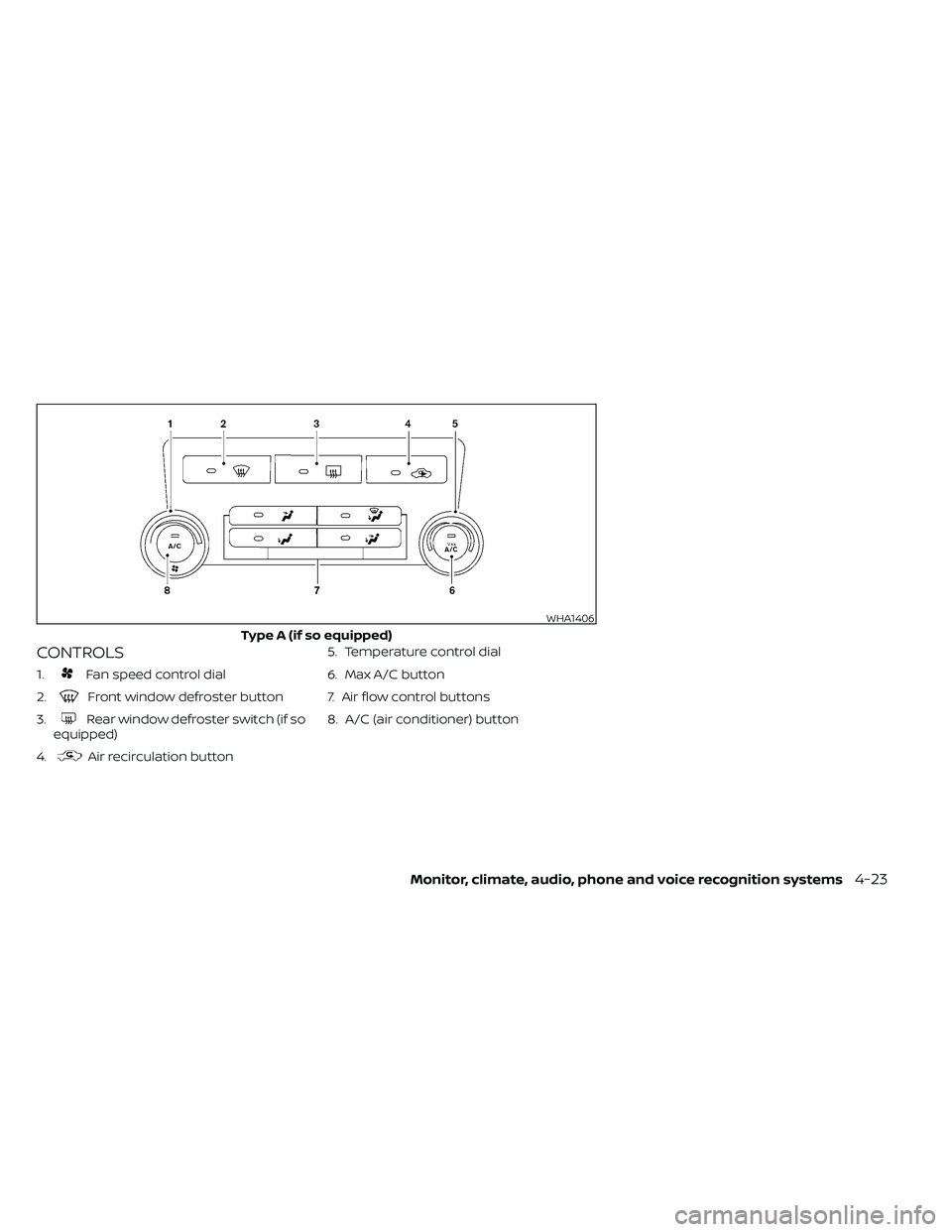
CONTROLS
1.Fan speed control dial
2.
Front window defroster button
3.
Rear window defroster switch (if so
equipped)
4.
Air recirculation button 5. Temperature control dial
6. Max A/C button
7. Air flow control buttons
8. A/C (air conditioner) button
WHA1406
Type A (if so equipped)
Monitor, climate, audio, phone and voice recognition systems4-23
Page 220 of 492
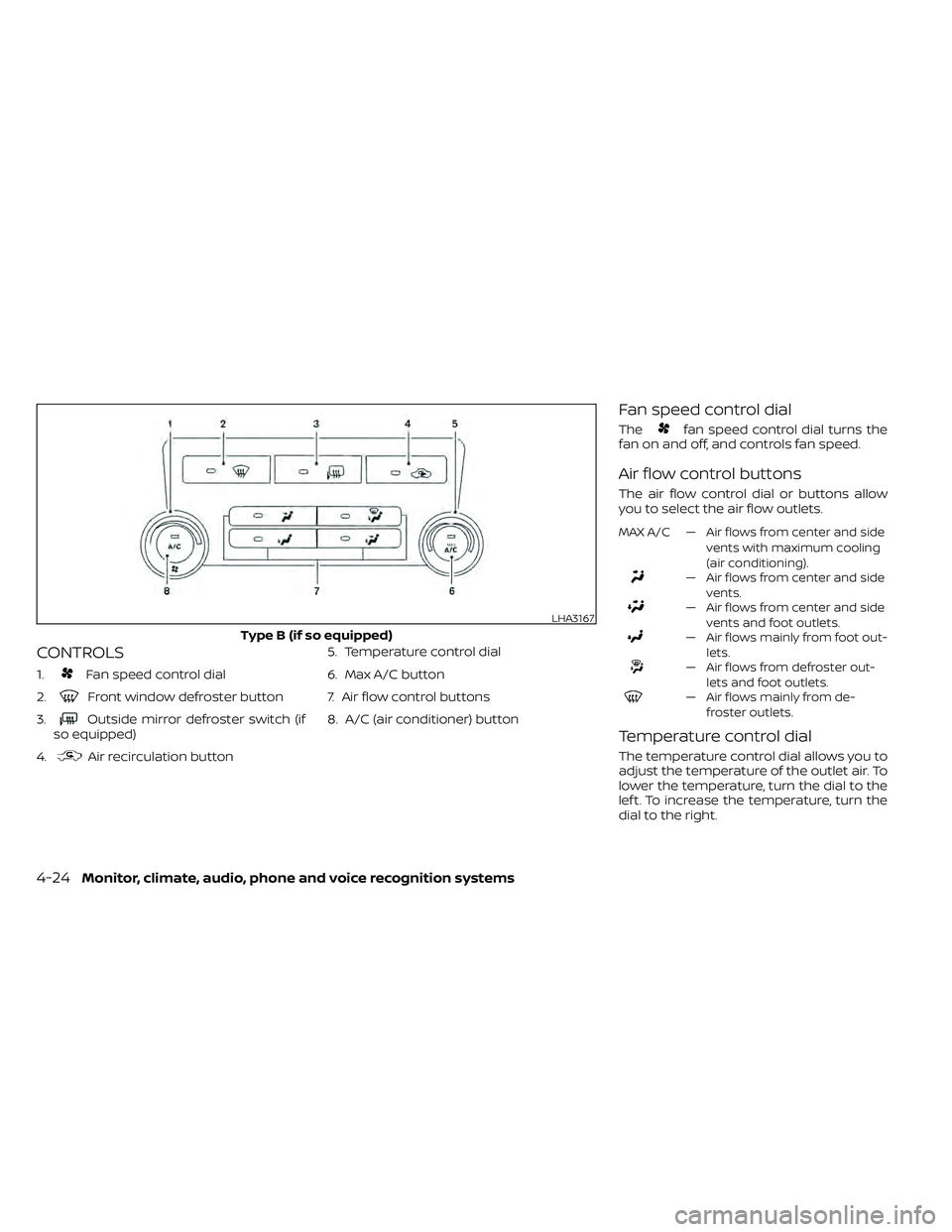
CONTROLS
1.Fan speed control dial
2.
Front window defroster button
3.
Outside mirror defroster switch (if
so equipped)
4.
Air recirculation button 5. Temperature control dial
6. Max A/C button
7. Air flow control buttons
8. A/C (air conditioner) button
Fan speed control dial
Thefan speed control dial turns the
fan on and off, and controls fan speed.
Air flow control buttons
The air flow control dial or buttons allow
you to select the air flow outlets.
MAX A/C — Air flows from center and side
vents with maximum cooling
(air conditioning).
— Air flows from center and sidevents.
— Air flows from center and sidevents and foot outlets.
— Air flows mainly from foot out-lets.
— Air flows from defroster out-lets and foot outlets.
— Air flows mainly from de-froster outlets.
Temperature control dial
The temperature control dial allows you to
adjust the temperature of the outlet air. To
lower the temperature, turn the dial to the
lef t. To increase the temperature, turn the
dial to the right.
LHA3167
Type B (if so equipped)
4-24Monitor, climate, audio, phone and voice recognition systems
Page 221 of 492
Air recirculation button
ON position (Indicator light on)
Interior air is recirculated inside the vehicle.
Press the
button to the ON position
when:
• driving on a dusty road.
• to prevent traffic fumes from entering passenger compartment.
• for maximum cooling when using the air conditioner.
OFF position (Indicator light off )
Outside air is drawn into the passenger
compartment and distributed through the
selected outlet.
Use the OFF position for normal heater or
air conditioner operation.
A/C (air conditioner) button
Start the engine, turn thefan speed
control dial to the desired position and
press the
button to turn on the air
conditioner. To turn off the air conditioner,
press the
button again.
The air conditioner cooling function op-
erates only when the engine is running.
Rear window or outside mirror
defroster switch (if so equipped)
For additional information about the rear
window or outside mirror defroster switch,
refer to “Rear window or outside mirror de-
froster switch.” in the “Instruments and
controls” section of this manual.
HEATER OPERATION
Heating
This mode is used to direct heated air to
the foot outlets. Some air also flows from
the defrost outlets.
1. Press the
air flow control button.
2. Turn the
fan speed control dial to
the desired position.
3. Turn the temperature control dial to the desired position between the middle
and the hot position.
Ventilation
This mode directs outside air to the side
and center vents.
1. Press the
button to the OFF posi-
tion. The indicator light on thebut-
ton will go off.
2. Press the
air flow control button.
3. Turn the
fan speed control dial to
the desired position.
4. Turn the temperature control dial to the desired position.
Defrosting or defogging
This mode directs the air to the defrost
outlets to defrost/defog the windows.
1. Press the
defrost/defog button.
2. Turn the
fan speed control dial to
the desired position.
3. Turn the temperature control dial to the desired position between the middle
and the hot position.
• To quickly remove ice or fog from the win- dows, turn the
fan speed control dial
to the highest setting and the tempera-
ture control to the full HOT position.
Monitor, climate, audio, phone and voice recognition systems4-25
Page 222 of 492
• When theposition is selected, the air
conditioner automatically turns on if the
outside temperature is more than 36°F
(2°C). This dehumidifies the air which
helps defog the windshield. The
mode automatically turns off, allowing
outside air to be drawn into the passen-
ger compartment to further improve the
defogging performance. The recircula-
tion mode cannot be activated in the
position.
Bi-level heating
The bi-level mode directs warmed air to
the side and center vents and to the front
and rear floor outlets.
1. Press the
button to the OFF posi-
tion. The indicator light on thebut-
ton will go off.
2. Press the
air flow control button.
3. Turn the
fan speed control dial to
the desired position.
4. Turn the temperature control dial to the desired position.
Heating and defogging
This mode heats the interior and defogs
the windshield.
1. Press the
air flow control button.
2. Turn the
fan speed control dial to
the desired position.
3. Turn the temperature control dial to the desired position between the middle
and the hot position.
• When the
position is selected, the
air conditioner automatically turns on if
the outside temperature is more than
36°F (2°C). If the
air flow control
button is selected for more than 1 minute,
the air conditioning system will continue
to operate until the
fan speed con-
trol dial is turned to OFF, the vehicle is
shut off, or the A/C button is used to turn
off the compressor even if the air flow
control dial is turned to a position other
than the
position. This dehumidi-
fies the air which helps defog the wind-
shield. The
mode automatically
turns off, allowing outside air to be drawn
into the passenger compartment to fur-
ther improve the defogging perfor-
mance.
Operating tips
Clear snow and ice from the wiper blades
and air inlet in front of the windshield.
This improves heater operation.
AIR CONDITIONER OPERATION
Start the engine, turn thefan speed
control dial to the desired position, and
press the
button to activate the air
conditioner. When the air conditioner is on,
cooling and dehumidif ying functions are
added to the heater operation.
The air conditioner cooling function op-
erates only when the engine is running.
Cooling
This mode is used to cool and dehumidif y
the air.
1. Press the
button to the OFF
position.
2. Press the
air flow control button.
3. Turn the
fan speed control dial to
the desired position.
4. Press the
button.
5. Turn the temperature control dial to the desired position.
4-26Monitor, climate, audio, phone and voice recognition systems
Page 223 of 492
• For quick cooling when the outside tem-perature is high, press thebutton to
the ON position. Be sure to return the
to the OFF position for normal cool-
ing. The indicator light on thebutton
will go off. You may also select MAX A/C
for quick cooling.
Dehumidified heating
This mode is used to heat and dehumidif y
the air.
1. Press the
air flow control button.
2. Turn the
fan speed control dial to
the desired position.
3. Press the
button on.
4. Turn the temperature control dial to the desired position.
Dehumidified defogging
This mode is used to defog the windows
and dehumidif y the air.
1. Press the
air flow control button.
2. Turn the
fan speed control dial to
the desired position. • When the
orare selected, the
air conditioner automatically turns on if
the outside temperature is more than 36°
F (2° C). This dehumidifies the air which
helps defog the windshield. The
mode automatically turns off, allowing
outside air to be drawn into the passen-
ger compartment to further improve the
defogging performance.
• The air conditioner is always on in the
mode, regardless of whether the in-
dicator light is on or off.
3. Turn the temperature control dial to the desired position.
Operating tips
• Keep the windows and moonroof (if soequipped) closed while the air condi-
tioner is in operation.
• Af ter parking in the sun, drive for two or three minutes with the windows open to
vent hot air from the passenger com-
partment. Then, close the windows. This
allows the air conditioner to cool the inte-
rior more quickly. •
The air conditioning system should be
operated for approximately 10 minutes
at least once a month. This helps pre-
vent damage to the system due to lack
of lubrication.
• A visible mist may be seen coming from the ventilators in hot, humid conditions
as the air is cooled rapidly. This does not
indicate a malfunction.
• If the engine coolant temperature
gauge indicates engine coolant tem-
perature over the normal range, turn
the air conditioner off. For additional
information, refer to “If your vehicle
overheats” in the “In case of emer-
gency ” section of this manual.AIR FLOW CHARTS
The following charts show the button and
dial positions for MAXIMUM AND QUICK
heating, cooling or defrosting. The air re-
circulation (
) button should always
be in the OFF position for heating and
defrosting.
Monitor, climate, audio, phone and voice recognition systems4-27
Page 227 of 492
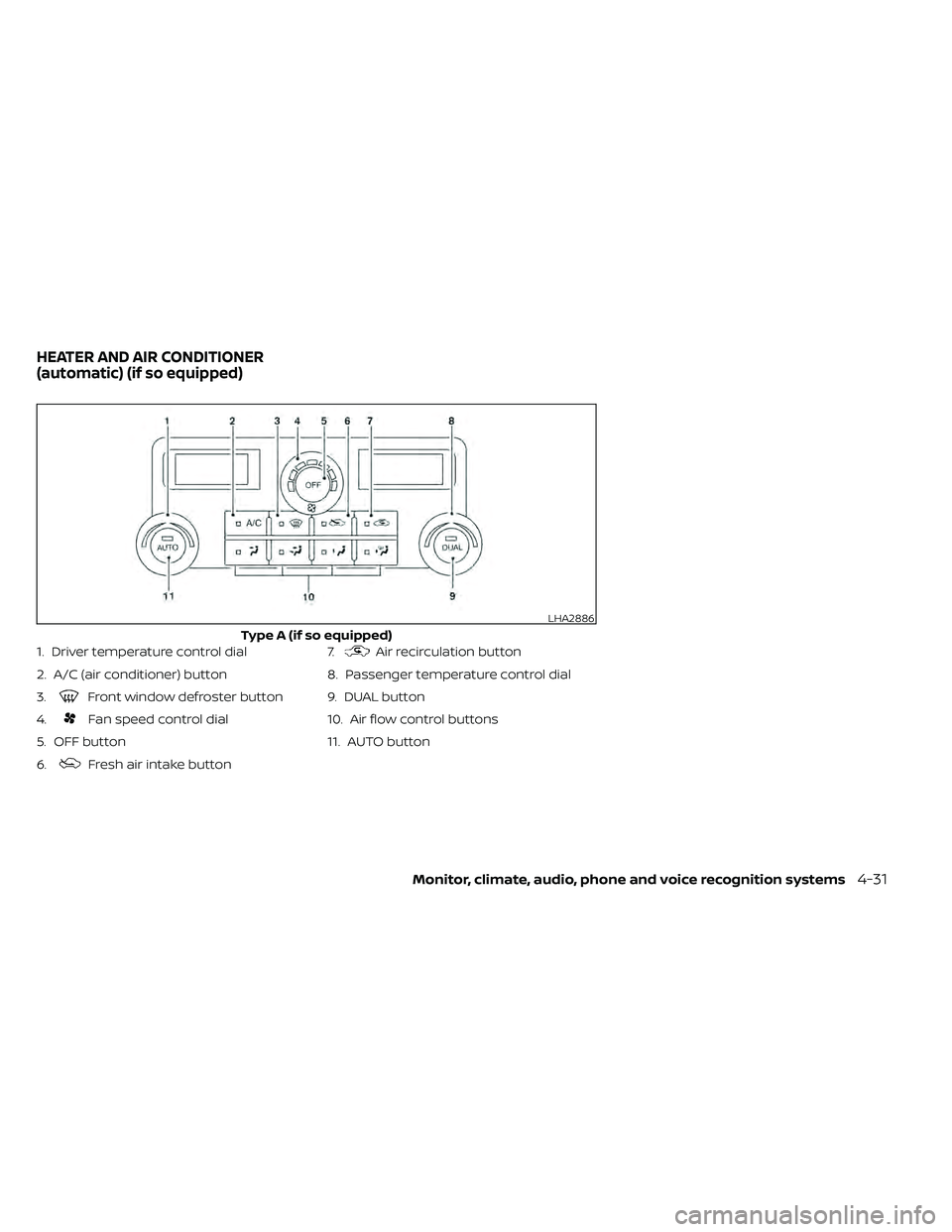
1. Driver temperature control dial
2. A/C (air conditioner) button
3.
Front window defroster button
4.
Fan speed control dial
5. OFF button
6.
Fresh air intake button 7.
Air recirculation button
8. Passenger temperature control dial
9. DUAL button
10. Air flow control buttons
11. AUTO button
LHA2886
Type A (if so equipped)
HEATER AND AIR CONDITIONER
(automatic) (if so equipped)
Monitor, climate, audio, phone and voice recognition systems4-31