parking NISSAN FRONTIER 2022 Owner´s Manual
[x] Cancel search | Manufacturer: NISSAN, Model Year: 2022, Model line: FRONTIER, Model: NISSAN FRONTIER 2022Pages: 556, PDF Size: 6.11 MB
Page 353 of 556
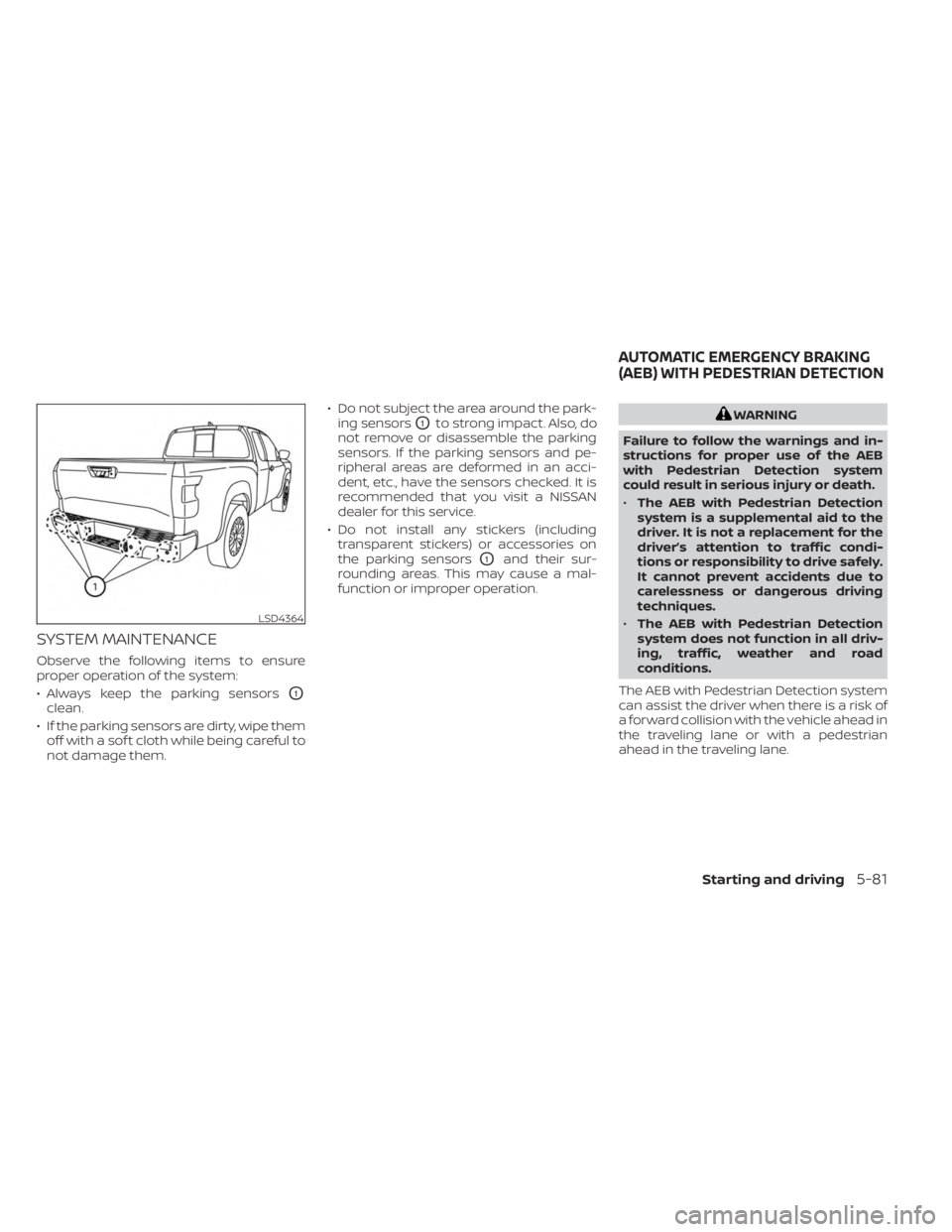
SYSTEM MAINTENANCE
Observe the following items to ensure
proper operation of the system:
• Always keep the parking sensors
O1
clean.
• If the parking sensors are dirty, wipe them off with a sof t cloth while being careful to
not damage them. • Do not subject the area around the park-
ing sensors
O1to strong impact. Also, do
not remove or disassemble the parking
sensors. If the parking sensors and pe-
ripheral areas are deformed in an acci-
dent, etc., have the sensors checked. It is
recommended that you visit a NISSAN
dealer for this service.
• Do not install any stickers (including transparent stickers) or accessories on
the parking sensors
O1and their sur-
rounding areas. This may cause a mal-
function or improper operation.
WARNING
Failure to follow the warnings and in-
structions for proper use of the AEB
with Pedestrian Detection system
could result in serious injury or death.
• The AEB with Pedestrian Detection
system is a supplemental aid to the
driver. It is not a replacement for the
driver’s attention to traffic condi-
tions or responsibility to drive safely.
It cannot prevent accidents due to
carelessness or dangerous driving
techniques.
• The AEB with Pedestrian Detection
system does not function in all driv-
ing, traffic, weather and road
conditions.
The AEB with Pedestrian Detection system
can assist the driver when there is a risk of
a forward collision with the vehicle ahead in
the traveling lane or with a pedestrian
ahead in the traveling lane.
LSD4364
AUTOMATIC EMERGENCY BRAKING
(AEB) WITH PEDESTRIAN DETECTION
Starting and driving5-81
Page 359 of 556
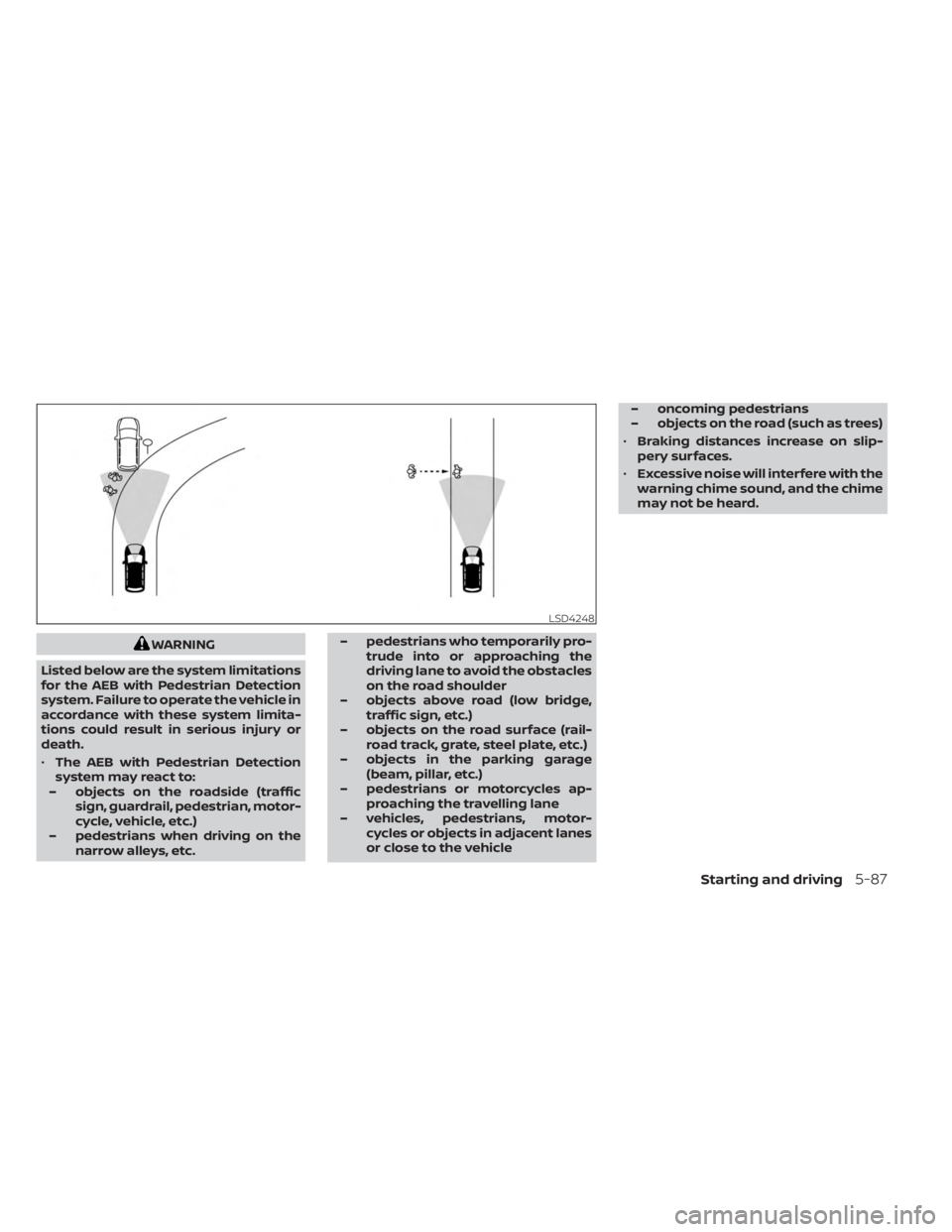
WARNING
Listed below are the system limitations
for the AEB with Pedestrian Detection
system. Failure to operate the vehicle in
accordance with these system limita-
tions could result in serious injury or
death.
• The AEB with Pedestrian Detection
system may react to:
– objects on the roadside (traffic sign, guardrail, pedestrian, motor-
cycle, vehicle, etc.)
– pedestrians when driving on the narrow alleys, etc. – pedestrians who temporarily pro-
trude into or approaching the
driving lane to avoid the obstacles
on the road shoulder
– objects above road (low bridge, traffic sign, etc.)
– objects on the road surface (rail- road track, grate, steel plate, etc.)
– objects in the parking garage (beam, pillar, etc.)
– pedestrians or motorcycles ap- proaching the travelling lane
– vehicles, pedestrians, motor- cycles or objects in adjacent lanes
or close to the vehicle – oncoming pedestrians
– objects on the road (such as trees)
• Braking distances increase on slip-
pery surfaces.
• Excessive noise will interfere with the
warning chime sound, and the chime
may not be heard.
LSD4248
Starting and driving5-87
Page 380 of 556
Follow these easy-to-use Fuel Efficient
Driving Tips to help you achieve the most
fuel economy from your vehicle.
1.Use Smooth Accelerator and Brake
Pedal Application
• Avoid rapid starts and stops.
• Use smooth, gentle accelerator and brake application whenever possible.
• Maintain constant speed while com- muting and coast whenever possible.
2. Maintain Constant Speed
• Look ahead to try and anticipate and minimize stops.
• Synchronizing your speed with traffic lights allows you to reduce your num-
ber of stops.
• Maintaining a steady speed can mini- mize red light stops and improve fuel
efficiency.
3. Use Air Conditioning (A/C) at Higher
Vehicle Speeds
• Below 40 mph (64 km/h), it is more efficient to open windows to cool the
vehicle due to reduced engine load.
• Above 40 mph (64 km/h), it is more efficient to use A/C to cool the vehicle
due to increased aerodynamic drag. • Recirculating the cool air in the cabin
when the A/C is on reduces cooling
load.
4. Drive at Economical Speeds and
Distances
• Observing the speed limit and not ex- ceeding 60 mph (97 km/h) (where le-
gally allowed) can improve fuel effi-
ciency due to reduced aerodynamic
drag.
• Maintaining a safe following distance behind other vehicles reduces unnec-
essary braking.
• Safely monitoring traffic to anticipate changes in speed permits reduced
braking and smooth acceleration
changes.
• Select a gear range suitable to road conditions.
5. Use Cruise Control
• Using cruise control during highway driving helps maintain a steady speed.
• Cruise control is particularly effective in providing fuel savings when driving
on flat terrains.
6. Plan for the Shortest Route
• Utilize a map or navigation system to determine the best route to save time. 7.
Avoid Idling
• Shutting off your engine when safe for stops exceeding 30–60 seconds saves
fuel and reduces emissions.
8. Buy an Automated Pass for Toll Roads
• Automated passes permit drivers to use special lanes to maintain cruising
speed through the toll and avoid stop-
ping and starting.
9. Winter Warm Up
• Limit idling time to minimize impact to fuel economy.
• Vehicles typically need no more than 30 seconds of idling at start-up to ef-
fectively circulate the engine oil before
driving.
• Your vehicle will reach its ideal operat- ing temperature more quickly while
driving versus idling.
10. Keeping your Vehicle Cool
• Park your vehicle in a covered parking area or in the shade whenever
possible.
• When entering a hot vehicle, opening the windows will help to reduce the
inside temperature faster, resulting in
reduced demand on your A/C system.
FUEL EFFICIENT DRIVING TIPS
5-108Starting and driving
Page 382 of 556
TRANSFER CASE SHIFTING
PROCEDURES
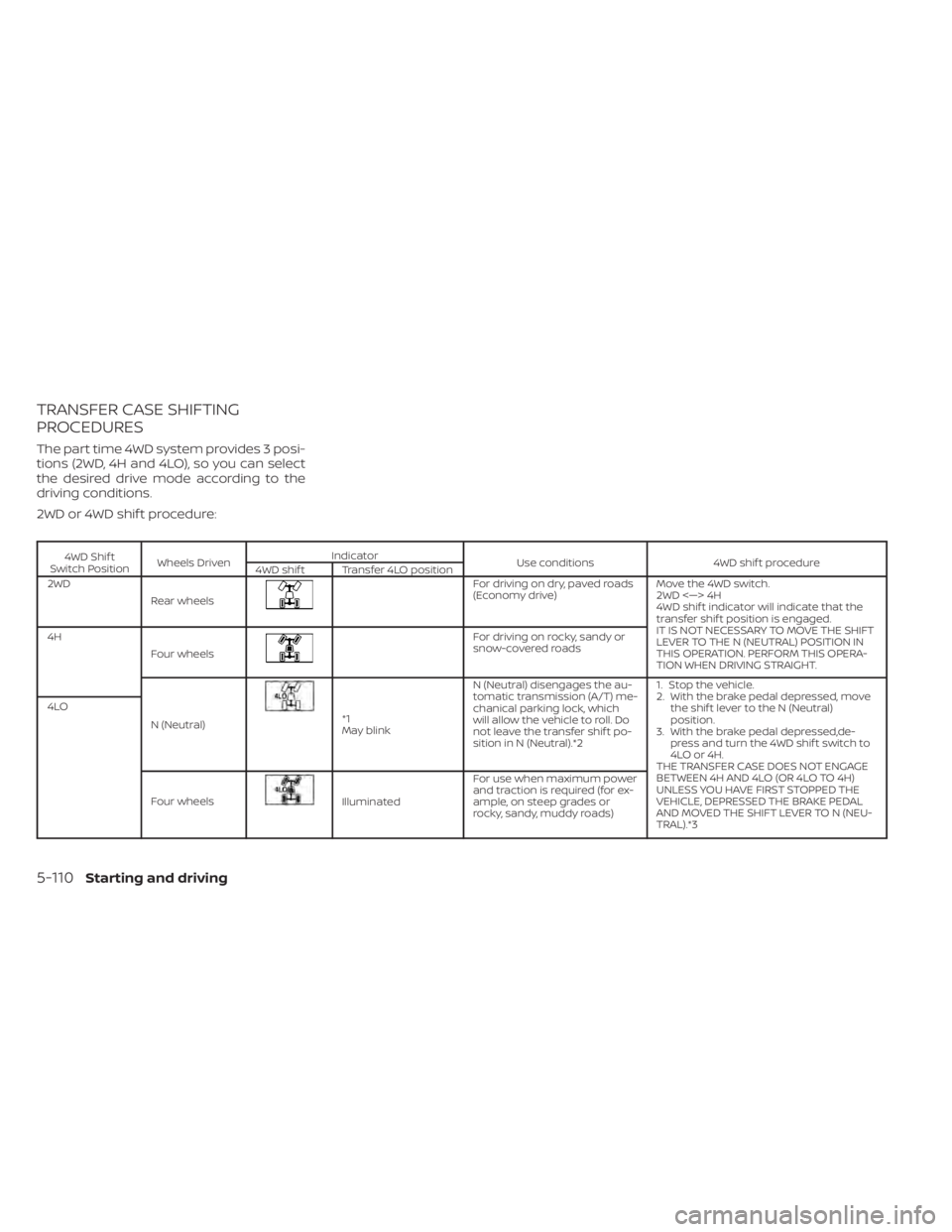
The part time 4WD system provides 3 posi-
tions (2WD, 4H and 4LO), so you can select
the desired drive mode according to the
driving conditions.
2WD or 4WD shif t procedure:
4WD Shif t
Switch Position Wheels Driven Indicator
Use conditions 4WD shif t procedure
4WD shif t Transfer 4LO position
2WD
Rear wheels
For driving on dry, paved roads
(Economy drive) Move the 4WD switch.
2WD <—> 4H
4WD shif t indicator will indicate that the
transfer shif t position is engaged.
IT IS NOT NECESSARY TO MOVE THE SHIFT
LEVER TO THE N (NEUTRAL) POSITION IN
THIS OPERATION. PERFORM THIS OPERA-
TION WHEN DRIVING STRAIGHT.
4H
Four wheels
For driving on rocky, sandy or
snow-covered roads
N (Neutral)
*1
May blink N (Neutral) disengages the au-
tomatic transmission (A/T) me-
chanical parking lock, which
will allow the vehicle to roll. Do
not leave the transfer shif t po-
sition in N (Neutral).*2 1. Stop the vehicle.
2. With the brake pedal depressed, move
the shif t lever to the N (Neutral)
position.
3. With the brake pedal depressed,de- press and turn the 4WD shif t switch to
4LO or 4H.
THE TRANSFER CASE DOES NOT ENGAGE
BETWEEN 4H AND 4LO (OR 4LO TO 4H)
UNLESS YOU HAVE FIRST STOPPED THE
VEHICLE, DEPRESSED THE BRAKE PEDAL
AND MOVED THE SHIFT LEVER TO N (NEU-
TRAL).*3
4LO
Four wheels
Illuminated For use when maximum power
and traction is required (for ex-
ample, on steep grades or
rocky, sandy, muddy roads)
5-110Starting and driving
Page 383 of 556
*1: Before moving the shif t lever from N
(Neutral), wait until the 4LO indicator stays
on steady. This indicates that the 4WD shif t
procedure is completed and the transfer
gear is correctly set in the 4LO position. If
the vehicle is shif ted into gear before the
indicator is on steady, the transfer gear
may grind, not engage correctly or stay in
the N (Neutral) position.
- If the 4WD vehicle information display
warning message illuminates, perform the
following procedure to return the transfer
case to correct operating condition.
1. Turn off the engine by placing the ignition
switch in the OFF position.
2. Start the engine.
- Check that the 4WD vehicle information
display warning message turns off. If the
warning message in the vehicle informa-
tion display stays on, have the system
checked. It is recommended that you visit a
NISSAN dealer for this service.
3. Apply the parking brake, depress the
brake pedal and move the shif t lever to the
N (Neutral) position.
4. With the brake pedal depressed, move
the 4WD shif t switch to the desired mode.- Be sure to wait until the transfer gear
change completes before shif ting the shif t
lever from the N (Neutral) position.
*2: While changing in and out of 4LO, the
ignition switch must be in the ON position
and the vehicle's engine must be running
for a shif t to take place and for the 4WD
shif t and 4LO position indicators to be op-
erable. Otherwise, the shif t will not take
place and no indicators will be on or
flashing.
*3: Make sure the transfer 4LO position in-
dicator turns on when you shif t the 4WD
shif t switch to 4LO. The
indicator light
will also turn on when 4LO is selected. For
additional information, see “Vehicle Dy-
namic Control (VDC) system” (P. 5-121).
When the 4LO position is selected, the VDC
system is disabled and the VDC off indica-
tor light illuminates, see “Vehicle Dynamic
Control (VDC) OFF indicator light”(P. 2-18).
The transfer case 4WD shif t switch is used
to select either 2WD or 4WD depending on
the driving conditions. There are three
types of drive modes available, 2WD, 4H and
4LO. The 4WD shif t switch electronically controls
the transfer case operation. Rotate the
switch to move between each mode, 2WD,
4H and 4LO.
To change into or out of 4LO, the vehicle
MUST be stationary, move the shif t lever
to N (Neutral), and depress the brake
pedal. The switch must be pushed and
turned to select 4LO.
WARNING
• When parking, apply the parking
brake before stopping the engine
and make sure that the 4WD shif t in-
dicator is on and the Automatic
Transmission Park (ATP) warning
light goes off. Otherwise, the vehicle
could unexpectedly move even if the
A/T is in the P (Park) position.
• The 4LO indicator must stop blinking
and remain illuminated or turn off
before shif ting the transmission into
gear. If the shif t lever is shif ted from
the N (Neutral) position to any other
gear when the 4LO indicator is blink-
ing, the vehicle may move
unexpectedly.
Starting and driving5-111
Page 389 of 556
WARNING
• Do not stop or park the vehicle over
flammable materials such as dry
grass, waste paper or rags. They may
ignite and cause a fire.
•
Safe parking procedures require that
both the parking brake be set and the
transmission placed into P (Park). Fail-
ure to do so could cause the vehicle to
move unexpectedly or roll away and re-
sult in an accident. Make sure the shif t
lever has been pushed as far forward as
it can go and cannot be moved without
depressing the foot brake pedal.
• Never leave the engine running while
the vehicle is unattended.
• Do not leave children unattended in-
side the vehicle. They could unknow-
ingly activate switches or controls or
make the vehicle move. Unattended
children could become involved in
serious accidents.
• To help avoid risk of injury or death
through unintended operation of the
vehicle and/or its systems, do not
leave children, people who require
the assistance of others or pets unat-
tended in your vehicle. Additionally,
the temperature inside a closed vehicle on a warm day can quickly
become high enough to cause a sig-
nificant risk of injury or death to
people and pets.
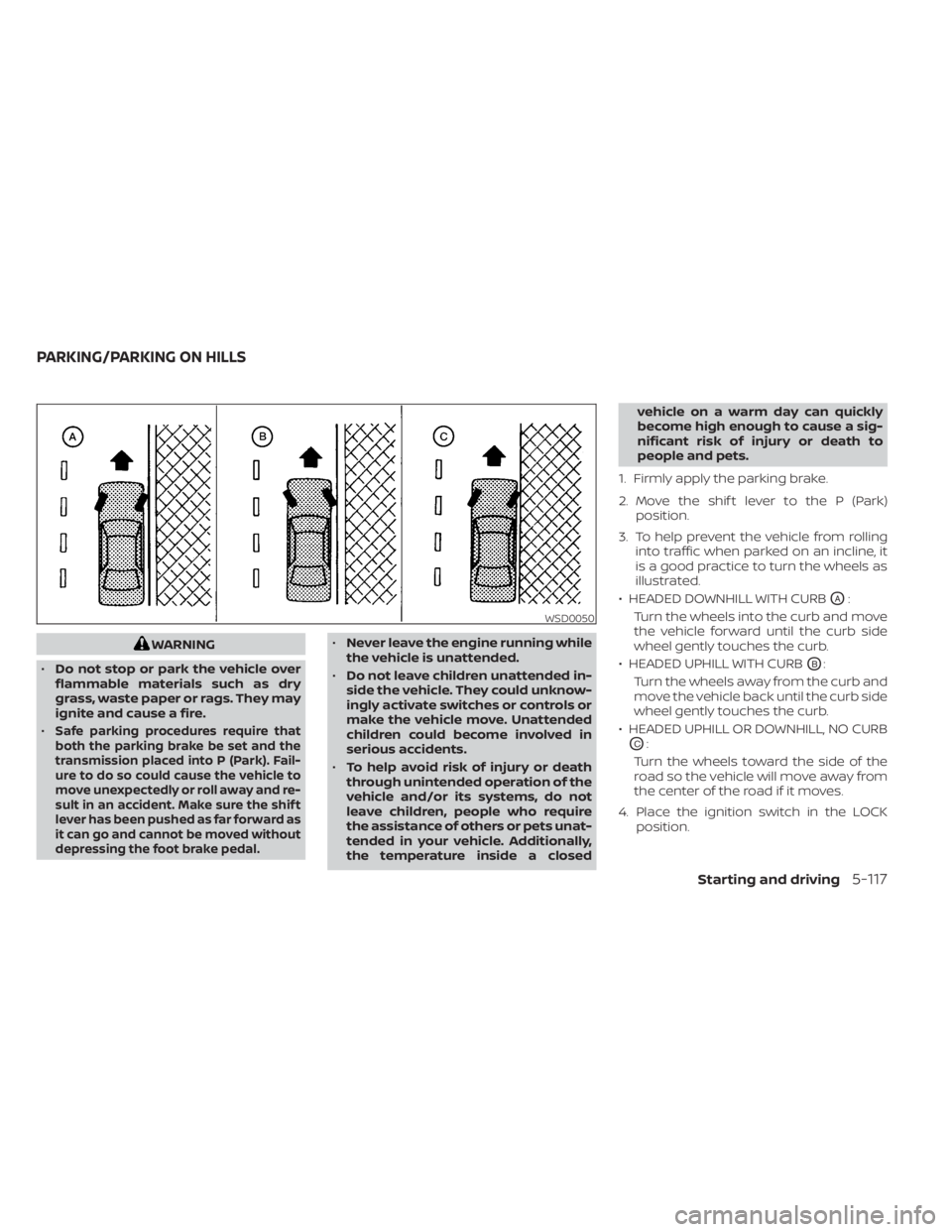
1. Firmly apply the parking brake.
2. Move the shif t lever to the P (Park) position.
3. To help prevent the vehicle from rolling into traffic when parked on an incline, it
is a good practice to turn the wheels as
illustrated.
• HEADED DOWNHILL WITH CURB
OA:
Turn the wheels into the curb and move
the vehicle forward until the curb side
wheel gently touches the curb.
• HEADED UPHILL WITH CURB
OB:
Turn the wheels away from the curb and
move the vehicle back until the curb side
wheel gently touches the curb.
• HEADED UPHILL OR DOWNHILL, NO CURB
OC:
Turn the wheels toward the side of the
road so the vehicle will move away from
the center of the road if it moves.
4. Place the ignition switch in the LOCK position.
WSD0050
PARKING/PARKING ON HILLS
Starting and driving5-117
Page 390 of 556
The power assisted steering uses a hy-
draulic pump, driven by the engine, to as-
sist steering.
If the engine stops or the drive belt breaks,
you will still have control of the vehicle.
However, much greater steering effort is
needed, especially in sharp turns and at
low speeds.
WARNING
If the engine is not running or is turned
off while driving, the power assist for
the steering will not work. Steering will
be harder to operate. The brake system has two separate hy-
draulic circuits. If one circuit malfunctions,
you will still have braking at two wheels.
BRAKE PRECAUTIONS
Using the brakes
Avoid resting your foot on the brake pedal
while driving. This will overheat the brakes,
wear out the brake pads faster, and reduce
gas mileage.
To help reduce brake wear and to prevent
the brakes from overheating, reduce speed
and downshif t to a lower gear before going
down a slope or long grade. Overheated
brakes may reduce braking performance
and could result in loss of vehicle control.
WARNING
• While driving on a slippery surface,
be careful when braking, accelerat-
ing or downshif ting. Abrupt braking
or accelerating could cause the
wheels to skid and result in an
accident.
• If the engine is not running or is
turned off while driving, the power
assist for the brakes will not work.
Braking will be harder.
Wet brakes
When the vehicle is washed or driven
through water, the brakes may get wet. As
a result, your braking distance will be lon-
ger and the vehicle may pull to one side
during braking.
To dry the brakes, drive the vehicle at a safe
speed while lightly pressing the brake
pedal to heat up the brakes. Do this until
the brakes return to normal. Avoid driving
the vehicle at high speeds until the brakes
function correctly.
Parking brake break-in
Break in the parking brake shoes whenever
the stopping effect of the parking brake is
weakened or whenever the parking brake
shoes are replaced, in order to assure the
best braking performance.
This procedure is described in the vehicle
service manual. It is recommended that
you visit a NISSAN dealer for this service.
POWER STEERING BRAKE SYSTEM
5-118Starting and driving
Page 397 of 556
WARNING
• The RSS is a convenience but it is not
a substitute for proper parking.
• The driver is always responsible for
safety during parking and other ma-
neuvers. Always look around and
check that it is safe to do so before
parking.
• Read and understand the limitations
of the RSS as contained in this sec-
tion. The colors of the corner sonar
indicator and the distance guide
lines in the rear view indicate differ-
ent distances to the object.
• Inclement weather or ultrasonic
sources such as an automatic car
wash, a truck's compressed-air
brakes or a pneumatic drill may af-
fect the function of the system; this
may include reduced performance or
a false activation.
• This function is designed as an aid to
the driver in detecting large station-
ary objects to help avoid damaging
the vehicle. •
The system is not designed to pre-
vent contact with small or moving
objects. Always move slowly. The
system will not detect small objects
below the bumper, and may not de-
tect objects close to the bumper or
on the ground.
• The system may not detect the fol-
lowing objects: fluff y objects such as
snow, cloth, cotton, glass, wool, etc.;
thin objects such as rope, wire and
chain, etc.; or wedge-shaped objects.
If your vehicle sustains damage to the
bumper fascia, leaving it misaligned or
bent, the sensing zone may be altered
causing inaccurate measurement of ob-
stacles or false alarms.
CAUTION
• Excessive noise (such as audio sys-
tem volume or an open vehicle win-
dow) will interfere with the tone and
it may not be heard. •
Keep the sonar sensors (located on
the bumper fascia) free from snow,
ice and large accumulations of dirt.
Do not clean the sensors with sharp
objects. If the sensors are covered,
the accuracy of the sonar function
will be diminished.
SYSTEM OPERATION
The system informs with a visual and au-
dible alert of rear obstacles when the shif t
lever is in the R (Reverse) position.
The system is deactivated at speeds above
6 mph (10 km/h). It is reactivated at lower
speeds.
The intermittent tone will stop af ter 3 sec-
onds when an obstacle is detected by only
the corner sensor and the distance does
not change. The tone will stop when the
obstacle gets away from the vehicle.
When the object is detected, the indicator
(green) appears and blinks and the tone
sounds intermittently. When the vehicle
moves closer to the object, the color of the
indicator turns yellow and the rate of the
blinking increases. When the vehicle is very
close to the object, the indicator stops
blinking and turns red, and the tone
sounds continuously.
Starting and driving5-125
Page 399 of 556
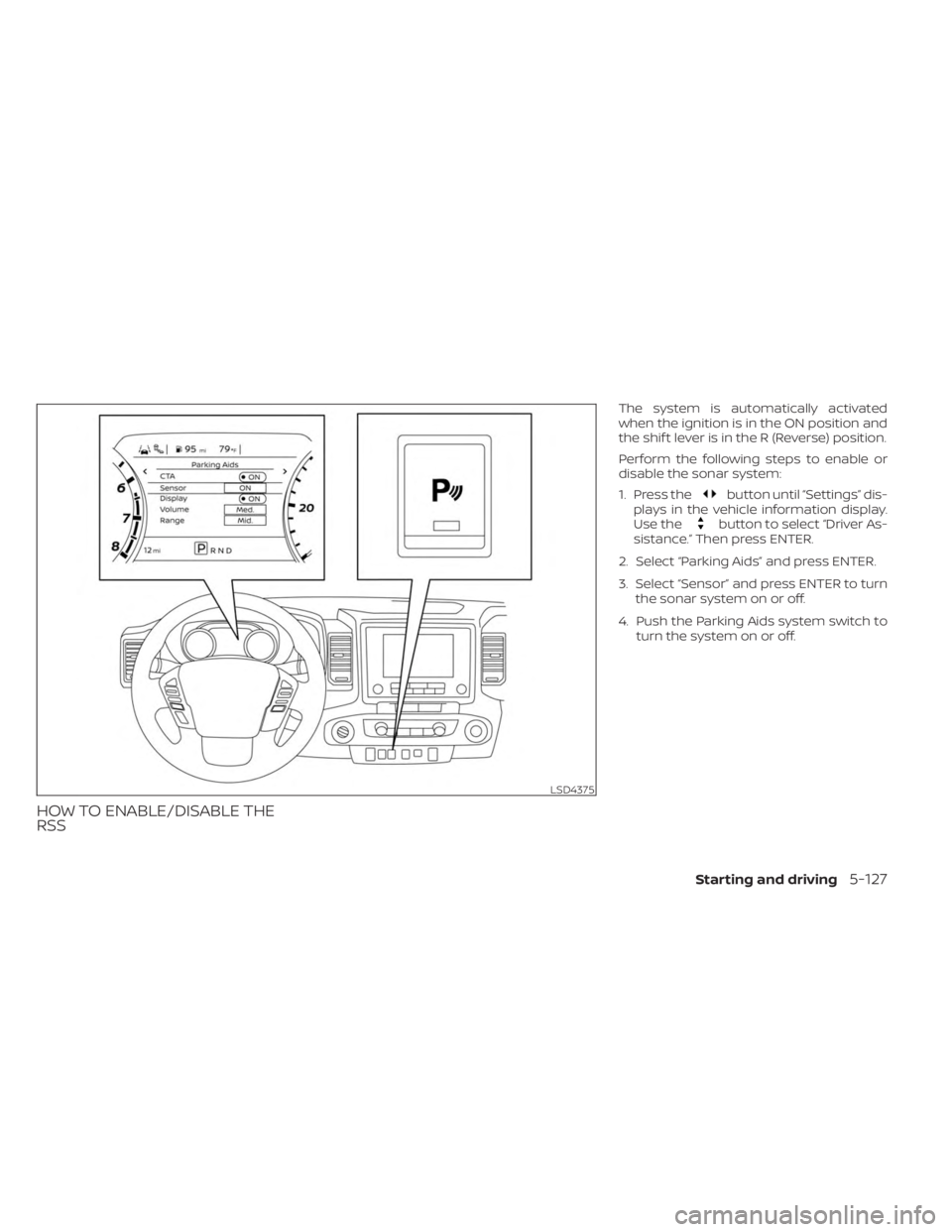
HOW TO ENABLE/DISABLE THE
RSS
The system is automatically activated
when the ignition is in the ON position and
the shif t lever is in the R (Reverse) position.
Perform the following steps to enable or
disable the sonar system:
1. Press the
button until “Settings” dis-
plays in the vehicle information display.
Use the
button to select “Driver As-
sistance.” Then press ENTER.
2. Select “Parking Aids” and press ENTER.
3. Select “Sensor” and press ENTER to turn the sonar system on or off.
4. Push the Parking Aids system switch to turn the system on or off.
LSD4375
Starting and driving5-127
Page 408 of 556
3. Park on a level surface and apply theparking brake. Move the shif t lever to P
(Park).
4. Turn off the engine.
5. Raise the hood to warn other traffic and to signal professional road assistance
personnel that you need assistance.
6. Have all passengers get out of the ve- hicle and stand in a safe place, away
from traffic and clear of the vehicle.
WARNING
• Make sure the parking brake is se-
curely applied and the shif t lever is
shif ted into P (Park).
• Never change tires when the vehicle
is on a slope, ice or slippery areas.
This is hazardous.
• Never change tires if oncoming traf-
fic is close to your vehicle. Wait for
professional road assistance.
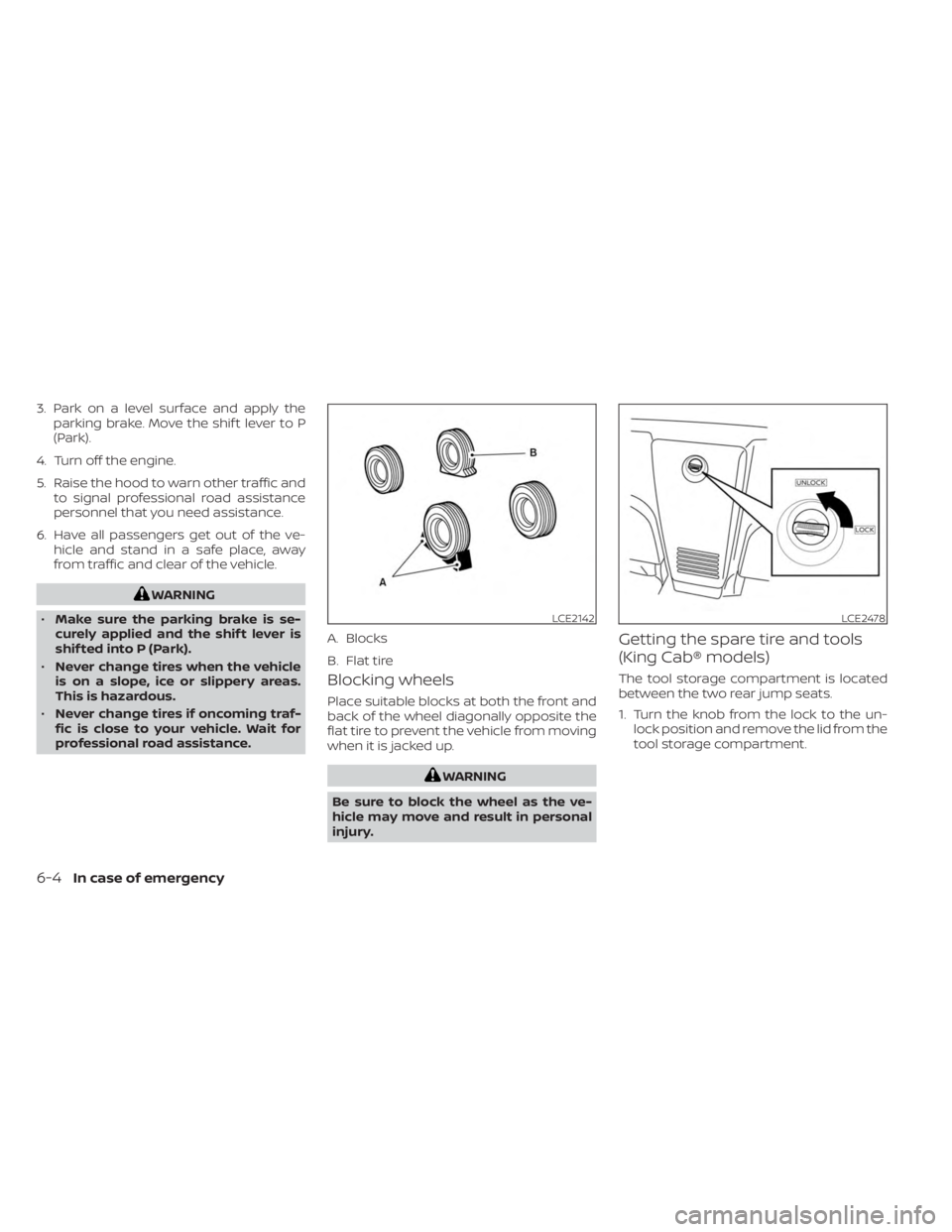
Blocking wheels
Place suitable blocks at both the front and
back of the wheel diagonally opposite the
flat tire to prevent the vehicle from moving
when it is jacked up.
WARNING
Be sure to block the wheel as the ve-
hicle may move and result in personal
injury.
Getting the spare tire and tools
(King Cab® models)
The tool storage compartment is located
between the two rear jump seats.
1. Turn the knob from the lock to the un- lock position and remove the lid from the
tool storage compartment.
LCE2142
A. Blocks
B. Flat tire
LCE2478
6-4In case of emergency