roof NISSAN FRONTIER 2023 Owners Manual
[x] Cancel search | Manufacturer: NISSAN, Model Year: 2023, Model line: FRONTIER, Model: NISSAN FRONTIER 2023Pages: 572, PDF Size: 6.58 MB
Page 12 of 572
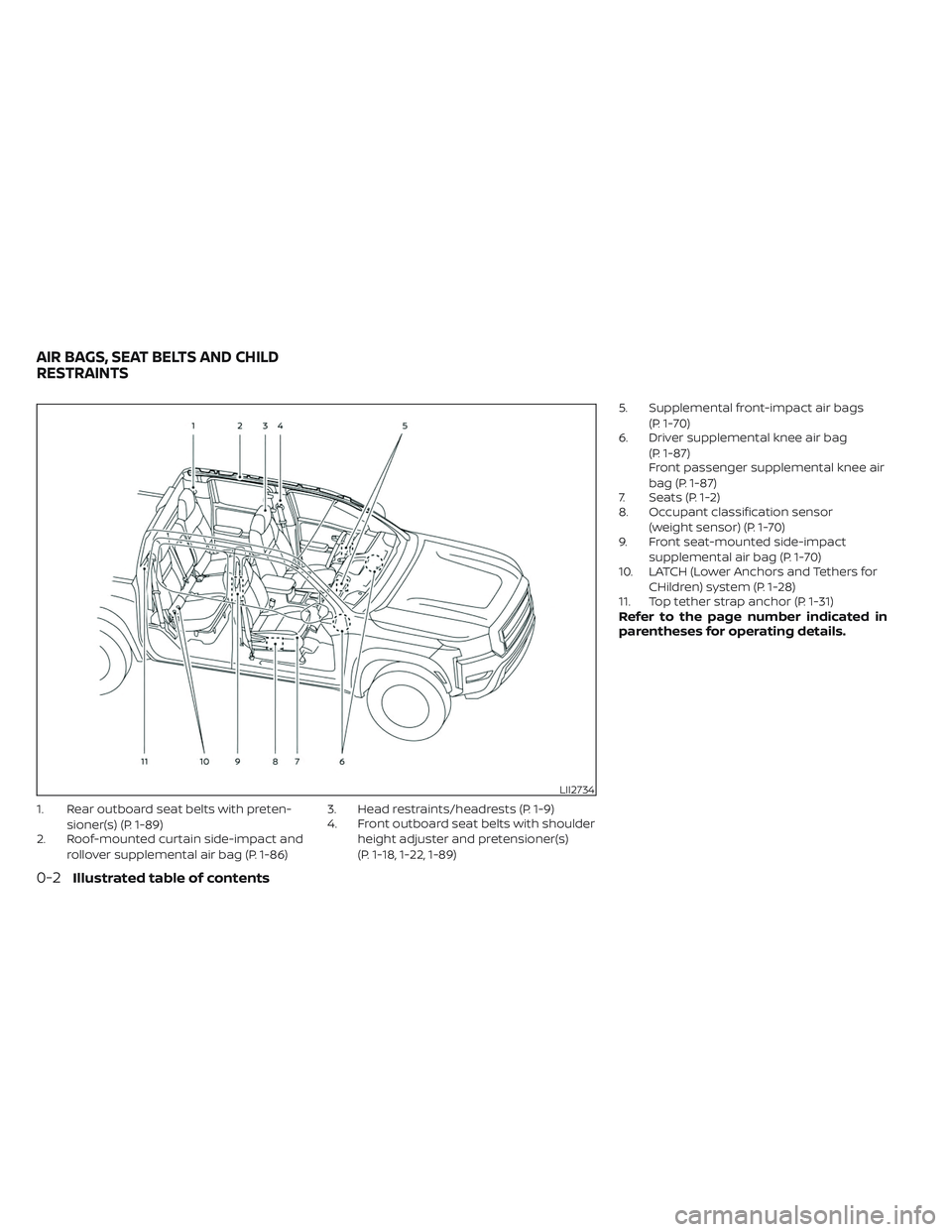
1. Rear outboard seat belts with preten-sioner(s) (P. 1-89)
2. Roof-mounted curtain side-impact and
rollover supplemental air bag (P. 1-86) 3. Head restraints/headrests (P. 1-9)
4. Front outboard seat belts with shoulder
height adjuster and pretensioner(s)
(P. 1-18, 1-22, 1-89) 5. Supplemental front-impact air bags
(P. 1-70)
6. Driver supplemental knee air bag
(P. 1-87)
Front passenger supplemental knee air
bag (P. 1-87)
7. Seats (P. 1-2)
8. Occupant classification sensor
(weight sensor) (P. 1-70)
9. Front seat-mounted side-impact
supplemental air bag (P. 1-70)
10. LATCH (Lower Anchors and Tethers for
CHildren) system (P. 1-28)
11. Top tether strap anchor (P. 1-31)
Refer to the page number indicated in
parentheses for operating details.
LII2734
AIR BAGS, SEAT BELTS AND CHILD
RESTRAINTS
0-2Illustrated table of contents
Page 13 of 572
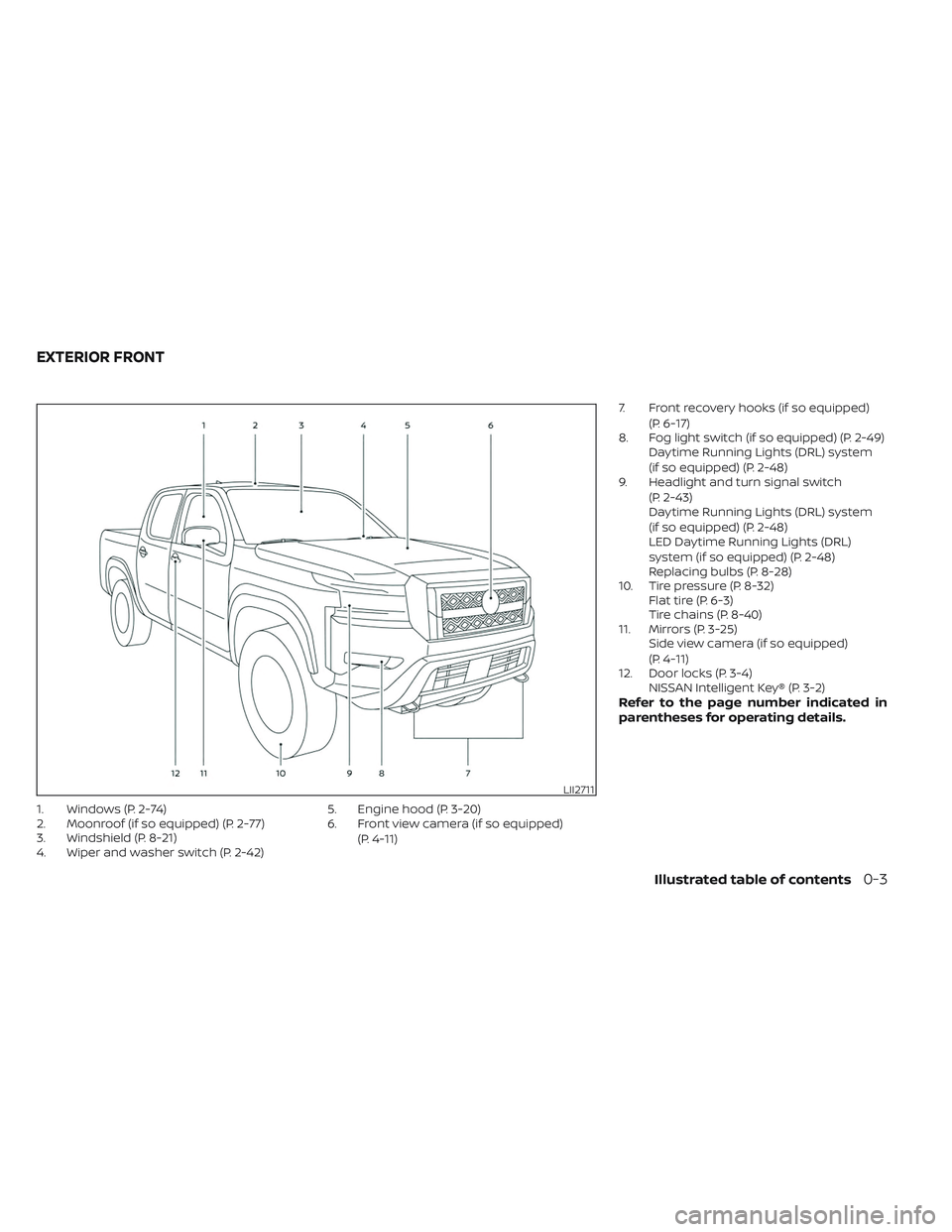
1. Windows (P. 2-74)
2. Moonroof (if so equipped) (P. 2-77)
3. Windshield (P. 8-21)
4. Wiper and washer switch (P. 2-42)5. Engine hood (P. 3-20)
6. Front view camera (if so equipped)
(P. 4-11) 7. Front recovery hooks (if so equipped)
(P. 6-17)
8. Fog light switch (if so equipped) (P. 2-49) Daytime Running Lights (DRL) system
(if so equipped) (P. 2-48)
9. Headlight and turn signal switch
(P. 2-43)
Daytime Running Lights (DRL) system
(if so equipped) (P. 2-48)
LED Daytime Running Lights (DRL)
system (if so equipped) (P. 2-48)
Replacing bulbs (P. 8-28)
10. Tire pressure (P. 8-32) Flat tire (P. 6-3)
Tire chains (P. 8-40)
11. Mirrors (P. 3-25) Side view camera (if so equipped)
(P. 4-11)
12. Door locks (P. 3-4) NISSAN Intelligent Key® (P. 3-2)
Refer to the page number indicated in
parentheses for operating details.
LII2711
EXTERIOR FRONT
Illustrated table of contents0-3
Page 15 of 572
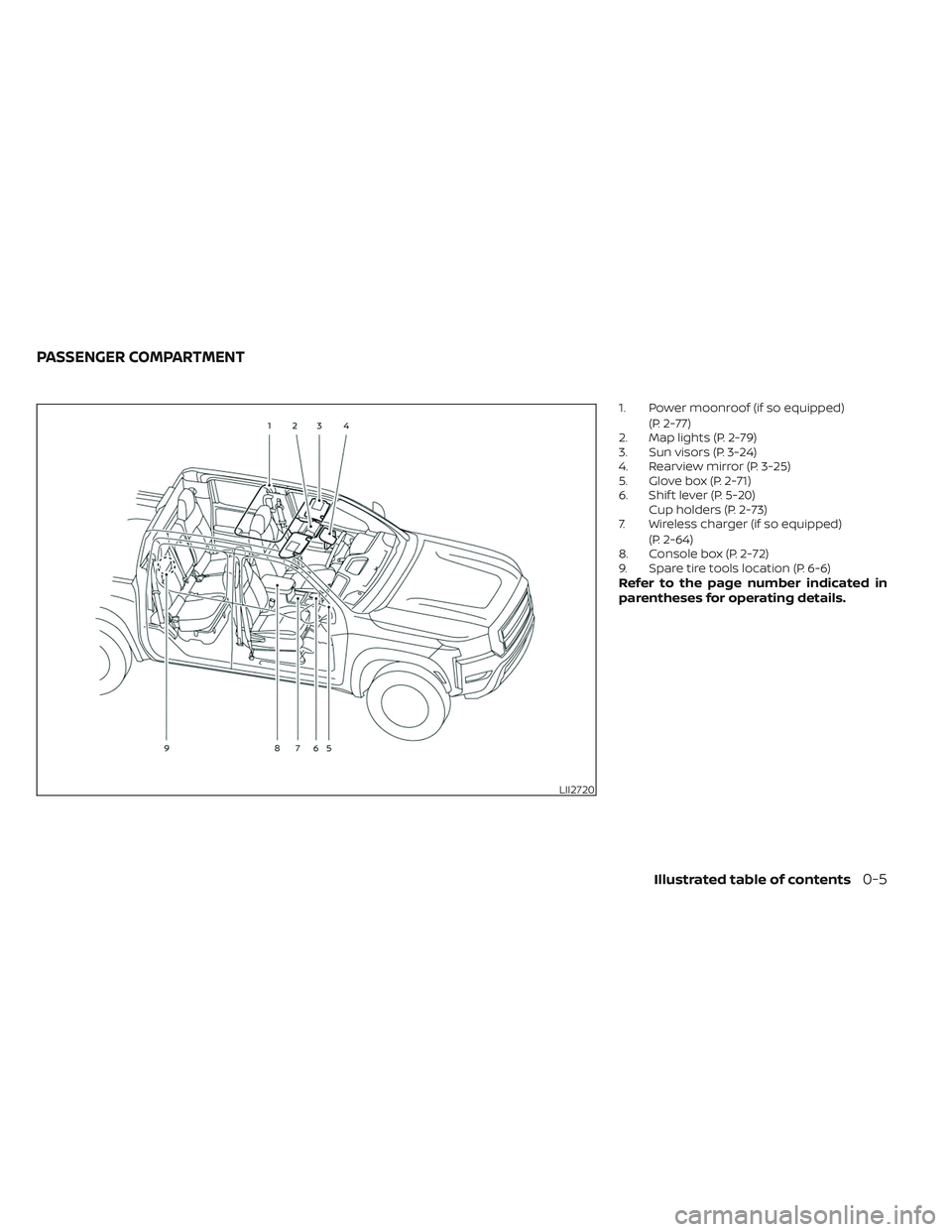
1. Power moonroof (if so equipped)(P. 2-77)
2. Map lights (P. 2-79)
3. Sun visors (P. 3-24)
4. Rearview mirror (P. 3-25)
5. Glove box (P. 2-71)
6. Shif t lever (P. 5-20) Cup holders (P. 2-73)
7. Wireless charger (if so equipped)
(P. 2-64)
8. Console box (P. 2-72)
9. Spare tire tools location (P. 6-6)
Refer to the page number indicated in
parentheses for operating details.
LII2720
PASSENGER COMPARTMENT
Illustrated table of contents0-5
Page 92 of 572
PRECAUTIONS ON SRS
This SRS section contains important infor-
mation concerning the following systems:
• Driver and front passenger supplementalfront-impact air bag (NISSAN Advanced
Air Bag System)
• Front seat-mounted side-impact supple- mental air bag
• Roof-mounted curtain side-impact and rollover supplemental air bag
• Driver and front passenger supplemental knee air bag
• Seat belt with pretensioner(s) (front and rear outboard seats)
Supplemental front-impact air bag system
The NISSAN Advanced Air Bag System can
help cushion the impact force to the head
and chest of the driver and front passenger
in certain frontal collisions.
Front seat-mounted side-impact supple-
mental air bag system
This system can help cushion the impact
force to the chest area of the driver and
front passenger in certain side-impact col-
lisions. The side air bags are designed to
inflate on the side where the vehicle is
impacted. Roof-mounted curtain side-impact and
rollover supplemental air bag system
This system can help cushion the impact
force to the head of occupants in front and
rear outboard seating positions in certain
side-impact or rollover collisions. In a side-
impact, the curtain air bags are designed
to inflate on the side where the vehicle is
impacted. In a rollover, the curtain air bags
are designed to inflate and remain inflated
for a short time.
Driver and front passenger supplemen-
tal knee air bags
This system can help cushion the impact
force to the driver’s and front passenger’s
knees in certain collisions.
The SRS is designed to
supplementthe
crash protection provided by the seat belts
and is not a substitute for them. Seat belts
should always be correctly worn and the
occupant seated a suitable distance away
from the steering wheel, instrument panel
and door finishers. For additional informa-
tion, see “Seat belts” (P. 1-14). The supplemental air bags operate only
when the ignition switch is in the ON
position.
Af ter placing the ignition switch in the
ON position, the supplemental air bag
warning light illuminates. The supple-
mental air bag warning light will turn off
af ter about 7 seconds if the system is
operational.
SUPPLEMENTAL RESTRAINT SYSTEM
(SRS)
1-70Safety-Seats, seat belts and supplemental restraint system
Page 97 of 572
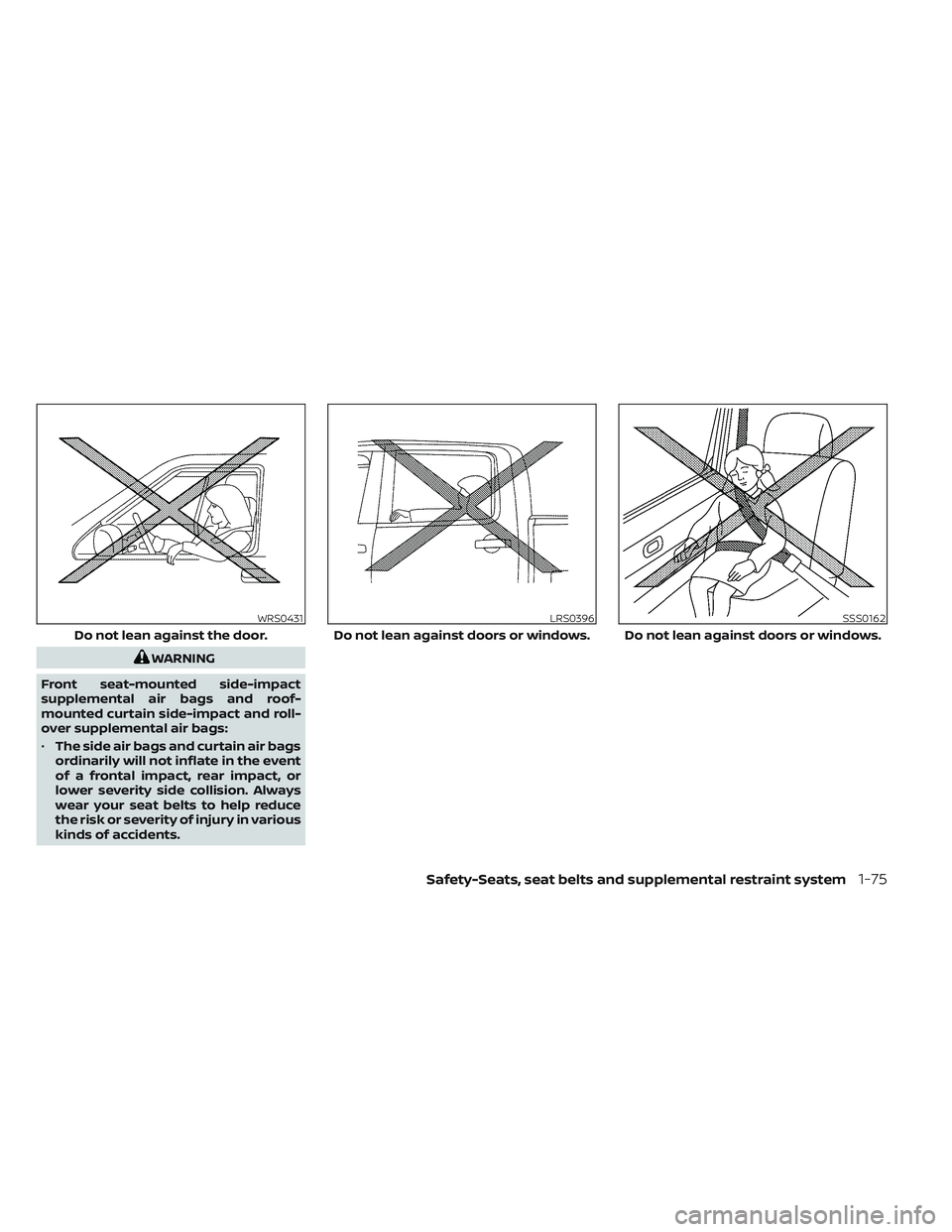
WARNING
Front seat-mounted side-impact
supplemental air bags and roof-
mounted curtain side-impact and roll-
over supplemental air bags:
• The side air bags and curtain air bags
ordinarily will not inflate in the event
of a frontal impact, rear impact, or
lower severity side collision. Always
wear your seat belts to help reduce
the risk or severity of injury in various
kinds of accidents.
WRS0431
Do not lean against the door.
LRS0396
Do not lean against doors or windows.
SSS0162
Do not lean against doors or windows.
Safety-Seats, seat belts and supplemental restraint system1-75
Page 98 of 572
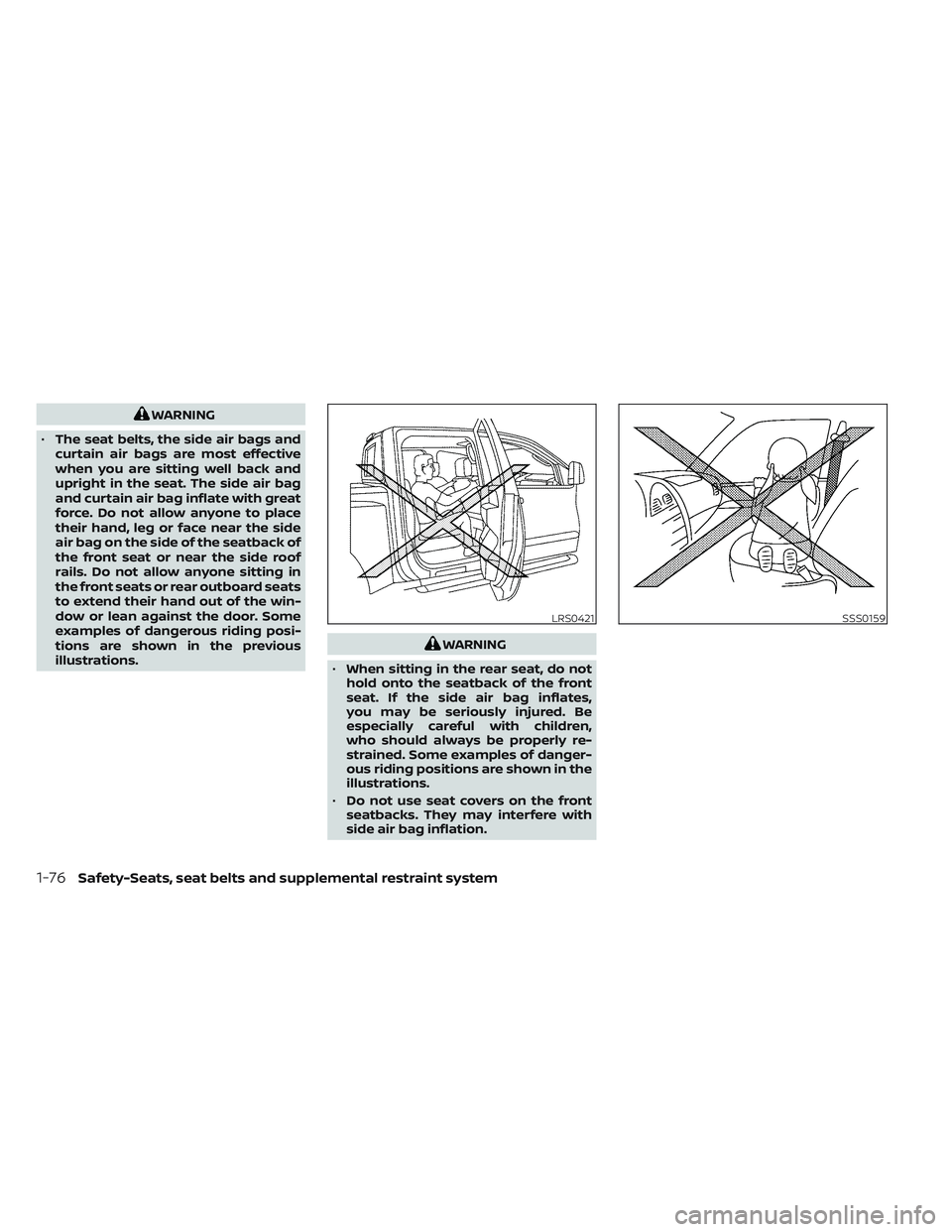
WARNING
• The seat belts, the side air bags and
curtain air bags are most effective
when you are sitting well back and
upright in the seat. The side air bag
and curtain air bag inflate with great
force. Do not allow anyone to place
their hand, leg or face near the side
air bag on the side of the seatback of
the front seat or near the side roof
rails. Do not allow anyone sitting in
the front seats or rear outboard seats
to extend their hand out of the win-
dow or lean against the door. Some
examples of dangerous riding posi-
tions are shown in the previous
illustrations.
WARNING
• When sitting in the rear seat, do not
hold onto the seatback of the front
seat. If the side air bag inflates,
you may be seriously injured. Be
especially careful with children,
who should always be properly re-
strained. Some examples of danger-
ous riding positions are shown in the
illustrations.
• Do not use seat covers on the front
seatbacks. They may interfere with
side air bag inflation.
LRS0421SSS0159
1-76Safety-Seats, seat belts and supplemental restraint system
Page 99 of 572

NISSAN Advanced Air Bag System
(front seats)1. Roof-mounted curtain side-impact androllover supplemental air bag inflators 2. Seat belt with pretensioner(s) (front and
rear outboard seats)
3. Front seat-mounted side-impact supplemental air bag module
4. Roof-mounted curtain side-impact and rollover supplemental air bags
5. Front seat belt buckle switches
6. Air bag Control Unit (ACU)
7. Front door satellite sensor (driver’s side shown; passenger’s side similar)
8. Supplemental front-impact air bag modules
9. Driver and front passenger supplemen- tal knee air bags
10. Crash zone sensor
11. Occupant classification system control unit
12. Occupant classification sensor (weight sensors)
13.
Satellite sensors (passenger’s side shown;
driver’s side similar) (if so equipped)
14.Rear seat belt buckle switches
LRS3637
Safety-Seats, seat belts and supplemental restraint system1-77
Page 108 of 572
Front seat-mounted side-impact
supplemental air bag and
roof-mounted curtain
side-impact and rollover
supplemental air bag systems
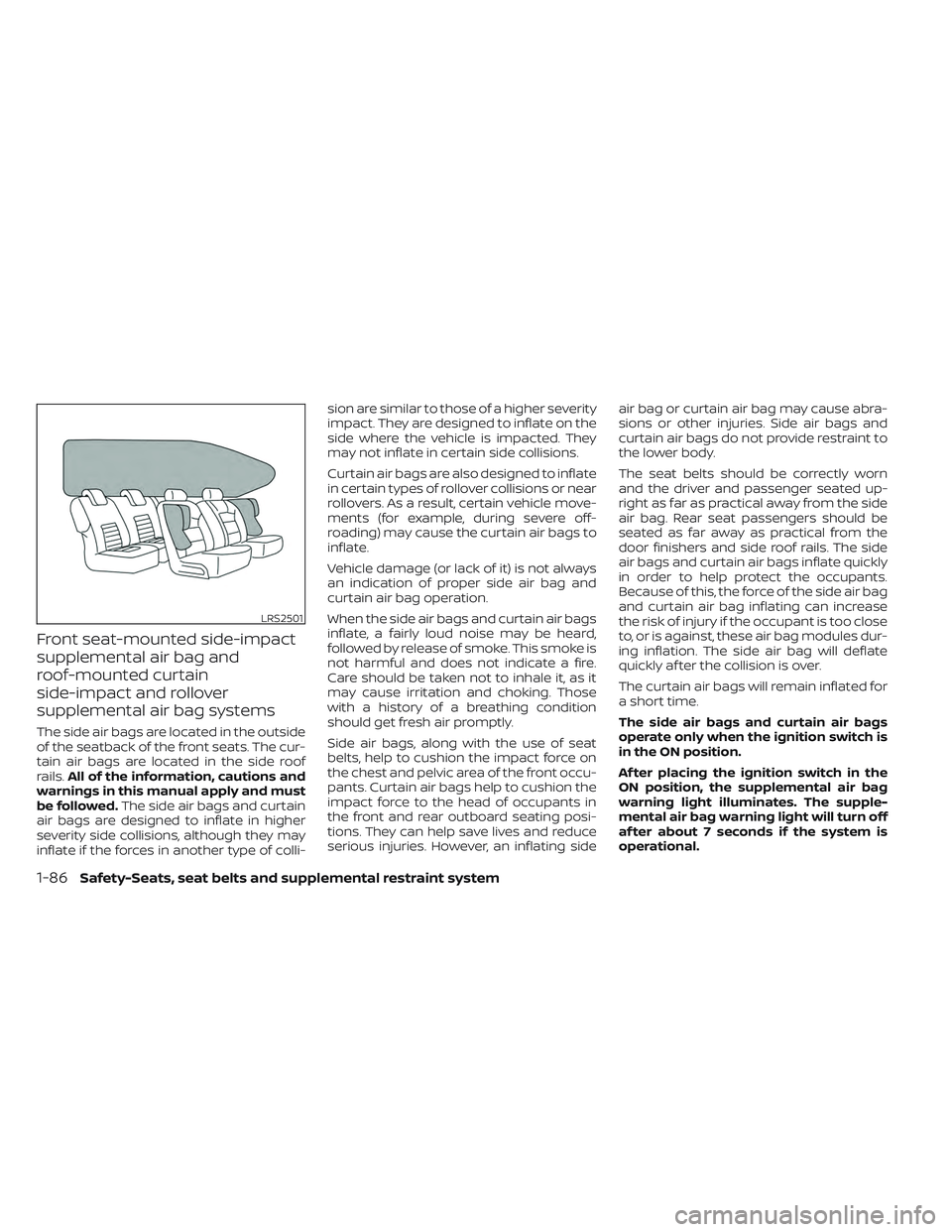
The side air bags are located in the outside
of the seatback of the front seats. The cur-
tain air bags are located in the side roof
rails.All of the information, cautions and
warnings in this manual apply and must
be followed. The side air bags and curtain
air bags are designed to inflate in higher
severity side collisions, although they may
inflate if the forces in another type of colli- sion are similar to those of a higher severity
impact. They are designed to inflate on the
side where the vehicle is impacted. They
may not inflate in certain side collisions.
Curtain air bags are also designed to inflate
in certain types of rollover collisions or near
rollovers. As a result, certain vehicle move-
ments (for example, during severe off-
roading) may cause the curtain air bags to
inflate.
Vehicle damage (or lack of it) is not always
an indication of proper side air bag and
curtain air bag operation.
When the side air bags and curtain air bags
inflate, a fairly loud noise may be heard,
followed by release of smoke. This smoke is
not harmful and does not indicate a fire.
Care should be taken not to inhale it, as it
may cause irritation and choking. Those
with a history of a breathing condition
should get fresh air promptly.
Side air bags, along with the use of seat
belts, help to cushion the impact force on
the chest and pelvic area of the front occu-
pants. Curtain air bags help to cushion the
impact force to the head of occupants in
the front and rear outboard seating posi-
tions. They can help save lives and reduce
serious injuries. However, an inflating side
air bag or curtain air bag may cause abra-
sions or other injuries. Side air bags and
curtain air bags do not provide restraint to
the lower body.
The seat belts should be correctly worn
and the driver and passenger seated up-
right as far as practical away from the side
air bag. Rear seat passengers should be
seated as far away as practical from the
door finishers and side roof rails. The side
air bags and curtain air bags inflate quickly
in order to help protect the occupants.
Because of this, the force of the side air bag
and curtain air bag inflating can increase
the risk of injury if the occupant is too close
to, or is against, these air bag modules dur-
ing inflation. The side air bag will deflate
quickly af ter the collision is over.
The curtain air bags will remain inflated for
a short time.
The side air bags and curtain air bags
operate only when the ignition switch is
in the ON position.
Af ter placing the ignition switch in the
ON position, the supplemental air bag
warning light illuminates. The supple-
mental air bag warning light will turn off
af ter about 7 seconds if the system is
operational.
LRS2501
1-86Safety-Seats, seat belts and supplemental restraint system
Page 117 of 572
Power inverter switch (if so equipped)..........2-56
Parking Aids system switch (if so equipped) ....2-56
Tow mode switch (if so equipped) ..............2-57
Emergency Call (SOS) button (if so equipped) . . . 2-58 Emergency support ......................... 2-58
Rear Door Alert ................................. 2-59
Power outlets .................................. 2-60
12v Outlets .................................. 2-60
120v outlets (if so equipped) .................2-61
USB charging ports (if so equipped) ............2-63
Wireless charger (if so equipped) ...............2-64
Wireless charger indicator ...................2-65
Wireless charger operation ..................2-65
Extended storage switch .......................2-66
Storage ........................................ 2-67
Front-door pockets ......................... 2-67
Rear-door pockets .......................... 2-68
Seatback pocket ............................ 2-68
Under-seat storage bins
(if so equipped) .............................. 2-69
Storagetrays................................ 2-71
Glovebox ................................... 2-71
Console box ................................. 2-72Overhead sunglasses storage
(if so equipped)
.............................. 2-72
Cup holders ................................. 2-73
Windows .......................................2-74
Power windows .............................2-74
Rear sliding window (if so equipped) .........2-76
Moonroof (if so equipped) ......................2-77
Power moonroof ............................ 2-77
Interior lights ................................... 2-78
Map lights ................................... 2-79
Cargo light .................................. 2-80
HomeLink® Universal Transceiver
(if so equipped) ................................. 2-80
Programming HomeLink® ...................2-81
Programming HomeLink® for Canadian
customers and gate openers ...............2-83
Operating the HomeLink® Universal
Transceiver .................................. 2-83
Pr
ogramming trouble-shooting .............2-84
Clearing the programmed information ......2-84
Reprogramming a single HomeLink®
button ...................................... 2-84
If your vehicle is stolen ......................2-84
Page 123 of 572
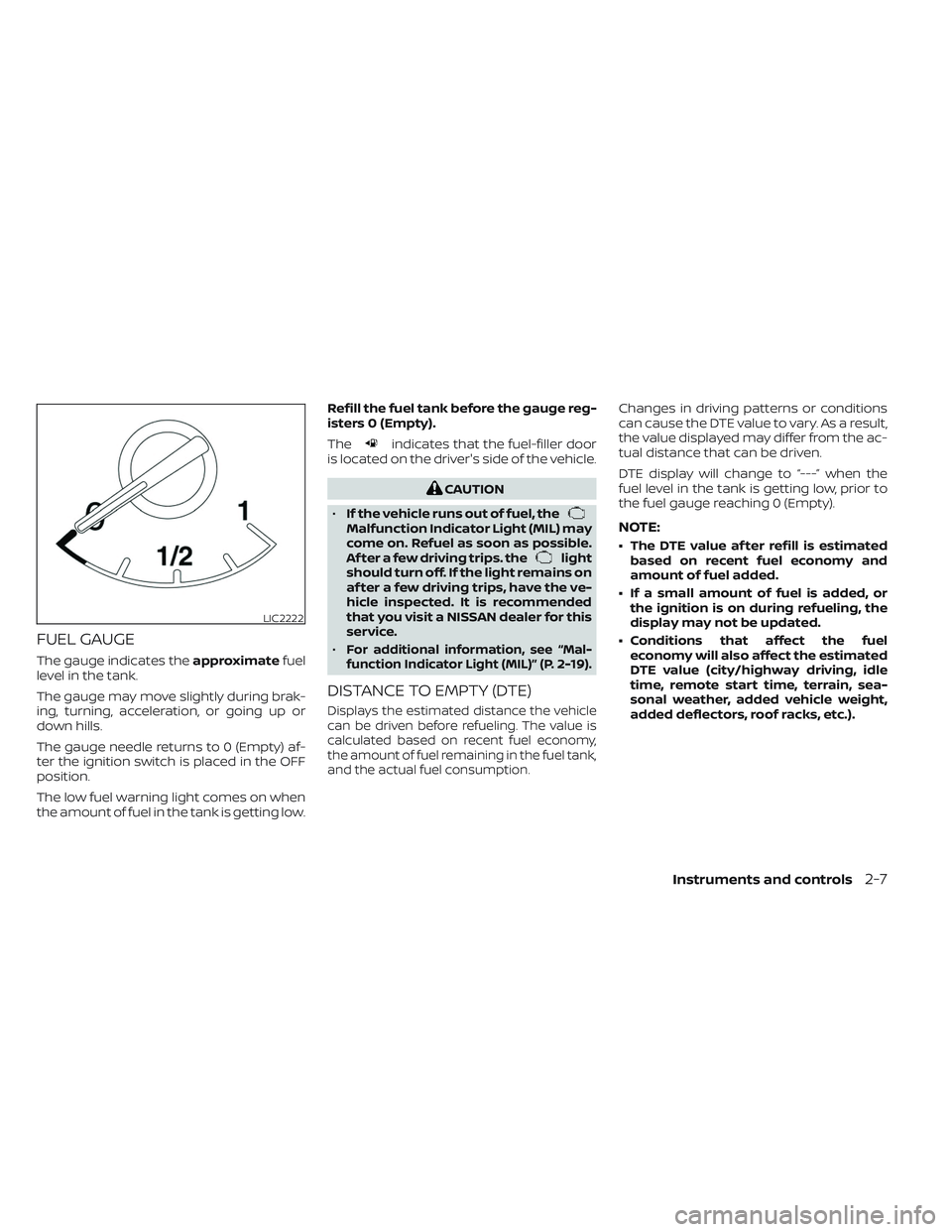
FUEL GAUGE
The gauge indicates theapproximatefuel
level in the tank.
The gauge may move slightly during brak-
ing, turning, acceleration, or going up or
down hills.
The gauge needle returns to 0 (Empty) af-
ter the ignition switch is placed in the OFF
position.
The low fuel warning light comes on when
the amount of fuel in the tank is getting low. Refill the fuel tank before the gauge reg-
isters 0 (Empty).
The
indicates that the fuel-filler door
is located on the driver's side of the vehicle.
CAUTION
• If the vehicle runs out of fuel, the
Malfunction Indicator Light (MIL) may
come on. Refuel as soon as possible.
Af ter a few driving trips. the
light
should turn off. If the light remains on
af ter a few driving trips, have the ve-
hicle inspected. It is recommended
that you visit a NISSAN dealer for this
service.
•
For additional information, see “Mal-
function Indicator Light (MIL)” (P. 2-19).
DISTANCE TO EMPTY (DTE)
Displays the estimated distance the vehicle
can be driven before refueling. The value is
calculated based on recent fuel economy,
the amount of fuel remaining in the fuel tank,
and the actual fuel consumption.
Changes in driving patterns or conditions
can cause the DTE value to vary. As a result,
the value displayed may differ from the ac-
tual distance that can be driven.
DTE display will change to “---” when the
fuel level in the tank is getting low, prior to
the fuel gauge reaching 0 (Empty).
NOTE:
• The DTE value af ter refill is estimated based on recent fuel economy and
amount of fuel added.
• If a small amount of fuel is added, or the ignition is on during refueling, the
display may not be updated.
• Conditions that affect the fuel economy will also affect the estimated
DTE value (city/highway driving, idle
time, remote start time, terrain, sea-
sonal weather, added vehicle weight,
added deflectors, roof racks, etc.).
LIC2222
Instruments and controls2-7