ignition NISSAN GT-R 2014 R35 User Guide
[x] Cancel search | Manufacturer: NISSAN, Model Year: 2014, Model line: GT-R, Model: NISSAN GT-R 2014 R35Pages: 354, PDF Size: 5.08 MB
Page 102 of 354
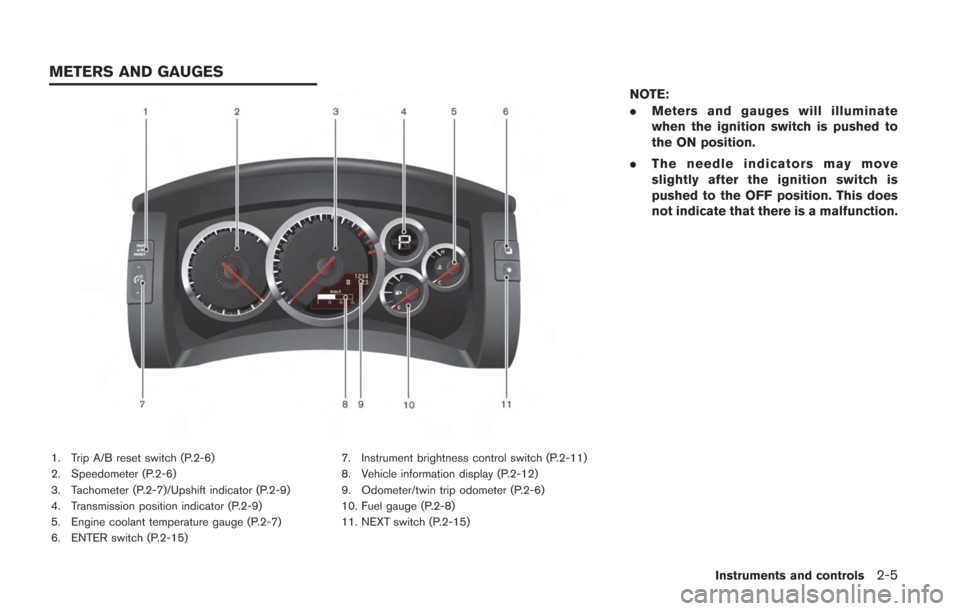
1. Trip A/B reset switch (P.2-6)
2. Speedometer (P.2-6)
3. Tachometer (P.2-7)/Upshift indicator (P.2-9)
4. Transmission position indicator (P.2-9)
5. Engine coolant temperature gauge (P.2-7)
6. ENTER switch (P.2-15)7. Instrument brightness control switch (P.2-11)
8. Vehicle information display (P.2-12)
9. Odometer/twin trip odometer (P.2-6)
10. Fuel gauge (P.2-8)
11. NEXT switch (P.2-15)
NOTE:
.
Meters and gauges will illuminate
when the ignition switch is pushed to
the ON position.
. The needle indicators may move
slightly after the ignition switch is
pushed to the OFF position. This does
not indicate that there is a malfunction.
Instruments and controls2-5
METERS AND GAUGES
Page 105 of 354
2-8Instruments and controls
NOTICE
If the gauge indicates engine coolant
temperature near the hot (H) end of the
normal range, reduce vehicle speed to
decrease temperature. If gauge is over
the normal range, stop the vehicle as
soon as safely possible. If the engine is
overheated, continued operation of the
vehicle may seriously damage the en-
gine. (
“If your vehicle overheats”
page 6-8)
FUEL GAUGE
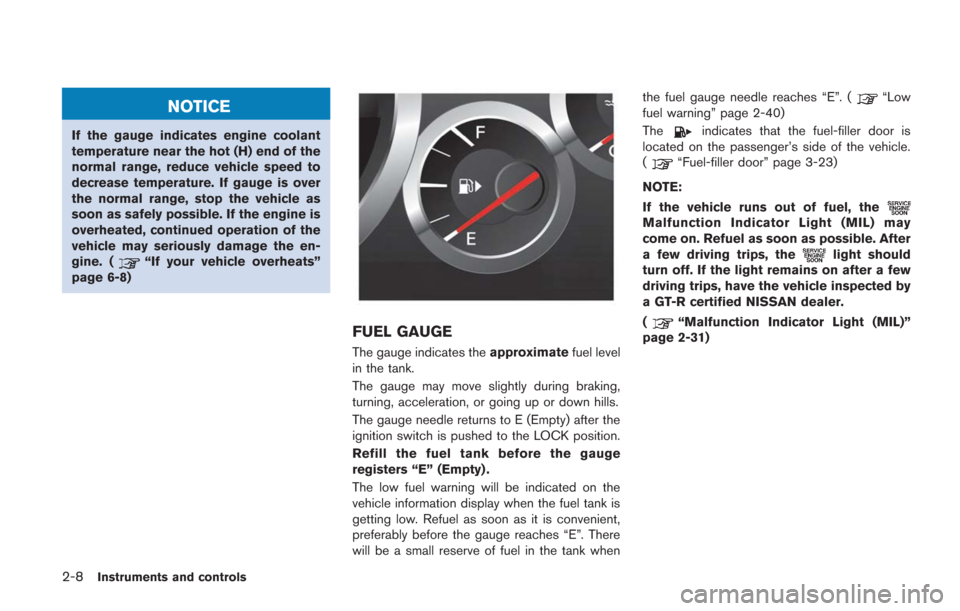
The gauge indicates the approximatefuel level
in the tank.
The gauge may move slightly during braking,
turning, acceleration, or going up or down hills.
The gauge needle returns to E (Empty) after the
ignition switch is pushed to the LOCK position.
Refill the fuel tank before the gauge
registers “E” (Empty) .
The low fuel warning will be indicated on the
vehicle information display when the fuel tank is
getting low. Refuel as soon as it is convenient,
preferably before the gauge reaches “E”. There
will be a small reserve of fuel in the tank when the fuel gauge needle reaches “E”. (
“Low
fuel warning” page 2-40)
The
indicates that the fuel-filler door is
located on the passenger’s side of the vehicle.
(
“Fuel-filler door” page 3-23)
NOTE:
If the vehicle runs out of fuel, the
Malfunction Indicator Light (MIL) may
come on. Refuel as soon as possible. After
a few driving trips, the
light should
turn off. If the light remains on after a few
driving trips, have the vehicle inspected by
a GT-R certified NISSAN dealer.
(
“Malfunction Indicator Light (MIL)”
page 2-31)
Page 107 of 354
2-10Instruments and controls
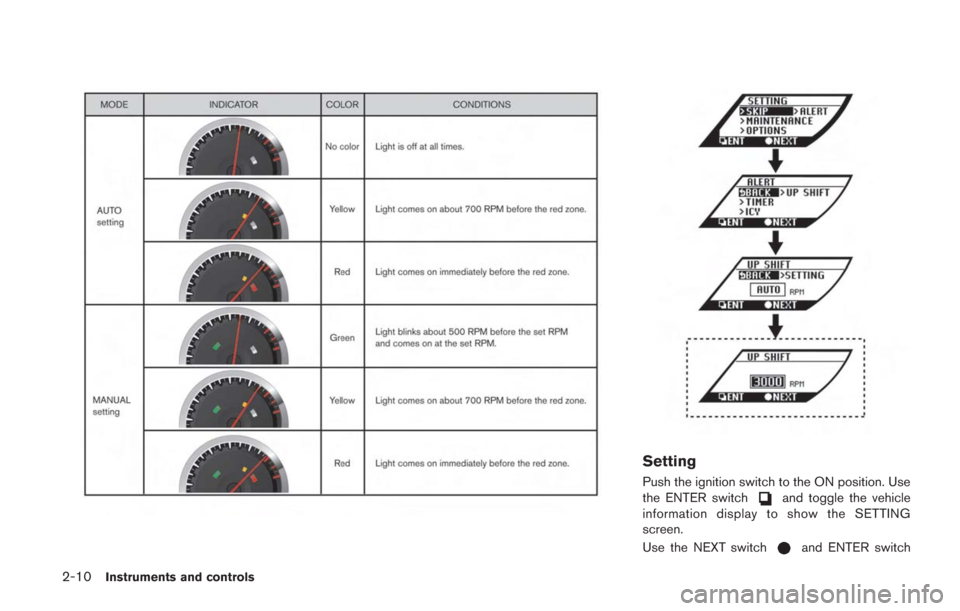
Setting
Push the ignition switch to the ON position. Use
the ENTER switchand toggle the vehicle
information display to show the SETTING
screen.
Use the NEXT switch
and ENTER switch
Page 108 of 354
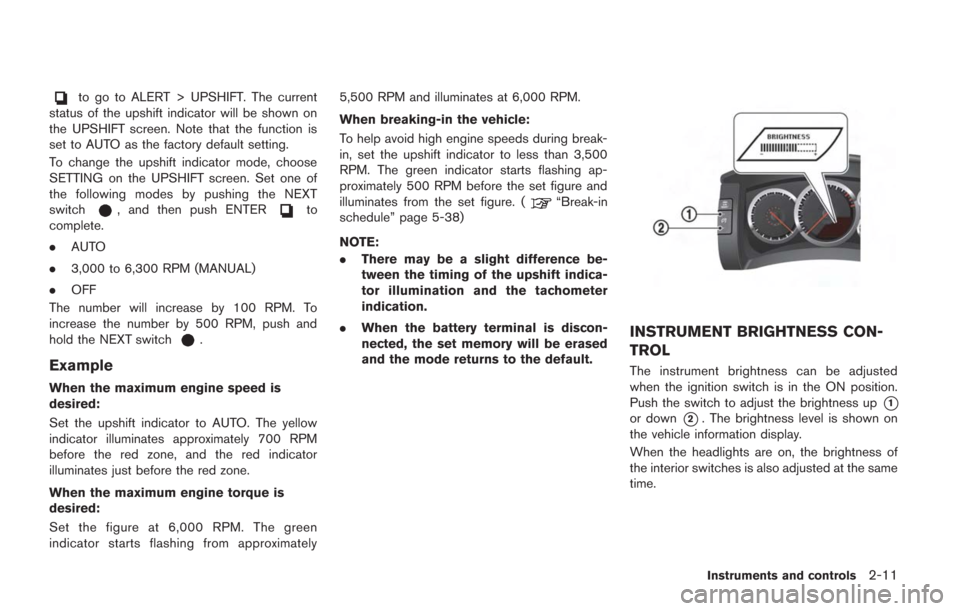
to go to ALERT > UPSHIFT. The current
status of the upshift indicator will be shown on
the UPSHIFT screen. Note that the function is
set to AUTO as the factory default setting.
To change the upshift indicator mode, choose
SETTING on the UPSHIFT screen. Set one of
the following modes by pushing the NEXT
switch
, and then push ENTERto
complete.
. AUTO
. 3,000 to 6,300 RPM (MANUAL)
. OFF
The number will increase by 100 RPM. To
increase the number by 500 RPM, push and
hold the NEXT switch
.
Example
When the maximum engine speed is
desired:
Set the upshift indicator to AUTO. The yellow
indicator illuminates approximately 700 RPM
before the red zone, and the red indicator
illuminates just before the red zone.
When the maximum engine torque is
desired:
Set the figure at 6,000 RPM. The green
indicator starts flashing from approximately 5,500 RPM and illuminates at 6,000 RPM.
When breaking-in the vehicle:
To help avoid high engine speeds during break-
in, set the upshift indicator to less than 3,500
RPM. The green indicator starts flashing ap-
proximately 500 RPM before the set figure and
illuminates from the set figure. (
“Break-in
schedule” page 5-38)
NOTE:
. There may be a slight difference be-
tween the timing of the upshift indica-
tor illumination and the tachometer
indication.
. When the battery terminal is discon-
nected, the set memory will be erased
and the mode returns to the default.
INSTRUMENT BRIGHTNESS CON-
TROL
The instrument brightness can be adjusted
when the ignition switch is in the ON position.
Push the switch to adjust the brightness up
*1
or down*2. The brightness level is shown on
the vehicle information display.
When the headlights are on, the brightness of
the interior switches is also adjusted at the same
time.
Instruments and controls2-11
Page 109 of 354
2-12Instruments and controls
NOTE:
.The instrument brightness can be ad-
justed separately for daytime and
nighttime conditions. The adjusted set-
tings are automatically stored.
. When the battery terminal is discon-
nected, the set memory will be erased
and the setting returns to the default.The vehicle information display can display the
following information.
.Engine oil level display
. Transmission system check display
. Instrument brightness control level display
(
“Instrument brightness control” page
2-11)
. Drive computer
(
“Drive computer” page 2-15)
. Warning display
(
“Warning display” page 2-33)
. Operation display
(
“Operation displays” page 2-42)
. Cruise control display
(
“Cruise control” page 5-33)
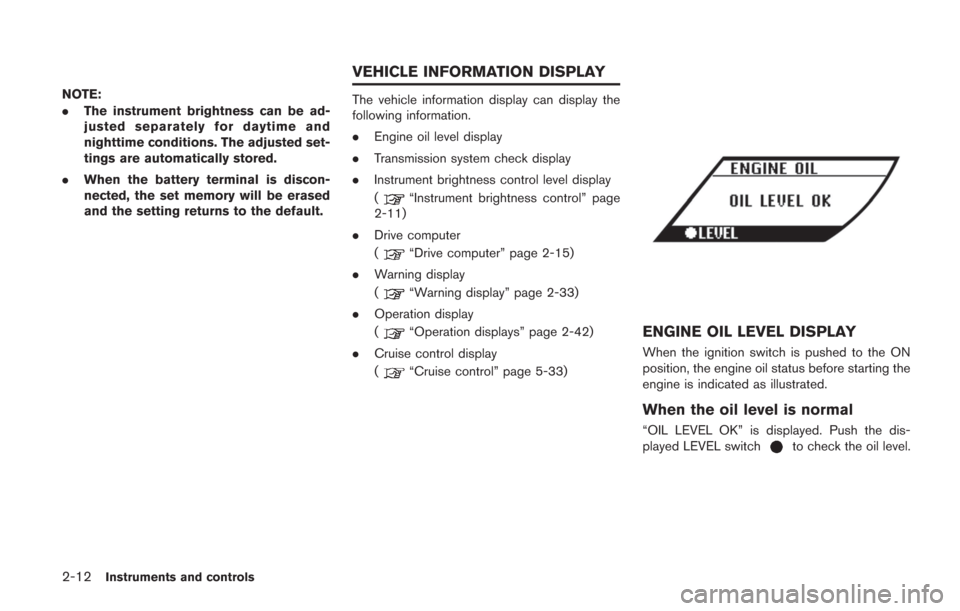
ENGINE OIL LEVEL DISPLAY
When the ignition switch is pushed to the ON
position, the engine oil status before starting the
engine is indicated as illustrated.
When the oil level is normal
“OIL LEVEL OK” is displayed. Push the dis-
played LEVEL switchto check the oil level.
VEHICLE INFORMATION DISPLAY
Page 110 of 354
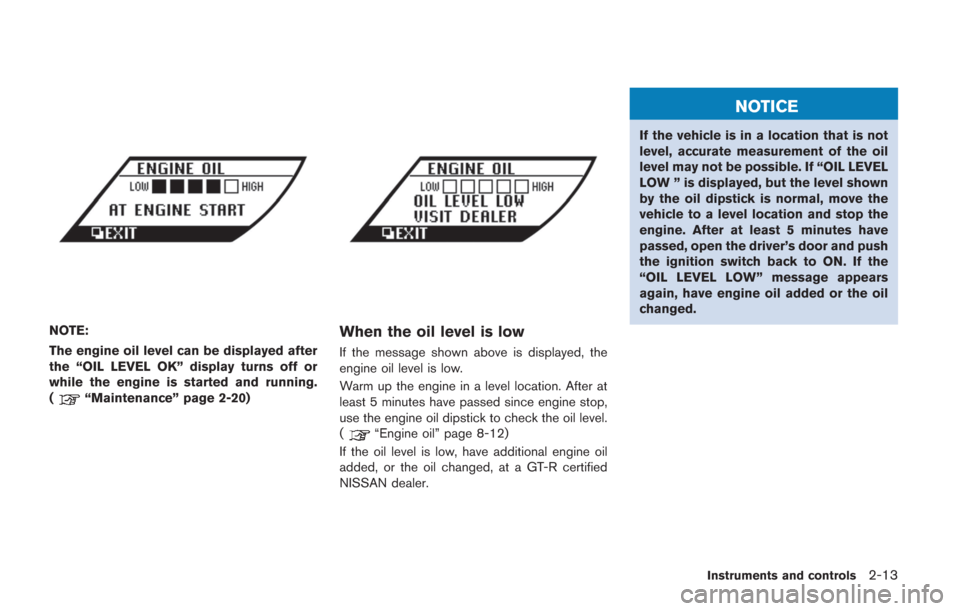
NOTE:
The engine oil level can be displayed after
the “OIL LEVEL OK” display turns off or
while the engine is started and running.
(
“Maintenance” page 2-20)
When the oil level is low
If the message shown above is displayed, the
engine oil level is low.
Warm up the engine in a level location. After at
least 5 minutes have passed since engine stop,
use the engine oil dipstick to check the oil level.
(
“Engine oil” page 8-12)
If the oil level is low, have additional engine oil
added, or the oil changed, at a GT-R certified
NISSAN dealer.
NOTICE
If the vehicle is in a location that is not
level, accurate measurement of the oil
level may not be possible. If “OIL LEVEL
LOW ” is displayed, but the level shown
by the oil dipstick is normal, move the
vehicle to a level location and stop the
engine. After at least 5 minutes have
passed, open the driver’s door and push
the ignition switch back to ON. If the
“OIL LEVEL LOW” message appears
again, have engine oil added or the oil
changed.
Instruments and controls2-13
Page 112 of 354
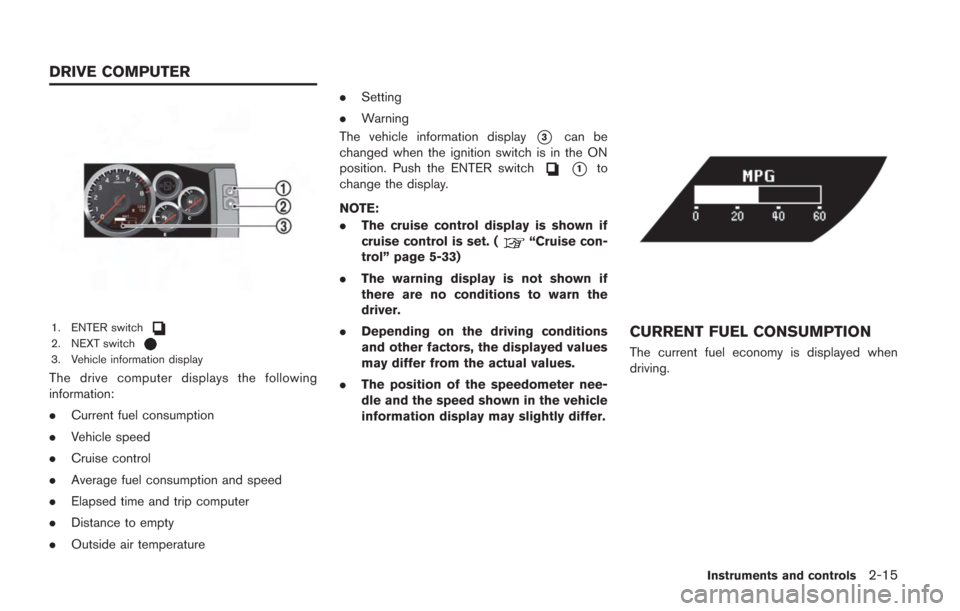
1. ENTER switch2. NEXT switch3. Vehicle information display
The drive computer displays the following
information:
.Current fuel consumption
. Vehicle speed
. Cruise control
. Average fuel consumption and speed
. Elapsed time and trip computer
. Distance to empty
. Outside air temperature .
Setting
. Warning
The vehicle information display
*3can be
changed when the ignition switch is in the ON
position. Push the ENTER switch
*1to
change the display.
NOTE:
. The cruise control display is shown if
cruise control is set. (
“Cruise con-
trol” page 5-33)
. The warning display is not shown if
there are no conditions to warn the
driver.
. Depending on the driving conditions
and other factors, the displayed values
may differ from the actual values.
. The position of the speedometer nee-
dle and the speed shown in the vehicle
information display may slightly differ.
CURRENT FUEL CONSUMPTION
The current fuel economy is displayed when
driving.
Instruments and controls2-15
DRIVE COMPUTER
Page 122 of 354
All-Wheel Drive (AWD) warning lightIntelligent Key warning lightCruise set switch indicator light
Anti-lock Braking System (ABS) warning
lightLow tire pressure warning lightExterior light indicator
Master warning lightFront passenger air bag status light
Brake warning lightSeat belt warning lightHigh beam indicator light
Supplemental air bag warning lightMalfunction Indicator Light (MIL)
Charge warning lightTransmission warning lightTurn signal/hazard indicator lights
Engine oil pressure warning lightVehicle Dynamic Control (VDC) warning
lightVehicle Dynamic Control (VDC) off indicator
light
Cruise main switch indicator light
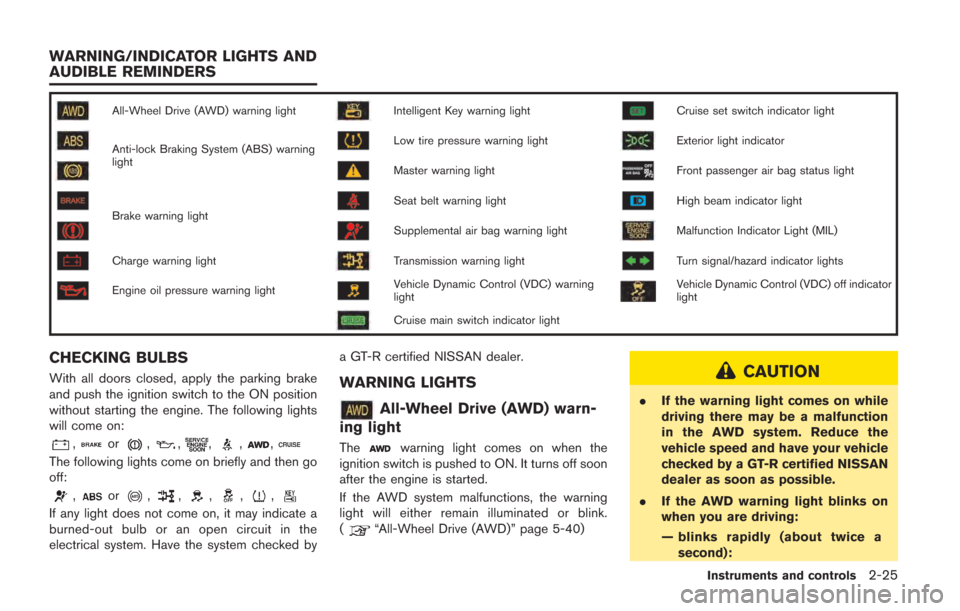
CHECKING BULBS
With all doors closed, apply the parking brake
and push the ignition switch to the ON position
without starting the engine. The following lights
will come on:
,or,,,,,
The following lights come on briefly and then go
off:
,or,,,,,
If any light does not come on, it may indicate a
burned-out bulb or an open circuit in the
electrical system. Have the system checked bya GT-R certified NISSAN dealer.
WARNING LIGHTS
All-Wheel Drive (AWD) warn-
ing light
Thewarning light comes on when the
ignition switch is pushed to ON. It turns off soon
after the engine is started.
If the AWD system malfunctions, the warning
light will either remain illuminated or blink.
(
“All-Wheel Drive (AWD)” page 5-40)
CAUTION
. If the warning light comes on while
driving there may be a malfunction
in the AWD system. Reduce the
vehicle speed and have your vehicle
checked by a GT-R certified NISSAN
dealer as soon as possible.
. If the AWD warning light blinks on
when you are driving:
— blinks rapidly (about twice a
second):
Instruments and controls2-25
WARNING/INDICATOR LIGHTS AND
AUDIBLE REMINDERS
Page 123 of 354
2-26Instruments and controls
Pull off the road in a safe area,
and idle the engine. The driving
mode will change to RWD to
prevent the AWD system from
malfunctioning. If the warning
light turns off, you can drive
again. This does not indicate
that there is a malfunction.
— blinks slowly (about once every 2 seconds):
Pull off the road in a safe area,
and idle the engine. Check that
all tire sizes are the same as
that specified on the Tire and
Loading Information label lo-
cated in the driver’s door open-
ing, tire pressure is correct and
tires are not worn. (
“Tire
and loading information label”
page 9-13)
If the tire pressure is insuffi-
cient, fill with nitrogen gas.
Contact a GT-R certified NISSAN
dealer about filling with nitro-
gen gas. If nitrogen gas is not
available, compressed air may
be safely used under normal
driving conditions. However,
NISSAN recommends refilling with nitrogen gas for maximum
tire performance.
. If the warning light is still on after
the above operations, have your
vehicle checked by a GT-R certified
NISSAN dealer as soon as possible.
orAnti-lock Braking
System (ABS) warning light
When the ignition switch is in the ON position,
the Anti-lock Braking System (ABS) warning
light illuminates and then turns off. This indicates
the ABS is operational.
If the ABS warning light illuminates while the
engine is running, or while driving, it may
indicate the ABS is not functioning properly.
Have the system checked by a GT-R certified
NISSAN dealer.
If an ABS malfunction occurs, the anti-lock
function is turned off. The brake system then
operates normally, but without anti-lock assis-
tance. (
“Brake system” page 5-47)
orBrake warning light
This light functions for both the parking brake
and the foot brake systems. Parking brake indicator:
When the ignition switch is in the ON position,
the light comes on when the parking brake is
applied.
Low brake fluid warning light:
When the ignition switch is in the ON position,
the light warns of a low brake fluid level. If the
light comes on while the engine is running with
the parking brake not applied, stop the vehicle
and perform the following:
1. Check the brake fluid level. Add brake fluid
as necessary. (
“Brake fluid” page 8-
15)
2. If the brake fluid level is correct, have the warning system checked by a GT-R certified
NISSAN dealer.
Anti-lock Braking System (ABS) warning
indicator:
When the parking brake is released and the
brake fluid level is sufficient, if both the brake
warning light and the Anti-lock Braking System
(ABS) warning light illuminate, it may indicate
the ABS is not functioning properly. Have the
brake system checked, and if necessary re-
paired, by a GT-R certified NISSAN dealer
promptly. (
“Anti-lock Braking System
(ABS) warning light” page 2-26)
Page 124 of 354
WARNING
.Your brake system may not be
working properly if the warning light
is on. Driving could be dangerous. If
you judge it to be safe, drive care-
fully to the nearest service station
for repairs. Otherwise, have your
vehicle towed because driving it
could be dangerous.
. Pressing the brake pedal with the
engine stopped and/or low brake
fluid level may increase your stop-
ping distance and braking will re-
quire greater pedal effort as well as
pedal travel.
. If the brake fluid level is below the
minimum or MIN mark on the brake
fluid reservoir, do not drive until the
brake system has been checked at a
GT-R certified NISSAN dealer.
Charge warning light
If the light comes on while the engine is running,
it may indicate the charging system is not
functioning properly. Turn the engine off and
check the alternator belt. If the belt is loose, broken, missing or if the light remains on, see a
GT-R certified NISSAN dealer immediately.
NOTICE
Do not continue driving if the alternator
belt is loose, broken or missing.
Engine oil pressure warning
light
This light warns of low engine oil pressure. If the
light flickers or comes on during normal driving,
pull off the road in a safe area, stop the engine
immediately and call a GT-R certified NISSAN
dealer.
The engine oil pressure warning light is
not designed to indicate a low oil level.
Check the vehicle information display or
use the dipstick to check the oil level.
(
“Engine oil level display” page 2-12)
(“Checking engine oil level” page 8-12)
NOTICE
Running the engine with the engine oil
pressure warning light on could cause
serious damage to the engine almost
immediately. Turn off the engine as soon as it is safe to do so.
Intelligent Key warning light
After the ignition switch is pushed to the ON
position, this light comes on for about 2 seconds
and then turns off.
This light warns of a malfunction with the
electrical steering lock system or the Intelligent
Key system.
If the light comes on while the engine is
stopped, it may be impossible to free the
steering lock or to start the engine. If the light
comes on while the engine is running, you can
drive the vehicle. However in these cases,
contact a GT-R certified NISSAN dealer for
repair as soon as possible.
Low tire pressure warning light
Your vehicle is equipped with a Tire Pressure
Monitoring System (TPMS) that monitors the tire
pressure of all tires.
The low tire pressure warning light warns of low
tire pressure and flat tire, or indicates that the
TPMS is not functioning properly.
After the ignition switch is pushed ON, this light
illuminates for about 1 second and turns off.
Instruments and controls2-27