air NISSAN GT-R 2021 Service Manual
[x] Cancel search | Manufacturer: NISSAN, Model Year: 2021, Model line: GT-R, Model: NISSAN GT-R 2021Pages: 1808, PDF Size: 4.88 MB
Page 256 of 1808
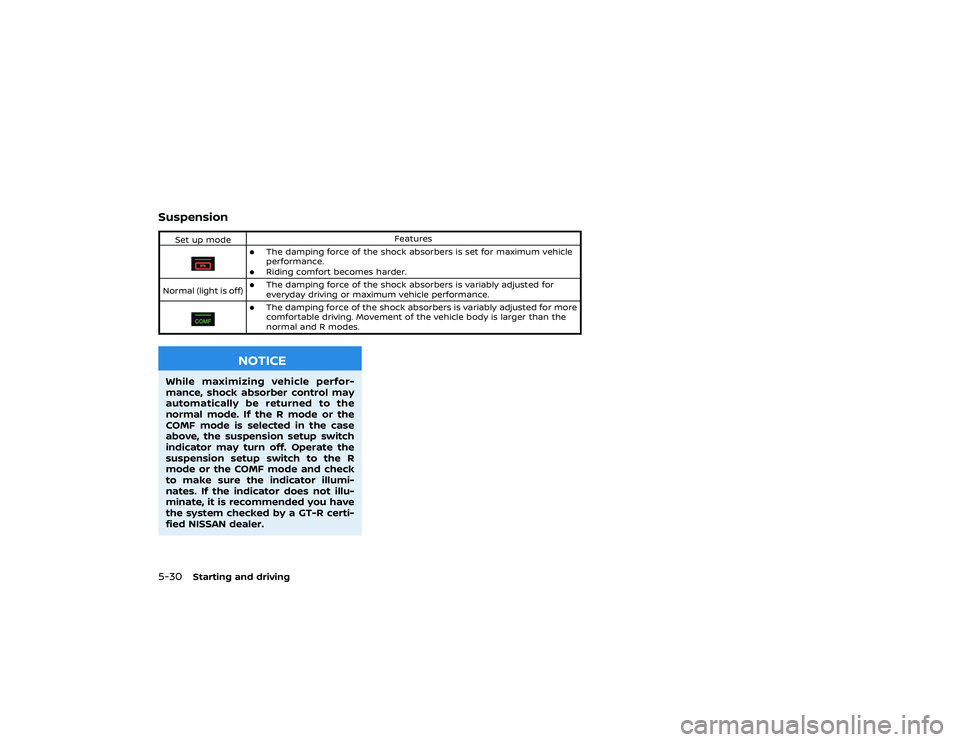
.If the vehicle becomes involved in
a collision but the pretensioner is
not activated, it is recommended
to have the pretensioner system
checked and, if necessary, re-
placed by a GT-R certified NISSAN
dealer.
. No unauthorized changes should
be made to any components or
wiring of the pretensioners. This
is to prevent damage to or acci-
dental activation of the preten-
sioners. Tampering with the
pretensioner system may result
in serious personal injury.
. Work around and on the preten-
sioners should be done by a GT-R
certified NISSAN dealer. Installa-
tion of electrical equipment
should also be done by a GT-R
certified NISSAN dealer. Un-
authorized electrical test equip-
ment and probing devices should
not be used on the pretensioners.
. If you need to dispose of a pre-
tensioner or scrap the vehicle, it is
recommended you contact a
GT-R certified NISSAN dealer. In-
correct disposal procedures
could cause personal injury. The pretensioner system may activate
with the supplemental air bag system in
certain types of collisions. Working with
the seat belt retractor, it helps tighten the
seat belt when the vehicle becomes
involved in certain types of collisions,
helping to restrain front seat occupants.
The pretensioner is encased with the seat
belt retractor. These seat belts are used
the same way as conventional seat belts.
When a pretensioner activates, smoke is
released and a loud noise may be heard.
The smoke is not harmful, and it does not
indicate a fire. Care should be taken not
to inhale it as it may cause irritation and
choking. Those with a history of a breath-
ing condition should get fresh air
promptly.
After pretensioner activation, load limiters
allow the seat belt to release webbing (if
necessary) to reduce forces against the
chest.
The supplemental air bag warning light
“Supplemental air bag warning light”
page 1-48 for more details.) If the opera-
tion of the supplemental air bag warning
light indicates there is a malfunction, it is
recommended you have the system
checked by a GT-R certified NISSAN deal-
er. When selling your vehicle, we request that
you inform the buyer about the preten-
sioner system and guide the buyer to the
appropriate sections in this Owner’s Man-
ual.
Safety — Seats, seat belts and supplemental restraint system
1-47
Page 257 of 1808
SUPPLEMENTAL AIR BAG WARNING
LIGHTThe supplemental air bag warning light,
displaying
in the meter, monitors the
circuits for the air bag systems, preten-
sioners and all related wirings.
When the ignition switch is in the ON
position, the supplemental air bag warn-
ing light illuminates for about 7 seconds
and then turns off. This means the SRS air
bag systems are operational.
If any of the following conditions occur,
the air bag and/or pretensioner systems
need servicing:
Page 258 of 1808

.The supplemental air bag warning
light remains on after approximately
7 seconds.
. The supplemental air bag warning
light flashes intermittently.
. The supplemental air bag warning
light does not come on at all.
Under these conditions, the air bag and/
or pretensioner systems may not operate
properly. They must be checked and
repaired. It is recommended you take
your vehicle to the nearest GT-R certified
NISSAN dealer.
Safety — Seats, seat belts and supplemental restraint system
1-49
Page 267 of 1808

1 second.
NOTE:
When the battery is disconnected, the
memory for trips
is erased, and
both return to zero.
TACHOMETERThe tachometer indicates the engine
speed in revolutions per minute (rpm).
Do not rev the engine into the red zone
.
NOTICE
When engine speed approaches the
red zone, shift to a higher gear or
reduce engine speed. Operating the
engine in the red zone may cause
serious engine damage.
ENGINE COOLANT TEMPERATURE
GAUGEThe gauge indicates the engine coolant
temperature.
The engine coolant temperature is within
the normal range when the gauge needle
points within the zone
shown in the
illustration.
The engine coolant temperature varies
with the outside air temperature and
driving conditions.
Page 275 of 1808

2. NEXT switch3. Vehicle information displayThe drive computer displays the following
information:
.Current fuel consumption
. Vehicle speed
. Cruise control
. Average fuel consumption and speed
. Elapsed time and trip computer
. Distance to empty
. Outside air temperature
. Setting .
Warning
The vehicle information display
can be
changed when the ignition switch is in
the ON position. Push the ENTER switch
to change the display.
NOTE:
. The cruise control display is shown if
cruise control is set. (
“Cruise
control” page 5-35)
. The warning display is not shown if
there are no conditions to warn the
driver.
. Depending on the driving conditions
and other factors, the displayed
values may differ from the actual
values.
. The position of the speedometer
needle and the speed shown in the
vehicle information display may
slightly differ.
CURRENT FUEL CONSUMPTIONThe current fuel economy is displayed
when driving.
DRIVE COMPUTER
Page 278 of 1808

OUTSIDE AIR TEMPERATUREThis displays the outside air temperature.
NOTE:
.The outside air temperature may not
be displayed correctly in the follow-
ing cases.
—The outside air temperature is
lower than −22°F (−30°C) or is
higher than 131°F (55°C).
— The vehicle is stopped or is driving
at a low speed (less than approxi-
mately 12 MPH (20 km/h)).
— The temperature in the engine
compartment is high. .
When the outside air temperature is
lower than 37°F (3°C), the low outside
temperature warning will be dis-
played and “ICY” is indicated on the
outside air temperature display.
(
“Alert” page 2-20)Instruments and controls
2-19
Page 280 of 1808
to change the time. Push and
hold the switch to increase the number
every 1 hour. A maximum of 6 hours can
be set.
NOTE:
The default setting is OFF.
Low outside temperature warning:
This alert informs the driver when the
outside air temperature is lower than 37°F
(3°C).
On the ICY screen, push the NEXT switch
to turn this warning ON/OFF.
NOTE:
The default setting is ON.
MaintenanceThis function can be used to set the
various maintenance intervals and to
check the engine oil level. The reminders
shown below are used to notify the driver
of the maintenance intervals.
NOTE:
Because these are displayed based on
the mileage driven, they do not indicate
the actual conditions of the vehicle. Use
these functions only as a reference.
Input the maintenance distance using the
following items:
. On each setting screen, push the
Instruments and controls
2-21
Page 285 of 1808

All-Wheel Drive (AWD) warning light
Cruise main switch indicator light
Anti-lock Braking System (ABS) warn-
ing light
Cruise set switch indicator light
Charge warning light
Exterior light indicator
Engine oil pressure warning light
Intelligent Key warning light
Front passenger air bag status light
Seat belt warning light
Low tire pressure warning light
High beam indicator light
Supplemental air bag warning light
Malfunction Indicator Light (MIL)
Turn signal/hazard indicator lights
Master warning lightTransmission warning lightVehicle Dynamic Control (VDC) off
indicator lightVehicle Dynamic Control (VDC) warn-
ing light
CHECKING LIGHTSWith all doors closed, apply the parking
brake, fasten the seat belts and place the
ignition switch in the ON position without
starting the engine. The following lights (if
so equipped) will come on:
,
or
,
,
,
The following lights (if so equipped) willcome on briefly and then go off:
,
or
,
,
,
,
,
If any light does not come on or operates
in a way other than described, it may
indicate a burned-out bulb and/or a
system malfunction. It is recommended
you have the system checked by a GT-R
certified NISSAN dealer.
WARNING/INDICATOR LIGHTS (red)See
“Warning display” page 2-36 and
“Vehicle information display” page 2-
13.
Brake warning light
This light functions for both the parking
brake and the foot brake systems.
WARNING LIGHTS, INDICATOR
LIGHTS AND AUDIBLE REMINDERS
Page 286 of 1808

Parking brake indicator:
When the ignition switch is in the ON
position, the light comes on when the
parking brake is applied.
Low brake fluid warning light:
When the ignition switch is in the ON
position, the light warns of a low brake
fluid level. If the light comes on while the
engine is running with the parking brake
not applied, stop the vehicle and perform
the following:
1. Check the brake fluid level. Add brakefluid as necessary. (
“Brake fluid”
page 8-11)
2. If the brake fluid level is correct, it is recommended you have the warning
system checked by a GT-R certified
NISSAN dealer.
Anti-lock Braking System (ABS) warning
indicator:
When the parking brake is released and
the brake fluid level is sufficient, if both
the brake warning light and the Anti-lock
Braking System (ABS) warning light illu-
minate, it may indicate the ABS is not
functioning properly. It is recommended
you have the brake system checked, and
if necessary repaired, by a GT-R certified
NISSAN dealer promptly. (
“Anti-lock
Braking System (ABS) warning light” page 2-29)
Brake pad wear warning indicator
(models with NCCB (NISSAN Carbon
Ceramic Brake) package):
When the brake warning light illuminates,
it may indicate that there is brake pad
wear. Have the brake system checked
and brake pads replaced as soon as
possible. It is recommended you contact
a GT-R certified NISSAN dealer for this
service.
WARNING
.
Your brake system may not be
working properly if the warning
light is on. Driving could be dan-
gerous. If you judge it to be safe,
drive carefully to the nearest
service station for repairs. Other-
wise, have your vehicle towed because driving it could be dan-
gerous.
. Pressing the brake pedal with the
engine stopped and/or low brake
fluid level may increase your
stopping distance and braking
will require greater pedal effort
as well as pedal travel.
. If the brake fluid level is below the
minimum or MIN mark on the
brake fluid reservoir, do not drive
until the brake system has been
checked. It is recommended you
contact a GT-R certified NISSAN
dealer.
Charge warning light
If the light comes on while the engine is
running, it may indicate the charging
system is not functioning properly. Turn
the engine off and check the alternator
belt. If the belt is loose, broken, missing or
if the light remains on, it is recommended
you see a GT-R certified NISSAN dealer
immediately.
Instruments and controls
2-27
Page 288 of 1808

WARNING/INDICATOR LIGHTS (yel-
low)See
“Warning display” page 2-36 and
“Vehicle information display” page 2-
13.
warning light comes on when the
ignition switch is pushed to ON. It turns
off soon after the engine is started.
If the AWD system malfunctions, the
warning light will either remain illumi-
nated or blink. (
“All-Wheel Drive
(AWD)” page 5-42)
“Tire and loading infor-
mation label” page 10-14)
If the tire pressure is insuffi-
cient, fill with nitrogen gas. It
is recommended you contact
a GT-R certified NISSAN dealer
about filling with nitrogen
gas. If nitrogen gas is not
available, compressed air
may be safely used under
normal driving conditions. However, NISSAN recom-
mends refilling with nitrogen
gas for maximum tire perfor-
mance.
. If the warning light is still on after
the above operations, have your
vehicle checked as soon as pos-
sible. It is recommended you have
the vehicle checked by a GT-R
certified NISSAN dealer.
or
Anti-lock Braking
System (ABS) warning light
When the ignition switch is in the ON
position, the Anti-lock Braking System
(ABS) warning light illuminates and then
turns off. This indicates the ABS is opera-
tional.
If the ABS warning light illuminates while
the engine is running, or while driving, it
may indicate the ABS is not functioning
properly. It is recommended you have the
system checked by a GT-R certified
NISSAN dealer.
If an ABS malfunction occurs, the anti-
lock function is turned off. The brake
system then operates normally, but with-
out anti-lock assistance. (
“Brake sys-
tem” page 5-52)
Instruments and controls
2-29