heater NISSAN JUKE 2016 F15 / 1.G Quick Reference Guide
[x] Cancel search | Manufacturer: NISSAN, Model Year: 2016, Model line: JUKE, Model: NISSAN JUKE 2016 F15 / 1.GPages: 28, PDF Size: 1.89 MB
Page 20 of 28

18
TRIP COMPUTER
With the ignition switch in the ON position, trip
computer
1 modes can be selected by pressing the
trip computer mode switch
2 on the instrument panel.
The following modes can be selected in the display:
Trip A – measures the distance of one specific trip.
Trip B – measures the distance of a second
specific trip.
Current Fuel Consumption – displays the current fuel consumption.
Distance to Empty (dte) – displays the estimated distance to empty the vehicle can be
driven before refueling.
Average Fuel Consumption – displays the average fuel consumption since\
the last reset.
Torque Vectoring AWD (AWD model) – displays the current amount of torque
distributed to each wheel.
Push the trip computer mode switch
2 for approximately 1 second to reset the currently
displayed trip odometer to zero.
For more information, refer to the “Instruments and controls (section 2)” of your Owner’s Manual.
NISSANCONNECTSM MOBILE APPS
Integrates popular smartphone apps and services into your vehicle.
The NissanConnect Mobile Apps companion app must be downloaded to your
smartphone, and you must be enrolled to a NissanConnect account.
FOR SYSTEM WITH NAVIGATION
• iPhone
®: Please connect via USB when using an iPhone® with
NissanConnect Mobile Apps.
• Android
®: Please connect via Bluetooth® when using an Android® device with
NissanConnect Mobile Apps.
FOR SYSTEM WITHOUT NAVIGATION
• iPhone
®: Please connect via Bluetooth® when using an iPhone® with
NissanConnect Mobile Apps.
• Android®: Please connect via Bluetooth® when using an Android® device with
NissanConnect Mobile Apps.
For more information on how to pair your cellular phone and set up NissanConnect
Mobile Apps, visit: www.NissanUSA.com/connect/support.
*NissanConnect Mobile Apps is only available on vehicles equipped with an opt\
ional NissanConnect Mobile Apps
subscription service.
For more information, refer to the “Heater, air conditioner, audio and phone systems (section 4)” of your
Owner’s Manual.
SYSTEM GUIDE
2
1
1905578_16a_Juke_US_pQRG_081915.indd 188/19/15 11:08 AM
To view detailed instructional videos regarding these and other features, please go to www.nissanownersinfo.mobi.
Page 21 of 28

19
TEXT MESSAGING*
This system allows for sending and receiving text
messages through the vehicle’s interface.
Using predefined or custom messages, send a
text to a name or phone number stored in your
Bluetooth
® Hands-free Phone System.
Once enabled, the text message, sender and
delivery time are shown on the control panel
display when the vehicle speed is less than 5 mph (8 km/h).
Text messages have the option of being read aloud at all vehicle speeds.
Many cellular phones may require special permission to enable text messaging.
Check the cellular phone’s screen during Bluetooth® pairing. For some cellular
phones, you need to enable “Notifications” in the cellular phone\
’s Bluetooth® menu
for text messages to appear on the touch-screen display. For more information and
instructions, refer to your cellular phone’s Owner’s Manual.
Text message integration requires that the phone support Message Access Profile
(MAP) for both receiving and sending text messages. Some cellular phones may not
support all text messaging features. Please see www.NissanUSA.com/bluetooth
for compatibility information as well as your device’s Owner’s Manual.
*Laws in some jurisdictions may restrict the use of “Text-to-Speech”. Some of the applications and features, such
as social networking and texting, may also be restricted. Check local regulations for any requirements before using
these features.
For more information, refer to the “Heater, air conditioner, audio and phone systems (section 4)” of your
Owner’s Manual.
1905578_16a_Juke_US_pQRG_081915.indd 198/19/15 11:08 AM
To view detailed instructional videos regarding these and other features, please go to www.nissanownersinfo.mobi.
Page 25 of 28
23
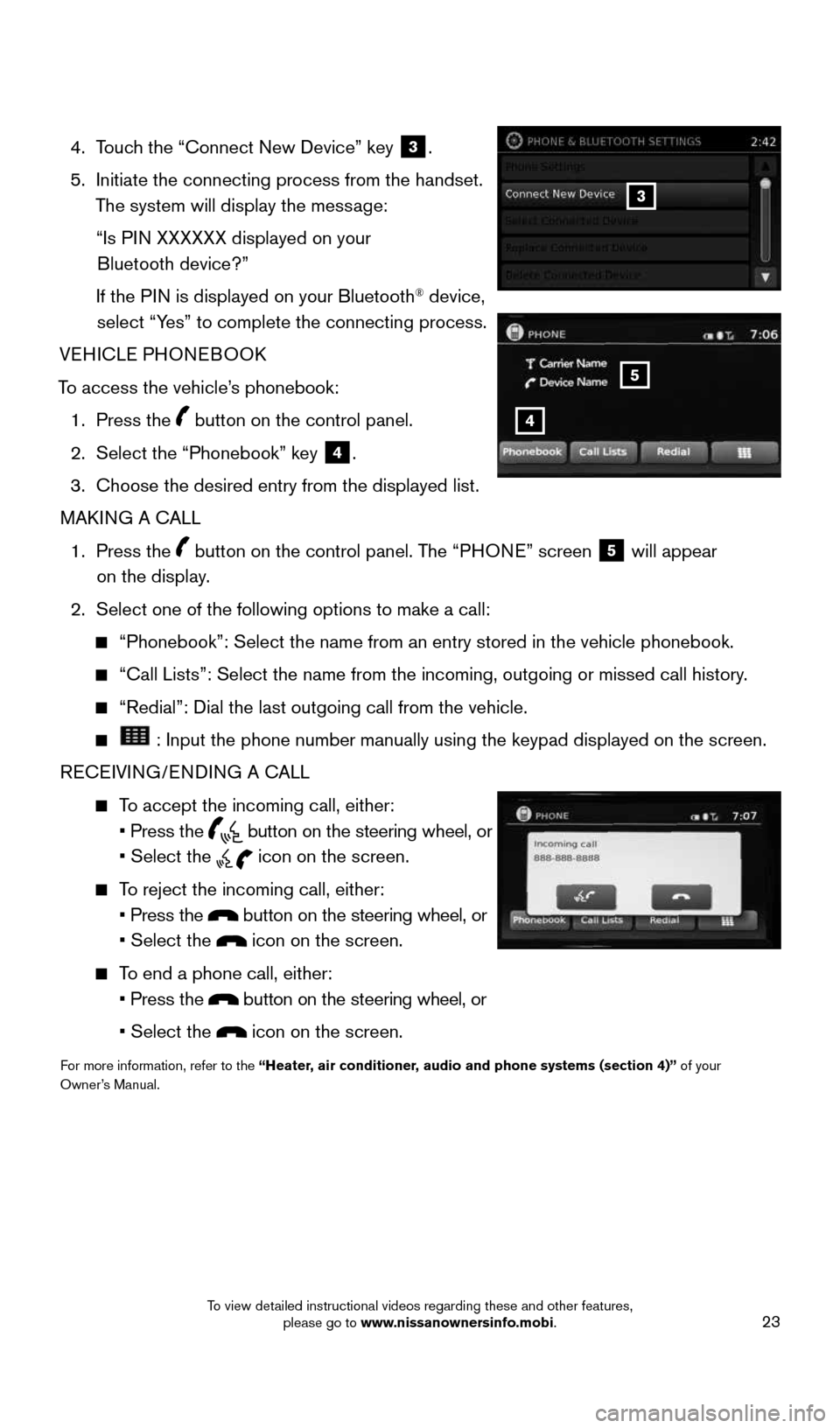
4. Touch the “Connect New Device” key 3.
5. Initiate the connecting process from the handset.
The system will display the message:
“Is PIN XXXXXX displayed on your
Bluetooth device?”
If the PIN is displayed on your Bluetooth
® device,
select “Yes” to complete the connecting process.
VEHICLE PHONEBOOK
To access the vehicle’s phonebook: 1. Press the
button on the control panel.
2. Select the “Phonebook” key
4.
3. Choose the desired entry from the displayed list.
MAKING A CALL
1. Press the
button on the control panel. The “PHONE” screen 5 will appear
on the display.
2. Select one of the following options to make a call:
“Phonebook”: Select the name from an entry stored in the vehicle p\
honebook.
“Call Lists”: Select the name from the incoming, outgoing or misse\
d call history.
“Redial”: Dial the last outgoing call from the vehicle.
: Input the phone number manually using the keypad displayed on the scr\
een.
RECEIVING/ENDING A CALL
To accept the incoming call, either:
• Press the
button on the steering wheel, or
• Select the
icon on the screen.
To reject the incoming call, either:
• Press the
button on the steering wheel, or
• Select the
icon on the screen.
To end a phone call, either:
• Press the
button on the steering wheel, or
• Select the
icon on the screen.
For more information, refer to the “Heater, air conditioner, audio and phone systems (section 4)” of your
Owner’s Manual.
3
4
5
1905578_16a_Juke_US_pQRG_081915.indd 238/19/15 11:08 AM
To view detailed instructional videos regarding these and other features, please go to www.nissanownersinfo.mobi.
Page 26 of 28

Your Navigation System can calculate a route from your current location t\
o a preferred
destination. The real-time map display and turn-by-turn voice guidan")
24
NAVIGATION SYSTEM (if so equipped)
Your Navigation System can calculate a route from your current location t\
o a preferred
destination. The real-time map display and turn-by-turn voice guidance will lead you
along the route.
The Navigation System will continually update your vehicle’s position. If you have
deviated from the original route, it will recalculate the route from you\
r current location.
To help promote safe driving, some functions cannot be operated or have limited
operation when the vehicle speed is above 5 mph (8 km/h). The on-screen text and
keys for these restricted functions will be grayed-out or muted and cann\
ot be selected
while driving. These functions will become available again when the vehicle speed
is reduced to 5 mph (8 km/h). Voice commands may be available for some of the
restricted functions. For more information, refer to the “Heater, air conditioner, audio
and phone systems (section 4)” of your Owner’s Manual.
1 N AV button – Press to access the functions of the Navigation System.
2 MAP button – Press to display the current location map screen.
3 VOL knob – Turn right to increase the volume or left to decrease the volume.
4 key – Select to zoom the map in.
5 key – Select to zoom the map out.
6 button – Press to access SiriusXM Traffic, MyApps, Settings, SiriusXM Travel
Link and Voice Commands.
7 button – Press to change the display brightness between day and night modes.
While the mode is being displayed, the brightness can be adjusted using t\
he TUNE
knob. Press and hold to turn the display off. Press again to turn the di\
splay on.
8 BACK button – Press to return to the previous screen.
9 TUNE knob – Turn to navigate the items in a list. Press to select a menu item.
10 Touch-screen display
11 SD-card location - An SD-card with map data must be inserted here for map functions
to operate.
For more information, refer to your Navigation System Owner’s Manual.
1
10
8
9
45
3
6
7
2
11
SYSTEM GUIDE
1905578_16a_Juke_US_pQRG_081915.indd 248/19/15 11:08 AM
To view detailed instructional videos regarding these and other features, please go to www.nissanownersinfo.mobi.