roof NISSAN KICKS 2023 User Guide
[x] Cancel search | Manufacturer: NISSAN, Model Year: 2023, Model line: KICKS, Model: NISSAN KICKS 2023Pages: 558, PDF Size: 6.25 MB
Page 156 of 558
•Heavy loading of the crossbars has
the potential to affect the vehicle
stability and handling during sudden
or unusual handling maneuvers.
• Properly secure all cargo with ropes
or straps to help prevent it from slid-
ing or shif ting. In a sudden stop or
collision, unsecured cargo could
cause personal injury.
• Drive extra carefully when the vehicle
is loaded at or near the cargo carry-
ing capacity, especially if the signifi-
cant portion of that load is carried on
the crossbars.
CAUTION
• Use care when placing or removing
items from the roof rack. If you can-
not comfortably lif t the items onto
the roof rack from the ground, use a
ladder or a stool. Do not apply any load directly to the roof
side rails
OA. CrossbarsOBmust be in-
stalled before applying load/cargo/
luggage to the roof of the vehicle.
Genuine NISSAN accessory crossbars may
be available through a NISSAN dealer. It is
recommended that you visit a NISSAN
dealer for additional information.
The service load capacity for the roof side
rails is 110 lbs. (50 kg.), however do not ex-
ceed the crossbars load capacity.
Be careful that your vehicle does not ex-
ceed the Gross Vehicle Weight Rating
(GVWR) or its Gross Axle Weight Rating
(GAWR front and rear).
For additional information regarding GVWR
and GAWR, refer to:
• F.M.V.S.S. or C.M.V.S.S. certification label (lo- cated on the driver’s door pillar).Installing Crossbars (if so
equipped)
WARNING
• It is recommended that you have the
roof rack crossbars installed by a
NISSAN dealer.
•
Protect the painted area on the vehicle
roof under the crossbars by placing a
piece of cloth under the cross bars to
prevent scratch damage.
• Make sure the moonroof (if so
equipped) is in the closed position
during the installation process.
2-68Instruments and controls
Page 157 of 558
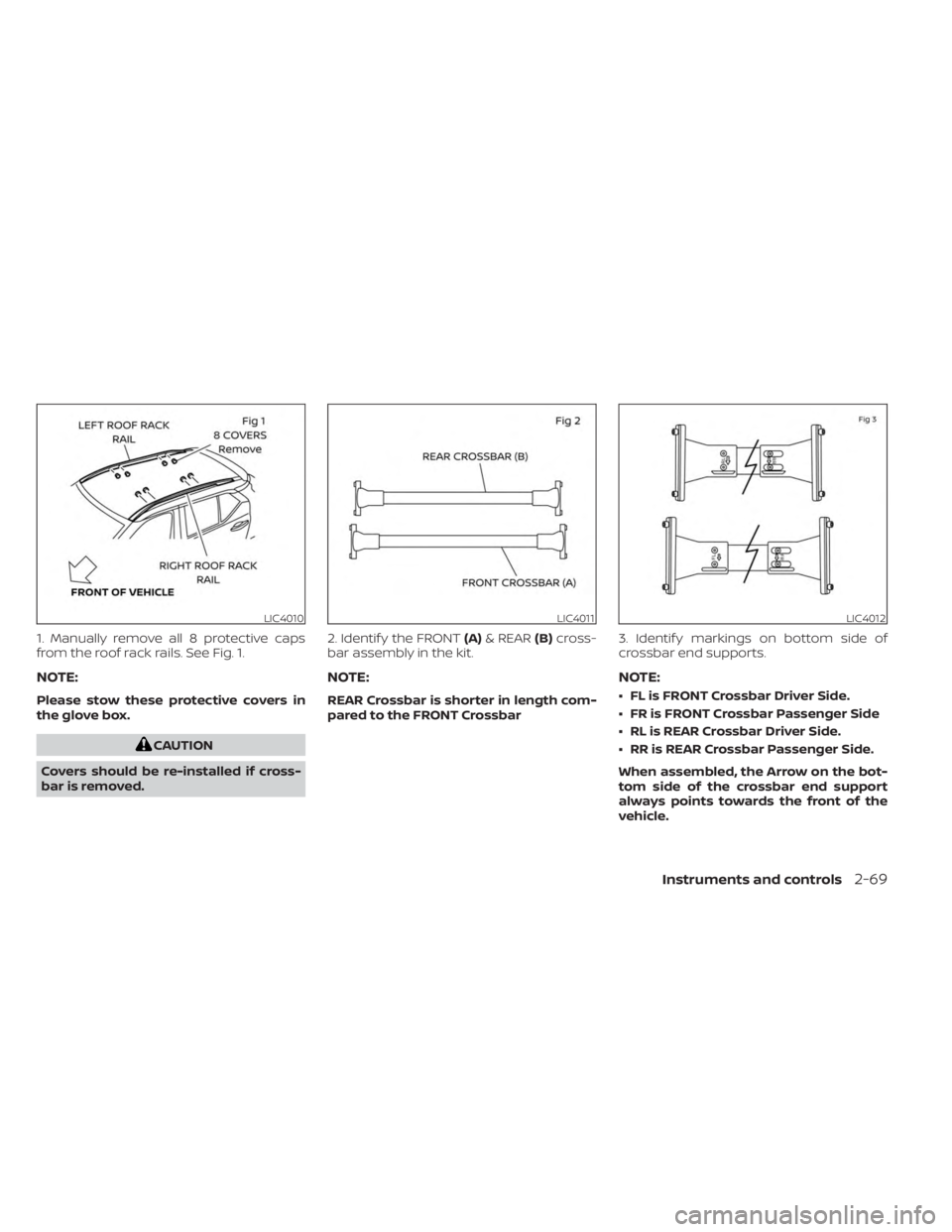
1. Manually remove all 8 protective caps
from the roof rack rails. See Fig. 1.
NOTE:
Please stow these protective covers in
the glove box.
CAUTION
Covers should be re-installed if cross-
bar is removed. 2. Identif y the FRONT
(A)& REAR (B)cross-
bar assembly in the kit.
NOTE:
REAR Crossbar is shorter in length com-
pared to the FRONT Crossbar 3. Identif y markings on bottom side of
crossbar end supports.
NOTE:
• FL is FRONT Crossbar Driver Side.
• FR is FRONT Crossbar Passenger Side
• RL is REAR Crossbar Driver Side.
• RR is REAR Crossbar Passenger Side.
When assembled, the Arrow on the bot-
tom side of the crossbar end support
always points towards the front of the
vehicle.
LIC4010LIC4011LIC4012
Instruments and controls2-69
Page 158 of 558
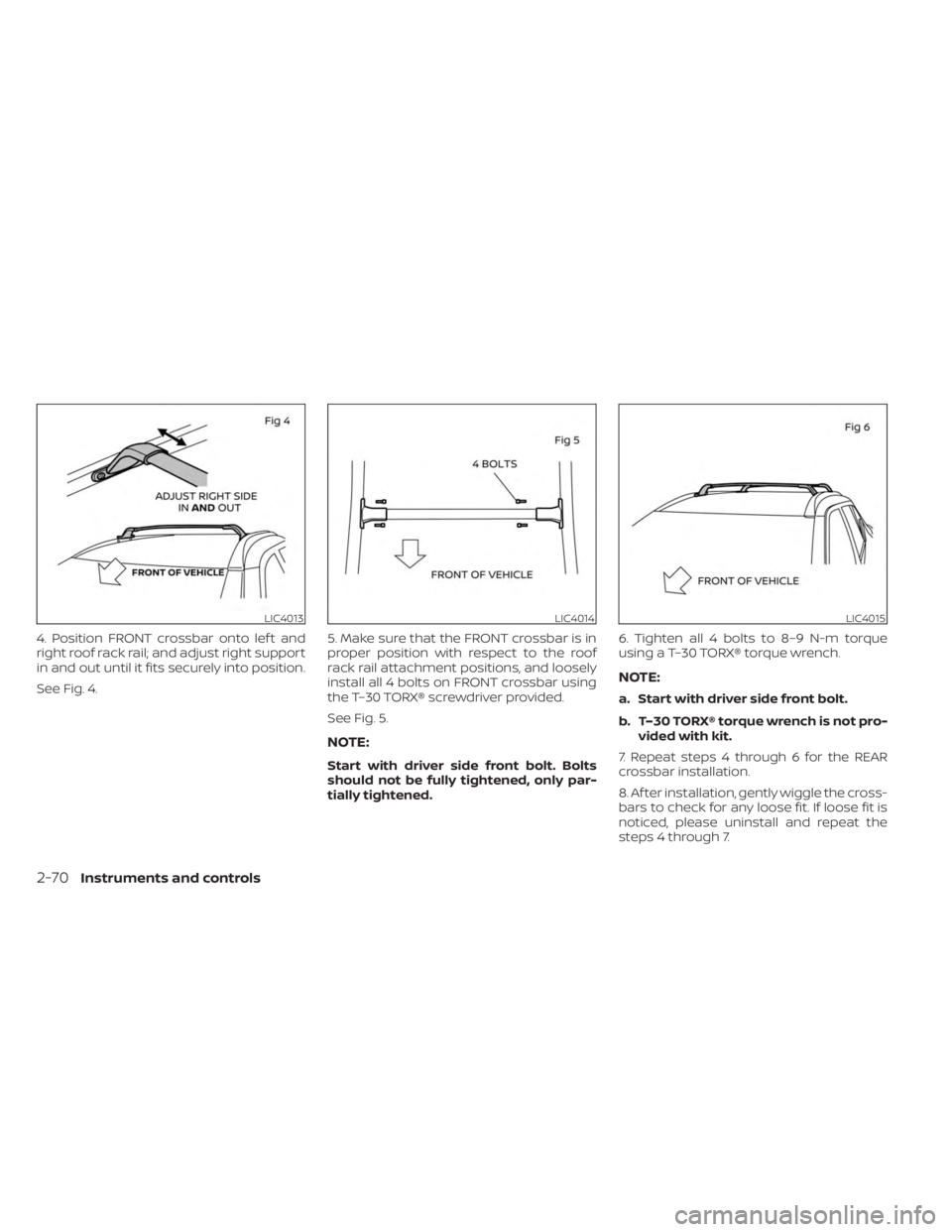
4. Position FRONT crossbar onto lef t and
right roof rack rail; and adjust right support
in and out until it fits securely into position.
See Fig. 4.5. Make sure that the FRONT crossbar is in
proper position with respect to the roof
rack rail attachment positions, and loosely
install all 4 bolts on FRONT crossbar using
the T–30 TORX® screwdriver provided.
See Fig. 5.
NOTE:
Start with driver side front bolt. Bolts
should not be fully tightened, only par-
tially tightened.6. Tighten all 4 bolts to 8–9 N-m torque
using a T–30 TORX® torque wrench.
NOTE:
a. Start with driver side front bolt.
b. T–30 TORX® torque wrench is not pro-
vided with kit.
7. Repeat steps 4 through 6 for the REAR
crossbar installation.
8. Af ter installation, gently wiggle the cross-
bars to check for any loose fit. If loose fit is
noticed, please uninstall and repeat the
steps 4 through 7.
LIC4013LIC4014LIC4015
2-70Instruments and controls
Page 197 of 558
Audio system.................................. 4-43
Radio ....................................... 4-43
FM radio reception .......................... 4-44
AM radio reception .......................... 4-44
Audio operation precautions ................4-44
FM/AM radio ................................ 4-48
USB (Universal Serial Bus) connection
port......................................... 4-53
iPod®* player operation .....................4-56
Bluetooth® streaming audio .................4-59
Steering wheel switch for audio control .....4-62
Roof Mounted Antenna ......................4-62
Siri® Eyes Free (if so equipped) ..................4-63
Requirements ............................... 4-63
Operating Siri® Eyes Free ....................4-63
Troubleshooting guide ......................4-65
Car phone or CB radio .......................... 4-66Bluetooth® Hands-Free Phone System
.........4-66
Regulatory information ......................4-68
Using the system ........................... 4-68
Indicators ................................... 4-70
Control buttons ............................. 4-70
Connecting procedure ......................4-71
Voice commands ........................... 4-72
Phone display screen .......................4-74
Making a call ................................ 4-75
Receiving a call .............................. 4-75
During a call ................................. 4-75
Ending a call ................................ 4-76
Text messaging (if so equipped) .............4-76
Bluetooth® connections screen .............4-79
Phone and text message settings ...........4-80
iPod®/iPhone® ................................. 4-82
Page 258 of 558
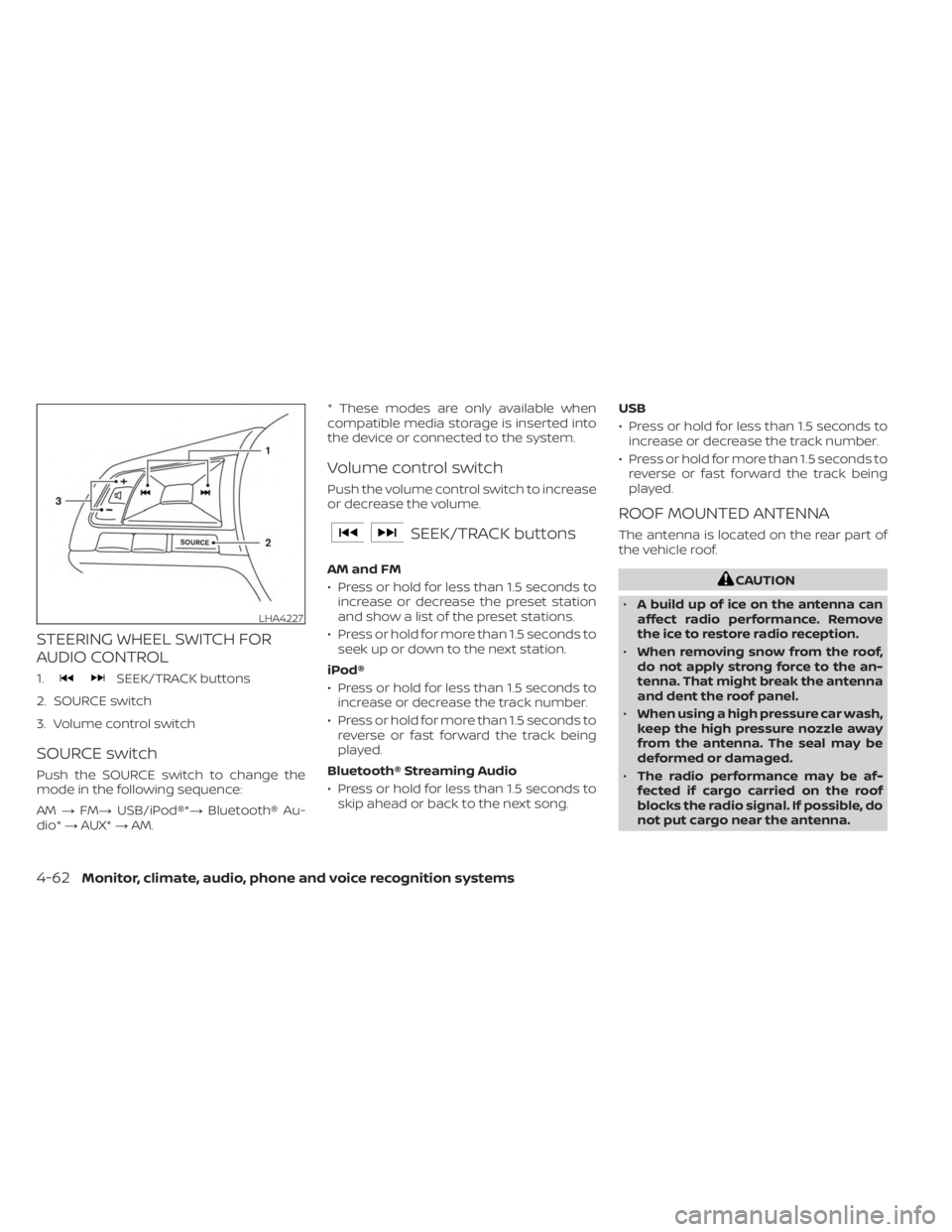
STEERING WHEEL SWITCH FOR
AUDIO CONTROL
1.SEEK/TRACK buttons
2. SOURCE switch
3. Volume control switch
SOURCE switch
Push the SOURCE switch to change the
mode in the following sequence:
AM →FM→ USB/iPod®*→ Bluetooth® Au-
dio* →AUX* →AM. * These modes are only available when
compatible media storage is inserted into
the device or connected to the system.
Volume control switch
Push the volume control switch to increase
or decrease the volume.
SEEK/TRACK buttons
AM and FM
• Press or hold for less than 1.5 seconds to
increase or decrease the preset station
and show a list of the preset stations.
• Press or hold for more than 1.5 seconds to seek up or down to the next station.
iPod®
• Press or hold for less than 1.5 seconds to increase or decrease the track number.
• Press or hold for more than 1.5 seconds to reverse or fast forward the track being
played.
Bluetooth® Streaming Audio
• Press or hold for less than 1.5 seconds to skip ahead or back to the next song. USB
• Press or hold for less than 1.5 seconds to
increase or decrease the track number.
• Press or hold for more than 1.5 seconds to reverse or fast forward the track being
played.
ROOF MOUNTED ANTENNA
The antenna is located on the rear part of
the vehicle roof.
CAUTION
• A build up of ice on the antenna can
affect radio performance. Remove
the ice to restore radio reception.
• When removing snow from the roof,
do not apply strong force to the an-
tenna. That might break the antenna
and dent the roof panel.
• When using a high pressure car wash,
keep the high pressure nozzle away
from the antenna. The seal may be
deformed or damaged.
• The radio performance may be af-
fected if cargo carried on the roof
blocks the radio signal. If possible, do
not put cargo near the antenna.
LHA4227
4-62Monitor, climate, audio, phone and voice recognition systems
Page 282 of 558
WARNING
• Do not leave children or adults who
would normally require the assis-
tance of others alone in your vehicle.
Pets should also not be lef t alone.
They could accidentally injure them-
selves or others through inadvertent
operation of the vehicle. Also, on hot,
sunny days, temperatures in a closed
vehicle could quickly become high
enough to cause severe or possibly
fatal injuries to people or animals.
• Properly secure all cargo with ropes
or straps to help prevent it from slid-
ing or shif ting. Do not place cargo
higher than the seatbacks. In a sud-
den stop or collision, unsecured
cargo could cause personal injury.
• To avoid raising the center of gravity
excessively, do not exceed the rated
capacity of the roof rack (if so
equipped) and evenly distribute the
load.EXHAUST GAS (carbon monoxide)
WARNING
• Do not breathe exhaust gases; they
contain colorless and odorless car-
bon monoxide. Carbon monoxide is
dangerous. It can cause uncon-
sciousness or death.
• If you suspect that exhaust fumes
are entering the vehicle, drive with all
windows fully open, and have the ve-
hicle inspected immediately.
• Do not run the engine in closed
spaces such as a garage.
• Do not park the vehicle with the en-
gine running for any extended length
of time.
•
Keep the rear vent windows, lif tgates,
doors and trunk lids (if so equipped)
closed while driving, otherwise ex-
haust gases could be drawn into the
passenger compartment. If you must
drive with one of these open, follow
these precautions:
1. Open all the windows.
2. Set the
air recirculation but-
ton to off and the fan control dial
to high to circulate the air. •
If electrical wiring or other cable con-
nections must pass to a trailer
through the seal on the trunk lid or
the body, follow the manufacturer's
recommendation to prevent carbon
monoxide entry into the vehicle.
• The exhaust system and body should
be inspected by a qualified mechanic
whenever:
a. The vehicle is raised for service.
b. You suspect that exhaust fumes are entering into the passenger
compartment.
c. You notice a change in the sound of the exhaust system.
d. You have had an accident involv- ing damage to the exhaust sys-
tem, underbody, or rear of the
vehicle.
THREE-WAY CATALYST
The three-way catalyst is an emission con-
trol device installed in the exhaust system.
Exhaust gases in the three-way catalyst
are burned at high temperatures to help
reduce pollutants.
PRECAUTIONS WHEN STARTING AND
DRIVING
5-4Starting and driving
Page 550 of 558
Instrument brightness control.......2-50Instrument panel.............0-6, 2-2Instrument panel dimmer switch.....2-50Intelligent Around View® Monitor......4-16Intelligent Cruise Control..........5-58Intelligent Driver Alertness (I-DA).....5-125Intelligent Engine Brake (I-EB).......5-138Intelligent Forward Collision Warning
(I-FCW).....................5-110Intelligent Key systemKey operating range............3-7Key operation................3-9Mechanical key................3-3Remote keyless entry operation. . . .3-12Troubleshooting guide..........3-15Warning signals...............3-15Intelligent Trace Control (I-TC).......5-137Interior light...................2-74iPod® Player................. .4-56ISOFIX child restraints.............1-21
J
Jump starting..............6-10,8-12
K
Key.........................3-2Key fob battery replacement........8-22Keyless entry
With Intelligent Key system
(See Intelligent Key system)
.......3-12
KeysNISSAN Intelligent Key®...........3-6NISSAN Vehicle Immobilizer System
keys..................... .3-3
L
Labels
Air conditioner specification label. . .10-12Emission control information label. .10-11Engine serial number...........10-11F.M.V.S.S. certification label........10-11Tire and Loading Information label. .10-12Vehicle identification number (VIN)
plate.................... .10-10Warning labels (for SRS)..........1-62Lane Departure Warning (LDW).......5-28Lane Departure Warning (LDW) switch. .2-54LATCH (Lower Anchors and Tethers for
CHildren) System................1-21Launch bar menu................4-7License plate
Installing the license plate........10-13Lif tgate.....................3-22LightAir bag warning light........1-63, 2-15Brake light (See stop light)........8-26Bulb check/instrument panel......2-13Bulb replacement.............8-26Charge warning light...........2-14Exterior and Interior lights........8-26Fog light switch...............2-51Fog lights..................8-25
Headlight and turn signal switch. . . .2-44Headlight control switch.........2-44Headlights..................8-24Interior light.................2-74Light bulbs.................8-24Low tire pressure warning light.....2-18Low windshield-washer fluid warning
light......................2-19Luggage compartment lights......2-76Personal lights...............2-75Security indicator light..........2-15Lights......................8-24Map lights..................2-75LockChild safety rear door lock.........3-6Door locks................. .3-4Fuel-filler door lock opener lever. . . .3-25Power door locks..............3-5Low fuel warning light. .2-15, 2-17, 2-20, 2-33Low tire pressure warning light.......2-18Low windshield-washer fluid warning
light........................2-19Luggage (See vehicle loading
information)..................10-14Luggage compartment lights.......2-76Luggage hook.................2-65Luggage rack (see roof rack). . . .2-67, 2-68
M
Maintenance
General maintenance...........9-2Inside the vehicle..............9-3
11-4
Page 552 of 558
Rear Sonar System (RSS)..........5-140Rear sonar system OFF switch.......2-56Rear window and outside mirror defroster
switch...............2-43, 4-34, 4-42Rear window defroster switch.......2-43Rear window wiper and washer
switches....................2-42Rearview mirror................3-28RearView Monitor................4-8Adjusting the screen...........4-24Recommended Fluids............10-2Recorders
Event Data................ .10-23Refrigerant recommendation........10-7Registering a vehicle in another
country.................... .10-10Remote Engine Start..........3-18,5-16Reporting safety defects (US only). . . .10-21Roof rack.................2-67, 2-68
S
Safety
Child safety rear door lock.........3-6Child seat belts.....1-19,1-26, 1-33, 1-38Reporting safety defects (US only). . .10-21Seat adjustment
Front manual seat adjustment......1-3Rear seat adjustment............1-4Seat beltChild safety..................1-17Infants and small children........1-18Injured person................1-12
Larger children...............1-18Precautions on seat belt usage......1-9Pregnant women..............1-12Seat belt extenders............1-16Seat belt maintenance..........1-16Seat belts................1-9, 7-6Shoulder belt height adjustment. . . .1-15Three-point type with retractor.....1-13Seat belt extenders..............1-16Seat belt warning light.........1-12,2-15Seatback pockets...............2-62SeatsAdjustment..................1-2Front seats..................1-2Manual front seat adjustment......1-3Rear seat.................. .1-4Security indicator light............2-15Security system (NISSAN Anti-Thef t System),
engine start...............2-39, 5-14Security system (NISSAN Vehicle Immobilizer
System), engine start.........2-40, 5-14Security systems
Vehicle security system.........2-38Self-adjusting brakes.............8-17Service manual order form........10-23Servicing air conditioner...........4-43Shif tingContinuously Variable Transmission
(CVT)
.....................5-18Shoulder belt height adjustment......1-15Siri® Eyes-Free................ .4-63Sonar
Rear system................5-140Spark plug replacement...........8-14
Spark plugs...................8-14Specifications................ .10-8Speedometer...............2-5, 2-6SRS warning label...............1-62Stability control................5-134Standard maintenance............9-8Starting
Before starting the engine........5-15Jump starting............6-10,8-12Precautions when starting and
driving.................... .5-4Push starting................6-12Starting the engine............5-15Starting the engine..............5-15Steering
Power steering system.........5-131Steering wheel.................3-26Steering wheel audio control switch. . .4-62Stop light....................8-26Storage.................... .2-61Storage tray..................2-62Sun visors....................3-27Supplemental air bag warning labels. . .1-62Supplemental air bag warning
light................... .1-63, 2-15Supplemental front impact air bag
system..................... .1-49Supplemental restraint system
Information and warning labels.....1-62Precautions on supplemental restraint
system................... .1-41Supplemental restraint system
(Supplemental air bag system).......1-41
11-6