O2 sensor NISSAN LATIO 2010 Service Repair Manual
[x] Cancel search | Manufacturer: NISSAN, Model Year: 2010, Model line: LATIO, Model: NISSAN LATIO 2010Pages: 3745, PDF Size: 73.67 MB
Page 3661 of 3745
![NISSAN LATIO 2010 Service Repair Manual C1607, C1608 EPS CONTROL UNIT
STC-15
< DTC/CIRCUIT DIAGNOSIS > [EPS]
C
D
E
F
H I
J
K L
M A
B
STC
N
O P
C1607, C1608 EPS CONTROL UNIT
DescriptionINFOID:0000000005600174
EPS control unit performs an ari](/img/5/57358/w960_57358-3660.png "NISSAN LATIO 2010 Service Repair Manual C1607, C1608 EPS CONTROL UNIT
STC-15
< DTC/CIRCUIT DIAGNOSIS > [EPS]
C
D
E
F
H I
J
K L
M A
B
STC
N
O P
C1607, C1608 EPS CONTROL UNIT
DescriptionINFOID:0000000005600174
EPS control unit performs an ari")
C1607, C1608 EPS CONTROL UNIT
STC-15
< DTC/CIRCUIT DIAGNOSIS > [EPS]
C
D
E
F
H I
J
K L
M A
B
STC
N
O P
C1607, C1608 EPS CONTROL UNIT
DescriptionINFOID:0000000005600174
EPS control unit performs an arithmetical operation on data, such as steering wheel turning force (sensor sig-
nal) from the torque sensor, vehicle speed signal, etc. T hen it generates an optimum assist torque signal to the
EPS motor according to the driving condition.
DTC LogicINFOID:0000000005600175
DTC DETECTION LOGIC
DTC CONFIRMATION PROCEDURE
1.DTC REPRODUCTION PROCEDURE
With CONSULT-III
1. Turn the ignition switch OFF to ON.
2. Perform EPS control unit self-diagnosis.
Is DTC
“C1607” or “C1608” detected?
YES >> Proceed to diagnosis procedure. Refer to STC-15, "Diagnosis Procedure".
NO >> Inspection End.
Diagnosis ProcedureINFOID:0000000005600176
1.PERFORM SELF-DIAGNOSIS
With CONSULT-III
1. Turn the ignition switch OFF to ON.
2. Erase EPS control unit self-diagnostic results.
3. Perform EPS control unit self-diagnosis.
Is DTC
“C1607” or “C1608” detected?
YES >> Replace EPS control unit. Refer to PS-9, "Removal and Installation".
NO >> Check EPS control unit pin terminals for damage or loose connection with harness connector. If
any item are damaged, repair or replace error-detected parts.
DTC Display item Malfunction detected condition Possible cause
C1607 EEPROM When the memory (EEPROM)
system malfunction is
detected in EPS control unit.
EPS control unit
C1608 CONTROL UNIT When the internal malfunction is detected in EPS
control unit.
Revision: January 20102010 Versa
Page 3666 of 3745
![NISSAN LATIO 2010 Service Repair Manual STC-20
< ECU DIAGNOSIS INFORMATION >[EPS]
EPS CONTROL UNIT
ECU DIAGNOSIS INFORMATION
EPS CONTROL UNIT
Reference ValueINFOID:0000000005600190
VALUES ON THE DIAGNOSIS TOOL
CAUTION:
The output signal ind](/img/5/57358/w960_57358-3665.png "NISSAN LATIO 2010 Service Repair Manual STC-20
< ECU DIAGNOSIS INFORMATION >[EPS]
EPS CONTROL UNIT
ECU DIAGNOSIS INFORMATION
EPS CONTROL UNIT
Reference ValueINFOID:0000000005600190
VALUES ON THE DIAGNOSIS TOOL
CAUTION:
The output signal ind")
STC-20
< ECU DIAGNOSIS INFORMATION >[EPS]
EPS CONTROL UNIT
ECU DIAGNOSIS INFORMATION
EPS CONTROL UNIT
Reference ValueINFOID:0000000005600190
VALUES ON THE DIAGNOSIS TOOL
CAUTION:
The output signal indicates the EPS control unit calculation data. Th
e normal values will be displayed
even in the event that the output circuit (harness) is open.
*1: Almost in accordance with the value of MOTOR SIG. It is not a malfunction though these values are not accorded when steerin g
quickly.
*2: It is not a malfunction, though it might not be corresponding just after ignition switch in turned ON.
TERMINAL LAYOUT
PHYSICAL VALUES
Monitor item Display content Data monitor
Condition Display value
MOTOR VOL Power supply voltage for
EPS control unit Ignition switch: ON
Battery voltage
TORQUE SENSOR Steering wheel turning
force Engine runningSteering wheel: Not steering
(There is no steering force)
Approx. 0 Nm
Steering wheel: Right turn Positive value (Nm)
Steering wheel: Left turn Negative value (Nm)
MOTOR CURRENT Consumption current of
EPS motor Engine runningSteering wheel: Not steering
(There is no steering force)
Approx. 0 A
Steering wheel: Right or left
turn Displays consumption cur-
rent of EPS motor (A)
*1
MOTOR SIG
Command current to
EPS motor Engine runningSteering wheel: Not steering
(There is no steering force)
Approx. 0 A
Steering wheel: Right turn Negative value (A)
Steering wheel: Left turn Positive value (A)
DERATING STAT Displays overload sta-
tus.
Engine running
Off
VEHICLE SPEED Vehicle speed Vehicle stopped
0 km/h (0 mph)
While driving Approximately equal to the
indication on speedometer
(inside of
±10%)
*2
WARNING LAMP EPS warning lamp con-
dition EPS warning lamp: ON
On
EPS warning lamp: OFF Off
ENGINE STATUS Engine status Engine not running
Stop
Engine running Run
SGIA1624E
Revision: January 20102010 Versa
Page 3667 of 3745
![NISSAN LATIO 2010 Service Repair Manual EPS CONTROL UNITSTC-21
< ECU DIAGNOSIS INFORMATION > [EPS]
C
D
E
F
H I
J
K L
M A
B
STC
N
O P
Te r m i n a l N o . (Wire Color) Description
ConditionVa l u e
(Approx.)
+ − Signal name Input/Output
4](/img/5/57358/w960_57358-3666.png "NISSAN LATIO 2010 Service Repair Manual EPS CONTROL UNITSTC-21
< ECU DIAGNOSIS INFORMATION > [EPS]
C
D
E
F
H I
J
K L
M A
B
STC
N
O P
Te r m i n a l N o . (Wire Color) Description
ConditionVa l u e
(Approx.)
+ − Signal name Input/Output
4")
EPS CONTROL UNITSTC-21
< ECU DIAGNOSIS INFORMATION > [EPS]
C
D
E
F
H I
J
K L
M A
B
STC
N
O P
Te r m i n a l N o . (Wire Color) Description
ConditionVa l u e
(Approx.)
+ − Signal name Input/Output
4
(V) Ground Torque sensor sub Input Ignition switch: ON
Steering wheel: Not
steering (There is no
steering force) 2.5 V
Engine running Steering wheel: steer-
ing 1.6 V – 3.4 V
(The value is changed according to steering
left or right)
5
(BR −) Ground
Torque sensor power
supply Output
Ignition switch: ON 5 V
6
(− ) Ground Torque sensor main Input Ignition switch: ON
Steering wheel: Not
steering (There is no
steering force) 2.5 V
Engine running Steering wheel: steer-
ing 1.6 V – 3.4 V
(The value is changed according to steering
left or right)
7
(R) Ground Torque sensor ground —
Always0 V
9
(L) Ground CAN-H
Input/Output ——
10
(O) Ground Ignition power supply Input Ignition switch: ON
Battery voltage
Ignition switch: OFF 0 V
16
(P) Ground CAN-L
Input/Output ——
17
(R) Ground Battery power supply Input
AlwaysBattery voltage
18
(B) Ground Ground
—Always 0 V
19 — Motor —— —
20 — Motor —— —
Revision: January 20102010 Versa
Page 3670 of 3745
![NISSAN LATIO 2010 Service Repair Manual STC-24
< ECU DIAGNOSIS INFORMATION >[EPS]
EPS CONTROL UNIT
DTC Inspection Priority Chart
INFOID:0000000005600193
When multiple DTCs are detected simultaneously, c heck one by one depending on the foll](/img/5/57358/w960_57358-3669.png "NISSAN LATIO 2010 Service Repair Manual STC-24
< ECU DIAGNOSIS INFORMATION >[EPS]
EPS CONTROL UNIT
DTC Inspection Priority Chart
INFOID:0000000005600193
When multiple DTCs are detected simultaneously, c heck one by one depending on the foll")
STC-24
< ECU DIAGNOSIS INFORMATION >[EPS]
EPS CONTROL UNIT
DTC Inspection Priority Chart
INFOID:0000000005600193
When multiple DTCs are detected simultaneously, c heck one by one depending on the following priority list.
DTC IndexINFOID:0000000005600194
Priority Priority order item (DTC)
1 U1000 CAN COMM CIRCUIT
2 C1601 BATTERY POWER SUPPLY
3 Other than the above
DTC Items (CONSULT-III screen terms) Reference
C1601 BATTERY VOLT STC-9, "
DTC Logic"
C1604TORQUE SENSOR STC-11, "DTC Logic"
C1606EPS MOTOR STC-13, "DTC Logic"
C1607EEPROM STC-15, "DTC Logic"
C1608CONTROL UNIT STC-15, "DTC Logic"
C1609CAN VHCL SPEED STC-16, "DTC Logic"
C1610CAN ENG RPM STC-17, "DTC Logic"
U1000CAN COMM CIRCUIT STC-18, "DTC Logic"
Revision: January 20102010 Versa
Page 3673 of 3745
![NISSAN LATIO 2010 Service Repair Manual STEERING WHEEL TURNING FORCE IS HEAVY OR LIGHTSTC-27
< SYMPTOM DIAGNOSIS > [EPS]
C
D
E
F
H I
J
K L
M A
B
STC
N
O P
STEERING WHEEL TURNING FO RCE IS HEAVY OR LIGHT
DescriptionINFOID:0000000005600199
St](/img/5/57358/w960_57358-3672.png "NISSAN LATIO 2010 Service Repair Manual STEERING WHEEL TURNING FORCE IS HEAVY OR LIGHTSTC-27
< SYMPTOM DIAGNOSIS > [EPS]
C
D
E
F
H I
J
K L
M A
B
STC
N
O P
STEERING WHEEL TURNING FO RCE IS HEAVY OR LIGHT
DescriptionINFOID:0000000005600199
St")
STEERING WHEEL TURNING FORCE IS HEAVY OR LIGHTSTC-27
< SYMPTOM DIAGNOSIS > [EPS]
C
D
E
F
H I
J
K L
M A
B
STC
N
O P
STEERING WHEEL TURNING FO RCE IS HEAVY OR LIGHT
DescriptionINFOID:0000000005600199
Steering wheel turning force is heavy or light.
Diagnosis ProcedureINFOID:0000000005600200
1.CHECK THE ILLUMINATION OF THE EPS WARNING LAMP
Check that the EPS warning lamp turns ON when igni tion switch turns ON. Then, EPS warning lamp turns
OFF after the engine is started.
Is the inspection result normal?
YES >> GO TO 4.
NO >> GO TO 2.
2.PERFORM SELF-DIAGNOSIS
With CONSULT-III
1. Turn the ignition switch OFF to ON.
2. Perform EPS control unit self-diagnosis.
Is any DTC detected?
YES >> Check the DTC. Refer to STC-24, "DTC Index".
NO >> GO TO 3.
3.CHECK EPS CONTROL UNIT SIGNAL
With CONSULT-III
1. Start the engine. CAUTION:
Stop the vehicle.
2. Turn steering wheel from full left stop to full right stop.
3. Select “TORQUE SENSOR” of “DATA MONITOR” for EPS control unit.
Is the inspection result normal?
YES >> GO TO 5.
NO >> GO TO 4.
4.CHECK EPS MOTOR
Perform the trouble diagnosis of EPS motor. Refer to STC-13, "
Diagnosis Procedure".
Is the inspection result normal?
YES >> GO TO 5.
NO >> Repair or replace the specific malfunctioning part.
5.CHECK STEERING WH EEL TURNING FORCE
Check the steering wheel turning force. Refer to PS-6, "
On-Vehicle Inspection and Service".
Is the inspection result normal?
YES >> Inspection End
NO >> Check the steering wheel turning force for mechanical malfunction. Refer to PS-6, "
On-Vehicle
Inspection and Service".
Monitor item ConditionDisplay value
TORQUE SENSOR Steering wheel: Not steer-
ing (There is no steering
force)
Approx. 0 Nm
Steering wheel: Right turn Positive value (Nm)
Steering wheel: Left turn Negative value (Nm)
Revision: January 20102010 Versa
Page 3674 of 3745
![NISSAN LATIO 2010 Service Repair Manual STC-28
< SYMPTOM DIAGNOSIS >[EPS]
UNBALANCE STEERING WHEEL TURNING FORCE AND RETURN BETWEEN
RIGHT AND LEFT
UNBALANCE STEERING WHEEL TU RNING FORCE AND RETURN BE-
TWEEN RIGHT AND LEFT
DescriptionINFOI](/img/5/57358/w960_57358-3673.png "NISSAN LATIO 2010 Service Repair Manual STC-28
< SYMPTOM DIAGNOSIS >[EPS]
UNBALANCE STEERING WHEEL TURNING FORCE AND RETURN BETWEEN
RIGHT AND LEFT
UNBALANCE STEERING WHEEL TU RNING FORCE AND RETURN BE-
TWEEN RIGHT AND LEFT
DescriptionINFOI")
STC-28
< SYMPTOM DIAGNOSIS >[EPS]
UNBALANCE STEERING WHEEL TURNING FORCE AND RETURN BETWEEN
RIGHT AND LEFT
UNBALANCE STEERING WHEEL TU RNING FORCE AND RETURN BE-
TWEEN RIGHT AND LEFT
DescriptionINFOID:0000000005600201
Unbalance steering wheel turning force and return between right and left.
Diagnosis ProcedureINFOID:0000000005600202
1.CHECK THE ILLUMINATION OF THE EPS WARNING LAMP
Check that the EPS warning lamp turns ON when igni tion switch turns ON. Then, EPS warning lamp turns
OFF after the engine is started.
Is the inspection result normal?
YES >> GO TO 2.
NO >> Refer to STC-26, "
Diagnosis Procedure".
2.CHECK WHEEL ALIGNMENT
1. Check the wheel alignment. Refer to FSU-7, "
On-Vehicle Inspection and Service".
2. Perform EPS control unit self-diagnosis.
Is the inspection result normal?
YES >> GO TO 3.
NO >> Adjustment of wheel alignment.
3.CHECK EPS CONTROL UNIT SIGNAL
With CONSULT-III
1. Start the engine. CAUTION:
Stop the vehicle.
2. Turn steering wheel from full left stop to full right stop.
3. Select “TORQUE SENSOR” of “DATA MONITOR” for EPS control unit.
Is the inspection result normal?
YES >> GO TO 5.
NO >> GO TO 4.
4.CHECK EPS MOTOR
Perform the trouble diagnosis of EPS motor. Refer to STC-13, "
Diagnosis Procedure".
Is the inspection result normal?
YES >> GO TO 5.
NO >> Repair or replace the specific malfunctioning part.
5.CHECK STEERING WHEEL TURNING FORCE
Check the steering wheel turning force. Refer to PS-6, "
On-Vehicle Inspection and Service".
Is the inspection result normal?
YES >> Inspection End.
NO >> Check the steering wheel turning force for mechanical malfunction. Refer to PS-6, "
On-Vehicle
Inspection and Service".
Monitor item ConditionDisplay value
TORQUE SENSOR Steering wheel: Not steer-
ing (There is no steering
force)
Approx. 0 Nm
Steering wheel: Right turn Positive value (Nm)
Steering wheel: Left turn Negative value (Nm)
Revision: January 20102010 Versa
Page 3675 of 3745
![NISSAN LATIO 2010 Service Repair Manual UNBALANCE STEERING WHEEL TURNING FORCE (TORQUE VARIATION)
STC-29
< SYMPTOM DIAGNOSIS > [EPS]
C
D
E
F
H I
J
K L
M A
B
STC
N
O P
UNBALANCE STEERING WHEEL TU RNING FORCE (TORQUE VARIA-
TION)
DescriptionI](/img/5/57358/w960_57358-3674.png "NISSAN LATIO 2010 Service Repair Manual UNBALANCE STEERING WHEEL TURNING FORCE (TORQUE VARIATION)
STC-29
< SYMPTOM DIAGNOSIS > [EPS]
C
D
E
F
H I
J
K L
M A
B
STC
N
O P
UNBALANCE STEERING WHEEL TU RNING FORCE (TORQUE VARIA-
TION)
DescriptionI")
UNBALANCE STEERING WHEEL TURNING FORCE (TORQUE VARIATION)
STC-29
< SYMPTOM DIAGNOSIS > [EPS]
C
D
E
F
H I
J
K L
M A
B
STC
N
O P
UNBALANCE STEERING WHEEL TU RNING FORCE (TORQUE VARIA-
TION)
DescriptionINFOID:0000000005600203
Unbalance steering wheel turning force (torque variation).
Diagnosis ProcedureINFOID:0000000005600204
1.CHECK THE ILLUMINATION OF THE EPS WARNING LAMP
Check that the EPS warning lamp turns ON when igni tion switch turns ON. Then, EPS warning lamp turns
OFF after the engine is started.
Is the inspection result normal?
YES >> GO TO 2.
NO >> Refer to STC-26, "
Diagnosis Procedure".
2.CHECK STEERING COLU MN AND STEERING GEAR
Check the steering column assembly and steering gear assembly.
• Steering column assembly. Refer to PS-9, "
Removal and Installation".
• Steering gear assembly. Refer to PS-12, "
Disassembly and Assembly".
Is the inspection result normal?
YES >> GO TO 3.
NO >> Repair or replace the specific malfunctioning part.
3.CHECK EPS CONTROL UNIT SIGNAL
With CONSULT-III
1. Start the engine. CAUTION:
Stop the vehicle.
2. Turn steering wheel from full left stop to full right stop.
3. Select “TORQUE SENSOR” of “DATA MONITOR” for EPS control unit.
Is the inspection result normal?
YES >> GO TO 5.
NO >> GO TO 4.
4.CHECK EPS MOTOR
Perform the trouble diagnosis of EPS motor. Refer to STC-13, "
Diagnosis Procedure".
Is the inspection result normal?
YES >> GO TO 5.
NO >> Repair or replace the specific malfunctioning part.
5.CHECK STEERING WH EEL TURNING FORCE
Check the steering wheel turning force. Refer to PS-6, "
On-Vehicle Inspection and Service".
Is the inspection result normal?
YES >> Inspection End.
NO >> Check the steering wheel turning force for mechanical malfunction. Refer to PS-6, "
On-Vehicle
Inspection and Service".
Monitor item ConditionDisplay value
TORQUE SENSOR Steering wheel: Not steer-
ing (There is no steering
force)
Approx. 0 Nm
Steering wheel: Right turn Positive value (Nm)
Steering wheel: Left turn Negative value (Nm)
Revision: January 20102010 Versa
Page 3676 of 3745
![NISSAN LATIO 2010 Service Repair Manual STC-30
< PRECAUTION >[EPS]
PRECAUTIONS
PRECAUTION
PRECAUTIONS
Precaution for Supplemental Restraint Syst
em (SRS) "AIR BAG" and "SEAT BELT
PRE-TENSIONER"
INFOID:0000000005602355
The Supplemental Rest](/img/5/57358/w960_57358-3675.png "NISSAN LATIO 2010 Service Repair Manual STC-30
< PRECAUTION >[EPS]
PRECAUTIONS
PRECAUTION
PRECAUTIONS
Precaution for Supplemental Restraint Syst
em (SRS) \"AIR BAG\" and \"SEAT BELT
PRE-TENSIONER\"
INFOID:0000000005602355
The Supplemental Rest")
STC-30
< PRECAUTION >[EPS]
PRECAUTIONS
PRECAUTION
PRECAUTIONS
Precaution for Supplemental Restraint Syst
em (SRS) "AIR BAG" and "SEAT BELT
PRE-TENSIONER"
INFOID:0000000005602355
The Supplemental Restraint System such as “A IR BAG” and “SEAT BELT PRE-TENSIONER”, used along
with a front seat belt, helps to reduce the risk or severity of injury to the driver and front passenger for certain
types of collision. This system includes seat belt switch inputs and dual stage front air bag modules. The SRS
system uses the seat belt switches to determine the front air bag deployment, and may only deploy one front
air bag, depending on the severity of a collision and w hether the front occupants are belted or unbelted.
Information necessary to service the system safely is included in the SRS and SB section of this Service Man-
ual.
WARNING:
• To avoid rendering the SRS inopera tive, which could increase the risk of personal injury or death in
the event of a collision which would result in air bag inflation, all maintenance must be performed by
an authorized NISSAN/INFINITI dealer.
• Improper maintenance, including incorrect removal and installation of the SRS can lead to personal
injury caused by unintent ional activation of the system. For re moval of Spiral Cable and Air Bag
Module, see the SRS section.
• Do not use electrical test equipmen t on any circuit related to the SRS unless instructed to in this
Service Manual. SRS wiring harn esses can be identified by yellow and/or orange harnesses or har-
ness connectors.
PRECAUTIONS WHEN USING POWER TOOLS (AIR OR ELECTRIC) AND HAMMERS
WARNING:
• When working near the Airbag Diagnosis Sensor Unit or other Airbag System sensors with the Igni-
tion ON or engine running, DO NOT use air or electri c power tools or strike near the sensor(s) with a
hammer. Heavy vibration could activate the sensor( s) and deploy the air bag(s), possibly causing
serious injury.
• When using air or electric power tools or hammers , always switch the Ignition OFF, disconnect the
battery, and wait at least 3 minu tes before performing any service.
Precaution Necessary for Steering W heel Rotation After Battery Disconnect
INFOID:0000000005602353
NOTE:
• This Procedure is applied only to models with In telligent Key system and NVIS/IVIS (NISSAN/INFINITI
VEHICLE IMMOBILIZER SYSTEM - NATS).
• Remove and install all control units after disconnecting both battery cables with the ignition knob in the
″LOCK ″ position.
• Always use CONSULT-III to perform self-diagnosis as a part of each function inspection after finishing work.
If DTC is detected, perform trouble diagnosis according to self-diagnostic results.
For models equipped with the Intelligent Key system and NVIS /IVIS, an electrically controlled steering lock
mechanism is adopted on the key cylinder.
For this reason, if the battery is disconnected or if the battery is discharged, the steering wheel will lock and
steering wheel rotation will become impossible.
If steering wheel rotation is required when battery pow er is interrupted, follow the procedure below before
starting the repair operation.
OPERATION PROCEDURE
1. Connect both battery cables. NOTE:
Supply power using jumper cables if battery is discharged.
2. Use the Intelligent Key or mechanical key to turn the ignition switch to the ″ACC ″ position. At this time, the
steering lock will be released.
3. Disconnect both battery cables. The steering lock will remain released and the steering wheel can be rotated.
4. Perform the necessary repair operation.
Revision: January 20102010 Versa
Page 3679 of 3745

WT-2
< SERVICE INFORMATION >
PRECAUTIONS
SERVICE INFORMATION
PRECAUTIONS
Precaution for Supplemental Restraint System (SRS) "AIR BAG" and "SEAT BELT
PRE-TENSIONER"
INFOID:0000000005397085
The Supplemental Restraint System such as “A IR BAG” and “SEAT BELT PRE-TENSIONER”, used along
with a front seat belt, helps to reduce the risk or severity of injury to the driver and front passenger for certain
types of collision. This system includes seat belt switch inputs and dual stage front air bag modules. The SRS
system uses the seat belt switches to determine the front air bag deployment, and may only deploy one front
air bag, depending on the severity of a collision and w hether the front occupants are belted or unbelted.
Information necessary to service the system safely is included in the SRS and SB section of this Service Man-
ual.
WARNING:
• To avoid rendering the SRS inopera tive, which could increase the risk of personal injury or death in
the event of a collision which would result in air bag inflation, all maintenance must be performed by
an authorized NISSAN/INFINITI dealer.
• Improper maintenance, including incorrect removal and installation of the SRS can lead to personal
injury caused by unintent ional activation of the system. For re moval of Spiral Cable and Air Bag
Module, see the SRS section.
• Do not use electrical test equipmen t on any circuit related to the SRS unless instructed to in this
Service Manual. SRS wiring harn esses can be identified by yellow and/or orange harnesses or har-
ness connectors.
PRECAUTIONS WHEN USING POWER TOOLS (AIR OR ELECTRIC) AND HAMMERS
WARNING:
• When working near the Airbag Diagnosis Sensor Unit or other Airbag System sensors with the Igni-
tion ON or engine running, DO NOT use air or electri c power tools or strike near the sensor(s) with a
hammer. Heavy vibration could activate the sensor( s) and deploy the air bag(s), possibly causing
serious injury.
• When using air or electric power tools or hammers , always switch the Ignition OFF, disconnect the
battery, and wait at least 3 minu tes before performing any service.
Precaution Necessary for Steering W heel Rotation After Battery Disconnect
INFOID:0000000005397086
NOTE:
• This Procedure is applied only to models with Intelligent Key system and NATS (NISSAN ANTI-THEFT SYS-
TEM).
• Remove and install all control units after disconnecting both battery cables with the ignition knob in the
″LOCK ″ position.
• Always use CONSULT-III to perform self-diagnosis as a part of each function inspection after finishing work.
If DTC is detected, perform trouble diagnosis according to self-diagnostic results.
For models equipped with the Intelligent Key system and NATS, an electrically controlled steering lock mech-
anism is adopted on the key cylinder.
For this reason, if the battery is disconnected or if the battery is discharged, the steering wheel will lock and
steering wheel rotation will become impossible.
If steering wheel rotation is required when battery pow er is interrupted, follow the procedure below before
starting the repair operation.
OPERATION PROCEDURE
1. Connect both battery cables. NOTE:
Supply power using jumper cables if battery is discharged.
2. Use the Intelligent Key or mechanical key to turn the ignition switch to the ″ACC ″ position. At this time, the
steering lock will be released.
3. Disconnect both battery cables. The steering lock will remain released and the steering wheel can be rotated.
4. Perform the necessary repair operation.
Revision: January 20102010 Versa
Page 3687 of 3745
WT-10
< SERVICE INFORMATION >
TIRE PRESSURE MONITORING SYSTEM
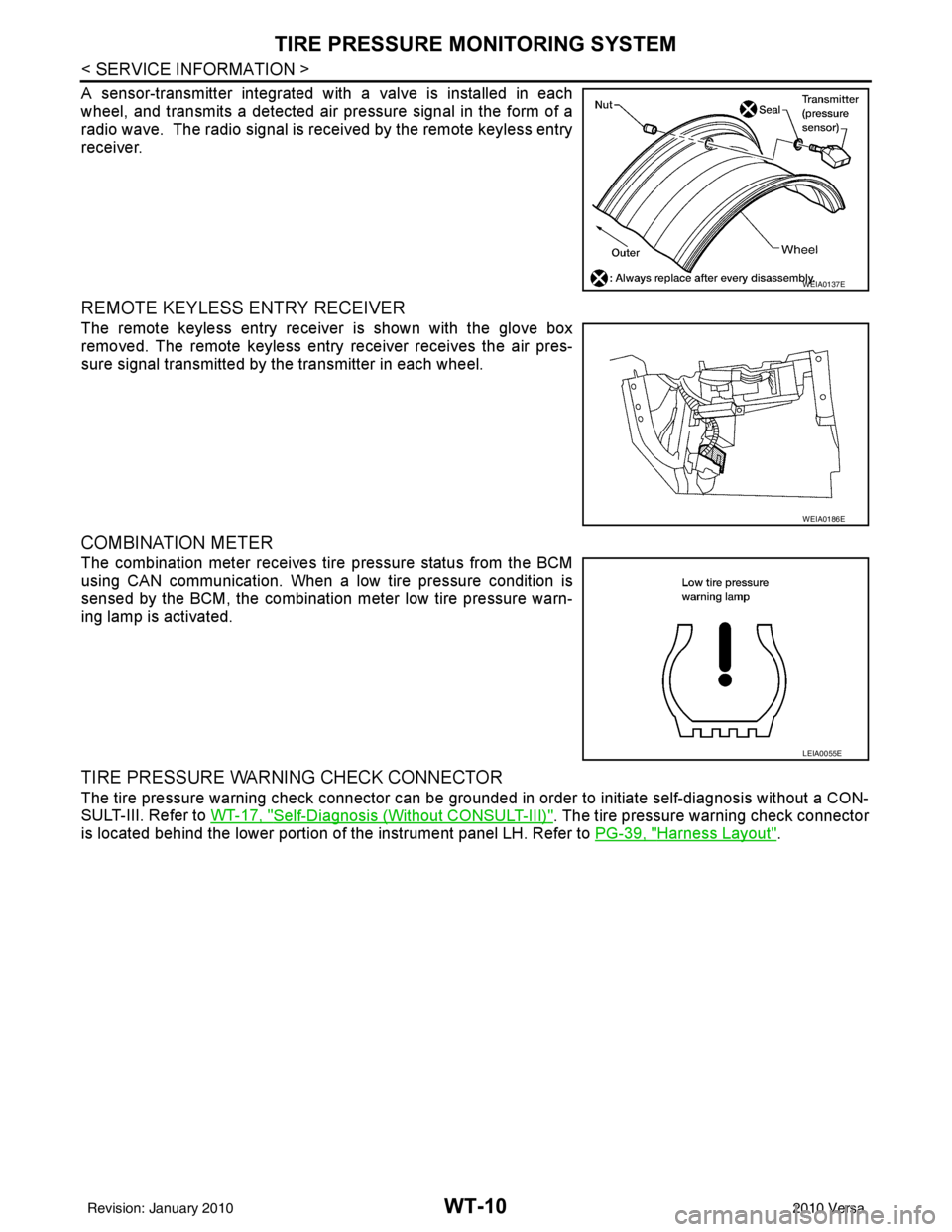
A sensor-transmitter integrated with a valve is installed in each
wheel, and transmits a detected air pressure signal in the form of a
radio wave. The radio signal is received by the remote keyless entry
receiver.
REMOTE KEYLESS ENTRY RECEIVER
The remote keyless entry receiver is shown with the glove box
removed. The remote keyless entry receiver receives the air pres-
sure signal transmitted by the transmitter in each wheel.
COMBINATION METER
The combination meter receives tire pressure status from the BCM
using CAN communication. When a low tire pressure condition is
sensed by the BCM, the combination meter low tire pressure warn-
ing lamp is activated.
TIRE PRESSURE WARNING CHECK CONNECTOR
The tire pressure warning check connector can be grounded in order to initiate self-diagnosis without a CON-
SULT-III. Refer to WT-17, "
Self-Diagnosis (Without CONSULT-III)". The tire pressure warning check connector
is located behind the lower portion of the instrument panel LH. Refer to PG-39, "
Harness Layout".
WEIA0137E
WEIA0186E
LEIA0055E
Revision: January 20102010 Versa