battery NISSAN LATIO 2010 Service User Guide
[x] Cancel search | Manufacturer: NISSAN, Model Year: 2010, Model line: LATIO, Model: NISSAN LATIO 2010Pages: 3745, PDF Size: 73.67 MB
Page 94 of 3745
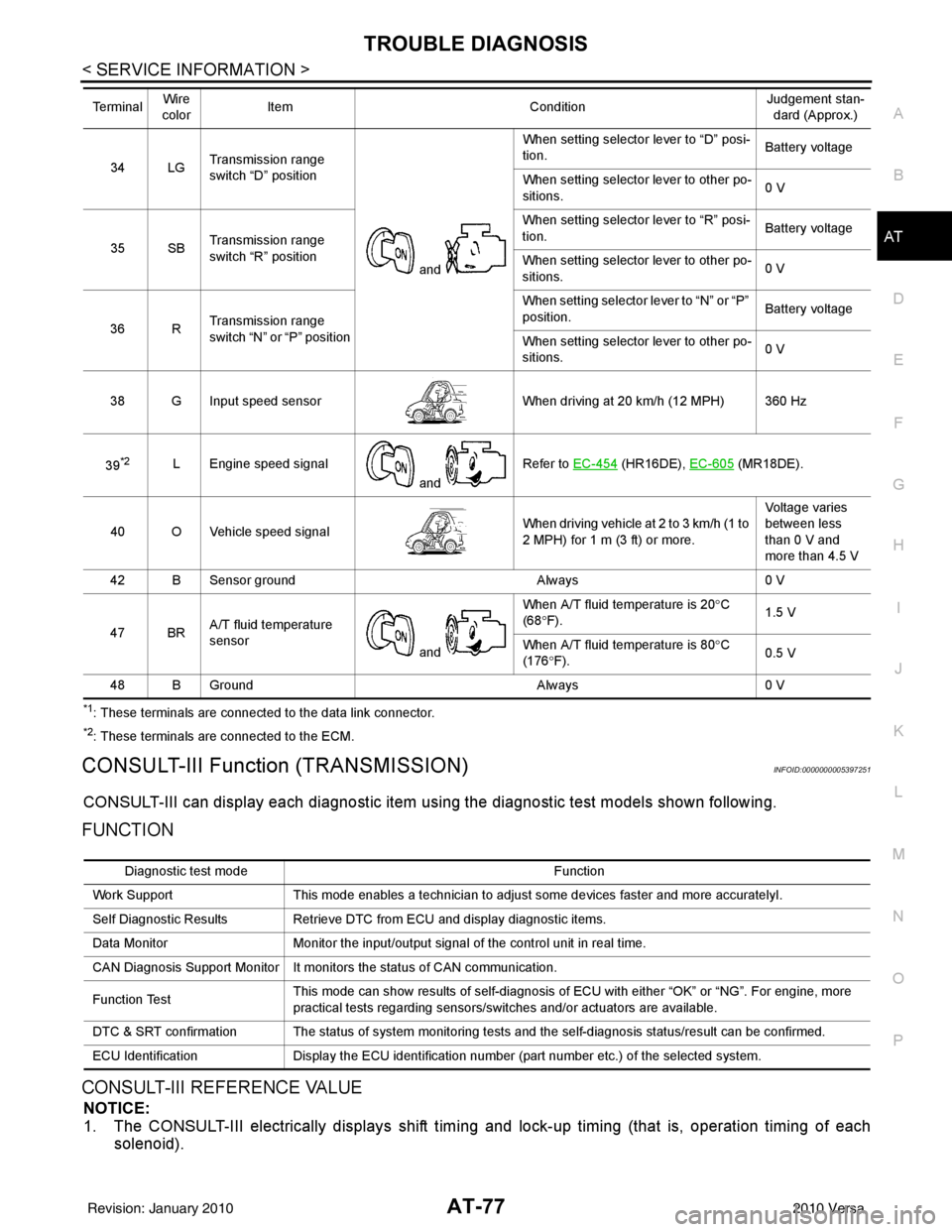
TROUBLE DIAGNOSISAT-77
< SERVICE INFORMATION >
DE
F
G H
I
J
K L
M A
B
AT
N
O P
*1: These terminals are connected to the data link connector.
*2: These terminals are connected to the ECM.
CONSULT-III Function (TRANSMISSION)INFOID:0000000005397251
CONSULT-III can display each diagnostic item using the diagnostic test models shown following.
FUNCTION
CONSULT-III REFERENCE VALUE
NOTICE:
1. The CONSULT-III electrically displays shift timi ng and lock-up timing (that is, operation timing of each
solenoid).
34 LG Transmission range
switch “D” position
and When setting selector lever to “D” posi-
tion.
Battery voltage
When setting selector lever to other po-
sitions. 0 V
35 SB Transmission range
switch “R” position When setting selector lever to “R” posi-
tion.
Battery voltage
When setting selector lever to other po-
sitions. 0 V
36 R Transmission range
switch “N” or “P” position When setting selector
lever to “N” or “P”
position. Battery voltage
When setting selector lever to other po-
sitions. 0 V
38 G Input speed sensor When driving at 20 km/h (12 MPH) 360 Hz
39
*2L Engine speed signal and Refer to EC-454 (HR16DE),
EC-605 (MR18DE).
40 O Vehicle speed signal When driving vehicle at 2 to 3 km/h (1 to
2 MPH) for 1 m (3 ft) or more.Voltage varies
between less
than 0 V and
more than 4.5 V
42 B Sensor ground Always0 V
47 BR A/T fluid temperature
sensor
and When A/T fluid temperature is 20°
C
(68 °F). 1.5 V
When A/T fluid temperature is 80° C
(176 °F). 0.5 V
48 B Ground Always0 V
Te r m i n a l
Wire
color Item
ConditionJudgement stan-
dard (Approx.)
Diagnostic test mode Function
Work Support This mode enables a technician to adjust some devices faster and more accuratelyI.
Self Diagnostic Results Retrieve DTC from ECU and display diagnostic items.
Data Monitor Monitor the input/output signal of the control unit in real time.
CAN Diagnosis Support Monitor It monitors the status of CAN communication.
Function Test This mode can show results of self-diagnosis of ECU with either “OK” or “NG”. For engine, more
practical tests regarding sensors/switches and/or actuators are available.
DTC & SRT confirmation The status of system monitoring tests and the self-diagnosis status/result can be confirmed.
ECU Identification Display the ECU identification number (part number etc.) of the selected system.
Revision: January 20102010 Versa
Page 95 of 3745

AT-78
< SERVICE INFORMATION >
TROUBLE DIAGNOSIS
Check for time difference between actual shift timing and the CONSULT-III display. If the difference is
noticeable, mechanical parts (except solenoids, sens ors, etc.) may be malfunctioning. Check mechanical
parts using applicable diagnostic procedures.
2. Shift schedule (which implies gear position) display ed on CONSULT-III and that indicated in Service Man-
ual may differ slightly. This occurs because of the following reasons:
- Actual shift schedule has more or less tolerance or allowance,
- Shift schedule indicated in Service Manual refers to the point where shifts start, and
- Gear position displayed on CONSULT-III indicates the point where shifts are completed.
3. Shift solenoid valve “A” or “B” is displayed on CONSUL T-III at the start of shifting. Gear position is dis-
played upon completion of shifting (which is computed by TCM).
Item name Condition Display value (Approx.)
VHCL/S SE-A/T During driving Approximately matches the speedometer
reading.
VHCL/S SE-MTR
THROTTLE POSI Released accelerator pedal.
0.0/8
Fully depressed accelerator pedal. 8.0/8
FLUID TEMP SE When A/T fluid temperature is 20
°C (68 °F). 1.5 V
When A/T fluid temperature is 80 °C (176 °F). 0.5 V
BATTERY VOLT When turning ignition switch to “ON”. Battery voltage
ENGINE SPEED Engine running Approximately matches the tachometer
reading.
INPUT SPEED During driving (lock-up ON) Approximately matche s the engine speed.
OVERDRIVE SW When overdrive control switch is depressed. ON
When overdrive control switch is released. OFF
PN POSI SW When setting selector lever
to “N” or “P” position. ON
When setting selector lever to other positions. OFF
R POSITION SW When setting selector lever to “R” position. ON
When setting selector lever to other positions. OFF
D POSITION SW When setting selector lever to “D” position. ON
When setting selector lever to other positions. OFF
2 POSITION SW When setting selector lever to “2” position. ON
When setting selector lever to other positions. OFF
1 POSITION SW When setting selector lever to “1” position. ON
When setting selector lever to other positions. OFF
CLOSED THL/SW Released accelerator pedal.
ON
Depressed accelerator pedal. OFF
W/O THRL/P-SW Fully depressed accelerator pedal.
ON
Released accelerator pedal. OFF
SHIFT S/V A When shift solenoid valve A operates.
(When driving in “D
1” or “D4”.)
ON
When shift solenoid valve A does not operate.
(When driving in “D
2” or “D3”.) OFF
SHIFT S/V B When shift solenoid valve B operates.
(When driving in “D
1” or “D2”.)
ON
When shift solenoid valve B does not operate.
(When driving in “D
3” or “D4”.) OFF
Revision: January 20102010 Versa
Page 97 of 3745
AT-80
< SERVICE INFORMATION >
TROUBLE DIAGNOSIS
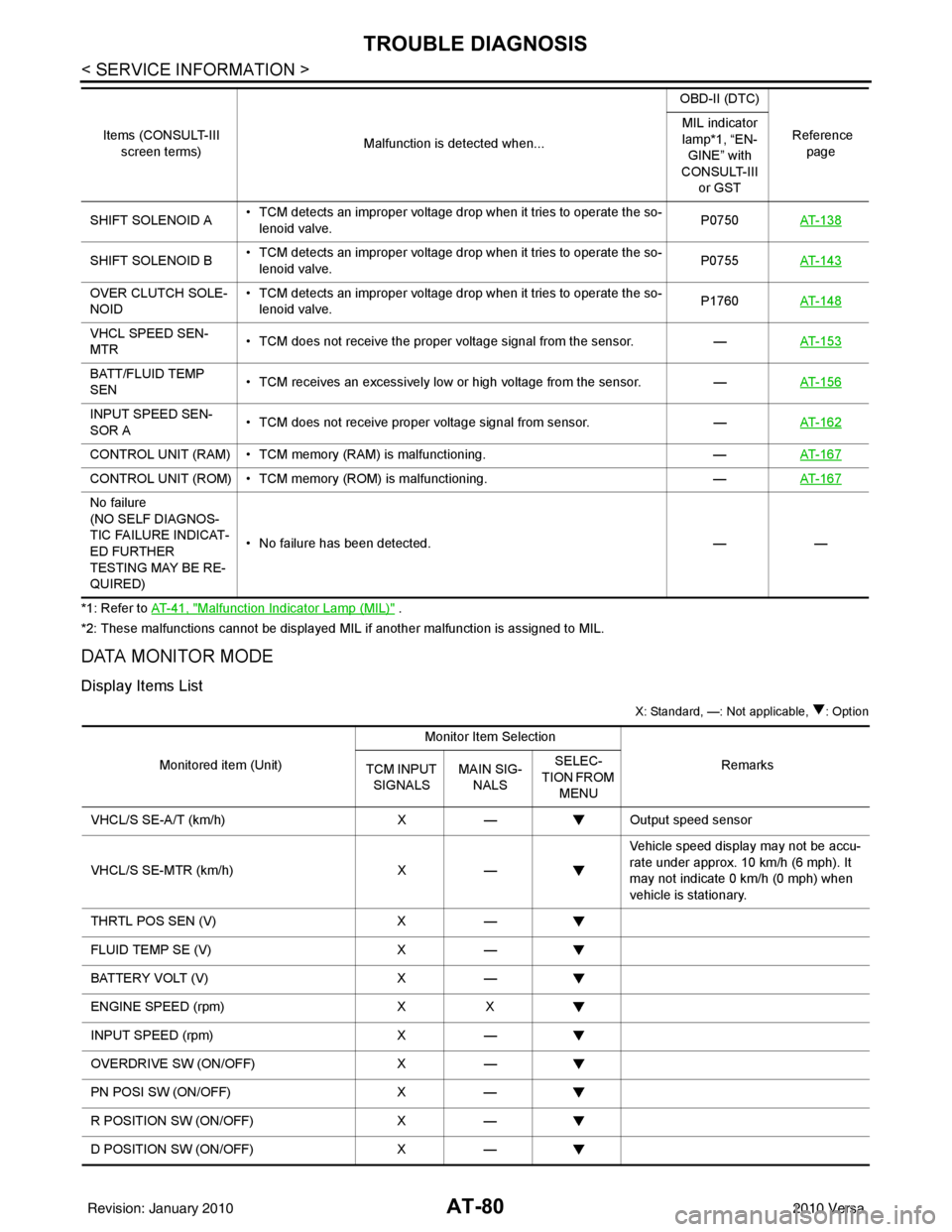
*1: Refer to AT- 4 1 , "Malfunction Indicator Lamp (MIL)" .
*2: These malfunctions cannot be displayed MIL if another malfunction is assigned to MIL.
DATA MONITOR MODE
Display Items List
X: Standard, —: Not applicable, : Option
SHIFT SOLENOID A • TCM detects an improper voltage drop when it tries to operate the so-
lenoid valve. P0750
AT- 1 3 8
SHIFT SOLENOID B • TCM detects an improper voltage drop when it tries to operate the so-
lenoid valve. P0755
AT- 1 4 3
OVER CLUTCH SOLE-
NOID • TCM detects an improper voltage drop when it tries to operate the so-
lenoid valve. P1760
AT- 1 4 8
VHCL SPEED SEN-
MTR • TCM does not receive the proper voltage signal from the sensor.
—AT- 1 5 3
BATT/FLUID TEMP
SEN • TCM receives an excessively low or high voltage from the sensor.
—AT- 1 5 6
INPUT SPEED SEN-
SOR A • TCM does not receive proper voltage signal from sensor.
—AT- 1 6 2
CONTROL UNIT (RAM) • TCM memory (RAM) is malfunctioning. —AT- 1 6 7
CONTROL UNIT (ROM) • TCM memory (ROM) is malfunctioning. —AT- 1 6 7
No failure
(NO SELF DIAGNOS-
TIC FAILURE INDICAT-
ED FURTHER
TESTING MAY BE RE-
QUIRED) • No failure has been detected.
——
Items (CONSULT-III
screen terms) Malfunction is detected when... OBD-II (DTC)
Reference page
MIL indicator
lamp*1, “EN-
GINE” with
CONSULT-III or GST
Monitored item (Unit) Monitor Item Selection
Remarks
TCM INPUT
SIGNALS MAIN SIG-
NALS SELEC-
TION FROM MENU
VHCL/S SE-A/T (km/h) X— Output speed sensor
VHCL/S SE-MTR (km/h) X— Vehicle speed display may not be accu-
rate under approx. 10 km/h (6 mph). It
may not indicate 0 km/h (0 mph) when
vehicle is stationary.
THRTL POS SEN (V) X—
FLUID TEMP SE (V) X—
BATTERY VOLT (V) X—
ENGINE SPEED (rpm) XX
INPUT SPEED (rpm) X—
OVERDRIVE SW (ON/OFF) X—
PN POSI SW (ON/OFF) X—
R POSITION SW (ON/OFF) X—
D POSITION SW (ON/OFF) X—
Revision: January 20102010 Versa
Page 109 of 3745
AT-92
< SERVICE INFORMATION >
P0705 TRANSMISSION RANGE SWITCH A
Diagnosis Procedure
INFOID:0000000005397265
1.CHECK INPUT SIGNAL
With CONSULT-III
1. Turn ignition switch ON. (Do not start engine.)
2. Select “TCM INPUT SIGNALS” in “DATA MONITOR” mode for “TRANSMISSION” with CONSULT-III.
3. Read out “P·N”, “R”, “D”, “2” and “1” position switches moving selector lever to each position.
OK or NG
OK >> GO TO 6.
NG >> GO TO 3.
2.CHECK INPUT SIGNAL
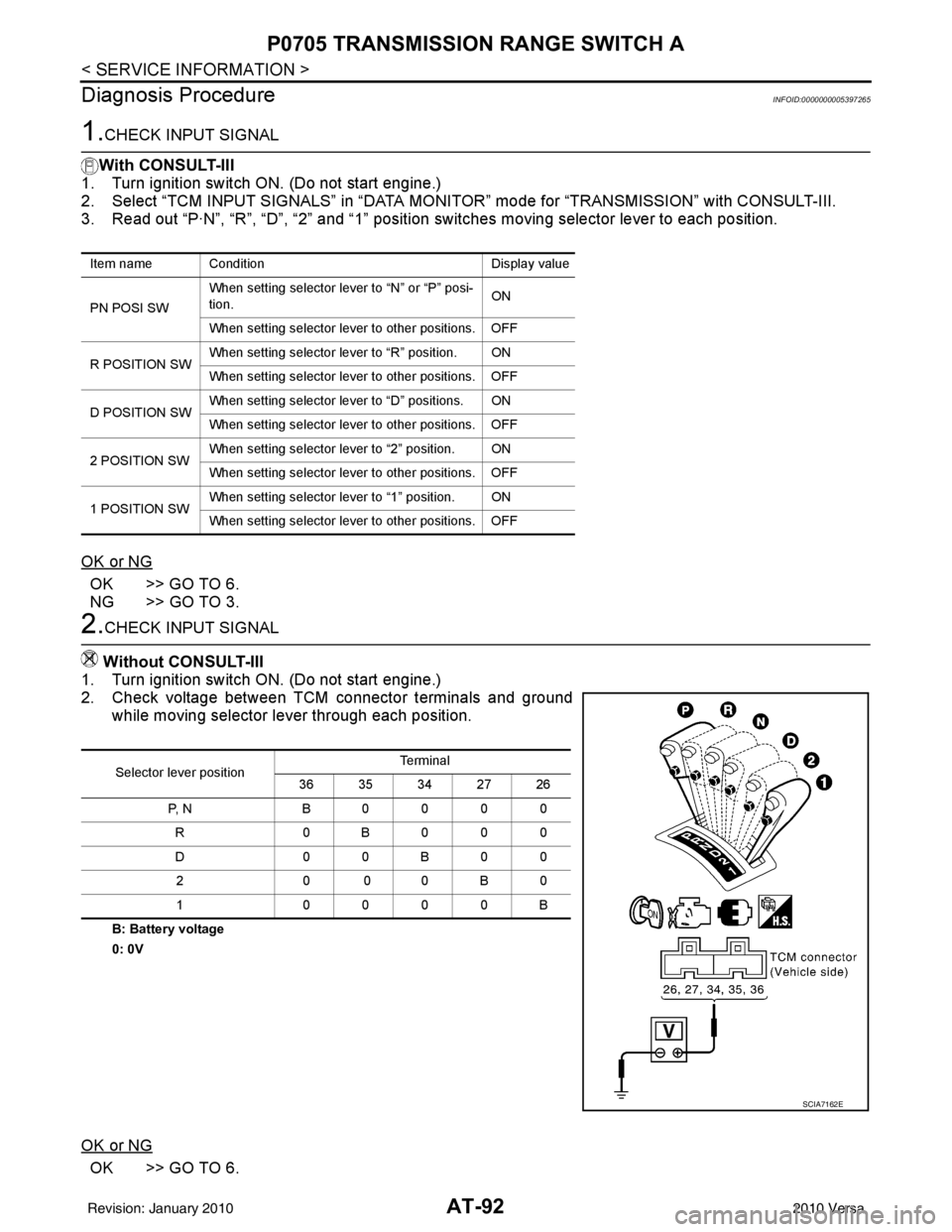
Without CONSULT-III
1. Turn ignition switch ON. (Do not start engine.)
2. Check voltage between TCM connector terminals and ground while moving selector lever through each position.
B: Battery voltage
0: 0V
OK or NG
OK >> GO TO 6.
Item name Condition Display value
PN POSI SW When setting selector le
ver to “N” or “P” posi-
tion. ON
When setting selector lever to other positions. OFF
R POSITION SW When setting selector lever to “R” position. ON
When setting selector lever to other positions. OFF
D POSITION SW When setting selector lever to “D” positions. ON
When setting selector lever to other positions. OFF
2 POSITION SW When setting selector lever to “2” position. ON
When setting selector lever to other positions. OFF
1 POSITION SW When setting selector lever to “1” position. ON
When setting selector lever to other positions. OFF
Selector lever position Te r m i n a l
36 35 34 27 26
P, N B0000 R 0B000
D0 0B 00
20 00B 0
1 0000B
SCIA7162E
Revision: January 20102010 Versa
Page 119 of 3745
AT-102
< SERVICE INFORMATION >
P0720 OUTPUT SPEED SENSOR
TCM TERMINALS AND REFERENCE VALUES
Refer to AT-75, "TCM Terminal and Reference Value".
Diagnosis ProcedureINFOID:0000000005397281
1.CHECK INPUT SIGNAL
With CONSULT-III
1. Start engine.
2. Select “TCM INPUT SIGNALS” in “DATA MONITOR” mode for “TRANSMISSION” with CONSULT-III.
3. Read out the value of “VHCL/S SE-A/T” while driving. Check the value changes according to driving speed.
OK or NG
OK >> GO TO 8.
NG >> GO TO 2.
2. CHECK OUTPUT SPEED SENSOR
With CONSULT-III
1. Start engine.
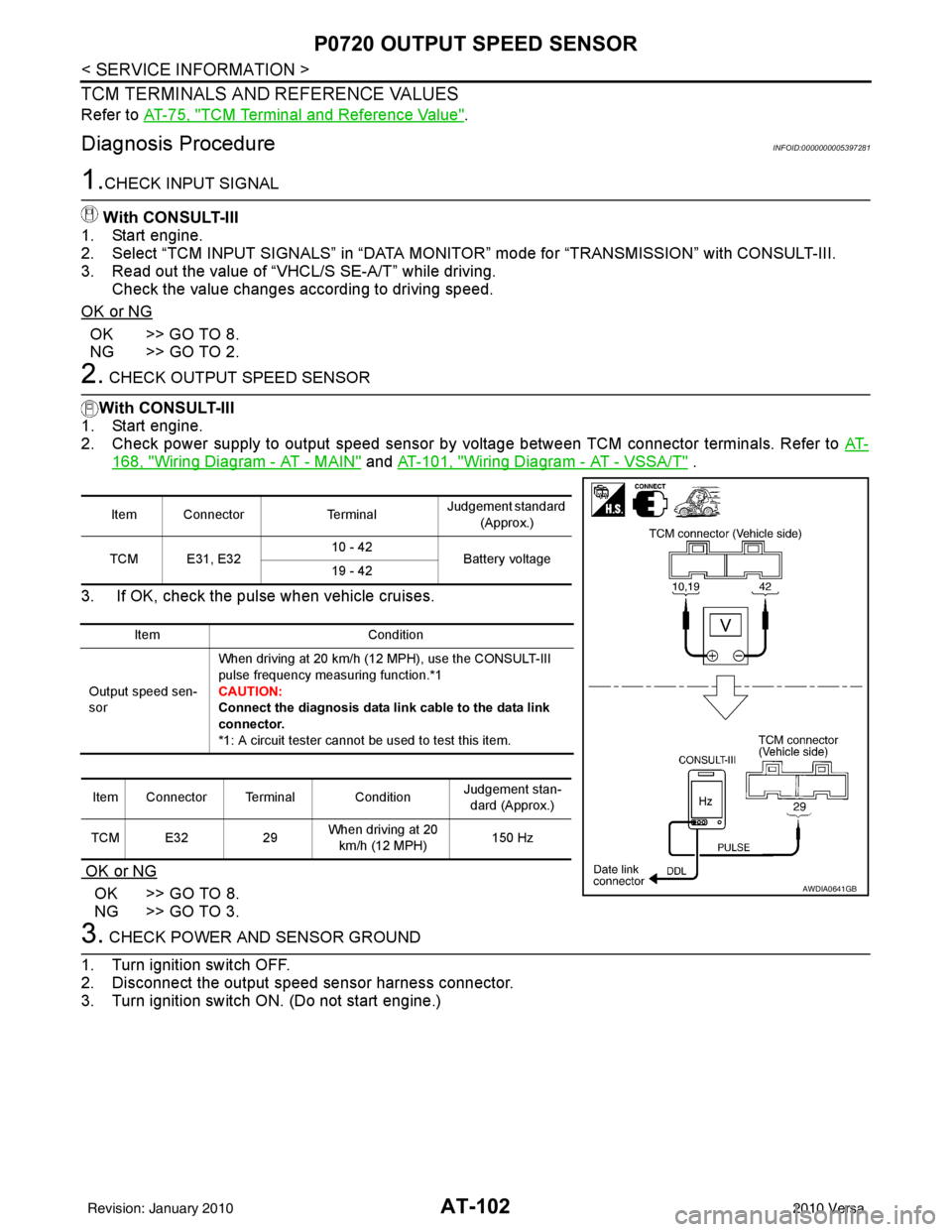
2. Check power supply to output speed sensor by voltage between TCM connector terminals. Refer to AT-
168, "Wiring Diagram - AT - MAIN" and AT-101, "Wiring Diagram - AT - VSSA/T" .
3. If OK, check the pulse when vehicle cruises.
OK or NG
OK >> GO TO 8.
NG >> GO TO 3.
3. CHECK POWER AND SENSOR GROUND
1. Turn ignition switch OFF.
2. Disconnect the output speed sensor harness connector.
3. Turn ignition switch ON. (Do not start engine.)
Item Connector TerminalJudgement standard
(Approx.)
TCM E31, E32 10 - 42
Battery voltage
19 - 42
Item Condition
Output speed sen-
sor When driving at 20 km/h (12 MPH), use the CONSULT-III
pulse frequency measuring function.*1
CAUTION:
Connect the diagnosis
data link cable to the data link
connector.
*1: A circuit tester cannot be used to test this item.
Item Connector Terminal Condition Judgement stan-
dard (Approx.)
TCM E32 29When driving at 20
km/h (12 MPH) 150 Hz
AWDIA0641GB
Revision: January 20102010 Versa
Page 120 of 3745

P0720 OUTPUT SPEED SENSORAT-103
< SERVICE INFORMATION >
DE
F
G H
I
J
K L
M A
B
AT
N
O P
4. Check voltage between output speed sensor harness connector terminals.
5. Check voltage between output speed sensor harness connector terminal and ground.
6. If OK, check harness for short to ground and short to power.
7. Reinstall any part removed.
OK or NG
OK >> GO TO 4.
NG - 1 >> Battery voltage is not supplied between terminals 1 and 3, terminals 1 and ground: GO TO 6.
NG - 2 >> Battery voltage is not supplied between terminals 1 and 3 only: GO TO 7.
4. CHECK HARNESS BETWEEN TCM AND OUTPUT SPEED SENSOR
1. Turn ignition switch OFF.
2. Disconnect the TCM connector and output speed sensor harness connector.
3. Check continuity between TCM connector (A) terminal and out- put speed sensor harness connector (B) terminal.
4. If OK, check harness for short to ground and short to power.
5. Reinstall any part removed.
OK or NG
OK >> GO TO 5.
NG >> Repair open circuit or short to ground or short to power in harness or connectors.
5.CHECK TCM
1. Check TCM input/output signal. Refer to AT-75, "
TCM Terminal and Reference Value" .
2. If NG, re-check TCM pin terminals for dam age or loose connection with harness connector.
OK or NG
OK >> GO TO 8.
NG >> Repair or replace damaged parts.
6. CHECK HARNESS BETWEEN TCM AND OUTPUT SPEED SENSOR (POWER)
1. Turn ignition switch OFF.
2. Disconnect the TCM connector and output speed sensor harness connector.
Item Connector Terminal Judgement standard
(Approx.)
Output speed sen- sor F38
1 - 3Battery voltage
JSDIA1504ZZ
Item Connector Terminal Judgement standard
(Approx.)
Output speed sen- sor F38
1 - ground Battery voltage
JSDIA1505ZZ
Item Connector Terminal Continuity
TCM E3229
Ye s
Output speed sensor F382
JSDIA1506ZZ
Revision: January 20102010 Versa
Page 128 of 3745
P0731 1GR INCORRECT RATIOAT-111
< SERVICE INFORMATION >
DE
F
G H
I
J
K L
M A
B
AT
N
O P
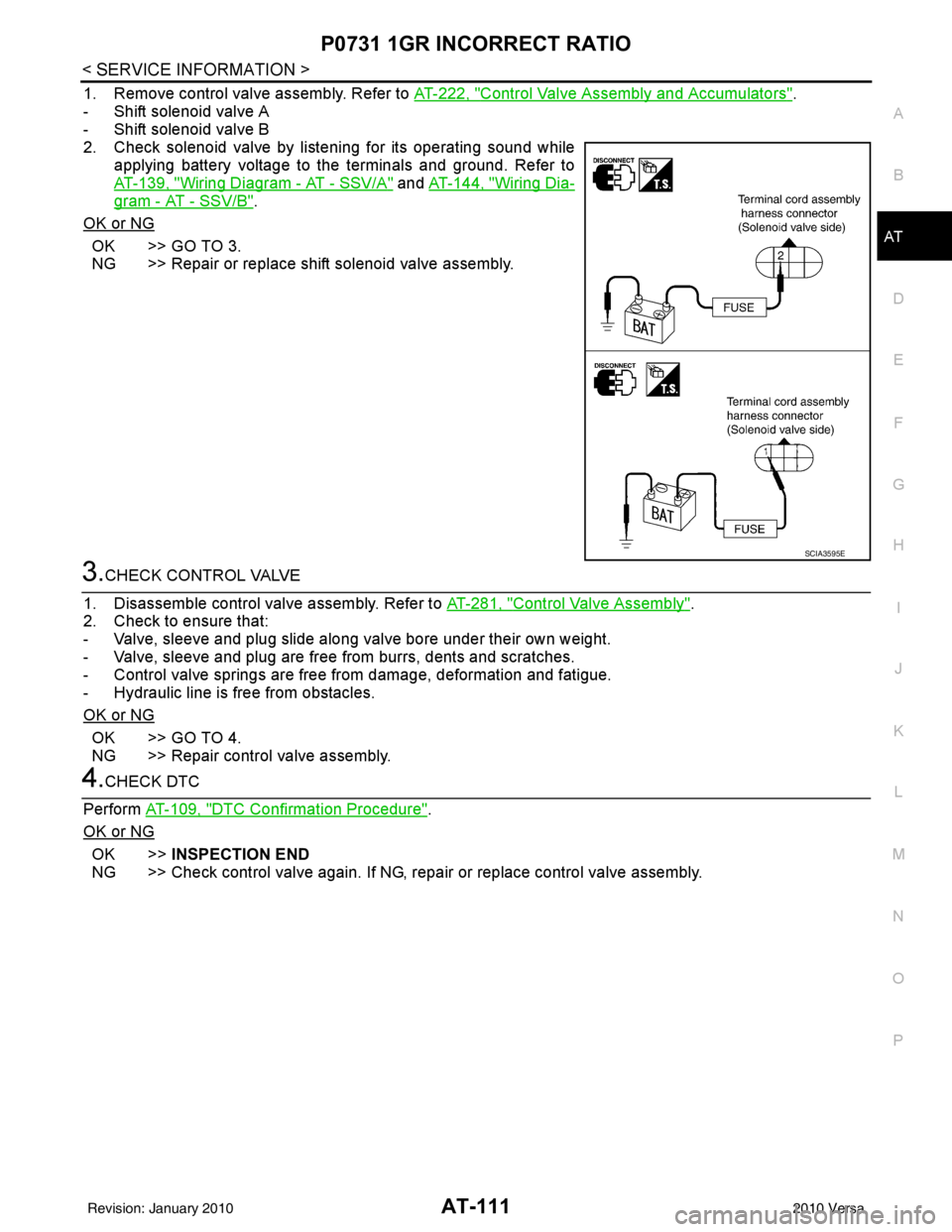
1. Remove control valve assembly. Refer to AT-222, "Control Valve Assembly and Accumulators".
- Shift solenoid valve A
- Shift solenoid valve B
2. Check solenoid valve by listening for its operating sound while applying battery voltage to the terminals and ground. Refer to
AT-139, "
Wiring Diagram - AT - SSV/A" and AT-144, "Wiring Dia-
gram - AT - SSV/B".
OK or NG
OK >> GO TO 3.
NG >> Repair or replace shift solenoid valve assembly.
3.CHECK CONTROL VALVE
1. Disassemble control valve assembly. Refer to AT-281, "
Control Valve Assembly".
2. Check to ensure that:
- Valve, sleeve and plug slide along valve bore under their own weight.
- Valve, sleeve and plug are free from burrs, dents and scratches.
- Control valve springs are free from damage, deformation and fatigue.
- Hydraulic line is free from obstacles.
OK or NG
OK >> GO TO 4.
NG >> Repair control valve assembly.
4.CHECK DTC
Perform AT-109, "
DTC Confirmation Procedure".
OK or NG
OK >> INSPECTION END
NG >> Check control valve again. If NG, repa ir or replace control valve assembly.
SCIA3595E
Revision: January 20102010 Versa
Page 130 of 3745
P0732 2GR INCORRECT RATIOAT-113
< SERVICE INFORMATION >
DE
F
G H
I
J
K L
M A
B
AT
N
O P
- Make sure that “GEAR” shows “3” or “4” after releasing pedal.
6. Depress accelerator pedal to WOT (more than 7.0/8 of “THROTTLE POSI”) quickly from a speed of 45 to 50 km/h (28 to 31 MPH) until “TESTING” changes to “STOP VEHICLE” or “COMPLETE”. (It will take
approximately 3 seconds.)
If the check result NG appears on CONSULT-III screen, go to AT-113, "
Diagnosis Procedure".
If “STOP VEHICLE” appears on CONSULT-III screen, go to following step.
- Make sure that “GEAR” shows “2” when depressing accelerator pedal to WOT.
- If “TESTING” does not appear on CONSULT-III fo r a long time, select “SELF-DIAG RESULTS” for
“TRANSMISSION”. In case a DTC other than “P0732 2GR INCORRECT RATIO” is shown, refer to
AT-77, "
CONSULT-III Function (TRANSMISSION)".
7. Stop vehicle.
8. Follow the instruction displayed. (Check for normal shifting referring to the table below.)
9. Make sure that “OK” is disp layed. (If “NG” is displayed, refer to “Diagnostic Procedure”.)
Refer to AT-113, "
Diagnosis Procedure".
Refer to AT-64, "
Vehicle Speed at Which Gear Shifting Occurs".
WITH GST
Follow the procedure “WITH CONSULT-III”.
Diagnosis ProcedureINFOID:0000000005397298
1.CHECK VALVE RESISTANCE
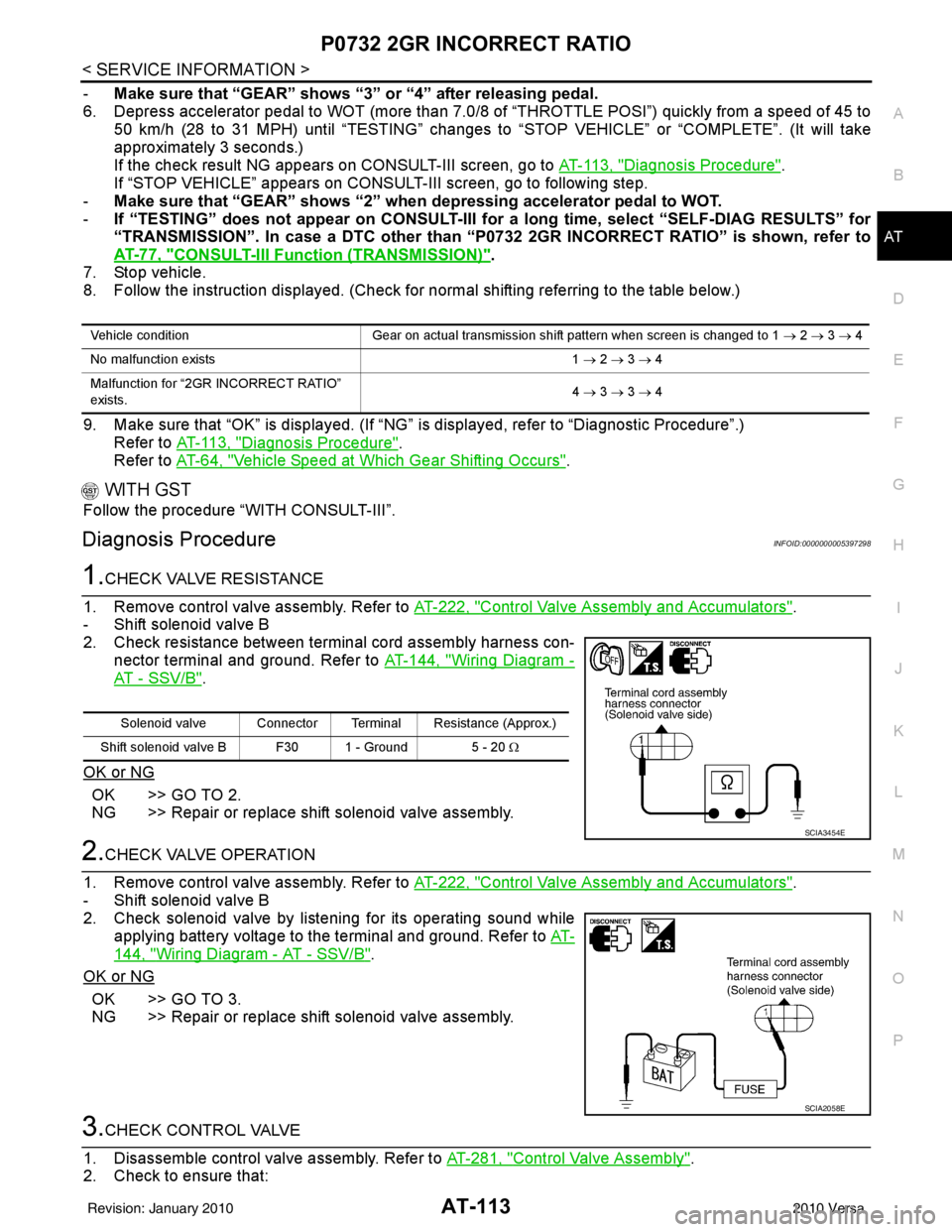
1. Remove control valve assembly. Refer to AT-222, "
Control Valve Assembly and Accumulators".
- Shift solenoid valve B
2. Check resistance between terminal cord assembly harness con- nector terminal and ground. Refer to AT-144, "
Wiring Diagram -
AT - SSV/B".
OK or NG
OK >> GO TO 2.
NG >> Repair or replace shift solenoid valve assembly.
2.CHECK VALVE OPERATION
1. Remove control valve assembly. Refer to AT-222, "
Control Valve Assembly and Accumulators".
- Shift solenoid valve B
2. Check solenoid valve by listening for its operating sound while applying battery voltage to the terminal and ground. Refer to AT-
144, "Wiring Diagram - AT - SSV/B".
OK or NG
OK >> GO TO 3.
NG >> Repair or replace shift solenoid valve assembly.
3.CHECK CONTROL VALVE
1. Disassemble control valve assembly. Refer to AT-281, "
Control Valve Assembly".
2. Check to ensure that:
Vehicle condition Gear on actual transmission shift pattern when screen is changed to 1 → 2 → 3 → 4
No malfunction exists 1 → 2 → 3 → 4
Malfunction for “2GR INCORRECT RATIO”
exists. 4
→ 3 → 3 → 4
Solenoid valve Connector Terminal Resistance (Approx.)
Shift solenoid valve B F30 1 - Ground 5 - 20 Ω
SCIA3454E
SCIA2058E
Revision: January 20102010 Versa
Page 134 of 3745

P0733 3GR INCORRECT RATIOAT-117
< SERVICE INFORMATION >
DE
F
G H
I
J
K L
M A
B
AT
N
O P
2. Check solenoid valve by listening for its operating sound while applying battery voltage to the terminals and ground. Refer to
AT-139, "
Wiring Diagram - AT - SSV/A" and AT-144, "Wiring Dia-
gram - AT - SSV/B".
OK or NG
OK >> GO TO 3.
NG >> Repair or replace shift solenoid valve assembly.
3.CHECK CONTROL VALVE
1. Disassemble control valve assembly. Refer to AT-281, "
Control Valve Assembly".
2. Check to ensure that:
- Valve, sleeve and plug slide along valve bore under their own weight.
- Valve, sleeve and plug are free from burrs, dents and scratches.
- Control valve springs are free from damage, deformation and fatigue.
- Hydraulic line is free from obstacles.
OK or NG
OK >> GO TO 4.
NG >> Repair control valve assembly.
4.CHECK DTC
Perform AT-115, "
DTC Confirmation Procedure".
OK or NG
OK >> INSPECTION END
NG >> Check control valve again. If NG, repair or replace control valve assembly.
SCIA3595E
Revision: January 20102010 Versa
Page 137 of 3745
AT-120
< SERVICE INFORMATION >
P0734 4GR INCORRECT RATIO
3.CHECK VALVE RESISTANCE
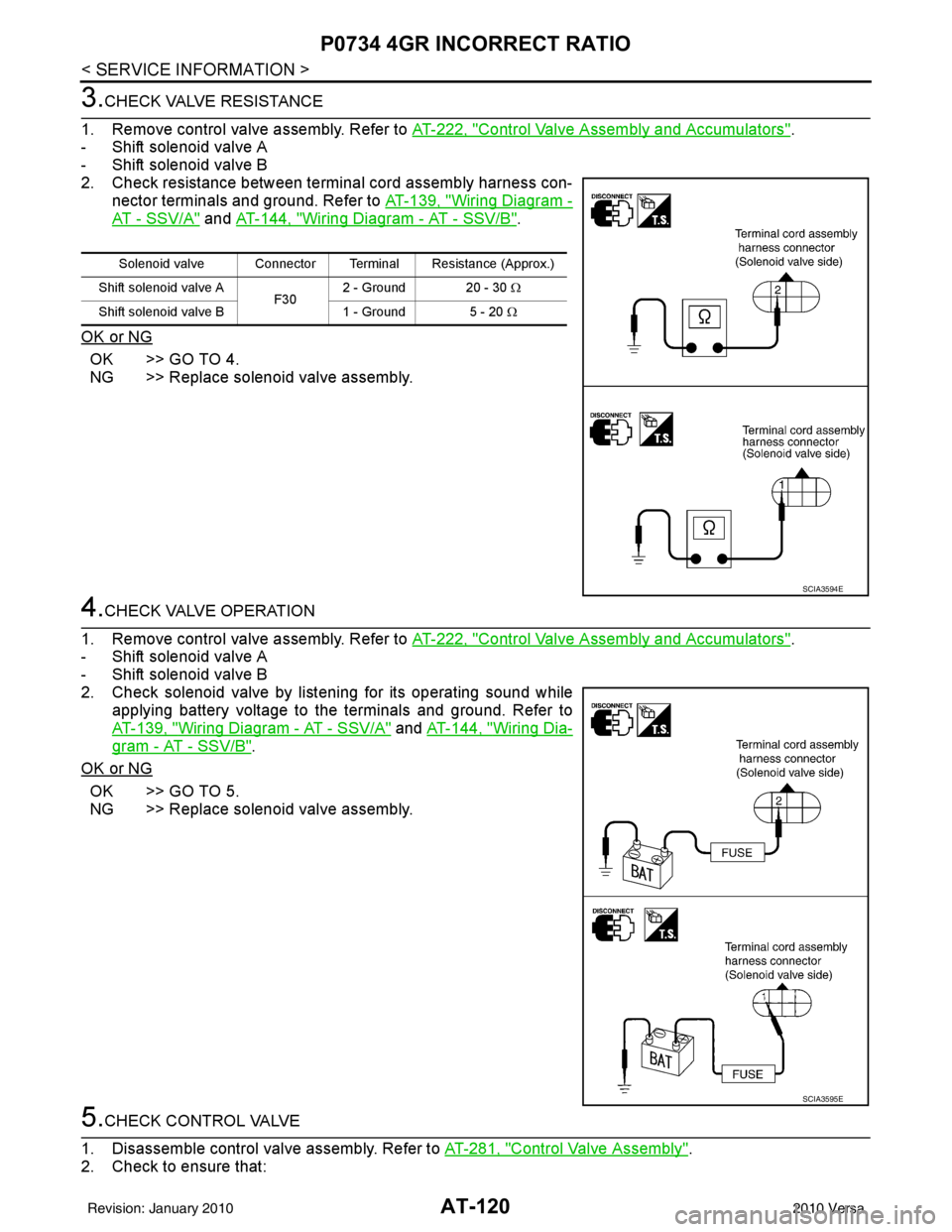
1. Remove control valve assembly. Refer to AT-222, "
Control Valve Assembly and Accumulators".
- Shift solenoid valve A
- Shift solenoid valve B
2. Check resistance between terminal cord assembly harness con- nector terminals and ground. Refer to AT-139, "
Wiring Diagram -
AT - SSV/A" and AT-144, "Wiring Diagram - AT - SSV/B".
OK or NG
OK >> GO TO 4.
NG >> Replace solenoid valve assembly.
4.CHECK VALVE OPERATION
1. Remove control valve assembly. Refer to AT-222, "
Control Valve Assembly and Accumulators".
- Shift solenoid valve A
- Shift solenoid valve B
2. Check solenoid valve by listening for its operating sound while applying battery voltage to the terminals and ground. Refer to
AT-139, "
Wiring Diagram - AT - SSV/A" and AT-144, "Wiring Dia-
gram - AT - SSV/B".
OK or NG
OK >> GO TO 5.
NG >> Replace solenoid valve assembly.
5.CHECK CONTROL VALVE
1. Disassemble control valve assembly. Refer to AT-281, "
Control Valve Assembly".
2. Check to ensure that:
Solenoid valve Connector Terminal Resistance (Approx.)
Shift solenoid valve A F302 - Ground 20 - 30
Ω
Shift solenoid valve B 1 - Ground 5 - 20 Ω
SCIA3594E
SCIA3595E
Revision: January 20102010 Versa