torque NISSAN LATIO 2011 Service Repair Manual
[x] Cancel search | Manufacturer: NISSAN, Model Year: 2011, Model line: LATIO, Model: NISSAN LATIO 2011Pages: 3787, PDF Size: 78.35 MB
Page 3708 of 3787
![NISSAN LATIO 2011 Service Repair Manual EPS CONTROL UNITSTC-21
< ECU DIAGNOSIS INFORMATION > [EPS]
C
D
E
F
H I
J
K L
M A
B
STC
N
O P
Te r m i n a l N o . (Wire Color) Description
ConditionVa l u e
(Approx.)
+ − Signal name Input/Output
4](/img/5/57357/w960_57357-3707.png "NISSAN LATIO 2011 Service Repair Manual EPS CONTROL UNITSTC-21
< ECU DIAGNOSIS INFORMATION > [EPS]
C
D
E
F
H I
J
K L
M A
B
STC
N
O P
Te r m i n a l N o . (Wire Color) Description
ConditionVa l u e
(Approx.)
+ − Signal name Input/Output
4")
EPS CONTROL UNITSTC-21
< ECU DIAGNOSIS INFORMATION > [EPS]
C
D
E
F
H I
J
K L
M A
B
STC
N
O P
Te r m i n a l N o . (Wire Color) Description
ConditionVa l u e
(Approx.)
+ − Signal name Input/Output
4
(V) Ground Torque sensor sub Input Ignition switch: ON
Steering wheel: Not
steering (There is no
steering force) 2.5 V
Engine running Steering wheel: steer-
ing 1.6 V – 3.4 V
(The value is changed according to steering
left or right)
5
(BR −) Ground
Torque sensor power
supply Output
Ignition switch: ON 5 V
6
(− ) Ground Torque sensor main Input Ignition switch: ON
Steering wheel: Not
steering (There is no
steering force) 2.5 V
Engine running Steering wheel: steer-
ing 1.6 V – 3.4 V
(The value is changed according to steering
left or right)
7
(R) Ground Torque sensor ground —
Always0 V
9
(L) Ground CAN-H
Input/Output ——
10
(O) Ground Ignition power supply Input Ignition switch: ON
Battery voltage
Ignition switch: OFF 0 V
16
(P) Ground CAN-L
Input/Output ——
17
(R) Ground Battery power supply Input
AlwaysBattery voltage
18
(B) Ground Ground
—Always 0 V
19 — Motor —— —
20 — Motor —— —
Revision: May 2010
2011 Versa
Page 3711 of 3787
![NISSAN LATIO 2011 Service Repair Manual STC-24
< ECU DIAGNOSIS INFORMATION >[EPS]
EPS CONTROL UNIT
DTC Inspection Priority Chart
INFOID:0000000005931257
When multiple DTCs are detected simultaneously, c heck one by one depending on the foll](/img/5/57357/w960_57357-3710.png "NISSAN LATIO 2011 Service Repair Manual STC-24
< ECU DIAGNOSIS INFORMATION >[EPS]
EPS CONTROL UNIT
DTC Inspection Priority Chart
INFOID:0000000005931257
When multiple DTCs are detected simultaneously, c heck one by one depending on the foll")
STC-24
< ECU DIAGNOSIS INFORMATION >[EPS]
EPS CONTROL UNIT
DTC Inspection Priority Chart
INFOID:0000000005931257
When multiple DTCs are detected simultaneously, c heck one by one depending on the following priority list.
DTC IndexINFOID:0000000005931258
Priority Priority order item (DTC)
1 U1000 CAN COMM CIRCUIT
2 C1601 BATTERY POWER SUPPLY
3 Other than the above
DTC Items (CONSULT-III screen terms) Reference
C1601 BATTERY VOLT STC-9, "
DTC Logic"
C1604TORQUE SENSOR STC-11, "DTC Logic"
C1606EPS MOTOR STC-13, "DTC Logic"
C1607EEPROM STC-15, "DTC Logic"
C1608CONTROL UNIT STC-15, "DTC Logic"
C1609CAN VHCL SPEED STC-16, "DTC Logic"
C1610CAN ENG RPM STC-17, "DTC Logic"
U1000CAN COMM CIRCUIT STC-18, "DTC Logic"
Revision: May 2010 2011 Versa
Page 3714 of 3787
![NISSAN LATIO 2011 Service Repair Manual STEERING WHEEL TURNING FORCE IS HEAVY OR LIGHTSTC-27
< SYMPTOM DIAGNOSIS > [EPS]
C
D
E
F
H I
J
K L
M A
B
STC
N
O P
STEERING WHEEL TURNING FO RCE IS HEAVY OR LIGHT
DescriptionINFOID:0000000005931263
St](/img/5/57357/w960_57357-3713.png "NISSAN LATIO 2011 Service Repair Manual STEERING WHEEL TURNING FORCE IS HEAVY OR LIGHTSTC-27
< SYMPTOM DIAGNOSIS > [EPS]
C
D
E
F
H I
J
K L
M A
B
STC
N
O P
STEERING WHEEL TURNING FO RCE IS HEAVY OR LIGHT
DescriptionINFOID:0000000005931263
St")
STEERING WHEEL TURNING FORCE IS HEAVY OR LIGHTSTC-27
< SYMPTOM DIAGNOSIS > [EPS]
C
D
E
F
H I
J
K L
M A
B
STC
N
O P
STEERING WHEEL TURNING FO RCE IS HEAVY OR LIGHT
DescriptionINFOID:0000000005931263
Steering wheel turning force is heavy or light.
Diagnosis ProcedureINFOID:0000000005931264
1.CHECK THE ILLUMINATION OF THE EPS WARNING LAMP
Check that the EPS warning lamp turns ON when igni tion switch turns ON. Then, EPS warning lamp turns
OFF after the engine is started.
Is the inspection result normal?
YES >> GO TO 4.
NO >> GO TO 2.
2.PERFORM SELF-DIAGNOSIS
With CONSULT-III
1. Turn the ignition switch OFF to ON.
2. Perform EPS control unit self-diagnosis.
Is any DTC detected?
YES >> Check the DTC. Refer to STC-24, "DTC Index".
NO >> GO TO 3.
3.CHECK EPS CONTROL UNIT SIGNAL
With CONSULT-III
1. Start the engine. CAUTION:
Stop the vehicle.
2. Turn steering wheel from full left stop to full right stop.
3. Select “TORQUE SENSOR” of “DATA MONITOR” for EPS control unit.
Is the inspection result normal?
YES >> GO TO 5.
NO >> GO TO 4.
4.CHECK EPS MOTOR
Perform the trouble diagnosis of EPS motor. Refer to STC-13, "
Diagnosis Procedure".
Is the inspection result normal?
YES >> GO TO 5.
NO >> Repair or replace the specific malfunctioning part.
5.CHECK STEERING WH EEL TURNING FORCE
Check the steering wheel turning force. Refer to PS-6, "
On-Vehicle Inspection and Service".
Is the inspection result normal?
YES >> Inspection End
NO >> Check the steering wheel turning force for mechanical malfunction. Refer to PS-6, "
On-Vehicle
Inspection and Service".
Monitor item ConditionDisplay value
TORQUE SENSOR Steering wheel: Not steer-
ing (There is no steering
force)
Approx. 0 Nm
Steering wheel: Right turn Positive value (Nm)
Steering wheel: Left turn Negative value (Nm)
Revision: May 2010 2011 Versa
Page 3715 of 3787
![NISSAN LATIO 2011 Service Repair Manual STC-28
< SYMPTOM DIAGNOSIS >[EPS]
UNBALANCE STEERING WHEEL TURNING FORCE AND RETURN BETWEEN
RIGHT AND LEFT
UNBALANCE STEERING WHEEL TU RNING FORCE AND RETURN BE-
TWEEN RIGHT AND LEFT
DescriptionINFOI](/img/5/57357/w960_57357-3714.png "NISSAN LATIO 2011 Service Repair Manual STC-28
< SYMPTOM DIAGNOSIS >[EPS]
UNBALANCE STEERING WHEEL TURNING FORCE AND RETURN BETWEEN
RIGHT AND LEFT
UNBALANCE STEERING WHEEL TU RNING FORCE AND RETURN BE-
TWEEN RIGHT AND LEFT
DescriptionINFOI")
STC-28
< SYMPTOM DIAGNOSIS >[EPS]
UNBALANCE STEERING WHEEL TURNING FORCE AND RETURN BETWEEN
RIGHT AND LEFT
UNBALANCE STEERING WHEEL TU RNING FORCE AND RETURN BE-
TWEEN RIGHT AND LEFT
DescriptionINFOID:0000000005931265
Unbalance steering wheel turning force and return between right and left.
Diagnosis ProcedureINFOID:0000000005931266
1.CHECK THE ILLUMINATION OF THE EPS WARNING LAMP
Check that the EPS warning lamp turns ON when igni tion switch turns ON. Then, EPS warning lamp turns
OFF after the engine is started.
Is the inspection result normal?
YES >> GO TO 2.
NO >> Refer to STC-26, "
Diagnosis Procedure".
2.CHECK WHEEL ALIGNMENT
1. Check the wheel alignment. Refer to FSU-7, "
On-Vehicle Inspection and Service".
2. Perform EPS control unit self-diagnosis.
Is the inspection result normal?
YES >> GO TO 3.
NO >> Adjustment of wheel alignment.
3.CHECK EPS CONTROL UNIT SIGNAL
With CONSULT-III
1. Start the engine. CAUTION:
Stop the vehicle.
2. Turn steering wheel from full left stop to full right stop.
3. Select “TORQUE SENSOR” of “DATA MONITOR” for EPS control unit.
Is the inspection result normal?
YES >> GO TO 5.
NO >> GO TO 4.
4.CHECK EPS MOTOR
Perform the trouble diagnosis of EPS motor. Refer to STC-13, "
Diagnosis Procedure".
Is the inspection result normal?
YES >> GO TO 5.
NO >> Repair or replace the specific malfunctioning part.
5.CHECK STEERING WHEEL TURNING FORCE
Check the steering wheel turning force. Refer to PS-6, "
On-Vehicle Inspection and Service".
Is the inspection result normal?
YES >> Inspection End.
NO >> Check the steering wheel turning force for mechanical malfunction. Refer to PS-6, "
On-Vehicle
Inspection and Service".
Monitor item ConditionDisplay value
TORQUE SENSOR Steering wheel: Not steer-
ing (There is no steering
force)
Approx. 0 Nm
Steering wheel: Right turn Positive value (Nm)
Steering wheel: Left turn Negative value (Nm)
Revision: May 2010 2011 Versa
Page 3716 of 3787
![NISSAN LATIO 2011 Service Repair Manual UNBALANCE STEERING WHEEL TURNING FORCE (TORQUE VARIATION)
STC-29
< SYMPTOM DIAGNOSIS > [EPS]
C
D
E
F
H I
J
K L
M A
B
STC
N
O P
UNBALANCE STEERING WHEEL TU RNING FORCE (TORQUE VARIA-
TION)
DescriptionI](/img/5/57357/w960_57357-3715.png "NISSAN LATIO 2011 Service Repair Manual UNBALANCE STEERING WHEEL TURNING FORCE (TORQUE VARIATION)
STC-29
< SYMPTOM DIAGNOSIS > [EPS]
C
D
E
F
H I
J
K L
M A
B
STC
N
O P
UNBALANCE STEERING WHEEL TU RNING FORCE (TORQUE VARIA-
TION)
DescriptionI")
UNBALANCE STEERING WHEEL TURNING FORCE (TORQUE VARIATION)
STC-29
< SYMPTOM DIAGNOSIS > [EPS]
C
D
E
F
H I
J
K L
M A
B
STC
N
O P
UNBALANCE STEERING WHEEL TU RNING FORCE (TORQUE VARIA-
TION)
DescriptionINFOID:0000000005931267
Unbalance steering wheel turning force (torque variation).
Diagnosis ProcedureINFOID:0000000005931268
1.CHECK THE ILLUMINATION OF THE EPS WARNING LAMP
Check that the EPS warning lamp turns ON when igni tion switch turns ON. Then, EPS warning lamp turns
OFF after the engine is started.
Is the inspection result normal?
YES >> GO TO 2.
NO >> Refer to STC-26, "
Diagnosis Procedure".
2.CHECK STEERING COLU MN AND STEERING GEAR
Check the steering column assembly and steering gear assembly.
• Steering column assembly. Refer to PS-10, "
Removal and Installation".
• Steering gear assembly. Refer to PS-15, "
Disassembly and Assembly".
Is the inspection result normal?
YES >> GO TO 3.
NO >> Repair or replace the specific malfunctioning part.
3.CHECK EPS CONTROL UNIT SIGNAL
With CONSULT-III
1. Start the engine. CAUTION:
Stop the vehicle.
2. Turn steering wheel from full left stop to full right stop.
3. Select “TORQUE SENSOR” of “DATA MONITOR” for EPS control unit.
Is the inspection result normal?
YES >> GO TO 5.
NO >> GO TO 4.
4.CHECK EPS MOTOR
Perform the trouble diagnosis of EPS motor. Refer to STC-13, "
Diagnosis Procedure".
Is the inspection result normal?
YES >> GO TO 5.
NO >> Repair or replace the specific malfunctioning part.
5.CHECK STEERING WH EEL TURNING FORCE
Check the steering wheel turning force. Refer to PS-6, "
On-Vehicle Inspection and Service".
Is the inspection result normal?
YES >> Inspection End.
NO >> Check the steering wheel turning force for mechanical malfunction. Refer to PS-6, "
On-Vehicle
Inspection and Service".
Monitor item ConditionDisplay value
TORQUE SENSOR Steering wheel: Not steer-
ing (There is no steering
force)
Approx. 0 Nm
Steering wheel: Right turn Positive value (Nm)
Steering wheel: Left turn Negative value (Nm)
Revision: May 2010 2011 Versa
Page 3726 of 3787
WT-8
< SERVICE INFORMATION >
ROAD WHEEL TIRE ASSEMBLY
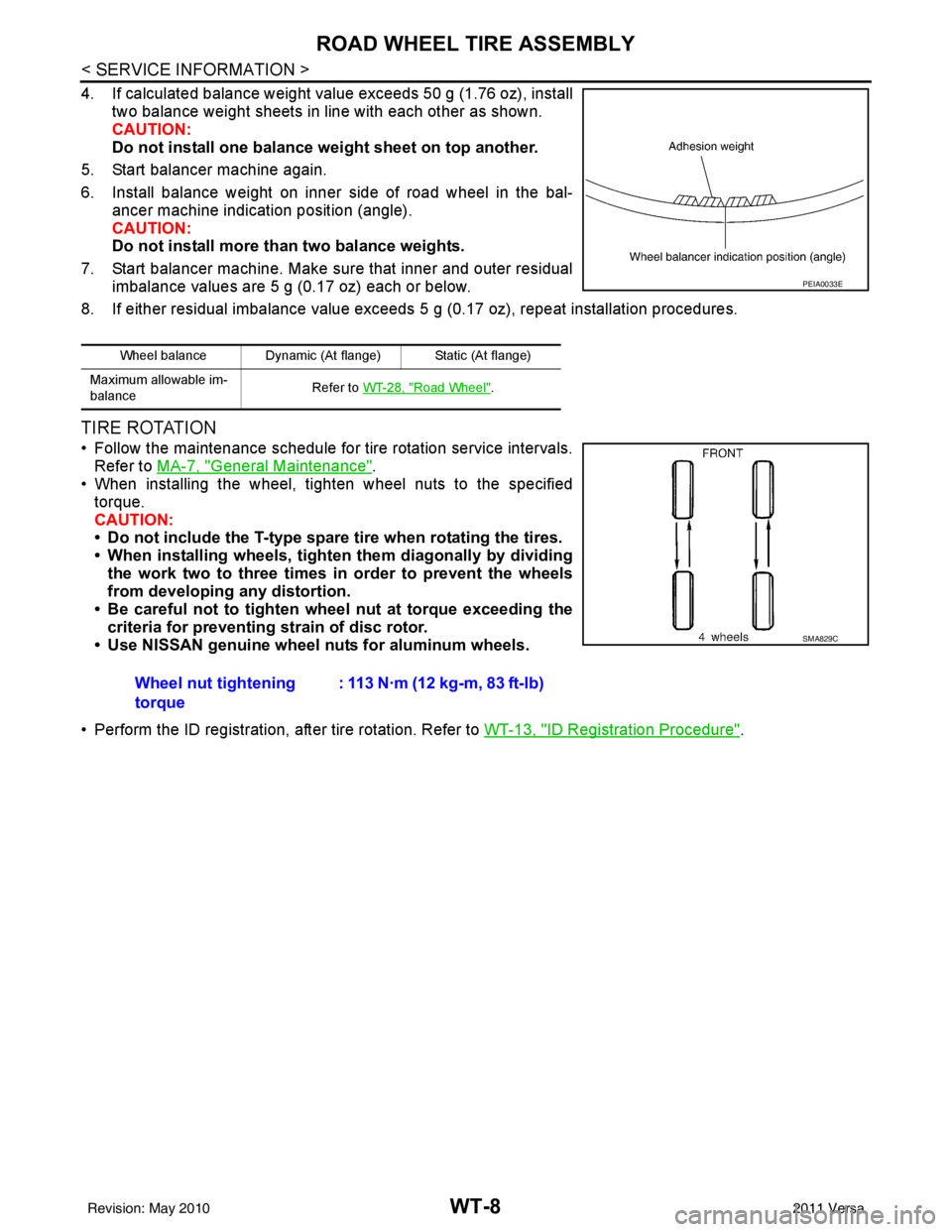
4. If calculated balance weight value exceeds 50 g (1.76 oz), installtwo balance weight sheets in line with each other as shown.
CAUTION:
Do not install one balance weight sheet on top another.
5. Start balancer machine again.
6. Install balance weight on inner side of road wheel in the bal- ancer machine indication position (angle).
CAUTION:
Do not install more than two balance weights.
7. Start balancer machine. Make sure that inner and outer residual imbalance values are 5 g (0.17 oz) each or below.
8. If either residual imbalance value exceeds 5 g (0.17 oz), repeat installation procedures.
TIRE ROTATION
• Follow the maintenance schedule for tire rotation service intervals.
Refer to MA-7, "
General Maintenance".
• When installing the wheel, tighten wheel nuts to the specified
torque.
CAUTION:
• Do not include the T-type spare tire when rotating the tires.
• When installing wheels, tighten them diagonally by dividing
the work two to three times in order to prevent the wheels
from developing any distortion.
• Be careful not to tighten wheel nut at torque exceeding the criteria for preventing strain of disc rotor.
• Use NISSAN genuine wheel nuts for aluminum wheels.
• Perform the ID registration, after tire rotation. Refer to WT-13, "
ID Registration Procedure".
Wheel balance Dynamic (At flange) Static (At flange)
Maximum allowable im-
balance Refer to
WT-28, "
Road Wheel".
PEIA0033E
Wheel nut tightening
torque : 113 N·m (12 kg-m, 83 ft-lb)
SMA829C
Revision: May 2010
2011 Versa