light NISSAN LEAF 2013 1.G Navigation Manual
[x] Cancel search | Manufacturer: NISSAN, Model Year: 2013, Model line: LEAF, Model: NISSAN LEAF 2013 1.GPages: 275, PDF Size: 6.66 MB
Page 67 of 275
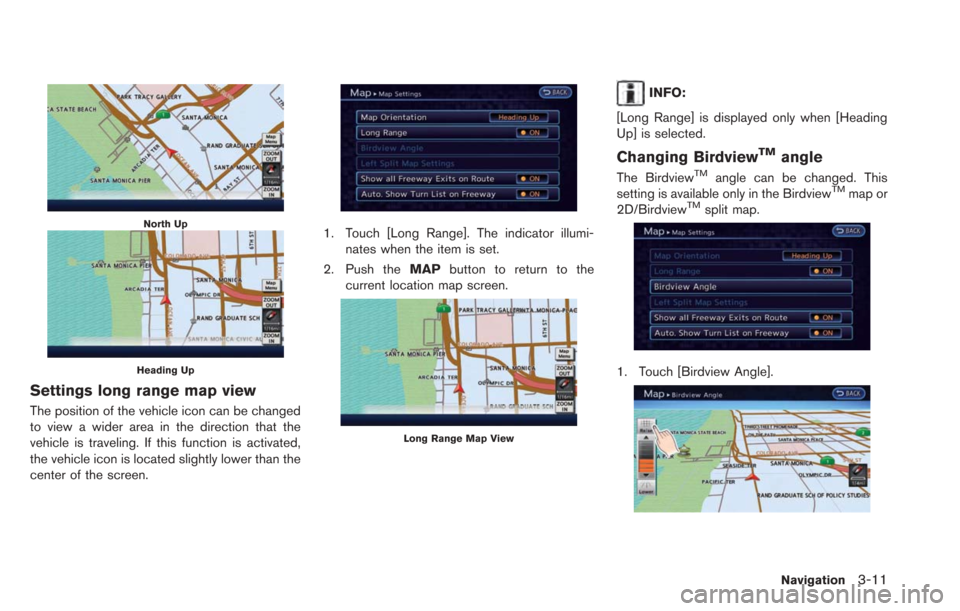
North Up
Heading Up
Settings long range map view
The position of the vehicle icon can be changed
to view a wider area in the direction that the
vehicle is traveling. If this function is activated,
the vehicle icon is located slightly lower than the
center of the screen.
1. Touch [Long Range]. The indicator illumi-nates when the item is set.
2. Push the MAPbutton to return to the
current location map screen.
Long Range Map View
INFO:
[Long Range] is displayed only when [Heading
Up] is selected.
Changing BirdviewTMangle
The BirdviewTMangle can be changed. This
setting is available only in the BirdviewTMmap or
2D/BirdviewTMsplit map.
1. Touch [Birdview Angle].
Navigation3-11
Page 68 of 275
![NISSAN LEAF 2013 1.G Navigation Manual 3-12Navigation
2. Adjust the BirdviewTMangle by touching
[Raise] or [Lower].
3. Push the MAPbutton to return to the
current location map screen.
Setting left screen display
When the split screen is di](/img/5/324/w960_324-67.png "NISSAN LEAF 2013 1.G Navigation Manual 3-12Navigation
2. Adjust the BirdviewTMangle by touching
[Raise] or [Lower].
3. Push the MAPbutton to return to the
current location map screen.
Setting left screen display
When the split screen is di")
3-12Navigation
2. Adjust the BirdviewTMangle by touching
[Raise] or [Lower].
3. Push the MAPbutton to return to the
current location map screen.
Setting left screen display
When the split screen is displayed, the map
settings of the left screen can be changed.
1. Touch [Left Split Map Settings].
2. Touch the preferred map setting. 3. Push the
MAPbutton to return to the
current location map screen.
Available settings
. [Map Orientation]:
The map direction can be selected as
follows.
— [North Up]:
The top of the map remains oriented to
the north.
— [Heading Up]: The top of the map follows the direction
in which the vehicle is traveling.
. [Long Range]:
Positions the vehicle icon slightly lower than
the center of the screen. This offers a wider
view in the traveling direction.
. [Map Scale]:
Displays a scale on the left side of the
screen. Use this to change the scale of a
map.
INFO:
. The settings of the right screen are the same
as the settings of the full screen map.
. The scale of the map can also be changed
by touching [ZOOM OUT] or [ZOOM IN].
LOOKING AT INFORMATION ON
MAP
Icons can be displayed on the map, and
information about destinations and landmarks
can be displayed.
Displaying map icons
The map icons can be displayed or hidden by
type.
1. Touch [Map Menu] while the current location
map screen is displayed.
2. Touch [Map Icons].
Page 73 of 275
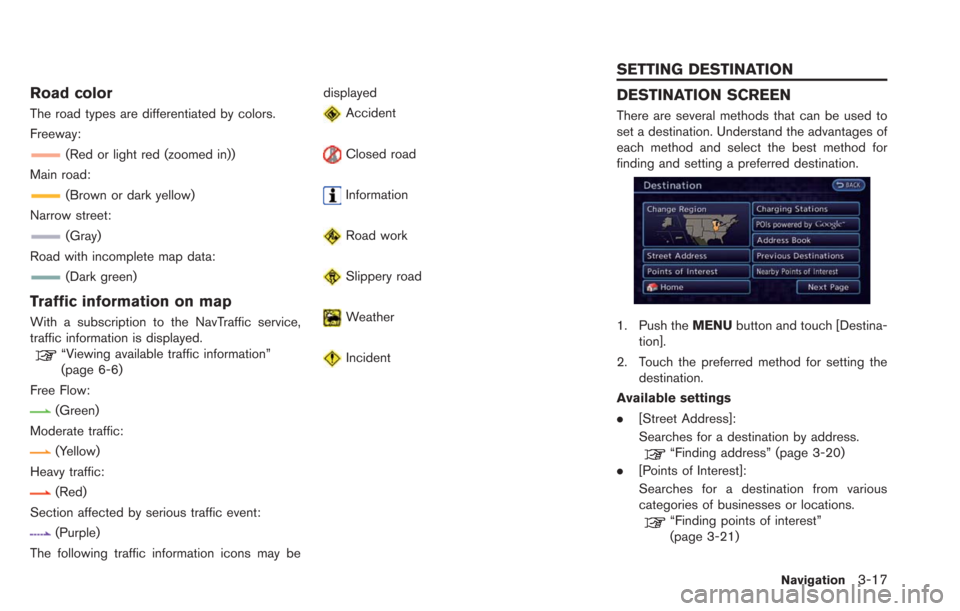
Road color
The road types are differentiated by colors.
Freeway:
(Red or light red (zoomed in))
Main road:
(Brown or dark yellow)
Narrow street:
(Gray)
Road with incomplete map data:
(Dark green)
Traffic information on map
With a subscription to the NavTraffic service,
traffic information is displayed.
“Viewing available traffic information”
(page 6-6)
Free Flow:
(Green)
Moderate traffic:
(Yellow)
Heavy traffic:
(Red)
Section affected by serious traffic event:
(Purple)
The following traffic information icons may be displayed
Accident
Closed road
Information
Road work
Slippery road
Weather
Incident
DESTINATION SCREEN
There are several methods that can be used to
set a destination. Understand the advantages of
each method and select the best method for
finding and setting a preferred destination.
1. Push the
MENUbutton and touch [Destina-
tion].
2. Touch the preferred method for setting the destination.
Available settings
. [Street Address]:
Searches for a destination by address.
“Finding address” (page 3-20)
. [Points of Interest]:
Searches for a destination from various
categories of businesses or locations.
“Finding points of interest”
(page 3-21)
Navigation3-17
SETTING DESTINATION
Page 129 of 275
![NISSAN LEAF 2013 1.G Navigation Manual .[Reset All Navigation Settings to Default]:
Reset all of the settings to default.
“Resetting all navigation settings to
default” (page 3-76)
SPEED LIMIT INDICATION ON MAP
Turn the [Speed Limit In](/img/5/324/w960_324-128.png "NISSAN LEAF 2013 1.G Navigation Manual .[Reset All Navigation Settings to Default]:
Reset all of the settings to default.
“Resetting all navigation settings to
default” (page 3-76)
SPEED LIMIT INDICATION ON MAP
Turn the [Speed Limit In")
.[Reset All Navigation Settings to Default]:
Reset all of the settings to default.
“Resetting all navigation settings to
default” (page 3-76)
SPEED LIMIT INDICATION ON MAP
Turn the [Speed Limit Indication on Map] display
on or off. The indicator light illuminates when the
speed limit display function is set to on.
1. Touch [Speed Limit Indication on Map] to
toggle the function between on and off. The
indicator light illuminates when the speed
limit display function is set to on.
OTHER NAVIGATION SETTINGS
1. Push the MENUbutton and touch [Set-
tings].
2. Touch [Navigation].
3. Touch [Others].
4. Touch the item you would like to set.
Available settings
. [Audio Display on Map]:
Allows the audio information to be displayed
at all times.
“Displaying audio information on map
screen” (page 3-73)
. [Map Scrolling Information]:
Sets the system so that when the map
scrolls the information about the location
aligned at the center of the cross pointer is
displayed.
“Map scrolling information”
(page 3-13) .
[Customize Nearby Places]:
Set the category of frequently visited nearby
places.
“Customizing Nearby Places”
(page 3-74)
. [Keyboard Type]:
Switches the keyboard layout for the char-
acter input screen.
“Settings keyboard layout of character
input screen” (page 3-74)
. [North Up when Zoomed Out]:
When this setting is ON, the orientation of
the map is automatically changed to North
Up when the widest map scale is selected.
The orientation is changed to North Up even
when Heading Up is set.
. [Adjust Current Location]:
Corrects the position of the current location.
“Adjusting current vehicle location”
(page 3-75)
Displaying audio information on
map screen
The operating status of audio functions can be
displayed on the map screen.
1. Touch [Others].
Navigation3-73
Page 136 of 275
4-2Audio system
RADIO
Push the power switch to the "ACC" or "ON"
position and push the radio band select button
to turn on the radio. If you listen to the radio with
the READY to drive indicator light is OFF, the
power switch should be pushed to the "ACC"
position.
Radio reception is affected by station signal
strength, distance from radio transmitter, build-
ings, bridges, mountains and other external
influences. Intermittent changes in reception
quality normally are caused by these external
influences.
Using a cellular phone in or near the
vehicle may influence radio reception
quality.
Radio reception
Your NISSAN radio system is equipped with
state-of-the-art electronic circuits to enhance
radio reception. These circuits are designed to
extend reception range, and to enhance the
quality of that reception.
However there are some general characteristics
of both FM and AM radio signals that can affect
radio reception quality in a moving vehicle, even
when the finest equipment is used. These
characteristics are completely normal in a given
reception area, and do not indicate any mal-function in your NISSAN radio system.
Reception conditions will constantly change
because of vehicle movement. Buildings, terrain,
signal distance and interference from other
vehicles can work against ideal reception.
Described below are some of the factors that
can affect your radio reception.
Some cellular phones or other devices may
cause interference or a buzzing noise to come
from the audio system speakers. Storing the
device in a different location may reduce or
eliminate the noise.
While charging the vehicle, radio programs may
not be tuned in to because the reception of the
radio becomes weak.
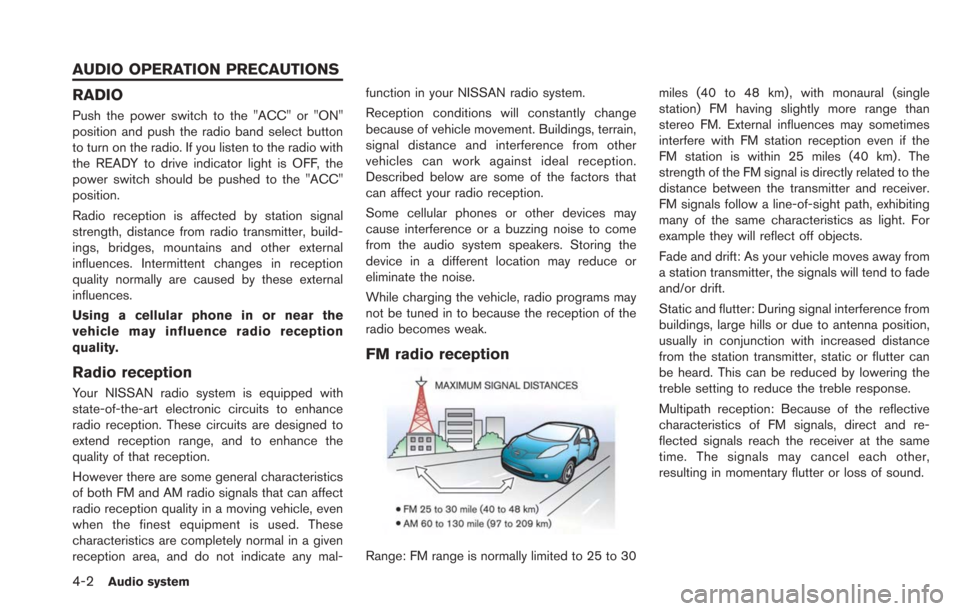
FM radio reception
Range: FM range is normally limited to 25 to 30
miles (40 to 48 km) , with monaural (single
station) FM having slightly more range than
stereo FM. External influences may sometimes
interfere with FM station reception even if the
FM station is within 25 miles (40 km). The
strength of the FM signal is directly related to the
distance between the transmitter and receiver.
FM signals follow a line-of-sight path, exhibiting
many of the same characteristics as light. For
example they will reflect off objects.
Fade and drift: As your vehicle moves away from
a station transmitter, the signals will tend to fade
and/or drift.
Static and flutter: During signal interference from
buildings, large hills or due to antenna position,
usually in conjunction with increased distance
from the station transmitter, static or flutter can
be heard. This can be reduced by lowering the
treble setting to reduce the treble response.
Multipath reception: Because of the reflective
characteristics of FM signals, direct and re-
flected signals reach the receiver at the same
time. The signals may cancel each other,
resulting in momentary flutter or loss of sound.
AUDIO OPERATION PRECAUTIONS
Page 137 of 275
AM radio reception
AM signals, because of their low frequency, can
bend around objects and skip along the ground.
In addition, the signals can bounce off the
ionosphere and be bent back to earth. Because
of these characteristics, AM signals are also
subject to interference as they travel from
transmitter to receiver.
Fading: Occurs while the vehicle is passing
through freeway underpasses or in areas with
many tall buildings. It can also occur for several
seconds during ionospheric turbulence even in
areas where no obstacles exist.
Static: Caused by thunderstorms, electrical
power lines, electric signs and even traffic lights.
Satellite radio reception
When the satellite radio is used for the first time
or the battery has been replaced, the satellite
radio may not work properly. This is not a
malfunction. Wait more than 10 minutes with the
satellite radio ON and the vehicle outside of any
metal or large building for the satellite radio to
receive all of the necessary data.
The satellite radio mode requires an active
SiriusXM Satellite Radio subscription. The sa-
tellite radio is not available in Alaska, Hawaii and
Guam.
The satellite radio performance may be affectedif cargo carried on the roof blocks the satellite
radio signal.
If possible, do not put cargo near the satellite
antenna.
A build up of ice on the satellite radio antenna
can affect satellite radio performance. Remove
the ice to restore satellite radio reception.
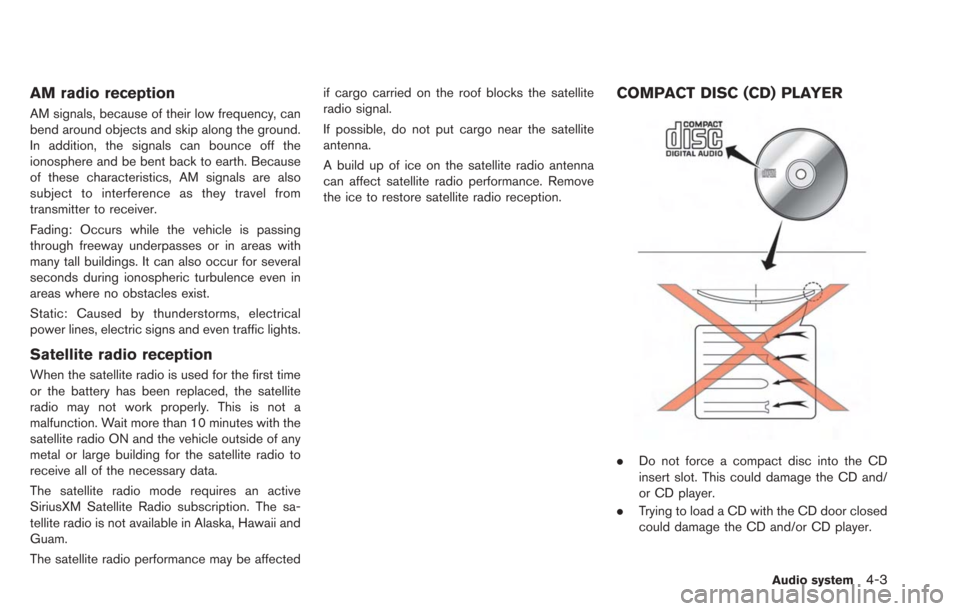
COMPACT DISC (CD) PLAYER
.
Do not force a compact disc into the CD
insert slot. This could damage the CD and/
or CD player.
. Trying to load a CD with the CD door closed
could damage the CD and/or CD player.
Audio system4-3
Page 138 of 275
4-4Audio system
.During cold weather or rainy days, the player
may malfunction due to the humidity. If this
occurs, remove the CD and dehumidify or
ventilate the player completely.
. The player may skip while driving on rough
roads.
. The CD player sometimes cannot function
when the passenger compartment tempera-
ture is extremely high. Decrease the tem-
perature before use.
. Only use high quality 4.7 in (12 cm) round
discs that have the "COMPACT disc DIGI-
TAL AUDIO" logo on the disc or packaging.
. Do not expose the CD to direct sunlight.
. CDs that are of poor quality, dirty, scratched,
covered with fingerprints, or that have pin
holes may not work properly.
. The following CDs may not work properly:
— Copy control compact discs (CCCD)
— Recordable compact discs (CD-R)
— Rewritable compact discs (CD-RW)
. Do not use the following CDs as they may
cause the CD player to malfunction.
— 3.1 in (8 cm) discs
— CDs that are not round
— CDs with a paper label — CDs that are warped, scratched, or have
abnormal edges
. This audio system can only play prerecorded
CDs. It has no capabilities to record or burn
CDs.
. If the CD cannot be played, one of the
following messages will be displayed.
CHECK DISC:
— Confirm that the CD is inserted correctly
(the label side is facing up, etc.).
— Confirm that the CD is not bent or warped and it is free of scratches.
PUSH EJECT:
This is an error due to the temperature inside
the player being too high. Remove the CD
by pushing the
button, and after a short
time reinsert the CD. The CD can be played
when the temperature of the player returns
to normal.
UNPLAYABLE:
The file is unplayable in this audio system
(the system only supports CDs containing
MP3 or WMA files) .
USB (Universal Serial Bus)
WARNING
Do not connect or disconnect the USB
device while driving. Doing so can be a
distraction. If distracted you could lose
control of your vehicle and cause an
accident or serious injury.
CAUTION
. Do not force the USB device into the
USB port. Inserting the USB device
tilted or up-side-down into the port
may damage the USB device and
the port. Make sure that the USB
device is connected correctly into
the USB port.
. Do not grab the USB port cover (if
so equipped) when pulling the USB
device out of the port. This could
damage the port and the cover.
. Do not leave the USB cable in a
place where it can be pulled unin-
tentionally. Pulling the cable may
break the wire, USB device or the
port.
Page 162 of 275
5-2CARWINGSTM
In addition to Event Data Recorders (EDRs)
mentioned in the LEAF Owner’s Manual, this
vehicle is equipped with electronic modules that
monitor, control and record data concerning
various vehicle systems, including the motor,
batteries, braking and electrical systems. Other
electronic modules record information concern-
ing driving conditions, including idling, braking,
acceleration, trip and other related data, in-
formation about your use of the car and its
features such as air conditioner or headlight
usage, diagnostic trouble codes, vehicle char-
ging, vehicle speed, direction and/or location.
Some of this data is stored by the vehicle for use
during vehicle servicing. Other data concerning
your vehicle’s operation and performance is
wirelessly transmitted by cellular connection
through the vehicle onboard telematics system
upon vehicle start-up or at other intervals to
NISSAN. This data may be used by NISSAN for
various purposes, including: to provide you with
CARWINGS
TMservices (refer to the CAR-
WINGSTMsection of this manual for details);
troubleshooting; evaluation of your vehicle’s
quality, functionality and performance; analysis
and research by NISSAN designed to, among
other things, optimize performance of future
electric vehicles including improvements in
future battery life; to offer you new or additional
products or services; and as otherwise may be required by law. Such data may be shared with
NISSAN’s parents, subsidiaries, affiliates, suc-
cessors or assignees; authorized NISSAN certi-
fied LEAF dealers; NISSAN’s marketing
partners; your fleet company, if your vehicle is
a fleet vehicle; your rental company, if your
vehicle is a rental vehicle; and third party service
providers such as cellular, information systems
and data management providers.
State laws allow access and use of data
recorded by vehicle devices with the consent
of the vehicle owner or pursuant to subscription
agreement. While you are not required to allow
such access and use, if you do not so agree
NISSAN may be unable under applicable law to
activate the vehicle telematics system in your
vehicle, and certain features of your vehicle
which are dependent on vehicle telematics will
not operate as intended or designed. These may
include features such as automatic charging
station map updates, remote battery state of
charge check, charging complete notice, remote
plug in reminder, remote charging on, remote
climate control on, drive route planning, driving
tips to improve range, driving history, billing
simulation, ECO ranking, ECO forest, mainte-
nance reminders, etc. Other features that may
be developed and offered by NISSAN in the
future may also not function without telematics
data transmission.CARWINGS
TMtelematics services are provided
by NISSAN pursuant to a subscription services
agreement covering your vehicle. This agree-
ment is necessary for all owners. This agree-
ment, and an explanation of its terms and
conditions, can be found at the NISSAN Own-
er’s Portal webpage. Further, the operator of the
vehicle must also touch [OK] on the Navi screen
to indicate assent each time he or she starts the
car. If you decide at any time that you do not
want your vehicle to transmit data to NISSAN,
you can deactivate the telematics account
associated with this vehicle by canceling the
subscription services agreement by visiting the
NISSAN Owner’s Portal Webpage or calling
NISSAN at 1-877-NOGASEV (1-877-664-
2738) . The service can be reactivated later
upon request if you choose. Simply visit the
same website or call the number above. Alter-
natively, you can turn off the transmission of
certain categories of data through the use of
settings found in the Navigation system under
Menu, CARWINGS
TM, Vehicle Information
Sharing with NISSAN. Note, turning off “Vehicle
Information Sharing with NISSAN” will only
disable the automatic sharing of information at
vehicle start-up. Certain categories of data may
still be transmitted if vehicle telematics features
are accessed either in the vehicle or remotely.
Your agreement to the transmission and use of
TELEMATICS OVERVIEW
Page 186 of 275
6-4Viewing technical information
.the maintenance interval is set again.
COMFORT & CONVENIENCE SET-
TINGS
This key does not appear on the display until the
power switch is pushed to the "ON" position.
1. Push the MENUbutton and touch [Set-
tings].
2. Touch [Comfort & Convenience].
3. Touch the item you would like to set.
Available settings
. [Auto Interior Illumination]:
When this item is turned on, the interior
lights will illuminate if any door is unlocked.
. [Speed Sensing Wiper Interval]:
When this item is turned to ON, the wiper
interval is adjusted automatically according
to the vehicle speed. .
[Light Sensitivity]:
Adjust the sensitivity of the automatic head-
light by touching [+] or [-].
. [Light Off Delay]:
Select the duration of the automatic head-
light off timer from 0, 30, 45, 60, 90, 120,
150 and 180 second periods.
. [Selective Door Unlock]:
When this item is turned on, only the driver’s
door is unlocked first after the door unlock
operation. When the door handle request
switch on the driver’s or front passenger’s
side door is pushed to be unlocked, only the
corresponding door is unlocked first. All the
doors can be unlocked if the door unlock
operation is performed again within 60
seconds. When this item is turned to OFF,
all the doors will be unlocked after the door
unlock operation is performed once.
. [Intelligent Key Lock/Unlock]:
When this item is turned to ON, door lock/
unlock function by pushing the door handle
request switch will be activated.
. [Return All Settings to Default]:
Touch this item and touch [Yes] if you want
to return all settings to the default.
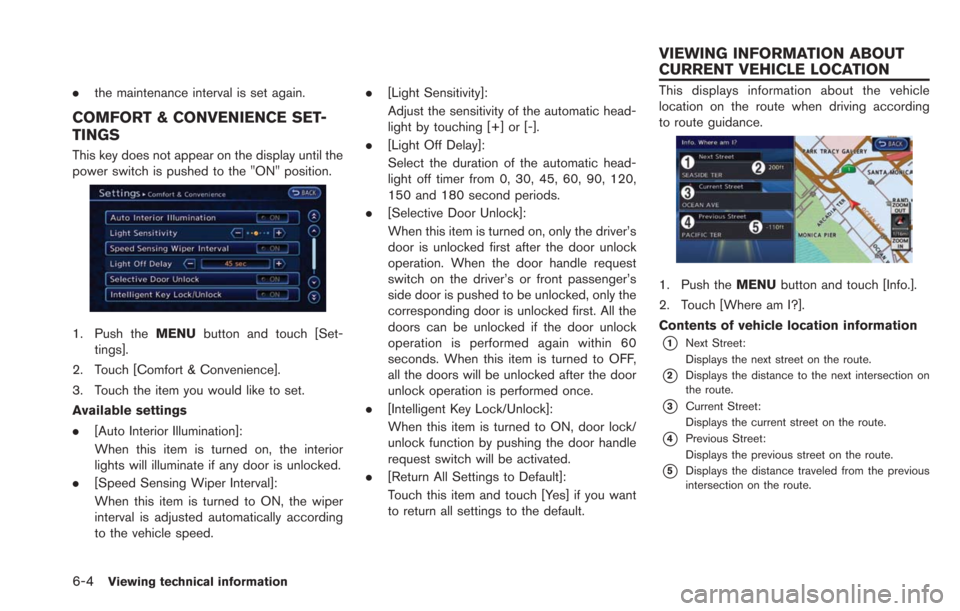
This displays information about the vehicle
location on the route when driving according
to route guidance.
1. Push the MENUbutton and touch [Info.].
2. Touch [Where am I?].
Contents of vehicle location information
*1Next Street:
Displays the next street on the route.
*2Displays the distance to the next intersection on
the route.
*3Current Street:
Displays the current street on the route.
*4Previous Street:
Displays the previous street on the route.
*5Displays the distance traveled from the previous
intersection on the route.
VIEWING INFORMATION ABOUT
CURRENT VEHICLE LOCATION
Page 196 of 275
7-2Bluetooth®Hands-Free Phone System
WARNING
.Use a phone after stopping your
vehicle in a safe location. If you
have to use a phone while driving,
exercise extreme caution at all
times so full attention may be given
to vehicle operation.
. If you find yourself unable to devote
full attention to vehicle operation
while talking on the phone, pull off
the road to a safe location and stop
your vehicle before doing so.
CAUTION
To avoid draining the vehicle battery,
use a phone after the READY to drive
indicator light is ON.
Your vehicle is equipped with Bluetooth
®
Hands-Free Phone System. If you are an owner
of a compatible Bluetooth®enabled cellular
phone, you can set up the wireless connection
between your cellular phone and the in-vehicle
phone module. With Bluetooth
®wireless tech-
nology, you can make or receive a telephone call
with your cellular phone in your pocket. Once a cellular phone is connected to the in-
vehicle phone module, the procedure for con-
necting the phone does not need to be
performed again. Your phone is automatically
selected with the in-vehicle phone module when
the power switch is pushed to the "ON" position
with the selected cellular phone turned on and
carried in the vehicle.
You can register up to 3 different Bluetooth
®
cellular phones in the in-vehicle phone module.
However, you can talk on only one cellular phone
at a time.
The NISSAN Voice Recognition system sup-
ports phone commands, so dialing a phone
number using your voice is possible.
“8. Voice recognition”
Before using the Bluetooth®Hands-Free Phone
System, refer to the following notes.
. Wireless LAN (Wi-Fi) and the Bluetooth
®
functions share the same frequency band
(2.4 GHz) . Using the Bluetooth®and the
wireless LAN functions at the same time may
slow down or disconnect the communica-
tion and cause undesired noise. It is
recommended that you turn off the wireless
LAN (Wi-Fi) when using the Bluetooth
®
functions. .
Set up the wireless connection between a
compatible cellular phone and the in-vehicle
phone module before using the Bluetooth
®
Hands-Free Phone System.
. Some Bluetooth®enabled cellular phones
may not be recognized by the in-vehicle
phone module.
Please visit www.nissanusa.com/bluetooth
for a recommended phone list.
. You will not be able to use a hands-free
phone under the following conditions:
— Your vehicle is outside of the telephone
service area.
— Your vehicle is in an area where it is difficult to receive radio waves; such as in
a tunnel, in an underground parking
garage, behind a tall building or in a
mountainous area.
— Your cellular phone is locked in order to prevent dialing.
. When the radio wave condition is not ideal
or ambient sound is too loud, it may be
difficult to hear the other person’s voice
during a call.
. Immediately after the power switch is
pushed to the "ON" position, it may be
impossible to receive a call for a short period
of time.
BLUETOOTH®HANDS-FREE PHONE
SYSTEM