light NISSAN LEAF 2013 1.G Navigation Manual
[x] Cancel search | Manufacturer: NISSAN, Model Year: 2013, Model line: LEAF, Model: NISSAN LEAF 2013 1.GPages: 275, PDF Size: 6.66 MB
Page 221 of 275
objects viewed in the monitor are
closer than they appear. Use the
mirrors or actually look to properly
judge distances to other objects.
The vehicle width and predictive course lines are
wider than the actual width and course.
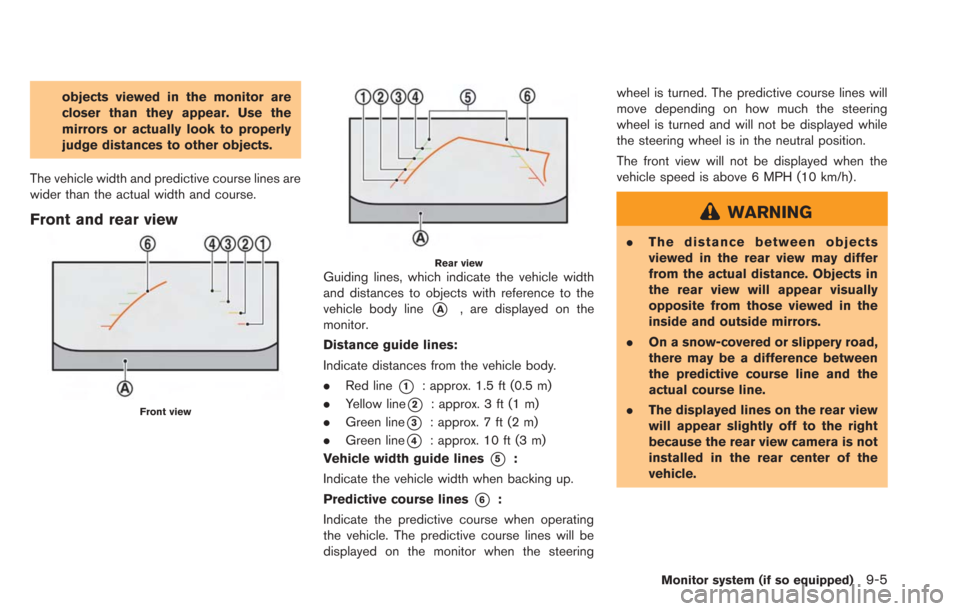
Front and rear view
Front view
Rear viewGuiding lines, which indicate the vehicle width
and distances to objects with reference to the
vehicle body line
*A, are displayed on the
monitor.
Distance guide lines:
Indicate distances from the vehicle body.
. Red line
*1: approx. 1.5 ft (0.5 m)
. Yellow line
*2: approx. 3 ft (1 m)
. Green line
*3: approx. 7 ft (2 m)
. Green line
*4: approx. 10 ft (3 m)
Vehicle width guide lines
*5:
Indicate the vehicle width when backing up.
Predictive course lines
*6:
Indicate the predictive course when operating
the vehicle. The predictive course lines will be
displayed on the monitor when the steering wheel is turned. The predictive course lines will
move depending on how much the steering
wheel is turned and will not be displayed while
the steering wheel is in the neutral position.
The front view will not be displayed when the
vehicle speed is above 6 MPH (10 km/h).
WARNING
.
The distance between objects
viewed in the rear view may differ
from the actual distance. Objects in
the rear view will appear visually
opposite from those viewed in the
inside and outside mirrors.
. On a snow-covered or slippery road,
there may be a difference between
the predictive course line and the
actual course line.
. The displayed lines on the rear view
will appear slightly off to the right
because the rear view camera is not
installed in the rear center of the
vehicle.
Monitor system (if so equipped)9-5
Page 222 of 275
9-6Monitor system (if so equipped)
CAUTION
When the monitor displays the front
view and the steering wheel turns about
90 degrees or less from the neutral
position, both the right and left pre-
dictive course lines
*6are displayed.
When the steering wheel turns about 90
degrees or more, a predictive course
line is displayed only on the opposite
side of the turn.
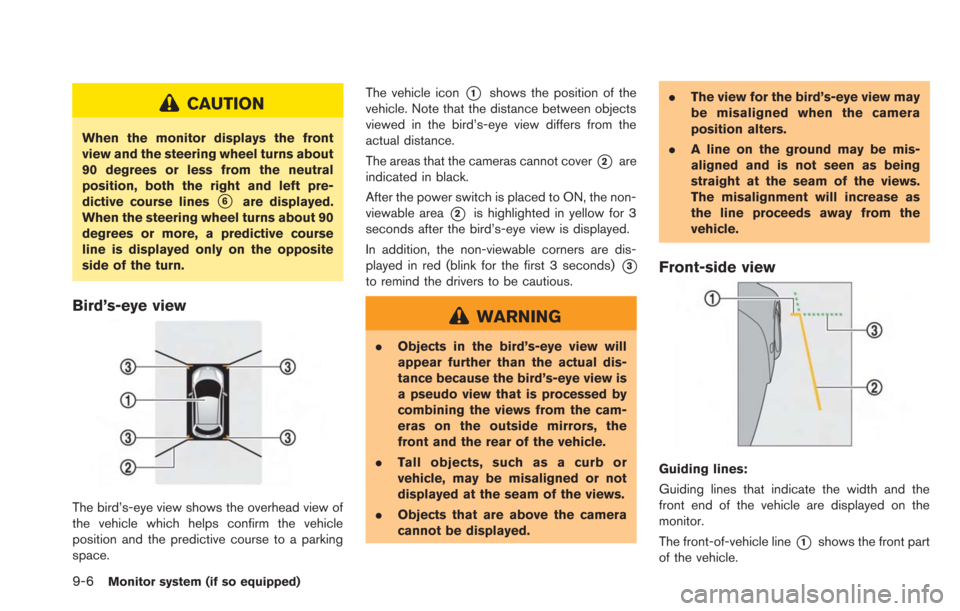
Bird’s-eye view
The bird’s-eye view shows the overhead view of
the vehicle which helps confirm the vehicle
position and the predictive course to a parking
space. The vehicle icon
*1shows the position of the
vehicle. Note that the distance between objects
viewed in the bird’s-eye view differs from the
actual distance.
The areas that the cameras cannot cover
*2are
indicated in black.
After the power switch is placed to ON, the non-
viewable area
*2is highlighted in yellow for 3
seconds after the bird’s-eye view is displayed.
In addition, the non-viewable corners are dis-
played in red (blink for the first 3 seconds)
*3
to remind the drivers to be cautious.
WARNING
. Objects in the bird’s-eye view will
appear further than the actual dis-
tance because the bird’s-eye view is
a pseudo view that is processed by
combining the views from the cam-
eras on the outside mirrors, the
front and the rear of the vehicle.
. Tall objects, such as a curb or
vehicle, may be misaligned or not
displayed at the seam of the views.
. Objects that are above the camera
cannot be displayed. .
The view for the bird’s-eye view may
be misaligned when the camera
position alters.
. A line on the ground may be mis-
aligned and is not seen as being
straight at the seam of the views.
The misalignment will increase as
the line proceeds away from the
vehicle.
Front-side view
Guiding lines:
Guiding lines that indicate the width and the
front end of the vehicle are displayed on the
monitor.
The front-of-vehicle line
*1shows the front part
of the vehicle.
Page 223 of 275
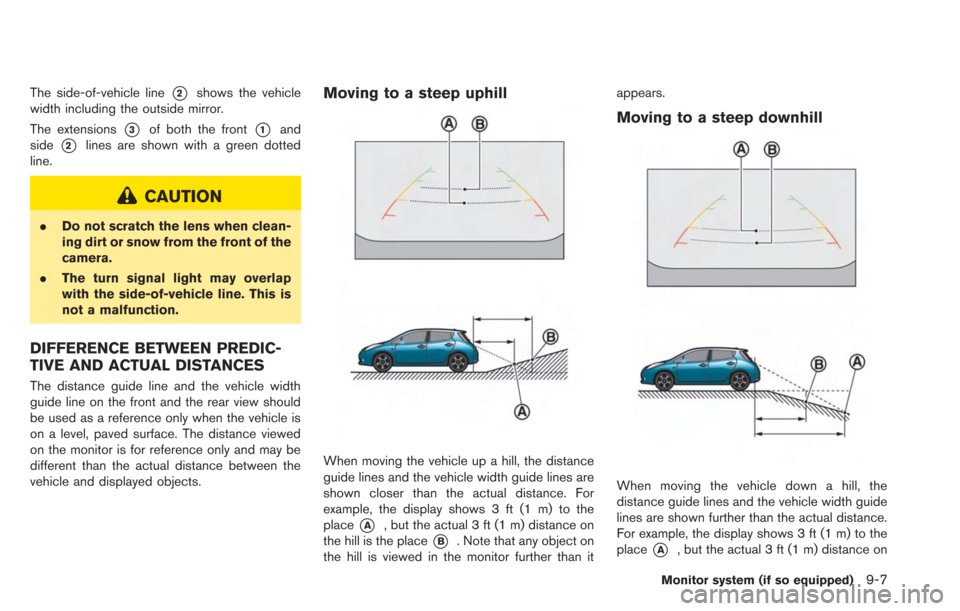
The side-of-vehicle line*2shows the vehicle
width including the outside mirror.
The extensions
*3of both the front*1and
side
*2lines are shown with a green dotted
line.
CAUTION
. Do not scratch the lens when clean-
ing dirt or snow from the front of the
camera.
. The turn signal light may overlap
with the side-of-vehicle line. This is
not a malfunction.
DIFFERENCE BETWEEN PREDIC-
TIVE AND ACTUAL DISTANCES
The distance guide line and the vehicle width
guide line on the front and the rear view should
be used as a reference only when the vehicle is
on a level, paved surface. The distance viewed
on the monitor is for reference only and may be
different than the actual distance between the
vehicle and displayed objects.
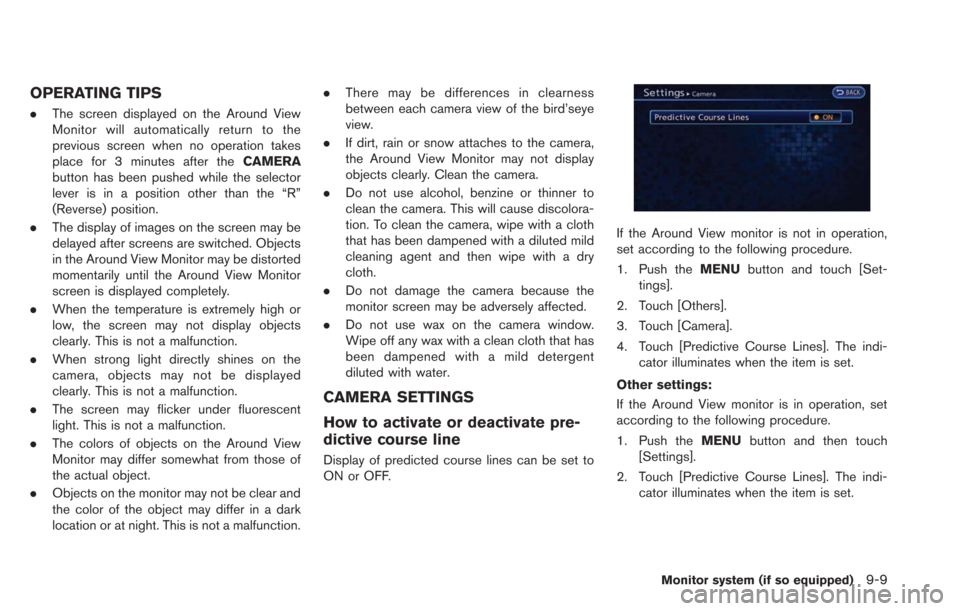
Moving to a steep uphill
When moving the vehicle up a hill, the distance
guide lines and the vehicle width guide lines are
shown closer than the actual distance. For
example, the display shows 3 ft (1 m) to the
place
*A, but the actual 3 ft (1 m) distance on
the hill is the place
*B. Note that any object on
the hill is viewed in the monitor further than it appears.
Moving to a steep downhill
When moving the vehicle down a hill, the
distance guide lines and the vehicle width guide
lines are shown further than the actual distance.
For example, the display shows 3 ft (1 m) to the
place
*A, but the actual 3 ft (1 m) distance on
Monitor system (if so equipped)9-7
Page 225 of 275
OPERATING TIPS
.The screen displayed on the Around View
Monitor will automatically return to the
previous screen when no operation takes
place for 3 minutes after the CAMERA
button has been pushed while the selector
lever is in a position other than the “R”
(Reverse) position.
. The display of images on the screen may be
delayed after screens are switched. Objects
in the Around View Monitor may be distorted
momentarily until the Around View Monitor
screen is displayed completely.
. When the temperature is extremely high or
low, the screen may not display objects
clearly. This is not a malfunction.
. When strong light directly shines on the
camera, objects may not be displayed
clearly. This is not a malfunction.
. The screen may flicker under fluorescent
light. This is not a malfunction.
. The colors of objects on the Around View
Monitor may differ somewhat from those of
the actual object.
. Objects on the monitor may not be clear and
the color of the object may differ in a dark
location or at night. This is not a malfunction. .
There may be differences in clearness
between each camera view of the bird’seye
view.
. If dirt, rain or snow attaches to the camera,
the Around View Monitor may not display
objects clearly. Clean the camera.
. Do not use alcohol, benzine or thinner to
clean the camera. This will cause discolora-
tion. To clean the camera, wipe with a cloth
that has been dampened with a diluted mild
cleaning agent and then wipe with a dry
cloth.
. Do not damage the camera because the
monitor screen may be adversely affected.
. Do not use wax on the camera window.
Wipe off any wax with a clean cloth that has
been dampened with a mild detergent
diluted with water.
CAMERA SETTINGS
How to activate or deactivate pre-
dictive course line
Display of predicted course lines can be set to
ON or OFF.
If the Around View monitor is not in operation,
set according to the following procedure.
1. Push the MENUbutton and touch [Set-
tings].
2. Touch [Others].
3. Touch [Camera].
4. Touch [Predictive Course Lines]. The indi- cator illuminates when the item is set.
Other settings:
If the Around View monitor is in operation, set
according to the following procedure.
1. Push the MENUbutton and then touch
[Settings].
2. Touch [Predictive Course Lines]. The indi- cator illuminates when the item is set.
Monitor system (if so equipped)9-9
Page 228 of 275
10-2Troubleshooting guide/General system information
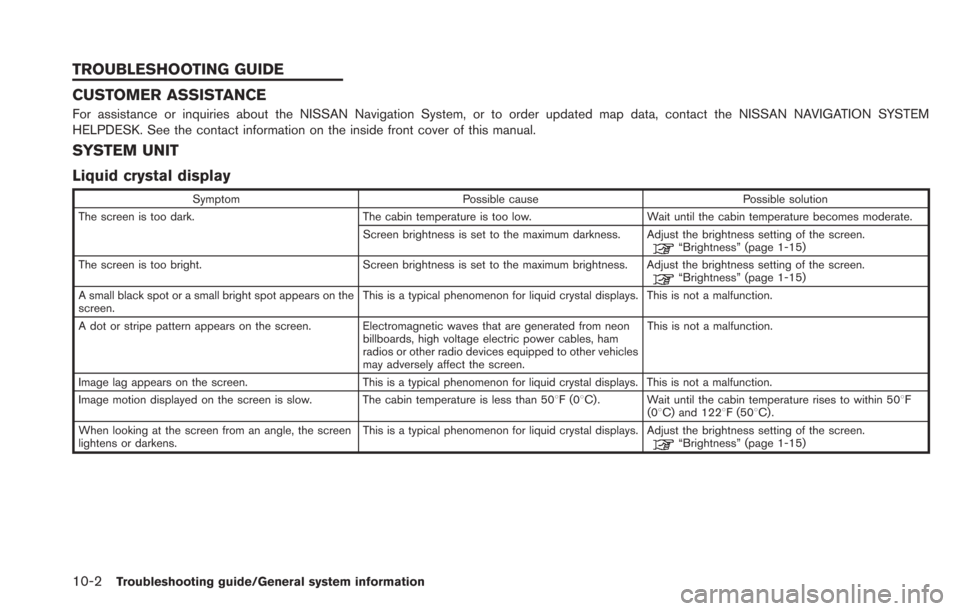
CUSTOMER ASSISTANCE
For assistance or inquiries about the NISSAN Navigation System, or to order updated map data, contact the NISSAN NAVIGATION SYSTEM
HELPDESK. See the contact information on the inside front cover of this manual.
SYSTEM UNIT
Liquid crystal display
SymptomPossible cause Possible solution
The screen is too dark. The cabin temperature is too low.Wait until the cabin temperature becomes moderate.
Screen brightness is set to the maximum darkness. Adjust the brightness setting of the screen.
“Brightness” (page 1-15)
The screen is too bright. Screen brightness is set to the maximum brightness. Adjust the brightness setting of the screen.
“Brightness” (page 1-15)
A small black spot or a small bright spot appears on the
screen. This is a typical phenomenon for liquid crystal displays. This is not a malfunction.
A dot or stripe pattern appears on the screen. Electromagnetic waves that are generated from neon billboards, high voltage electric power cables, ham
radios or other radio devices equipped to other vehicles
may adversely affect the screen.This is not a malfunction.
Image lag appears on the screen. This is a typical phenomenon for liquid crystal displays. This is not a malfunction.
Image motion displayed on the screen is slow. The cabin temperature is less than 508F(0 8C) . Wait until the cabin temperature rises to within 508F
(08C) and 1228F (508C) .
When looking at the screen from an angle, the screen
lightens or darkens. This is a typical phenomenon for liquid crystal displays. Adjust the brightness setting of the screen.
“Brightness” (page 1-15)
TROUBLESHOOTING GUIDE
Page 230 of 275
10-4Troubleshooting guide/General system information
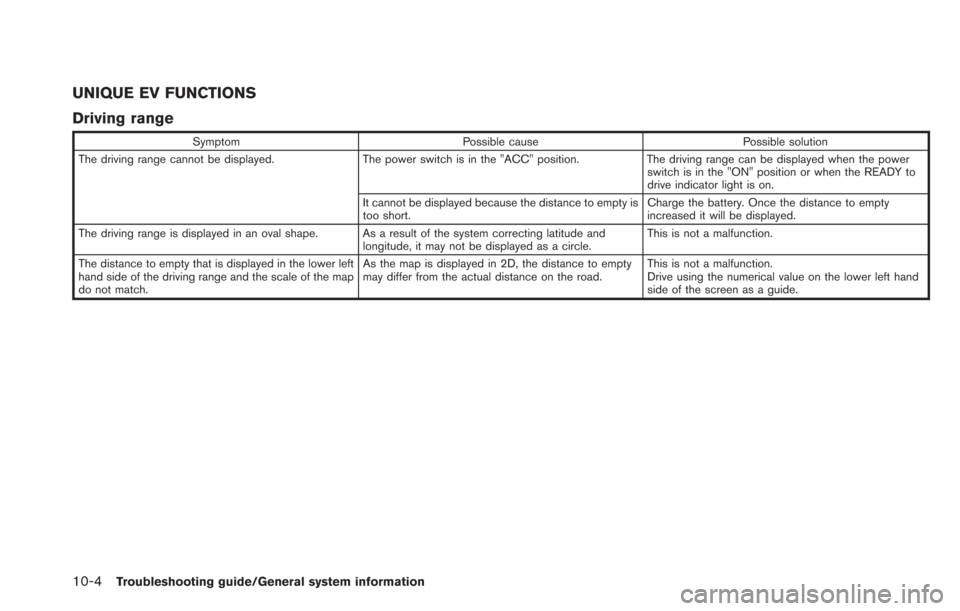
UNIQUE EV FUNCTIONS
Driving range
SymptomPossible cause Possible solution
The driving range cannot be displayed. The power switch is in the "ACC" position.The driving range can be displayed when the power
switch is in the "ON" position or when the READY to
drive indicator light is on.
It cannot be displayed because the distance to empty is
too short. Charge the battery. Once the distance to empty
increased it will be displayed.
The driving range is displayed in an oval shape. As a result of the system correcting latitude and longitude, it may not be displayed as a circle.This is not a malfunction.
The distance to empty that is displayed in the lower left
hand side of the driving range and the scale of the map
do not match. As the map is displayed in 2D, the distance to empty
may differ from the actual distance on the road.
This is not a malfunction.
Drive using the numerical value on the lower left hand
side of the screen as a guide.
Page 233 of 275
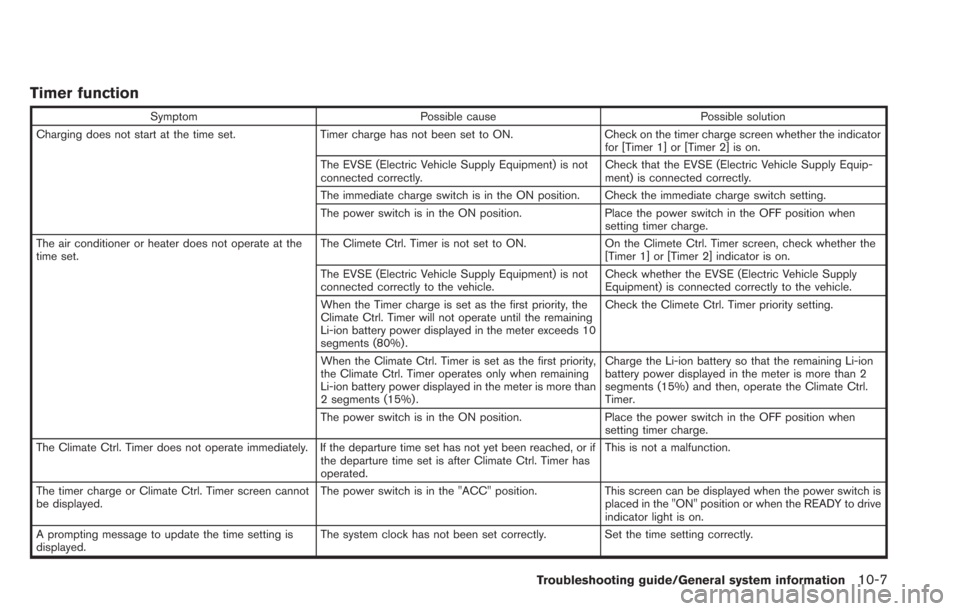
Timer function
SymptomPossible cause Possible solution
Charging does not start at the time set. Timer charge has not been set to ON. Check on the timer charge screen whether the indicator
for [Timer 1] or [Timer 2] is on.
The EVSE (Electric Vehicle Supply Equipment) is not
connected correctly. Check that the EVSE (Electric Vehicle Supply Equip-
ment) is connected correctly.
The immediate charge switch is in the ON position. Check the immediate charge switch setting.
The power switch is in the ON position. Place the power switch in the OFF position when
setting timer charge.
The air conditioner or heater does not operate at the
time set. The Climete Ctrl. Timer is not set to ON.
On the Climete Ctrl. Timer screen, check whether the
[Timer 1] or [Timer 2] indicator is on.
The EVSE (Electric Vehicle Supply Equipment) is not
connected correctly to the vehicle. Check whether the EVSE (Electric Vehicle Supply
Equipment) is connected correctly to the vehicle.
When the Timer charge is set as the first priority, the
Climate Ctrl. Timer will not operate until the remaining
Li-ion battery power displayed in the meter exceeds 10
segments (80%) . Check the Climete Ctrl. Timer priority setting.
When the Climate Ctrl. Timer is set as the first priority,
the Climate Ctrl. Timer operates only when remaining
Li-ion battery power displayed in the meter is more than
2 segments (15%) . Charge the Li-ion battery so that the remaining Li-ion
battery power displayed in the meter is more than 2
segments (15%) and then, operate the Climate Ctrl.
Timer.
The power switch is in the ON position. Place the power switch in the OFF position when
setting timer charge.
The Climate Ctrl. Timer does not operate immediately. If the departure time set has not yet been reached, or if the departure time set is after Climate Ctrl. Timer has
operated.This is not a malfunction.
The timer charge or Climate Ctrl. Timer screen cannot
be displayed. The power switch is in the "ACC" position.
This screen can be displayed when the power switch is
placed in the "ON" position or when the READY to drive
indicator light is on.
A prompting message to update the time setting is
displayed. The system clock has not been set correctly. Set the time setting correctly.
Troubleshooting guide/General system information10-7
Page 236 of 275

10-10Troubleshooting guide/General system information
Vehicle icon
SymptomPossible cause Possible solution
Names of roads and locations differ between
Plan View and Birdview
TM. This is because the quantity of the displayed information is reduced
so that the screen does not become too cluttered. There is also a
chance that names of the roads or locations may be displayed
multiple times, and the names appearing on the screen may be
different because of a processing procedure. This is not a malfunction.
The vehicle icon is not displayed in the correct
position. The vehicle was transported after the power switch was pushed off,
for example, by a ferry or car transporter. Drive the vehicle for a period of time on a road where
GPS signals can be received.
The position and direction of the vehicle icon may be incorrect
depending on the driving environments and the levels of positioning
accuracy of the navigation system. This is not a malfunction. Drive the vehicle for a
period of time to automatically correct the position
and direction of the vehicle icon.
“Current vehicle location” (page 10-28)
When the vehicle is traveling on a new road,
the vehicle icon is located on another road
nearby. Because the new road is not stored in the map data, the system
automatically places the vehicle icon on the nearest road available.
Updated road information will be included in the next
version of the map data.
The screen does not switch to the night screen
even after turning on the headlights. The daytime screen was set the last time the headlights were turned
on. Set the screen to the night screen mode using the
button when turning on the headlights.“Display adjustment” (page 1-14)
The map does not scroll even when the vehicle
is moving. The current location map screen is not displayed.
Push theMAPbutton.
The vehicle icon is not displayed. The current location map screen is not displayed. Push the MAPbutton.
The GPS indicator on the screen remains gray. GPS signals cannot be received under certain conditions, such as in a parking garage, on a road with many tall buildings, etc. Drive on an open, straight road for a period of time.
GPS signals cannot be received because objects are placed on the
instrument panel. Remove the objects from the instrument panel.
A sufficient number of GPS satellites is not available. Wait for the satellites to move to locations available for the navigation system.
Page 252 of 275

10-26Troubleshooting guide/General system information
VOICE RECOGNITION
SymptomPossible cause Possible solution
The system does not operate or fails to interpret the
command correctly after speaking a voice command. The system interprets the passenger’s speech. Ask the passenger to be as quiet as possible.
The fan speed of the air conditioner is too fast. Decrease the fan speed of the air conditioner.
The ambient noise level is excessive. (For example:
heavy rain, construction sites, inside a tunnel, oncoming
vehicles, etc.)Close the windows to shut out ambient noise.
The noise generated by driving the vehicle is too loud. Reduce the vehicle speed, and then speak the command.
The voice command is spoken in a low voice. Speak the command in a louder voice.
The timing of speaking a command is too fast. Speak the command after confirming the following: a voice guidance is announced, a tone sounds, and an
icon on the screen changes from white to orange.
The command is spoken too slowly. Speak in a natural voice without pausing between
words.
The system announces, "Please say again". Pronunciation is unclear. Speak clearly.
The user starts speaking too late after the tone. Speak the command within 5 seconds after confirming the following: a voice guidance is announced, a tone
sounds, and an icon on the screen changes from white
to orange.
An improper command is spoken. Speak the command or a number that is displayed in
orange on the screen.
Speak the command that is shown in the command list.
The system does not correctly recognize a number
spoken. Many numbers are spoken at once.
Place a pause between the appropriate digits for
correct recognition by the system. When speaking a
telephone number, place a pause between area codes,
dial codes, etc.
Voice recognition does not operate and a tone sounds
twice after pushing the
button. Thebutton is pushed immediately after the READY
to drive indicator light is ON. Push thebutton again after a short period of time.
Page 253 of 275
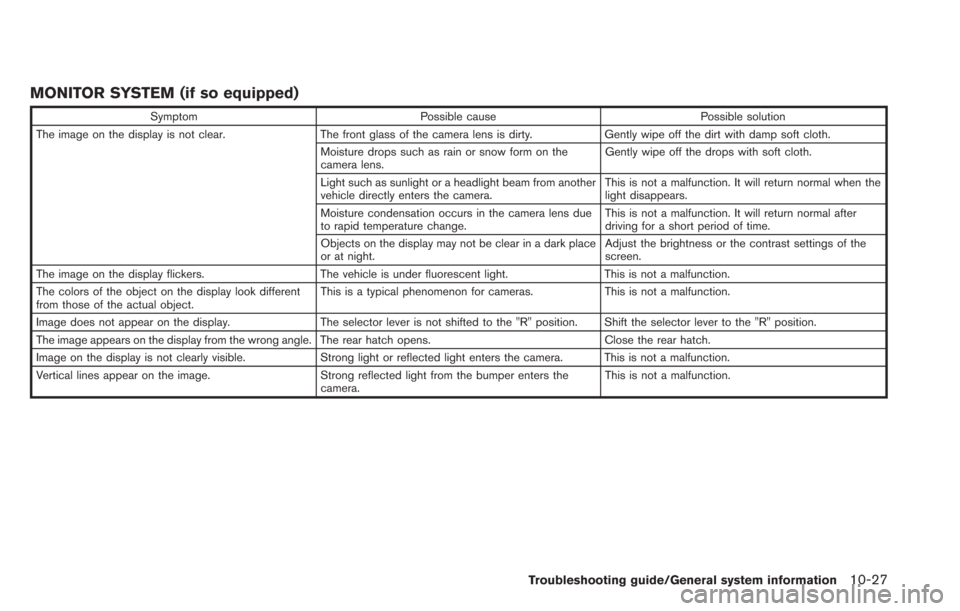
MONITOR SYSTEM (if so equipped)
SymptomPossible cause Possible solution
The image on the display is not clear. The front glass of the camera lens is dirty.Gently wipe off the dirt with damp soft cloth.
Moisture drops such as rain or snow form on the
camera lens. Gently wipe off the drops with soft cloth.
Light such as sunlight or a headlight beam from another
vehicle directly enters the camera. This is not a malfunction. It will return normal when the
light disappears.
Moisture condensation occurs in the camera lens due
to rapid temperature change. This is not a malfunction. It will return normal after
driving for a short period of time.
Objects on the display may not be clear in a dark place
or at night. Adjust the brightness or the contrast settings of the
screen.
The image on the display flickers. The vehicle is under fluorescent light.This is not a malfunction.
The colors of the object on the display look different
from those of the actual object. This is a typical phenomenon for cameras.
This is not a malfunction.
Image does not appear on the display. The selector lever is not shifted to the "R" position. Shift the selector lever to the "R" position.
The image appears on the display from the wrong angle. The rear hatch opens. Close the rear hatch.
Image on the display is not clearly visible. Strong light or reflected light enters the camera. This is not a malfunction.
Vertical lines appear on the image. Strong reflected light from the bumper enters the
camera. This is not a malfunction.
Troubleshooting guide/General system information10-27