phone NISSAN LEAF 2013 1.G Navigation Manual
[x] Cancel search | Manufacturer: NISSAN, Model Year: 2013, Model line: LEAF, Model: NISSAN LEAF 2013 1.GPages: 275, PDF Size: 6.66 MB
Page 26 of 275
1-6Getting Started
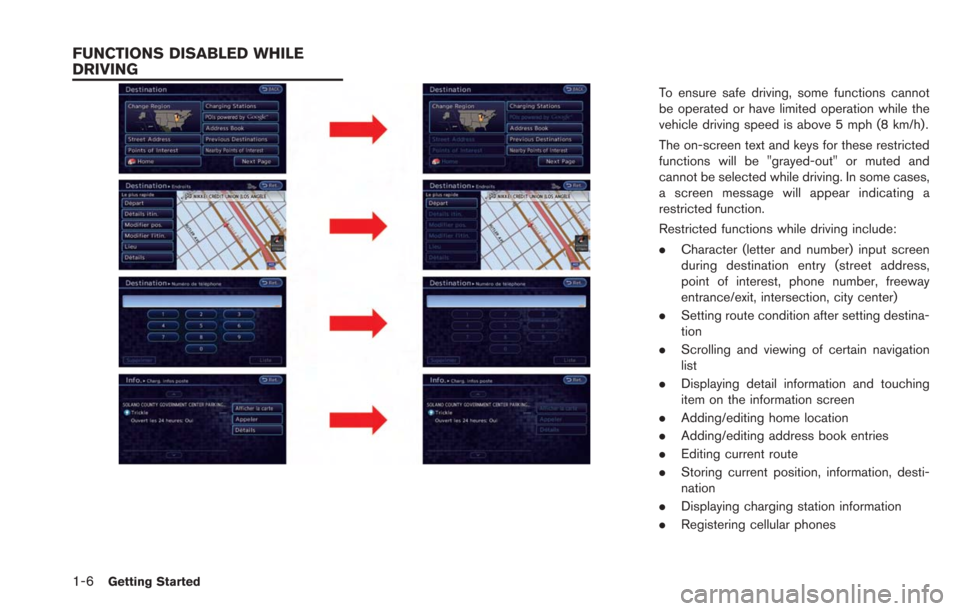
To ensure safe driving, some functions cannot
be operated or have limited operation while the
vehicle driving speed is above 5 mph (8 km/h).
The on-screen text and keys for these restricted
functions will be "grayed-out" or muted and
cannot be selected while driving. In some cases,
a screen message will appear indicating a
restricted function.
Restricted functions while driving include:
.Character (letter and number) input screen
during destination entry (street address,
point of interest, phone number, freeway
entrance/exit, intersection, city center)
. Setting route condition after setting destina-
tion
. Scrolling and viewing of certain navigation
list
. Displaying detail information and touching
item on the information screen
. Adding/editing home location
. Adding/editing address book entries
. Editing current route
. Storing current position, information, desti-
nation
. Displaying charging station information
. Registering cellular phones
FUNCTIONS DISABLED WHILE
DRIVING
Page 27 of 275
.Making a call by dial number and handset
phonebook
. Setting phone, CARWINGS
TMand Blue-
tooth®functions
These functions will become available again
when the vehicle speed is reduced to 5 mph (8
km/h).
Destination functions available while driving
include:
. Home
. Nearby Charging Stations
. Address Book
. Previous Destinations
. Nearby Points of Interest
. Stored Routes
. Map input
Examples of operations performed using the
touch panel operation are described here.
SELECTING ITEM
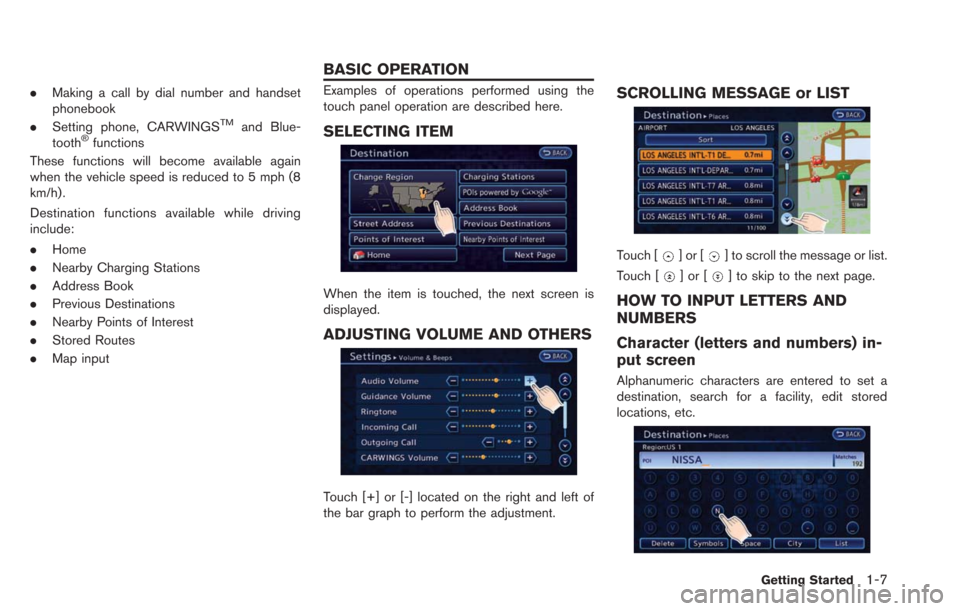
When the item is touched, the next screen is
displayed.
ADJUSTING VOLUME AND OTHERS
Touch [+] or [-] located on the right and left of
the bar graph to perform the adjustment.
SCROLLING MESSAGE or LIST
Touch []or[] to scroll the message or list.
Touch [
]or[] to skip to the next page.
HOW TO INPUT LETTERS AND
NUMBERS
Character (letters and numbers) in-
put screen
Alphanumeric characters are entered to set a
destination, search for a facility, edit stored
locations, etc.
Getting Started1-7
BASIC OPERATION
Page 28 of 275
![NISSAN LEAF 2013 1.G Navigation Manual 1-8Getting Started
1. Touch a character on the displayed key-board. The selected character is entered.
2. Touch [Delete] to delete the last characterentered.
Touch and hold [Delete] to delete all the](/img/5/324/w960_324-27.png "NISSAN LEAF 2013 1.G Navigation Manual 1-8Getting Started
1. Touch a character on the displayed key-board. The selected character is entered.
2. Touch [Delete] to delete the last characterentered.
Touch and hold [Delete] to delete all the")
1-8Getting Started
1. Touch a character on the displayed key-board. The selected character is entered.
2. Touch [Delete] to delete the last characterentered.
Touch and hold [Delete] to delete all the
characters entered.
Touch [Space] to enter a space.
3. After finishing the entry, touch [List].
INFO:
.The list screen appears automaticallywhen text has been entered and the
matching list items have been narrowed
down to a number that will fit on the
screen.
.Symbol keys are displayed by touching
[Symbols]. Alphabet keys are displayed
by touching [A-Z].
Phone number input screen
Perform the following procedure to enter a
number.
INFO:
Only the locations included in the map data
database can be searched for by a phone
number.
1. Touch a number on the displayed keyboard. The selected number is entered.
2. Touch [Delete] to delete the last numberentered.
Touch and hold [Delete] to delete all the
numbers entered.
3. After finishing the entry, touch [List].
Page 29 of 275
This system allows you to set various functions
and check information on the screen that is
displayed by pushing each button located on the
control panel.
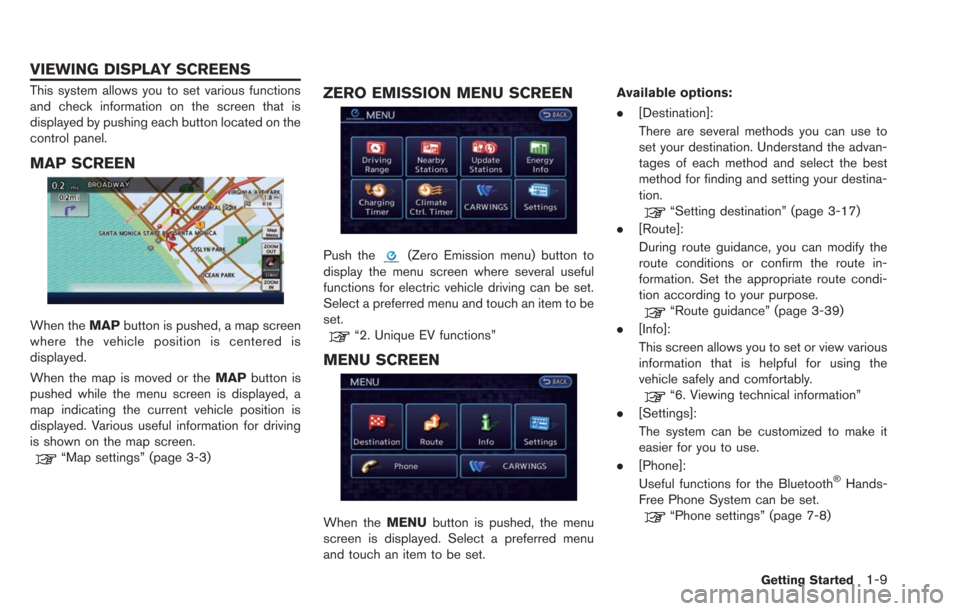
MAP SCREEN
When theMAPbutton is pushed, a map screen
where the vehicle position is centered is
displayed.
When the map is moved or the MAPbutton is
pushed while the menu screen is displayed, a
map indicating the current vehicle position is
displayed. Various useful information for driving
is shown on the map screen.
“Map settings” (page 3-3)
ZERO EMISSION MENU SCREEN
Push the(Zero Emission menu) button to
display the menu screen where several useful
functions for electric vehicle driving can be set.
Select a preferred menu and touch an item to be
set.
“2. Unique EV functions”
MENU SCREEN
When the MENUbutton is pushed, the menu
screen is displayed. Select a preferred menu
and touch an item to be set. Available options:
.
[Destination]:
There are several methods you can use to
set your destination. Understand the advan-
tages of each method and select the best
method for finding and setting your destina-
tion.
“Setting destination” (page 3-17)
. [Route]:
During route guidance, you can modify the
route conditions or confirm the route in-
formation. Set the appropriate route condi-
tion according to your purpose.
“Route guidance” (page 3-39)
. [Info]:
This screen allows you to set or view various
information that is helpful for using the
vehicle safely and comfortably.
“6. Viewing technical information”
. [Settings]:
The system can be customized to make it
easier for you to use.
. [Phone]:
Useful functions for the Bluetooth
®Hands-
Free Phone System can be set.
“Phone settings” (page 7-8)
Getting Started1-9
VIEWING DISPLAY SCREENS
Page 33 of 275
![NISSAN LEAF 2013 1.G Navigation Manual 3. Confirm the contents of the message, thentouch [Yes].
4. Touch [Map]. The current location mapscreen is displayed.
5. If necessary, adjust your home location bytouch panel operation.
6. After adjus](/img/5/324/w960_324-32.png "NISSAN LEAF 2013 1.G Navigation Manual 3. Confirm the contents of the message, thentouch [Yes].
4. Touch [Map]. The current location mapscreen is displayed.
5. If necessary, adjust your home location bytouch panel operation.
6. After adjus")
3. Confirm the contents of the message, thentouch [Yes].
4. Touch [Map]. The current location mapscreen is displayed.
5. If necessary, adjust your home location bytouch panel operation.
6. After adjusting the location, touch [OK]. A message is displayed and your home loca-
tion is stored in the Address Book.
7. Adjust the location of a stored item and editthe contents of a stored item as necessary.
8. Touch [OK] to return to the Destination screen.
INFO:
You can also perform the same setting by
pushing the MENUbutton and selecting [Set-
tings].
“Storing location” (page 3-38)
CONNECTING CELLULAR PHONE
Your vehicle is equipped with Bluetooth®
Hands-Free Phone System. If you are an owner
of a compatible Bluetooth®enabled cellular
phone, you can set up the wireless connection
between your cellular phone and the in-vehicle
phone module. With Bluetooth
®wireless tech-
nology, you can make or receive a telephone call
with your cellular phone in your pocket.
1. Push thebutton and touch [Connect
Phone].
Getting Started1-13
Page 34 of 275
1-14Getting Started
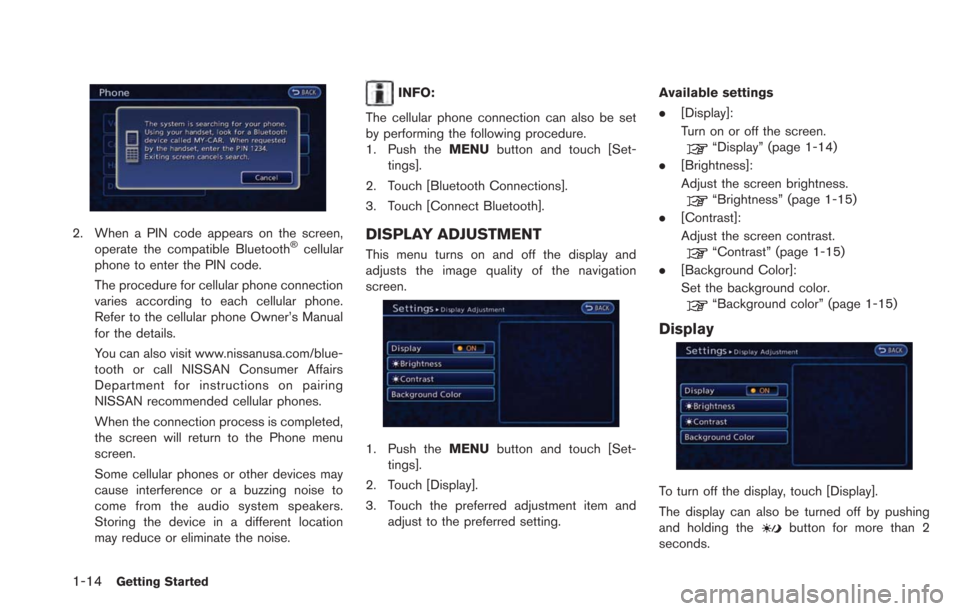
2. When a PIN code appears on the screen,operate the compatible Bluetooth®cellular
phone to enter the PIN code.
The procedure for cellular phone connection
varies according to each cellular phone.
Refer to the cellular phone Owner’s Manual
for the details.
You can also visit www.nissanusa.com/blue-
tooth or call NISSAN Consumer Affairs
Department for instructions on pairing
NISSAN recommended cellular phones.
When the connection process is completed,
the screen will return to the Phone menu
screen.
Some cellular phones or other devices may
cause interference or a buzzing noise to
come from the audio system speakers.
Storing the device in a different location
may reduce or eliminate the noise.
INFO:
The cellular phone connection can also be set
by performing the following procedure.
1. Push the MENUbutton and touch [Set-
tings].
2. Touch [Bluetooth Connections].
3. Touch [Connect Bluetooth].
DISPLAY ADJUSTMENT
This menu turns on and off the display and
adjusts the image quality of the navigation
screen.
1. Push the MENUbutton and touch [Set-
tings].
2. Touch [Display].
3. Touch the preferred adjustment item and adjust to the preferred setting. Available settings
.
[Display]:
Turn on or off the screen.
“Display” (page 1-14)
. [Brightness]:
Adjust the screen brightness.
“Brightness” (page 1-15)
. [Contrast]:
Adjust the screen contrast.
“Contrast” (page 1-15)
. [Background Color]:
Set the background color.
“Background color” (page 1-15)
Display
To turn off the display, touch [Display].
The display can also be turned off by pushing
and holding the
button for more than 2
seconds.
Page 36 of 275
1-16Getting Started
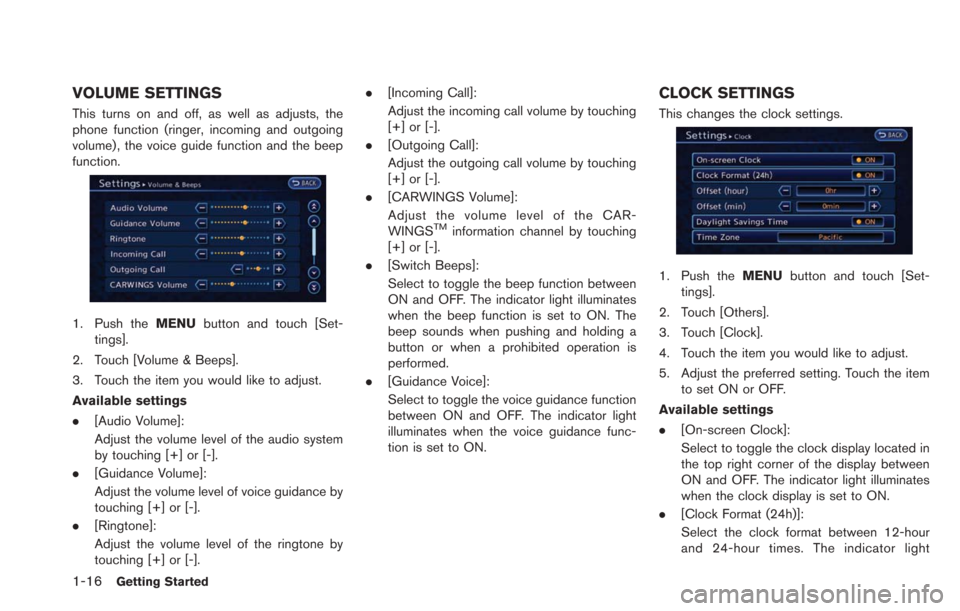
VOLUME SETTINGS
This turns on and off, as well as adjusts, the
phone function (ringer, incoming and outgoing
volume) , the voice guide function and the beep
function.
1. Push theMENUbutton and touch [Set-
tings].
2. Touch [Volume & Beeps].
3. Touch the item you would like to adjust.
Available settings
. [Audio Volume]:
Adjust the volume level of the audio system
by touching [+] or [-].
. [Guidance Volume]:
Adjust the volume level of voice guidance by
touching [+] or [-].
. [Ringtone]:
Adjust the volume level of the ringtone by
touching [+] or [-]. .
[Incoming Call]:
Adjust the incoming call volume by touching
[+] or [-].
. [Outgoing Call]:
Adjust the outgoing call volume by touching
[+] or [-].
. [CARWINGS Volume]:
Adjust the volume level of the CAR-
WINGS
TMinformation channel by touching
[+] or [-].
. [Switch Beeps]:
Select to toggle the beep function between
ON and OFF. The indicator light illuminates
when the beep function is set to ON. The
beep sounds when pushing and holding a
button or when a prohibited operation is
performed.
. [Guidance Voice]:
Select to toggle the voice guidance function
between ON and OFF. The indicator light
illuminates when the voice guidance func-
tion is set to ON.
CLOCK SETTINGS
This changes the clock settings.
1. Push the MENUbutton and touch [Set-
tings].
2. Touch [Others].
3. Touch [Clock].
4. Touch the item you would like to adjust.
5. Adjust the preferred setting. Touch the item to set ON or OFF.
Available settings
. [On-screen Clock]:
Select to toggle the clock display located in
the top right corner of the display between
ON and OFF. The indicator light illuminates
when the clock display is set to ON.
. [Clock Format (24h)]:
Select the clock format between 12-hour
and 24-hour times. The indicator light
Page 40 of 275
![NISSAN LEAF 2013 1.G Navigation Manual 2-2Unique EV functions
Push the(Zero Emission menu) button to
display the menu that includes useful functions
for electric vehicle driving.
Available settings
. [Driving Range]:
The estimated driving](/img/5/324/w960_324-39.png "NISSAN LEAF 2013 1.G Navigation Manual 2-2Unique EV functions
Push the(Zero Emission menu) button to
display the menu that includes useful functions
for electric vehicle driving.
Available settings
. [Driving Range]:
The estimated driving")
2-2Unique EV functions
Push the(Zero Emission menu) button to
display the menu that includes useful functions
for electric vehicle driving.
Available settings
. [Driving Range]:
The estimated driving area within range,
including the current position is displayed on
the map screen.
“Displaying estimated driving range”
(page 2-3)
. [Nearby Stations]:
Charging station information for the current
position area is displayed.
“Finding charging station” (page 3-25)
. [Update Stations]:
Charging station information is updated
through connection to the Nissan CARW-
INGS Data Center.
“Updating charging station informa-
tion” (page 2-7) .
[Energy Info]:
Energy information is displayed on the
screen.
“Energy information display”
(page 2-8)
. [Charging Timer]:
The timer charge function can be set.
“Setting timer charge” (page 2-10)
. [Climate Ctrl. Timer]:
The Climate Ctrl. Timer function can be set.
“Setting Climate Ctrl. Timer”
(page 2-12)
. [CARWINGS]:
Information feeds are displayed and settings
for CARWINGS
TMcan be performed.“5. CARWINGSTM”
. [Settings]:
Set messages that are displayed on the
screen and email messages that can by
received using a personal computer or
cellular phone.
“Unique EV function settings”
(page 2-15) NOTE:
.
Establishing the CARWINGS
TMservice
is necessary before using this service.
. To check the Li-ion battery charging
status or to use the remote heater and
air conditioner using an internet en-
abled smart phone or personal compu-
ter, the following conditions must be
met:
—The vehicle must be located in a
cellular phone or smart phone cov-
erage area.
— The internet enabled cellular phone
or smart phone must be located in a
cellular phone or smart phone cov-
erage area.
— The computer must be connected to
the internet.
— A cellular phone must be used to
communicate with the vehicle.
— A cellular phone capable of text
messaging must be used to receive
text message regarding vehicle
charge status.
. When the remote heater and air condi-
tioner is set, the system operates the
heater and air conditioner to adjust the
in-cabin temperature to a set tempera-
ture.
ZERO EMISSION MENU SCREEN
Page 41 of 275
.When the charge connector is discon-
nected from the vehicle, the heater and
air conditioner operates using vehicle
Li-ion battery electric power.
. If the remote heater and air conditioner
function and Li-ion battery charging are
performed at the same time, Li-ion
battery charging will take longer than
usual due to the power used to heat or
cool the vehicle.
. Certain remote functions require a
compatible smart phone, which is not
included with vehicle.
. CARWINGS
TMinformation system fea-
tures are included through a subscrip-
tion service which requires owner
consent to activate. The subscription
must be active to use these features.
. CARWINGS
TMcommunications may be
received at a verified e-mail address or
by SMS/text messaging-enabled cellu-
lar phone.
. Standard text rates and/or data usage
may apply depending on your carrier.
The estimated driving range and charging
station information are displayed on the map
screen.
CAUTION
Charging station information may not
be detailed in all areas or reflect current
charging station locations. For up to
date information about charging sta-
tions, such as business hours or char-
ging equipment, NISSAN recommends
that you directly access the information
on your own. Additionally, always check
the Li-ion battery available charge and
set a reasonable driving schedule.
DISPLAYING ESTIMATED DRIVING
RANGE
The estimated driving range including the
current position or the destination is displayed
on the map screen depending on the charging
status of the vehicle. A destination or a waypoint
can be set on this screen.
INFO:
The estimated driving range map shows the
predicted area the vehicle can reach on the
basis of the estimated driving range that is
indicated in the meter. Driving habits, the actual
road environment (hills, etc.), and traffic condi-
tions (traffic jams, etc.) will affect the actual
available range.
The Driving Range screen is displayed by
performing the following procedure.
. Push the
button on the steering wheel.
. Push the
(Zero Emission menu) button
and touch [Driving Range].
INFO:
Models with Li-ion battery warmer:
The estimated driving range will increase or
decrease when the air conditioner, heater or Li-
ion battery warmer is turned on or off, or the
vehicle is shifted between D (Drive) and ECO, or
when any other accessory is turned on or off
based on driving.
Unique EV functions2-3
DISPLAYING ESTIMATED DRIVING
RANGE AND CHARGING STATION
INFORMATION
Page 57 of 275

3 Navigation
Map settings ........................................................................\
....... 3-3Map types ........................................................................\
...... 3-3
Displaying current vehicle location .................................. 3-5
Moving map ........................................................................\
... 3-5
Changing scale of map ...................................................... 3-7
Changing map view............................................................. 3-8
Map view settings ................................................................ 3-9
Looking at information on map ...................................... 3-12
Map menu screen ............................................................. 3-14
Map symbols ...................................................................... 3-16
Setting destination.................................................................. 3-17 Destination screen ............................................................ 3-17
Changing region................................................................ 3-18
Finding address ................................................................. 3-20
Finding points of interest ................................................ 3-21
Setting home as destination .......................................... 3-24
Finding charging station .................................................. 3-25
Searching from address book ....................................... 3-28
Searching from history..................................................... 3-28
Finding nearby Points of Interest .................................. 3-29
Using Google Map ........................................................... 3-30
Using route planner .......................................................... 3-31
Setting from stored routes ............................................. 3-31 Setting by phone number ............................................. 3-32
Setting intersection ........................................................ 3-32
Setting city center .......................................................... 3-34
Setting freeway entrance/exit ...................................... 3-35
Setting point on map ..................................................... 3-36
Operations after setting destination .......................... 3-36
Route guidance ...................................................................... 3-39 Procedures after setting route .................................... 3-39
About route guidance .................................................... 3-41
Guidance screen settings ............................................ 3-43
Route screen ................................................................... 3-46
Canceling/reactivating route ........................................ 3-47
Editing route ..................................................................... 3-48
Confirming route ............................................................. 3-52
Voice guidance settings ................................................ 3-53
Recalculating route ........................................................ 3-53
Setting detour route ....................................................... 3-54
Searching for detour route using
traffic information ............................................................ 3-54
Setting conditions for route calculation .................... 3-55
Route guidance settings ............................................... 3-57
Storing a location/route ........................................................ 3-58
Storing location ............................................................... 3-58