phone NISSAN LEAF 2013 1.G Navigation Manual
[x] Cancel search | Manufacturer: NISSAN, Model Year: 2013, Model line: LEAF, Model: NISSAN LEAF 2013 1.GPages: 275, PDF Size: 6.66 MB
Page 74 of 275
![NISSAN LEAF 2013 1.G Navigation Manual 3-18Navigation
.[Home]:
Searches for a route from the current
location to the previously stored home
destination.
“Setting home as destination”
(page 3-24)
. [Charging Stations]:
Searches for char](/img/5/324/w960_324-73.png "NISSAN LEAF 2013 1.G Navigation Manual 3-18Navigation
.[Home]:
Searches for a route from the current
location to the previously stored home
destination.
“Setting home as destination”
(page 3-24)
. [Charging Stations]:
Searches for char")
3-18Navigation
.[Home]:
Searches for a route from the current
location to the previously stored home
destination.
“Setting home as destination”
(page 3-24)
. [Charging Stations]:
Searches for charging stations located near
the current vehicle location.
“Finding charging station” (page 3-25)
. [POIs powered by GoogleTM]:
Key words can be searched for using
Google.
“Google search” (page 5-10)
. [Address Book]:
Searches for a destination from the list of the
stored locations.
“Searching from address book”
(page 3-28)
. [Previous Destinations]:
Sets the previous starting point as the
destination. Searches for the destination
from the previous destinations.
“Searching from history” (page 3-28)
. [Nearby Points of Interest]:
Searches for points of interest near the
current vehicle location, such as restaurants
and charging stations, etc.
“Finding nearby Points of Interest”
(page 3-29)
Available settings (next page screen)
. [ Google(TM) Send-To-Car]:
Searches for a destination using Google
Maps.
“Using Google Map” (page 3-30)
. [Route Planner]:
Sets a route plan downloaded from the
NISSAN Owner’s Portal Website.
“Using route planner” (page 3-31)
. [Stored Routes]:
Selects a stored route.
“Setting from stored routes”
(page 3-31)
. [Phone Number]:
Searches for a point of interest by a
telephone number.
“Setting by phone number”
(page 3-32)
. [Intersection]:
Searches for a destination from an intersec-
tion.
“Setting intersection” (page 3-32)
. [City Center]:
Sets the center of a city as the destination.
“Setting city center” (page 3-34) .
[Freeway Entrance/Exit]:
Searches for a destination from a freeway
entrance/exit.
“Setting freeway entrance/exit”
(page 3-35)
INFO:
. If the required battery power level may be
insufficient when the destination is set, the
system provides guidance to any available
charging stations.
. If setting a destination when the Li-ion
battery power level may be insufficient to
reach the set destination, the information for
charging stations is displayed, allowing you
to set a charging station as the destination.
CHANGING REGION
When setting a destination, the location can be
narrowed down by specifying the region or city.
Page 83 of 275
![NISSAN LEAF 2013 1.G Navigation Manual .[Show Quick Charging Stations Only]:ON: Only the Quick Charge Stations are
displayed in the order of closest location
from the current vehicle position.
OFF: All charging stations are displayed
in th](/img/5/324/w960_324-82.png "NISSAN LEAF 2013 1.G Navigation Manual .[Show Quick Charging Stations Only]:ON: Only the Quick Charge Stations are
displayed in the order of closest location
from the current vehicle position.
OFF: All charging stations are displayed
in th")
.[Show Quick Charging Stations Only]:ON: Only the Quick Charge Stations are
displayed in the order of closest location
from the current vehicle position.
OFF: All charging stations are displayed
in the order of the closest location from
the current vehicle position.
4. The entire route is shown on the map. Touch [Start] to confirm after checking the
displayed route. The system starts route
guidance to the selected destination.
How to view charging station infor-
mation
Touch any icon displayed on the list screen to
show the charging station information screen.
Detailed information about a charging station
can be checked.
Contents of charging station information
.Facility name
. Type of charging devices
: Normal charge icon
: Quick charge icon (for vehicle equipped for
quick charging)
.Type and number of charge connectors
. Whether this facility is open 24 hours a day,
whether the business hours are fixed
Available settings
The following settings are available from the
information screen. Displayed items vary de-
pending on the received information.
. [Show Map]:
Displays a map screen for the selected
charging station. The charging station on
this screen can be set as the destination.
“Operations after setting destination”
(page 3-36) .
[Call]:
Makes a call to the selected charging
station. A cellular phone needs to be
connected beforehand.
“Connecting cellular phone”
(page 1-13)
. [Details]:
Displays the following information about the
selected charging station.
— Address
— Phone number
— Whether there is a charge for using
charging equipment at this facility or not
NOTE:
Equipment that is displayed on the char-
ging station information screen is not
necessarily compatible with a LEAF. Be
sure to check whether equipment can be
used with a LEAF beforehand.
Navigation3-27
Page 88 of 275
3-32Navigation
stored.
SETTING BY PHONE NUMBER
If the phone number of a facility is known, it is
possible to search for a facility by entering the
phone number, and have the system calculate a
route.
INFO:
. If the area code of the specified telephone
number does not exist in the map data, the
system cannot search for the location.
. Only the locations included in the database
in the map data can be searched by the
phone number. Residential phone numbers
cannot be used to search for a location.
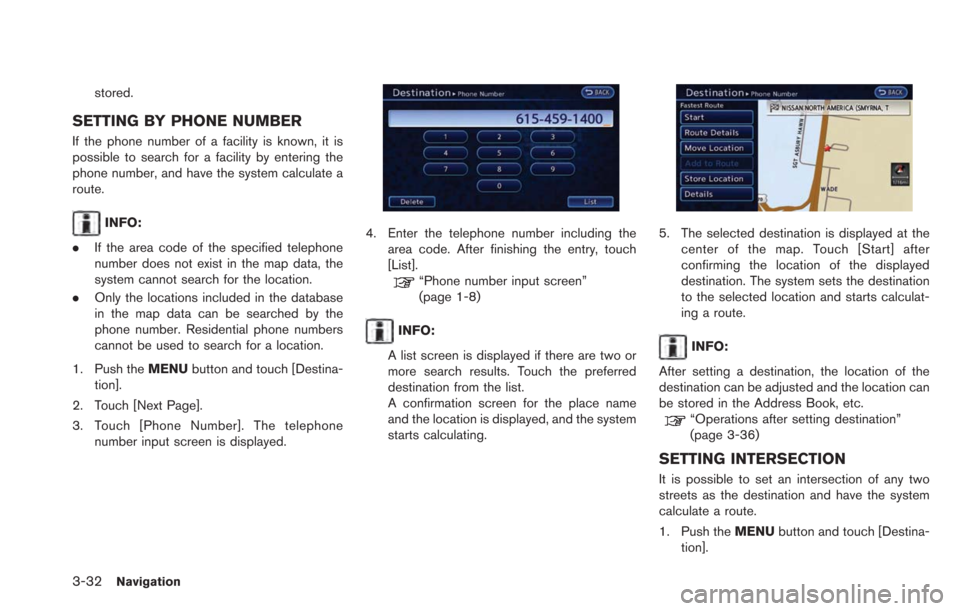
1. Push the MENUbutton and touch [Destina-
tion].
2. Touch [Next Page].
3. Touch [Phone Number]. The telephone number input screen is displayed.4. Enter the telephone number including thearea code. After finishing the entry, touch
[List].
“Phone number input screen”
(page 1-8)
INFO:
A list screen is displayed if there are two or
more search results. Touch the preferred
destination from the list.
A confirmation screen for the place name
and the location is displayed, and the system
starts calculating.
5. The selected destination is displayed at the center of the map. Touch [Start] after
confirming the location of the displayed
destination. The system sets the destination
to the selected location and starts calculat-
ing a route.
INFO:
After setting a destination, the location of the
destination can be adjusted and the location can
be stored in the Address Book, etc.
“Operations after setting destination”
(page 3-36)
SETTING INTERSECTION
It is possible to set an intersection of any two
streets as the destination and have the system
calculate a route.
1. Push the MENUbutton and touch [Destina-
tion].
Page 94 of 275
![NISSAN LEAF 2013 1.G Navigation Manual 3-38Navigation
cannot be selected.
1. Touch [Add to Route].
2. Touch [Add Destination] or [Add Waypoint].The system starts calculating a route that
includes the added destination or waypoint.
When the](/img/5/324/w960_324-93.png "NISSAN LEAF 2013 1.G Navigation Manual 3-38Navigation
cannot be selected.
1. Touch [Add to Route].
2. Touch [Add Destination] or [Add Waypoint].The system starts calculating a route that
includes the added destination or waypoint.
When the")
3-38Navigation
cannot be selected.
1. Touch [Add to Route].
2. Touch [Add Destination] or [Add Waypoint].The system starts calculating a route that
includes the added destination or waypoint.
When the calculation is finished, the route is
displayed.
Storing location
A searched location can be stored in the
Address Book. Then it can be easily retrieved
and set as a destination (or waypoint).
1. Touch [Store Location]. A message isdisplayed, the location is stored in the
Address Book. The corresponding icon is
displayed at the set location on the map.
Viewing information about searched
location
Information (street address and phone number)
about points of interest stored in the map data
can be displayed.
1. Touch [Details]. Information about the loca-
tion is displayed.
2. Touch the item you would like to set. Available settings
.[Show Map]:Returns to the previous screen.
.[Call]:
Makes a call to the selected charging
station. A cellular phone needs to be
connected beforehand.
“Connecting cellular phone”
(page 1-13)
.[Details]:This appears only when a charging
station is set as a destination. Displays
detailed information including the type
and number of charging devices existing
at the selected charging station.
INFO:
Information about locations is not displayed
while driving.
Page 121 of 275
![NISSAN LEAF 2013 1.G Navigation Manual 2. Set the direction that sounds the alarm bytouching []or[].
3. Touch [OK]. The selected direction is set.
INFO:
After the direction is set and [Direction] is
selected and set again, a confirmation m](/img/5/324/w960_324-120.png "NISSAN LEAF 2013 1.G Navigation Manual 2. Set the direction that sounds the alarm bytouching []or[].
3. Touch [OK]. The selected direction is set.
INFO:
After the direction is set and [Direction] is
selected and set again, a confirmation m")
2. Set the direction that sounds the alarm bytouching []or[].
3. Touch [OK]. The selected direction is set.
INFO:
After the direction is set and [Direction] is
selected and set again, a confirmation message
is displayed. Confirm the contents of the
message then touch [Yes]. The set direction is
overwritten.
Distance:
Sets the alarm to sound when reaching a
specific distance to the home or stored address.
1. Touch [Distance].
2. Touch the preferred distance option. The indicator of the selected distance illumi-
nates. Available distance options:
.
150 feet (50 m)
. 300 feet (100 m)
. 1000 feet (300 m)
. 1500 feet (500 m)
INFO:
Once the direction and the distance to sound an
alarm are set, the system will sound the alarm
when the vehicle enters the triggering zone.
Phone number:
Stores the telephone number of the home or a
stored address.
1. Touch [Phone No.]. The telephone number entry screen is displayed.
2. Enter the telephone number of the home or stored address.
“Phone number input screen”
(page 1-8) 3. Touch [OK]. The telephone number is
stored.
Group (only for stored addresses):
This groups the stored addresses. By grouping
the stored addresses, the [Sorted By Group]
option of the sort function can be used more
effectively in the [Sort] mode.
1. Touch [Group].
2. Touch the preferred group. When the indicator of the selected group illuminates,
the stored address is classified into the
applicable group.
Entry Numbers (only for stored addresses):
Index the position numbers of any two stored
addresses in the list.
Navigation3-65
Page 135 of 275

4 Audio system
Audio operation precautions ................................................... 4-2Radio ........................................................................\
............... 4-2
Compact Disc (CD) player ................................................ 4-3
USB (Universal Serial Bus) ............................................... 4-4
iPod
®player and iPhone®................................................. 4-6
Compressed Audio Files (MP3/WMA) .......................... 4-7
Bluetooth
®streaming audio ........................................... 4-11
FM-AM-SAT radio with compact disc (CD) player ........ 4-11 Audio main operation ....................................................... 4-11 FM-AM-SAT radio operation ........................................ 4-12
Compact Disc (CD) player operation........................ 4-14
iPod
®player operation .................................................. 4-16
Pandora®operation (if so equipped) ........................ 4-17
USB memory operation ................................................. 4-19
Bluetooth
®streaming audio operation ...................... 4-20
Auxiliary input jack .......................................................... 4-23
Steering wheel switches for audio control .............. 4-24
Page 136 of 275
4-2Audio system
RADIO
Push the power switch to the "ACC" or "ON"
position and push the radio band select button
to turn on the radio. If you listen to the radio with
the READY to drive indicator light is OFF, the
power switch should be pushed to the "ACC"
position.
Radio reception is affected by station signal
strength, distance from radio transmitter, build-
ings, bridges, mountains and other external
influences. Intermittent changes in reception
quality normally are caused by these external
influences.
Using a cellular phone in or near the
vehicle may influence radio reception
quality.
Radio reception
Your NISSAN radio system is equipped with
state-of-the-art electronic circuits to enhance
radio reception. These circuits are designed to
extend reception range, and to enhance the
quality of that reception.
However there are some general characteristics
of both FM and AM radio signals that can affect
radio reception quality in a moving vehicle, even
when the finest equipment is used. These
characteristics are completely normal in a given
reception area, and do not indicate any mal-function in your NISSAN radio system.
Reception conditions will constantly change
because of vehicle movement. Buildings, terrain,
signal distance and interference from other
vehicles can work against ideal reception.
Described below are some of the factors that
can affect your radio reception.
Some cellular phones or other devices may
cause interference or a buzzing noise to come
from the audio system speakers. Storing the
device in a different location may reduce or
eliminate the noise.
While charging the vehicle, radio programs may
not be tuned in to because the reception of the
radio becomes weak.
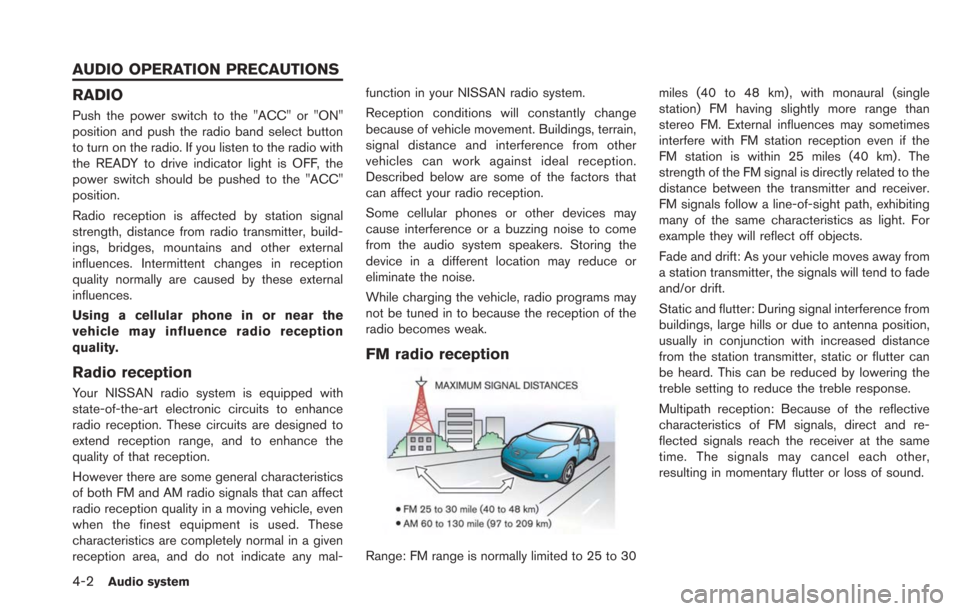
FM radio reception
Range: FM range is normally limited to 25 to 30
miles (40 to 48 km) , with monaural (single
station) FM having slightly more range than
stereo FM. External influences may sometimes
interfere with FM station reception even if the
FM station is within 25 miles (40 km). The
strength of the FM signal is directly related to the
distance between the transmitter and receiver.
FM signals follow a line-of-sight path, exhibiting
many of the same characteristics as light. For
example they will reflect off objects.
Fade and drift: As your vehicle moves away from
a station transmitter, the signals will tend to fade
and/or drift.
Static and flutter: During signal interference from
buildings, large hills or due to antenna position,
usually in conjunction with increased distance
from the station transmitter, static or flutter can
be heard. This can be reduced by lowering the
treble setting to reduce the treble response.
Multipath reception: Because of the reflective
characteristics of FM signals, direct and re-
flected signals reach the receiver at the same
time. The signals may cancel each other,
resulting in momentary flutter or loss of sound.
AUDIO OPERATION PRECAUTIONS
Page 139 of 275
.To avoid damage and loss of func-
tion when using a USB device, note
the following precautions.
— Do not bend the cable exces-
sively 1.6 in (40 mm) radius
minimum.
— Do not twist the cable exces- sively (more than 180 degrees) .
— Do not pull or drop the cable.
— Do not hit or press the USB port or USB device with hands, feet,
or objects.
— Do not store objects with sharp edges in the storage area where
the cable is stored.
— Do not leave the USB device and attached devices in the vehicle
compartment. When not in use
for extended periods of time,
store the cable and USB device
in a clean, dust free environment
at room temperature and with-
out direct sun exposure.
— Do not use the cable for any other purposes than its intended
use in the vehicle. The vehicle is not equipped with a USB device.
USB devices should be purchased separately
as necessary.
This system cannot be used to format USB
devices. To format a USB device, use a personal
computer.
In some states/area, the USB device for the
front seats plays only sound without images for
regulatory reasons, even when the vehicle is
parked.
This system supports various USB memory
devices, USB hard drives, iPhone
®and iPod®
players. Some USB devices may not be
supported by this system.
.
Partitioned USB devices may not play
correctly.
. Some characters used in other languages
(Chinese, Japanese, etc.) may not appear
properly in the display. Using English lan-
guage characters with a USB device is
recommended.
General notes for USB use:
. The USB device may not function when the
passenger compartment temperature is ex-
tremely high. Lower the temperature before
use. .
During cold weather or rainy days, the player
may malfunction due to humidity. If this
occurs, remove the USB device and dehu-
midify or ventilate the USB player comple-
tely.
. Do not connect a USB device if a connector,
cable or USB port is wet. Allow the
connector, cable, and USB port to dry
completely before connecting the USB
device. (Wait for 24 hours or more until it
is dry.) If the connector and USB port are
exposed to fluids other than water, evapora-
tive residue may cause a short circuit
between the connector pins and USB port.
In this case, replace the cable and USB port.
Otherwise damage to the USB device and a
loss of function may occur.
. If the cable is damaged (insulation cut,
connectors cracked, contamination such as
liquids, dust, dirt, etc. in the connectors) , do
not use the cable. Replace the cable with a
new one.
. Do not put a USB device in a location where
static electricity occurs, electrical noise is
generated or hot air from the air conditioner
blows directly on it. Doing so may cause the
data stored on the USB device to be
corrupted.
Audio system4-5
Page 140 of 275
4-6Audio system
Notes for iPod®use:
iPod®is a trademark of Apple Inc., registered in
the U.S. and other countries.
. Improperly plugging in the iPod
®may cause
a checkmark to be displayed on and off
(flickering) . Always make sure that the iPod
®
is connected properly.
. An iPod nano®(1st Generation) may remain
in fast forward or rewind mode if it is
connected during a seek operation. In this
case, please manually reset the iPod
®.
. An iPod nano®(2nd Generation) will con-
tinue to fast-forward or rewind if it is
disconnected during a seek operation.
. An incorrect song title may appear when the
Play Mode is changed while using an iPod
nano
®(2nd Generation)
. Audiobooks may not play in the same order
as they appear on an iPod
®.
. Large video files cause slow responses in an
iPod
®. The vehicle display may momentarily
black out, but will soon recover.
. If an iPod
®automatically selects large video
files while in the shuffle mode, the vehicle
display may momentarily black out, but will
soon recover.
iPod®PLAYER AND iPhone®
This system supports iPod®and iPhone®
models.
. A USB cable for connecting an iPod®or
iPhone®is not included with this system.
Use your own USB cable to connect an
iPod
®or iPhone®.
. Once connected to the system, operation
will not be possible from an iPod
®or
iPhone®.
. Some functions may be limited depending
on the model of iPod
®or iPhone®and/or the
version of the firmware currently installed.
. When connected to the system, the battery
of an iPod
®or iPhone®will be recharged.
. Do not use headphones or other acces-
sories when an iPod
®or iPhone®is con-
nected to the system. Doing so could
prevent the system from operating properly.
. NISSAN does not accept any responsibility
for any data that may be lost from an iPod
®
or iPhone®while it is connected to the
system.
. Please refer to the Owner’s Manual of the
iPod
®or iPhone®that is connected to the
system. .
Large video files cause slow responses in an
iPod
®. The vehicle center display may
momentarily black out, but it will soon
recover.
. If an iPod
®automatically selects large video
files while in the shuffle mode, the vehicle
center display may momentarily black out,
but it will soon recover.
. An iPod nano
®(1st Generation) may remain
in fast forward or rewind mode if it is
connected during a seek operation. In this
case, please manually reset the iPod
®.
. After the Album Shuffle setting has been set
when an iPod touch
®1G is connected, if the
USB cable is pulled out and inserted again,
or if the power switch is placed in the "ACC"
or "OFF" positions from the "ON" position,
the song that was last played will not be
saved.
. Songs that are being played back cannot be
cued using the track down operation of an
iPod touch
®1G. To use this function,
update the firmware of the iPod®that is
being used (version 2.2.1 or later) .
. After the Album Shuffle setting has been set
when an iPod touch
®2G is connected, if the
USB cable is pulled out and inserted again,
or if the power switch is placed in the "ACC"
or "OFF" positions from the "ON" position,
Page 141 of 275
the song that was last played will not be
saved. This can be fixed by updating the
iPod
®’s firmware (version 4.0 or later) .
. After the Album Shuffle setting has been set
when an iPhone
®is connected, if the USB
cable is pulled out and inserted again, or if
the power switch is placed in the "ACC" or
"OFF" positions from the "ON" position, the
song that was last played will not be saved.
. After the Album Shuffle setting has been set
when an iPhone
®3G or iPhone®3GS is
connected, if the USB cable is pulled out
and inserted again, or if the power switch is
placed in the "ACC" or "OFF" positions from
the "ON" position, the song that was last
played will not be saved. This can be fixed
by updating the iPhone
®’s firmware (version
4.0 or later) .
. When an iPhone
®3G, iPhone®3GS or
iPhone®4 is playing back music, if a
Bluetooth®audio device is connected, or if
the iPod®mode is switched to again after
switching to the Bluetooth®streaming audio
mode and playing back Bluetooth®audio,
there may be no audio output. In this case,
disconnect the iPhone
®from the system and
then reconnect it again. .
There may be no audio output of Bluetooth
®
streaming audio if an iPhone®3G or an
iPhone®3GS and a Bluetooth®audio
device are connected to the system and
the audio mode is toggled back and forth
between the Bluetooth
®streaming audio
mode and the iPod®mode. In this case,
disconnect the Bluetooth®streaming audio
from the system and connect again. Addi-
tionally, this can be fixed by updating the
iPhone
®’s firmware (version 4.0 or later) .
iPod®and iPhone®are a trademark of Apple
Inc., registered in the U.S. and other countries.
Compatibility
The following models are available.
. Fifth generation iPod®(firmware version 1.3
or later)
. iPod Classic
®(firmware version 1.1.2 or
later)
. First generation iPod touch
®(firmware ver-
sion 2.2.1 or later)
. Second generation iPod touch
®(firmware
version 2.2.1 or later)
. Third generation iPod touch
®(firmware
version 5.1.1 or later)
. First generation iPod nano
®(firmware ver-
sion 1.3.1 or later) .
Second generation iPod nano
®(firmware
version 1.1.3 or later)
. Third generation iPod nano
®(firmware ver-
sion 1.1 or later)
. Fourth generation iPod nano
®(firmware
version 1.0.3 or later)
. Fifth generation iPod nano
®(firmware ver-
sion 1.0.1PC or later)
. iPhone
®(firmware version 3.1.3 or later)
. iPhone®3G (firmware version 3.1.3 or later)
. iPhone®3GS (firmware version 3.1.3 or
later)
. iPhone
®4 (firmware version 4.0 or later)
. iPhone®4S (firmware version 5.0 or later)
Make sure that the iPod®firmware version is
updated.
COMPRESSED AUDIO FILES (MP3/
WMA)
Explanation of terms
. MP3 — MP3 is short for Moving Pictures
Experts Group Audio Layer 3. MP3 is the
most well known compressed digital audio
file format. This format allows for near "CD
quality" sound, but at a fraction of the size of
normal audio files. MP3 conversion of an
audio track can reduce the file size by
approximately a 10:1 ratio (Sampling: 44.1
Audio system4-7