phone NISSAN LEAF 2013 1.G Navigation Manual
[x] Cancel search | Manufacturer: NISSAN, Model Year: 2013, Model line: LEAF, Model: NISSAN LEAF 2013 1.GPages: 275, PDF Size: 6.66 MB
Page 172 of 275
![NISSAN LEAF 2013 1.G Navigation Manual 5-12CARWINGSTM
1. Push theMENUbutton and touch [CARW-
INGS].
2. Touch [CARWINGS Settings].
3. Touch the item you would like to set.
Available settings
. [Charging Message]:
Sends a notification to a p](/img/5/324/w960_324-171.png "NISSAN LEAF 2013 1.G Navigation Manual 5-12CARWINGSTM
1. Push theMENUbutton and touch [CARW-
INGS].
2. Touch [CARWINGS Settings].
3. Touch the item you would like to set.
Available settings
. [Charging Message]:
Sends a notification to a p")
5-12CARWINGSTM
1. Push theMENUbutton and touch [CARW-
INGS].
2. Touch [CARWINGS Settings].
3. Touch the item you would like to set.
Available settings
. [Charging Message]:
Sends a notification to a preset e-mail
address. This notification includes the
charge connector status and the charge
completion.
“Setting messages that are received
by email” (page 5-12)
. [Sign in]:
The user ID and password can be entered.
“Inputting user ID and password”
(page 1-11)
. [Auto-Update Stations]:
When information for new charging stations
is received while the vehicle is connecting to
the NISSAN CARWINGS Data Center, the information is automatically downloaded and
the map data is updated.
. [Service Reminders]:
The information that is sent from the
NISSAN CARWINGS Data Center is dis-
played.
. [Information Feed Setting]:
Set the timing of the connection to the
NISSAN CARWINGS Data Center, or edit
the list of the information feeds.
“Information feed setting” (page 5-15)
. [Vehicle Data Transmission Setting]:
— [Share Vehicle Information]:
Vehicle information (driving history, etc.) is
automatically sent to the NISSAN CARWINGS
Data Center. — [Share Vehicle Info When Powered On]:
Vehicle information (such as the driving history,
etc.) is automatically sent to the NISSAN
CARWINGS Data Center every time the power
switch is turned to the ACC, ON or READY
position. — [Delete Share Vehicle Information]
Vehicle information (driving history, etc.) is
deleted.
. [Unit ID Information]:
The necessary information for user registra-
tion is displayed.
“Displaying unit ID information” (page 5-18)
. [Reset all CARWINGS settings to default]:
All CARWINGS
TMsettings are reset to the
factory default setting.
“Reset all CARWINGSTMsettings to
default” (page 5-18)
SETTING MESSAGES THAT ARE
RECEIVED BY EMAIL
Sends a notification to a preset e-mail address.
This notification includes the charge connector
status and the charge completion. To receive a
notification to your personal computer or cellular
phone, an e-mail address should be set before-
hand. For details, access the NISSAN Owner’s
Portal Website.
Storing location for receiving charge
connector disconnected notifica-
tions
A maximum of 5 regularly used charging stations
can be registered. If the charging connector is
disconnected in one of these locations, an email
informing you of this will be sent.
1. Touch [Store charging plug reminder loca- tions].
CARWINGSTMSETTINGS
Page 178 of 275
![NISSAN LEAF 2013 1.G Navigation Manual 5-18CARWINGSTM
2. Confirm the contents of the message, thentouch [Yes].
INFO:
Once the information feeds are deleted from the
history, the deleted items cannot be restored.
DISPLAYING UNIT ID INFORMAT](/img/5/324/w960_324-177.png "NISSAN LEAF 2013 1.G Navigation Manual 5-18CARWINGSTM
2. Confirm the contents of the message, thentouch [Yes].
INFO:
Once the information feeds are deleted from the
history, the deleted items cannot be restored.
DISPLAYING UNIT ID INFORMAT")
5-18CARWINGSTM
2. Confirm the contents of the message, thentouch [Yes].
INFO:
Once the information feeds are deleted from the
history, the deleted items cannot be restored.
DISPLAYING UNIT ID INFORMATION
1. Push the MENUbutton and touch [CARW-
INGS].
2. Touch [CARWINGS Settings].
3. Touch [Unit ID Information]. The unit in- formation screen is displayed.
Available information.Unit ID
.TCU ID
.TCU Phone No.
.SIM ID
.VIN
4. Touch [BACK] to return to the previous screen.
RESET ALL CARWINGSTMSETTINGS
TO DEFAULT
All CARWINGSTMare reset to the factory
default setting.
1. Touch [Reset all CARWINGS settings to default]. A confirmation message is dis-
played.
2. Confirm the contents of the message, thentouch [Yes].
Page 179 of 275
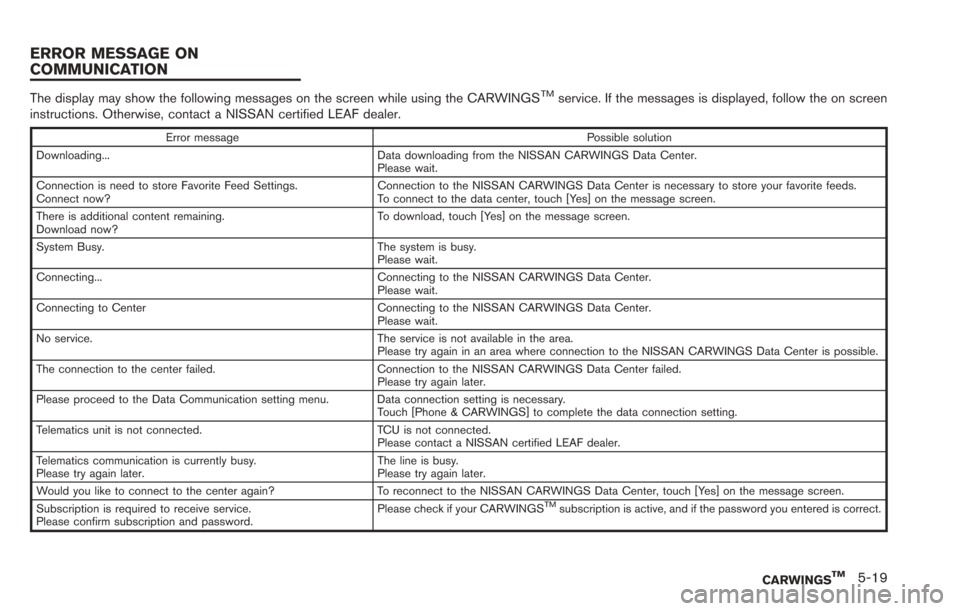
The display may show the following messages on the screen while using the CARWINGSTMservice. If the messages is displayed, follow the on screen
instructions. Otherwise, contact a NISSAN certified LEAF dealer.
Error message Possible solution
Downloading... Data downloading from the NISSAN CARWINGS Data Center. Please wait.
Connection is need to store Favorite Feed Settings.
Connect now? Connection to the NISSAN CARWINGS Data Center is necessary to store your favorite feeds.
To connect to the data center, touch [Yes] on the message screen.
There is additional content remaining.
Download now? To download, touch [Yes] on the message screen.
System Busy. The system is busy. Please wait.
Connecting... Connecting to the NISSAN CARWINGS Data Center. Please wait.
Connecting to Center Connecting to the NISSAN CARWINGS Data Center. Please wait.
No service. The service is not available in the area. Please try again in an area where connection to the NISSAN CARWINGS Data Center is possible.
The connection to the center failed. Connection to the NISSAN CARWINGS Data Center failed. Please try again later.
Please proceed to the Data Communication setting menu. Data connection setting is necessary. Touch [Phone & CARWINGS] to complete the data connection setting.
Telematics unit is not connected. TCU is not connected. Please contact a NISSAN certified LEAF dealer.
Telematics communication is currently busy.
Please try again later. The line is busy.
Please try again later.
Would you like to connect to the center again? To reconnect to the NISSAN CARWINGS Data Center, touch [Yes] on the message screen.
Subscription is required to receive service.
Please confirm subscription and password. Please check if your CARWINGS
TMsubscription is active, and if the password you entered is correct.
CARWINGSTM5-19
ERROR MESSAGE ON
COMMUNICATION
Page 180 of 275
![NISSAN LEAF 2013 1.G Navigation Manual 5-20CARWINGSTM
AUTOMATIC CARRIER SETTINGS
1. Push theMENUbutton and touch [Set-
tings].
2. Touch [Phone & CARWINGS].
3. Touch [Data Communication].
4. Touch [Select Carrier].
5. Touch [Automatic Setup](/img/5/324/w960_324-179.png "NISSAN LEAF 2013 1.G Navigation Manual 5-20CARWINGSTM
AUTOMATIC CARRIER SETTINGS
1. Push theMENUbutton and touch [Set-
tings].
2. Touch [Phone & CARWINGS].
3. Touch [Data Communication].
4. Touch [Select Carrier].
5. Touch [Automatic Setup")
5-20CARWINGSTM
AUTOMATIC CARRIER SETTINGS
1. Push theMENUbutton and touch [Set-
tings].
2. Touch [Phone & CARWINGS].
3. Touch [Data Communication].
4. Touch [Select Carrier].
5. Touch [Automatic Setup]. The indicator illuminates when the item is set.
MANUAL CARRIER SETTINGS
1. Push the MENUbutton and touch [Set-
tings].
2. Touch [Phone & CARWINGS].
3. Touch [Data Communication].
4. Touch [Select Carrier].
5. Touch [Manual Setup]. The indicator illumi- nates, and then [Select Carrier] can be
touched.
6. Touch [Select Carrier]. A list screen is displayed.
DATA COMMUNICATION SETTINGS
Page 188 of 275
![NISSAN LEAF 2013 1.G Navigation Manual 6-6Viewing technical information
.[Call]:
Makes a call for the selected charging
station. A cellular phone should be con-
nected beforehand.
“Connecting cellular phone”
(page 1-13)
. [Details]:
Di](/img/5/324/w960_324-187.png "NISSAN LEAF 2013 1.G Navigation Manual 6-6Viewing technical information
.[Call]:
Makes a call for the selected charging
station. A cellular phone should be con-
nected beforehand.
“Connecting cellular phone”
(page 1-13)
. [Details]:
Di")
6-6Viewing technical information
.[Call]:
Makes a call for the selected charging
station. A cellular phone should be con-
nected beforehand.
“Connecting cellular phone”
(page 1-13)
. [Details]:
Displays detailed information including the
type and number of charging devices exist-
ing at the selected charging station.
NavTraffic information is a subscription service
offered by SiriusXM Satellite Radio.
This service provides real-time information
regarding traffic flow, accidents, road construc-
tion and other incidents, where available.
NavTraffic combines information from commer-
cial and public traffic data providers including
government departments of transportation, po-
lice, emergency services, road sensors, cameras
and aircraft reports. The traffic information is
broadcast to the vehicle by the SiriusXM
Satellite Radio. Available traffic information on
the route the driver selected is shown on the
navigation screen so traffic conditions between
you and the destination are known. Three types
of real-time traffic information for major road-
ways are shown on the navigation system:
* Unscheduled traffic data for example, acci-
dents and disabled vehicles.
* Scheduled traffic data, for example road
construction and road closures.
* Traffic flow information (rate of speed data) .WARNING
NavTraffic information is not a substi-
tute for attentive driving. Traffic condi-
tions change constantly and emergency
situations can arise without warning.
Relying only on NavTraffic information
may lead to a collision and could result
in serious personal injury.
INFO:
. Flow information is provided only for roads
equipped with traffic sensors and is not
available in all markets covered by the
service. Flow data may not be available on
portions of a road that is under construction.
. If a contract is not completed for NavTraffic
traffic information service, a message ap-
pears, and it will not be possible to check
the information on the traffic information
menu.
NavTraffic information is available in limited
markets. To subscribe or to check if this service
is available in the area:
call 1-866-635-2349 or see www.siriusxm.
com/navtraffic
VIEWING AVAILABLE TRAFFIC
INFORMATION
Page 195 of 275
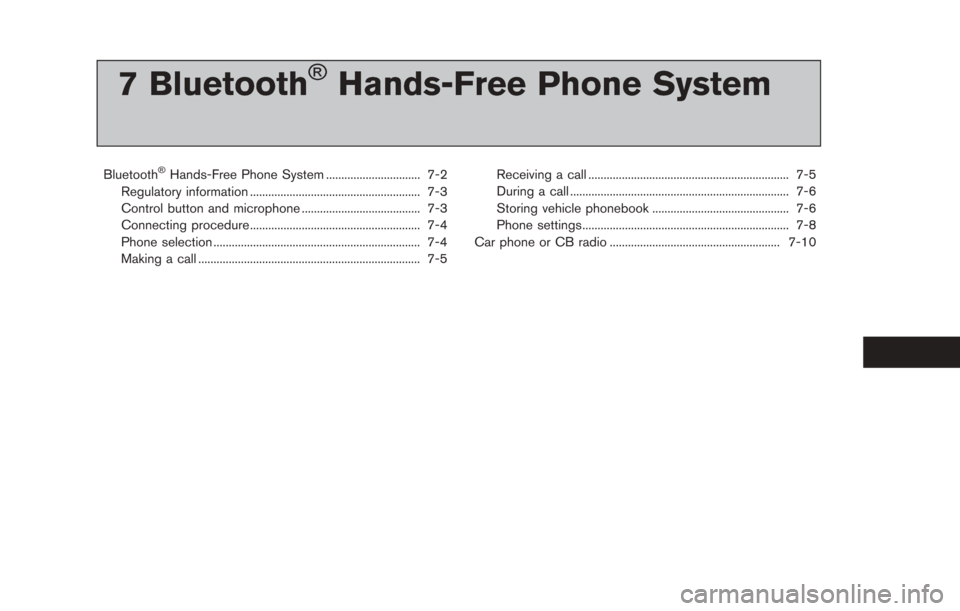
7 Bluetooth®Hands-Free Phone System
Bluetooth®Hands-Free Phone System ............................... 7-2
Regulatory information ........................................................ 7-3
Control button and microphone ....................................... 7-3
Connecting procedure........................................................ 7-4
Phone selection .................................................................... 7-4
Making a call ........................................................................\
. 7-5 Receiving a call .................................................................. 7-5
During a call ........................................................................\
7-6
Storing vehicle phonebook ............................................. 7-6
Phone settings.................................................................... 7-8
Car phone or CB radio ........................................................ 7-10
Page 196 of 275
7-2Bluetooth®Hands-Free Phone System
WARNING
.Use a phone after stopping your
vehicle in a safe location. If you
have to use a phone while driving,
exercise extreme caution at all
times so full attention may be given
to vehicle operation.
. If you find yourself unable to devote
full attention to vehicle operation
while talking on the phone, pull off
the road to a safe location and stop
your vehicle before doing so.
CAUTION
To avoid draining the vehicle battery,
use a phone after the READY to drive
indicator light is ON.
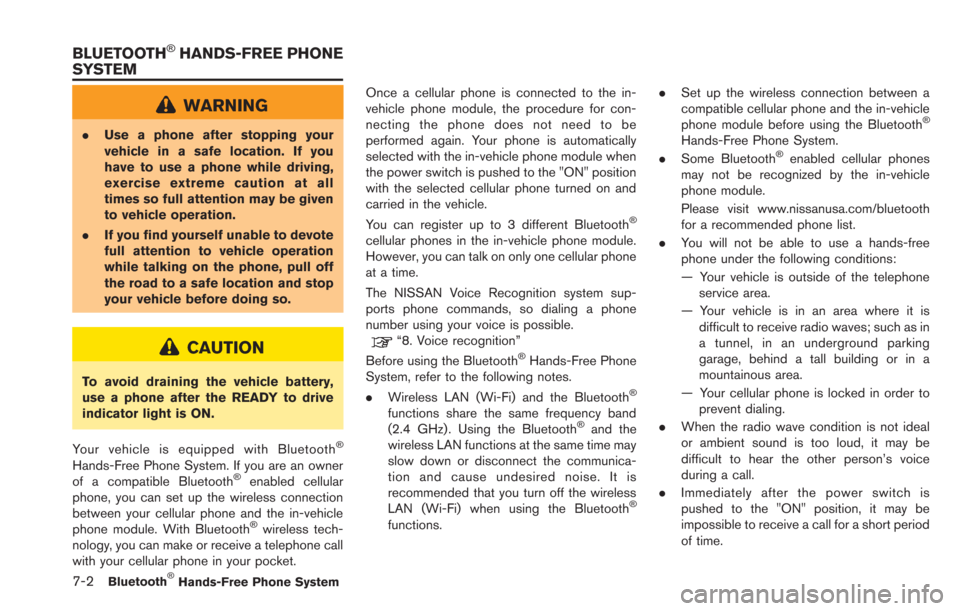
Your vehicle is equipped with Bluetooth
®
Hands-Free Phone System. If you are an owner
of a compatible Bluetooth®enabled cellular
phone, you can set up the wireless connection
between your cellular phone and the in-vehicle
phone module. With Bluetooth
®wireless tech-
nology, you can make or receive a telephone call
with your cellular phone in your pocket. Once a cellular phone is connected to the in-
vehicle phone module, the procedure for con-
necting the phone does not need to be
performed again. Your phone is automatically
selected with the in-vehicle phone module when
the power switch is pushed to the "ON" position
with the selected cellular phone turned on and
carried in the vehicle.
You can register up to 3 different Bluetooth
®
cellular phones in the in-vehicle phone module.
However, you can talk on only one cellular phone
at a time.
The NISSAN Voice Recognition system sup-
ports phone commands, so dialing a phone
number using your voice is possible.
“8. Voice recognition”
Before using the Bluetooth®Hands-Free Phone
System, refer to the following notes.
. Wireless LAN (Wi-Fi) and the Bluetooth
®
functions share the same frequency band
(2.4 GHz) . Using the Bluetooth®and the
wireless LAN functions at the same time may
slow down or disconnect the communica-
tion and cause undesired noise. It is
recommended that you turn off the wireless
LAN (Wi-Fi) when using the Bluetooth
®
functions. .
Set up the wireless connection between a
compatible cellular phone and the in-vehicle
phone module before using the Bluetooth
®
Hands-Free Phone System.
. Some Bluetooth®enabled cellular phones
may not be recognized by the in-vehicle
phone module.
Please visit www.nissanusa.com/bluetooth
for a recommended phone list.
. You will not be able to use a hands-free
phone under the following conditions:
— Your vehicle is outside of the telephone
service area.
— Your vehicle is in an area where it is difficult to receive radio waves; such as in
a tunnel, in an underground parking
garage, behind a tall building or in a
mountainous area.
— Your cellular phone is locked in order to prevent dialing.
. When the radio wave condition is not ideal
or ambient sound is too loud, it may be
difficult to hear the other person’s voice
during a call.
. Immediately after the power switch is
pushed to the "ON" position, it may be
impossible to receive a call for a short period
of time.
BLUETOOTH®HANDS-FREE PHONE
SYSTEM
Page 197 of 275
.Do not place the cellular phone in an area
surrounded by metal or far away from the in-
vehicle phone module to prevent tone quality
degradation and wireless connection dis-
ruption.
. While a cellular phone is connected through
the Bluetooth
®wireless connection, the
battery power of the cellular phone may
discharge quicker than usual.
. If the Bluetooth
®Hands-Free Phone System
seems to be malfunctioning, please visit
www.nissanusa.com/bluetooth for trouble-
shooting help.
. Some cellular phones or other devices may
cause interference or a buzzing noise to
come from the audio system speakers.
Storing the device in a different location
may reduce or eliminate the noise.
. Refer to the cellular phone Owner’s Manual
regarding the telephone pairing procedure
specific to your phone, battery charging,
cellular phone antenna, etc.
. The antenna display on the monitor will not
coincide with the antenna display of some
cellular phones.
. The battery display on the monitor will not
coincide with the battery display of some
cellular phones. .
Keep the interior of the vehicle as quiet as
possible to hear the caller’s voice clearly as
well as to minimize its echoes.
. If reception between callers is unclear,
adjusting the incoming or outgoing call
volume may improve the clarity.
REGULATORY INFORMATION
FCC Regulatory information
.CAUTION: To maintain compliance with
FCC’s RF exposure guidelines, use only
the supplied antenna. Unauthorized antenna,
modification, or attachments could damage
the transmitter and may violate FCC regula-
tions.
. Operation is subject to the following two
conditions:
— this device may not cause interference
and
— this device must accept any interference, including interference that may cause
undesired operation of the device
IC Regulatory information
. Operation is subject to the following two
conditions:
— this device may not cause interference,
and — this device must accept any interference,
including interference that may cause
undesired operation of the device.
. This Class B digital apparatus meets all
requirements of the Canadian Interference-
Causing Equipment Regulations.
Bluetooth
®trademark:
Bluetooth®is a trademark owned
by Bluetooth®SIG, Inc., and
licensed to Clarion.
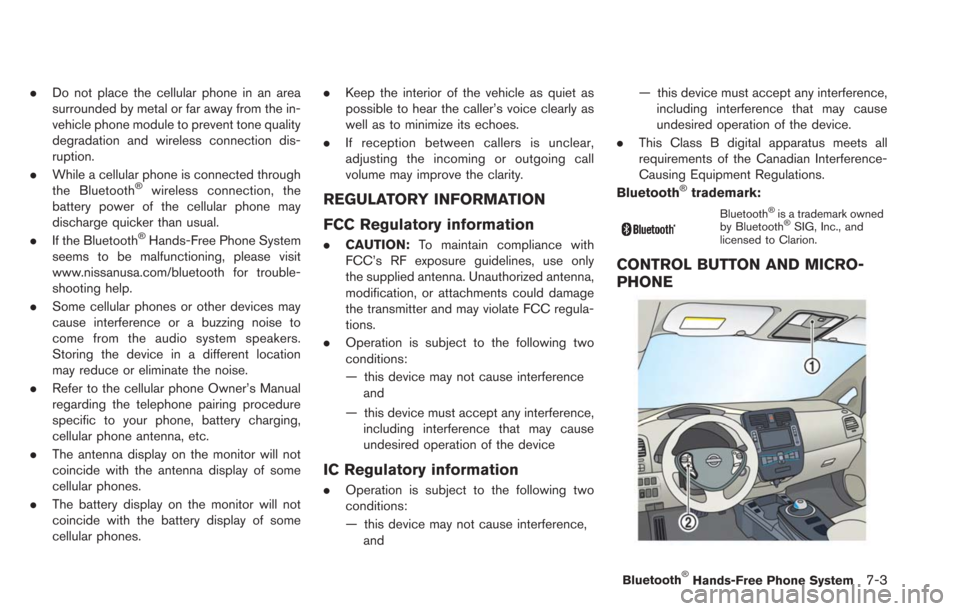
CONTROL BUTTON AND MICRO-
PHONE
Bluetooth®Hands-Free Phone System7-3
Page 198 of 275
![NISSAN LEAF 2013 1.G Navigation Manual 7-4Bluetooth®Hands-Free Phone System
*1Microphone
*2button on the steering wheel
CONNECTING PROCEDURE
1. Push thebutton on the steering wheel
and touch [Connect Phone].
2. When a PIN code appears on](/img/5/324/w960_324-197.png "NISSAN LEAF 2013 1.G Navigation Manual 7-4Bluetooth®Hands-Free Phone System
*1Microphone
*2button on the steering wheel
CONNECTING PROCEDURE
1. Push thebutton on the steering wheel
and touch [Connect Phone].
2. When a PIN code appears on")
7-4Bluetooth®Hands-Free Phone System
*1Microphone
*2button on the steering wheel
CONNECTING PROCEDURE
1. Push thebutton on the steering wheel
and touch [Connect Phone].
2. When a PIN code appears on the screen, operate the Bluetooth®compatible cellular
phone to enter the PIN code.
The procedure for connecting of the cellular
phone varies according to each cellular
phone. See the cellular phone Owner’s Manual for the details.
You can also visit www.nissanusa.com/blue-
tooth or call NISSAN Consumer Affairs
Department for instructions on pairing
NISSAN recommended cellular phones.
When the connection process is completed,
the screen will return to the Phone menu
display.
PHONE SELECTION
Up to 3 cellular phones can be registered to the
system.
1. Push the
MENUbutton and touch [Phone].
2. Touch [Connected Phones]. The list of the
registered cellular phones is displayed.
3. Touch one of the registered cellular phonesfrom the list.
4. Touch [Connect]. If you select a cellularphone that is different from the one currently
connected, the newly selected phone will be
connected to the system.
Page 199 of 275
![NISSAN LEAF 2013 1.G Navigation Manual MAKING A CALL
To make a call, follow this procedure.
1. Push the
button on the steering wheel.
2. Touch a method for making a call.Available methods
.[Vehicle Phonebook]:Select a telephone number from](/img/5/324/w960_324-198.png "NISSAN LEAF 2013 1.G Navigation Manual MAKING A CALL
To make a call, follow this procedure.
1. Push the
button on the steering wheel.
2. Touch a method for making a call.Available methods
.[Vehicle Phonebook]:Select a telephone number from")
MAKING A CALL
To make a call, follow this procedure.
1. Push the
button on the steering wheel.
2. Touch a method for making a call.Available methods
.[Vehicle Phonebook]:Select a telephone number from the
phonebook, and then make a call. Before
making a call, the telephone number must
be registered in the phonebook.
.[Call History]:Select a telephone number from the
incoming or outgoing history lists, and
then make a call.
.[Handset Phonebook]:Download the phonebook from a cellular
phone that is connected to the vehicle,
select a telephone number from the
phonebook, and then make a call. Phone-
book data should be registered in the system after downloading the phonebook
from the cellular phone that is connected
to the vehicle. If the phonebook is not
registered, a message that reminds you
of phonebook data download will be
displayed.
.[Dial Number]:
Input the phone number manually using
the keypad displayed on the screen.
“How to input letters and numbers”
(page 1-7)
3. Dialing will start and the screen will change to the call in progress screen.
4. After the call is over, perform one of the following actions to finish the call.
.Push thebutton on the steering
wheel.
.Touch [Hang up].
RECEIVING A CALL
When you hear a phone ring, the display will
change to the incoming call mode. To receive a
call, perform one of the following procedures
listed below.
. Push the
button on the steering wheel.
. Touch [Answer].
There are some options available when receiving
a call. Select one of the following displayed on
the screen.
.[Answer]:
Accept an incoming call to talk.
. [Hold Call]:
Put an incoming call on hold.
. [Reject Call]:
Reject an incoming call.
To finish the call, perform one of the following
procedures listed below.
Bluetooth®Hands-Free Phone System7-5