charging NISSAN LEAF 2017 1.G Navigation Manual
[x] Cancel search | Manufacturer: NISSAN, Model Year: 2017, Model line: LEAF, Model: NISSAN LEAF 2017 1.GPages: 268, PDF Size: 1.41 MB
Page 45 of 268
.When the remote heater and air condi-
tioner is set, the system operates the
heater and air conditioner to adjust the
in-cabin temperature to a set tempera-
ture.
. When the charge connector is discon-
nected from the vehicle, the heater and
air conditioner operates using vehicle
Li-ion battery electric power.
. If the remote heater and air conditioner
function and Li-ion battery charging are
performed at the same time, Li-ion
battery charging will take longer than
usual due to the power used to heat or
cool the vehicle.
. Certain remote functions require a
compatible smart phone, which is not
included with vehicle.
. NissanConnect
SMEV information sys-
tem features are included through a
subscription service which requires
owner consent to activate. The sub-
scription must be active to use these
features.
. NissanConnect
SMEV communications
may be received at a verified e-mail
address or by SMS/text messaging-
enabled cellular phone. .
Standard text rates and/or data usage
may apply depending on your carrier.
DISPLAYING ESTIMATED DRIV-
ING RANGE AND CHARGING
STATION INFORMATION
The estimated driving range and charging station
information are displayed on the map screen.
CAUTION
Charging station information may not be
detailed in all areas or reflect current
charging station locations. For up to date
information about charging stations,
such as business hours or charging
equipment, NISSAN recommends that
you directly access the information on
your own. Additionally, always check the
Li-ion battery available charge and set a
reasonable driving schedule.
2-3
2. Unique EV functions
Page 46 of 268
DISPLAYING ESTIMATED DRIVING
RANGE
The estimated driving range including the current
position or the destination is displayed on the
map screen depending on the charging status of
the vehicle. A destination or a waypoint can be
set on this screen.
INFO:
The estimated driving range map shows the
predicted area the vehicle can reach on the basis
of the estimated driving range that is indicated in
the meter. Driving habits, the actual road
environment (hills, etc.) , and traffic conditions
(traffic jams, etc.) will affect the actual available
range.
To display the estimated driving range, push
<
> and touch [Driving Range].
INFO:
Models with Li-ion battery warmer:
The estimated driving range will increase or
decrease when the air conditioner, heater or Li-
ion battery warmer is turned on or off, or the
vehicle is shifted between D (Drive) and ECO, or
when any other accessory is turned on or off
based on driving.
How to view driving range screen
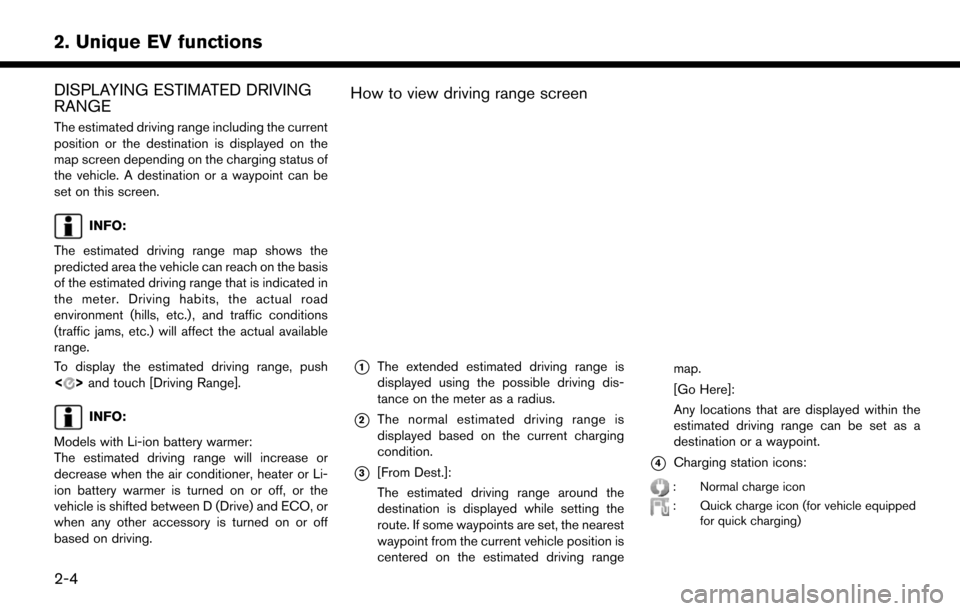
*1The extended estimated driving range is
displayed using the possible driving dis-
tance on the meter as a radius.
*2The normal estimated driving range is
displayed based on the current charging
condition.
*3[From Dest.]:
The estimated driving range around the
destination is displayed while setting the
route. If some waypoints are set, the nearest
waypoint from the current vehicle position is
centered on the estimated driving range map.
[Go Here]:
Any locations that are displayed within the
estimated driving range can be set as a
destination or a waypoint.*4Charging station icons:
: Normal charge icon
: Quick charge icon (for vehicle equipped
for quick charging)
2-4
2. Unique EV functions
Page 47 of 268
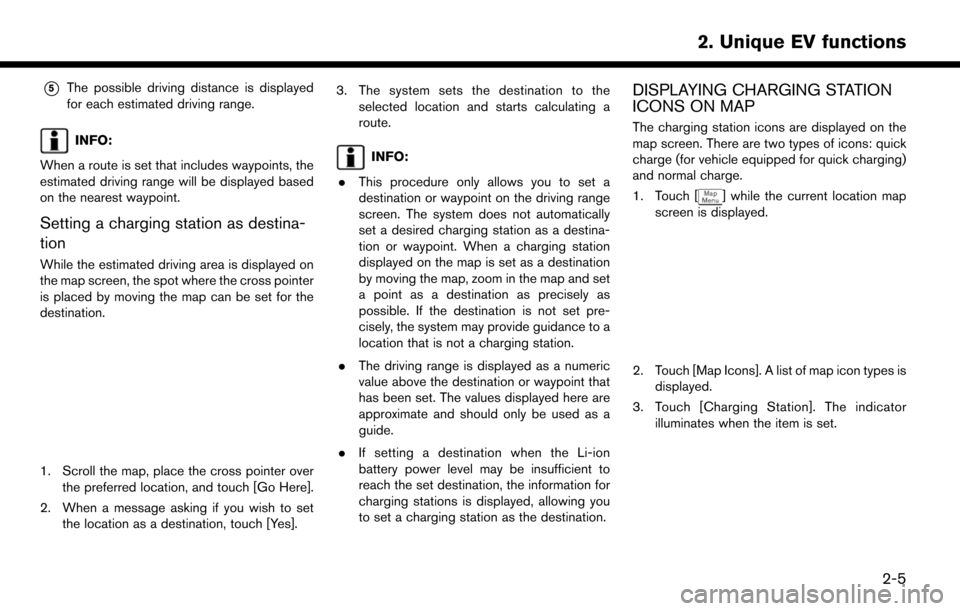
*5The possible driving distance is displayed
for each estimated driving range.
INFO:
When a route is set that includes waypoints, the
estimated driving range will be displayed based
on the nearest waypoint.
Setting a charging station as destina-
tion
While the estimated driving area is displayed on
the map screen, the spot where the cross pointer
is placed by moving the map can be set for the
destination.
1. Scroll the map, place the cross pointer over the preferred location, and touch [Go Here].
2. When a message asking if you wish to set the location as a destination, touch [Yes]. 3. The system sets the destination to the
selected location and starts calculating a
route.
INFO:
. This procedure only allows you to set a
destination or waypoint on the driving range
screen. The system does not automatically
set a desired charging station as a destina-
tion or waypoint. When a charging station
displayed on the map is set as a destination
by moving the map, zoom in the map and set
a point as a destination as precisely as
possible. If the destination is not set pre-
cisely, the system may provide guidance to a
location that is not a charging station.
. The driving range is displayed as a numeric
value above the destination or waypoint that
has been set. The values displayed here are
approximate and should only be used as a
guide.
. If setting a destination when the Li-ion
battery power level may be insufficient to
reach the set destination, the information for
charging stations is displayed, allowing you
to set a charging station as the destination.
DISPLAYING CHARGING STATION
ICONS ON MAP
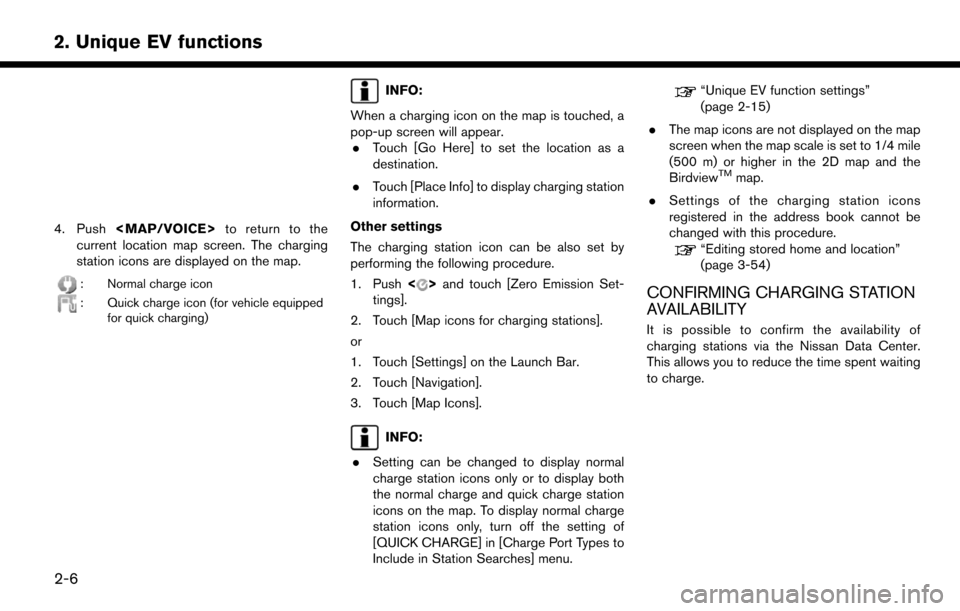
The charging station icons are displayed on the
map screen. There are two types of icons: quick
charge (for vehicle equipped for quick charging)
and normal charge.
1. Touch [
] while the current location map
screen is displayed.
2. Touch [Map Icons]. A list of map icon types is displayed.
3. Touch [Charging Station]. The indicator illuminates when the item is set.
2-5
2. Unique EV functions
Page 48 of 268
4. Push
Page 49 of 268
![NISSAN LEAF 2017 1.G Navigation Manual Viewing from Zero Emission menu
screen
1. Push<>and touch [NissanConnect EV].
2. Touch [Charging Availability].
3. Select the area for charging station search.
.[Near Current Location]: Displays a lis](/img/5/531/w960_531-48.png "NISSAN LEAF 2017 1.G Navigation Manual Viewing from Zero Emission menu
screen
1. Push<>and touch [NissanConnect EV].
2. Touch [Charging Availability].
3. Select the area for charging station search.
.[Near Current Location]: Displays a lis")
Viewing from Zero Emission menu
screen
1. Push<>and touch [NissanConnect EV].
2. Touch [Charging Availability].
3. Select the area for charging station search.
.[Near Current Location]: Displays a list of charging stations that
are near the current vehicle location.
.[Near Destination]:Displays a list of charging stations that
are near the destination, when a destina-
tion has been set.
.[Near Scroll Position]:Displays a list of charging stations that
are near the cursor when the map has
been moved.
4. A list screen is displayed. Confirm the charging station information from the list. Full/vacant information of charging station is
indicated by icon color.
Icons Charging sta-
tion type Availability
Normal charge
iconGreen: Fully vacant
Yellow: Partly vacant
Red: Full
Gray: No information or
unclear
Quick charge
icon
Normal charge
iconClosed or out of service
Quick charge
icon
Normal charge
iconNo information
Quick charge
icon
INFO:
Touch [Options] to select types of charging
stations you wish to include in the searched
location list.
Available items: . [Show Quick Charging Stations Only]:
Shows charging stations with quick charger.
. [Open 24-hours]:
Shows charging stations that are open 24 hours.
. [Show Available Charging Stations]:
Show all charging stations that are available.
Viewing from map menu
Charging station information can also be ob-
tained from map menu.
1. Touch [
] while the current location map
screen is displayed and then touch [Charge
Avail.].
2. The system connects to Nissan Data Center, and a list of search results will be displayed.
UPDATING CHARGING STATION IN-
FORMATION
An active NissanConnectSMEV subscription is
needed to update charging station information.
Information about the charging stations that are
located around the current position, destination
and your home is updated through connection to
the Nissan Data Center.
While the vehicle is connecting to the Nissan
Data Center, information related to charging
stations in the area around your home will be
automatically updated. Also, when the driving
range is restricted, information related to char-
ging stations in the area near the current vehicle
location will also be automatically updated.
2-7
2. Unique EV functions
Page 50 of 268
“Unique EV function settings” (page 2-15)
Charging station information for the area around
a location set can be updated manually by using
the following procedure.
1. Push <
>and touch [Update Stations].
2. Touch the preferred setting item. The system then connects to the Nissan Data Center and
the update of charging station information
will start.
Available settings
.[Near Current Location]:
Charging station information for the area
around the current position is updated.
.[Near Destination]:Charging station information for the area
around the destination is updated.
.[Near Home]:Charging station information for the area
around your home is updated. Registra-
tion of your home in the Address Book is
necessary before using this item.
“Storing home location”
(page 3-51)
.[Near a location on the Map]:
Charging station information for the area
where the cross pointer is placed by
moving the map is updated. 3. When the update is completed, a message is
displayed.
INFO:
.When [Stop] is touched while updating
information, connection to the Nissan Data
Center is disconnected.
. If communication with the Nissan Data
Center is disconnected due to poor signal
reception, a message will be displayed.
Touch [Yes] to restart the download.
ENERGY INFORMATION DIS-
PLAY
Energy economy and energy usage information
are displayed.
VIEWING ENERGY ECONOMY IN-
FORMATION
Estimated driving range, average energy econo-
my and instant energy economy are displayed.
1. Push <
>and touch [Energy Info].
2. Touch [Energy Economy].
*1Driving Range:
The possible driving distance based on the
current charging status is displayed.
*2Variable distance:
When the climate control system is turned
on, the additional distance the vehicle can
drive by turning the climate control system
2-8
2. Unique EV functions
Page 51 of 268

off is displayed. When the climate control
system is turned off, the distance the vehicle
can drive less if the climate control system is
turned on is displayed.
*3Instant:
The system shows the distance that the
vehicle can travel using 1kWh.
*4Average:
The average energy economy from the
previous to the next resets is displayed.
*5[Reset]:
Touch [Reset] to reset the average energy
economy. After resetting the average energy
economy, it is stored in the history.
VIEWING ENERGY ECONOMY HIS-
TO RY
The previous 10 histories of the average energy
economy are displayed.
1. Push<
>and touch [Energy Info].
2. Touch [History].
*1Driving Range:
The possible driving distance based on the
current charging status is displayed.
*2Variable distance:
When the climate control system is turned
on, the additional distance the vehicle can
drive by turning the climate control system
off is displayed. When the climate control
system is turned off, the distance the vehicle
can drive less if the climate control system is
turned on is displayed.
*3Previous Reset Intervals:
The average energy economy history is
displayed from along with the average for
previous Reset-to-Reset period.
*4Current Period:
The latest average energy economy is
displayed.
VIEWING ENERGY USAGE INFOR-
MATION
Estimated driving range and energy usage of
various systems are displayed.
1. Push <
>and touch [Energy Info].
2. Touch [Energy Usage].
*1Driving Range:
The possible driving distance based on the
current charging status is displayed.
*2Variable distance:
When the climate control system is turned
on, the additional distance the vehicle can
drive by turning the climate control system
off is displayed. When the climate control
system is turned off, the distance the vehicle
can drive less if the climate control system is
turned on is displayed.
2-9
2. Unique EV functions
Page 52 of 268
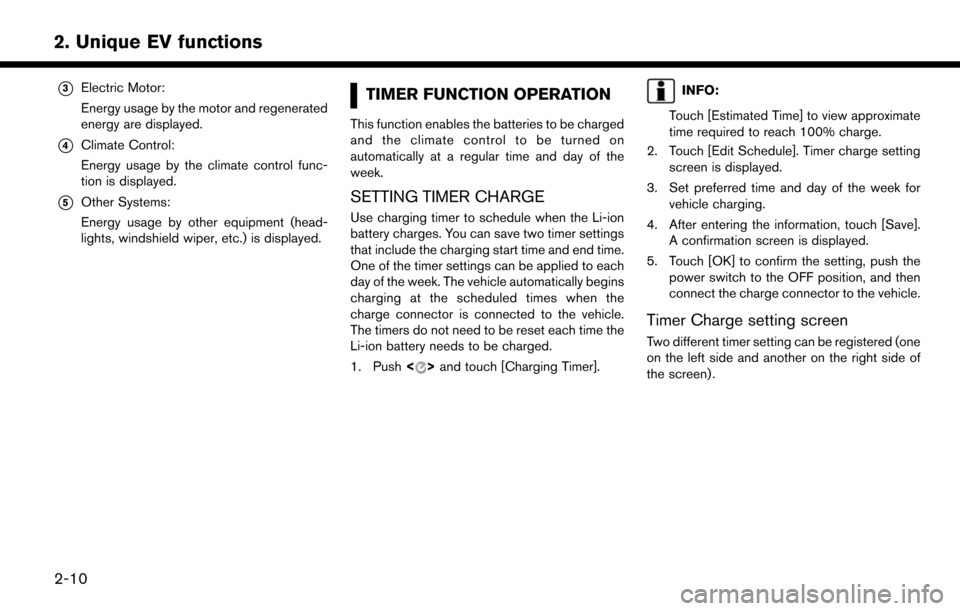
*3Electric Motor:
Energy usage by the motor and regenerated
energy are displayed.
*4Climate Control:
Energy usage by the climate control func-
tion is displayed.
*5Other Systems:
Energy usage by other equipment (head-
lights, windshield wiper, etc.) is displayed.
TIMER FUNCTION OPERATION
This function enables the batteries to be charged
and the climate control to be turned on
automatically at a regular time and day of the
week.
SETTING TIMER CHARGE
Use charging timer to schedule when the Li-ion
battery charges. You can save two timer settings
that include the charging start time and end time.
One of the timer settings can be applied to each
day of the week. The vehicle automatically begins
charging at the scheduled times when the
charge connector is connected to the vehicle.
The timers do not need to be reset each time the
Li-ion battery needs to be charged.
1. Push<
>and touch [Charging Timer].
INFO:
Touch [Estimated Time] to view approximate
time required to reach 100% charge.
2. Touch [Edit Schedule]. Timer charge setting screen is displayed.
3. Set preferred time and day of the week for vehicle charging.
4. After entering the information, touch [Save]. A confirmation screen is displayed.
5. Touch [OK] to confirm the setting, push the power switch to the OFF position, and then
connect the charge connector to the vehicle.
Timer Charge setting screen
Two different timer setting can be registered (one
on the left side and another on the right side of
the screen) .
2-10
2. Unique EV functions
Page 53 of 268
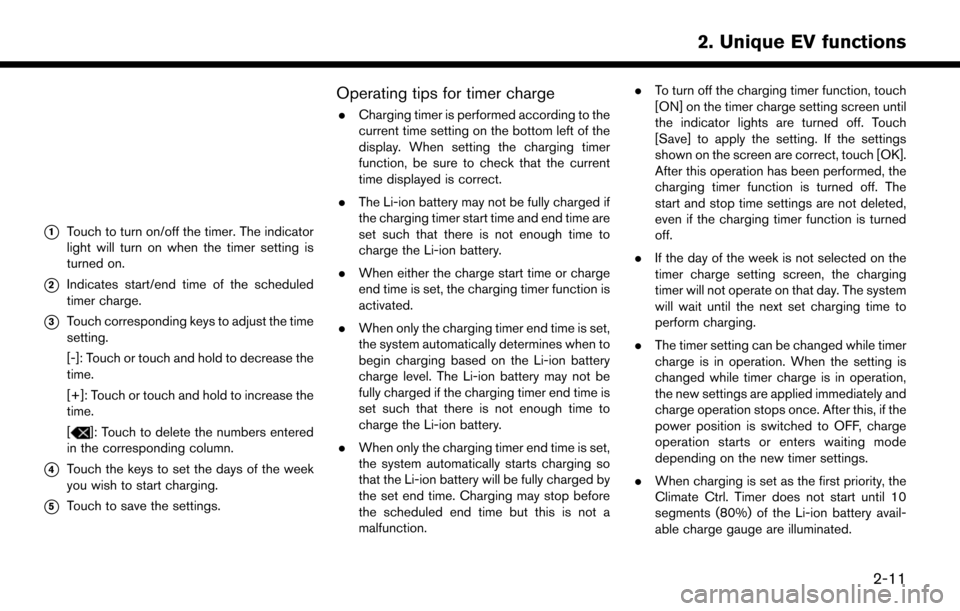
*1Touch to turn on/off the timer. The indicator
light will turn on when the timer setting is
turned on.
*2Indicates start/end time of the scheduled
timer charge.
*3Touch corresponding keys to adjust the time
setting.
[-]: Touch or touch and hold to decrease the
time.
[+]: Touch or touch and hold to increase the
time.
[
]: Touch to delete the numbers entered
in the corresponding column.
*4Touch the keys to set the days of the week
you wish to start charging.
*5Touch to save the settings.
Operating tips for timer charge
. Charging timer is performed according to the
current time setting on the bottom left of the
display. When setting the charging timer
function, be sure to check that the current
time displayed is correct.
. The Li-ion battery may not be fully charged if
the charging timer start time and end time are
set such that there is not enough time to
charge the Li-ion battery.
. When either the charge start time or charge
end time is set, the charging timer function is
activated.
. When only the charging timer end time is set,
the system automatically determines when to
begin charging based on the Li-ion battery
charge level. The Li-ion battery may not be
fully charged if the charging timer end time is
set such that there is not enough time to
charge the Li-ion battery.
. When only the charging timer end time is set,
the system automatically starts charging so
that the Li-ion battery will be fully charged by
the set end time. Charging may stop before
the scheduled end time but this is not a
malfunction. .
To turn off the charging timer function, touch
[ON] on the timer charge setting screen until
the indicator lights are turned off. Touch
[Save] to apply the setting. If the settings
shown on the screen are correct, touch [OK].
After this operation has been performed, the
charging timer function is turned off. The
start and stop time settings are not deleted,
even if the charging timer function is turned
off.
. If the day of the week is not selected on the
timer charge setting screen, the charging
timer will not operate on that day. The system
will wait until the next set charging time to
perform charging.
. The timer setting can be changed while timer
charge is in operation. When the setting is
changed while timer charge is in operation,
the new settings are applied immediately and
charge operation stops once. After this, if the
power position is switched to OFF, charge
operation starts or enters waiting mode
depending on the new timer settings.
. When charging is set as the first priority, the
Climate Ctrl. Timer does not start until 10
segments (80%) of the Li-ion battery avail-
able charge gauge are illuminated.
2-11
2. Unique EV functions
Page 54 of 268
.When the climate control is set as the first
priority, the Climate Ctrl. Timer will operate
when the remaining Li-ion battery power
displayed in the meter is 2 segments (15%)
or higher.
. The Li-ion battery will not charge when the
charge connector is connected to the vehicle
until the next scheduled charge start time
when the charge timer is active. If necessary,
use immediate charge or remote charge to
charge the Li-ion battery.
. Some charging stations used to perform
normal charge are equipped with timer
functions. If the charger timer function and
the vehicle timer are both set, and the two
timers are not set to operate at the same
time, it is possible that the charger will not
start or that the battery will not be fully
charged.
. The Li-ion battery may not be fully charged
when the Li-ion battery warmer (if so
equipped) operates while charging using
the Charging Timer.
. Set only the end time for the timer charging
when charging in cold weather. The vehicle
automatically determines when to start char-
ging to fully charge the Li-ion battery, even if
the Li-ion battery warmer (if so equipped) operates. Charging ends before the set end
time if the Li-ion battery is fully charged.
SETTING CLIMATE CTRL. TIMER
While the charger is connected to vehicle, this
function pre-heats or pre-cools the passenger
compartment of the vehicle to the set tempera-
ture before driving. This helps reduce power
consumption from the Li-ion battery.
“Unique EV function settings” (page 2-15)
The Climate Ctrl. Timer operates the air condi-
tioner using power from the charger. Electric
power from the Li-ion battery is not used.
The Climate Ctrl. Timer function allows two
different timer settings. Each timer charge
function can be set to activate on a different
day of the week.
Once the Climate Ctrl. Timer is set, it will
complete air conditioning by the time that is
set. It is not necessary to set the Climate Ctrl.
Timer everyday.
WARNING
Even if the Climate Ctrl. Timer is set, the
temperature in the passenger compart-
ment may become high if the system
automatically stops. Do not leave chil-
dren or adults who would normally require the support of others alone in
your vehicle. Pets should not be left
alone either. On hot, sunny days, tem-
peratures in a closed vehicle could
quickly become high enough to cause
severe or possibly fatal injuries to people
or animals.
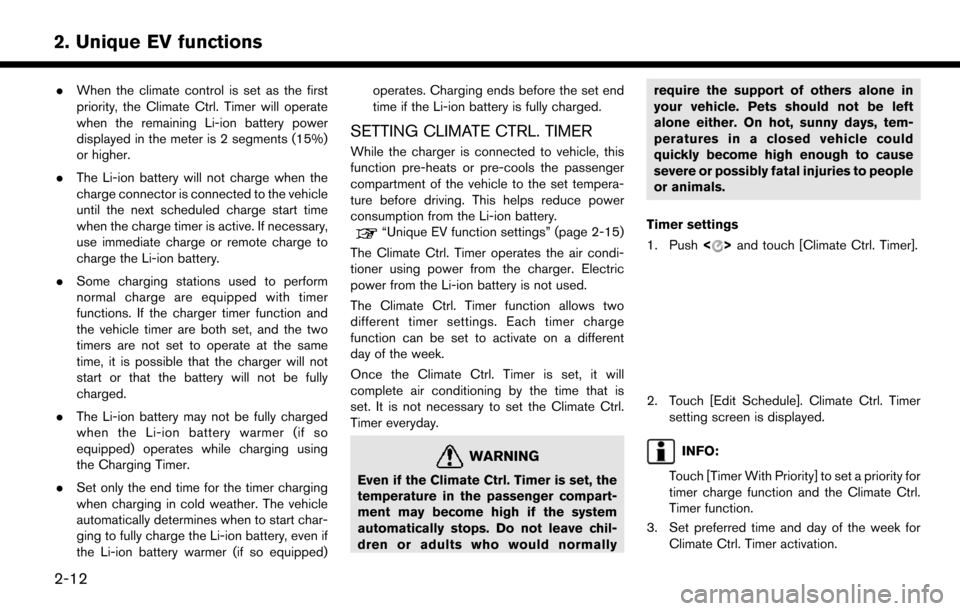
Timer settings
1. Push <
>and touch [Climate Ctrl. Timer].
2. Touch [Edit Schedule]. Climate Ctrl. Timer
setting screen is displayed.
INFO:
Touch [Timer With Priority] to set a priority for
timer charge function and the Climate Ctrl.
Timer function.
3. Set preferred time and day of the week for Climate Ctrl. Timer activation.
2-12
2. Unique EV functions