charging NISSAN LEAF 2017 1.G Navigation Manual
[x] Cancel search | Manufacturer: NISSAN, Model Year: 2017, Model line: LEAF, Model: NISSAN LEAF 2017 1.GPages: 268, PDF Size: 1.41 MB
Page 202 of 268
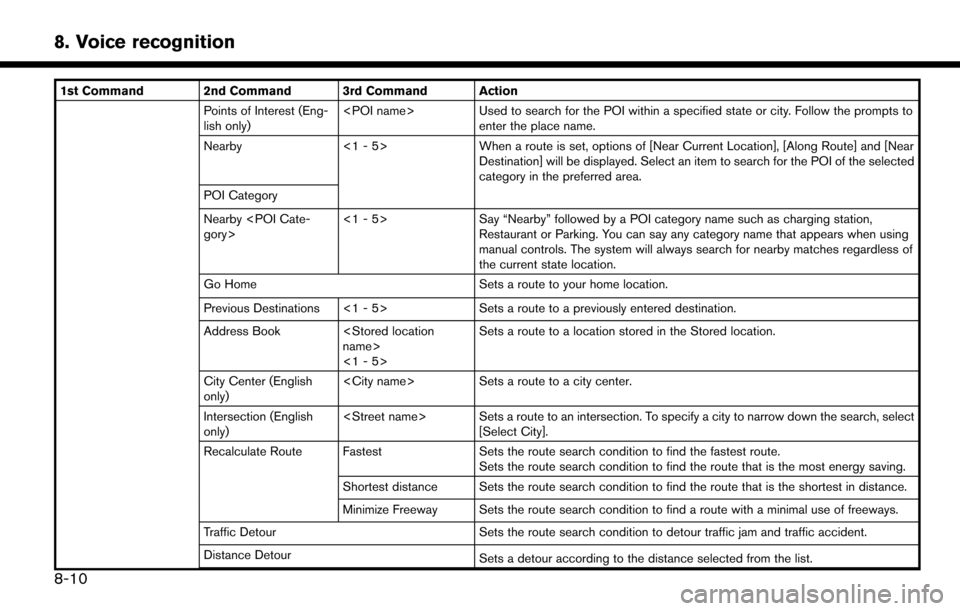
1st Command 2nd Command 3rd Command ActionPoints of Interest (Eng-
lish only)
enter the place name.
Nearby <1 - 5>When a route is set, options of [Near Current Location], [Along Route] and [Near
Destination] will be displayed. Select an item to search for the POI of the selected
category in the preferred area.
POI Category
Nearby
Say “Nearby” followed by a POI category name such as charging station,
Restaurant or Parking. You can say any category name that appears when using
manual controls. The system will always search for nearby matches regardless of
the current state location.
Go Home Sets a route to your home location.
Previous Destinations <1 - 5> Sets a route to a previously entered destination.
Address Book
<1 - 5>Sets a route to a location stored in the Stored location.
City Center (English
only)
Sets a route to a city center.
Intersection (English
only)
[Select City].
Recalculate Route Fastest Sets the route search condition to find the fastest route.
Sets the route search condition to find the route that is the most energy saving.
Shortest distance Sets the route search condition to find the route that is the shortest in distance.
Minimize Freeway Sets the route search condition to find a route with a minimal use of freeways.
Traffic Detour Sets the route search condition to detour traffic jam and traffic accident.
Distance Detour Sets a detour according to the distance selected from the list.
8-10
8. Voice recognition
Page 208 of 268
.When selecting “Yes” in the pop-up screen that displays after a new USB audio device is connected, the USB audio device is registered in the voice
recognition system and is selected automatically. One iPodŠand one USB device can be registered in the system. If a USB audio device is newly
registered, old data is overwritten. It may take a few moments to register an audio device. If you want to enable voice operation for music stored in a
previously registered audio device, select the device you want to use in advance. Even when a device has been previously registered, simply connecting
the device will not result in it being selected automatically.
“Voice recognition settings” (page 8-18)
. The Voice Recognition system may not function when the song information is too long (artist names, album titles, song titles and play lists, etc.) .
. The SiriusXM function will not operate without a subscription to SiriusXM Satellite Radio.
. When playing USB files with the voice recognition system, do not pronounce the extension attached to the file name (such as “.mp3”) .
. Song titles registered in ID3 tags cannot be pronounced for voice recognition operation.
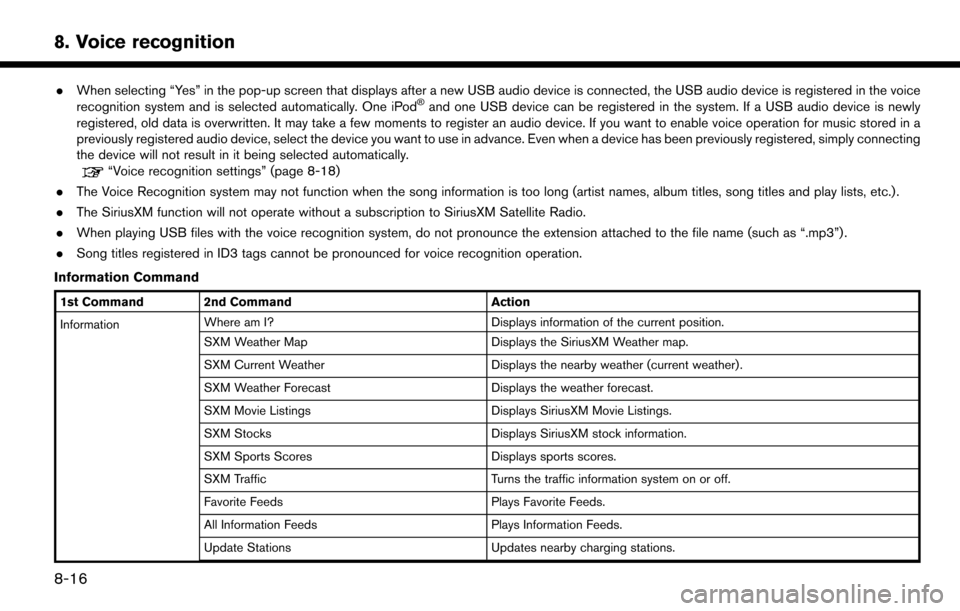
Information Command
1st Command 2nd Command Action
Information Where am I?
Displays information of the current position.
SXM Weather Map Displays the SiriusXM Weather map.
SXM Current Weather Displays the nearby weather (current weather).
SXM Weather Forecast Displays the weather forecast.
SXM Movie Listings Displays SiriusXM Movie Listings.
SXM Stocks Displays SiriusXM stock information.
SXM Sports Scores Displays sports scores.
SXM Traffic Turns the traffic information system on or off.
Favorite Feeds Plays Favorite Feeds.
All Information Feeds Plays Information Feeds.
Update Stations Updates nearby charging stations.
8-16
8. Voice recognition
Page 209 of 268
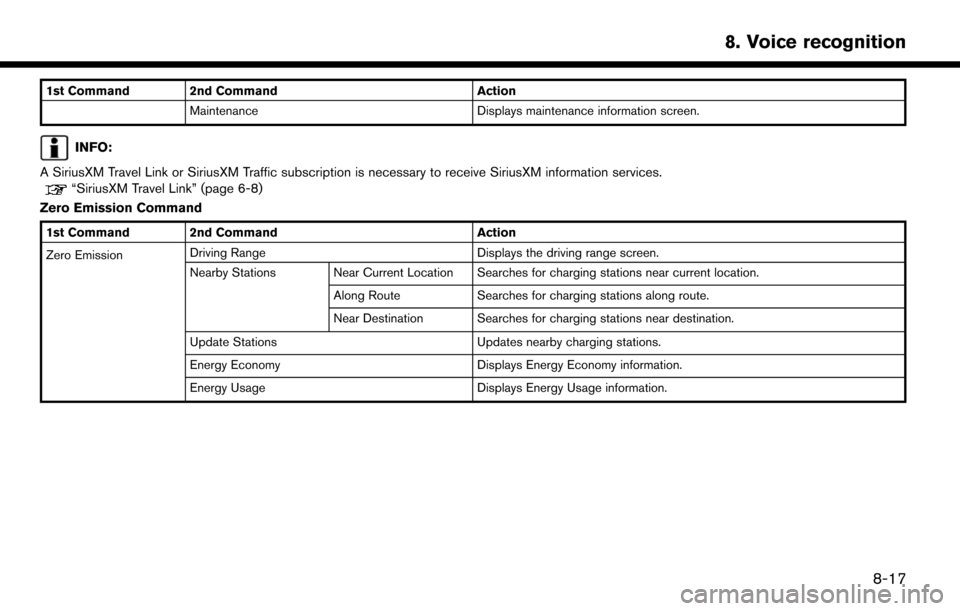
1st Command 2nd CommandAction
Maintenance Displays maintenance information screen.
INFO:
A SiriusXM Travel Link or SiriusXM Traffic subscription is necessary to receive SiriusXM information services.
“SiriusXM Travel Link” (page 6-8)
Zero Emission Command
1st Command 2nd Command Action
Zero Emission Driving Range
Displays the driving range screen.
Nearby Stations Near Current Location Searches for charging stations near current location.
Along RouteSearches for charging stations along route.
Near Destination Searches for charging stations near destination.
Update Stations Updates nearby charging stations.
Energy Economy Displays Energy Economy information.
Energy Usage Displays Energy Usage information.
8-17
8. Voice recognition
Page 227 of 268

10 Troubleshooting guide
Customer assistance ............................................................. 10-2
System unit ........................................................................\
...... 10-3Liquid crystal display ....................................................... 10-3
Unique EV functions .............................................................. 10-5 Driving range ..................................................................... 10-5
Charging stations ............................................................. 10-6
Energy information display ............................................. 10-7
Timer function .................................................................... 10-8
Audio system ........................................................................\
10-10 HD Radio technology (for U.S.) ................................. 10-10
Compact Disc (CD) player ......................................... 10-12
iPod
Šplayer .................................................................... 10-14 USB memory device ................................................... 10-16
Bluetooth
Šstreaming audio ..................................... 10-17
BluetoothŠHands-Free Phone System ........................ 10-19
NissanConnectSMEV ........................................................ 10-22
Navigation ........................................................................\
..... 10-23 Basic operations .......................................................... 10-23
Vehicle icon .................................................................. 10-24
Route calculation and visual guidance .................. 10-26
Voice guidance ............................................................ 10-28
Traffic information ........................................................ 10-29
Voice recognition ................................................................ 10-30
Page 232 of 268
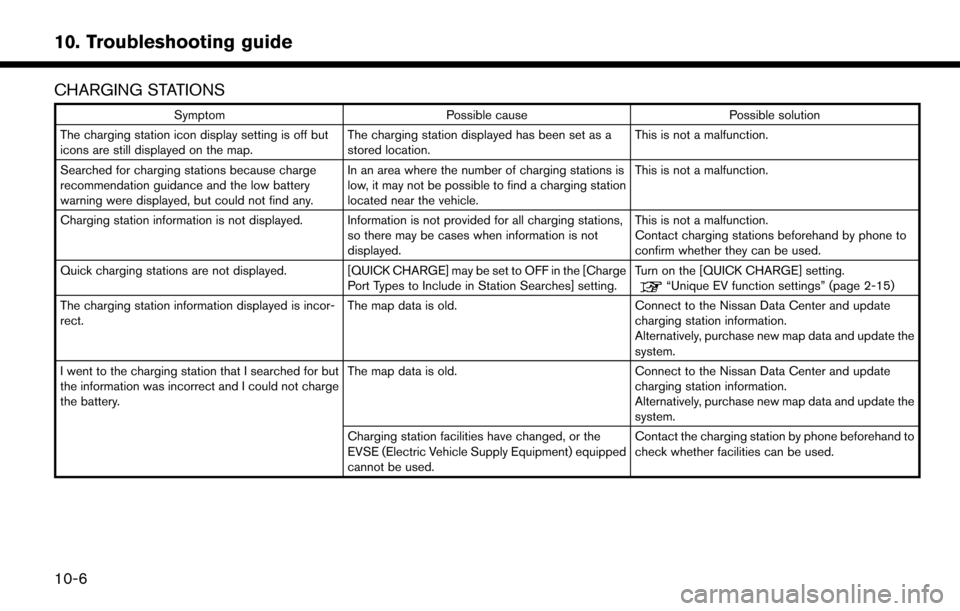
CHARGING STATIONS
SymptomPossible cause Possible solution
The charging station icon display setting is off but
icons are still displayed on the map. The charging station displayed has been set as a
stored location.This is not a malfunction.
Searched for charging stations because charge
recommendation guidance and the low battery
warning were displayed, but could not find any. In an area where the number of charging stations is
low, it may not be possible to find a charging station
located near the vehicle.This is not a malfunction.
Charging station information is not displayed. Information is not provided for all charging stations, so there may be cases when information is not
displayed.This is not a malfunction.
Contact charging stations beforehand by phone to
confirm whether they can be used.
Quick charging stations are not displayed. [QUICK CHARGE] may be set to OFF in the [Charge Port Types to Include in Station Searches] setting.Turn on the [QUICK CHARGE] setting.
“Unique EV function settings” (page 2-15)
The charging station information displayed is incor-
rect. The map data is old.
Connect to the Nissan Data Center and update
charging station information.
Alternatively, purchase new map data and update the
system.
I went to the charging station that I searched for but
the information was incorrect and I could not charge
the battery. The map data is old.
Connect to the Nissan Data Center and update
charging station information.
Alternatively, purchase new map data and update the
system.
Charging station facilities have changed, or the
EVSE (Electric Vehicle Supply Equipment) equipped
cannot be used. Contact the charging station by phone beforehand to
check whether facilities can be used.
10-6
10. Troubleshooting guide
Page 234 of 268

TIMER FUNCTION
SymptomPossible cause Possible solution
Charging does not start at the time set. Timer charge has not been set to ON. Check on the timer charge screen whether the
indicator for the timer charge is turned on.
The EVSE (Electric Vehicle Supply Equipment) is not
connected correctly. Check that the EVSE (Electric Vehicle Supply
Equipment) is connected correctly.
The immediate charge switch is in the ON position. Check the immediate charge switch setting.
The power switch is in the ON position. Place the power switch in the OFF position when
setting timer charge.
The air conditioner or heater does not operate at the
time set. The Climate Ctrl. Timer is not set to ON.
On the Climate Ctrl. Timer screen, check whether the
Climate Ctrl. Timer indicator is on.
The EVSE (Electric Vehicle Supply Equipment) is not
connected correctly to the vehicle. Check whether the EVSE (Electric Vehicle Supply
Equipment) is connected correctly to the vehicle.
When the Timer charge is set as the first priority, the
Climate Ctrl. Timer will not operate until the remain-
ing Li-ion battery power displayed in the meter
exceeds 10 segments (80%) . Check the Climate Ctrl. Timer priority setting.
“Priority setting between timer charge and
Climate Ctrl. Timer” (page 2-13)
When the Climate Ctrl. Timer is set as the first
priority, the Climate Ctrl. Timer operates only when
remaining Li-ion battery power displayed in the meter
is more than 2 segments (15%) . Charge the Li-ion battery so that the remaining Li-ion
battery power displayed in the meter is more than 2
segments (15%) and then, operate the Climate Ctrl.
Timer.
The power switch is in the ON position. Place the power switch in the OFF position when setting timer charge.
10-8
10. Troubleshooting guide
Page 259 of 268
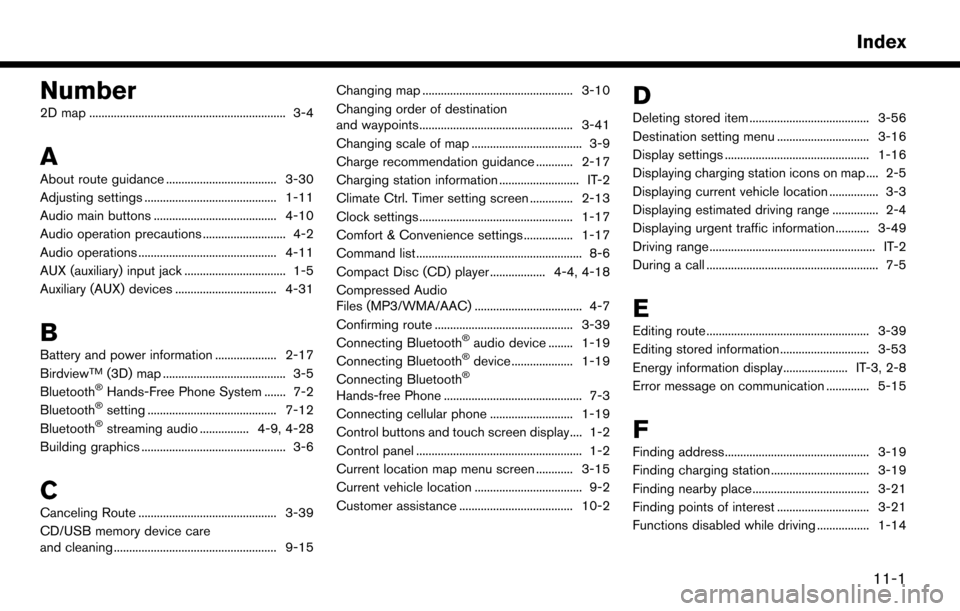
Number
2D map ................................................................ 3-4
A
About route guidance .................................... 3-30
Adjusting settings ........................................... 1-11
Audio main buttons ........................................ 4-10
Audio operation precautions ........................... 4-2
Audio operations ............................................. 4-11
AUX (auxiliary) input jack ................................. 1-5
Auxiliary (AUX) devices ................................. 4-31
B
Battery and power information .................... 2-17
BirdviewTM(3D) map ........................................ 3-5
BluetoothŠHands-Free Phone System ....... 7-2
BluetoothŠsetting .......................................... 7-12
BluetoothŠstreaming audio ................ 4-9, 4-28
Building graphics ............................................... 3-6
C
Canceling Route ............................................. 3-39
CD/USB memory device care
and cleaning ..................................................... 9-15 Changing map ................................................. 3-10
Changing order of destination
and waypoints.................................................. 3-41
Changing scale of map .................................... 3-9
Charge recommendation guidance ............ 2-17
Charging station information .......................... IT-2
Climate Ctrl. Timer setting screen .............. 2-13
Clock settings .................................................. 1-17
Comfort & Convenience settings ................ 1-17
Command list ...................................................... 8-6
Compact Disc (CD) player .................. 4-4, 4-18
Compressed Audio
Files (MP3/WMA/AAC) ................................... 4-7
Confirming route ............................................. 3-39
Connecting Bluetooth
Šaudio device ........ 1-19
Connecting BluetoothŠdevice .................... 1-19
Connecting BluetoothŠ
Hands-free Phone ............................................. 7-3
Connecting cellular phone ........................... 1-19
Control buttons and touch screen display.... 1-2
Control panel ...................................................... 1-2
Current location map menu screen ............ 3-15
Current vehicle location ................................... 9-2
Customer assistance ..................................... 10-2
D
Deleting stored item ....................................... 3-56
Destination setting menu .............................. 3-16
Display settings ............................................... 1-16
Displaying charging station icons on map .... 2-5
Displaying current vehicle location ................ 3-3
Displaying estimated driving range ............... 2-4
Displaying urgent traffic information........... 3-49
Driving range ...................................................... IT-2
During a call ........................................................ 7-5
E
Editing route ..................................................... 3-39
Editing stored information ............................. 3-53
Energy information display..................... IT-3, 2-8
Error message on communication .............. 5-15
F
Finding address............................................... 3-19
Finding charging station ................................ 3-19
Finding nearby place...................................... 3-21
Finding points of interest .............................. 3-21
Functions disabled while driving ................. 1-14
11-1
Index
Page 261 of 268

S
Safety information ..................................... 0-3, 3-3
Scrolled location map screen ...................... 3-16
Searching for detour route using
traffic information ............................................ 3-42
Searching from address book ..................... 3-23
Searching from previous destinations ....... 3-24
Setting at information on map ..................... 3-14
Setting by phone number ............................. 3-25
Setting city center .......................................... 3-25
Setting Climate Ctrl. Timer ........................... 2-12
Setting detour route ....................................... 3-43
Setting freeway entrance/exit ...................... 3-26
Setting from stored routes ........................... 3-26
Setting home as destination ........................ 3-23
Setting intersection ........................................ 3-24
Setting menu.................................................... 1-15
Setting new destination ................................ 3-39
Setting point on map ..................................... 3-27
Setting timer charge ...................................... 2-10
Setting with NissanConnect
SMEV ............. 3-28
SiriusXM Travel Link .......................................... 6-8
Smartphone integration .................................... 6-7
Specifying region ............................................ 3-18
Split screen ...................................................... 3-10
Starting system .................................................. 1-6 Start-up screen .................................................. 1-6
Status screen...................................................... 1-9
Steering wheel controls for audio............... 4-11
Steering wheel switches .................................. 1-5
Storing a location/route................................. 3-51
Storing avoid area .......................................... 3-52
Storing favorites ................................................. 5-9
Storing home location ................................... 3-51
Storing location ............................................... 3-51
Storing route .................................................... 3-52
System settings ............................................... 1-15
T
Telematics overview .......................................... 5-2
Telematics service ............................................ IT-4
Text message settings ...................................... 7-9
Timer function operation ............................... 2-10
Timer functions .................................................. IT-3
Touch panel ......................................................... 1-9
Trademarks .......................................................... 0-4
Traffic information on map ............................ 3-49
Traffic information setting.............................. 3-50
Transferring information to/from
address book ................................................... 3-57
Turn list .............................................................. 3-35
U
Unique EV function settings......................... 2-15
Unique EV functions ........................................ IT-2
Updating charging station information ......... 2-7
USB (Universal Serial Bus)
connection port ......................................... 1-5, 4-5
USB memory device player .......................... 4-21
V
Viewing energy economy history ................... 2-9
Viewing energy economy information ........... 2-8
Viewing energy usage information................. 2-9
Viewing from map menu .................................. 2-7
Viewing NissanConnect
SMEV records ........ 5-9
Viewing SiriusXM Travel Link .......................... 6-8
Viewing traffic events from list ..................... 3-48
Viewing traffic information ............................ 3-48
Voice Prompt Interrupt ..................................... 8-3
Voice recognition ............................................... 8-2
Voice recognition settings ............................ 8-18
Volume settings ............................................... 1-16
Z
Zero Emission menu screen ........................... 2-2
11-3
Index